AWS Database Blog
Accelerate database migration to Amazon Aurora DSQL with Kiro and Amazon Bedrock AgentCore
Amazon Aurora DSQL is a serverless, distributed SQL database designed for the highest levels of availability and performance at any scale. Aurora DSQL offers the fastest multi-Region reads and writes, making it the ideal choice for globally distributed applications requiring low-latency access across regions. Many customers looking to migrate from PostgreSQL and MySQL databases to Aurora DSQL have expressed a need for intelligent tooling that can automate schema analysis, compatibility assessment, and data migration. To address this demand, we present the Aurora DSQL migration assistant, an agent-based reference implementation that demonstrates how to use Kiro and Amazon Bedrock AgentCore with Strands Agents to transform complex migrations into a streamlined, automated workflow.
In this post, we walk through the steps to set up the custom migration assistant agent and migrate a PostgreSQL database to Aurora DSQL. We demonstrate how to use natural language prompts to analyze database schemas, generate compatibility reports, apply converted schemas, and manage data replication through AWS Database Migration Service (AWS DMS). As of this writing, AWS DMS does not support Aurora DSQL as target endpoint. To address this, our solution uses Amazon Simple Storage Service (Amazon S3) and AWS Lambda functions as a bridge to load data into Aurora DSQL.
As of this writing, Amazon Bedrock AgentCore is available in select AWS regions. Check the AgentCore Region availability before deploying this solution.
Solution overview
Aurora DSQL migration assistant demonstrates an AI-driven approach that combines Kiro, Amazon Bedrock AgentCore with Strands Agents SDK, Aurora DSQL MCP (Model Context Protocol) server, and AWS DMS to automate database migrations. With this assistant, you can interact using natural language to assess Aurora DSQL compatibility for PostgreSQL and MySQL databases, convert database objects for DSQL compatibility, validate schemas, and manage data migration through DMS.
The solution demonstrates an approach that uses agents to automate an end-to-end migration process. A dedicated schema analyzer and DMS agent built with Strands Agents SDK and hosted on Amazon Bedrock AgentCore Runtime. The Strands Agents SDK seamlessly integrates with agent frameworks, providing automatic memory management and intelligent context retrieval to maintain conversational continuity throughout the migration workflow.
The schema analyzer agent uses an Amazon Bedrock knowledge base containing Aurora DSQL documentation as data source to handle comprehensive compatibility assessment and schema conversion by analyzing source database objects, identifying incompatible data types and features, and generating Aurora DSQL-compatible DDL statements with detailed migration recommendations. The Aurora DSQL MCP server writes converted schemas and objects directly to the target DSQL database. Data transfer from the source database is handled through AWS DMS with Amazon S3 as an intermediate target. Amazon S3 triggers AWS Lambda functions in an event-driven architecture to read, parse, and write records directly to Aurora DSQL, supporting both initial load and continuous replication capabilities. A separate DMS agent manages DMS task operations and performs data validation between source and target databases.
The following diagram illustrates the solution architecture.
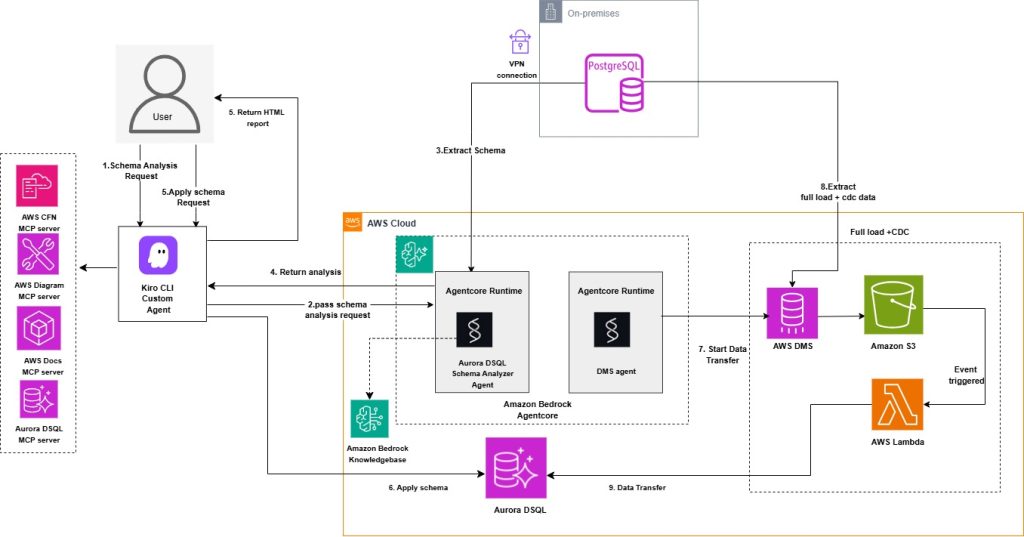
The solution consists of the following key components:
- Custom Kiro CLI agent – The central orchestration component that manages the migration workflow. It integrates four specialized MCP (Model Context Protocol) servers: AWS CFN MCP server for infrastructure provisioning , AWS Docs MCP server for documentation access , Aurora DSQL MCP server for database operations.
- Aurora DSQL schema analyzer agent – Agent deployed on Amazon Bedrock AgentCore Runtime, configured with Amazon Bedrock foundation models and knowledge base, that performs intelligent schema analysis and conversion.
- Amazon Bedrock Agent knowledge base with Amazon OpenSearch Serverless vector store. Aurora DSQL documentation is used as a data source for the knowledge base.
- Amazon Aurora DSQL – The target distributed SQL database where your converted schema and data are migrated.
- AWS DMS – For migrating existing and ongoing changes from source to Amazon S3.
- Amazon S3 for event-driven data processing
- DMS agent – Agent deployed on Amazon Bedrock AgentCore Runtime, configured with Amazon Bedrock foundation models, that handles DMS task management and data validation between source and target databases.
The migration workflow follows these steps:
- You initiate a schema analysis request through the Kiro CLI Agent.
- The agent forwards the request to the Aurora DSQL schema analyzer agent.
- The analyzer extracts the schema from your source database. You can analyze one schema at a time. Analyzing multiple schemas simultaneously is not supported.
- The schema analyzer agent analyzes the source database schema for Aurora DSQL compatibility and returns the analysis with compatibility issues, recommendations, and converted schema to Kiro.
- You can use natural language prompt with the Kiro agent to generate an HTML report based on the schema analyzer agent output, formatted according to a predefined styling guide.
- After user assessment and review of the report, the converted schema can be applied using the Aurora DSQL MCP server.
- Data transfer from the source database is handled through AWS DMS with Amazon S3 as an intermediate target, which triggers AWS Lambda functions in an event-driven architecture to read, parse, and write records directly to Amazon Aurora DSQL, enabling both initial load and ongoing replication. A dedicated DMS agent manages DMS task operations and performs data validation between source and target databases.
This solution primarily uses Amazon Bedrock AgentCore for analyzer and DMS agent, which provides production-ready agent orchestration with built-in scalability, security, and observability. This approach enables production-ready deployments without custom infrastructure management. Users interact with the agent using natural language prompts while the system handles complex orchestration, schema analysis, and data migration tasks behind the scenes, making the migration process intuitive and accessible.
Prerequisites
To use this solution, you need:
- An AWS account with Identity and Access Management (IAM) role or user permissions for Amazon Bedrock AgentCore, Amazon Bedrock Knowledge Base, Amazon OpenSearch Serverless, AWS Lambda, Amazon S3, IAM, AWS Secrets Manager, Amazon Elastic Compute Cloud (Amazon EC2), AWS DMS, and AWS CloudFormation.
- AWS Secrets Manager secret containing source database credentials. For PostgreSQL source the required secrets fields are host, port, engine, username, password, database and schema. For MySQL source the required secrets fields are host, port, engine, username, password, database.
- A target Amazon Aurora DSQL cluster.
- AWS Secrets Manager secret containing target Aurora DSQL credentials including fields endpoint, database, schema, username and uuid_namespace. Aurora DSQL supports both UUID-based identifiers and integer values generated using sequences or identity columns. Include a uuid_namespace field in Secrets Manager when converting identity or sequence-based source primary keys to UUIDs. Aurora DSQL recommends UUIDs as the default identifier for optimal distributed performance.
- Amazon Virtual Private Cloud (Amazon VPC), subnets, and security groups configured for Lambda functions to allow access to your source database. Make sure to use the private subnets with NAT gateway configured for the Lambda functions.
- AWS Command Line Interface (AWS CLI) installed and configured.
- AWS Builder ID for Kiro authentication.
- Python version 3.14 required for Lambda functions.
Getting started
Clone the project repository to your home directory:
git clone https://github.com/aws-samples/sample-migration-aurora-dsql-using-ai.git
Initialize AWS resources
This solution uses AWS serverless services to perform schema analysis, data migration, and validation. Amazon OpenSearch Serverless serves as the vector store for the Bedrock knowledge base. AWS Lambda handles database connectivity and data processing. Purpose-built agents with Strands Agents SDK deployed in Bedrock AgentCore Runtime for schema analysis and DMS management. AWS DMS with S3 handles the data replication pipeline. IAM provides the necessary service roles with permissions.
For a quick setup, you can use AWS CloudFormation templates in the GitHub repository to create the required resources.
The solution includes three CloudFormation templates. Deploy the stacks using the AWS CloudFormation console or the AWS CLI as shown in the following commands. Replace the placeholder parameter values with your actual resource identifiers.
- OpenSearch and Knowledge Base setup (
cfn-opensearch-vector-index.yaml) – Creates the OpenSearch Serverless Collection, Index, and Knowledge Base IAM Role.
To deploy OpenSearch and Knowledge Base stack, provide your IAM user ARN with permissions to create Knowledge Base IAM role, Amazon OpenSearch collections, and indexes. Optionally specify an embedding model id (defaults toamazon.titan-embed-text-v2:0).After the previous stack is created, retrieve the ARNs for the Amazon OpenSearch Serverless Collection, Index, and Knowledge Base IAM Role, to use them in the following CloudFormation stack as input parameter.
Before deploying the next CloudFormation stack, you need to create the Lambda dependency layers for PostgreSQL and MySQL engines. The Lambda function used in the analyzer agent configuration requires these layers for database connectivity. Follow the steps listed in the GitHub repository README.md to create and publish the Lambda layers. Get the layer ARNs to use them in the following CloudFormation stacks as input parameter.
- Aurora DSQL schema analyzer agent and Lambda functions (
cfn-agentcore-analyze-kb.yaml) – Creates an Amazon Elastic Container Registry (Amazon ECR) repository, AWS CodeBuild project to build and push the agent Docker image, a Bedrock AgentCore Runtime for the DSQL analyzer agent, IAM roles, and Amazon CloudWatch Logs delivery configuration for observability, Bedrock Knowledge Base with Aurora DSQL documentation data sources, and Lambda functions for database connectivity.To deploy analyzer AgentCore resources and Lambda functions stack, provide the source database credentials secret ARN, VPC networking details (VPC ID, subnet, security group) for the Lambda functions, Network Mode as public or VPC, Lambda layer ARNs created earlier, and the ARNs of OpenSearch collection, index, Knowledge Base resources from the previous stack. The agent uses the specified foundation model (default:Claude-haiku 4.5) and embedding model (amazon.titan-embed-text-v2:0) to analyze database schemas. You can specify a different foundation model and embedding model ID if needed.When using NetworkMode as VPC, you must create the following VPC endpoints in your VPC before deploying the stack:
All Interface endpoints (except S3 gateway endpoint) require security groups allowing inbound HTTPS/443 traffic from AgentCore subnets. AgentCore’s security group must allow outbound HTTPS/443 traffic to reach the VPC endpoints. You need to provide VPC Id, Subnet Id and Security Group Id in the parameter to use VPC mode.
- DMS agent and data transfer resources (cfn-agentcore-dms.yaml) – Creates S3 bucket, VPC endpoint for S3, DMS replication instance, endpoints, tasks, Lambda function to process S3 records and write to Aurora DSQL, Lambda function for DMS agent operations, ECR repository, CodeBuild project for building the DMS agent Docker image, Bedrock AgentCore Runtime for the DMS agent, IAM roles, and CloudWatch Logs delivery configuration.
To deploy DMS and data transfer stack, provide source database details (engine type, source secret ARN, database name, port, schema), target Aurora DSQL cluster secret ARN, Network Mode as public or VPC and networking configuration for both DMS replication instance and Lambda functions. When using NetworkMode as VPC, if same VPC is used for both analyzer and DMS agent stack, you only need to create the VPC endpoints once and can reuse them for both stacks.The stack can either create a new DMS replication instance or use an existing one. An S3 bucket is created for staging data changes, VPC endpoint for DMS replication instance to connect to S3 bucket. S3 VPC endpoint is created only when CreateS3VPCEndpoint parameter is set to true and either when the stack is creating a new VPC or you’ve provided route table IDs for an existing VPC. You can set CreateS3VPCEndpoint to false and leave DMSRouteTableIds parameter empty if you already have VPC endpoint for S3. DMS Agent is created and hosted in AgentCore Runtime. The DMS agent uses the specified foundation model. You can specify a different foundation model ID if needed.
For MySQL-based sources, SourceDatabaseName and SourceDBSchema parameters value will be the same as your source database name. For PostgreSQL based sources SourceDBSchema will be schema name such as public or your own schema name and SourceDatabaseName will be your PostgreSQL source database name.Note: Do not use cdc/ as S3BucketPrefix or any prefix matching your schema name, it creates conflict with S3 data processing Lambda’s table name lookup logic, causing data load to fail completely. Safe prefix for S3 bucket directory can be something like migration/ or dms-cdc/.
After the preceding CloudFormation stacks are created, follow the remaining deployments steps listed in the GitHub repository README.md.
Running the migration
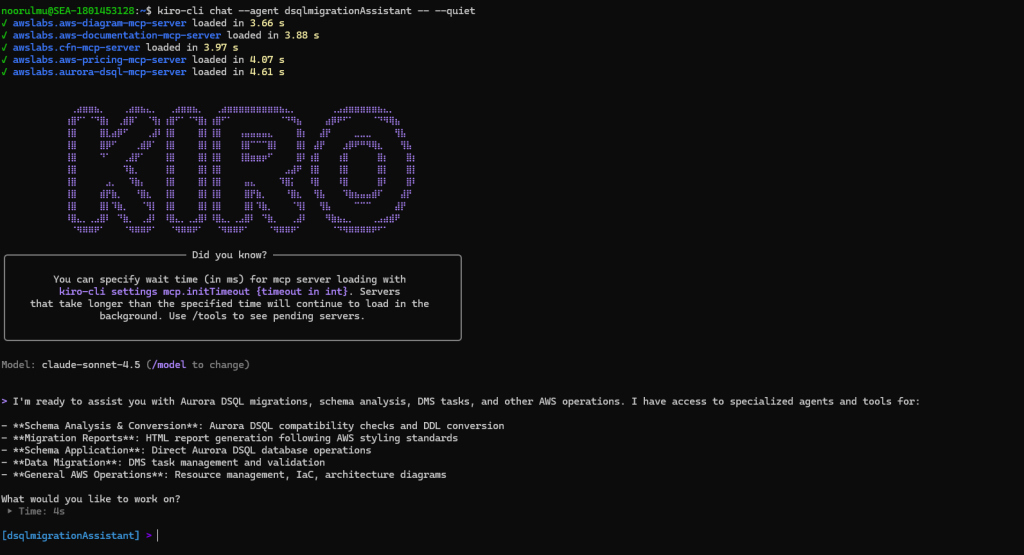
After all the solution components are deployed and configured, you’re ready to begin the migration process using natural language commands through the Kiro custom agent. With the Aurora DSQL migration assistant agent configured, you can now use natural language prompts to analyze your database schema, generate compatibility reports, apply converted schemas, and manage data replication.Start a chat session with your custom agent using the following command.
Schema analysis and compatibility assessment
The first step is to analyze your source database schema for Aurora DSQL compatibility.
The following are sample prompts, you can use the same prompts with your updated database name.
The analyzer agent returns the Aurora DSQL compatibility analysis and recommendations as shown in the following screenshot.
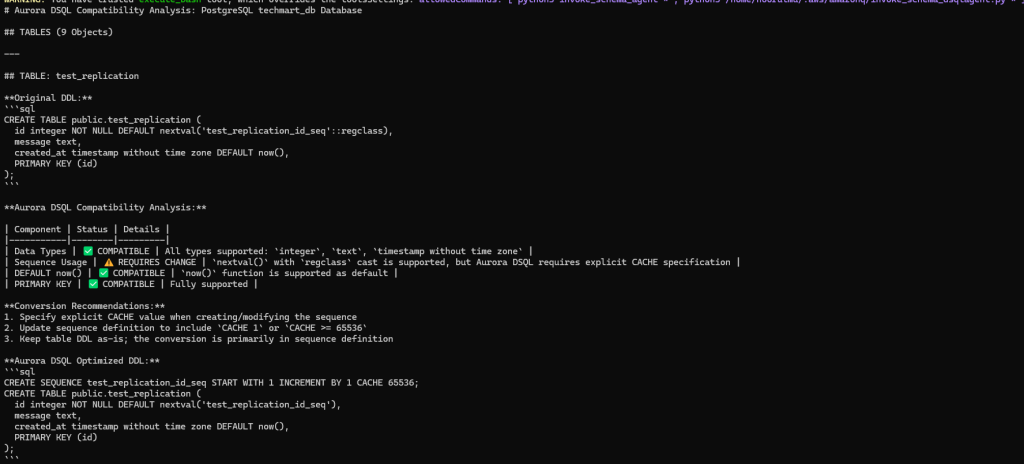
After the analysis is completed, you can prompt the dsqlmigrationassistant Kiro agent to generate an HTML report following the styling guide. The Kiro agent generates a html report with comprehensive Aurora DSQL compatibility analysis that can be used for pre-migration assessment.
The following is a sample prompt, you can use to generate the HTML report of the analysis.
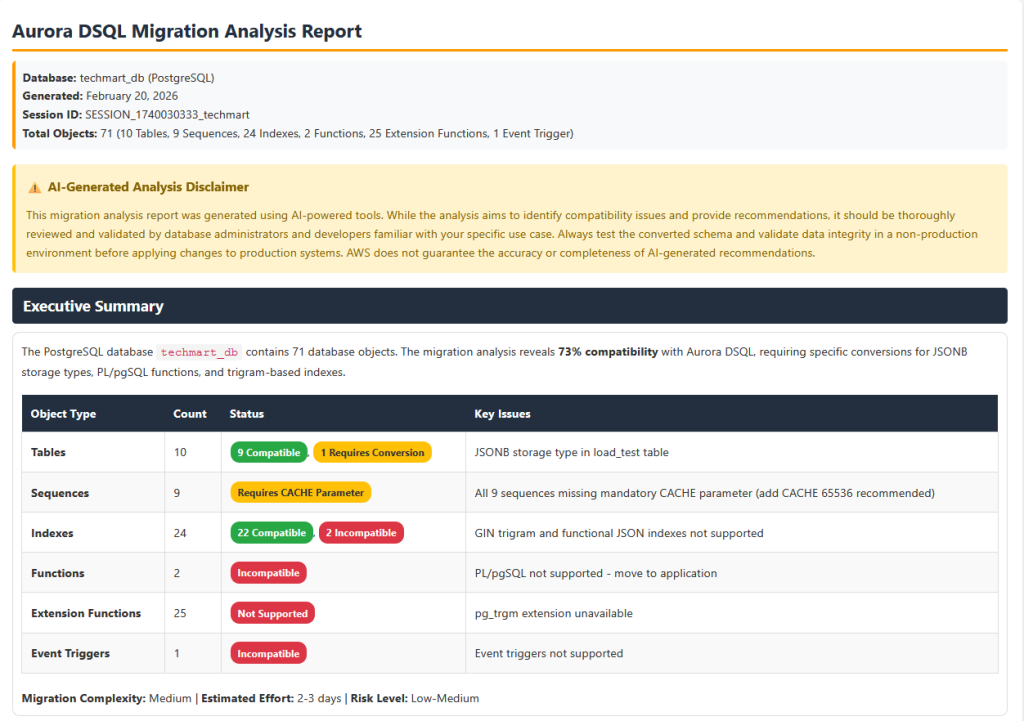
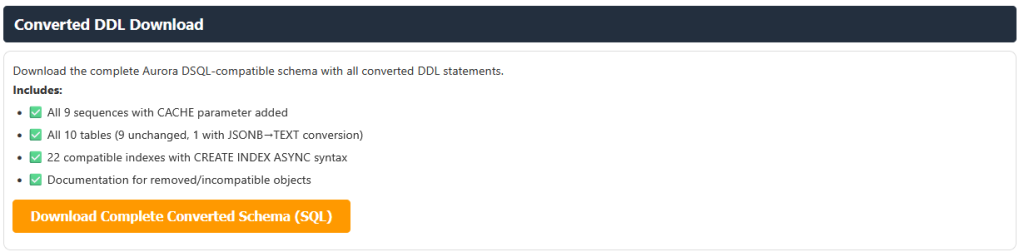
The report also provides converted Aurora DSQL compliant table and database object DDL as a downloadable file. Review the compatibility analysis and recommendations to understand any required schema changes before proceeding with the migration.
Apply converted schema to Aurora DSQL
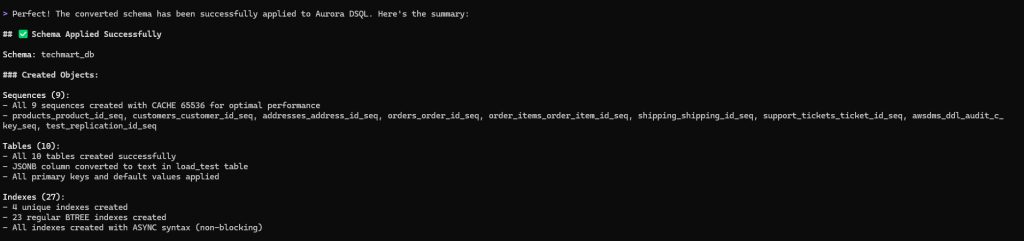
After reviewing the compatibility report and addressing any critical issues, you can prompt the migration assistant to apply the converted DDL to the target Aurora DSQL schema. The assistant uses the Aurora DSQL MCP server, which is configured with write permissions (--allow-writes flag), to enable direct schema application to your target cluster. We recommend that you test the converted schema in a non-production environment first. Use the following prompt (update with your database name)
The converted objects are applied to the target Aurora DSQL with a single prompt.
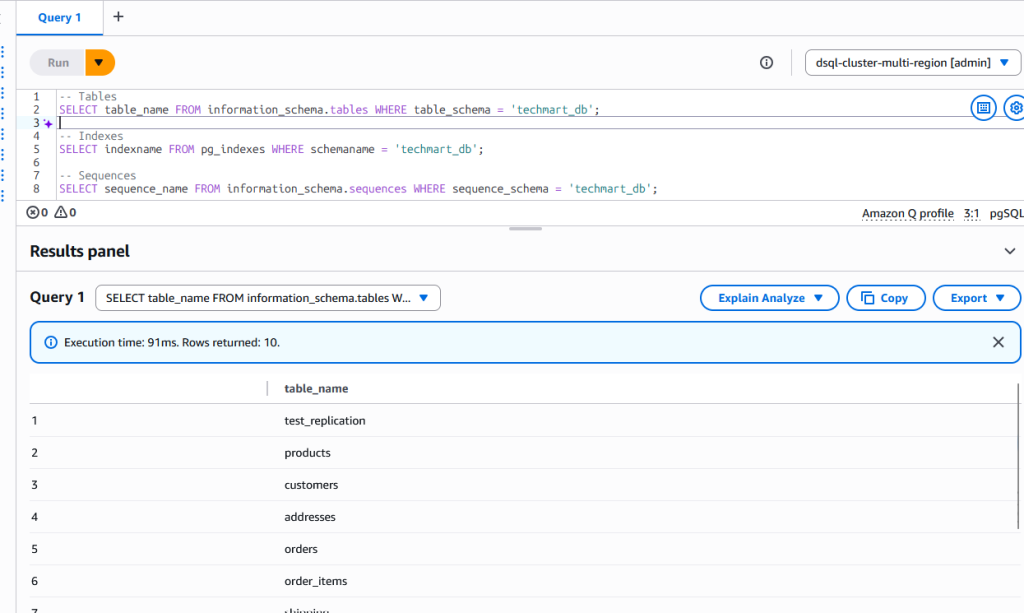
On the target Aurora DSQL, you can verify that the schema was created with tables, sequences, and indexes.
Data transfer and validation
Data transfer flows from the source database through AWS DMS to S3, which triggers Lambda functions to write records to Aurora DSQL for both initial load and ongoing changes. This function supports both Integer based and UUID based conversions for primary key columns. A DMS agent manages DMS task operations and validates data between source and target databases.Use the following prompt to initiate data transfer and validation. Update your target schema name in the prompt before using it.
The following screenshot shows data transfer completed successfully from PostgreSQL source database to Aurora DSQL.
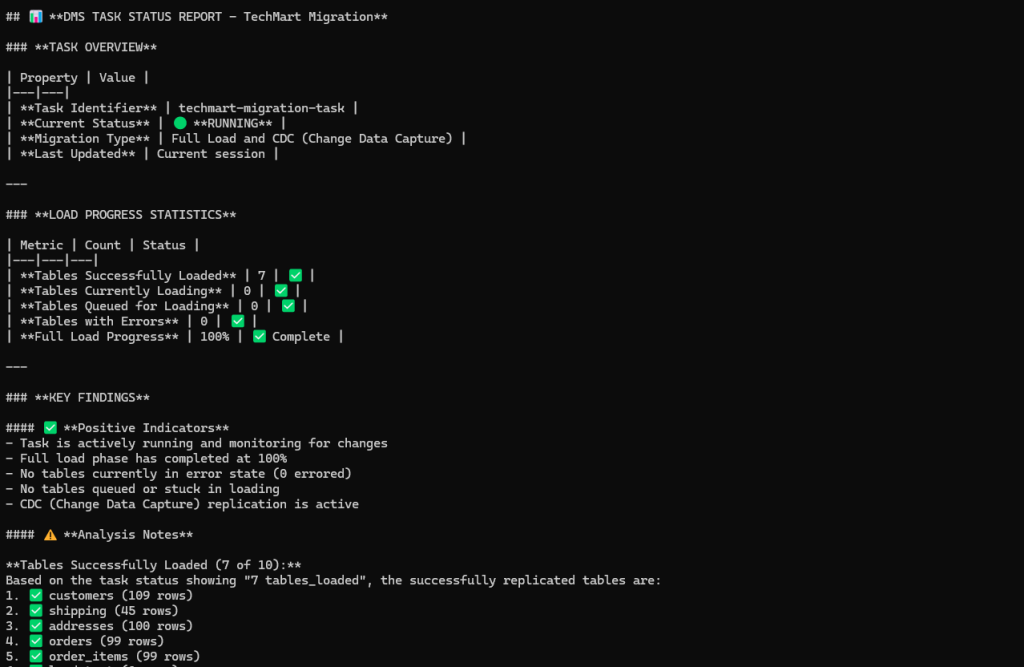
DMS agent handles data validation by comparing the source and target tables and indicates if any data mismatch is found. Any data mismatches identified during validation are logged in a validation_results table in target Aurora DSQL public schema. This table contains the primary key, source value, target value, timestamp, schema name, and table name for each mismatched record, which can be used for troubleshooting data inconsistencies.

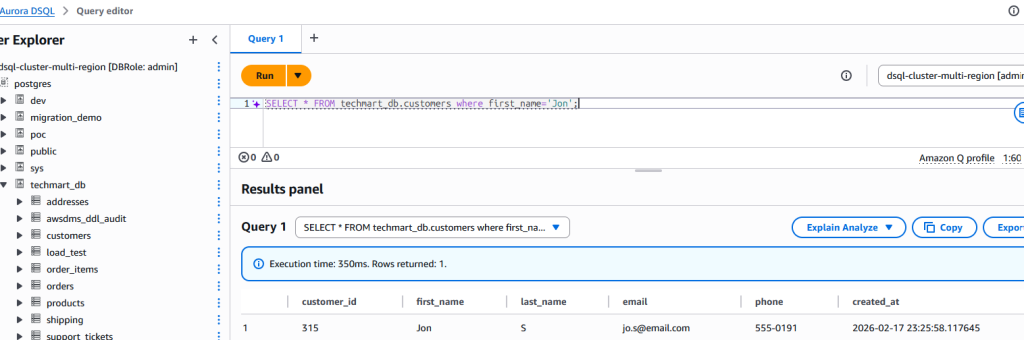
To demonstrate the Aurora DSQL Migration Assistant’s change data capture (CDC) capabilities, we inserted a new record into the source table.
The change was replicated to the target table in near real-time.
The solution handles DMS task failures gracefully by ensuring data can be safely reprocessed on restart. S3 data processing Lambda uses ON CONFLICT DO NOTHING when inserting to Aurora DSQL, which skips duplicate records and prevents data conflicts during recovery. You can monitor task status and restart failed tasks through the DMS Agent via Kiro custom agent (such as, “restart the DMS task”). The task restarts and continues loading remaining data, automatically skipping any records that already exist in the target.
Best practices and considerations
When using this solution, keep the following best practices in mind for successful migrations:
Understanding AI model constraints – The schema conversion analysis depends on the foundation model’s token capacity. For databases with extensive schemas or numerous objects, the analysis may exceed the model’s output token limit, resulting in truncated responses. To prevent incomplete responses, consider splitting the analysis into multiple sessions by processing tables, indexes, sequences, and functions separately. This modular approach ensures comprehensive analysis without truncation and allows the agent to provide more detailed recommendations for each component. For more details refer MaxTokensReachedException.
High-volume change data capture – To maintain low latency during CDC with high-volume data changes, consider tuning DMS task settings and increasing Lambda function concurrency and memory allocation based on your workload characteristics.
Validating AI-generated conversions – While the schema analyzer agent automates compatibility analysis and schema conversion, always validate the generated DDL against your specific business requirements and use cases. The agent-generated output provides a strong foundation, but manual review is required to verify that the converted schema aligns with your application’s needs. Thoroughly test the provided agent recommendations in non-production environments before applying changes to production systems.
Specifying source database type – When prompting the schema analyzer agent, explicitly mention your source database type (PostgreSQL or MySQL) to ensure the correct analysis workflow is invoked. This helps the agent select the appropriate action group and Lambda functions for accurate schema extraction and compatibility assessment.
Restarting analysis after session loss – If the Kiro-cli session is closed or terminated before you save the analysis output, all in-memory analysis results will be lost. The Kiro custom agent does not automatically persist intermediate results, so you must restart the entire analysis process from the beginning to regenerate the schema assessment and migration recommendations.
Benefits
This agent-based solution delivers significant value throughout the migration journey:
- Accelerated proof of concept – Rapidly evaluate Aurora DSQL for your workloads without extensive manual analysis. The automated compatibility assessment enables quick proof of concept (POC) turnaround, helping you make informed decisions about adopting Aurora DSQL.
- Effort estimation and planning – The comprehensive HTML pre-migration assessment report provides detailed insights into compatibility issues, required schema changes, and conversion complexity. Use this report to accurately estimate migration timelines, resource requirements, and overall project scope.
- Reduced expertise requirements – Reduce the need for specialized Aurora DSQL knowledge during initial assessment. The agent handles compatibility analysis automatically, making Aurora DSQL migrations accessible to teams without prior DSQL experience.
Clean up
To clean up the resources created during this solution,
- Delete all three stacks created for this solution using the AWS CloudFormation console or AWS CLI
delete-stack. - Delete the Lambda layers using Lambda console or AWS CLI
delete-layer-version. - Delete VPC endpoints using VPC console or AWS CLI
delete-vpc-endpoints
Conclusion
In this post, we demonstrated how AWS AI services can be orchestrated to simplify database migrations. We showed how combining these services with AWS DMS automates complex technical workflows from schema analysis and compatibility assessment to conversion and data replication that traditionally require specialized expertise. By enabling natural language interactions for these tasks, the solution allows teams to focus on innovation rather than manual migration work, accelerating modernization efforts and improving operational efficiency.