AWS Database Blog
Migrate SSIS packages to Aurora PostgreSQL – Part 1
When you migrate your databases from Microsoft SQL Server to Amazon Aurora PostgreSQL-Compatible Edition, one of the more complex challenges you face is migrating SQL Server Integration Services (SSIS) packages. SSIS is deeply embedded in many enterprise data architectures, handling ETL (Extract, Transform, Load) workflows, data transformations, file operations, email notifications, and scheduled job orchestration. Unlike schema or data migration, SSIS packages represent business logic and operational workflows that don’t have a one-to-one equivalent in the PostgreSQL ecosystem.
You might have hundreds or even thousands of SSIS packages accumulated over years of development. These packages vary widely in complexity, ranging from simple table-to-table data movements to sophisticated multi-step workflows involving Script Tasks, custom components, FTP operations, and complex control flow logic.
This is a two-part series. In this post, we show you how to filter, categorize, and simplify packages using native PostgreSQL features and extensions. In Part 2, we address complex orchestration patterns, including complex control flow items.
Solution overview
The solution follows a Filter → Categorize → Simplify → Modernize approach that helps you rationalize your SSIS portfolio before investing effort in migration:
- Filter: Query the SSIS database catalog to identify which packages are active and in use. Remove disabled packages, packages that haven’t executed in months, and deprecated workflows. In some cases, this step alone typically reduces the migration scope by 30–50 percent.
- Categorize: Classify the remaining packages by their primary function (data movement, transformation, file operations, notifications, and so on) and complexity level. This determines which migration path is appropriate for each package.
- Simplify: For packages that perform straightforward operations (scheduled SQL execution, simple data movements between tables, basic cleanup jobs), convert them directly to PostgreSQL-native solutions using pg_cron, PL/pgSQL stored procedures, and Aurora PostgreSQL extensions such as aws_s3 and aws_lambda.
- Modernize: For complex packages involving external system integration, multi-step orchestration, file processing, or API calls, migrate to AWS cloud-native services such as AWS Step Functions, AWS Lambda, Amazon Simple Storage Service (Amazon S3), and Amazon EventBridge.
This approach helps you invest modernization effort where it’s truly needed, while using PostgreSQL’s native scheduling and procedural capabilities for simpler workloads.
Architecture
The following diagram illustrates the end-to-end architecture for migrating SSIS packages to Aurora PostgreSQL and AWS native services. We show how different AWS services work together to replicate SSIS packages in Aurora PostgreSQL.
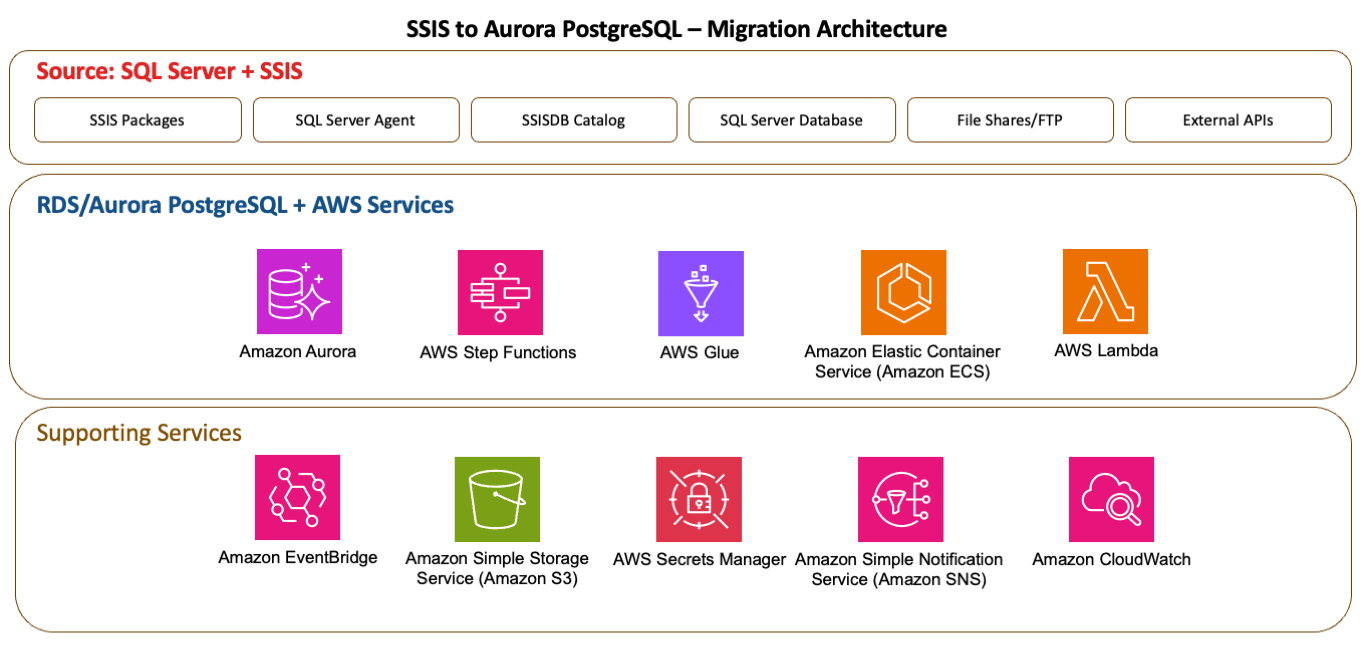
Figure 1: End-to-end architecture mapping SSIS components to Aurora PostgreSQL and AWS services
| SQL Agent Schedules | Amazon EventBridge Scheduler |
| Execute SQL Task | Pg_cron + pgSQL |
| Data Flow Task(Simple) | pgSQL/COPY/aws_s3 |
| Data Flow Task(Complex) | AWS Glue/Amazon Elastic Container Service (Amazon ECS) |
| Script Task | AWS Lambda |
| Control Flow Orchestration | AWS Step Functions |
| Connection Managers | AWS Secrets Manager |
| SSISDB Execution Logs | Amazon CloudWatch |
Prerequisites
Before beginning the migration process, make sure that the following are in place:
- An AWS account with sufficient permissions to launch the resources necessary for this solution.
- Completed schema conversion using AWS DMS Schema Conversion (AWS SC) and migrated data using AWS Database Migration Service (AWS DMS). This post uses the AdventureWorks2016 database set up on an Amazon Elastic Compute Cloud (Amazon EC2) SQL Server Enterprise Edition instance to illustrate the examples. The SSIS packages, stored procedures and additional artifacts were created to illustrate each pattern, and they aren’t part of the standard AdventureWorks installation. We provide a few code snippets to illustrate a few of the implementations.
- Amazon Aurora PostgreSQL cluster: A running Amazon Relational Database Service (Amazon RDS)/Aurora PostgreSQL-Compatible Edition cluster (version 17.x or later recommended) with appropriate instance sizing for your workload. The tests were carried out on Aurora engine version 17.7. Make sure that the following extensions are enabled. Query the pg_extension view to check if the following extensions are installed.
- Database User. This post connects to Aurora PostgreSQL as the postgres admin user for simplicity and stores those credentials in the Secrets Manager secret the Lambda functions use. For a least-privilege production setup, replace it with a dedicated role that has only the required grants and update the secret to point at that role.
- An Amazon Simple Storage Service (Amazon S3) bucket where the file exports will be stored.
- An AWS Identity and Access Management (IAM) role associated with the Aurora PostgreSQL cluster to access the S3 bucket for exporting data. Please follow the principle of least privilege.
- Virtual private cloud (VPC) networking: NAT Gateway or VPC endpoints for S3, AWS Lambda, and SNS access.
Solution walkthrough
The following steps walk you through migrating SSIS packages from SQL Server to Aurora PostgreSQL.
Step 1: Filter
The first step is to query the SSISDB catalog to determine which packages are in use. Many enterprises discover that a significant portion of their SSIS packages are no longer active. Execute the following query against your source(tested against SQL server 2019 version) SQL Server’s SSISDB catalog to get execution history:
Additionally, check for packages tied to disabled SQL Server Agent jobs:
Note: The following table is guidance that can be tailored to meet your team’s requirements.
| Criteria | Action | Rationale |
| No executions in last 6 months | Review and exclude from migration | Package is likely deprecated or replaced |
| Package is disabled in SQL Agent | Review and exclude from migration | Intentionally deactivated |
| 100% failure rate in last 3 months | Review with team, likely exclude | Broken package not providing value |
| One-time historical data load | Exclude from migration | Will not be needed again |
Step 2: Categorize
After you filter down to active packages, categorize each by its primary function and complexity. This determines the appropriate migration target. Use the following table as a guide to classify each active package into a migration category based on its primary SSIS pattern.
| Complexity | SSIS Components | Migration Target | Examples |
| Low | Execute SQL Task on a schedule | pg_cron and PL/pgSQL procedure | Scheduled aggregations, cleanup jobs |
| Medium | Data Flow Task, Flat file destination, Send Mail task | PL/pgSQL procedure, aws_s3 and aws_lambda | Data transformations, file exports and notifications |
| High | Foreach Loop, Script Task, Multiple Data Flow Tasks with error handling, Complex Control flow | AWS Step Functions + Lambda/ECS/Glue | Multi-Step ETL pipelines, conditional branching workflows |
Step 3: Simplify
For packages categorized as Low or Medium complexity, convert them directly to PostgreSQL-native implementations. In this step, we walk you through four representative examples covering the most common SSIS patterns for low and medium complexity packages.
3a. Replacing Execute SQL Task with pg_cron schedule
SSIS Pattern: An Execute SQL Task that runs a stored procedure or SQL statement on a daily or hourly schedule through SQL Server Agent. The following package contains three Execute SQL tasks in sequence:
- Cleanup: Truncate the daily aggregation staging table.
- Aggregate: Run Stored procedure to summarize sales by territory.
- Verify: Check row counts and totals.
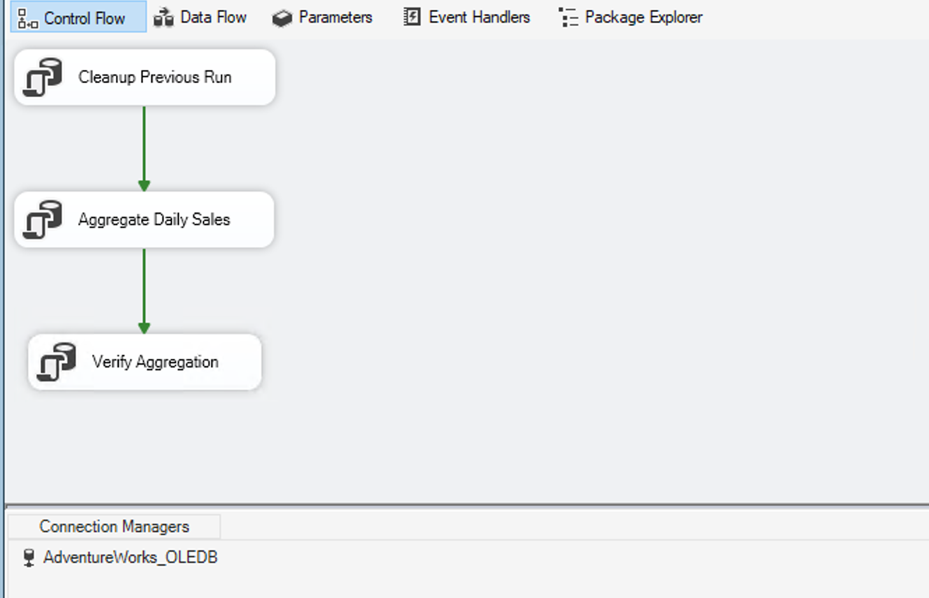
Figure 2: SSIS control flow with three sequential Execute SQL tasks for cleanup, aggregation, and verification
Aurora PostgreSQL equivalent:
On Aurora PostgreSQL, this maps directly to a PL/pgSQL stored procedure scheduled by the pg_cron extension. pg_cron runs inside the database engine, eliminating the need for an external scheduler. The procedure contains the same business logic, and cron expressions provide the same scheduling flexibility as SQL Server Agent (daily, hourly, weekly, and more). This is typically a line-for-line conversion with minimal refactoring.
Schedule the procedure with pg_cron to replace the SQL Server Agent job.
Note: The pg_cron extension must be added to the ‘shared_preload_libraries’ in the Aurora cluster parameter group, which requires a reboot.
To verify, check the cron job to confirm it runs on the schedule that was set on the SQL Server Agent. In the following example, the job ran successfully at 2:00 A.M.
3b. Replacing Data Flow Tasks with PL/pgSQL
SSIS Pattern: A Data Flow Task that reads from a source table, applies transformations (Derived Column, Lookup, Conditional Split), and writes to a destination table. The following package contains a Data Flow Task with the following components:
- OLE DB Source: Reads from Sales.SalesOrderDetail.
- Lookup (Product): Joins ‘Production.Product’ for product name.
- Lookup (Category): Joins
Production.ProductSubcategoryandProduction.ProductCategory. - Derived Column: Computes
OrderTier(ENTERPRISE / PREMIUM / STANDARD based on line total). - Conditional Split: Routes rows where
LineTotal > 1000to HighValueOrders, remainder to StandardOrders.
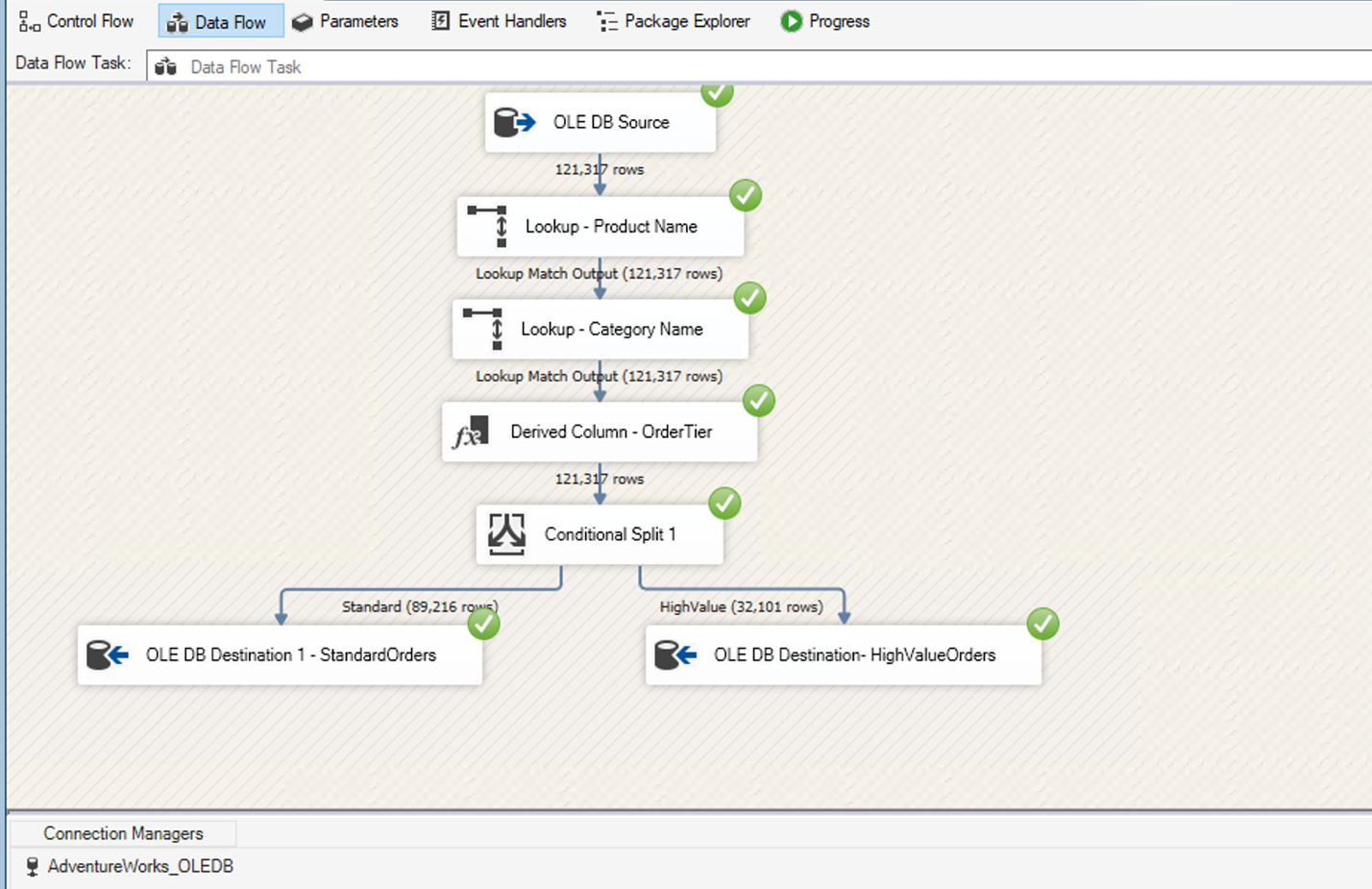
Figure 3: SSIS Data Flow Task with lookups, a derived column, and a conditional split
Aurora PostgreSQL equivalent:
On Aurora PostgreSQL, this entire pipeline collapses into a single PL/pgSQL procedure using standard SQL constructs: JOIN replaces Lookup transforms, CASE expressions replace Derived Columns, and WHERE clauses replace Conditional Splits. The result is more concise, easier to version control, and executes as a single set-based operation rather than a row-by-row pipeline — often with better performance on large datasets.
To verify, run the stored procedure on Aurora PostgreSQL and confirm the row counts match your source system.
3c. Replacing file export with the aws_s3 extension
SSIS Pattern: A Data Flow Task that exports query results to a flat file (CSV) on a file share. The following package contains:
- Expression Task: To define the path for Exports.
- File System Task: To Create Export Directory.
- Data Flow Task: Writes CSV file to a network share.
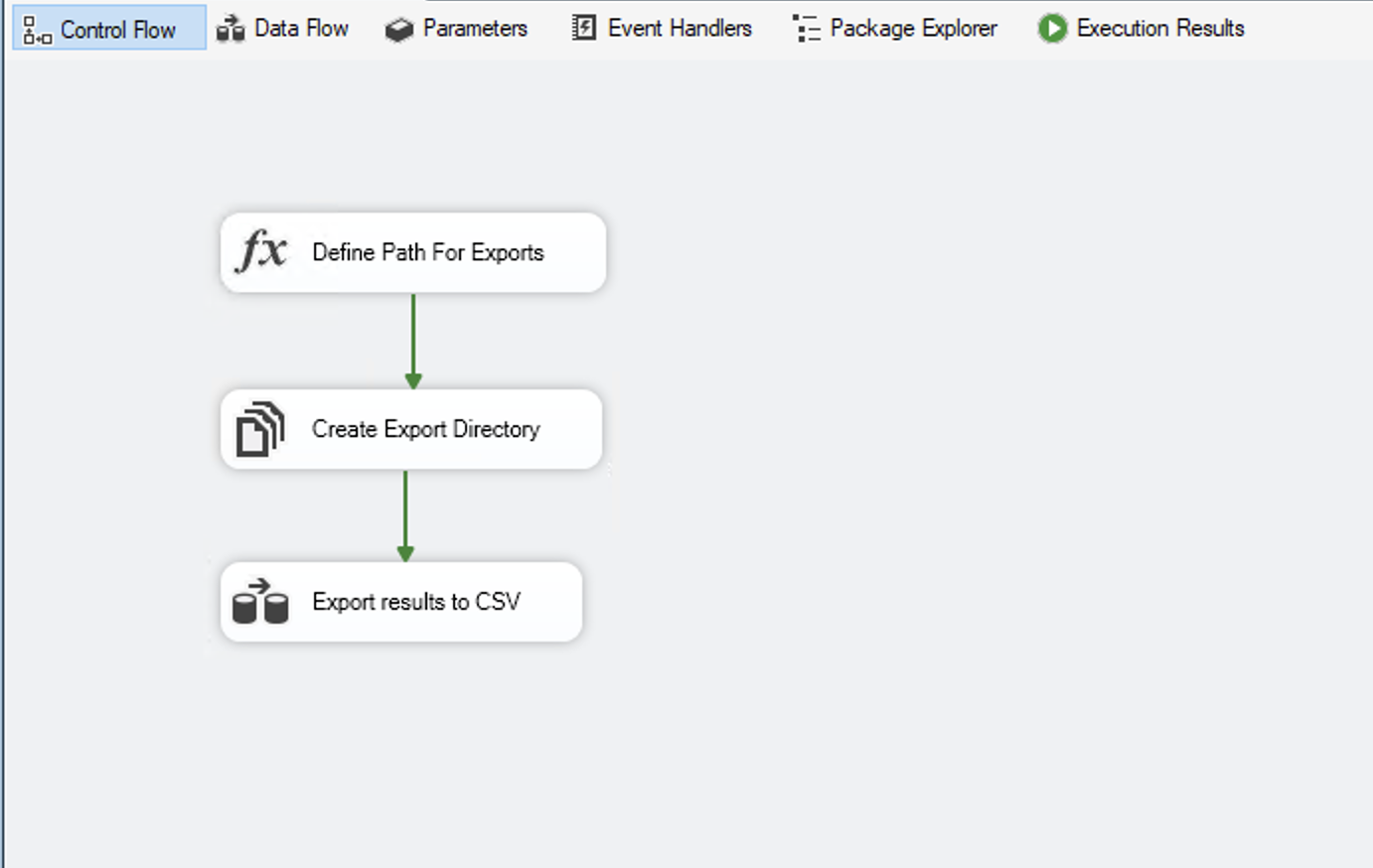
Figure 4: SSIS control flow that prepares the export path and directory
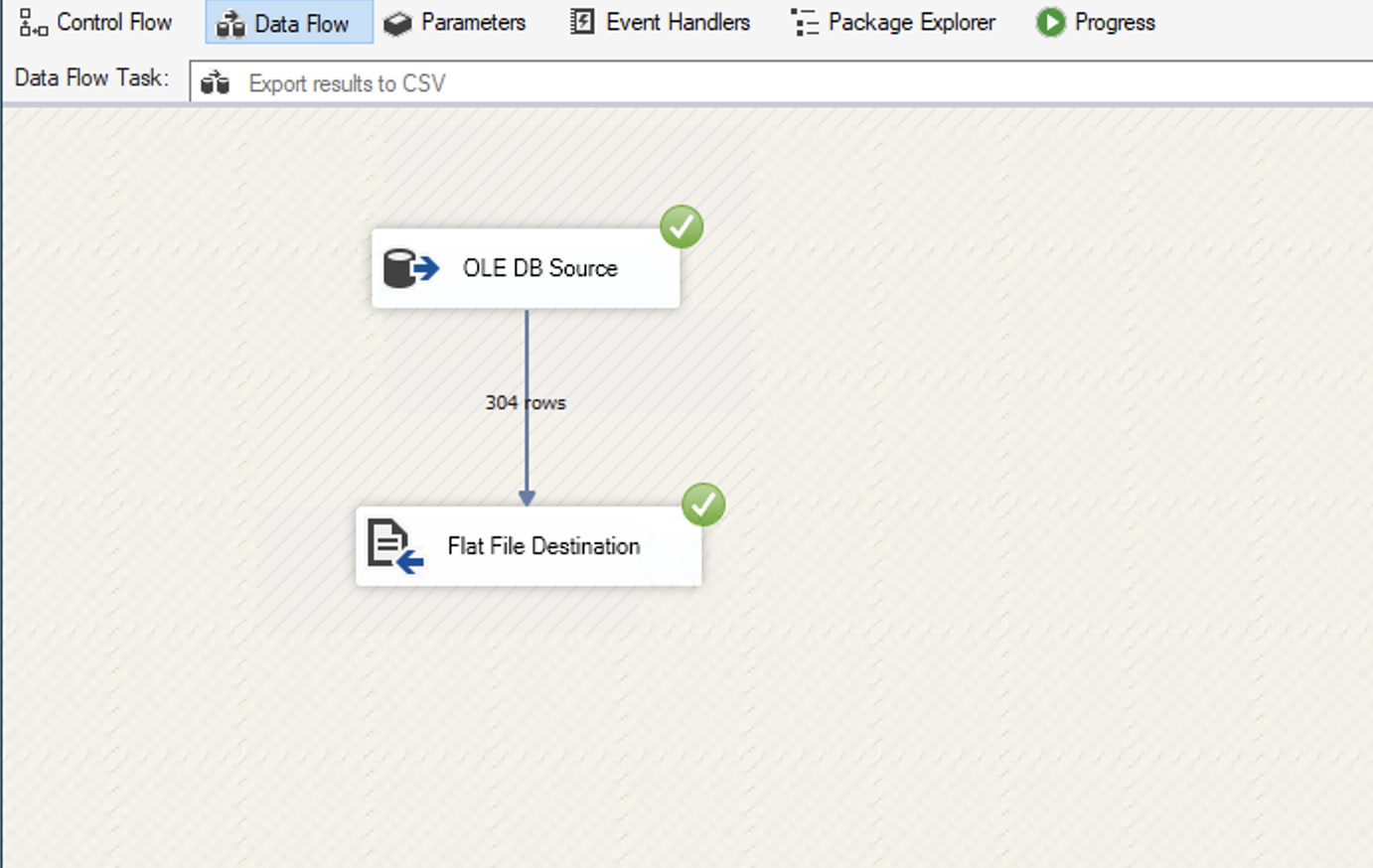
Figure 5: SSIS Data Flow Task writing the CSV file to a network share
Aurora PostgreSQL equivalent:
On Aurora PostgreSQL, the aws_s3 extension provides query_export_to_s3() which exports any SQL query directly to Amazon S3 in CSV, TSV, or text format in a single function call. This removes the need for file shares, local disk management, and file cleanup jobs. S3 provides durable, versioned storage with built-in lifecycle policies, and the exported files are immediately accessible to downstream consumers like Amazon Athena, AWS Glue, or Amazon Quick Sight.
The output confirms that the record count matches the source. You can also schedule this export using pg_cron. The following example runs weekly every Monday at 6:00 A.M.
3d. Replacing email notifications with the aws_lambda extension
SSIS Pattern: A Send Mail Task that sends a report or alert by email upon job completion or failure. The following package contains:
- Execute SQL Task: Queries products below reorder point.
- Send Mail Task: Sends alert email through SMTP with product details.
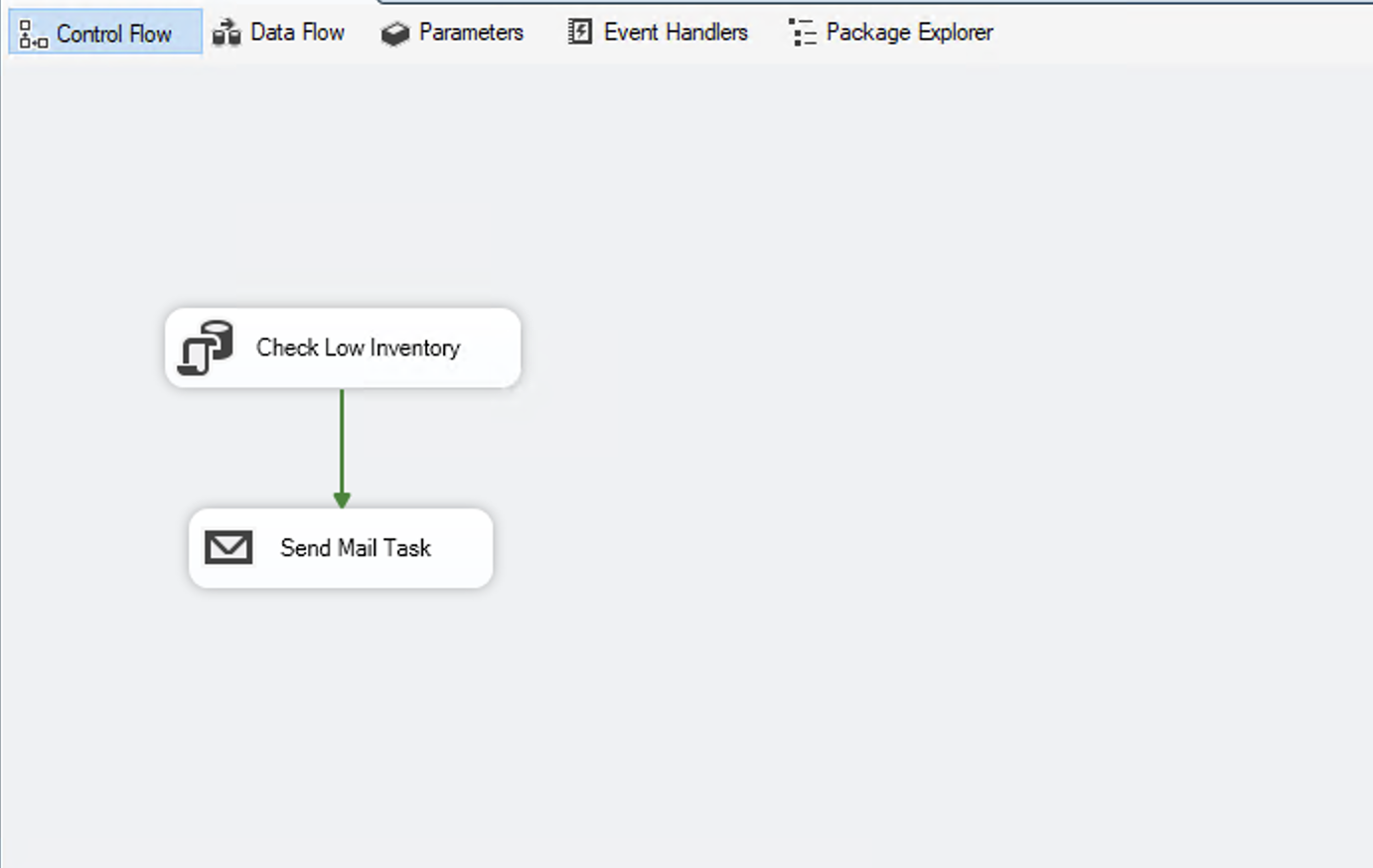
Figure 6: SSIS package with an Execute SQL Task and Send Mail Task for low-inventory alerts
Aurora PostgreSQL equivalent:
On Aurora PostgreSQL, the aws_lambda extension invokes an AWS Lambda function that publishes to an Amazon Simple Notification Service (Amazon SNS) topic. SNS handles subscriber management, delivery retries, and multi-channel notifications (email, SMS, HTTP endpoints). This decouples the database from mail infrastructure entirely. The PL/pgSQL function simply passes a JSON payload, and the Lambda formats and delivers the notification. Adding new recipients or notification channels requires no database changes.
To verify, run the following function call and confirm a successful response:
Schedule the alert using pg_cron:
Summary
In this post, we demonstrate a systematic approach to migrating SSIS packages to Amazon Aurora PostgreSQL using native features and AWS extensions. By filtering, categorizing, and simplifying, you can migrate common patterns without requiring external orchestration tools. In Part 2, we cover the Modernize phase where we tackle complex packages that cannot be simplified with database-native features alone. We show you how to decompose these packages into AWS Step Functions state machines, with AWS Lambda functions for compute steps and native AWS SDK integrations for service calls.