AWS Database Blog
Optimize costs in Amazon Aurora
Database costs continue to challenge organizations as they scale their critical workloads, with many AWS customers seeking new ways to optimize their database spending without sacrificing performance. Amazon Aurora, a relational database service that combines the speed and availability of high-end commercial databases with the simplicity and cost-effectiveness of open-source databases, offers multiple approaches to address this challenge. Although traditional cost optimization strategies like right-sizing commitment discounts deliver savings, many organizations miss opportunities to take advantage of the newest innovations in Aurora that can help reduce costs while simultaneously modernizing their data architecture and improving performances.
By implementing modern optimization techniques for Aurora, you can achieve additional cost reduction beyond traditional methods alone. This isn’t only about spending less—it’s about building a more efficient, scalable, and resilient database environment. In this post, we show you a structured approach to optimizing Amazon Aurora database costs. It outlines specific strategies, implementation steps, and best practices across different optimization areas.
Solution overview
Traditional database cost optimization primarily focuses on three approaches:
- Right-sizing DB instances based on CPU and memory utilization.
- Cleaning up unused databases and storage.
- Purchasing Reserved Instances for steady-state workloads.
Although these approaches remain valuable, AWS has introduced several innovations that enable additional optimization strategies. Before diving into specific solutions, it’s important to understand your database usage patterns. The key metrics to analyze include:
- Workload variability – How consistent is your CPU/memory utilization over time?
- I/O patterns – What’s the ratio of read to write operations? How I/O intensive is your workload?
- Data access patterns – What percentage of your data is frequently accessed or rarely accessed?
- Recovery requirements – What are your actual recovery time objective (RTO)/recovery point objective (RPO) requirements for different databases?
In the following sections, we discuss different modern cost optimization strategies.
Apply optimization strategies by workload type: decision matrix
Different database workloads benefit from different optimization techniques. Classify your databases and apply targeted strategies:
| Workload type | Optimization strategies |
| Variable workloads | • Implement Aurora Serverless • Configure Aurora Auto Scaling for read replicas • Consider start/stop schedules for non-production environments |
| I/O-intensive workloads | • Implement I/O-Optimized storage • Optimize queries and indexes to reduce I/O • Evaluate buffer cache sizing and instance types |
| Steady-state production workloads | • Optimize compute • Purchase Reserved Instances or Database Savings Plans • Implement data archiving and partitioning • Optimize backup retention periods |
| Disaster recovery & high availability | • Implement headless clusters for global databases • Right-size read replicas based on actual traffic patterns • Use selective replication with filters where appropriate |
The most effective database cost optimization strategies combine traditional approaches with these modern techniques. For long-term success, you should consider the following:
- Establish a baseline of your current costs before implementing changes.
- Set clear targets for cost reduction by component (compute, storage, I/O).
- Measure the impact of each optimization strategy independently.
- Document optimizations and their impacts for knowledge sharing.
- Implement continuous monitoring to make sure optimizations don’t negatively impact performance.
- Regularly review as workload patterns evolve and new AWS features become available.
- Create a database cost optimization Center of Excellence to share best practices across teams.
Strategy 1: Optimizing compute costs
In this section, we discuss options for optimizing compute costs.
Amazon Aurora Serverless for automatic scaling
Amazon Aurora Serverless v2 scales instantly to hundreds of thousands of transactions in a fraction of a second. As it scales, it adjusts compute and memory capacity in fine-grained increments to provide the right amount of database resources that the application needs. You pay only for the capacity your application consumes, and you can save up to 90% of your database cost compared to the cost of provisioning capacity for peak load.
Aurora Serverless v2 is suitable for unpredictable workloads that experience occasional activity spikes. It’s ideal for systems that respond to random events with irregular patterns, such as financial reporting databases that handle end-of-month processing bursts and social media backends that manage sudden traffic from viral content. In these scenarios, the automatic scaling eliminates the inefficiency and time investment of manual capacity management.
Also, Amazon Aurora Serverless v2 supports scaling capacity down to 0 Aurora capacity units (ACUs), enabling you to optimize costs during periods of database inactivity. For details, see Introducing scaling to 0 capacity with Amazon Aurora Serverless v2.
Aurora Serverless is optimal for the following use cases:
- Workloads with significant traffic fluctuations – Applications experiencing unpredictable variations between peak and off-peak periods.
- Non-production environments – Development, testing, and QA systems with intermittent usage patterns.
- Seasonal business applications – Systems facing predictable but significant changes in demand (retail during holidays, tax applications during filing season).
- Relational databases with unknown resource requirements – Relational databases where usage patterns (like difference between on-peak and off-peak usage) haven’t yet been established.
The implementation strategy consists of the following steps:
- Examine 30-day Amazon CloudWatch metrics focusing on CPU utilization and memory usage patterns, identifying variability exceeding 50% between peak and valley periods.
- Prioritize databases where the database activity shows long idle periods and sudden spikes in the CPU and memory usage.
- Create an Amazon Serverless v2 test environment using a restored snapshot of your current database.
- Measure performance metrics (like query response time, transaction throughput and commit, read, write latency) and projected cost savings against your provisioned environment under realistic workloads.
While evaluating Aurora Serverless v2, pay particular attention to query performance during scaling events. Optimizing database connection pooling and implementing appropriate retry logic can improve application resilience during capacity adjustments. For guidance on evaluating workload suitability, refer to Evaluate Amazon Aurora Serverless v2 for your provisioned Aurora clusters.
Start and stop clusters for non-production environments
For development, testing, and staging environments that don’t require all-day availability, implementing automated start/stop schedules can reduce costs.
The implementation strategy consists of the following steps:
- Identify environments that are only used during business hours.
- Use AWS Lambda functions with Amazon CloudWatch Events to automate start/stop schedules.
- Create tags to manage which clusters should be included in start/stop automation.
- Implement safety checks to prevent accidental shutdown of production clusters.
For implementation guidance, refer to Save costs by automating the start and stop of Amazon RDS instances with AWS Lambda and Amazon EventBridge.
Right instance type selection
Choosing the right Aurora instance class impacts performance and cost. Although memory-optimized R-series instances deliver high performance for production workloads, they might represent unnecessary expense for development environments or applications with lighter resource demands.
- T-series instances offer a cost-effective alternative for appropriate workloads, using a burstable performance model that provides baseline CPU performance with the ability to burst beyond this baseline when needed. They can save you up to 15% in costs when compared to M instances, and can lead to even more cost savings with smaller, more economical instance sizes, offering as low as 2 vCPUs and 0.5 GiB of memory.
Although T-series instances offer cost benefits, you should carefully evaluate their suitability for production workloads that require consistent performance or have unpredictable CPU usage patterns.
- Being up to date on the latest RDS Instance types will give you better price-performance, memory, and network bandwidth compared to previous generations.
Note: Always test your workloads against new instance types before moving critical production workloads to the new instance types.
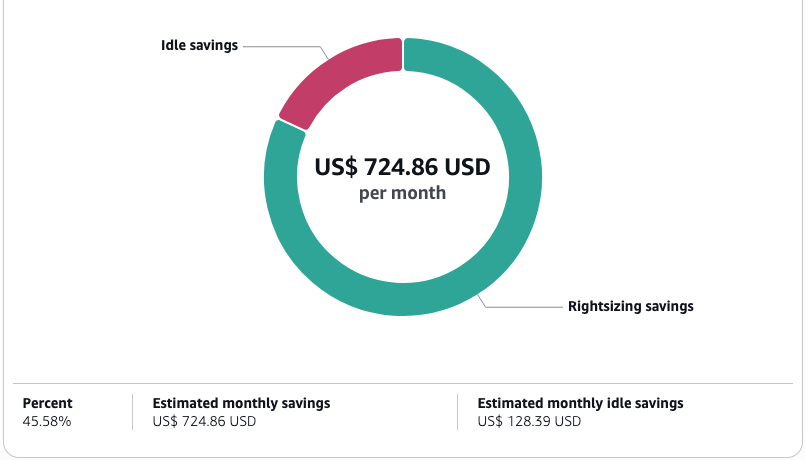
- Use AWS Compute Optimizer intelligence to receive automated instance class recommendations based on your specific usage patterns. Compute Optimizer provides specialized recommendations for Aurora DB instances, analyzing multiple performance metrics to identify both underutilized instances that could be downsized and under-provisioned instances that might benefit from upsizing. This machine learning-powered service continuously evaluates your workloads against the full range of available instance classes to identify your optimal configuration. For more information, refer to AWS Compute Optimizer now supports rightsizing recommendations for Amazon Aurora.
Reserved Instances for steady workloads
For production databases with predictable, steady-state utilization patterns, Reserved Instances (RIs) deliver substantial cost advantages, reducing your database expenditure by up to 69% compared to On-Demand pricing. This strategy is suitable for mission-critical databases that must operate continuously.
The implementation strategy consists of the following steps:
- Conduct utilization analysis to identify DB instances maintaining consistent operation patterns over extended periods.
- Select optimal commitment terms (1 or 3 years) by balancing higher discounts against flexibility needs and technology evolution timelines.
- Determine the right payment option by evaluating cash flow considerations against discount depth:
- All Upfront: Maximum discount (requires full payment at purchase). All Upfront RIs offer the highest discount of all of the RI payment options (up to 63% for a 3 year term).
- Partial Upfront: Balance between immediate investment and ongoing payments. Partial Upfront RIs offer a higher discount than No Upfront RIs (up to 60% for a 3 year term).
- No Upfront: Lower discount with complete payment flexibility. No Upfront RIs offer a significant discount (up to 30%) compared to On-Demand prices.
- Use the AWS Cost Explorer RI recommendation engine to identify specific instances and receive data-driven guidance on commitment levels aligned with your historical usage patterns.
You should focus your RI commitments on instances with persistent workloads that operate continuously. Databases that you regularly stop and start during low-demand periods are poor candidates for RI purchases because this practice can reduce RI utilization and hence reduces your cost-saving potential.
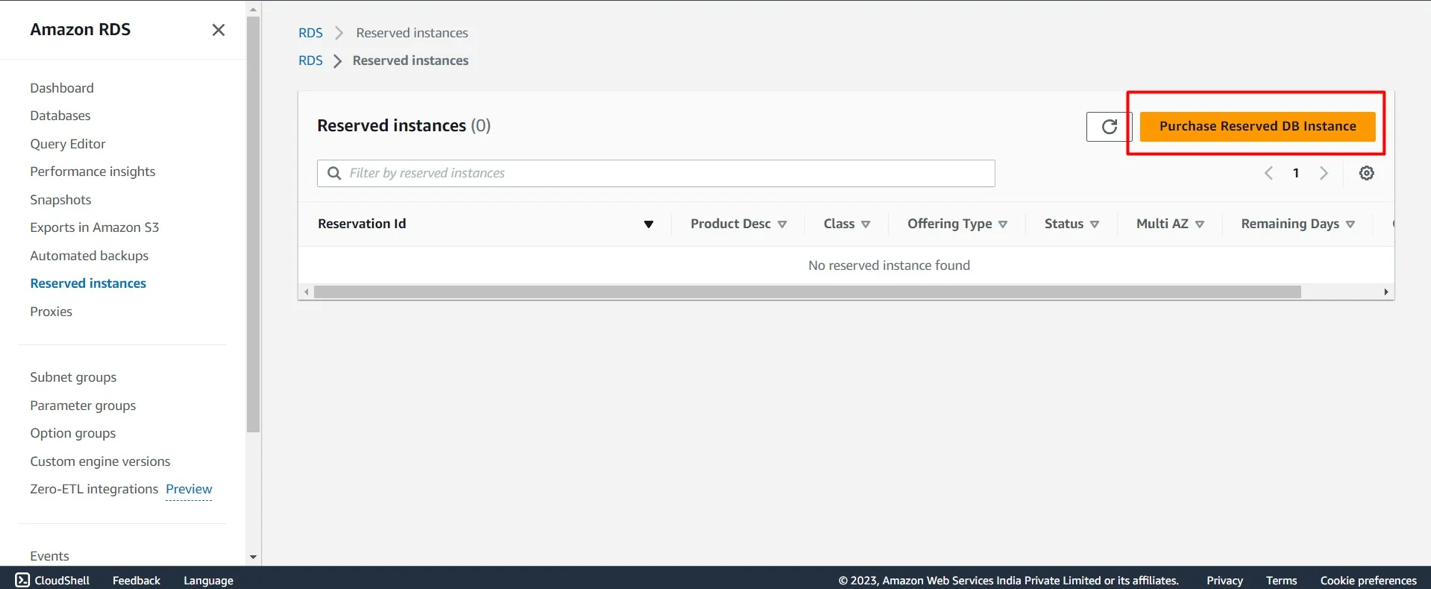
For optimal results, consider implementing a tiered approach: use RIs for stable production workloads while using On-Demand for variable workloads. This hybrid strategy maximizes savings while maintaining the flexibility to adapt to changing business requirements.
Database Savings Plans
In addition to existing reserved instances, AWS Database Savings Plans was announced in AWS re:Invent 2025 which can also be used to optimize your predictable workloads. AWS Database Savings Plans cover multiple database services including Aurora, Amazon Relational Database Service (Amazon RDS), Amazon DynamoDB, Amazon ElastiCache for Valkey, Amazon DocumentDB (with MongoDB compatibility), and more.
Database Savings Plans are a flexible pricing model that reduces your database costs by up to 35% when you commit to a consistent amount of usage over a 1-year term. These savings plans automatically apply to eligible serverless and provisioned instance usage regardless of engine, instance family, size, deployment option, or AWS Region with no upfront payment.
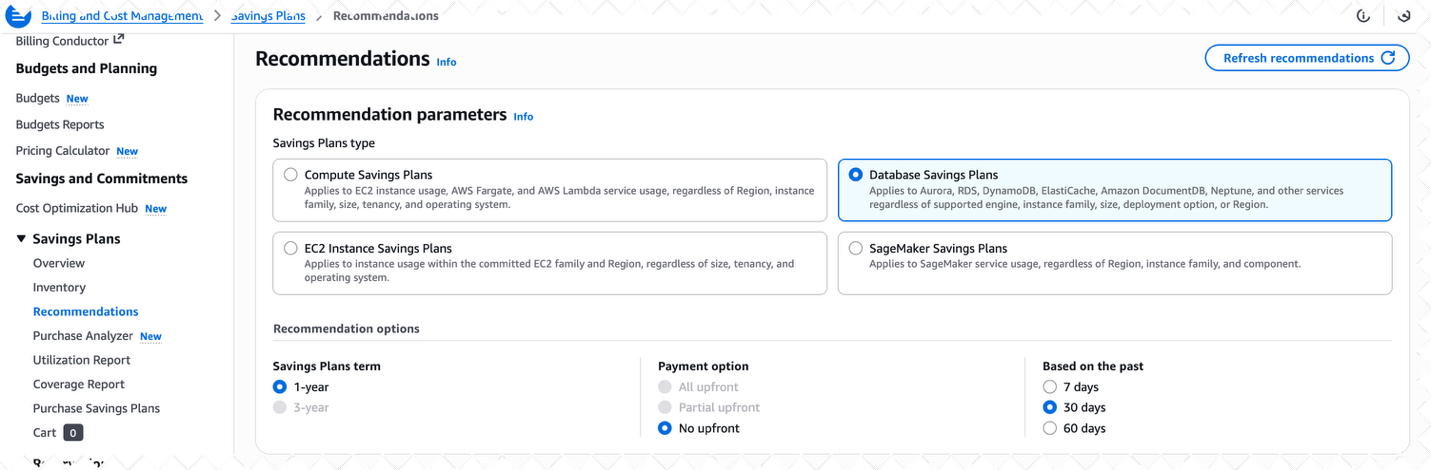
Note: For the same workload, you cannot combine Database Savings Plans with Amazon RDS Reserved Instances or Amazon DynamoDB reserved capacity discounts.
For details, see AWS Database Savings Plans.
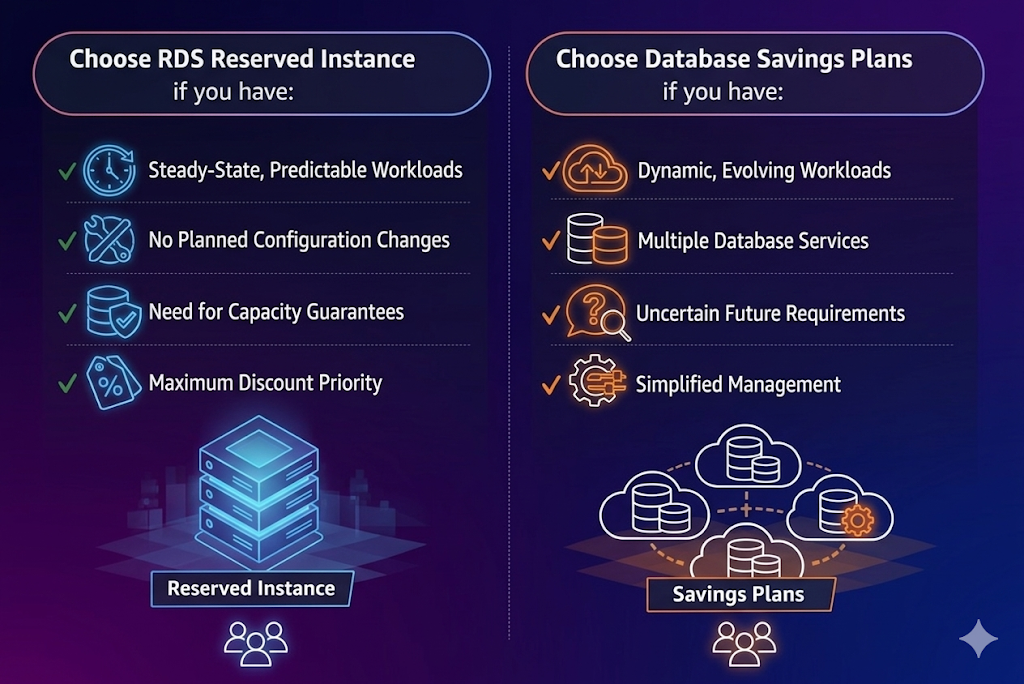
When to use RI vs Database Savings Plans
The following figure shows when to choose RDS Reserved Instances and when to choose Database Savings Plans based on your workload characteristics.
Strategy 2: Optimizing I/O and storage costs
After optimizing compute resources, addressing I/O and storage costs typically offers the next set of savings opportunity. The Aurora pricing model separates storage and I/O charges, creating optimization pathways particularly valuable for data-intensive applications.
Aurora I/O-Optimized cluster storage
For databases with high I/O requirements, I/O-Optimized cluster storage can reduce I/O costs by up to 40%.
With Aurora I/O-Optimized, there are zero charges for read and write I/O operations. You only pay for your database instances and storage usage, making it easy to predict your database spend up front. Aurora I/O-Optimized offers up to 40% cost savings for I/O-intensive applications where I/O charges exceed 25% of the total Aurora database spend.
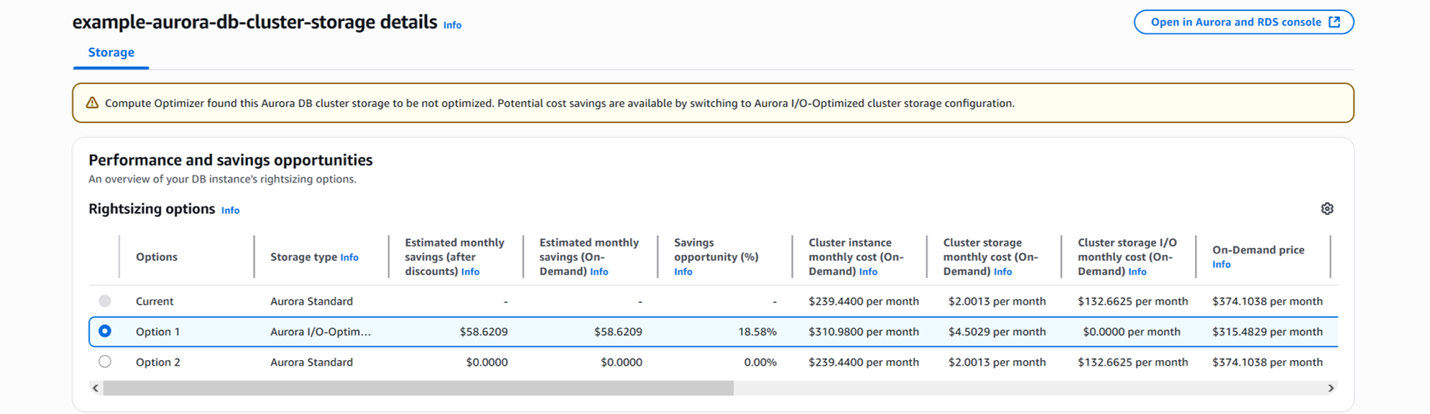
You can also use AWS Cost and Usage Report (CUR) Query to get potential savings at account level: Amazon Aurora I/O-Optimized Savings
Note: With Aurora I/O Optimized Cluster Storage, the instance and storage costs increase and the IO costs become 0. Hence for applications with moderate I/O usage, Aurora Standard is the best choice when your I/O spending is less than 25% of your total Aurora database spending.
Query optimization to reduce I/O operations
One often overlooked aspect of cost optimization is improving the efficiency of database queries to reduce I/O operations. Enhanced query performance not only improves application responsiveness, but also directly reduces billable I/O operations.
The implementation strategy consists of the following steps:
- Use CloudWatch Database Insights to identify queries with high I/O impact like increase in the
io/table/sql/handlerorwait/io/redo_log_flushevent in Aurora MySQL orIO:DataFileWriteorIO:DataFileReadevent in Aurora PostgreSQL. There can be other wait events that might indicate increased IO activity. For details, see: Amazon Aurora PostgreSQL wait events, Tuning Aurora MySQL with wait events. - Analyze the execution plans to identify opportunities for optimization. Identify inefficient operations, particularly full table scans and suboptimal join patterns.
- Create appropriate indexes to support common query patterns.
- Monitor the buffer cache hit ratio—aim for 90–95% to make sure most data is read from memory.
- Implement partitioning strategies for large tables to reduce scan sizes.
Storage optimization techniques
Aurora storage costs are based on the actual amount of data stored. Implementing proper data management can reduce these costs.
The implementation steps are as follows:
- Identify and drop unused tables and indexes.
- Consider appropriate data types, using smaller data types where possible.
- Implement table partitioning for large tables.
- Use Aurora automatic storage resizing, which can reclaim space after large deletions.
- Archive historical data to Amazon Simple Storage Service (Amazon S3) for long-term storage at lower costs. There can be multiple ways in which you can achieve this. For details, see Archiving data in Amazon RDS for MySQL, Amazon RDS for MariaDB, and Aurora MySQL-Compatible and Archive and Purge Data for Amazon RDS for PostgreSQL and Amazon Aurora with PostgreSQL Compatibility using pg_partman and Amazon S3.
Strategic data management techniques can reduce your storage requirements while maintaining full application functionality.
The implementation strategy consists of the following steps:
- Conduct schema auditing to identify and remove unused tables and indexes that consume space without delivering value. Pay particular attention to development artifacts, temporary tables, and indexes created for one-time operations that were never removed.
- Implement data type optimization by analyzing column content patterns against defined types. For example, replacing
CHAR(255)withVARCHAR(n)where appropriate, or usingSMALLINTinstead ofINTfor limited-range values can yield surprising space reductions across millions of rows. - Deploy table partitioning strategies for massive tables, especially those with time-series data. Partitioning improves both performance and manageability while enabling targeted storage optimization actions on specific data segments.
- Use the storage reclamation capabilities of Aurora, which automatically resize storage volumes after significant data deletion operations. Unlike traditional relational database services that retain allocated space after deletions, Aurora returns this space to your available pool, reducing ongoing costs. For details, see How Aurora storage automatically resizes.
- Establish automated data lifecycle policies by moving historical data to Amazon S3 using custom data pipelines (like using AWS Glue) or AWS Database Migration Service (AWS DMS). This approach maintains data accessibility while taking advantage of the lower Amazon S3 storage costs.
Strategy 3: Strategic data management
In this section, we discuss options for strategic data management.
Data partitioning and archiving
Implementing partitioning strategies enables you to split your data based on access patterns, keeping only frequently accessed data in your primary database while moving historical data to lower-cost storage options.
The implementation strategy consists of the following steps:
- Analyze query patterns to identify access frequency by data age.
- Implement table partitioning based on time periods.
- Archive older partitions to Amazon S3 using Aurora table export.
- Set up regular schedules for archiving based on data lifecycle policies.
Zero-ETL integration with analytics services
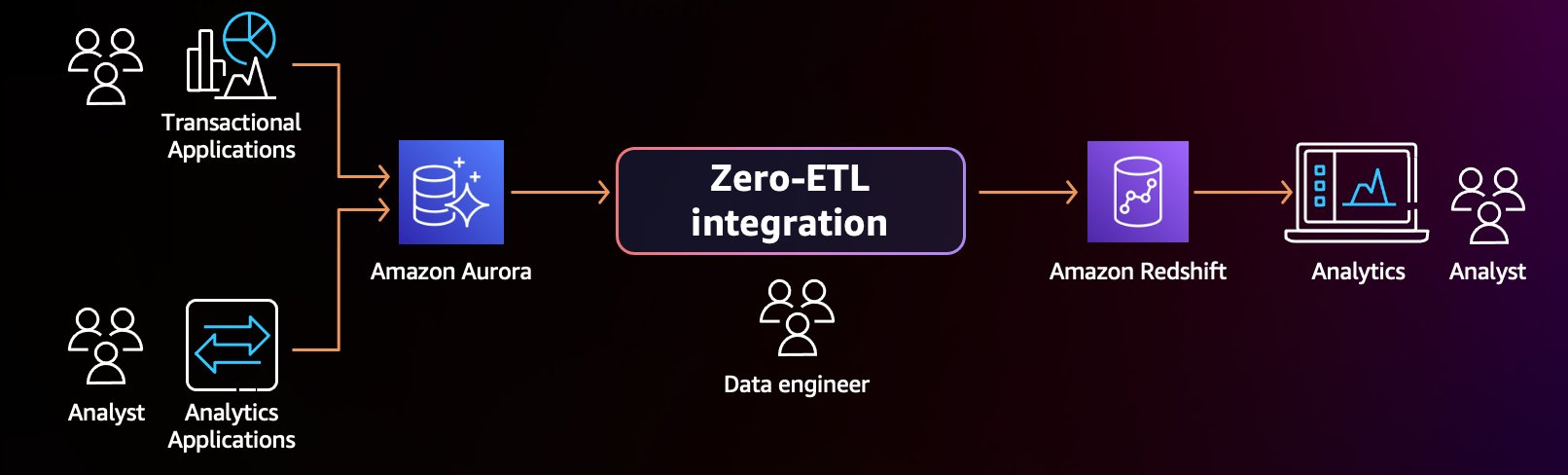
With Aurora zero-ETL integration with Amazon Redshift, you can automatically replicate data to purpose-built analytics platforms, enabling smaller operational databases while preserving access to historical data.
The implementation strategy consists of the following steps:
- Identify analytical workloads that can be offloaded from your transactional database.
- Configure Aurora zero-ETL replication to Amazon Redshift for analytical queries.
- Optimize your primary database for transactional performance.
- Create a data lifecycle strategy that moves aging data to analytics platforms.
Strategy 4: Cost-effective disaster recovery
In this section, we discuss options for cost-effective disaster recovery.
Amazon Aurora Global Database with headless clusters
Traditional disaster recovery approaches often involve maintaining fully provisioned standby databases. Headless clusters enable cross-Region disaster recovery without paying for idle compute in the secondary AWS Region. A headless secondary Aurora DB cluster is one without a DB instance. This type of configuration can lower expenses for Amazon Aurora Global Database. In an Aurora DB cluster, compute and storage are decoupled. Without the DB instance, you’re not charged for compute. You can add instances to the Aurora cluster in the secondary Region to make it available to your users and applications.
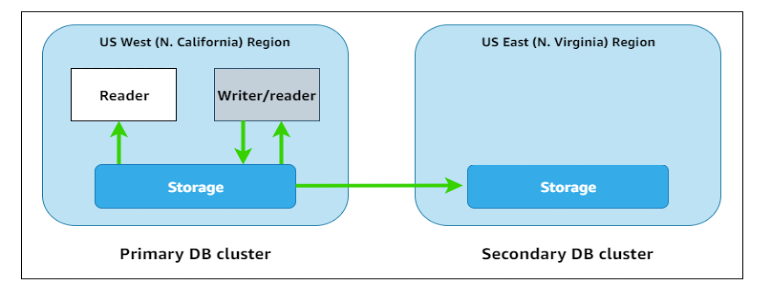
The Aurora storage layer continues replicating data to the secondary Region with typically less than 1 second of lag, but without provisioned compute instances, you incur no instance charges. When needed during a disaster event or planned failover, you provision instances in the secondary Region to activate your standby environment. You can use this approach as a DR strategy if you have an RTO greater than the time it takes to add (and make available) instances in the secondary region.
Note: You should also take into consideration that there can be situations of insufficient capacity if the specific DB instance class isn’t available in the requested Availability Zone. Refer Amazon RDS insufficient DB instances available in case you get the InsufficientDBInstanceCapacity error.
The implementation strategy consists of the following steps:
- Establish your foundation by deploying an Aurora global database spanning your primary and disaster recovery Regions.
- Optimize your configuration by removing all compute instances from the secondary Region, creating the headless cluster architecture while maintaining continuous data replication.
- Develop robust activation protocols documenting the precise steps to rapidly provision compute resources in the secondary Region, including instance types and configuration parameters.
- Validate your resilience strategy through regular testing of the complete failover process, measuring actual Recovery Time Objective (RTO) against business requirements.
This approach typically reduces disaster recovery infrastructure costs compared to traditional fully provisioned standby environments while maintaining strong Recovery Point Objective (RPO) performance (typically subsecond) and reasonable RTO capabilities (minutes rather than seconds). For details, see Achieve cost-effective multi-Region resiliency with Amazon Aurora Global Database headless clusters.
Optimize backup retention
Aurora automatically backs up your database and retains backups according to your retention settings. Optimizing these settings can reduce costs without sacrificing data protection. To learn more, see Backing up and restoring an Amazon Aurora DB cluster.
The implementation strategy consists of the following steps:
- Review your backup retention policy based on actual recovery needs.
- Reduce retention periods for non-production environments.
- Use manual snapshots only when necessary (automated backups are included up to the size of your database).
- Identify orphan snapshots with no provisioned instances and delete if not required.
- Export long-term backups to Amazon S3 and transition to lower-cost storage tiers.
- Refer to Understanding Amazon Aurora backup storage usage for more details.
Strategy 5: Efficient replica management
In this section, we discuss options for efficient replica management.
Aurora Auto Scaling for read replicas
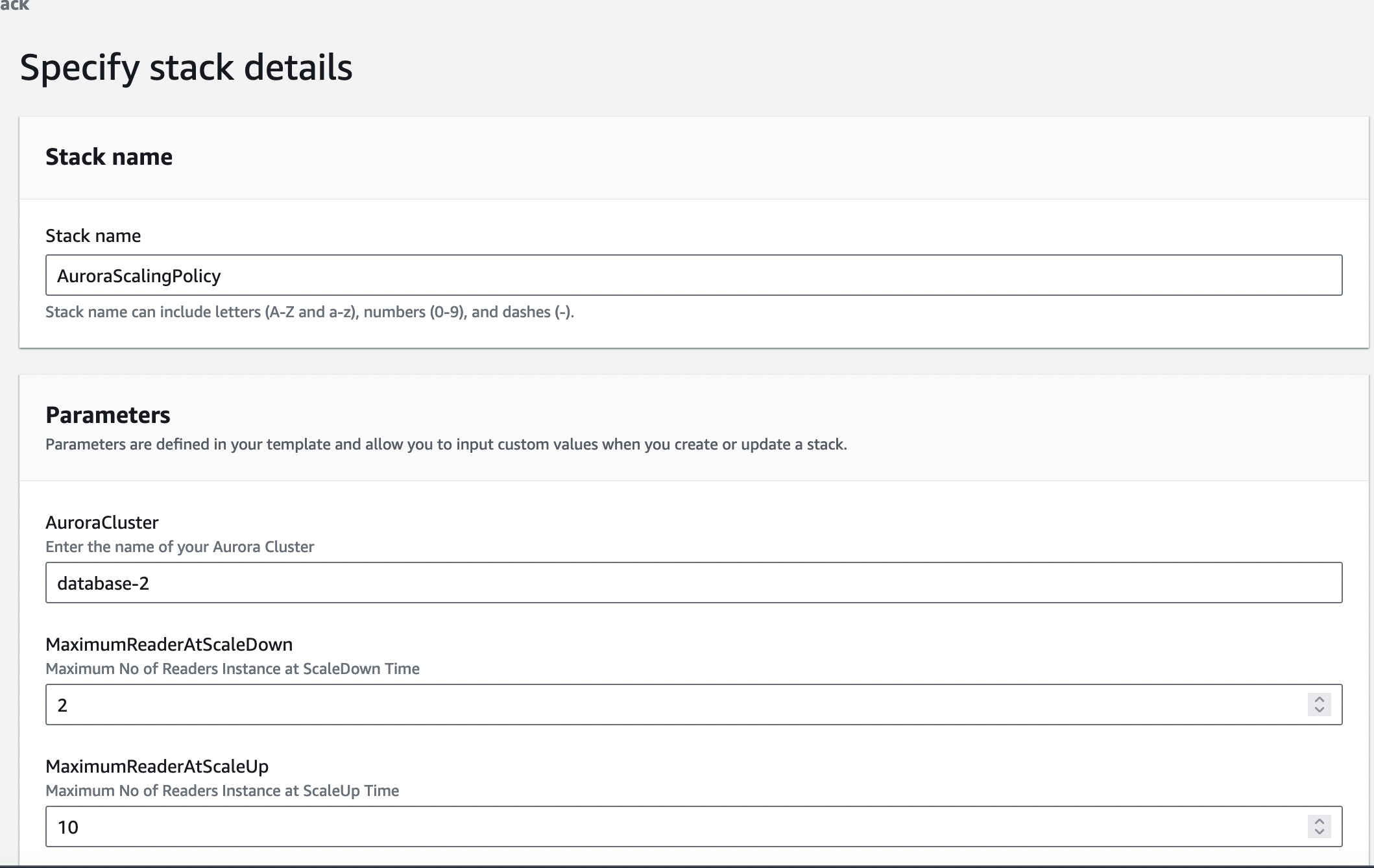
Rather than provisioning read replicas for peak load, implement Aurora Auto Scaling to automatically adjust replica count based on actual demand.
The implementation strategy consists of the following steps:
- Identify read-heavy workloads with variable traffic patterns.
- Configure Auto Scaling policies based on CPU utilization or throughput metrics.
- Set appropriate minimum and maximum replica counts.
- Monitor scaling events and adjust thresholds as needed.
For details, see Amazon Aurora Auto Scaling with Aurora Replicas.
Selective data replication with filters (MySQL only)
For Amazon Aurora MySQL-Compatible Edition read-heavy workloads, traditional replication approaches copy the entire database, which can be inefficient when only specific data is needed on replicas. You can use replication filters to specify which databases and tables are replicated with a read replica. Replication filters can include databases and tables in replication or exclude them from replication.
The implementation strategy consists of the following steps:
- Identify which schemas and tables are required for read workloads.
- Configure replication filters to include only necessary data.
- Size read replicas appropriately for the filtered dataset.
For more information, refer to Configuring replication filters with Aurora MySQL.
Strategy 6: Database consolidation
For organizations running multiple smaller databases, consolidation can significantly reduce overall costs by sharing infrastructure and management overhead.
The implementation strategy consists of the following steps:
- Identify smaller databases with compatible workload patterns.
- Evaluate consolidation approaches (schemas within a single instance or multiple databases in a cluster).
- Test performance to confirm workload isolation.
- Implement appropriate resource governance and monitoring.
Strategy 7: Feature optimization
Aurora offers several features that can provide cost benefits for specific use cases. However, these features also come with their own costs that should be managed strategically.
Aurora fast cloning
An Aurora clone creates new database instances using a copy-on-write protocol at the storage layer, where new instances initially point to the same underlying data as the source. This approach minimizes additional storage costs by only storing incremental changes, and eliminates performance impact on the source database. In contrast, self-managed solutions often require time-consuming full data copies and incur additional storage costs. Hence this feature can reduce costs for test and development environments.
For details, see Amazon Aurora Fast Database Cloning.
Snapshot export optimization
Aurora offers exporting snapshots to Amazon S3 in Parquet format, which can be useful for analytics and archiving. However, you should manage these exports strategically to control costs.
The implementation strategy consists of the following steps:
- Schedule exports based on actual data analysis needs.
- Consider exporting to Amazon S3 and transitioning to lower-cost storage classes.
- Reuse exported data rather than repeatedly exporting the same information.
For details, see Exporting DB cluster snapshot data to Amazon S3.
RDS Proxy
RDS Proxy can optimize costs by pooling connections to reduce database load, allowing smaller instances, and improving efficiency, especially with Aurora Serverless. However, you pay for the proxy’s underlying vCPU/ACU, so cost savings depend on significant workload reduction, not only adding the proxy, often needing careful configuration like shorter idle timeouts.
How RDS Proxy saves costs
- Connection pooling & multiplexing: It efficiently manages a pool of database connections, reducing the overhead of frequent opens/closes and allowing fewer overall connections to the database, potentially reducing the need to scale up your instance for connection handling.
- Scalability with Serverless: For Aurora Serverless, it enables efficient scaling by managing connections, preventing database overload during traffic spikes, and paying only for ACUs used.
You should take in consideration that you pay for the proxy’s vCPU/ACU, which adds to your RDS instance cost and unmanaged idle connections in the proxy can still consume resources and incur charges.
To optimize, you must:
- Lower idle timeouts: Adjust settings to close idle connections faster, reducing proxy resource use.
- Delete unused proxies: Remove proxies when not needed to eliminate ongoing charges.
Implementation: Building your cost optimization strategy
To effectively implement these cost optimization strategies, follow the structured approach presented in this section.
Analyze current database usage and costs
You can use the following tools:
- AWS Cost Explorer to break down costs by DB cluster and cost dimension.
- CloudWatch metrics to understand utilization patterns.
- CloudWatch Database Insights to identify query patterns and I/O usage.
- AWS Trusted Advisor for preliminary cost optimization recommendations.
You should analyze the following key metrics:
- CPU and memory utilization patterns over time.
- Buffer cache hit ratio (aim for 90–95%).
- I/O operations (
BilledReadIOPSandBilledWriteIOPS). - Storage growth patterns.
- Backup and snapshot storage consumption.
Implement cost allocation tags
Implementing a comprehensive tagging strategy allows you to understand costs at a granular level and make targeted optimization decisions.
This strategy consists of the following steps:
- Create tags for environment (development, test, or production), application, team, and cost center.
- Activate tags on the billing console for cost allocation.
- Generate reports based on tags to identify high-cost resources.
- Use tags to automate start/stop schedules for non-production environments.
To learn more, see Organizing and tracking costs using AWS cost allocation tags.
Set up cost monitoring and alerting
Proactive monitoring makes sure cost optimization efforts stay on track and prevents unexpected cost increases.
The implementation steps are as follows:
- Create CloudWatch alarms for unexpected spikes in I/O usage.
- Set up AWS Budgets alerts for database costs exceeding thresholds.
- Implement regular reviews of AWS Cost and Usage Reports.
- Use AWS Budgets actions to automatically respond to cost anomalies.
Conclusion
By taking a comprehensive approach to database cost optimization that uses the latest AWS innovations, you can achieve significant savings while simultaneously modernizing your data infrastructure. The result is not only reduced costs, but improved performance, scalability, and resilience.
Remember that cost optimization is not a one-time project but an ongoing process that requires regular attention as workloads evolve, new features become available, and business requirements change. By building cost consciousness into your database operations, you can achieve sustainable efficiency that scales with your business.
If you have any questions, comments, or suggestions, please leave a comment. You can also visit the AWS re:Post.
For additional information on the architecture and performance of Aurora, refer to the User Guide.