AWS DevOps & Developer Productivity Blog
Leverage Agentic AI for Autonomous Incident Response with AWS DevOps Agent
Introduction
Teams running distributed workloads face a persistent operational challenge: when something breaks, the information needed to resolve it is scattered across logs, deployment pipelines, configuration histories, and third-party monitoring tools. A Site Reliability Engineer (SRE) responding to a 2 AM page must manually correlate telemetry from multiple sources, trace dependencies across services, and form hypotheses — a process that routinely takes hours. As systems grow in complexity, the need for an AI-powered operational teammate — an SRE agent — has become increasingly clear.
The Do It Yourself (DIY) path and its limits
Teams exploring this space often start by using their favorite AI coding tools to help during an investigation, a thin wrapper over an large language model (LLM). On-call engineers wake up and looks at the incident details, tickets, give coding tools access to logs, monitoring tools and ask it to launch investigation. These approaches can deliver value for straightforward scenarios, but real world application architectures at scale require context across accounts, monitoring systems, and application topology awareness, enforce governance and access controls, and retained learning from past incidents to ensure a comprehensive incident management. As environments scale, the gap between a simple coding tool with limited context and a production-grade operational agentic teammate widens.
A fully managed alternative
AWS DevOps Agent is your always-available operations teammate that resolves and proactively prevents incidents, optimizes application reliability and performance, and handles on-demand SRE tasks across AWS, multicloud, and on-prem environments. DevOps Agent delivers a comprehensive agentic SRE paradigm, shifting teams from reactive firefighting to proactive, AI-driven operational excellence.
But what makes AWS DevOps Agent more powerful than what individual SREs can do with their coding agent? In this post, we walk through a serverless URL shortener application on AWS and demonstrate how DevOps Agent — built on topology intelligence, a three-tier skills hierarchy, cross-account investigation, and continuous learning — delivers capabilities that a simple LLM wrapper cannot replicate, acting as a true operational teammate at scale that reduces Mean Time to Resolution (MTTR) from hours to minutes.
Prerequisites
Before getting started with DevOps Agent, ensure you have:
- An active AWS account with an eligible AWS Support plan (contact your AWS account team for supported tiers)
- Appropriate IAM permissions to configure cross-account observability
- AWS services deployed in a supported Region
- Amazon CloudWatch and AWS CloudTrail (included by default)
- additional integrations connected for enhanced capabilities — ServiceNow for ticketing, Slack for team notifications, or PagerDuty for on-call management
Application Overview
You are an SRE Engineer at a SaaS company that offers URL shortener service deployed on AWS. The application uses fully serverless architecture, creates short codes, redirects to original URLs, and tracks analytics.
- Amazon CloudFront serves static assets from an Amazon S3 bucket
- Amazon API Gateway routes API requests to AWS Lambda functions
- Amazon DynamoDB stores URL mappings accessed by Lambda functions
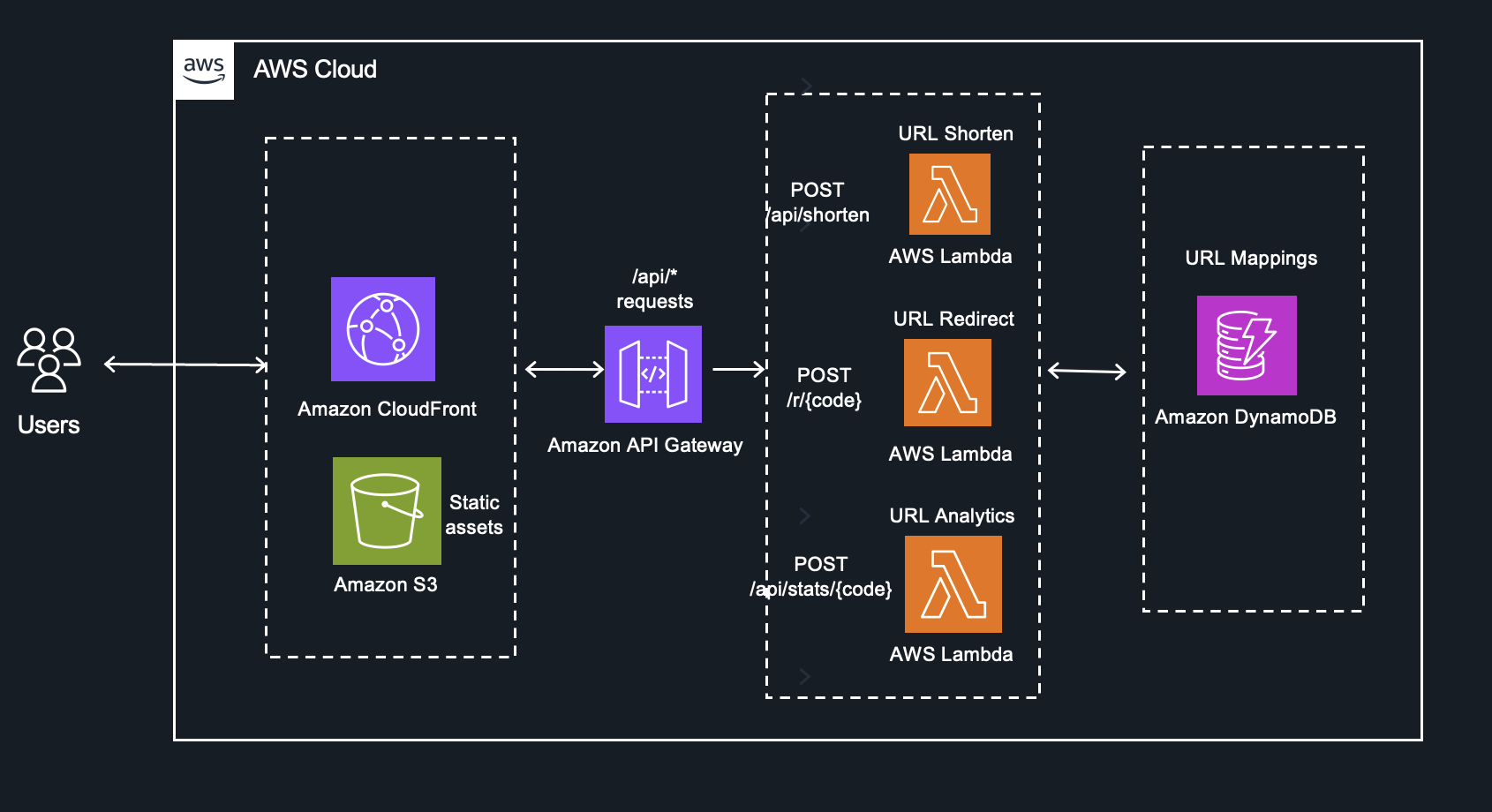
Fig 1 – URL Shortener Application
This architecture is straightforward to build but operationally complex to troubleshoot. A latency spike in the Redirect function could stem from DynamoDB throttling, a Lambda cold start regression, an API Gateway configuration change, or a CloudFront cache invalidation — and the signals live in different log groups, metrics namespaces, and trace spans. This is exactly where DevOps Agent demonstrates its value as an autonomous operational teammate.
An Investigation in Action
This workflow demonstrates the DevOps Agent autonomously detecting and diagnosing a production incident in just 4 minutes without human intervention, starting when a CloudWatch alarm triggers due to elevated 5xx errors and systematically testing hypotheses until it identifies DynamoDB write throttling caused by a recent code deployment. The DevOps Agent then autonomously posts a complete root cause analysis with specific mitigation recommendations to Slack, including the problematic commit and suggesting either on-demand capacity or a rollback—all accomplished in under 5 minutes from initial alarm to actionable solution.

Fig 2. Logical Investigation workflow
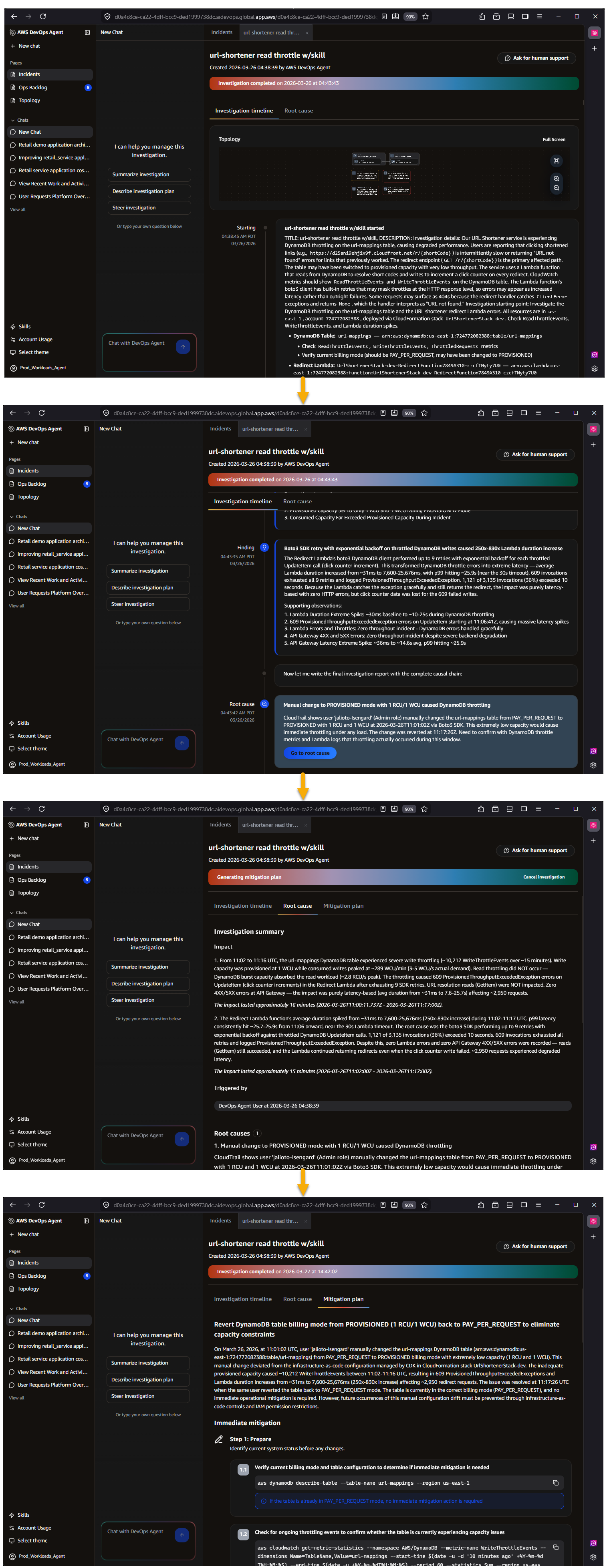
Figure 3 – AWS DevOps Agent investigation workflow demonstrating the automated flow from initial incident detection through root cause analysis to actionable mitigation recommendations
Why DevOps Agent is Different
DevOps Agent is not a chat interface layered over a large language model. It is built on Amazon Bedrock AgentCore with dedicated infrastructure for memory, policies, evaluations, and observability. Below, we break down six key capabilities — the 6 Cs — that collectively make DevOps Agent a fully functional nextgen operational teammate.
1. Context
An LLM without operational context is limited to generic suggestions. DevOps Agent solves this through Agent Spaces — isolated logical containers that provide cross-account access to cloud resources, telemetry sources, code repositories, CI/CD pipelines, and ticketing systems. Within each Agent Space, DevOps Agent builds an application resource topology by auto-discovering resources — containers, network components, log groups, alarms, and deployments — and mapping their interconnections across AWS, Azure, and on-prem environments. A learning agent runs in the background, analyzing infrastructure, telemetry, and code to generate an inferred topology at the application and service layer . DevOps Agent maintains deep, AWS-native integrations with services like Amazon Elastic Kubernetes Service (EKS), providing introspection into Kubernetes clusters, pod logs, and cluster events for both public and private environments — capabilities that require privileged access external tools don’t have. DevOps Agent doesn’t just know your resource topology, it knows your telemetry, deployment timeline, and infrastructure and application code. It discovers and knows the relationship between resources, alarms, metrics, and log groups. When it detects a latency spike, it automatically checks GitHub, GitLab, Azure DevOps for recent merges, correlates deployment timestamps with metric anomalies, and determines whether a code change is the probable cause. In the URL shortener example, the agent identifies that a commit adding batch DynamoDB writes was deployed 47 minutes before throttling began — a correlation a human SRE might take 30 minutes to discover manually.
In our URL shortener, DevOps Agent maps the dependency chain from CloudFront through API Gateway to each Lambda function and down to the DynamoDB table. When a latency spike hits the URL Redirect function, the agent traces the relationship graph to determine whether the root cause is DynamoDB read throttling, a Lambda concurrency limit, or an API Gateway timeout configuration — correlating CloudWatch metrics, Lambda traces, and DynamoDB consumed capacity in a single investigation.
2. Control
Context without governance creates risk. Agent Spaces provide centralized control over what the agent can access and how it operates. Administrators define which AWS and Azure accounts, telemetry and code integrations, and MCP servers are available within each Agent Space using granular IAM permissions, This eliminates the inconsistency of individual developers configuring their own toolchains — some thoroughly, some partially, some not at all — and removes the need for ad-hoc onboarding processes for new team members. Every reasoning step and action is logged in immutable audit journals that the agent cannot modify after recording, providing complete transparency into decision-making. AWS DevOps Agent is secured from day one with immutable audit trails logging every reasoning step and tool invocation, AWS CloudTrail integration, IAM Identity Center authentication with granular permissions, and Agent Space-level data governance that isolates investigation data and respects organizational security configurations.
For the URL shortener, the administrator configures a single Agent Space with read access to the production account’s CloudWatch logs, the DynamoDB table metrics, the GitHub repository, and the Slack channel for incident coordination. Every SRE on the team inherits this consistent, controlled configuration — no individual setup required.
3. Convenience
Once an Agent Space is configured, every developer and SRE on the team gets immediate, zero-setup access to the agent’s full operational context — topology, telemetry, code repositories, and ticketing integrations — without configuring anything themselves. This is a meaningful departure from the alternative, where each engineer individually connects their coding agent to Model Context Protocol (MCP) servers for CloudWatch, their observability tool, their source repository, and their ticketing system. In practice, some engineers will complete that setup, some will partially configure it, and some never will — resulting in inconsistent tooling across the team and an onboarding burden for every new hire. With DevOps Agent, the admin configures the Agent Space once, and engineers simply log in to the Operator Web App, or interact through Slack — whichever tool they already use. The agent provides context-aware responses, maintains conversation history, and supports natural language queries against the application topology without any per-user setup.
For the URL shortener team, a new SRE joining the on-call rotation doesn’t need to spend a day wiring up access to the three Lambda function log groups, the DynamoDB metrics dashboard, and the GitHub repository. They log in to the Agent Space and immediately ask, “Show me all Lambda functions connected to this DynamoDB table” — the topology, telemetry access, and code context are already there.
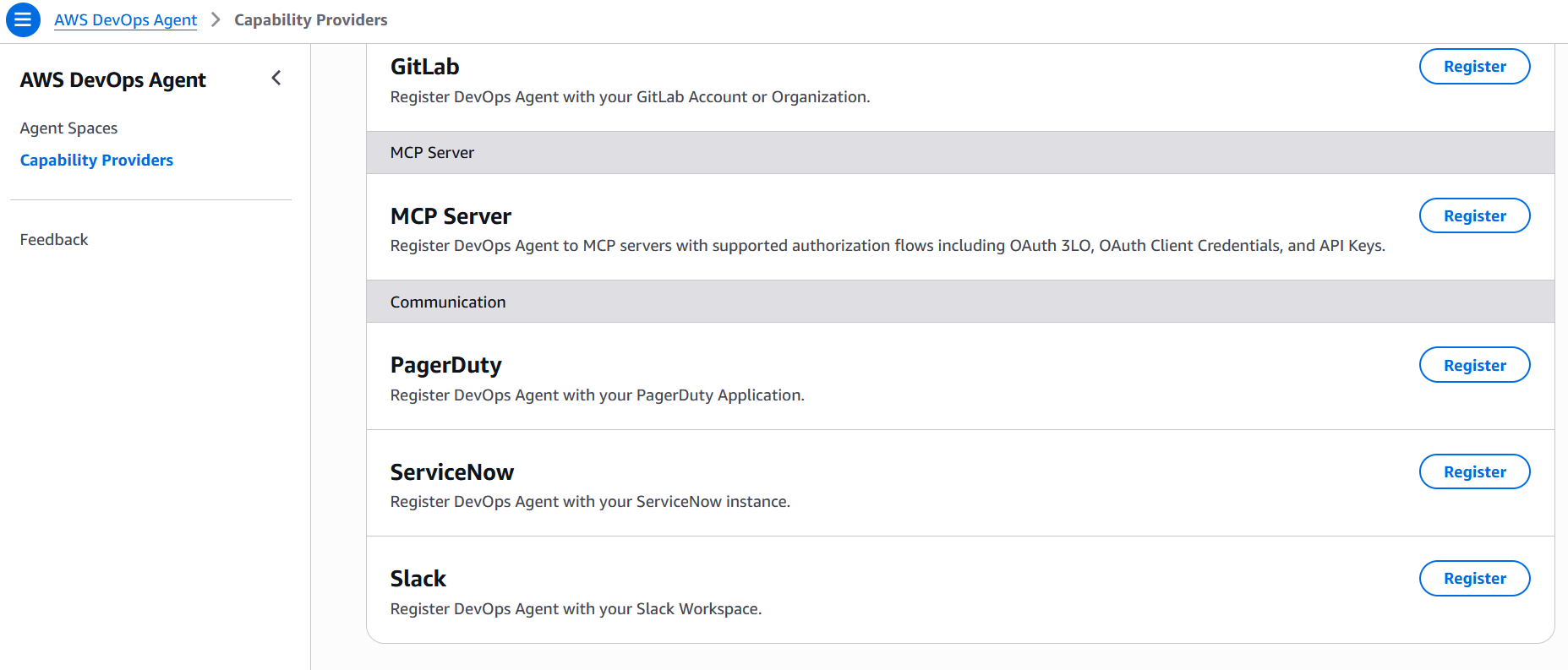
Fig 4 – AWS DevOps Agent MCP server and Communications integrations
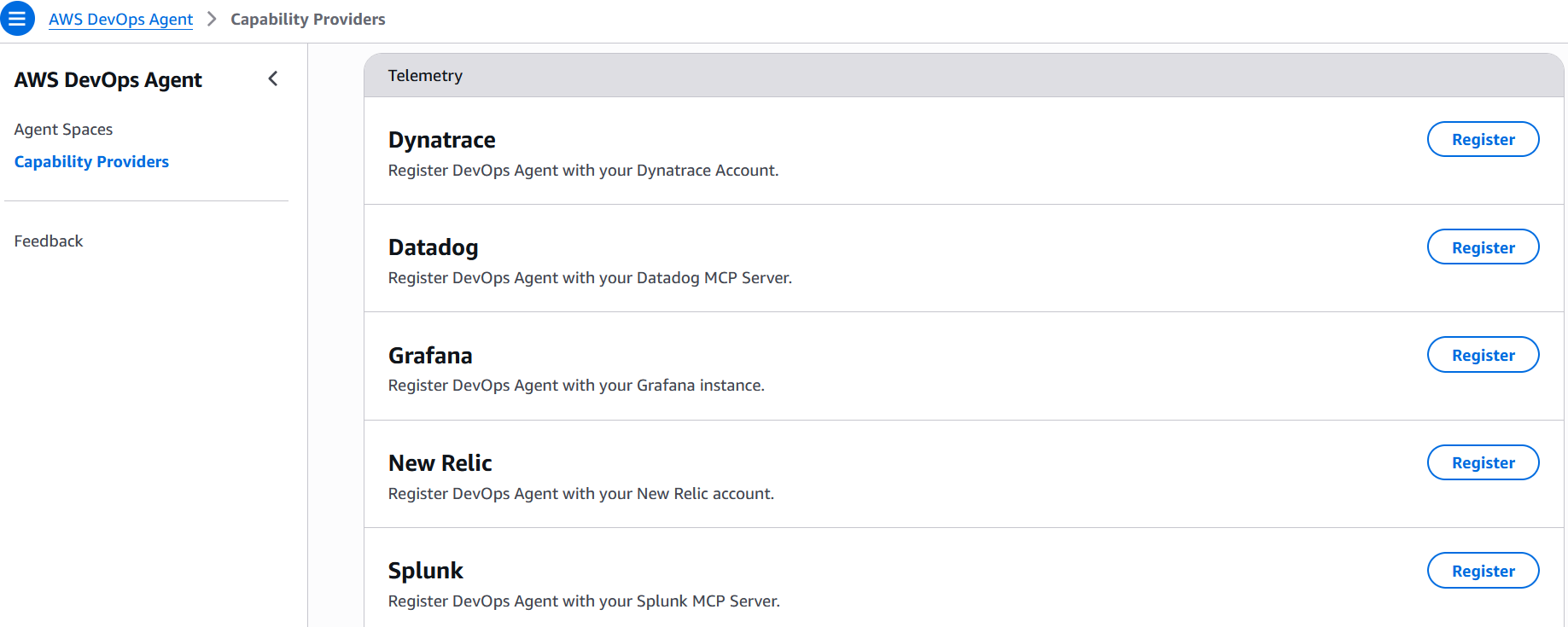
Fig 5 – AWS DevOps Agent Telemetry integrations
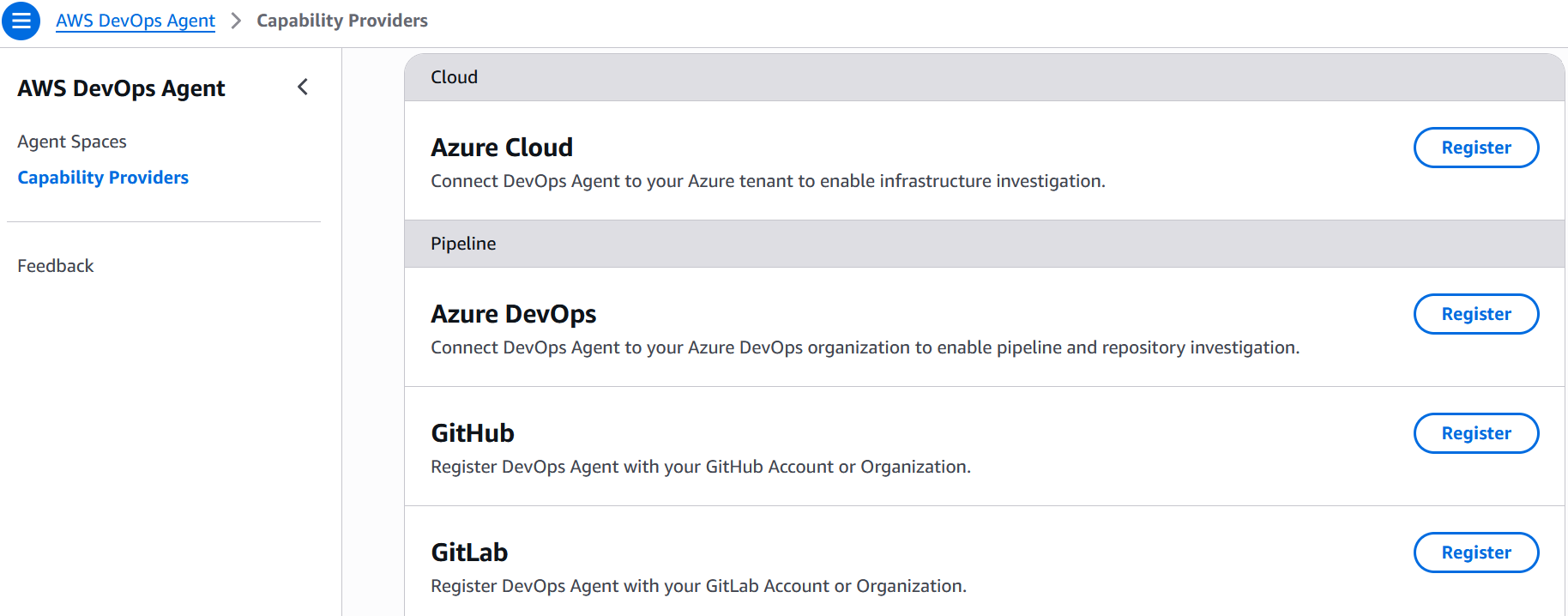
Fig 6 – AWS DevOps Agent Multi-Cloud and pipeline integrations
4. Collaboration
DevOps Agent is not a passive Q&A tool, it is an autonomous teammate. When an incident triggers via a CloudWatch alarm, PagerDuty alert, Dynatrace Problem, ServiceNow ticket, or any other event source you configure through the webhook, the agent begins investigating immediately without human prompting. It generates hypotheses, queries telemetry and code data sources to test them, and coordinates across collaboration channels — posting investigation timelines in Slack, updating ServiceNow tickets, and routing findings to stakeholders. Extensibility through the MCP and built-in integrations with CloudWatch, Datadog, Dynatrace, New Relic, Splunk, Grafana, GitHub, GitLab, and Azure DevOps ensures the agent can pull signals from wherever the team’s operational data lives. The agent also performs proactive weekly prevention recommendations, analyzing recent incidents to suggest specific improvements across code optimization, observability coverage, infrastructure resilience, and governance practices. Additionally, DevOps Agent operates within the broader frontier agent ecosystem, where investigation findings can include agent-ready instructions for Kiro to implement fixes.
When the URL shortener experiences a DynamoDB throttling event at 3 AM, DevOps Agent detects the alarm, investigates autonomously, identifies that a traffic spike exceeded the table’s provisioned capacity, and posts a mitigation plan in Slack — all before the on-call engineer finishes reading the page. The weekly prevention evaluation then recommends switching to on-demand capacity mode and adding a CloudWatch alarm on ConsumedWriteCapacityUnits to catch future spikes earlier.
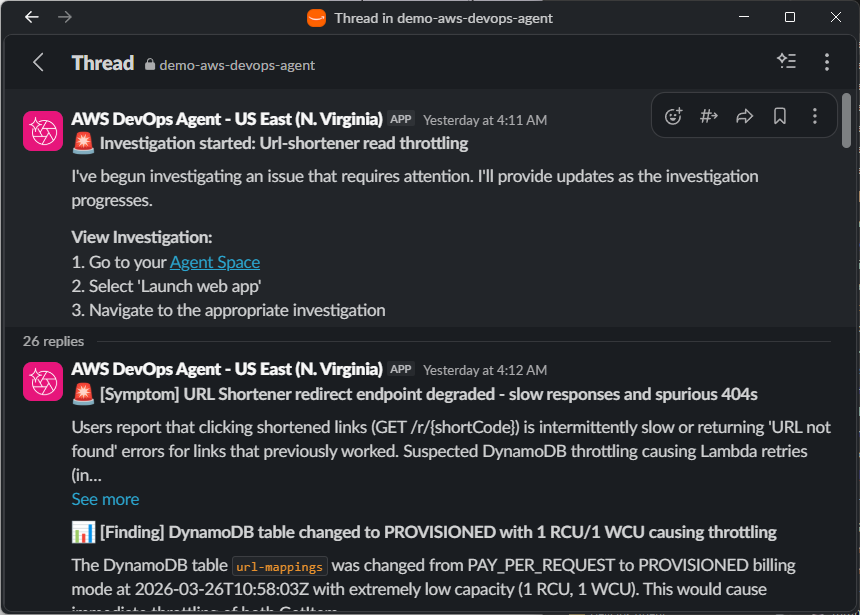
Fig 7 – AWS DevOps Agent Slack investigation notifications
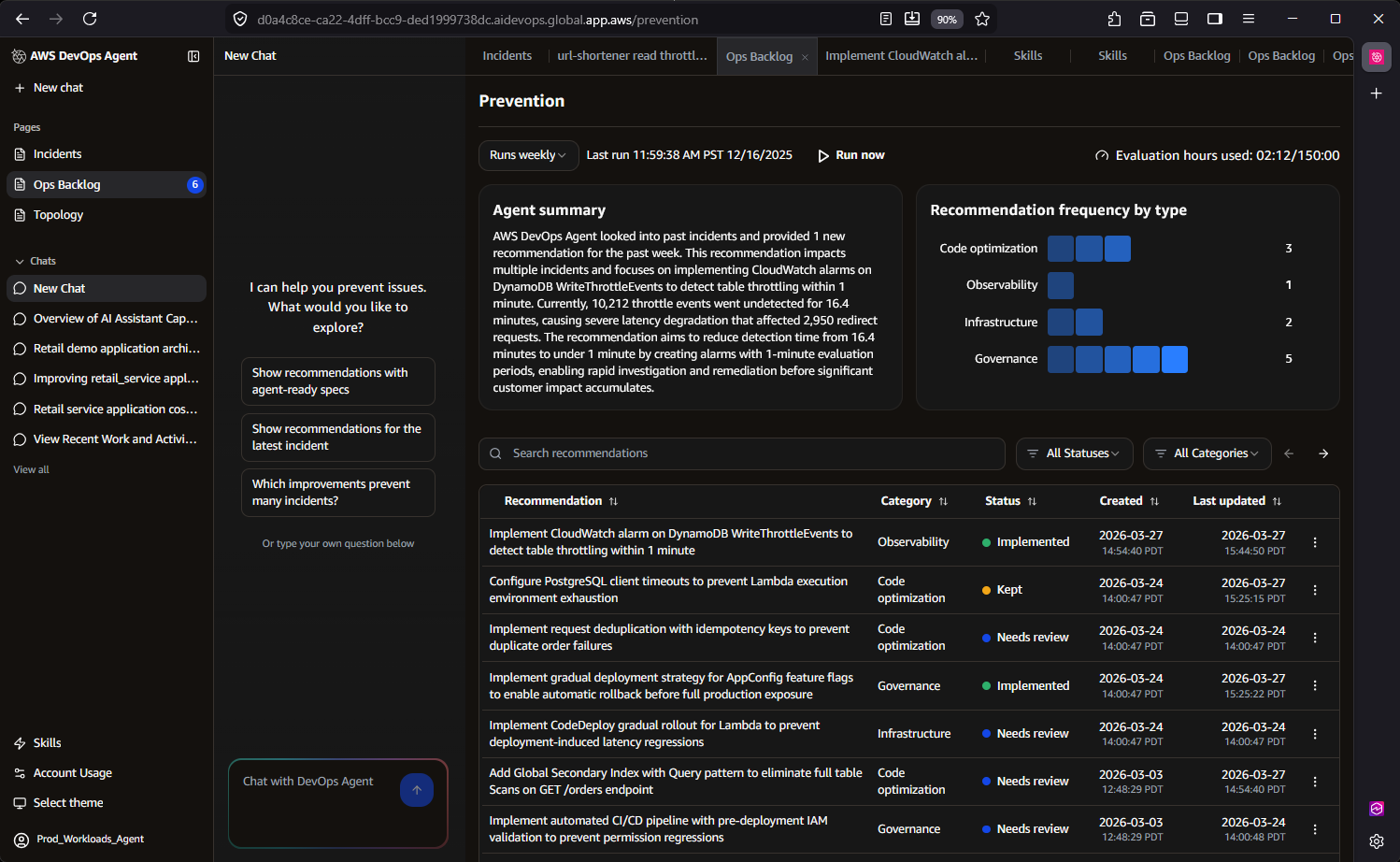
Fig 8 – AWS DevOps Agent prevention recommendations in the Ops Backlog
5. Continuous Learning
This is where AWS DevOps Agent most clearly separates itself from thin LLM wrappers. The agent implements a sophisticated three-tier skill hierarchy:
- AWS-provided skills – Built-in capabilities developed by AWS engineers and scientists that reflect proven operational approaches and are continuously maintained under the hood.
- User-defined skills – Custom skills that you define to help the agent work more effectively within your specific organizational context and workflows.
- Learned skills – Operating continuously in the background, AWS DevOps Agent includes a learning sub-agent that performs two critical functions. First, it scans your cloud infrastructure, telemetry data, and code repositories to continuously learn and update your application topology—understanding resources and their relationships to help zero in on key logs related to specific alarms. Second, it analyzes past investigations to identify patterns and optimize future troubleshooting workflows, becoming more effective over time.
For the URL shortener, after DevOps Agent resolves three DynamoDB throttling incidents over a month, the Learning Agent identifies the recurring pattern and generates a learned skill that accelerates future investigations of the same class. The next time throttling occurs, the agent skips exploratory hypotheses and immediately checks provisioned capacity against consumed capacity, reducing investigation time further. The SRE team also uploads a runbook describing their canary deployment process, which the agent references when evaluating whether a recent deployment correlates with an incident.
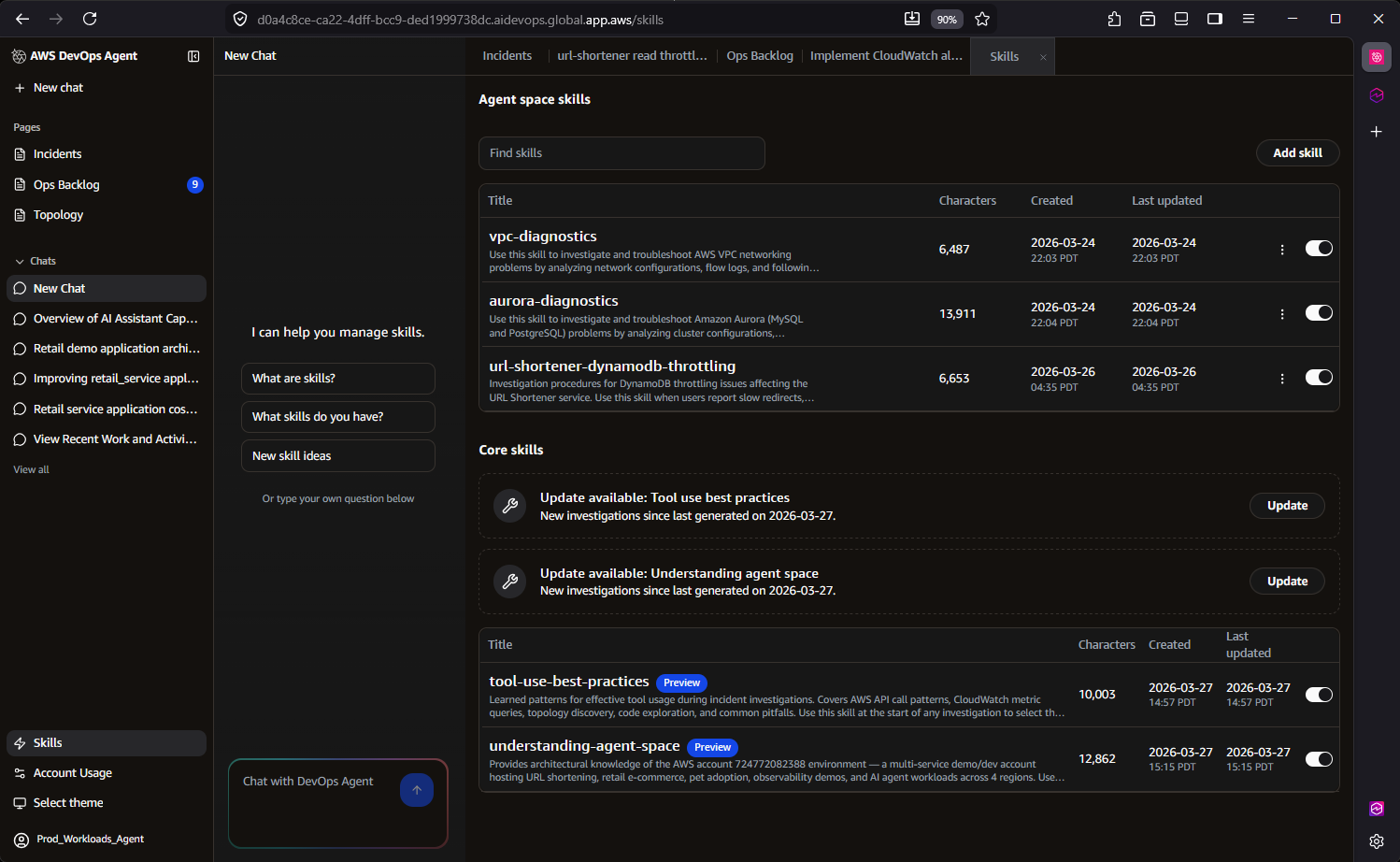
Fig 9 – AWS DevOps Agent user-defined and learned skills
6. Cost Effective
You could build your own agent, but you would still need to pay for the model tokens it consumes. More importantly, you would need to staff a team to develop, maintain, and operate the agent and its integrations. You would also need to periodically evaluate model quality, latency, and costs as underlying models change. With AWS DevOps Agent, you get a team of AWS engineers and scientists who do all of that for you.
DevOps Agent uses usage-based pricing — you pay only for the time the agent actively works on a task. There is no per-seat licensing or idle infrastructure cost. The agent works at machine speed, completing investigations in minutes that would take a human engineer hours, and only charges for the actual seconds of active computation.
Behind the scenes, DevOps Agent employs significant data retrieval optimizations that reduce cost while improving accuracy. Its query optimization techniques across tools achieve up to 15x faster querying across massive datasets by leveraging AWS-specific access patterns and data characteristics. These optimizations mean the agent consumes less compute per investigation while delivering more precise results — a direct benefit of deep AWS integration that generic LLM wrappers cannot replicate.
For the URL shortener, instead of an SRE spending two hours manually querying CloudWatch Logs Insights across three Lambda function log groups and correlating with DynamoDB metrics, DevOps Agent completes the same investigation in minutes using optimized queries — at a fraction of the cost of engineering time.
Proven real-world results
Customers and partners using AWS DevOps Agent in preview report up to 75% lower MTTR, 80% faster investigations, and 94% root cause accuracy, enabling 3–5x faster incident resolution.
Western Governor’s University (WGU), a leading online university serving over 191,000 students, was among the first organizations to deploy Amazon DevOps Agent into production, doing so even ahead of the preview launch at re:Invent. As a large-scale Dynatrace user, WGU leverages the DevOps Agent’s native Dynatrace integration, enabling Dynatrace Intelligence to automatically route problem records to the Agent for investigation and return enriched findings directly back into Dynatrace.
During a recent production investigation, WGU’s SRE team used the AWS DevOps Agent to analyze a service disruption scenario, reducing total resolution time from an estimated two hours to just 28 minutes—a 77% improvement in MTTR. AWS DevOps Agent quickly pinpointed the root cause within an AWS Lambda function’s configuration, surfacing critical operational knowledge that had previously existed only in undiscovered internal documentation.
Zenchef is a restaurant technology platform that helps restaurants manage reservations, table operations, digital menus, payments, and guest marketing from a single commission-free system. With a focused DevOps team managing several production environments across multiple business units, they faced a real test when an API integration issue affecting a downstream partner surfaced during a company hackathon, with engineers engaged in the event and nothing significant showing up in monitoring to point them in the right direction.
Rather than pulling engineers off the hackathon, the team brought the issue to AWS DevOps Agent. It worked through the problem systematically, ruling out authentication as a contributing factor, shifting investigation focus on Amazon Elastic Container Service (Amazon ECS) deployments, and ultimately tracing the root cause to a code regression in which a new version failed to handle an unrecognized enum value in the database. The full investigation wrapped in 20-30 minutes, roughly a 75% reduction compared to the 1-2 hours it would have taken manually, and the findings were shared directly with the responsible engineer.
Conclusion
AWS DevOps Agent is architecturally distinct from LLM wrappers. Its topology intelligence service maps AWS service relationships to understand application dependencies. Its three-tier skill hierarchy with a validation-based Learning Agent creates compounding operational knowledge specific to each customer environment. Its cross-account investigation capability, governed autonomy model, and immutable audit trails address enterprise requirements that no external wrapper can satisfy.
The 6 Cs — Context, Control, Convenience, Collaboration, Continuous Learning, and Cost Effective — are not marketing categories. They represent concrete engineering investments: Agent Spaces for isolation, topology, optimized log queries for performance, federated credential management for cross-account access, and a skills architecture that learns and improves with every investigation. For any team operating distributed and complex architectural applications on AWS — DevOps Agent reduces the operational burden of incident response while building institutional knowledge that makes every future investigation faster and more accurate.
Ready to get started? Visit the AWS DevOps Agent documentation to explore the setup process, join the AWS DevOps Agent workshop for hands-on experience, and/or contact your AWS account team to configure your first Agent Space.