AWS for Games Blog
Building an AI game testing agent with Amazon Bedrock
Automated game testing isn’t new, but previous approaches have always struggled to keep up. Can an AI agent on Amazon Bedrock deliver autonomous QA that actually works?
The most common approach is scripting: Bots replay recorded inputs and follow set paths, which makes them fast, repeatable, and good for regression checks. The problem is they tend to break quickly. Change the UI or tweak a mechanic and the scripts stop working. Someone has to keep fixing them with every build.
Reinforcement learning agents handle change better and can wander into states a script would never reach, but they bring their own overhead: You have to design rewards, train the agent, and retrain it whenever the game shifts. Neither type really understands the game. They execute or explore, but they can’t tell you whether what just happened was correct.
Large language models (LLMs) change that. An LLM-based agent can read a test case written in plain language, reason about what’s happening in the game, decide what to do next, then report whether the test passed or failed and why. They do this without the fragile scripts or lengthy training the older methods depend on. That move from running known inputs to reasoning about live game state is what makes autonomous QA realistic at the pace studios ship today.
For one major games publisher’s centralized QA team, every build cycle could involve 10+ hours of manual test execution. They needed to catch bugs earlier, keep pace with faster releases, and free their testers for exploratory testing and edge-case hunting.
In this post, we walk through how we built an autonomous QA agent on Amazon Bedrock that connects to a running Unity game and executes test scenarios without human intervention. We cover connecting to a game’s internal object hierarchy, a perception and reasoning loop inspired by recent research on autonomous testing agents, and game-agnostic tools that extend as complexity increases. The approach was validated against a turn-based mobile strategy game built in Unity.
Architecture overview
The Amazon Web Service (AWS) infrastructure is provisioned through AWS Cloud Development Kit (CDK) across three stacks:
- The Agent stack runs the QA agent and AltTester® Server (a third-party Unity testing framework) as containers on Amazon Elastic Container Service (Amazon ECS) with AWS Fargate, fronted by an NLB. A Unity build on a physical Android device connects to the server over WebSocket, and the agent connects to the same server to interact with the game.
- The Data stack provisions Amazon DynamoDB for test cases and action history, Amazon Simple Storage Service (Amazon S3) for player-facing game documentation and test results, and Amazon Bedrock Knowledge Bases for retrieval.
- The Web stack serves a React application through Amazon CloudFront with Amazon Cognito authentication and a REST API backed by Amazon API Gateway and AWS Lambda. Agent actions stream to the browser in real time using DynamoDB Streams and Amazon AppSync Events. Testers select test cases in the web UI and submit them for execution. Each request is queued in Amazon Simple Queue Service (SQS), where the agent picks it up, connects to the game, and begins executing. The following diagram shows how the three stacks connect:
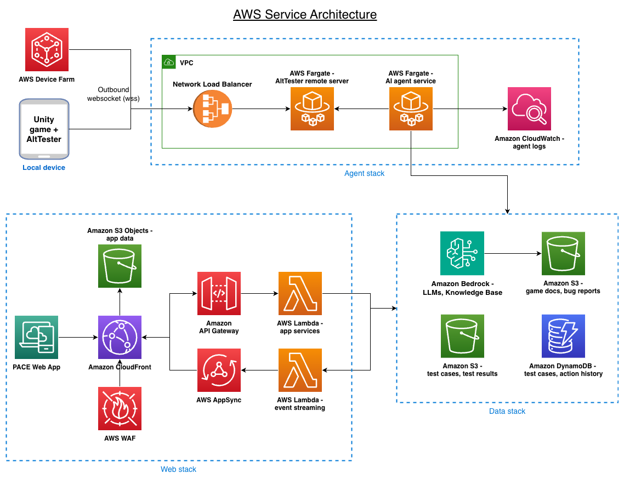
Figure 1: Architecture diagram showing three CDK stacks: Agent (AI agent and AltTester® Server on Fargate behind an NLB), Data (DynamoDB, S3, SQS, and Amazon Bedrock Knowledge Base), and Web (React app on Amazon CloudFront with real-time streaming using AWS AppSync Events). A physical Android device on AWS Device Farm connects to the Agent stack over WebSocket.
Connecting to a running game
The first challenge was giving the agent reliable access to game state. Vision-based approaches that send screenshots to a multimodal model add latency and can’t read internal states like health values or ability charges. We needed something faster and more direct.
We use AltTester®, an instrumentation framework that embeds into the Unity build and exposes the full GameObject hierarchy over WebSocket. The server runs in a private subnet with security groups restricting access to the agent container and the NLB.
Every object, component, and property becomes queryable at runtime, giving the agent the same access a developer has in the Unity Editor but against a running build on a real device. The AltTester® Server runs in batchmode on AWS Fargate, which requires a Pro subscription. The agent snapshots all objects before and after each action and computes a diff to detect changes like health values updating, or highlight overlays appearing on valid tiles.
We use AWS Device Farm to run the instrumented APK on physical Android devices, keeping a stable connection alive while the agent works through minutes-long test scenarios. The device connects outbound to the NLB as described in the architecture overview section.
Context engineering: Discovery and Amazon Knowledge Bases
The agent must understand game mechanics, unit abilities, and navigation procedures, but the code stays game-agnostic. All game-specific knowledge lives in an Amazon Bedrock Knowledge Base backed by Amazon OpenSearch Serverless.
Two sources feed it: game documentation uploaded by QA, including game guides and scene hierarchy exports from Unity, and a discovery module that autonomously taps every interactive entity in the game, reads its stats and abilities, and generates per-entity markdown documents.
At test time, the agent queries the Knowledge Base on demand. A question like “how do I use this unit’s attack?” returns ability slots, charge counts, and positioning strategy, all from discovery rather than manually authored.
Ten prompt templates govern perception, reasoning, reflection, navigation, and discovery. They’re editable from the web app with version tracking. The QA team can tune this behavior without touching code.
The discovery page in the web app shows the game object hierarchy and entity stats as they’re cataloged. Game-specific unit names have been redacted:
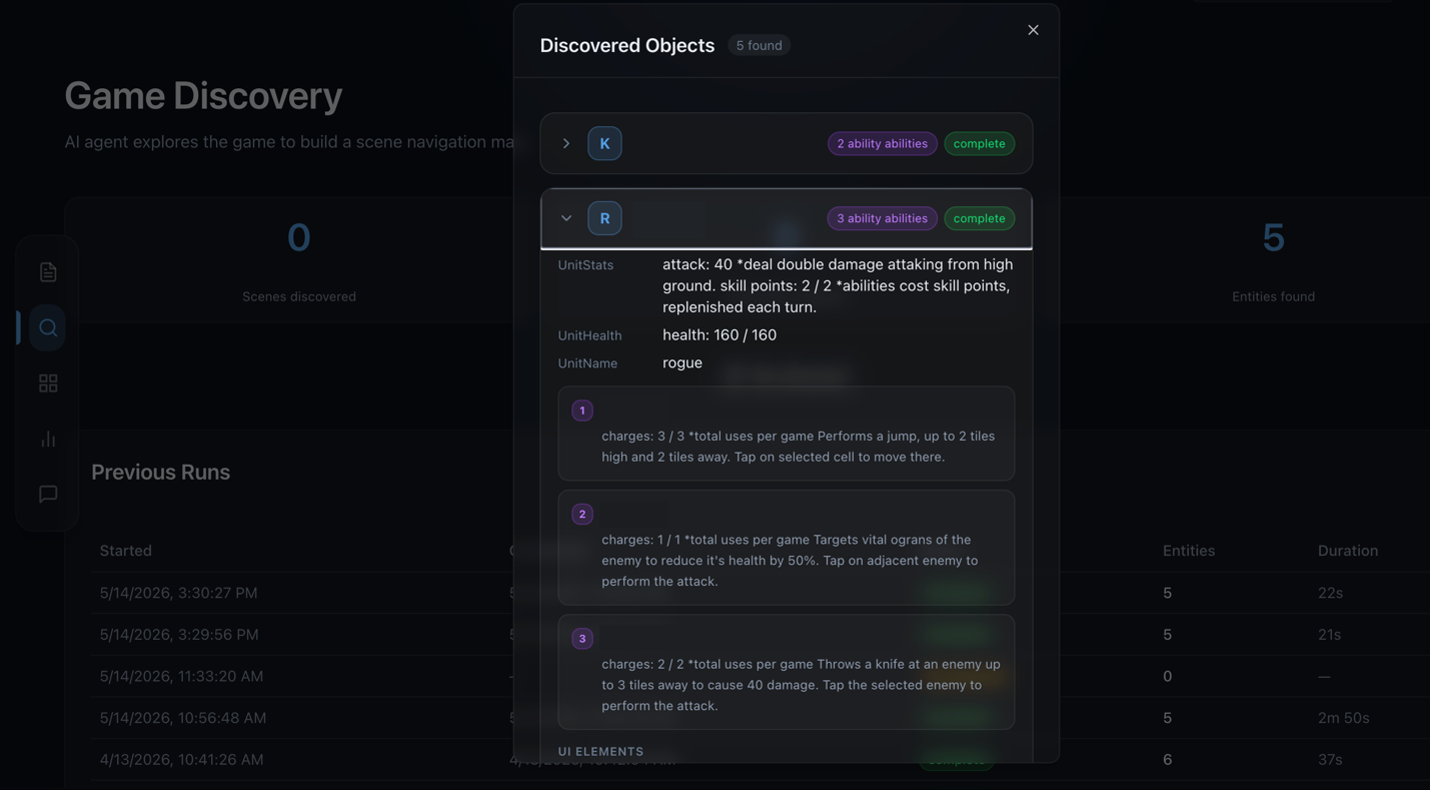
Figure 2: Web application showing the Game Discovery page with a Discovered Objects panel listing entities found by the agent, including their stats, health, abilities with charge counts and descriptions, and a history of previous discovery runs with timestamps and durations.
The TITAN reasoning loop
The core of the system is a perceive, reason, act, reflect cycle inspired by the TITAN research paper on autonomous game-testing agents. The Strands Agents SDK (open source from AWS) orchestrates the loop, and custom hooks inject perception and reflection at the right moments.
- Perception runs before every LLM call. The agent snapshots the full game state: over 1400 objects from the Unity scene. A rule-based filter removes structural noise (skeleton bones, terrain, engine internals), reducing the set to roughly 42 meaningful objects like unit entities, buttons, and health displays. An Amazon Nova model then summarizes the state and suggests relevant tools. Rules handle noise for free. The LLM handles game-specific interpretation using Knowledge Base context.
- Reasoning is handled by Anthropic Claude on Amazon Bedrock. The model sees the test case, Knowledge Base context, perception summary, and prior tool results, then selects one of 13 tools. Prompt caching on Amazon Bedrock achieves 50%+ hit rates, reducing cached-token cost by 90%. A complex test costs approximately $0.28, and the average is around $0.20.
- Reflection runs after every tool call. A pure Python check scans the last 10 actions for stuck patterns: identical tool calls three times in a row, or three consecutive no-change results. Only when stuck does the system invoke Claude for a revised strategy. If stuck three times, it auto-fails rather than looping. The following diagram illustrates the reasoning loop:
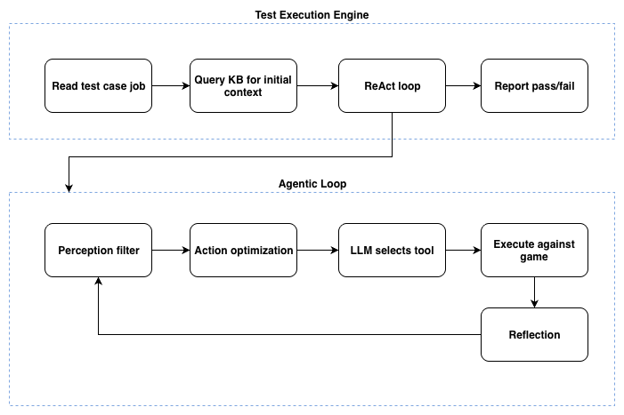
Figure 3: Flow diagram showing the Test Execution Engine with two layers. The top layer shows the orchestration sequence: Read test case job, Query KB for initial context, ReAct Loop, Report pass/fail. The bottom layer expands the Agentic Loop: Perception Filter, Action optimization, LLM selects tool, Execute against game, and Reflection, which loops back to Perception Filter for the next iteration.
A framework for game-agnostic tools
The tools are the backbone of the act stage. The agent has 13 parameterized tools that stay game-agnostic by design. For example, tap(name) taps an object. read_text(name) reads UI text. find_object(name) checks existence. query_knowledge_base(question) retrieves game context. verify(passed, observation, reasoning) records the test result and exits the loop.
By having the LLM call parameterized tools with arguments derived from Knowledge Base context, we separate game-specific knowledge from game-agnostic tooling. The tools never reference a specific entity, and the patterns extend naturally as games introduce new interaction paradigms.
The spatial tools are where this gets fun. find_highlighted_tiles queries the game for tiles marked as valid targets, then accepts toward and away_from parameters that sort results by screen distance to named units. A melee unit gets tiles sorted closest-first. A ranged unit keeping distance picks one further down. New tools follow the same shape: query state through AltTester®, do math, record the action, return a result.
The following snippet shows how find_highlighted_tiles sorts results by distance:
# find_highlighted_tiles — spatial sorting
if toward:
    targets = driver.find_objects(By.NAME, toward)
    nearest = min(targets, key=lambda t: (t.x - tiles[0]["x"])**2 + (t.y - tiles[0]["y"])**2)
    tiles.sort(key=lambda t: (t["x"] - nearest.x)**2 + (t["y"] - nearest.y)**2)

if away_from:
    for unit_name in away_from:
        units = driver.find_objects(By.NAME, unit_name)
        avg_positions.append((sum(u.x for u in units) / len(units),
                              sum(u.y for u in units) / len(units)))
    tiles.sort(key=lambda t: sum((t["x"]-ax)**2 + (t["y"]-ay)**2
                                  for ax, ay in avg_positions), reverse=True)
The tester experience
The web application gives QA testers end-to-end control without touching code or the AWS console. Test cases are created through a form or batch-imported from CSV in the format the QA team already uses.
During execution, the browser shows a live feed of every action: the tool called, its inputs, the result, and the agent’s reasoning. The feed is powered by DynamoDB Streams and AWS AppSync events. After a test completes, an action trace dashboard shows the full execution with pass/fail status, per-model token breakdowns, and estimated cost.
The test results page shows the live execution feed and a detailed action trace for each completed test. Game-specific ability names have been redacted:
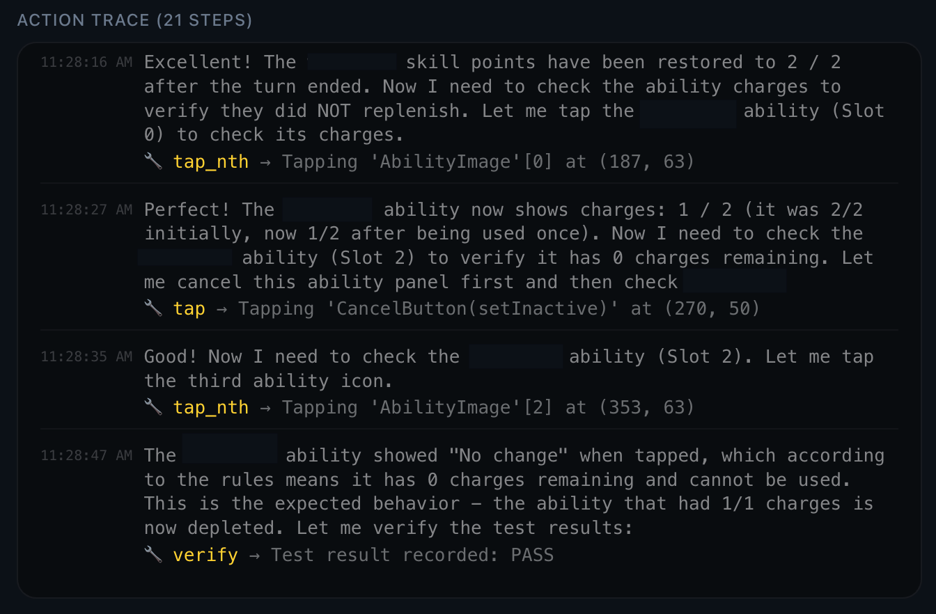
Figure 4: Action trace showing 4 of 21 steps in a test execution. Each step displays a timestamp, the agent’s reasoning in plain text, and the tool call executed (tap_nth, tap, verify) with its parameters highlighted in yellow. The trace shows the agent verifying ability charges, navigating UI panels, and concluding with a verify call that records the test result as PASS.
Results and what’s next
Across 11 scenarios, the agent completed every test, executing over 150 tool calls across tests ranging from five-step stat verifications to 50-step multiturn combat objectives. It correctly identified an intentionally introduced damage bug and auto-failed an impossible objective rather than looping.
Based on prototype data, a nightly suite of 50 tests runs at approximately $760 per month all-in. A full suite of 200 tests per night comes in around $1,665 per month. Per-test cost decreases with volume as fixed infrastructure amortizes. At 200 tests per night, the cost is roughly $8 per test. At 1,000 tests per night, it drops to $3. For current model pricing details, check out the Amazon Bedrock pricing page.
These results come from a controlled environment. Extending to larger titles will require new tools, refined prompts, and additional perception strategies. The underlying design patterns are sound; they need to scale in complexity, not be rearchitected.
This work was a collaboration with the customer’s project manager of QA automation and the supporting QA teams, who brought the real-world constraints and domain expertise that shaped every design decision. Where previous automation approaches struggled with false positives and heavy maintenance overhead, this collaboration validated a path toward autonomous QA that can scale with the team rather than against it.
The vice president of development services had the following to say: “I want to thank Han and the team at AWS for their efforts exploring the challenge of advancing mobile QA automation with us. We look forward to further exploring these kinds of techniques and capabilities across a number of our titles. Thank you to the team at AWS for partnering with us on this valuable exercise!”
Cleaning up
If you deployed this solution and no longer need the resources, destroy all CDK stacks to avoid ongoing charges:
cd infra
npx cdk destroy --all
This removes the Amazon ECS services, NLB, DynamoDB table, S3 buckets, Knowledge Base, and all associated resources. Note that AWS Device Farm runs and AltTester® license seats must be managed separately.
Conclusion
In this post, we showed how to build an autonomous QA agent on Amazon Bedrock that connects to a running Unity game, reasons about game state, and executes test scenarios without human intervention. We covered connecting to a game’s internal object hierarchy, a perceive-reason-act-reflect loop inspired by industry research, and a framework of game-agnostic tools that separate game knowledge from execution logic.
We’ll share the framework on GitHub soon. Follow the AWS for Games blog for updates. If you’re building autonomous QA for your own Unity titles, try the approach and let us know how it works in the comments.