AWS for Games Blog
Game development infrastructure simplified with AWS Game Dev Toolkit
Note: AnyCompany Games is a fictional company created to illustrate common challenges and solutions in game development.
If you’re building games with a distributed team, you’ve likely faced the challenge of setting up version control, build systems, and cloud infrastructure. This post shows you how the AWS Cloud Game Development Toolkit can deploy a complete game development pipeline in hours instead of weeks, using the story of AnyCompany Games as an example.
Like many indie game studios, AnyCompany Games began with a small remote team harboring big ambitions. Five industry veterans came together with a shared vision of creating immersive role-playing game (RPG) experiences. However, they soon faced a common challenge in game development—their ambitious project demanded robust infrastructure.
The team at AnyCompany Games had the talent and vision to build something special. The biggest issue standing in their way was the lack of infrastructure. The hardware they had on hand was leading to long build times that often failed, artists were waiting an hour or more for shaders to load, and sharing large assets and versioning were slowing down development.
Their development needs were substantial: servers for version control, such as Perforce P4; continuous integration and continuous delivery (CI/CD) tools, such as Unreal Engine Horde; and the underlying network infrastructure to support it all. This scenario is familiar throughout the gaming industry, where complex games with large assets require scalable infrastructure that most studios struggle to maintain at scale on premises.
As the team explored cloud solutions, Amazon Web Services (AWS) proved to be a promising option. AWS could address their hardware requirements at scale, allowing for provisioning and reduction of resources as needed. However, one challenge remained: configuring AWS resources to work efficiently with their game development tools.
This is where the Cloud Game Development Toolkit comes in—a purpose-built collection of Terraform modules and Packer templates stored within a publicly available open source repository, developed by AWS for Games. This post will explore how this toolkit helps AnyCompany Games and similar studios seamlessly integrate their development tools with AWS infrastructure.
Prerequisites for building cloud infrastructure
Like many developers new to cloud computing, AnyCompany Games began by creating an AWS account. When this was done, the team researched what cloud infrastructure would best support their game development needs.
That’s when they discovered the Cloud Game Development Toolkit. The repository provided configurable Terraform and Packer templates that streamline the deployment of essential gaming infrastructure components on AWS.
Creating the network foundation
The first step in establishing their cloud presence was creating a network architecture. The resources would need to be highly available across multiple Availability Zones.
To deploy Amazon Virtual Private Cloud (Amazon VPC) resources for hosting their network infrastructure, they used resources and data sources from the AWS provider for Terraform. Using these providers, they deployed public and private subnets across multiple Availability Zones, created an internet gateway for internet access from the virtual private cloud (VPC), and an Amazon VPC NAT gateway for initiating outbound internet traffic from private AWS resources. Route tables managed traffic flow between these subnets, providing proper network segmentation.
To provide reliable access to their development tools and services, AnyCompany Games required domain name management. They configured an Amazon Route 53 hosted zone for their domain, enabling:
- Centralized domain management
- Automated DNS record updates
- Integration with other AWS services
- SSL certificate management through AWS Certificate Manager
This foundation of networking and DNS infrastructure provided AnyCompany Games with the secure, scalable base needed to support their game development tools and services. They used the infrastructure as code (IaC) approach to version control their infrastructure configurations and deploy them consistently across different environments.
After deploying their infrastructure as code, AnyCompany Games had their network infrastructure ready to use with Perforce.
The following architecture diagram represents the foundations that will host the Perforce and Horde resources, which will be placed within this architecture throughout the post.
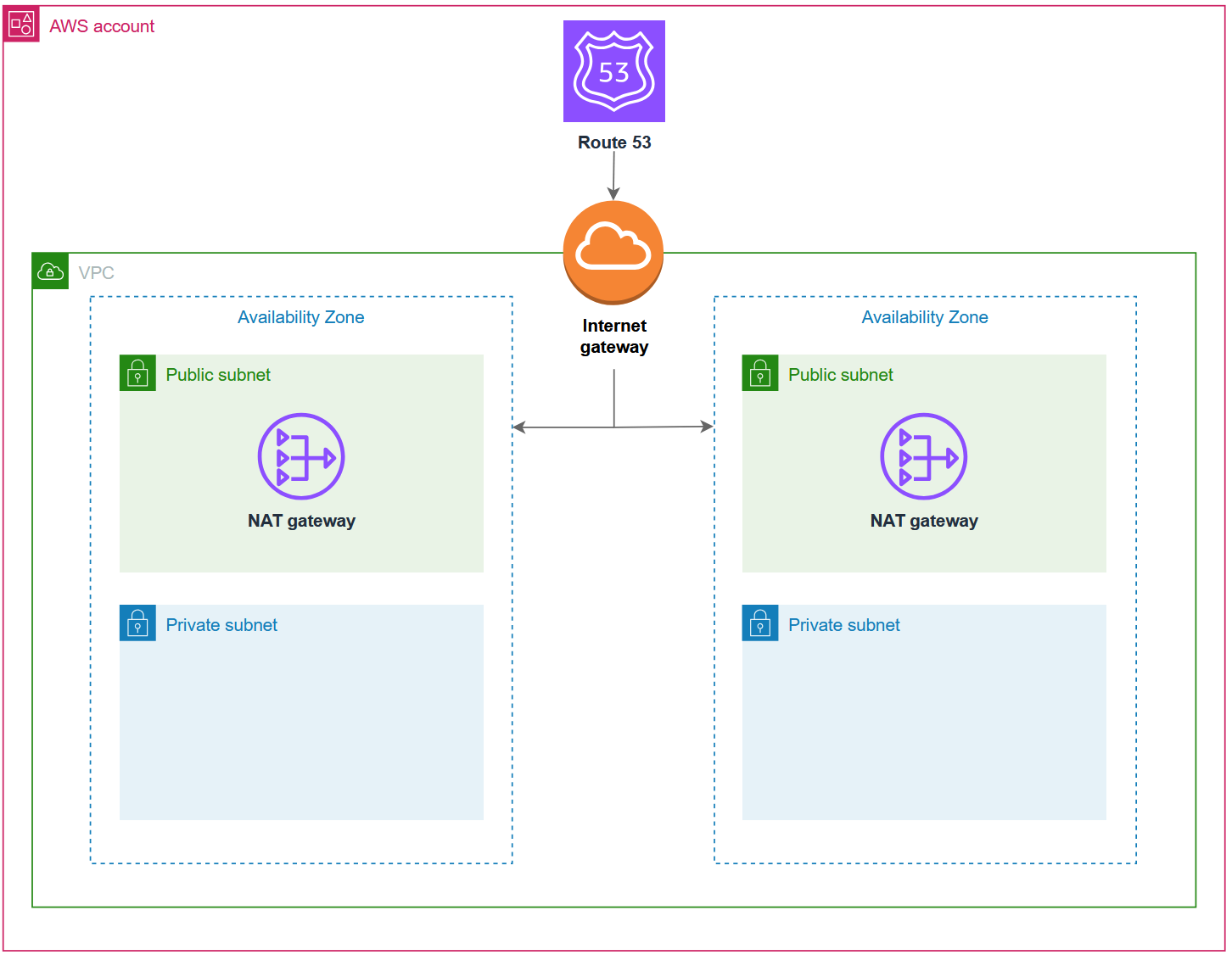
Figure 1: Network architecture.
Use Perforce P4 server for version control in the cloud
The key component in game development is version control, and AnyCompany Games needed a robust solution that could handle large binary assets, complex branching strategies, and a distributed workforce. Perforce P4 server would be the straightforward answer; however, configuring it would take away from valuable development time.
Using an example from the toolkit’s Perforce module, they deployed their entire version control system with a few lines of code. With a quick terraform apply command, they had a running Perforce server, code review system, and authentication service up and running in the cloud.
The Perforce module deployed three integrated components. The P4 server ran on Amazon Elastic Compute Cloud (Amazon EC2) instances with Amazon Elastic Block Store (Amazon EBS) volumes optimized for version control performance. Next, both P4 Code Review and P4 Authentication Service ran as Amazon Elastic Container Service (Amazon ECS) tasks on a shared cluster, providing secure authentication and collaboration capabilities.
Setup took hours instead of weeks, and the module even provided connection strings and configuration details for their team to connect their P4 One clients.
The toolkit automates the setup of Perforce authentication, handles the installation of the Helix Authentication Extension, deploys the P4 Authentication Service, and configures the authentication service for secure access.
After deploying Perforce, the AnyCompany Games distributed team could finally collaborate effectively. Artists in Seattle could check in large files, whereas programmers in Florida could simultaneously work on engine modifications.
The following architecture diagram shows Perforce deployment on AWS, including P4 Server, P4 Code Review, and P4 Auth services.
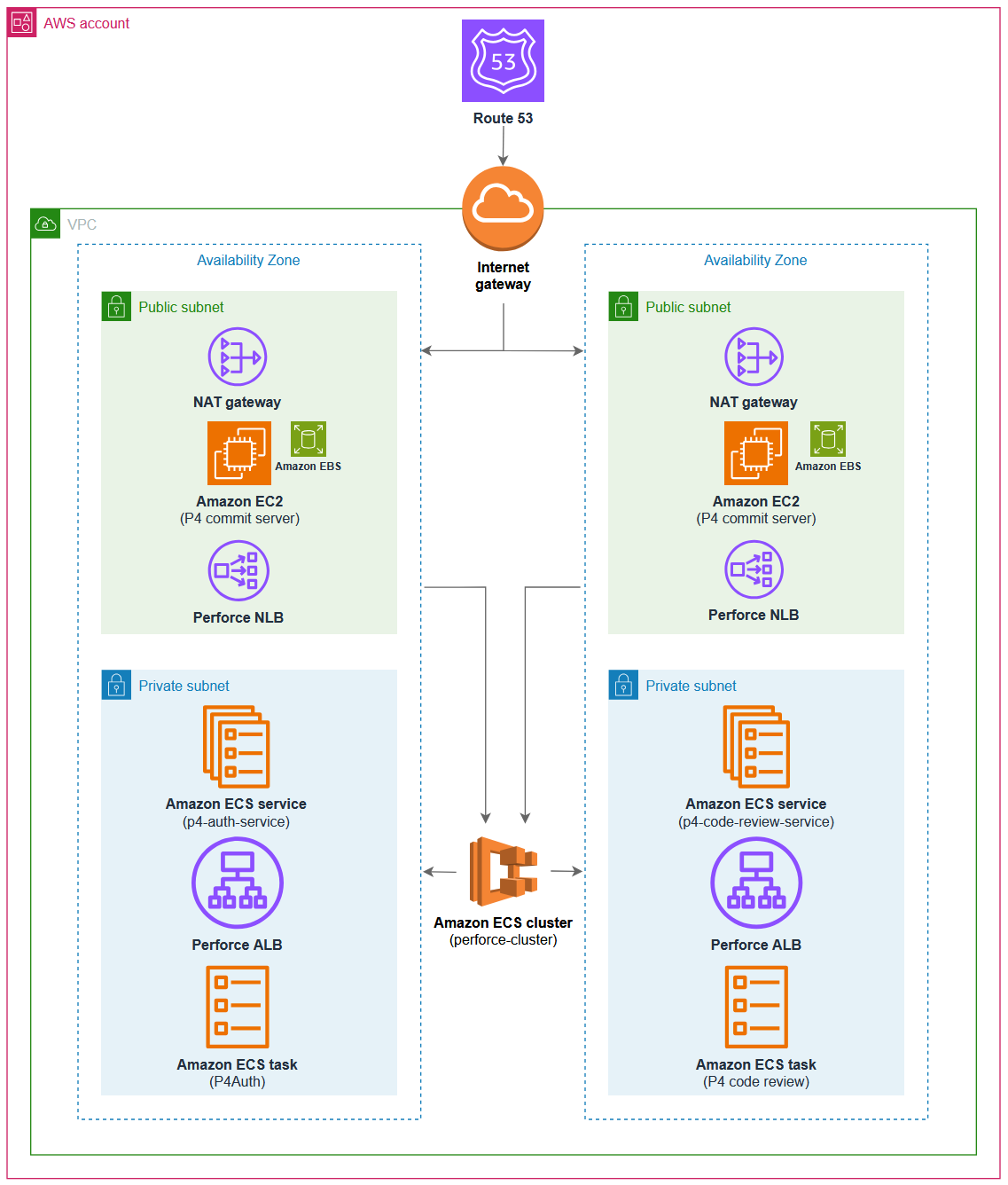
Figure 2: Architecture diagram.
Accelerate build pipelines with Horde
The next challenge was setting up a CI/CD pipeline for their Unreal Engine project. The team had two options for replacing their current hardware: they could either purchase the latest hardware at a high price and estimate the required capacity, or they could take advantage of the AWS Cloud pay-as-you-go pricing model and provision and deprovision servers as needed.
Looking back at the Cloud Game Development Toolkit they’d used for version control, the team discovered it also included specialized CI/CD tools ready for deployment. Because they were using Unreal Engine, they decided to deploy the toolkit’s Horde module.
What is Horde?
Unreal Engine Horde is a purpose-built CI/CD system developed by Epic Games for build and test automation. It’s designed by Epic Games to integrate with Unreal Engine and is used to develop major titles such as Fortnite. Unreal Engine Horde inherently understands the Unreal Engine build graph system (Unreal BuildGraph), which defines how projects are built and compiled. This allows for better integration with Unreal build processes compared to generic CI/CD tools.
Horde helps enhance CI/CD pipelines by providing distributed build capabilities optimized explicitly for game development, like managing resource-intensive tasks such as asset compilation and shader processing. These features, along with the remote execution capabilities of Unreal Build Accelerator, help enable faster build times, which improved team productivity. For more information on Horde’s features, refer to the official Unreal Engine Documentation.
Using an example from the toolkit, AnyCompany Games was able to quickly add Horde to their AWS environment.
The Horde module automatically deployed an Amazon DocumentDB (with MongoDB compatibility) cluster and an Amazon ElastiCache cluster for the Horde server, provided environment variables for setting server-level configurations, and supported agent deployments using auto scaling groups.
At a high level, it also achieved the team’s requirements for CI/CD:
- Horde Controller – The central service that manages build jobs and agents
- Build agents – Auto scaling EC2 instances that perform the actual build work
- Perforce integration – Seamless connection to their version control system
- Web interface – A user-friendly dashboard for monitoring builds
- Authentication – Secure access control integrated with their existing systems
Deploying Horde fulfilled two requirements: first, the team could use Unreal Build Accelerator, which helped enhance build velocity by distributing compilation to Windows targets on Linux machines using Wine. Second, Horde capabilities gave them the tools to configure builds for different environments including their game client, multiplayer servers, and editors.
The following expanded architecture diagram shows both Perforce and Horde running on Amazon ECS with supporting AWS services.
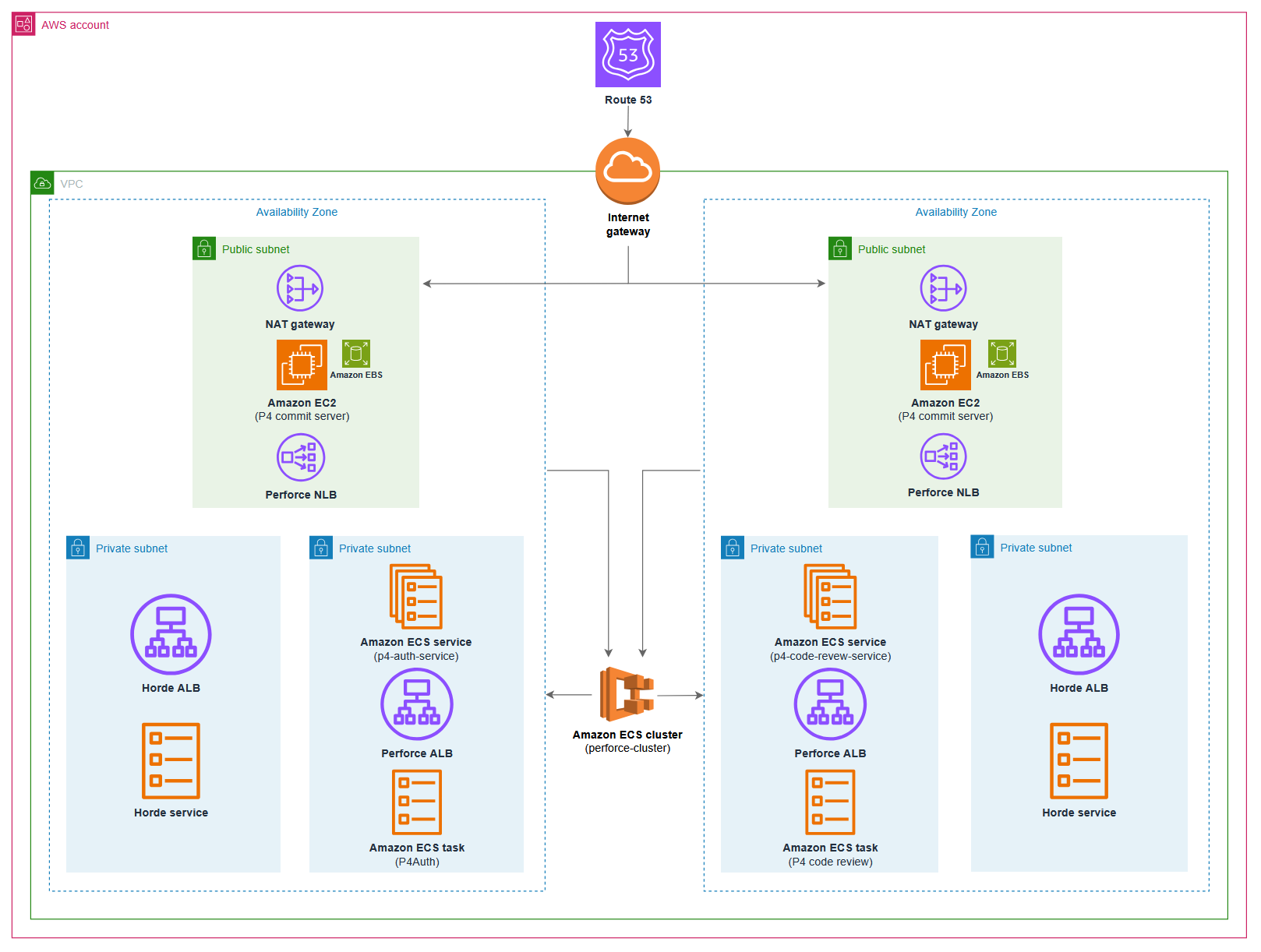
Figure 3: Expanded architecture diagram.
The impact of the toolkit
For AnyCompany Games, the Cloud Game Development Toolkit didn’t only solve technical challenges, it helped transform their entire development process. After setting up their pipeline, the team could focus on actual game development. The Cloud Game Development Toolkit simplified infrastructure creation and automatically configured AWS resources to match the game’s development needs.
For AnyCompany Games, the Cloud Game Development Toolkit provided several key advantages:
- Game-specific optimizations – The toolkit deployed the applications needed for Unreal Engine, large binary assets, and distributed teams—all with best practices in place.
- IaC – The ability to define IaC meant the team could track changes, test configurations, and replicate environments with confidence.
- AWS best practices built in – With AWS best practices built in, the team could prioritize game development, and the toolkit enabled more secure, scalable, repeatable infrastructure.
- Scalability – As AnyCompany Games continues to grow, their infrastructure can grow with them. Scaling from five build agents to 50 is a straightforward configuration change. To achieve the same result on premises would involve months of provisioning and deprovisioning server racks.
As a startup, controlling costs was critical for AnyCompany Games. The toolkit’s implementation of AWS best practices helped them optimize expenses:
- Auto scaling – Resources scale down during off-hours
- Spot instances – Build agents use EC2 Spot Instances, reducing compute costs by up to 90%
- Rightsizing – Infrastructure components match actual needs
- Pay-as-you-go – No significant upfront hardware investments
- Repo forking – Enable the repository to grow and change with the studio
Focus on creating, not infrastructure
By using the Cloud Game Development Toolkit on AWS, the fictional AnyCompany Games could focus on what they do best—creating innovative games—rather than becoming infrastructure experts.
To get started with the Cloud Game Development Toolkit, first identify your infrastructure pain points—whether that’s version control, build automation, or both. Deploy the networking foundation using the Amazon VPC and Route 53 modules, then add version control with the Perforce module. When your team can collaborate on assets, implement the Horde module for build automation. Throughout the process, adapt the Terraform modules to match your studio’s specific requirements.
By using the extensive documentation and support resources of AWS, game studios of different sizes can confidently begin their cloud journey. The Cloud Game Development Toolkit simplifies this transition by providing preconfigured templates that align with industry best practices and common game development workflows. Contact an AWS representative to know how we can help your game studio get started on the cloud.
Further reading
Ready to accelerate your game studio’s journey to the cloud? Check out these resources:
- Building Games with Unreal Engine and Horde on AWS
- Deploying Perforce with AWS Cloud Game Development Toolkit
- AWS for Games
—
The Cloud Game Development Toolkit is an open source project. AnyCompany Games is a fictional studio created to illustrate common challenges and solutions in game development. AWS and the AWS logo are trademarks of Amazon.com, Inc. or its affiliates in the United States and/or other countries.