Artificial Intelligence
Build multi-tenant agentic chat applications on enterprise data with Amazon Bedrock Managed Knowledge Base
Multi-tenant agentic chat assistants have become a frequent request for large-scale customers, and document chat sits at the top of the list. A user uploads a contract, a report, or a product manual, and then researches or asks questions about it immediately or in the future. The conversational interface is straightforward to build, but the multi-tenant agentic retrieval system behind it is not.
Each tenant’s documents must stay isolated from every other tenant’s, and that boundary must be enforced from a verified identity rather than a value sent by the client. Agentic retrieval compounds the problem. The agent decomposes a question into sub-queries and runs multiple retrievals, and every one of those hops must carry the tenant filter or isolation breaks. You also still need a vector and full-text search engine, an ingestion pipeline that parses and embeds multiple modalities, and a synchronized index. For a team that set out to ship this feature, that is a substantial amount of infrastructure to build, secure, and operate.
With Amazon Bedrock Managed Knowledge Base, you can alleviate that undifferentiated work. The service manages ingestion, storage, embedding, and ranking, so there is no infrastructure to provision or capacity to monitor. Beyond infrastructure, it provides built-in agentic retrieval that uses iterative planning and multi-hop retrievals to answer complex questions, and it honors access permissions on every hop. With direct ingestion through the custom connector, your application sends a document straight to the knowledge base, and it becomes retrievable within seconds.
In this post, we present the architecture of a multi-tenant agentic document chat application built on Amazon Bedrock Knowledge Bases. The solution has two data flows: document ingestion and conversational retrieval. We describe both, along with the asynchronous indexing lifecycle, per-user data isolation, and best practices for operating the solution at scale. We also provide an accompanying repository so you can deploy the code in your own account.
Solution overview
This solution addresses the challenges outlined in the introduction. It delivers a multi-tenant document chat experience in which each user can upload their own documents and immediately ask grounded questions against them, without the team having to build the retrieval stack or the isolation logic that keeps one user’s content separate from another’s.
When a user asks a question, the application calls the agentic retrieval API on Amazon Bedrock Knowledge Bases. The API runs an agentic workflow that decides how to respond to the question. For a simple lookup, it issues a single retrieval. For a complex or multi-part question, it decomposes the question into sub-queries and runs several retrievals before producing a response (multi-hop retrieval).
In both cases the response is grounded in the retrieved passages and includes citations. What makes this architecture straightforward to operate is that the knowledge base owns the components that do the retrieval and generation: the planning step that decides what to look up, the vector index, the ranker, and the model that produces the final response. Your application is responsible only for the parts that are specific to your product, such as the upload experience, the chat UI, authentication, per-user isolation, and any custom business logic.
The solution consists of the following key components:
- Amazon Bedrock Managed Knowledge Base: Crawls, parses, stores, and retrieves multimodal content. It provisions and manages retrieval infrastructure for text, vectors, metadata, and structured content such as CSV and Excel files, including managed parsing, embedding, and indexing. A custom connector data source ingests user uploads directly.
- Amazon API Gateway and AWS Lambda: Expose the upload, status, and chat endpoints and run the application logic.
- Amazon Cognito: Authenticates users and provides the verified identity that the application uses to isolate each user’s documents.
- Amazon Simple Queue Service (Amazon SQS): Decouples uploads from ingestion, absorbs upload bursts, and routes messages that repeatedly fail to a dead-letter queue. This keeps the upload endpoint responsive regardless of ingestion backpressure.
- Amazon DynamoDB: Tracks the indexing status of each document so the application can show users when a document is ready.
- Amazon Simple Storage Service (Amazon S3): Stages files that are larger than the inline limit and hosts the single-page application behind Amazon CloudFront.
The following diagram illustrates the architecture of the solution.
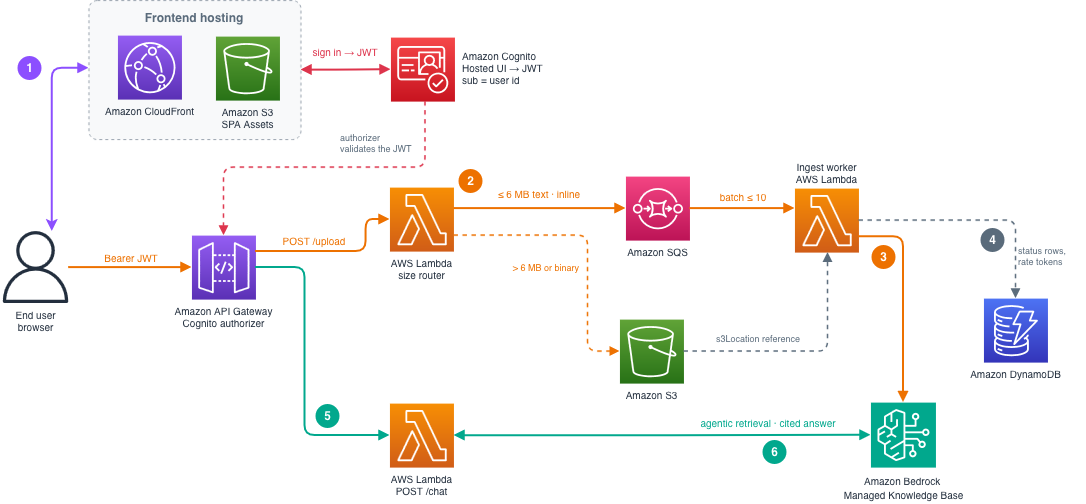
Figure 1: Architecture of the multi-tenant document chat solution
The workflow consists of the following steps, numbered to match the diagram:
- A user signs in through Amazon Cognito and uploads a document to the application. Every request carries the user’s JSON Web Token (JWT), which Amazon API Gateway validates. The application derives the user’s identity on the server rather than trusting a value sent by the client.
- The application extracts the user’s identity from the validated JWT and includes it in the SQS message along with the document (or its S3 reference). It immediately returns a response to the user, so the browser is not blocked while ingestion runs in the background. Files up to 6 MB are sent inline in the API request. Larger files are first uploaded to Amazon S3, and the SQS message carries the S3 URI so Amazon Bedrock can read the file directly from S3.
- A worker Lambda function reads the message from the queue and tags the document with a
user_idmetadata attribute set to the caller’s Amazon Cognitosub. The authenticated upload handler placed that value on the message. The worker then calls the IngestKnowledgeBaseDocuments API, and Amazon Bedrock chunks, embeds, and indexes the document asynchronously. - The worker records each document’s status in Amazon DynamoDB. The browser polls a status endpoint that reads from DynamoDB and updates the UI. The user sees each document move from received to processing to ready without refreshing the page.
- To ask a question, the user sends it to the application.
- To respond to the question, the application calls the AgenticRetrieveStream API with an explicit equals filter on
user_id. The application builds the filter value on the server from the verified JWT, not from the request body, so a user can retrieve only their own documents. The knowledge base returns the matching passages, a foundation model generates a cited response, and the application streams it back to the user.
Solution walkthrough
The following sections trace a request through the solution: we look more closely at the ingestion path, the indexing lifecycle, per-user isolation, and retrieval.
Direct ingestion of user uploads
Since users upload documents while the application is running, the application ingests them directly through a custom connector data source rather than the S3 connector. The S3 connector is designed for bulk ingestion of documents that you refresh with a scheduled sync, and that sync can overwrite or remove a document a user just added. Direct ingestion through the IngestKnowledgeBaseDocuments API has no sync, so a document persists until you delete it. You also assign your own document IDs, which keeps per-user management and updates straightforward. The knowledge base keeps a copy of each original file that you can retrieve with the GetDocumentContent API. As a result, you don’t operate a separate document store, and users can open the source behind a response.
The application chooses one of two ingestion paths based on file size. Files up to the 6 MB inline limit are sent as bytes in the API call itself, which covers most text documents, contracts, and reports. Larger files, up to 50 MB for text, are staged to Amazon S3 and ingested by reference through their S3 URI. A size router applies this rule on the server, so the path is transparent to the user and both paths converge on the same knowledge base.
Two API behaviors are worth designing around. First, because you set the document ID, re-ingesting a document under the same ID updates it in place instead of creating a duplicate, which is the behavior you want when a user replaces a file. Your application owns the mapping between a user’s file and its document ID. In the reference implementation, the same DynamoDB table that tracks indexing status also stores the (user_id, filename) → document_id mapping, so when a user re-uploads a file the application looks up the existing ID and reuses it. (There is no partial update. An edit is a full re-ingestion.) Second, a single IngestKnowledgeBaseDocuments call accepts up to 10 documents, so a worker can pack multiple ingestion jobs into a single request. We cover how to use this in the best practices section.
The document indexing lifecycle
The IngestKnowledgeBaseDocuments API is asynchronous. It returns immediately with a STARTING status, but the document is not retrievable until Amazon Bedrock has parsed, embedded, and indexed it. Each document advances through five states, and only at INDEXED is it fully queryable, as shown in the following table.
| Status | Meaning | Queryable | |
| 1 | STARTING |
The request was accepted. Processing has not begun | No |
| 2 | PENDING |
Queued, waiting for a processing slot | No |
| 3 | IN_PROGRESS |
Parsing and embedding are running | No |
| 4 | TEXT_INDEXED |
Text chunks are indexed. Multimodal processing (for PDFs) is still running | Yes, for text |
| 5 | INDEXED |
Fully processed | Yes |
Indexing time depends on the document type. The following table shows values we observed in our own testing against an idle knowledge base with small documents (under 5 MB). Times will vary by document size, content complexity, Region, and load on the knowledge base, and they are not a service-level commitment. Treat the numbers as an order-of-magnitude reference for design, not as guaranteed latencies.
| Document type | Queryable for text | Fully INDEXED |
|
| 1 | Plain text | 2 to 3 seconds | 2 to 3 seconds |
| 2 | 5 to 30 seconds (TEXT_INDEXED) |
About 90 seconds |
Under load, documents also spend time in PENDING while they wait for a processing slot, so the time to reach INDEXED grows with the depth of the ingestion queue.
The application polls the GetKnowledgeBaseDocuments API and records each document’s status in DynamoDB, which it surfaces in the UI as received, processing, and ready. A document becomes searchable as soon as it reaches TEXT_INDEXED, so mark it ready at that point rather than waiting for INDEXED. The difference between the two states matters only for PDFs and other multimodal content. At TEXT_INDEXED, the text chunks are queryable and cover the majority of retrieval needs. At INDEXED, the multimodal elements (such as images and tables in PDFs) are also queryable. If you treat acceptance (STARTING) as searchable, queries against a document that is still being indexed return empty results.
Per-user data isolation with metadata filtering
In a multi-tenant application, one user’s documents must never appear in another user’s results. You can enforce that boundary in one of two ways: provision a separate knowledge base per tenant, or use one shared knowledge base and scope every query to the calling user. With the shared approach, you scope each query through a metadata filter or through document-level access control lists (ACLs) evaluated by the service. For applications with many end users, the shared knowledge base is the right choice, because it avoids per-account knowledge base quotas, the baseline cost of many small indexes, and the provisioning latency of creating a knowledge base at sign-up. Amazon Bedrock Knowledge Bases can query multiple knowledge bases in a single call. That capability is intended for combining different knowledge domains for one user, not for isolating tenants from one another. Per-tenant knowledge bases can still make sense when you have a small number of large tenants with strict separation requirements. For user-level multi-tenancy, a shared knowledge base scales better and requires less configuration.
As shown in the workflow, the worker tags every document with a user_id metadata attribute, and the application filters every query on the same attribute. The filter value is built on the server from the verified JWT. This server-side derivation is the security boundary. The knowledge base can also infer a filter from the wording of a question, but that inference is a relevance feature, not an access control. Isolation must come from an explicit filter that your application builds from the authenticated identity. As defense in depth, the reference implementation confirms the filter is scoped to the caller before each request and discards any returned chunk whose user_id does not match.
Unauthenticated requests return an HTTP 401 response, and authenticated requests with no resolvable sub return an HTTP 403 response. For regulated workloads that need the service itself to enforce access, the knowledge base also supports document-level access control lists evaluated against a userContext at query time. This moves enforcement out of your application code.
Retrieval and response generation
Retrieval is the more direct of the two flows. The AgenticRetrieveStream API performs a full chat turn in a single call. It breaks the question into sub-queries, retrieves with the per-user filter applied to each one, and streams a grounded, cited response when you enable generateResponse. It maps cleanly onto a chat interface and gives you a low time to first token without orchestrating retrieval and generation yourself. Managed Knowledge Base does not support the RetrieveAndGenerate API. When you need more control, such as a custom prompt for a tenant or a specific model, use the Retrieve API to fetch passages and call the Converse API yourself, passing the same per-user filter. To show the source behind a citation, the GetDocumentContent API returns the original document for preview or download.
Best practices
The following practices keep that flow reliable as usage grows.
Decouple uploads from ingestion with a queue. For low-volume workloads, you can call IngestKnowledgeBaseDocuments directly from the upload handler. For any application that expects concurrent uploads from multiple users, place an Amazon SQS queue between the upload endpoint and ingestion. The upload endpoint accepts the file, writes an ingestion job to the queue, and returns immediately, so the browser is not blocked on ingestion. A worker Lambda function reads from the queue and packs up to 10 documents into each IngestKnowledgeBaseDocuments call, which is the primary lever for ingestion throughput when uploads arrive together. For example, when 500 users each upload a document at roughly the same time, the worker turns 500 queued jobs into roughly 50 batched API calls. Messages that fail repeatedly are routed to a dead-letter queue for investigation. This design absorbs bursts, gives you one place to meter the ingestion call rate, and keeps the upload endpoint responsive regardless of downstream backpressure. For the current ingestion throughput limits, refer to the Amazon Bedrock quotas documentation.
Plan for the ingestion ceiling rather than the retrieval one. Ingestion and retrieval scale differently. The Retrieve API supports bursts of 25 queries per second (QPS), or 10 QPS sustained per knowledge base, well beyond a conversational workload, so it is rarely the constraint. Ingestion throughput (described earlier) is adequate for interactive uploads, but a bulk migration of an existing repository will saturate it. For those scenarios, use the S3 connector with a scheduled sync, which is designed for large-corpus one-time loads and avoids competing with real-time user uploads.
Treat the concurrency limit as a retryable condition. When you exceed the concurrency limit, Amazon Bedrock returns a ValidationException, not a ThrottlingException. A retry classifier that retries only throttling treats this as a fatal error and drops the document.
Monitor the signals that predict the ceiling. Track ingestion success rate, the time to reach INDEXED at the P50 and P99 percentiles, and retrieval latency. A rising time to INDEXED is the earliest indicator that the ingestion pipeline is approaching its throughput limit, well before requests start failing.
Persist conversation history yourself. The AgenticRetrieveStream API accepts prior turns in the messages parameter to support multi-turn context, but it does not persist them between calls. Store conversation history in your own data store, such as Amazon DynamoDB, and pass the relevant turns with each request. Keeping this in your application also means you can enforce per-user isolation on conversation history the same way you do on documents.
Cost
The cost of the solution depends on your model configuration. With managed models, the Managed Knowledge Base is billed only on storage and retrieval (per call, not per token), and ingestion carries no additional charge. If you select an Amazon Bedrock model, you pay for embedding tokens at ingestion and the orchestration and generation tokens when using agentic retrieval. For current rates, see the Amazon Bedrock pricing page.
The supporting services (AWS Lambda, Amazon API Gateway, Amazon SQS, Amazon DynamoDB, and Amazon S3) are a small fraction of the total at moderate scale.
Conclusion
In this post, we walked through the architecture of a multi-tenant agentic document chat application built on Amazon Bedrock Knowledge Bases. The service takes care of the enterprise multimodal agentic retrieval infrastructure, so your team can focus on what is specific to your product. Your team owns the upload and chat experience, authentication, and the per-user isolation that scopes every retrieval to the authenticated user, including every hop of the agent’s plan.
To get started, deploy the accompanying sample from the GitHub repository in your own account and use it as the base for your own document chat application.
To go deeper into Amazon Bedrock Managed Knowledge Base, refer to the following blog posts:
- Build enterprise search for agents with Amazon Bedrock Managed Knowledge Base.
- Agentic retrieval for Amazon Bedrock Managed Knowledge Base.