Artificial Intelligence
How Boomi Scribe streamlines documentation using AWS
Boomi Scribe alleviates documentation, one of the most persistent sources of technical debt for enterprise development teams. Enterprise developers often struggle to create and maintain documentation, especially when workflows (automated business processes) involve integrations with multiple enterprise applications and data sources. Boomi recognized this challenge and built Boomi Scribe, an AI-powered agent running on AWS that automates and streamlines the entire documentation process. Boomi Scribe automatically generates detailed documentation for the entire integration process, as developers work.
Boomi Scribe generates accurate, detailed, and user-friendly documentation using a multi-step approach, powered by AWS artificial intelligence and machine learning (AI/ML) services including Amazon Bedrock and Claude models. Boomi Scribe goes beyond automatic documentation. It provides concrete insights and version comparisons developers can use in planning and broader communication. Complete documentation also helps prevent gaps in auditing for business and compliance needs.
In this post, you will learn how Boomi Scribe automates integration process documentation, compares component versions to surface meaningful changes, and enhances developer productivity. It’s all backed by a scalable architecture built for the cloud on AWS.
Documenting workflows
Boomi integration processes can be represented as Directed Acyclic Graphs (DAGs), with each node corresponding to a specific step in a workflow. These workflows govern how data is retrieved, manipulated, routed, and delivered between source and destination systems. Without accurate documentation, these workflows can be unreadable to anyone who didn’t build them. This creates a significant problem for debugging, handoffs, and compliance.
Manual documentation pitfalls
Documenting these workflows was a manual, time-consuming task that led to inconsistencies and inefficiencies. But the key logical and technical details of each step must be captured for maintainability and stakeholder confidence. Version management and comparing changes between process versions was also tedious and error prone. Missed updates, incomplete feature descriptions, or inaccuracies caused misunderstandings that could result in rework and lost time. To scale to efficiently handle large volumes of processes and maintain accuracy, automation was needed.
Boomi Scribe’s solution
Boomi Scribe automates the entire documentation process. Boomi stores integration processes as XML files that contain metadata about the process, including how each step is connected and other related information. The Boomi Scribe agent starts by parsing these complex XML representations of integration processes to extract relevant features. These features are then transformed into a Directed Acyclic Graph (DAG) dot notation format, which serves as a structured and consumable input for the model. The agent then generates documentation by passing this input to AI models, powered by Amazon Bedrock and Anthropic’s Claude Haiku 4.5. Finally, the agent compares versions of DAGs to highlight component differences and changes.
By parsing and extracting data for each integration step and its features and organizing it into a DAG on each revision, accurate and complete data is passed to the model to create or update existing documentation. Developers no longer need to manually create or analyze documentation for each step of the process to accurately reflect their additions and changes.
Solution overview and architecture
The architecture for Boomi Scribe must be reliable, and it has to scale for use by developers across more than 33,000 Boomi customers. Boomi uses machine learning (ML) services in Amazon SageMaker AI to build and maintain models for classifying user intents. Boomi uses foundational large language models (LLMs), including Claude Haiku 4.5, in Amazon Bedrock to generate natural language documentation. Haiku is a few-shot learning model that Boomi uses to process DAGs and generate detailed descriptions. Boomi stores DAG files, generated documentation, and metadata in Amazon Simple Storage Service (Amazon S3). Amazon DynamoDB serves as an internal backend datastore to power system features and maintain service operations. Lastly, Boomi uses AWS Lambda to orchestrate the entire pipeline, from DAG parsing to documentation generation and comparison.
Context file format
Generated documentation and metadata are available for contextual reference in the Boomi Integration Canvas and in Boomi GPT.
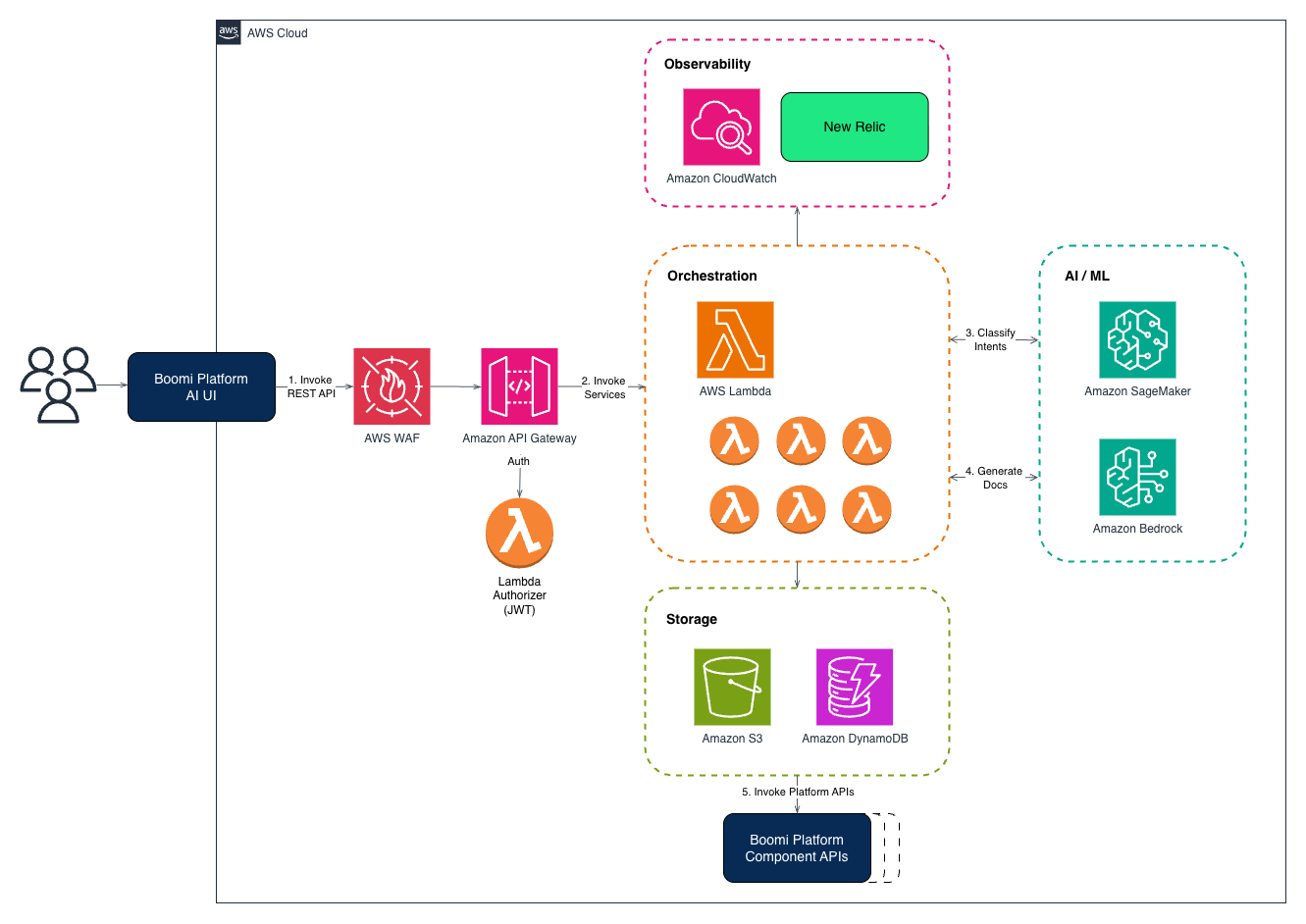
Figure 1: Boomi Scribe architecture on AWS
Boomi Scribe’s workflow
The agent parses the DAGs to capture the details of the integration process. Then it generates comprehensive documentation including highlighting changes and insights from comparison with the previous version. And finally, it stores the results in Amazon S3.
DAG parsing
The integration process DAG is uploaded to Amazon S3 and an AWS Lambda function triggers the parsing of nodes and edges to represent integration steps. The following example DAG illustrates the relevant features that get extracted from the more complex XML representations of integration processes and the dot notation format. These features and format align to the input features that AI models need to understand the workflow and the integration details to generate the documentation.
Documentation generation
The agent passes the parsed DAG to Claude Haiku 4.5 through Amazon Bedrock, where the model generates a summary consisting of high-level overviews of the workflow for stakeholders along with a process diagram. This is followed by a section for process metadata, including its name, version, dates, paths, and number of steps and components. The next section provides the business context for the process. Lastly, a process steps and functions section is generated with step-by-step descriptions for each step in the workflow, providing concise details about the process and context-sensitive descriptions tailored to Boomi’s integration processes.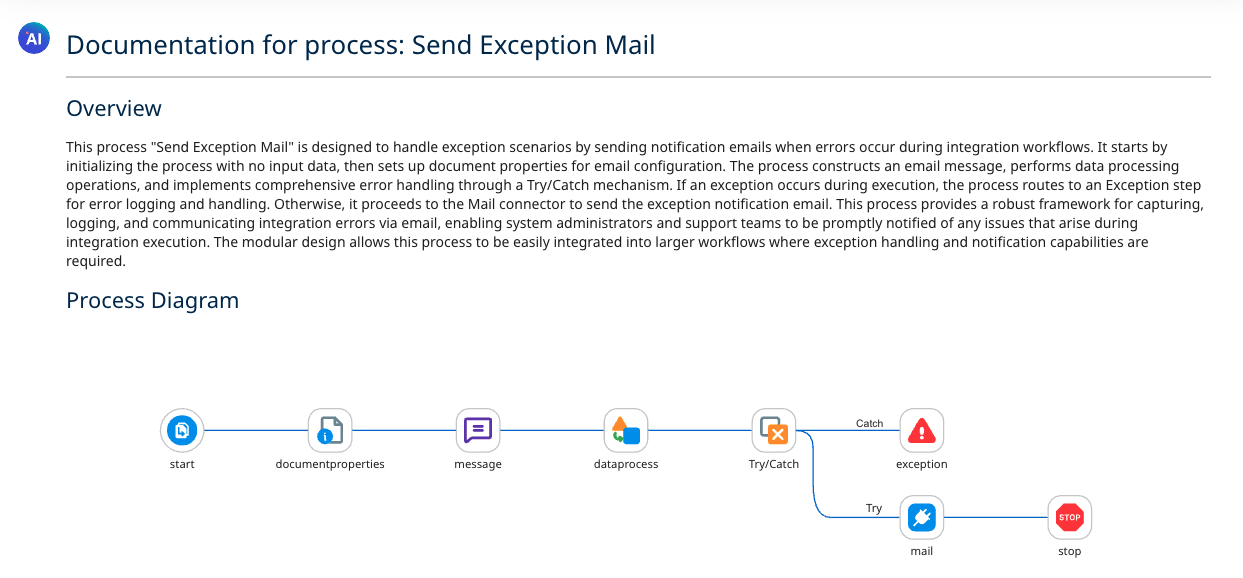
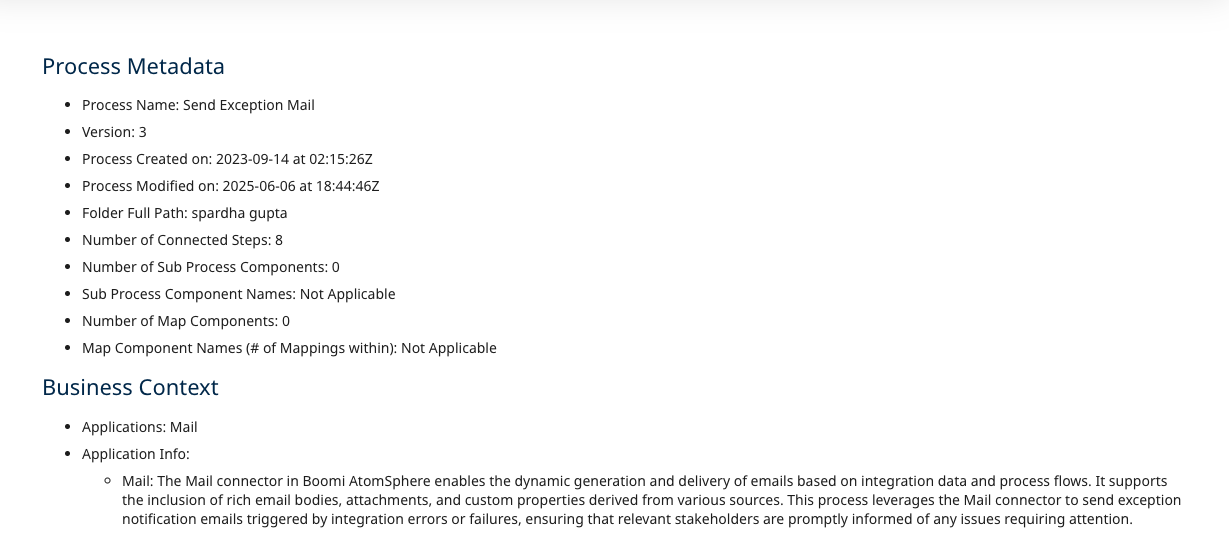
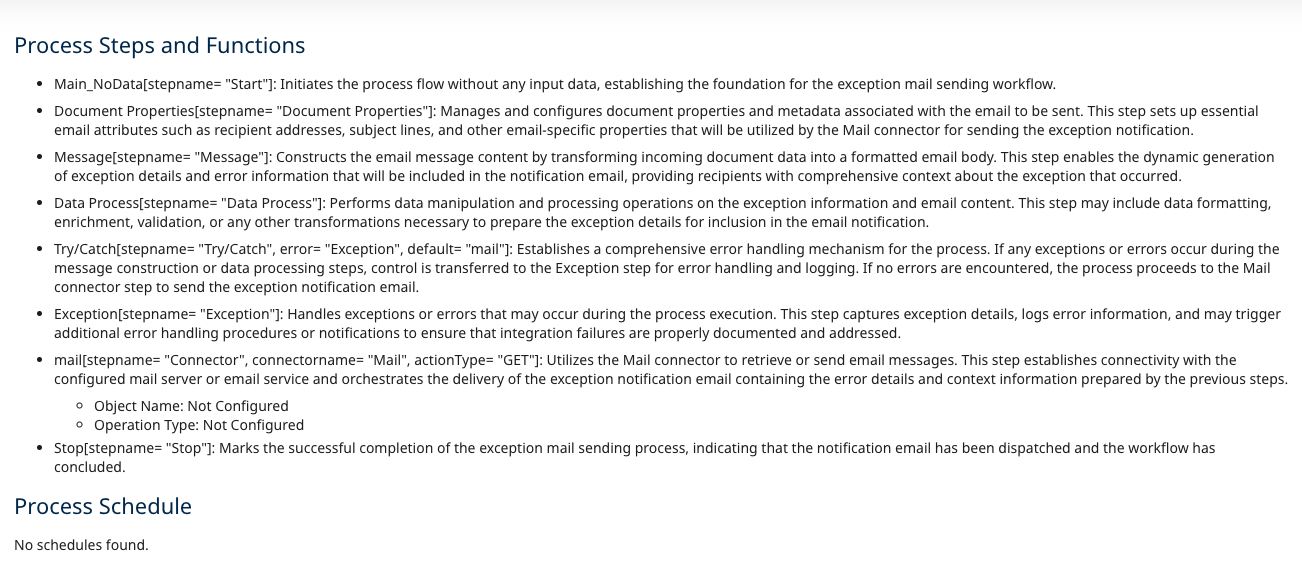
Figure 2: Boomi Scribe generated documentation showing the process overview, metadata, and step functions
Accessible text: Generated documentation output (overview, metadata, steps & functions)Documentation for process: Send Exception Mail Overview This process “Send Exception Mail” is designed to handle exception scenarios by sending notification email when errors occur during integration workflows. It starts by initializing the process with no input data, then sets up document properties for email configuration. The process constructs an email message, performs data processing operations, and implements comprehensive error handling through a Try/Catch mechanism. If an exception occurs during execution, the process routes to an Exception step for error logging and handling. Otherwise, it proceeds to the Mail connector to send the exception notification email. This process provides a robust framework for capturing, logging, and communicating integration errors via email, enabling system administrators and support teams to be promptly notified of any issues that arise during integration execution. The modular design allows this process to be easily integrated into larger workflows where exception handling and notification capabilities are required. Process Diagram start → documentproperties → message → dataprocess → Try/Catch Try/Catch branches: Catch → exception | Try → mail → stop Process Metadata • Process Name: Send Exception Mail • Version: 3 • Process Created on: 2023-09-14 at 02:15:26Z • Process Modified on: 2025-06-06 at 18:44:46Z • Folder Full Path: spardha gupta • Number of Connected Steps: 8 • Number of Sub Process Components: 0 • Sub Process Component Names: Not Applicable • Number of Map Components: 0 • Map Component Names (# of Mappings within): Not Applicable Business Context • Applications: Mail • Application Info: ○ Mail: The Mail connector in Boomi AtomSphere enables the dynamic generation and delivery of email based on integration data and process flows. It supports the inclusion of rich email bodies, attachments, and custom properties derived from various sources. This process leverages the Mail connector to send exception notification email triggered by integration errors or failures, ensuring that relevant stakeholders are promptly informed of any issues requiring attention. Process Steps and Functions • Main_NoData[stepname=“Start”]: Initiates the process flow without any input data, establishing the foundation for the exception mail sending workflow. • Document Properties[stepname=“Document Properties”]: Manages and configures document properties and metadata associated with the email to be sent. This step sets up essential email attributes such as recipient addresses, subject lines, and other email-specific properties that will be utilized by the Mail connector for sending the exception notification. • Message[stepname=“Message”]: Constructs the email message content by transforming incoming document data into a formatted email body. This step enables the dynamic generation of exception details and error information that will be included in the notification email, providing recipients with comprehensive context about the exception that occurred • Data Process[stepname=“Data Process”]: Performs data manipulation and processing operations on the exception information and email content. This step may include data formatting, enrichment, validation, or any other transformations necessary to prepare the exception details for inclusion in the email notification. • Try/Catch[stepname=“Try/Catch”, error=“Exception”, default=“mail”]: Establishes a comprehensive error handling mechanism for the process. If any exceptions or errors occur during the message construction or data processing steps, control is transferred to the Exception step for error handling and logging. If no errors are encountered, the process proceeds to the Mail connector step to send the exception notification email. • Exception[stepname=“Exception”]: Handles exceptions or errors that may occur during the process execution. This step captures exception details, logs error information, and may trigger additional error handling procedures or notifications to ensure that integration features are properly documented and addressed. • mail[stepname=“Connector”, connectorname=“Mail”, actionType=“GET”]: Utilizes the Mail connector to retrieve or send email messages. This step establishes connectivity with the configured mail server and orchestrates the delivery of the exception notification email containing the error details and context information prepared by the previous steps. Object Name: Not Configured. Operation Type: Not Configured. • Stop[stepname=“Stop”]: Marks the successful completion of the exception mail sending process, indicating that the notification email has been dispatched and the workflow has concluded. Process Schedule No schedules found. — End accessible text — |
Component comparison
The current and previous versions of DAGs are compared using a proprietary algorithm in the Lambda layer that details changes, including a summary that also provides specific observations developers can act on. This is followed by sections for additions, modifications, and deletions broken out and labeled for each step.
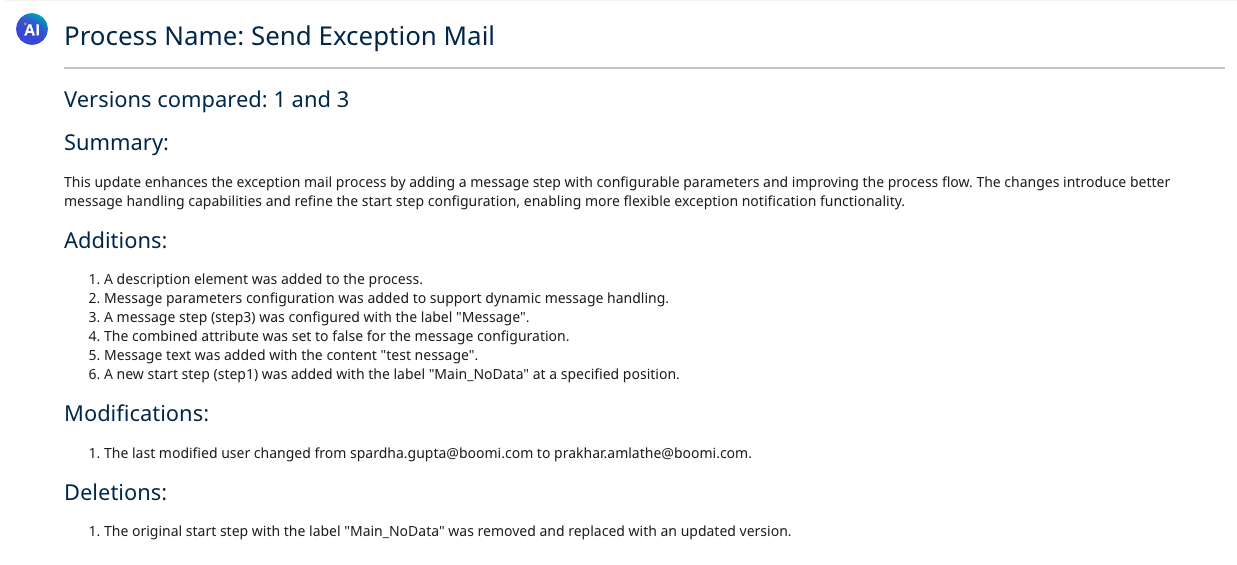
Figure 3: Boomi Scribe version comparison showing additions, modifications, and deletions between versions 1 and 3
Accessible text: Generated documentation output (overview, metadata, steps & functions)Process Name: Send Exception Mail Versions compared: 1 and 3 Summary: This update enhances the exception mail process by adding a message step with configurable parameters and improving the process flow. The changes introduce better message handling capabilities and refine the start step configuration, enabling more flexible exception notification functionality. Additions: 1. A description element was added to the process. 2. Message parameters configuration was added to support dynamic message handling. 3. A message step (step3) was configured with the label “Message”. 4. The combined attribute was set to false for the message configuration. 5. Message text was added with the content “test nessage”. 6. A new start step (step1) was added with the label “Main_NoData” at a specified position. Modifications: 1. The last modified user changed from spardha.gupta@boomi.com to prakhar.amlathe@boomi.com. Deletions: 1. The original start step with the label “Main_NoData” was removed and replaced with an updated version. — End accessible text — |
Storage and retrieval
The generated documentation can be viewed contextually within the tools, and the user can copy or download it in multiple formats, such as PDF and HTML.
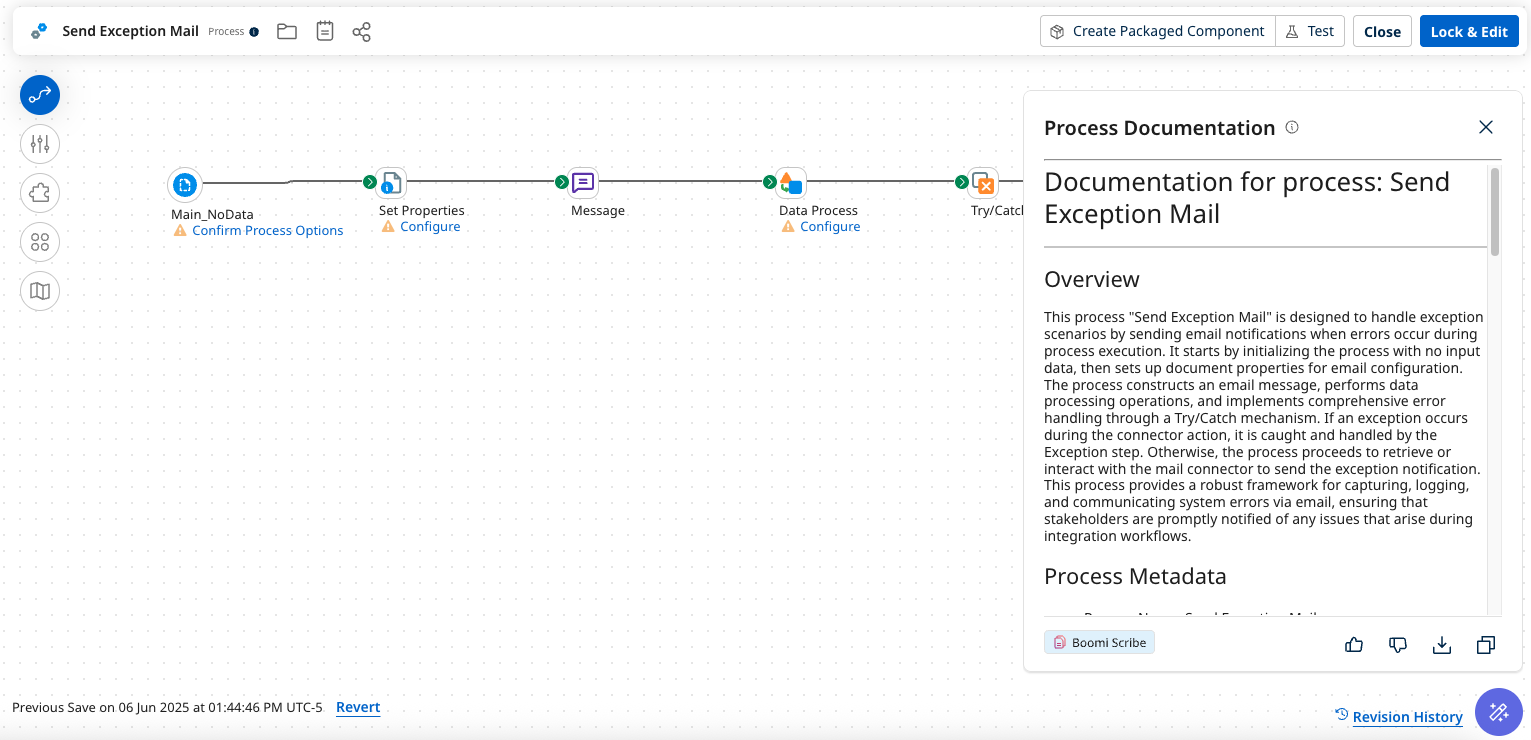
Figure 4: Boomi Scribe documentation panel in the Boomi Process Canvas with download and copy options
Accessible text: Storage & retrieval — documentation panel with download/copy optionsProcess Documentation Panel (Storage & Retrieval) The generated documentation is displayed in a panel within the Boomi Process Canvas. Users can interact with it using: • Thumbs up / thumbs down feedback buttons • Download button (PDF, HTML formats) • Copy to clipboard button The panel shows the “Boomi Scribe” branding badge and the documentation is available contextually while working on the process. — End accessible text — |
Benefits
Deployed processes average 42 recorded versions, with a median of 16. This is a strong signal that teams can generate multiple documentation versions. Versioning provides the flexibility to refer to prior versions when needed. Boomi Scribe makes sure documentation is consistent, accurate, and stays current across the full process lifecycle without manual effort (or manual errors), scaling to handle hundreds of processes per customer each day without performance bottlenecks. Multiple case studies have shown that Boomi Scribe has delivered significant time savings, reducing time spent on documentation by up to 85 percent.
Conclusion
Organizations want to reduce costs and improve productivity by alleviating unnecessary toil. Maintaining software documentation, especially for long, complex workflows, has been a long-standing, problematic burden and source of technical debt. Boomi Scribe uses AI/ML tools from AWS to automate documentation and version management for complex workflows in a proven, scalable, and reliable solution.
Next steps
To learn more about how Boomi can help streamline your integration processes, visit Boomi Integration & Automation and Boomi AI Agents. To learn more about building and managing your own AI agents for your own use cases, visit Amazon Bedrock Agents and Boomi Agentstudio.