Networking & Content Delivery
Private AI agent with WebSocket streaming over CloudFront VPC Origins and the next generation of OpenSearch Serverless for knowledge retrieval
Reviewing partner contracts by hand is slow and repetitive, so teams want an AI agent to do the first pass. In the example used throughout this post, a company called Example Corp reviews incoming partner agreements against its own standard operating procedures. A partner uploads an agreement, the agent checks it against those procedures, and the findings stream back on screen as the agent works through them. The streaming matters, because a full review takes a while to generate, and showing the text as it is written lets the reviewer start reading the first findings instead of waiting at a blank screen for the whole thing. Because those agreements contain sensitive commercial terms, the entire backend must stay private, with no public endpoints exposed to the Internet.
Example Corp is adopting Amazon OpenSearch Serverless as the serverless search and analytics service behind its AI applications. The company uses it for retrieval-augmented generation over internal knowledge, so its teams do not need to provision or tune search clusters. The contract-review agent is one of those applications and shares the same collection. The streaming connection between the browser and the agent also needs to remain private end to end, which means the architecture requires an entry point that can reach internal resources without exposing them publicly.
Amazon CloudFront sits at the entry point for three reasons. The first is distribution: CloudFront terminates connections at the edge location nearest to the user rather than routing all traffic to a single regional endpoint, which reduces latency for the streaming path and absorbs burst traffic before it reaches the origin. The second is resilience: CloudFront’s global edge infrastructure helps absorb and mitigate volumetric DDoS attempts before they reach the private backend, and a rate-based rule in the attached AWS WAF web ACL adds a further layer of protection. The third is inspection: when a WebSocket connection is established, the HTTP upgrade request passes through that AWS WAF web ACL, so the connection attempt can be evaluated against AWS managed rule groups and custom conditions before the persistent connection opens. All three apply whether the origin is public or private, and Amazon CloudFront VPC origins extends them to a backend that has no internet-routable address at all.
Two features released in May 2026 solve both requirements. Amazon CloudFront added WebSocket support for Amazon Virtual Private Cloud (Amazon VPC) origins, so a streaming connection can run from the browser, through the edge, to an internal Application Load Balancer (ALB) without exposing a public endpoint. AWS also introduced next generation of Amazon OpenSearch Serverless, which scales indexing and search independently and can scale to zero when a collection is idle, so the retrieval layer incurs no compute charges while no reviews are running.
In this post, we walk you through an architecture that combines those features with Amazon Bedrock AgentCore Runtime and the Strands Agents SDK. Everything behind Amazon CloudFront stays in private subnets of an Amazon VPC. We cover how the pieces fit, how the WebSocket reaches a private origin, how to encrypt the hop between CloudFront and the internal ALB, and how four user interactions travel end to end. An accompanying AWS CDK project deploys the whole thing, so you can follow along here and then run it yourself.
Solution overview
The request path is short, and Amazon CloudFront is the only Internet-facing component in it. A browser opens an HTTPS page and a secure WebSocket (WSS) connection to CloudFront, which forwards both through a VPC origin to an internal ALB in private, isolated subnets. The ALB sends traffic to an Amazon Elastic Container Service (Amazon ECS) service on AWS Fargate that runs a thin proxy. The proxy is not the agent. It serves the demo web page, terminates the browser WebSocket, enforces sign-in, and bridges each request to the agent runtime.
The agent runs in Amazon Bedrock AgentCore Runtime, a managed runtime that hosts the Strands agent in an isolated microVM. The proxy invokes it through an AWS PrivateLink interface endpoint for the bedrock-agentcore data plane, so even that call stays on the AWS network. AgentCore Runtime runs in VPC egress mode, so it places AWS-managed network interfaces in the same private subnets. Through those interfaces and the matching VPC endpoints, the agent reaches Amazon Bedrock for inference and Amazon OpenSearch Serverless for retrieval. Amazon Cognito handles login over its own interface endpoint, and an Amazon Simple Storage Service (Amazon S3) bucket holds uploaded documents over an S3 gateway endpoint. The following figure shows the full architecture.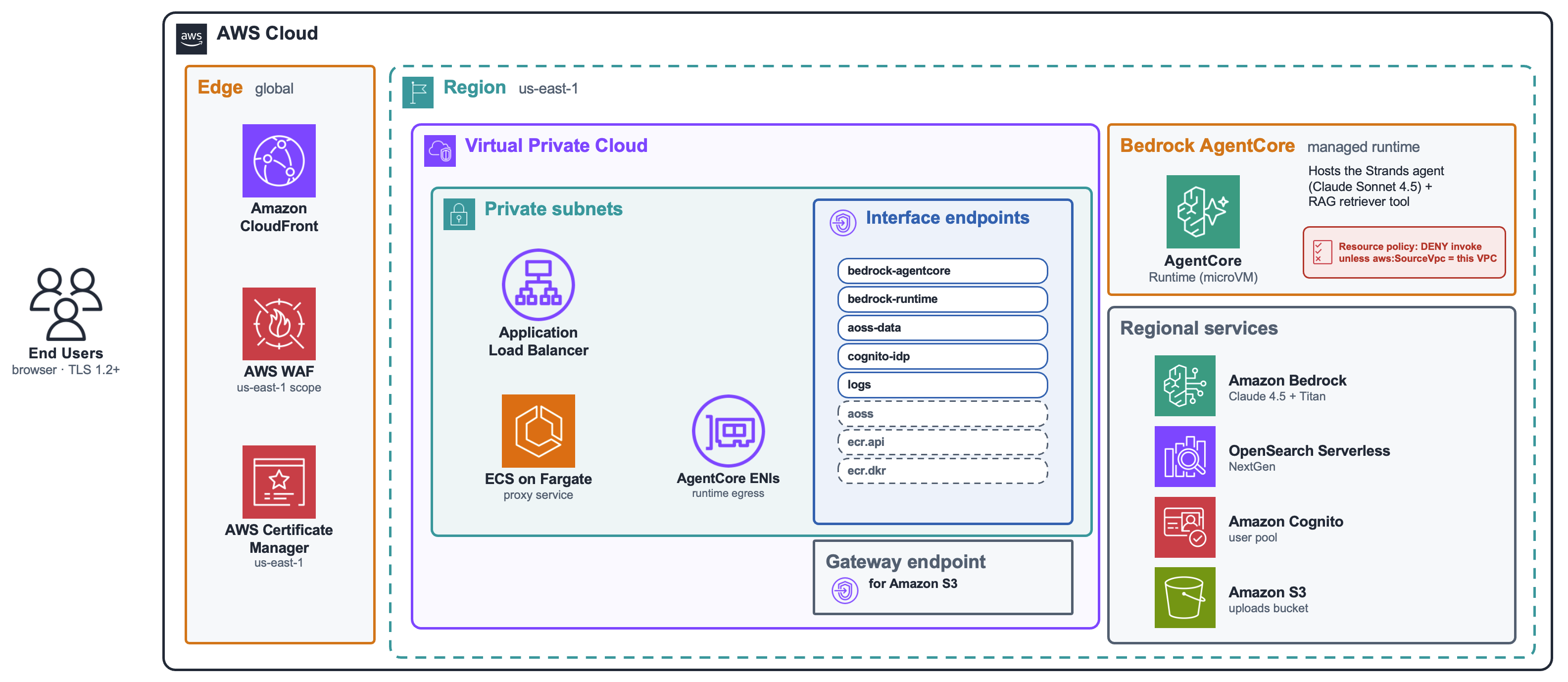
Figure 1. Private real-time AI agent architecture. Every component except the CloudFront distribution runs in private isolated subnets.
Two design choices enforce that privacy. The subnets are private with no NAT gateways, so there is no route from the VPC to the Internet. Every AWS API the solution calls, including the call to the agent runtime, goes through a VPC endpoint.
Keeping the ALB private is a deliberate choice. A common pattern is to leave the origin publicly reachable and restrict it to CloudFront’s published IP ranges, but those ranges change as AWS expands its network, so allowlists that are not actively maintained eventually block legitimate traffic or admit addresses that no longer belong to CloudFront. More fundamentally, a publicly reachable ALB still has a routable address that can be scanned and targeted directly, even if most connections are refused. A VPC origin removes that surface. The ALB has no internet-routable address, so there is nothing to discover, and the only component exposed to the Internet is the CloudFront distribution itself, which receives CloudFront’s inherent DDoS mitigation capabilities, WAF inspection at the edge, and rate limiting by default.
Deploy the solution
The accompanying GitHub repo provisions everything described in this post. You can deploy it now to follow along hands-on, or read on for the conceptual walkthrough without deploying anything. Either path works.
Prerequisites
Before you begin, make sure you have the following in place:
- An AWS account with the permissions required to deploy the resources described in this solution, in a Region where the chat and embeddings models used in this post are available.
- Node.js 20.x or later and the AWS CDK CLI, bootstrapped in your target account and Region.
- A domain you control, only if you want to encrypt the CloudFront to ALB hop, so the internal ALB’s AWS Certificate Manager (ACM) certificate can be validated against a hostname you own. Without one, deploy in the default HTTP origin mode, which still keeps the hop private.
Deploy the stacks
Clone the repository and run the deployment script from the cdk/ directory. The script auto-selects Availability Zones (AZs), prompts you for HTTP or HTTPS origin mode, then runs cdk deploy --all with the required context:
Note: Running a bare cdk deploy --all from the repository root will not work because there is no cdk.json at that level, and the script provides the required AZ and origin-mode context that the CDK stacks depend on.
The application is split into multiple stacks for the web access control list, the network, the image build, the data layer, the agent runtime, and the public application layer. You have two options for the CloudFront to ALB hop. The default deploys in HTTP mode, without TLS on the CloudFront-to-ALB hop. To deploy in HTTPS mode, provide the ARN of a verified certificate stored in ACM for your chosen origin hostname. The HTTPS option is covered in detail later in this post. After the deployment completes, you are provided with the CloudFront distribution domain and the demo user name. The generated password is stored in AWS Secrets Manager.
How the WebSocket reaches a private origin
Server-Sent Events (SSE) would handle one-way token streaming with less setup, but the agent interaction here requires a bidirectional channel. A user can send a follow-up question or cancel a running review without tearing down and re-establishing a connection, and the proxy needs to associate each incoming message with the correct in-flight agent session. That bidirectionality is why the solution uses WebSocket, and it is also why the behavior configuration, the WAF rule, and the keep-alive frames described below require more attention than a simple streaming response path would.
CloudFront VPC origins allows you to use CloudFront to deliver content from applications hosted in VPC private subnets, such as an internal ALB. The browser connects to the CloudFront edge, and requests are proxied to VPC origins in the Region. CloudFront VPC origins support both HTTP request-response traffic and WebSocket connections. The CloudFront documentation on working with distributions and the VPC origins guide cover the setup. What is specific to this architecture is how the behaviors are configured.
There is no separate switch named “enable WebSocket” on a CloudFront behavior. A WebSocket connection starts as an HTTP request that carries an Upgrade: websocket header. CloudFront forwards that upgrade when the behavior passes the relevant headers through and does not cache the response. The behavior serving the WebSocket path uses two managed policies. The Managed-AllViewer origin request policy forwards all viewer headers, including the Sec-WebSocket-*, Connection, and Upgrade headers that the handshake needs. The Managed-CachingDisabled cache policy prevents responses from being cached. The distribution defines three behaviors over one VPC origin: a default behavior for the web page, a /ws/* behavior for the streaming connection, and an /api/* behavior for synchronous calls. The following figure shows the behavior configuration in the CloudFront console.
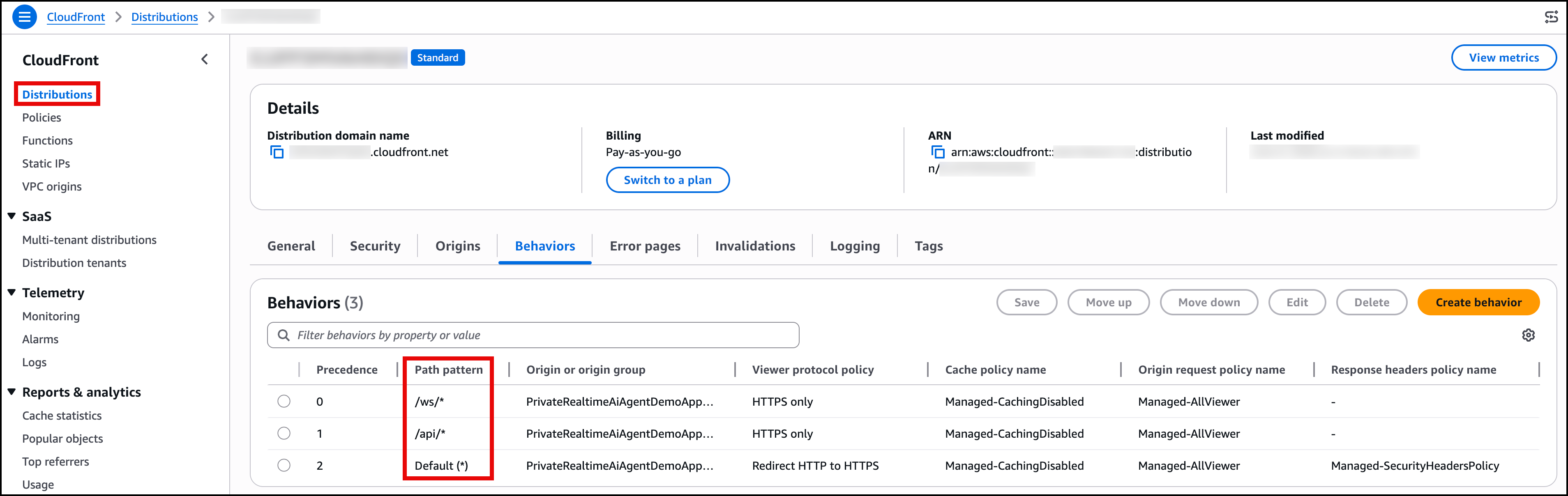
Figure 2. The CloudFront distribution behaviors, showing the default, /ws/*, and /api/* path patterns with their associated origin request and cache policies.
When AWS WAF sits in front of the distribution, the WebSocket handshake requires additional configuration. The WebSocket upgrade is a GET request with no body, and the AWS managed common rule set tends to block it, which shows up as a 403 on the handshake. The fix is a high-priority WAF rule that explicitly allows requests carrying the Upgrade: websocket header before the managed groups evaluate them, so the managed protections still apply to normal traffic. The web access control list is CloudFront-scoped, so it is created in the US East (N. Virginia) Region. The following figure shows the web ACL rules in the AWS WAF console.
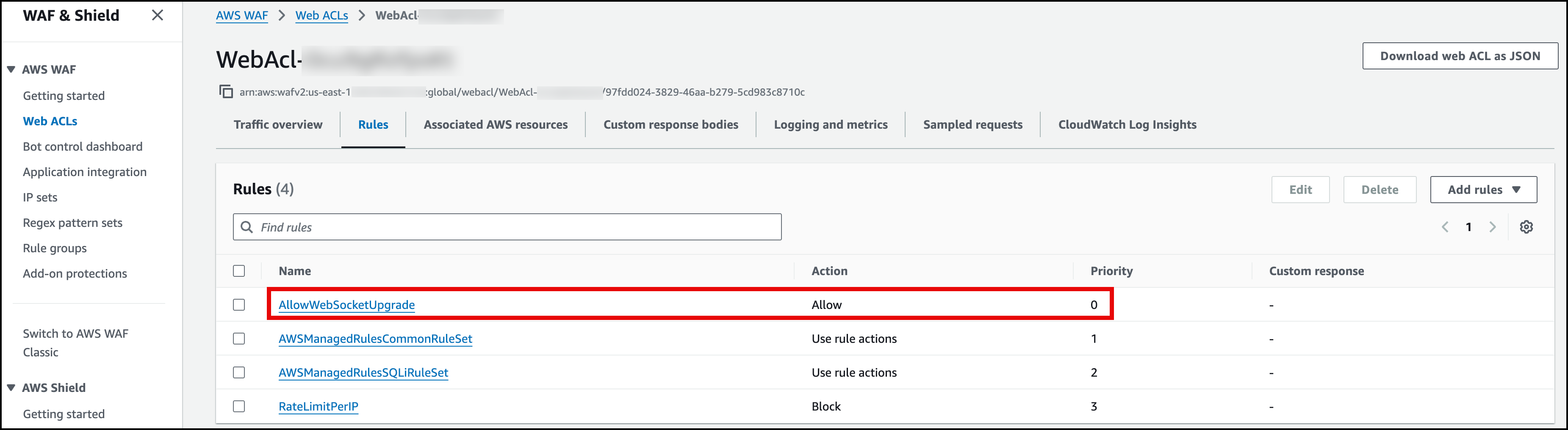
Figure 3. The web ACL rules in the AWS WAF console. The AllowWebSocketUpgrade rule at priority 0 allows the WebSocket handshake before the managed rule groups evaluate the request.
Connection lifetime needs attention too. CloudFront maintains an idle connection to the origin for up to 60 seconds, so the internal ALB is set to the same 60-second idle timeout, and the application sends periodic keep-alive frames every 25 seconds so an idle but open WebSocket is not closed mid-session.
Encrypting the hop between CloudFront and the internal ALB
The browser-to-CloudFront hop is always TLS, since the viewer protocol policy redirects to HTTPS and the WebSocket path is WSS only. The hop from CloudFront to the internal ALB is a separate decision. The CDK deploys HTTP by default, which stays on the AWS private backbone. The HTTPS mode adds TLS termination at the internal ALB with your own certificate for end-to-end application-layer encryption, and we recommend that mode for sensitive material such as contracts.
When you deploy in HTTPS mode, it is important to understand how CloudFront validates the origin certificate. CloudFront VPC origins route to the internal ALB by its ARN, not by a DNS name. CloudFront does not perform a public DNS lookup for the origin hostname. The hostname is used only during the TLS handshake so the server name matches the certificate. This means you do not need a public DNS record pointing at the internal ALB. You only need an ACM certificate valid for the hostname you choose, issued in the same Region as the internal ALB. Note that this origin certificate is separate from the viewer-facing certificate, which must always be in us-east-1 for CloudFront. If the certificate’s subject name does not match that hostname, the handshake fails and CloudFront returns a 502. The following figure shows an issued certificate in the ACM console.
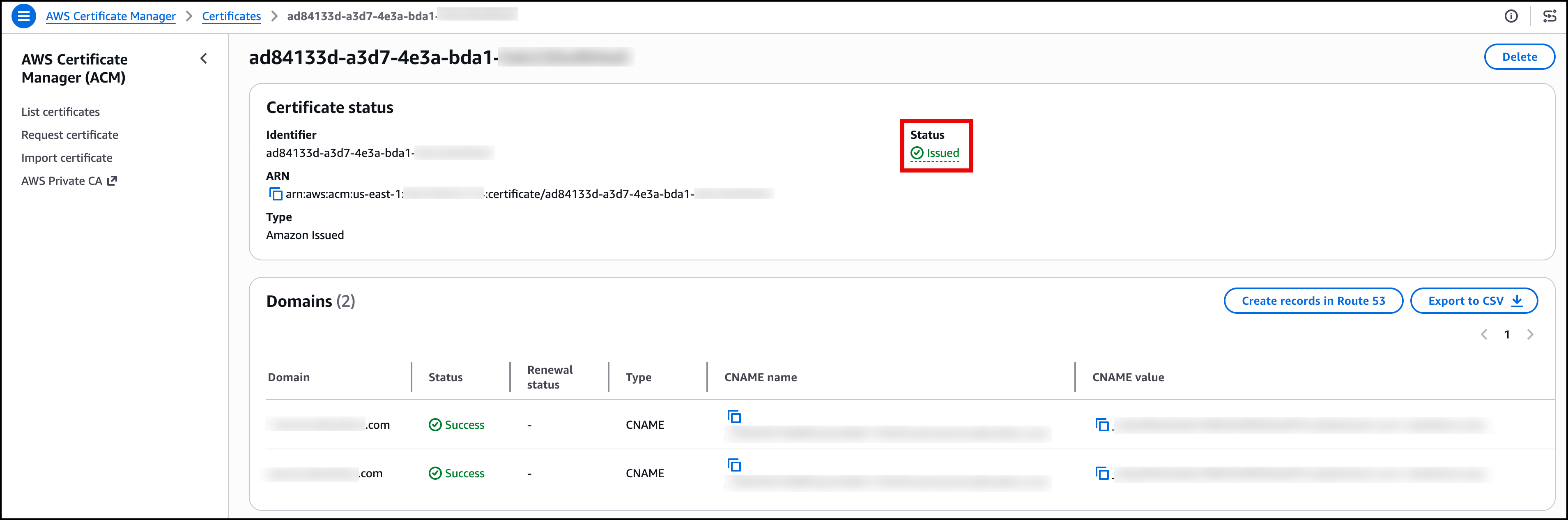
Figure 4. The origin certificate in ACM, issued in the same Region as the internal ALB. This is the only certificate the CloudFront to ALB hop needs, and it requires no public DNS record pointing at the internal ALB.
Next generation of Amazon OpenSearch Serverless for retrieval
The agent grounds its output in a private knowledge base that holds Example Corp’s standard operating procedures, retrieving the relevant sections before it writes a finding. The vector store is an Amazon OpenSearch Serverless collection on the NextGen serverless generation type.
NextGen suits this workload because reviews are intermittent. Standard Amazon OpenSearch Serverless requires a minimum of 1 OCU for indexing and 1 OCU for search, which means the collection incurs roughly $350 a month in compute charges even when it is completely idle. NextGen removes that floor by allowing a collection to scale its indexing and search OCUs to zero after 10 minutes of inactivity, eliminating idle compute cost between reviews and scaling back up automatically on the next request.
The quickest path is the Create collection flow in the console: you supply a collection name, choose the Vector search type, and select the NextGen generation. The console auto-creates a collection group with scale-to-zero configuration. Alternatively, you can create the collection group explicitly, set its generation to NextGen and the minimum indexing and search capacity to zero, then create a vector search collection inside it. The collection group requires standby replicas to be enabled for multi-AZ durability, even though the capacity floor is zero. The following figure shows the collection group in the OpenSearch Serverless console.
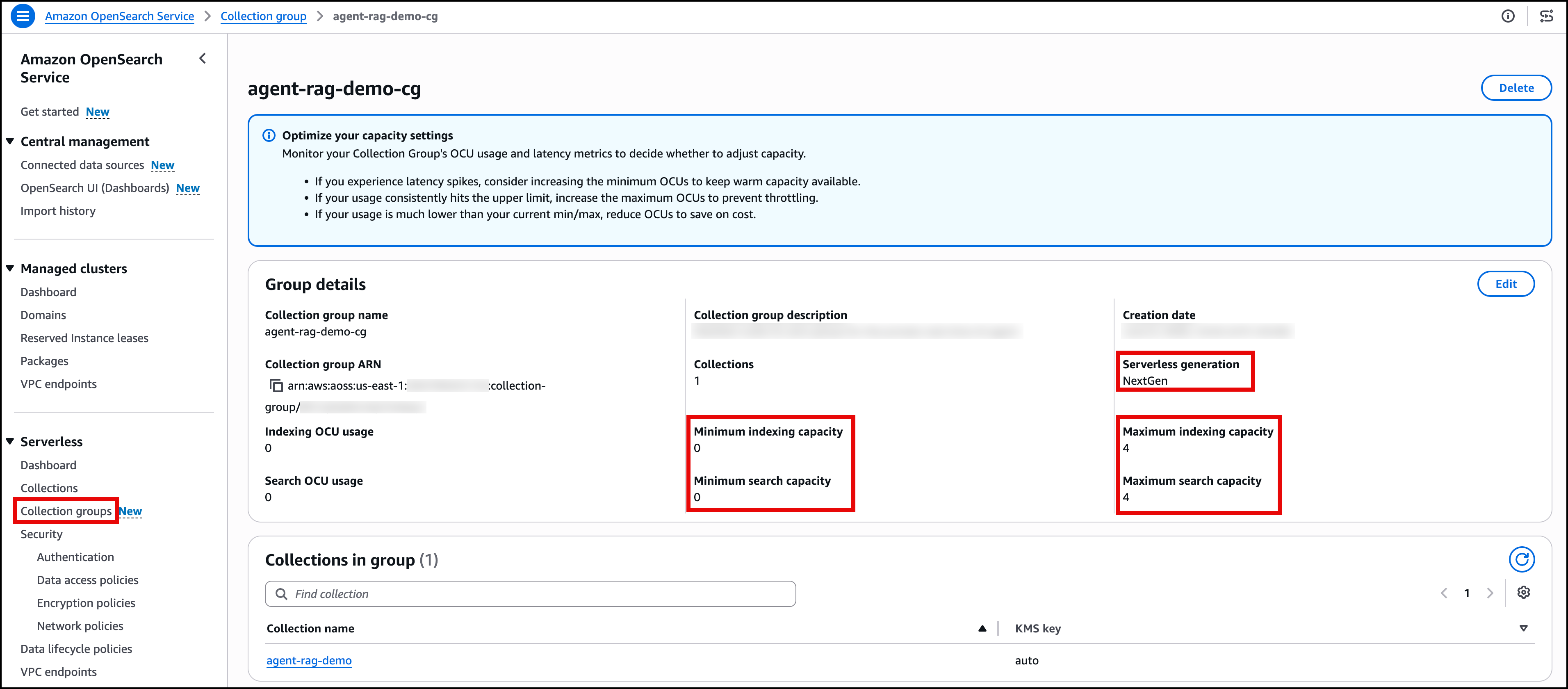
Figure 5. The collection group in the Amazon OpenSearch Serverless console, configured with the NextGen generation type and minimum capacity set to zero.
Tracing four interactions end to end
This section walks through what happens at each hop when a person uses the application. The four flows below cover how the connection is secured, how a user signs in, how a live query streams back, and how a document is uploaded and analyzed.
Flow A, connection setup
Before any user interaction begins, the security layers at the edge are established.
- ACM provides the viewer-facing TLS certificate to CloudFront, which the browser validates during the HTTPS or WSS handshake.
- The CloudFront-scoped AWS WAF web ACL inspects every inbound request at the edge before it reaches the origin.
- When deployed in HTTPS mode, a separate ACM certificate on the internal ALB encrypts the CloudFront-to-origin hop over the VPC origin path.
The following diagram shows this in further detail.
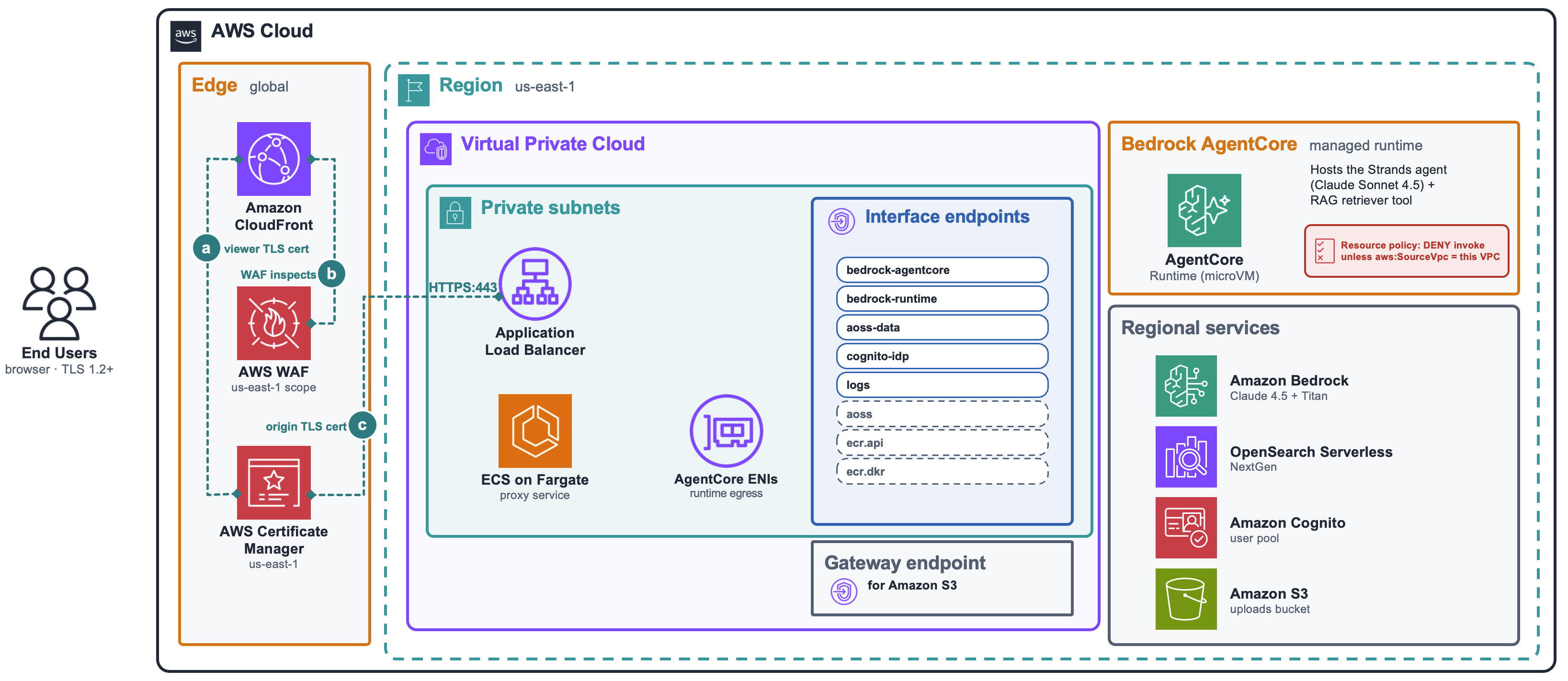
Figure 6. The connection setup. ACM certificates secure both the viewer-facing and origin-facing hops, while AWS WAF inspects traffic at the edge before it reaches the VPC origin.
Flow B, signing in
The sign-in flow follows six steps.
- The browser sends an HTTPS request to CloudFront.
- CloudFront forwards it to the internal ALB through the VPC origin.
- The ALB routes it to the ECS-on-Fargate proxy, which serves the self-hosted login form and handles
POST /auth/login. - The proxy calls the
cognito-idpinterface endpoint. - Amazon Cognito processes the
InitiateAuthrequest using theUSER_PASSWORD_AUTHflow and returns tokens. - The proxy verifies the JWT against the user pool’s cached JSON Web Key Set (JWKS) and sets a session cookie on the browser. The cookie is marked
HttpOnly, so client-side JavaScript cannot read it, and Secure, so it is only ever sent over HTTPS. The demo user’s password is generated at deploy time and stored in AWS Secrets Manager.
The following diagram shows this flow.
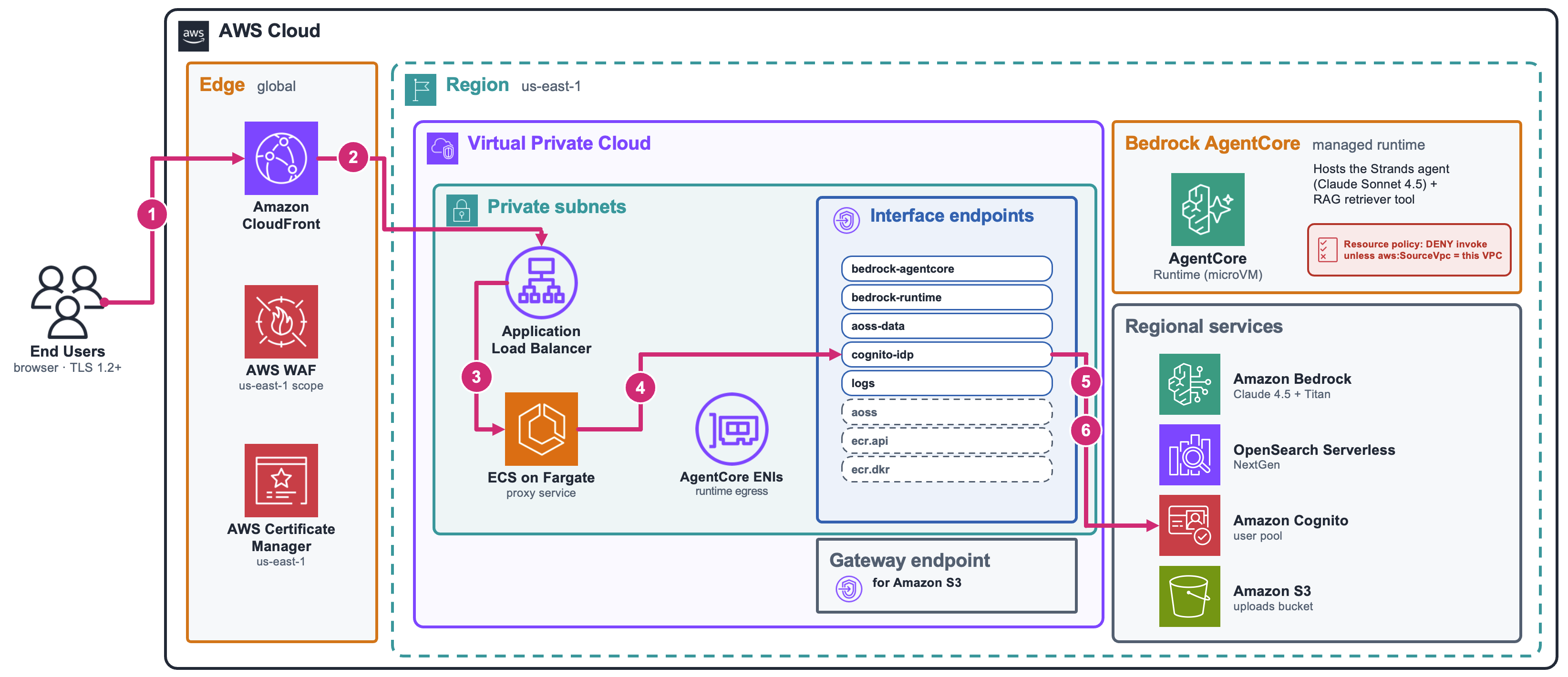
Figure 7. The sign-in flow. The browser loads the page through CloudFront and the VPC origin, and authentication is handled by Amazon Cognito over a VPC endpoint.
Flow C, asking a question
The live query flow follows eight steps.
- The browser sends the question to CloudFront over the WSS connection on the
/ws/*path. The browser automatically attaches its session cookie (prra_session), anHttpOnly, Secure cookie whose value is the user’s Cognito ID token (a signed JWT). The Fargate proxy verifies the JWT against the Cognito JWKS before accepting any query; a missing or invalid cookie closes the WebSocket. - CloudFront forwards the message to the internal ALB through the VPC origin.
- The ALB routes it to the proxy, which maintains one agent session per connection for multi-turn conversation.
- The proxy calls the
bedrock-agentcoreinterface endpoint. - AgentCore Runtime invokes the agent. A resource-based policy rejects any invoke whose source VPC is not this solution’s VPC, blocking calls from the public Internet even with valid credentials.
- Through its VPC-egress ENIs in the private subnets, the agent reaches AWS services.
- The agent embeds the text with Amazon Titan Text Embeddings v2 through the
bedrock-runtimeendpoint and runs a k-nearest-neighbor search against the OpenSearch Serverless collection over theaoss-dataendpoint, retrieving the most relevant knowledge base sections. - Grounded in those sections, Anthropic’s Claude Sonnet 4.5 generates the answer via the
bedrock-runtimeendpoint. The answer streams back as SSE, and the proxy forwards each update to the browser as a WebSocket message.
The following figures show this flow and the demo page during a live query.
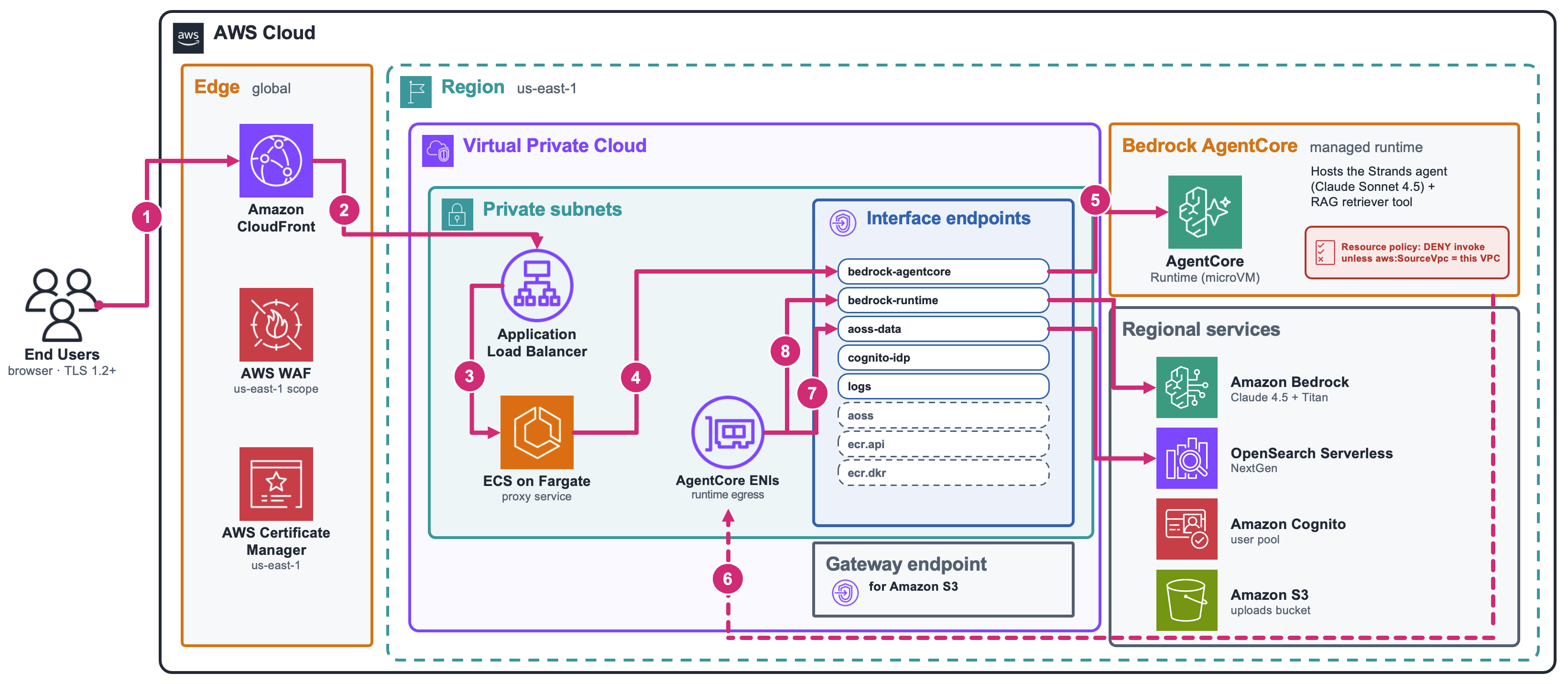
Figure 8. The live query flow (steps 1–8).
The following video shows what the frontend application looks like when a user asks a question and the response streams in.
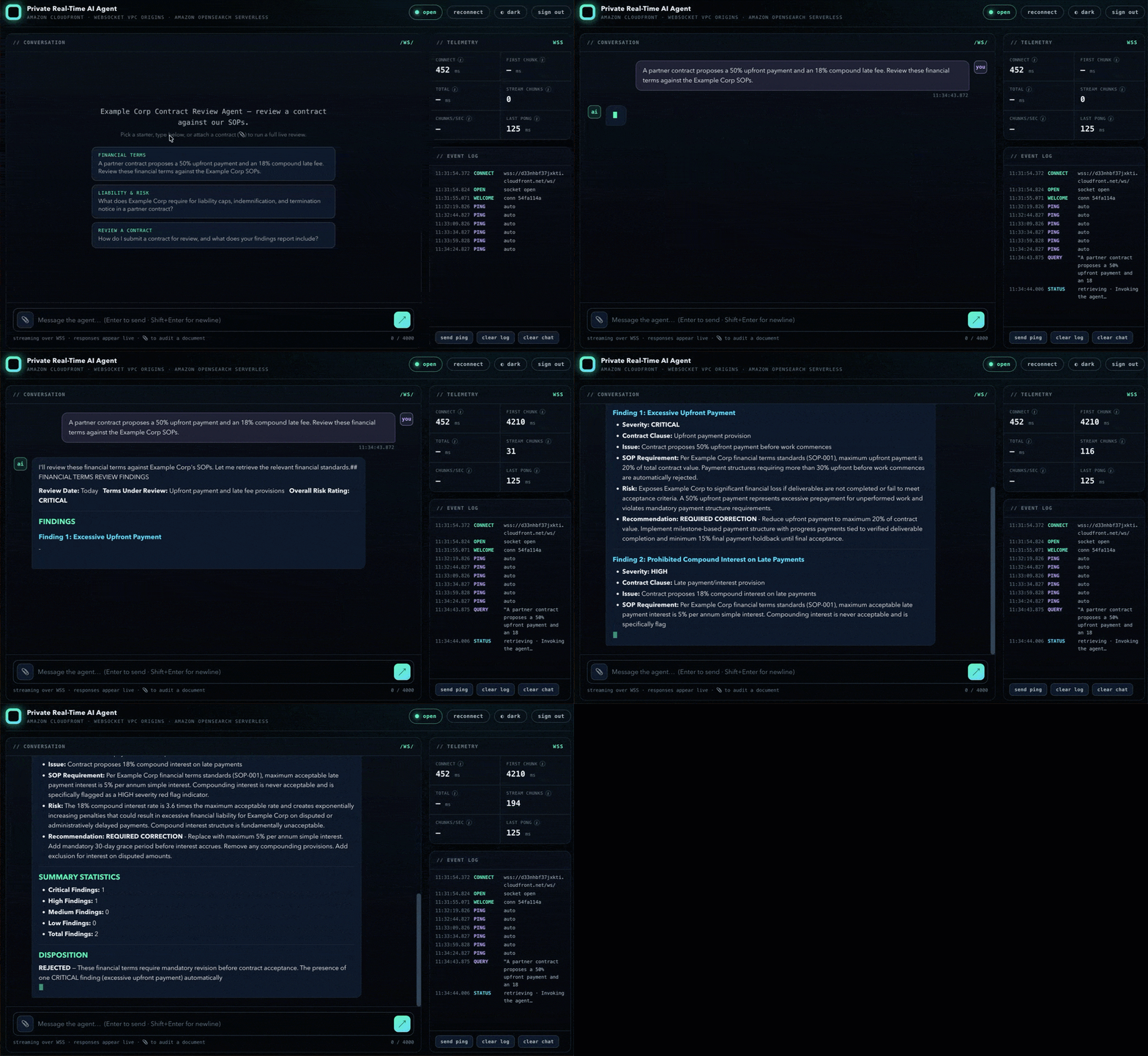
Figure 9. The frontend application during a live query, showing the response appearing progressively.
Flow D, uploading a document and running the analysis
The document flow has two phases. In the upload phase, the browser sends the file to the proxy, and in the analysis phase, the agent reviews it against the knowledge base. The following numbered steps trace both phases.
- The browser sends the file to CloudFront by using POST
/api/upload. - CloudFront forwards the request to the internal ALB, which routes it to the ECS-on-Fargate proxy.
- The proxy extracts the text, then stores both the original file and the extracted text in Amazon S3 over the S3 gateway endpoint.
- The proxy embeds the extracted text with Amazon Titan Text Embeddings v2 and indexes the chunks into the OpenSearch Serverless collection over the
aoss-dataendpoint, so the document is searchable alongside the seeded knowledge base. The proxy returns an identifier the browser uses to start the analysis. - The proxy frames a review request with the extracted text and calls AgentCore Runtime over the
bedrock-agentcoreinterface endpoint. - Through its VPC-egress ENIs in the private subnets, the agent reaches AWS services.
- For each section it reviews, the agent embeds the text with Amazon Titan Text Embeddings v2 and retrieves the most relevant SOPs from the OpenSearch Serverless collection via k-nearest-neighbor search over the
aoss-dataendpoint. - Grounded in those SOPs, Anthropic’s Claude Sonnet 4.5 generates a section-by-section audit via the
bedrock-runtimeendpoint. The review streams back as SSE, and the proxy forwards each update to the browser over the WebSocket.
Because the extracted text lives in Amazon S3 rather than in one proxy task’s memory, the analysis can run on whichever task picks up the connection, which keeps the service horizontally scalable.
One note on AWS WAF and uploads: the managed common rule set blocks any request body larger than 8 KB by default, which would reject a file upload. That single sub-rule (SizeRestrictions_BODY) is set to count rather than block, so every other managed rule still applies, and the proxy enforces its own size limit (5 MB) and file-type allowlist on the upload route.
The following diagram shows this flow.
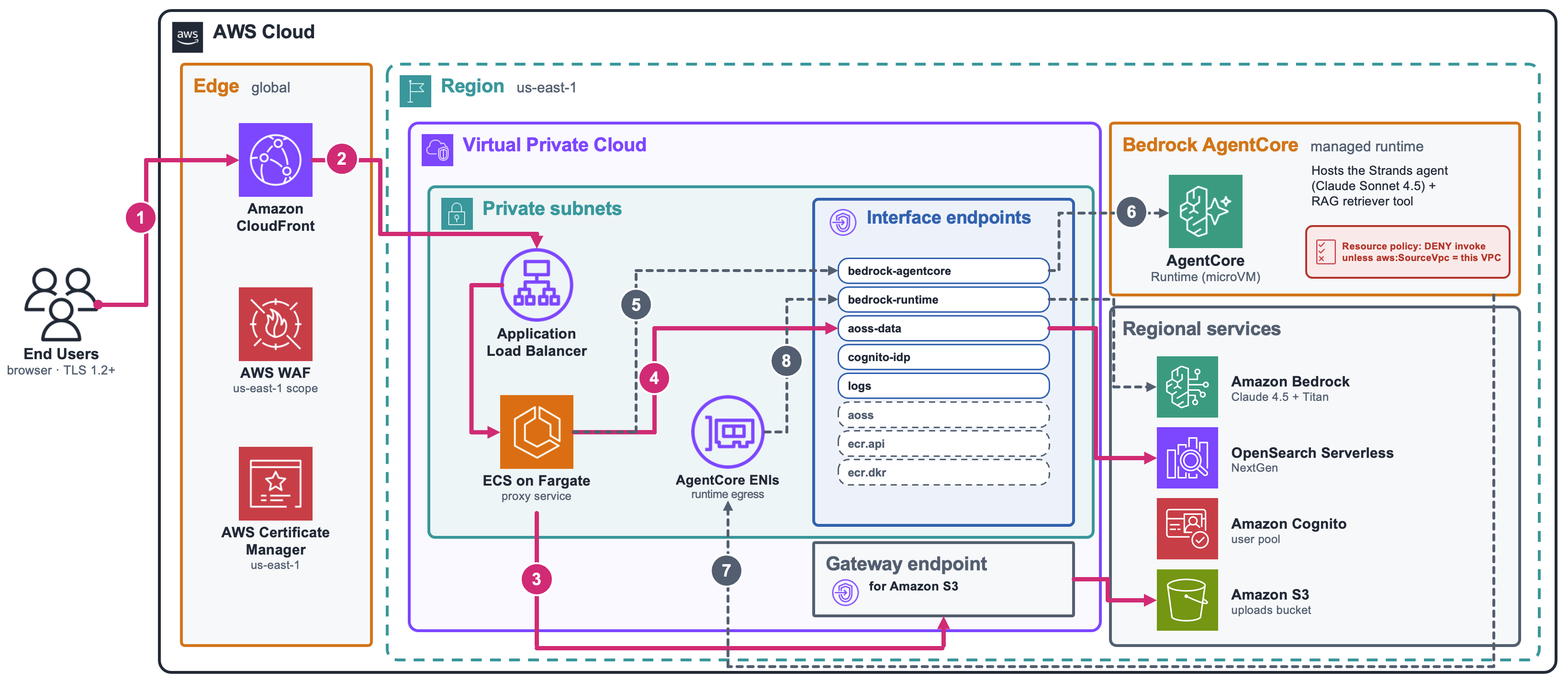
Figure 10. The document upload and analysis flow.
Test the solution
If you deployed the stacks, open the CloudFront URL in a browser, sign in with the printed credentials, and ask a question to watch the answer stream in.As the agent processes your question, watch for the response to appear word by word in the chat panel. This confirms the WebSocket streaming path is working. You can also open your browser’s developer tools, filter the Network tab by WS, and verify the connection URL starts with wss:// under the /ws/ path.
To confirm the private posture, check that the ALB scheme is internal and that the Fargate tasks have no public IP addresses.
Clean up
To tear down the solution, run the destroy script from the cdk/scripts directory. The script deletes all stacks except the network stack, which means the S3 buckets and the OpenSearch Serverless collection are all deleted.
./destroy.sh
The network stack is retained by default. AgentCore runs in VPC egress mode, so it places AWS-managed network interfaces in your subnets. As the AgentCore Runtime documentation notes, these interfaces are released automatically after the runtime is deleted but can take up to 8 hours. The VPC cannot be deleted until all interfaces are released. Rather than block teardown waiting on that, the script leaves the network stack in place. It has no NAT gateway, so it incurs no charges, and the next deploy reuses it. Once AWS has released the interfaces, you can remove the network stack by running the script again with the --include-network flag.
./destroy.sh --include-network
Cost considerations
Keeping the architecture fully private introduces specific cost components. The primary drivers are:
- VPC interface endpoints (hourly per AZ plus data processing)
- Amazon CloudFront (per-request fees, data transfer out, and WebSocket message charges; VPC origins add no extra cost)
- Amazon OpenSearch Serverless (OpenSearch Compute Units for indexing and search, and hot storage)
- Amazon Bedrock AgentCore Runtime (invocations and compute-seconds)
- Amazon Bedrock inference (input and output tokens for the selected model)
Each service publishes its current pricing on the AWS pricing pages. For a combined estimate tailored to your expected traffic, use the AWS Pricing Calculator.
Conclusion
WebSocket support for Amazon CloudFront VPC origins removes the need for separate public WebSocket infrastructure when you want streaming from a private backend. Amazon OpenSearch Serverless NextGen removes the idle compute cost of keeping a vector store warm for an intermittent workload. Combined with Amazon Bedrock AgentCore Runtime for the agent and VPC endpoints (interface and gateway) for service connectivity, the result is a real-time agent whose only public surface is the CloudFront distribution. The internal ALB, the proxy, the agent, the model calls, and the vector store all run privately.
The pattern extends beyond contract review. Any workload that needs a private, streaming AI interface, such as internal support chatbots, real-time compliance monitoring, or interactive data exploration, can reuse the same CloudFront-to-private-origin path. You can swap the retrieval backend for a different data source, add agent tools for write-back actions, or integrate with an existing identity provider by replacing the Amazon Cognito user pool with your own OIDC-compatible IdP.
To get started today, deploy the accompanying CDK project and try the flows yourself. To go deeper on the building blocks, see the Amazon CloudFront VPC origins documentation, the CloudFront WebSocket VPC origins launch announcement, the post introducing Amazon OpenSearch Serverless NextGen, the Amazon Bedrock AgentCore Runtime documentation, and the Strands Agents SDK.