AWS Architecture Blog
6,000 AWS accounts, three people, one platform: Lessons learned
This post is cowritten by Julius Blank from ProGlove.
As software-as-a-service (SaaS) platforms grow, balancing speed of innovation with strong security and tenant data isolation becomes critical. While the same AWS Identity and Access Management (IAM) mechanisms secure both shared and dedicated environments, establishing a hard security boundary is often easier in an account-per-tenant model because the account itself becomes the isolation boundary. In shared-account deployments, you instead rely on resource-level boundaries such as tenant-scoped IAM policies and data partitioning. This multi-tenancy increases architectural and operational complexity and can introduce security challenges if safeguard mechanisms are not properly designed and enforced. By adopting an account-per-tenant model on Amazon Web Services (AWS), you can achieve clearer security boundaries, streamlined ownership of services, and more transparent cost attribution, but this comes at the expense of increased investment in platform automation.
At ProGlove, we build smart wearable barcode scanning solutions that connect frontline workers to digital workflows. Our scanners integrate with Insight, our AWS based SaaS platform, to provide real-time process visibility. This helps customers in manufacturing, logistics, and retail improve their productivity, reduce errors, and enhance ergonomics on the shop floor.
This post describes why we chose a account-per-tenant approach for our serverless SaaS architecture and how it changes the operational model. It covers the challenges you need to anticipate around automation, observability and cost. We will also discuss how the approach can affect other operational models in different environments like an enterprise context.
Why multi-account?
Many SaaS providers begin their journey with a straightforward, dedicated deployment model, often with one AWS account per tenant. This approach makes initial implementation straightforward and limits the scope of issues, but as the platform scales, operational overhead and inefficiencies from idle or underutilized resources increase. These inefficiencies can be mitigated with serverless architectures that scale automatically to demand. Over time, providers often look to shared or multi-tenant models to consolidate operations and improve cost efficiency. However, this shift introduces new challenges as the number of tenants and services grows:
- Blast radius – An accidental misconfiguration or vulnerability could expose multiple tenants.
- Quota limits – Tenants in a single AWS account share the same quotas.
- Operational complexity – Shared infrastructure makes it difficult to reason about ownership of resources.
- Customization limits – Making changes for one tenant risks impacting others.
- Cost visibility – Attributing resource usage to individual tenants is challenging.
Choosing between a dedicated or shared model is ultimately a trade-off. Dedicated deployments are more straightforward to build but require investment in SaaS operations and orchestration to manage at scale, whereas shared models reduce operational overhead but increase architectural and management complexity.
AWS recommends a multi-account strategy to organizing your AWS environment. At scale, the AWS account boundary is the easiest way to implement isolation. Accounts are fully isolated containers for compute, storage, networking and more, with no shared scope unless you explicitly configure it.
Working backwards from our use case, we decided to take this model to its logical extreme: every tenant gets their own AWS account. The services they consume are deployed directly into that account. In that account, we deploy the full set of microservices that the tenant requires. These services run exclusively with that tenant’s data and configuration. At our current scale, ProGlove manages approximately:
- 6,000 tenant accounts, where approximately 50% are active and deployed
- 40 microservices, each with multiple AWS Lambda functions and supporting resources
- 70 internal accounts for continuous integration and continuous delivery (CI/CD), observability, and shared tooling
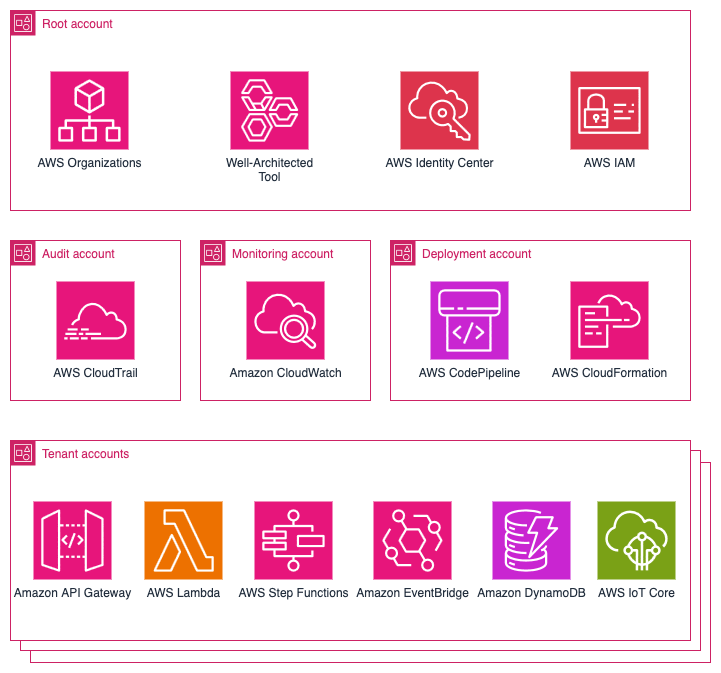
That translates to over 120,000 deployed service instances and roughly 1,000,000 Lambda functions in production. The following diagram shows an overview of the main services used in our platform.
Benefits of the account-per-tenant model
This model brings several benefits that directly support security, agility, and operational clarity, including a strong isolation model, simplified mental model, customization per tenant, and transparent cost attribution. Tenant data is not co-located. Each account has its own storage, compute, and permissions. If a security issue, runaway process, or misconfiguration occurs, the impact is limited to that tenant’s account while other tenants remain unaffected. For developers, they don’t need to think multi-tenancy as a deployed service instance always belongs to exactly one tenant. This reduces cognitive load and simplifies debugging. Developers can easily be provided with isolated, production-like tenant accounts to eliminate the gap between development and production environments. You can modify, test, and migrate individual accounts independently. This helps to create tailored deployments, such as activating premium features for certain tenants, without impacting the overall system.
AWS Cost Explorer and linked accounts make it straightforward to report and charge back costs on a per-tenant basis. For SaaS providers with consumption-based pricing models, this becomes a strong advantage.
When conducting an AWS Well-Architected Framework review together with AWS, we found that many items from the operational excellence as well as the security pillar didn’t even apply to our setup anymore. This made completing those review sections quick and straightforward.
Challenges and trade-offs
The account-per-tenant model, like most architectural choices, involves trade-offs. Although the model provides strong isolation, it introduces challenges in platform operations. The approach shifts complexity away from application development to platform development.
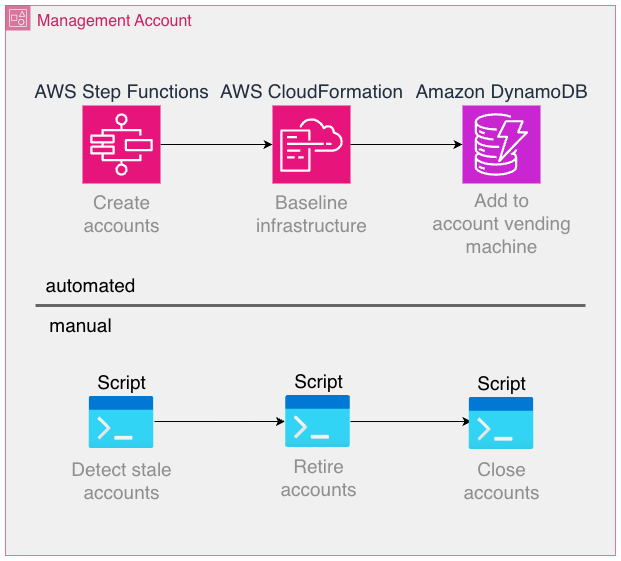
Provisioning, configuring, and managing thousands of accounts isn’t feasible manually. Automation of account creation, baseline setup, IAM roles, guardrails, and service enablement is mandatory. We rely on AWS Organizations, its service control policies (SCPs), and AWS CloudFormation StackSets, as well as custom tooling to handle this.
Some of the involved workflows lend themselves well to automation, whereas others can be implemented more effectively using traditional scripting and manual operations, as long as the overhead introduced is low enough. For example, account creation is a fully automated process using AWS Step Functions, but the retirement and closure of accounts are performed manually through regularly run scripts.
Some AWS services are billed per provisioned resource and independent of utilization as opposed to fully scaling to zero when not used. Prominent examples are Amazon Elastic Compute Cloud (Amazon EC2) or Amazon Relational Database Service (Amazon RDS), where resources need to be provisioned to use the service. Even the smallest EC2 instance type is charged at around USD $3, which adds up to USD $3,000 when deployed into 1,000 accounts. By contrast, serverless offerings such as AWS Lambda or Amazon DynamoDB automatically scale based on actual usage, minimizing idle resource costs. Although the per‑invocation or per‑request pricing for serverless services can seem higher, these models often offset the operational overhead and resource wastage associated with always‑on infrastructure. In any case, costs should be carefully modeled, measured, and optimized.
Monitoring infrastructure across accounts and Regions at scale is significantly harder than monitoring a handful of accounts. Observability tooling should be centralized, but without reintroducing the very risks that accounts are meant to isolate. It’s important to point out that Amazon CloudWatch offers greatly improved cross-account observability features today than when we started, for example, the Observability Access Manager.
Developers, operations teams, and platform services and tools need to operate across accounts on a daily basis. This requires a robust identity model with IAM roles and cross-account trust policies. If not designed carefully, this can become a source of complexity and security risk. Also, make sure to follow the best practice of avoiding long-lived credentials because these introduce a major security threat and monitoring effort if deployed into many accounts. AWS service limits are enforced per account. In a shared-account model, you monitor a single set of quotas. In an account-per-tenant setup, quota management becomes distributed and harder to predict. Proactive quota requests and monitoring are essential. For example, AWS Lambda employs a quota for the number of concurrent executions that functions in a single account share. In case a tenant is under heavier load, it’s likely for the corresponding account to experience throttling errors of Lambda functions, which is why it’s essential to provide a single pane of glass view to keep track of the quota usage and adapt as necessary. Although multi-account strategies are common at the enterprise level, adopting them at the SaaS tenant level is less common. Patterns, tooling, and reference architectures are still evolving, which means building custom solutions becomes necessary. Make sure to research available resources and consult AWS so you don’t reinvent the wheel.
Scaling observability across tenants
Observability can become a challenge in this architecture. If each tenant account emits its own logs, metrics, and traces, operational visibility becomes fragmented. For enhanced cross-account capabilities, we used a third-party observability solution. As an example, we forward telemetry (logs and metrics) to a central application where we can configure multi-alerts that are defined one time and applied to tenant accounts individually. This not only reduces cost but also simplifies the operational experience. Engineers interact with a single view, while underlying telemetry still originates from isolated accounts.
It’s vital to use tags whenever possible to correlate telemetry data as well as to use a consistent tagging and naming convention. Depending on the scale of operations, consider using AWS Organizations tag policies to enforce a consistent scheme. As an example, we include fields for the source AWS account ID in most metrics and logs to make sure we can easily drill down into the data for one particular tenant.
Key takeaways:
- Don’t replicate per-account alarms blindly. Use streaming and aggregation.
- Use tags for consistent context across thousands of instances.
- Stay current with AWS feature releases with the AWS News Blog: metric streams, Amazon EventBridge integrations, Amazon CloudWatch Observability Access Manager, and other offerings can streamline your observability stack.
- Follow the What’s New with AWS feed.
CI/CD and deployment at scale
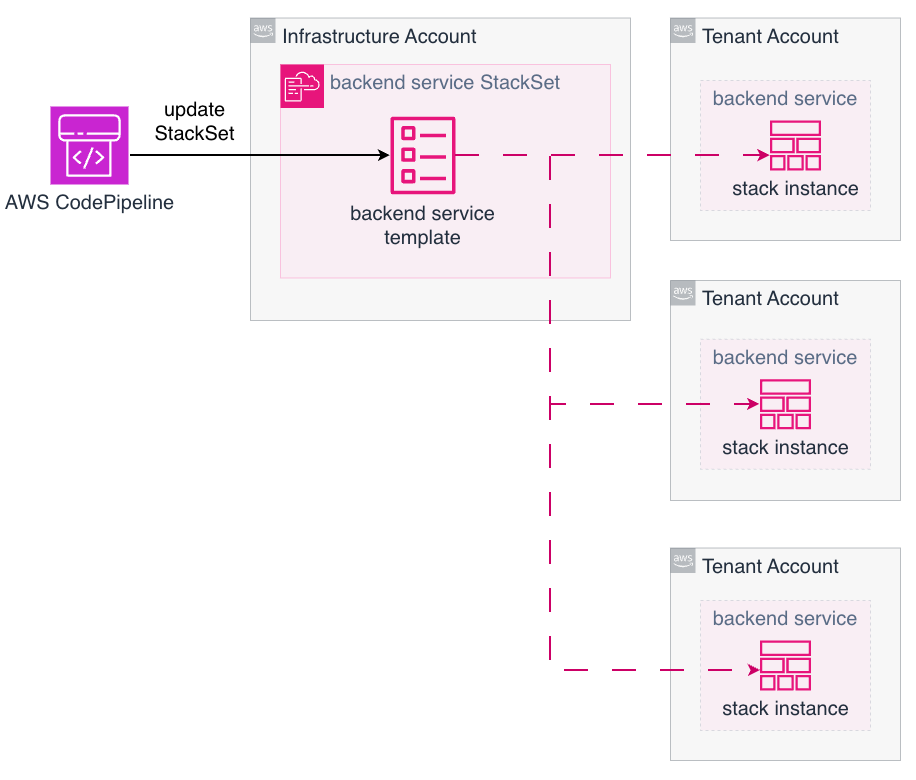
Deploying microservices into one AWS account is straightforward. Deploying the same service into thousands of accounts requires a different approach. Our application code is stored in a monorepo, which helps us to enforce the same version of libraries or Lambda layers among others. The following diagram illustrates how we update many tenant accounts using AWS CodePipeline combined with AWS CloudFormation StackSets to deploy the applications. Each pipeline execution updates many target accounts in parallel, with only a single StackSet update operation in a central account.
While this provides the necessary scale, it also introduces new failure modes:
- Partial rollouts – If one account fails to deploy, rollback or retry strategies need to be defined and tested.
- Pipeline duration – Large-scale updates can take significant time to propagate.
- Tooling maturity – StackSets are powerful but still evolving, and operational edge cases are possible.
In practice, this requires investing in platform engineering. A dedicated team builds and maintains internal tools that abstract deployment complexity away from service developers. Developers remain focused on business logic, and the platform team takes care of consistency and reliability across accounts.
Cost management
Cost modeling changes significantly with this architecture. In a shared account, many costs are pooled, making per-tenant attribution difficult. In a account-per-tenant model, costs are naturally segmented by account .On the positive side, tenant-specific cost reporting is trivial. SaaS providers can align billing directly with AWS usage and even get monthly reporting per tenant automatically through AWS billing.
Costs that scale per account needs to be carefully considered. At scale, even small charges per resource become meaningful. For example, collecting metrics from thousands of accounts requires careful planning and the chosen approach has great influence on costs. At this scale, it isn’t feasible to use standard observability tooling out of the box because the volume of collected data can make per‑account costs economically unsustainable. Instead, focus on understanding which metrics you need to monitor and select an observability approach that allows you to implement that. As a recommendation, evaluate cost multipliers early. Services that scale linearly with the number of accounts should be avoided where possible. Make sure to verify your assumptions with actual measurements.
Operational considerations
To succeed with this model, you need to be prepared to invest in platform capabilities:
- Account management – Automate everything from creation to decommissioning.
- Baseline guardrails – Enforce compliance and security controls using SCPs and a strict IAM management.
- Developer training – Make sure teams understand the scope and boundaries of their services.
- CI/CD investment – Pipelines need to scale to thousands of accounts without blocking innovation.
- Observability discipline – Monitoring needs to be consistent, centralized, and cost-effective.
Conclusion
In this post, we described how ProGlove implemented a large-scale account-per-tenant model on AWS and how that model shifts complexity from service code to platform operations. This is a trade-off that requires more platform automation, scalable CI/CD pipelines, and disciplined observability practices. The benefits are strong tenant and workload isolation, transparent costs, and severely reduced blast radius. These benefits are key for platform providers operating at scale with a strictly limited operations team size. Managing thousands of AWS accounts with three people might sound impossible. But with the right architectural choices, every new workload adds only marginal operational load while the platform absorbs the exponential scale. The team size stays constant, and efficiency grows with every account added. If security, compliance, and clarity are top priorities, this approach can serve as a strong foundation for your platform. Working backwards from these requirements can help you achieve the same balance: scaling your tenant base drastically, without scaling your operations team at the same rate.
Read more on Best practices for a multi-account environment, Managing stacks across accounts and Regions with StackSets, and the SaaS Lens for the AWS Well-Architected Framework.