AWS Architecture Blog
Eclipse Dataspace Components on AWS: Cost optimization strategies
When you deploy Eclipse Dataspace Components (EDC) connectors on AWS, one of the first challenges you face is predicting and controlling the cost of the required infrastructure. Without clear benchmarks, it is difficult to make informed decisions about workload sizing, environment configuration, and long-term investment.
Part 1 of this 3-part blog series covered the fundamentals of data space architectures and the EDC per the International Data Space Association’s (IDSA) standards. Part 2 explored production-ready architecture patterns for deploying EDC connectors on Amazon Web Services (AWS), discussing operational excellence, security, and reliability principles. This final post covers the remaining three AWS Well-Architected Framework pillars: Performance Efficiency, Cost Optimization, and Sustainability.
In this post, you will learn which AWS services drive cost in an EDC connector deployment, how to estimate monthly costs for business-critical and non-critical workloads, and how to apply optimization strategies that can reduce your spending by up to 58%.
Understanding cost drivers in data space deployments
Data spaces are secure and sovereign data environments that enable data sharing across independent organizations. With these architectures, you can collaborate with external organizations while maintaining full control over your data and compliance with data sovereignty principles. Your infrastructure costs can vary significantly. The main factors are your performance and reliability requirements, along with data volume and velocity across the network. It’s also important to distinguish between two types of infrastructure. A Dataspace Governance Authority (DSGA) centrally establishes components such as management, identity, and discovery functions. Participants host other components themselves, including the connector. This blog post focuses only on costs associated with EDC connector deployment on the participant, that is, the data provider and consumer sides.
Fictional usage assumptions
Before diving into the numbers, here are technical and operational assumptions you can use as a baseline for your own estimates.
Technical assumptions
| Category | Assumption | Justification |
| Data Volume | 5 GB per participant | Includes 6 months of historical data, and backups |
| Network Traffic | 20 GB/month per participant | Data transfers between participants |
| API Calls | 100,000/month per participant | Catalog queries, contract negotiations, and data transfers |
| OAuth Token Requests | 1,000/month per participant | Machine-to-machine authentication for data plane operations |
Table 1: Technical assumptions for EDC connector cost estimation
Operational assumptions
- Single AWS Region: Spain (eu-south-2)
- Operating hours: 24/7/365.
- Growth rate: Not considered in baseline estimates.
- Disaster recovery: Automated backups only (no cross-region replication)
Deployment architecture and scenarios
Figure 1 shows the reference architecture for deploying production-ready EDC connectors on AWS, covered in depth in Part 2 of this series.
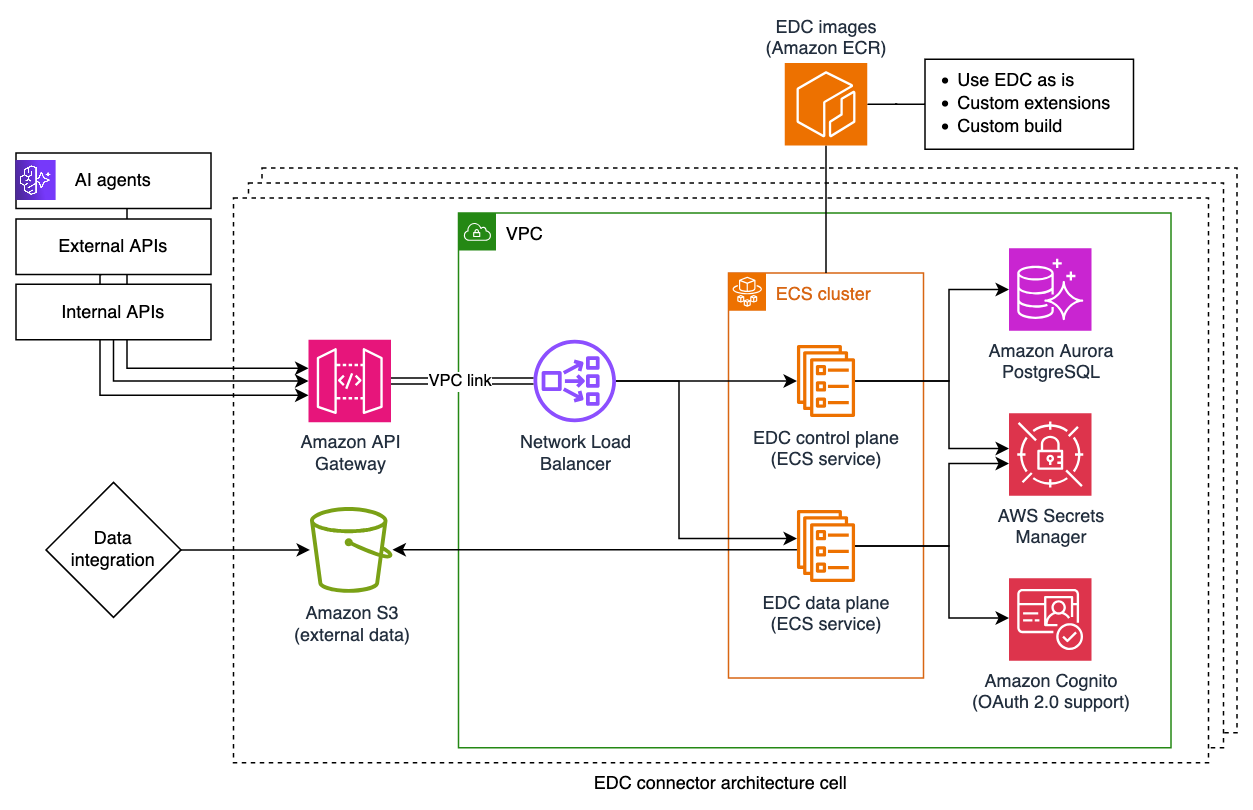
Figure 1: Production-ready EDC connector deployment
This post considers two cost scenarios depending on the criticality of the workload:
- Business-critical workloads: Designed for high availability, performance, and reliability of use cases supporting critical business functions.
- Non-critical workloads: Designed for use cases that tolerate interruptions, testing environments, or production workloads where brief disruptions are acceptable.
Both scenarios follow the architecture patterns described in Part 2 of this post series, with the primary differences being in sizing of compute and database resources.
Cost estimation: Business-critical workloads
Note: These estimates use the assumptions above and illustrate the relative cost contribution of each service. Your actual costs may vary based on your specific usage patterns, data volumes and regional pricing. This post highlights which components represent the highest cost drivers and therefore come with the highest potential for optimization.
| AWS Service | Configuration | Monthly Cost (USD) |
| Amazon Aurora PostgreSQL-Compatible Edition | db.r6g.large (2 vCPU, 16 GB), 20 GB storage + 10 GB backup | 276.00 |
| Amazon Elastic Container Service (Amazon ECS) with AWS Fargate | 2 vCPU, 4 GB RAM, always on | 83.00 |
| Network Load Balancer | 20 GB processed data | 20.00 |
| AWS Secrets Manager | 10 secrets | 4.00 |
| Amazon Cognito | 1K machine-to-machine (M2M) token requests | 2.25 |
| Amazon Elastic Container Registry (Amazon ECR) | 2 GB storage, 10 GB transfer | 1.00 |
| Amazon API Gateway | 100K REST API calls | 0.40 |
| Amazon Simple Storage Service (Amazon S3) | 5 GB Standard tier | 0.10 |
| Total | 387.00 |
Table 2: Estimated monthly cost for business-critical EDC connector deployment
These estimates help identify where your budget goes and where optimization has the most impact. In the business-critical scenario, the main cost driver is Amazon Aurora PostgreSQL. The db.r6g.large configuration is selected for constant workloads that require reliability and speed with high memory and performance. Amazon ECS with AWS Fargate is the second largest cost contributor as it runs containers continuously to maintain environment availability. Network Load Balancer represents a third notable cost component, while the remaining services contribute only a small portion of the total cost.
Cost estimation: Non-critical workloads
If you are running development, testing, or experimentation environments, you can reduce costs by up to 58% through rightsizing and use of Amazon EC2 Spot capacity.
| AWS Service | Configuration | Monthly Cost (USD) |
| Amazon Aurora PostgreSQL-Compatible | db.t4g.medium (2 vCPU, 4 GB), 20 GB storage + 10 GB backup | 110.00 |
| Amazon ECS with AWS Fargate Spot | 2 vCPU, 4 GB RAM, always on | 26.00 |
| Network Load Balancer | 20 GB processed data | 20.00 |
| AWS Secrets Manager | 10 secrets | 4.00 |
| Amazon Cognito | 1K M2M token requests | 2.25 |
| Amazon ECR | 2 GB storage, 10 GB transfer | 1.00 |
| Amazon API Gateway | 100K REST API calls | 0.40 |
| Amazon S3 | 5 GB Standard tier | 0.10 |
| Total | 164.00 |
Table 3: Estimated monthly cost for non-critical EDC connector deployment
These figures show that a non-critical configuration can cut costs significantly while maintaining the same data throughput and API capacity. Costs are reduced through the use of smaller and more flexible resources. Amazon Aurora PostgreSQL remains the main cost driver, but the smaller instance type (db.t4g.medium) reduces cost significantly. From a compute perspective, using Amazon ECS with AWS Fargate Spot capacity cuts costs by almost 70% compared to the business-critical setup. In total, this configuration reduces the monthly cost by approximately 58%, while maintaining identical assumptions for data throughput, API calls, and storage.
Key takeaways on cost optimization
This comparison shows that the primary cost contributors in both scenarios are database, compute and load balancing resources, which represent baseline infrastructure costs rather than usage-based charges. Services like Amazon S3, API Gateway, and data transfer charges contribute marginally to overall costs at these volumes. This cost structure indicates that the architecture scales efficiently with increased usage. As you onboard more use cases and increase data volume and velocity, you get more value from your existing infrastructure investment without proportional cost increases.
Well-Architected pillars: Performance efficiency, cost optimization, and sustainability
Part 2 of this series covered EDC best practices along the Operational Excellence, Security, and Reliability pillars of the AWS Well-Architected Framework. This section covers the remaining three pillars as they apply to EDC deployments.
Performance efficiency
Right-size compute resources: Match your Amazon ECS task definitions to actual workload requirements. Start with smaller configurations and scale up based on observed metrics rather than over-provisioning from the start. Amazon CloudWatch Container Insights provides the visibility needed to make informed sizing decisions.
Use the flexibility of Amazon Aurora: For workloads with variable demand patterns, consider Amazon Aurora Serverless v2 which automatically scales database capacity based on application needs. This eliminates the need to provision for peak capacity while maintaining performance during high-demand periods.
Optimize data transfer patterns: Design your data plane operations to minimize unnecessary data movement. Use Amazon S3 Transfer Acceleration for large transfers across geographic distances and consider data compression where appropriate to reduce both transfer times and costs.
Cost optimization
Reduce compute costs for fault-tolerant workloads: With AWS Fargate Spot, you can save up to 70% for workloads that can tolerate interruptions. Non-critical environments, batch processing, and development workloads are ideal candidates. Implement graceful shutdown handling to manage Spot interruptions effectively.
Lower storage costs over time: Configure Amazon S3 Lifecycle policies to automatically transition infrequently accessed data to lower-cost storage classes such as S3 Intelligent-Tiering or S3 Glacier Instant Retrieval. For EDC connector deployments, historical transfer logs and archived assets are good candidates for tiered storage.
Monitor for unexpected cost increases: Use AWS Cost Explorer and set up AWS Budgets with alerts to help detect unexpected cost increases. Tag EDC-related AWS resources consistently so you can accurately allocate costs and identify optimization opportunities.
Lock in lower rates for predictable workloads: For business-critical connectors with predictable, steady-state usage, Savings Plans for Amazon Aurora and AWS Fargate can provide significant discounts compared to On-Demand pricing.
Sustainability
Optimize resource utilization: Higher utilization of provisioned resources means less waste. Use automatic scaling policies to match capacity with demand and shut down non-production environments outside of business hours when possible.
Select efficient instance types: AWS Graviton-based instances (such as the r6g and t4g families used in our example) deliver better price-performance and energy efficiency compared to equivalent x86 instances. AWS Graviton processors offer improved performance per watt of energy use.
Minimize data movement: Each data transfer consumes energy. Design your data space integrations to avoid redundant transfers, cache frequently accessed catalog data of peers locally using the Federated Catalog, and batch operations where possible to reduce the total number of network round trips.
Summary
By rightsizing AWS infrastructure to match actual compute and database capacity needs, data space participants can achieve significant cost savings without compromising on data security and sovereignty aspects that make data spaces valuable. The comparison between business-critical and non-critical workload configurations demonstrates how AWS services like Amazon Aurora, AWS Fargate Spot, and Amazon S3 can be combined effectively to balance data sovereignty, performance, and cost efficiency.
As data spaces grow in adoption across industries and geographies, understanding these cost dynamics becomes increasingly important as you plan your network participation. The patterns and estimates in this post series offer a foundation for planning your cross-organizational data strategy and data spaces journey on AWS.
To get started, assess your workload criticality to determine whether a business-critical or non-critical configuration fits your needs. Then use the AWS Pricing Calculator to estimate costs for your specific data volumes, regions, and usage patterns. For an end-to-end reference implementation, explore the Dataspace Connector on AWS project which combines Infrastructure-as-Code with custom EDC extensions and AI tooling integration.
References
- https://github.com/awslabs/dataspace-connector-on-aws
- https://github.com/awslabs/minimum-viable-dataspace-on-aws
- https://aws.amazon.com/architecture/well-architected/