Containers
High-quality cost-effective AI image generation on Amazon ECS
AI image generation in production has three problems: it’s slow, it’s expensive, and quality depends on serving configuration. A team building a content pipeline or creative tool hits all three at once. Users stare at spinners, GPU bills climb with traffic, and outputs look different depending on which replica handled the request.
At AWS Professional Services, we built a solution that generates high-quality images at low cost by running Z-Image-Turbo, a 6-billion-parameter diffusion transformer, on AWS Inferentia2 accelerators. The service runs on Amazon Elastic Container Service (Amazon ECS) as a standard containerized microservice. It uses three ECS services (one per resolution), each backed by an internal Application Load Balancer (ALB). Compiled model artifacts are cached on Amazon Elastic File System (Amazon EFS) so containers start fast and scale out without recompilation.
This post covers the cost problem, how we solved it with ECS, and how to deploy the solution.
The cost problem
A diffusion model generates an image by starting from random noise and refining it over a series of denoising steps. Each step is one full forward pass through the model. Z-Image-Turbo needs 8 steps where most models need 20–50, but each step still requires the full 6 billion parameters to be resident in accelerator memory. That means:
- The model consumes 11.5 GB for weights alone, plus 1.6–4.1 GB of working memory during inference.
- One inference saturates the accelerator. There is no spare capacity to batch requests or run a second one in parallel.
- The hardware is either generating an image or idle. Utilization drives cost-per-image directly.
At $1.97/hr for an inf2.8xlarge instance, a 512px image (4.87s) costs $0.003 and a 1024px image (19.39s) costs $0.011. Those numbers are low enough for an embedded feature, but only if containers start fast. The bottleneck is model compilation.
These cost estimates are accurate as of publication. Verify current pricing for your AWS Region.
Solution overview
In this post, we walk through deploying our sample inference architecture in your AWS account. The solution is composed of six AWS Cloud Development Kit (AWS CDK) stacks that deploy in dependency order:
- Solution: Amazon Virtual Private Cloud (Amazon VPC), AWS Key Management Service (AWS KMS) keys, Amazon EFS file system, and VPC endpoints.
- Continuous integration and continuous delivery (CI/CD): Amazon Elastic Container Registry (Amazon ECR) repositories, AWS CodePipeline, AWS CodeBuild projects.
- Inference Infra: Amazon Simple Storage Service (Amazon S3) model buckets, Amazon DynamoDB cache table.
- Compile SFN: AWS Step Functions state machine, AWS Batch compute environments.
- Amazon ECS services: Three ECS services (one per resolution) and an internal ALB.
- Web: Amazon CloudFront, Amazon Cognito, AWS Lambda (REST API and WebSocket handler).
Architecture diagram
The following architecture diagram shows how a prompt flows from the React frontend through API Gateway and Lambda to the Inferentia2-backed ECS services.
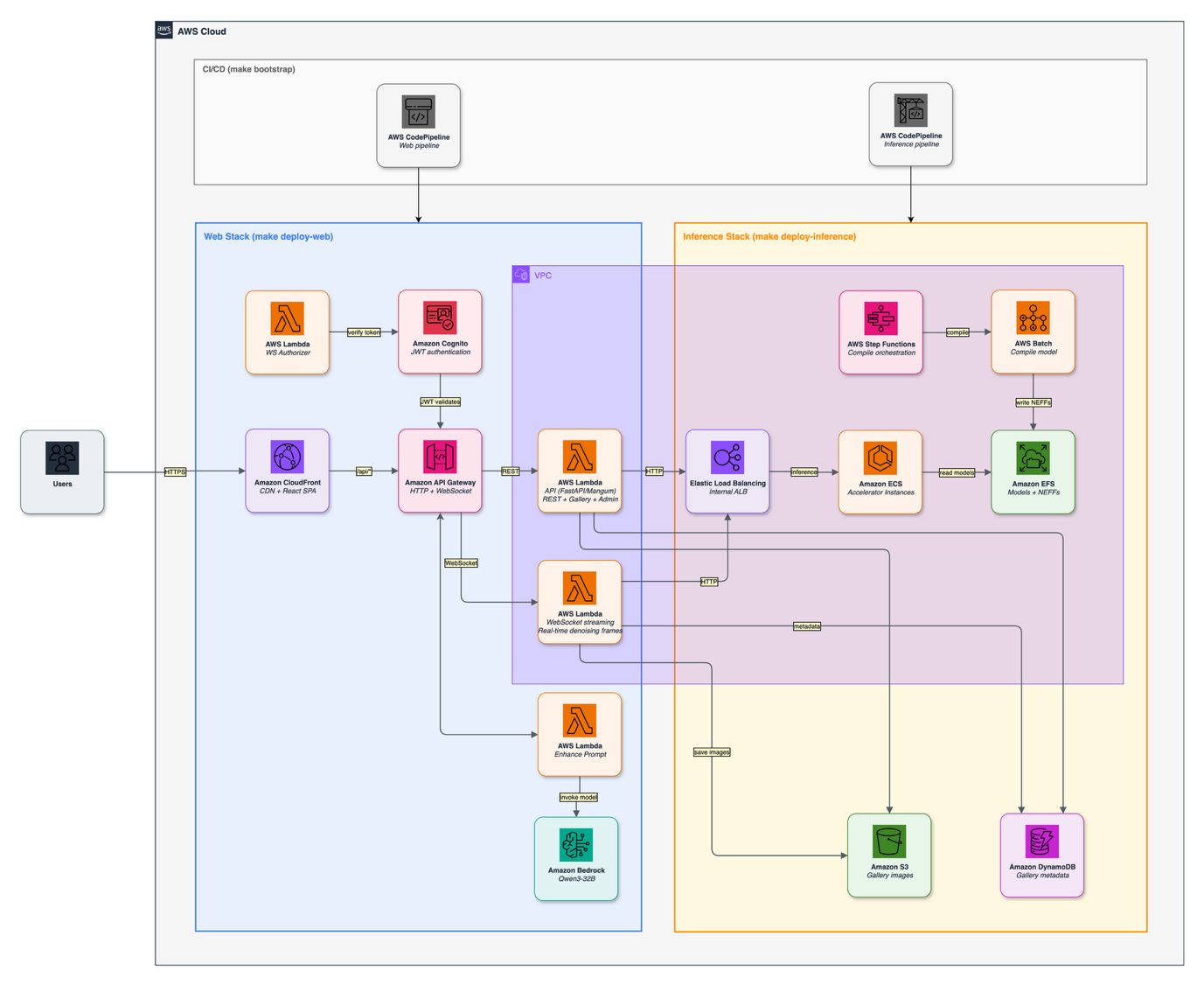
Figure 1: Request flow from the React frontend through API Gateway and Lambda to the Inferentia2-backed Amazon ECS services
The ECS tasks in this architecture run on Amazon Elastic Compute Cloud (Amazon EC2) inf2.8xlarge instances in an Auto Scaling group. Amazon ECS Managed Instances now supports Inferentia2 and is a great fit for this workload. AWS handles provisioning, patching, and scaling of the underlying instances, so teams can focus on the application.
The Image Generation on Amazon ECS with AWS Inferentia2 code repository is available on GitHub.
Request flow
- User enters a prompt in the React frontend (served through Amazon CloudFront).
- CloudFront terminates TLS and forwards the WebSocket upgrade to Amazon API Gateway.
- API Gateway validates the Cognito JSON Web Token (JWT) and routes to the Lambda handler.
- Lambda selects the target resolution and calls the internal ALB’s
/invocationsendpoint with anX-Target-Resolutionheader (512,768, or1024). - The ALB routes to the matching ECS service’s target group based on that header.
- The ECS container encodes the prompt, runs 8 denoising steps, and streams intermediate JPEG frames back.
- Lambda relays each frame as a WebSocket binary message to the client.
The round trip from prompt submission to final image takes 5–20 seconds depending on resolution.
The inference workload
A diffusion model generates an image by starting from random noise and refining it over a series of denoising steps, where each step is one full forward pass through the model. Fewer steps means faster generation. This is why the container can stream the image back as it sharpens: each step produces a slightly cleaner frame.
Z-Image-Turbo
The model is a 6-billion-parameter diffusion transformer from the Tongyi-MAI team at Alibaba. It needs only 8 denoising steps where most diffusion models need 20–50, runs a single forward pass per step (many models run two), and produces deterministic output for a given seed.
The architecture, called S3-DiT (Scalable Single-Stream DiT), processes text and image tokens in a unified stream through 30 transformer layers. From an ECS perspective, the key properties are:
- Memory footprint: 11.5 GB for model weights, plus 1.6–4.1 GB of working memory during inference depending on resolution. That consumes most of the 16 GB high bandwidth memory (HBM) ceiling.
- Deterministic: Same input produces the same output, byte-for-byte, across instances and restarts. This is why any instance can serve requests interchangeably.
- Single-threaded: One inference occupies the full accelerator, so an instance is either busy or idle. That is the property the load balancer and auto-scaler are built around.
Figure 2: Denoising progression of Z-Image-Turbo on AWS Inferentia2, refining random noise into a sharp image over 8 steps.
Why Inferentia2
AWS Inferentia2 is Amazon’s purpose-built machine learning (ML) inference accelerator. Each inf2.8xlarge instance ($1.97/hr on demand in us-east-1) has one chip with two NeuronCores, each with 16 GB of HBM. The chip is optimized for attention-heavy transformer workloads, and On-Demand Inf2 capacity is readily available in supported regions.
Our solution: compile once, cache the artifacts on Amazon EFS, and mount them into every container at startup. A container goes from launch to serving traffic in about 2 minutes instead of 30+. This is the core architecture pattern that makes the system practical.
Compile in CI/CD, cache on EFS
In our architecture, an AWS Step Functions state machine orchestrates compilation during the CI/CD pipeline:
- The
check_artifactsAWS Lambda function inspects EFS for cached Neuron Executable File Format (NEFF) files, comparing a SHA-256 hash of graph-affecting source files. - If the cache is stale, AWS Batch jobs on inf2.8xlarge compile each resolution and write the NEFFs to EFS.
- The
cache_purgeLambda function removes outdated artifacts.
The SHA-256 hash means that code changes to HTTP handlers, logging, or configuration do not trigger recompilation. Only changes to the model definition, pipeline code, or tensor shapes produce a different hash and force a recompile. This saves 25+ minutes on most deployments.
Container startup with EFS
With compiled artifacts already on EFS, a container starts fast:
- Amazon ECS launches the instance and pulls the container image from Amazon ECR.
- Container mounts EFS.
- Loads pre-compiled NEFF artifacts from EFS into accelerator memory.
- Runs a single warmup inference to prime the runtime.
- Health check passes (
GET /pingreturns 200), the ALB registers the target.
Scaling out
Because the compiled artifacts live on EFS (not baked into the container image), scaling out is straightforward. A new container mounts the same EFS volume, loads the same cached NEFFs, and in our testing, started serving in about 2 minutes. There is no per-instance compilation, no model download from Amazon S3, and no cold-compile penalty. The EFS cache turns the scale-out problem into a standard container-scheduling problem.
ECS service architecture
The service runs as three independent deployments, one per resolution. The following sections explain why they are separated and how each is configured.
Why three separate services
Each resolution has a different memory profile and inference latency:
| Resolution | Memory per container | Inference time | Requests/hr/instance |
| 512×512 | 13.1 GB | 4.87 s | ~739 |
| 768×768 | 15.2 GB | 9.81 s | ~367 |
| 1024×1024 | 15.6 GB | 19.39 s | ~186 |
A single multi-resolution service would need to swap compiled model artifacts per request while managing memory within 1 GB of the 16 GB hardware limit. Separate services let each resolution scale independently. In practice, 512px traffic is typically 3–5x higher volume than 1024px.
Service configuration
Each ECS service runs on inf2.8xlarge instances:
- Task definition: Single container per task,
awsvpcnetworking mode. - Instance type: inf2.8xlarge (1 AWS Inferentia2 chip, 2 NeuronCores, 32 GB HBM).
- Concurrency: 1 request at a time per instance (the model saturates the accelerator, so no batching is possible).
- Health check:
GET /pingreturns 200 only after the model is loaded and warm. - Deregistration delay: 120 seconds (allows in-flight inference to complete before draining).
- Amazon EFS mount: Read-only access point for compiled model artifacts.
Prerequisites
- AWS account with service quotas:
- Running On-Demand Inf instances >= 1 inf2.8xlarge per resolution you want to serve.
- Request a quota increase through the Service Quotas console if your account has 0 (new accounts typically start at 0 for Inf instances).
- Standard Amazon VPC, Amazon ECS, and AWS Lambda quotas (defaults are sufficient).
- AWS Cloud Development Kit (AWS CDK) Bootstrap: Your account/region must be CDK-bootstrapped:
- Local tools: Python 3.13+,
uv>= 0.4, Docker,Node.js, AWS Command Line Interface (AWS CLI) v2.
Deploy the solution
Configure your environment, then deploy the six stacks in dependency order.
Configure environment
Setup
Configure environment variables
Copy the example file and fill in your values:
Deploy
make bootstrap deploys the Amazon VPC, AWS KMS keys, Amazon EFS, and Amazon ECR repositories, and the AWS CodePipeline definitions (~5 minutes).
make deploy-inference uploads source to Amazon S3 and triggers the inference pipeline. First deployment takes ~45 minutes (includes model compilation). Subsequent deploys that don’t touch model code take ~20 minutes.
Deploy the web application
For authenticated public access with a UI, gallery, and admin panel:
Generate images
You can generate images through the web UI or directly through the REST and WebSocket APIs.
Web UI
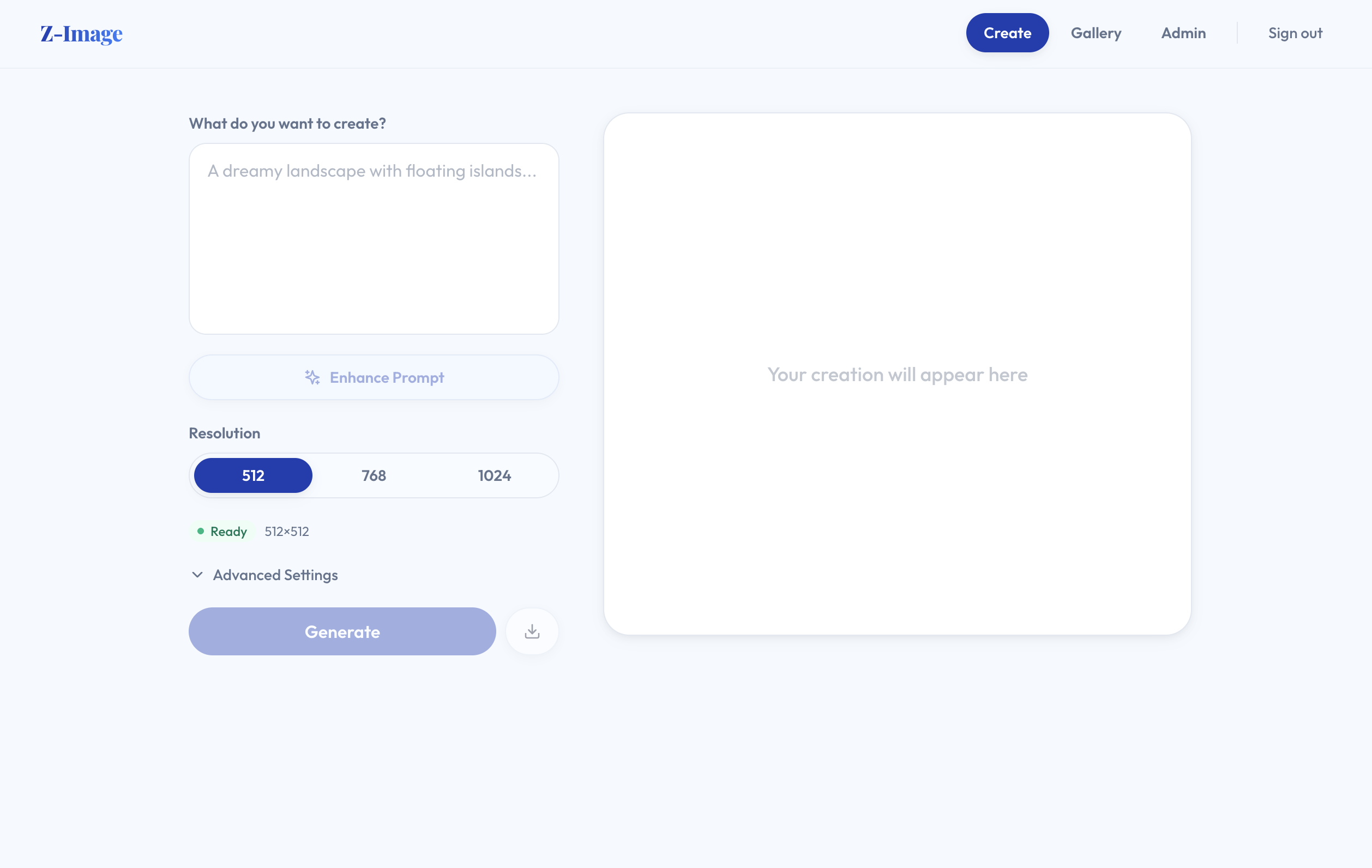
Figure 3: The Z-Image web UI, where you select a resolution, enter a prompt, and watch frames stream as each step completes
The solution ships a React frontend served through Amazon CloudFront. Select a resolution, enter a prompt, and watch intermediate frames stream as each denoising step completes.
REST API (web stack)
WebSocket streaming
Connect to wss://{api-id}.execute-api.{region}.amazonaws.com/v1 for real-time intermediate frames during generation. Each denoising step produces a progressively cleaner image, streamed to the client as a binary WebSocket message.
Generated images
The following images were generated with this architecture. The exact prompt used to generate each image appears with it.
All images were generated on Amazon ECS (inf2.8xlarge) with 8 denoising steps. Given the same prompt, seed, and resolution, the service produced identical output in our testing.
Album art (1024×1024)

Figure 4: Album art (1024×1024) generated with Z-Image-Turbo from the following prompt
Rock band album cover art featuring a red electric guitar engulfed in blue and purple flames, floating in a dark void, surrounded by shattered glass fragments with sharp edges and iridescent surface reflections under dim ambient lighting, bold creative stylized grunge text “IRON ECHO” centered at the top in cracked metallic chrome font with a yellow lightning bolt extending to the left of the text, smaller neon purple text “SHATTERED LIGHT” placed horizontally at the bottom of the composition, fonts with jagged edges and glowing outlines, black background with subtle texture resembling brushed steel, 50mm macro lens perspective emphasizing detailed textures of metal, glass, and flame surfaces, high definition rendering with emphasis on realistic lighting effects and sharp depth of field.
Campfire (1024×1024)

Figure 5: Campfire (1024×1024) generated with Z-Image-Turbo from the following prompt
A campfire is burning in a remote wilderness area under the night sky. The fire is composed of flame and glowing embers, situated on a flat forest floor surrounded by pine trees. Above the fire, the sky is clear and dark, with the milky way stretching from the horizon into the upper sky. The milky way appears as a bright, swirling band of stars with subtle blue and orange tones. The surrounding trees are tall, with conical shapes, their trunks are dark and textured. Smoke from the fire rises vertically and dissipates into the sky. The atmosphere is cool and calm, with no wind. The scene is illuminated by the soft glow of the fire and the faint light of the stars. The color palette is a combination of warm orange and yellow from the fire and cool blue from the night sky.
The additional samples are available on the Image Generation on Amazon ECS with AWS Inferentia2 GitHub repository.
Cost analysis
All costs use inf2.8xlarge On-Demand pricing at $1.97/hr in us-east-1. Check the Amazon EC2 Inf2 pricing page for current rates.
| Resolution | Cost per image | Latency | Throughput | Cost per 1,000 |
| 512×512 | $0.003 | 4.87 s | ~739 images/hr | $2.66 |
| 768×768 | $0.005 | 9.81 s | ~367 images/hr | $5.36 |
| 1024×1024 | $0.011 | 19.39 s | ~186 images/hr | $10.59 |
Monthly cost depends on utilization. An always-on single instance runs ~$1,416/month. Scaling to zero removes Inf2 instance charges when idle. You still pay for other resources such as Amazon EFS, the ALB, VPC endpoints and Amazon CloudFront. See the pricing pages.
Clean up
Destroys all 6 stacks in reverse dependency order (~10 minutes). Removes VPC, ECS cluster, ALB, EFS, ECR, S3 buckets, Cognito, CloudFront, and CodePipeline.
Conclusion
The cost problem with production image generation comes down to two things: expensive compilation and slow cold starts. The compile-once, cache-on-Amazon EFS pattern helps address both. The CI/CD pipeline compiles the model (25–45 minutes, paid once), and every container mounts the cached artifacts at startup (2 minutes to serving). The result is $0.003–$0.011 per image on inf2.8xlarge, which is low enough that image generation works as an embedded feature rather than a standalone service.
Feeling ready to build your own image generation service? Begin your journey with the Image generation on ECS quick start instructions!