Artificial Intelligence
Automate schema generation for intelligent document processing
Before you can extract information from documents using intelligent document processing (IDP) techniques, you need a schema for each document class that defines what to extract. But how do you create schemas when you have thousands of documents and don’t know what classes exist? Doing this at scale can take substantial manual effort, making downstream IDP initiatives difficult to justify.
In this post, we’ll show you how our multi-document discovery feature solves this problem. It serves as an automated pre-processing step, analyzing unknown documents, clustering them by type, and generating schemas ready for the IDP Accelerator. You’ll learn how the new capability uses visual embeddings for automatic clustering and agents for schema generation. We’ll also walk you through running the solution on your own document collections.
IDP Accelerator
The IDP Accelerator is a scalable, serverless, open-source solution for automated document processing and information extraction. To customize the solution to your specific document types, it requires a configuration file where you specify the classes and fields. For a minimal configuration example, see the IDP Accelerator GitHub repo.
Without a good understanding of your document types, creating this schema can be difficult. The IDP Accelerator includes a Discovery Module that can bootstrap a class configuration from a single example document. However, you must already know your document classes and be able to identify a representative example document for each class. The multi-document discovery feature introduced in this post removes that prerequisite, accelerating your path to applying the IDP Accelerator to a collection of unlabeled documents.
Solution overview
The following video shows the solution in the IDP Accelerator Console.
The multi-document discovery feature automates the transformation of unclassified document collections into structured schemas ready for downstream IDP initiatives. This solution is integrated into the IDP accelerator’s existing Discovery Module. It’s a new “Multiple Document” capability alongside the “Single Document” discovery feature. An AWS Step Functions state machine and AWS Lambda function provide orchestration and serverless compute. The solution processes documents from an Amazon Simple Storage Service (Amazon S3) bucket or Zip file upload. Models available through Amazon Bedrock generate schemas that automatically integrate into the IDP Accelerator configuration file. The following diagram shows the full workflow.
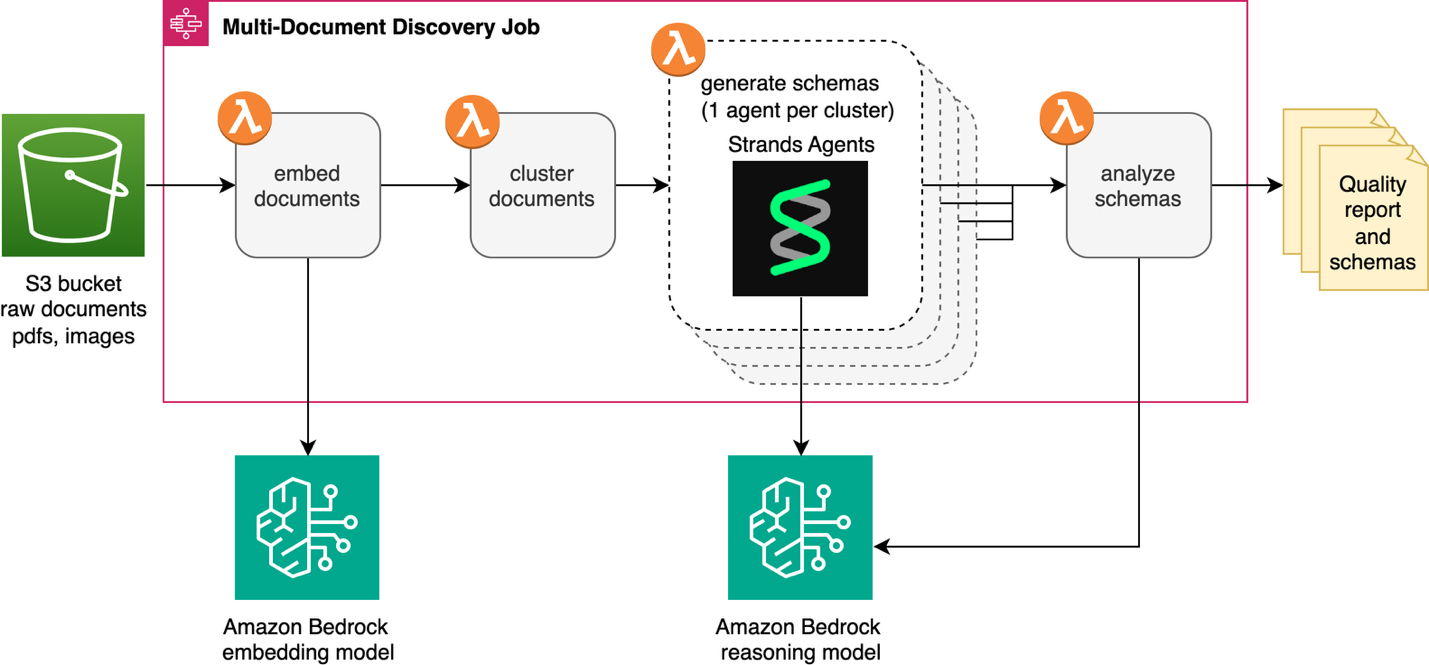
The discovery job starts by converting each document in Amazon S3 into a vector embedding using an embedding model available on Amazon Bedrock, then groups similar documents into clusters. An agent built with Strands Agents and an Amazon Bedrock LLM analyzes each cluster to identify the document type and generate a schema. Finally, a reflection step reviews schemas together to catch overlaps and inconsistencies before your final review.
Technical details
We’ll walk through each step of the process, highlighting key decisions and implementation details.
Embedding generation
The workflow creates an embedding for each document, converting visual features into numerical representations. For multi-page documents, only the first page is used. Currently, the workflow uses visual embeddings rather than OCR-based text because visual embeddings capture layout, formatting, and structural cues that distinguish document types, even when the text content is similar. The solution uses Cohere Embed v4 through Amazon Bedrock as the default embedding model for the discovery job. The embedding step automatically handles common pain points and obstacles like image compression, retry logic, and rate limiting.
Document clustering
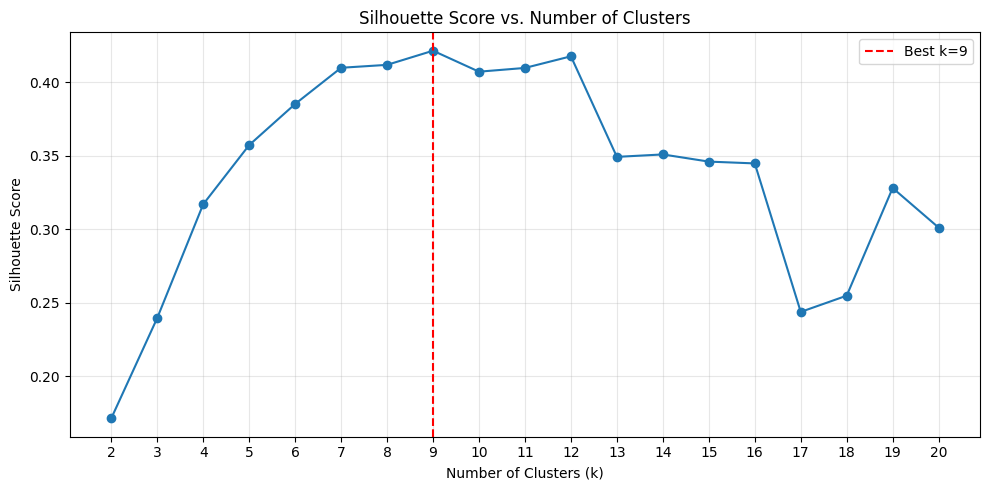
The multi-document discovery feature learns how many document types are in your collection using the silhouette score. In this context, the silhouette score provides a measure of how well-separated the clusters are from one another and how compact documents are within each cluster. Using k-means clustering, the agent tests k values from 2 to 20 by default and selects the grouping with the highest silhouette score. Here k represents the number of distinct document types in your collection. To create meaningful clusters, each must contain at least two documents. If necessary, the upper k bound is reduced below 20 to satisfy this constraint.
Benchmarking embeddings and clustering
To validate the embedding and clustering approach, we ran experiments with Cohere Embed v4 on the subset of the OCR-benchmark dataset available in the test set bucket deployed with the IDP Accelerator CloudFormation stack. To find your bucket name, go to the CloudFormation console, select your IDP Accelerator stack, open the Outputs tab, and look for the key S3TestSetBucketName.
This dataset consists of single-page document types. The deployed subset contains 293 documents across 9 document types: bank check, commercial lease agreement, credit card statement, delivery note, equipment inspection, glossary, petition form, real estate, and shift schedule.
To evaluate if k-means clustering can correctly identify these groupings using the Cohere embedding model, we tested the silhouette score as a metric for selecting the optimal k value. We ran the first two stages of the pipeline (embedding and clustering) and analyzed the silhouette score across k values ranging from 2 to 20. The following plot shows the silhouette score distribution across these k values. The highest silhouette score occurs at k=9, which matches the ground truth number of document types in the dataset.
The TSNE-plot (t-distributed Stochastic Neighbor Embedding plot, a visualization technique that reduces high-dimensional data to 2D space while preserving relationships between data points) shows the visualization of these embeddings in 2-dimensional space, with the cluster classification shown in the legend.
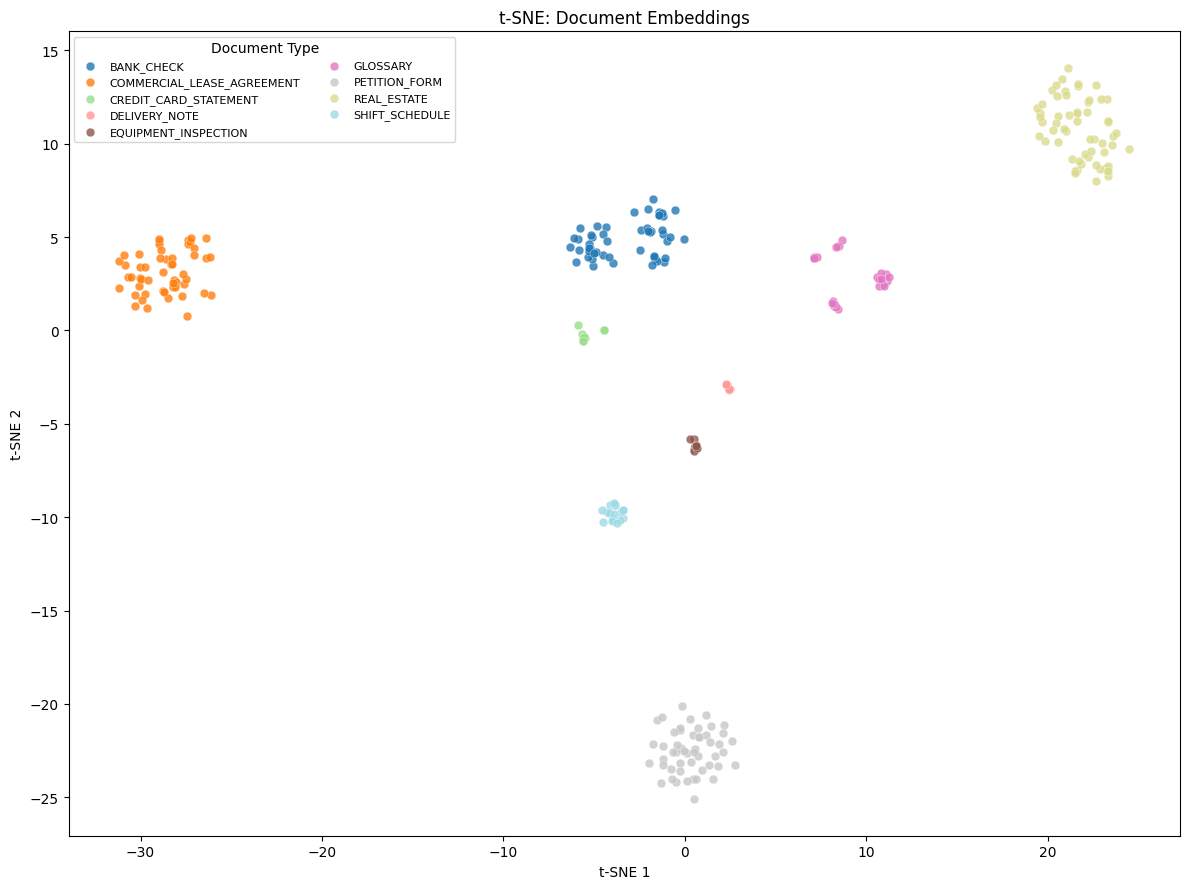
The clustering achieved a perfect Adjusted Rand Index (ARI) and Normalized Mutual Information (NMI) of 1.0. ARI measures how well the clustering matches the true groupings, while NMI quantifies the amount of information shared between the predicted and actual clusters. Every cluster maps one-to-one to a ground truth document class at 100% purity. These results demonstrate that high-quality multimodal embeddings can enable fully unsupervised document classification. The embeddings accurately separate diverse document types, such as bank checks, real estate forms, and credit card statements, without labeled training data.
Note: Performance on this benchmark dataset does not guarantee similar results on your specific document data because the characteristics of your dataset directly influence the quality of the results.
Agentic schema generation
After the clusters are identified, the pipeline enters the agentic phase. For each cluster, a Strands Agent is invoked to determine the document type and generate a schema. We chose Strands Agents for its model-driven approach. It gives the model the flexibility to reason through each schema autonomously. The agent needs to strategically visualize documents at various locations within the cluster to capture the full variety before generating a schema. For example, it examines one document near the center, one at the periphery, and one at a middle distance. A more deterministic, fixed sampling approach wouldn’t work here because clustering quality depends heavily on your specific documents. To do this, the agent is equipped with two specialized tools:
- Cluster Analysis Tool – Retrieves document IDs ordered by distance from the cluster centroid, enabling the agent to sample strategically across the range of variation within the cluster.
- Document Viewer Tool – Fetches and compresses document images for visual inspection, automatically handling size constraints for the model’s context window.
The agent’s system prompt encodes domain expertise about JSON Schema conventions and IDP Accelerator configuration requirements. It instructs the agent to:
- Sample documents strategically, stopping early if confident it has sufficient coverage.
- Generate JSON Schemas with proper metadata, type definitions, and descriptions.
- Include IDP Accelerator-specific annotations such as
x-aws-idp-document-typeandx-aws-idp-evaluation-method.x-aws-idp-evaluation-methodis used by the Stickler-based evaluation extension. - Create reusable
$defsfor common structures like addresses, line items, and tax information. - Apply appropriate evaluation methods based on field type:
EXACTfor strings,NUMERIC_EXACTfor numbers,LLMfor complex or nested objects.
The tools, prompt, and model equip the agent with capabilities to reason about its own sampling strategy. These agents run in parallel, so you’re not waiting for each cluster to finish before the next one starts.
Schema analysis
After each agent independently generates a schema, the schema analysis step evaluates the holistic differentiation between the output. It assesses whether the discovered document groupings are well-separated or overlapping, and whether the generated schemas are complete and consistent. It looks for redundancies or duplication across document types. Based on these findings, it surfaces concrete recommendations such as merging clusters or refining field definitions. It produces a summary report including a human-readable overview of your classes. This quality report is visible to you in the Discovery Job details of the IDP Accelerator.
Running a job on your documents
To run the multi-document discovery workflow on your own documents, follow these steps in the IDP Accelerator Console.
Step 1: Create a new configuration
Start by creating a fresh configuration in the IDP Accelerator Console:
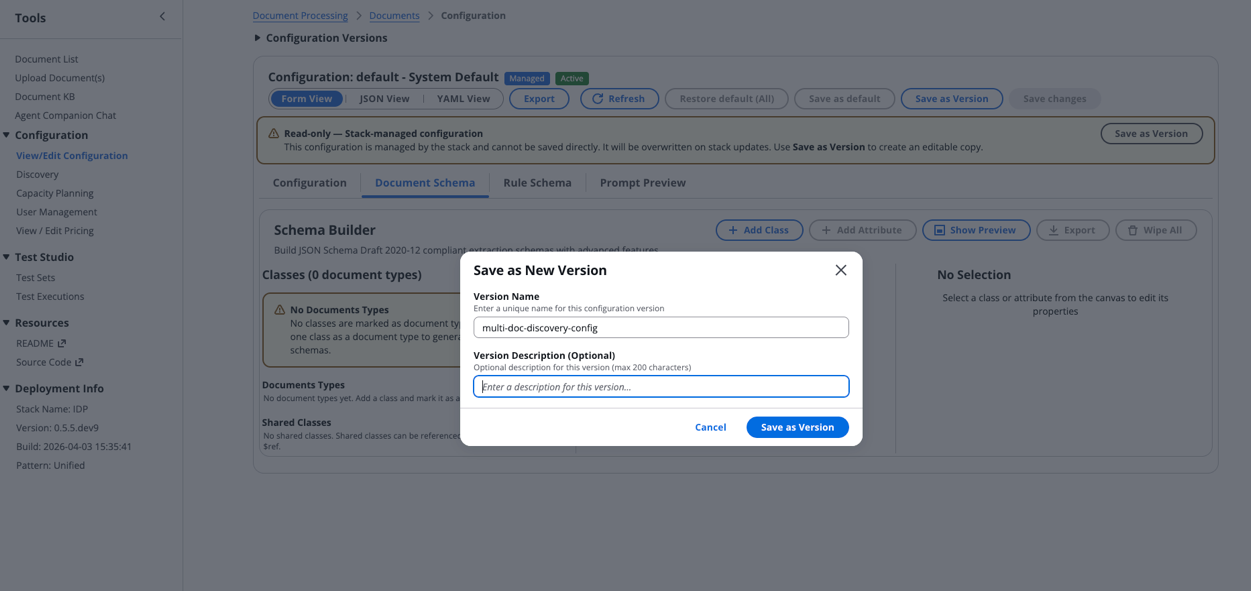
- Navigate to the Configuration section and select View/Edit Configuration.
- Choose Document Schema > Wipe All to create a new empty configuration.
- Select Save as Version, provide a descriptive Version Name, then choose Save as Version.
Step 2: Run multi-document discovery
With your configuration ready, initiate the discovery process:
- Navigate to the Discovery section and select the Multiple Documents option.
- Choose the configuration version you just created.
- Configure your document source:
- Select either S3 Path or Zip Upload.
- Choose your source bucket.
- Specify the S3 prefix where your documents are stored.
Note: Your documents must be added to one of the IDP Accelerator’s existing buckets (Discovery Bucket, Test Bucket, or Input Bucket) to use the Source Bucket option.
- Choose Start Discovery to trigger the state machine.
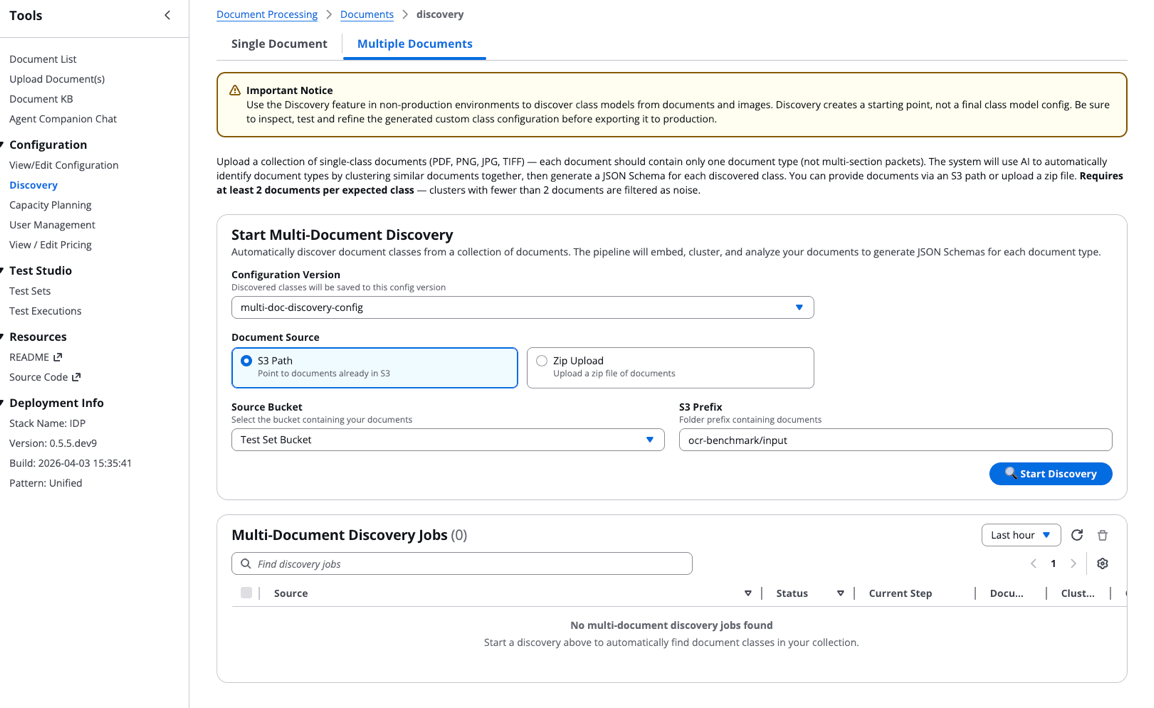
Step 3: Monitor discovery job and view results
Track your discovery job progress:
- A new entry will appear in the Multi-Document Discovery Jobs table showing execution status, current step, and metadata.
- After the job completes, choose the Source field to view results:
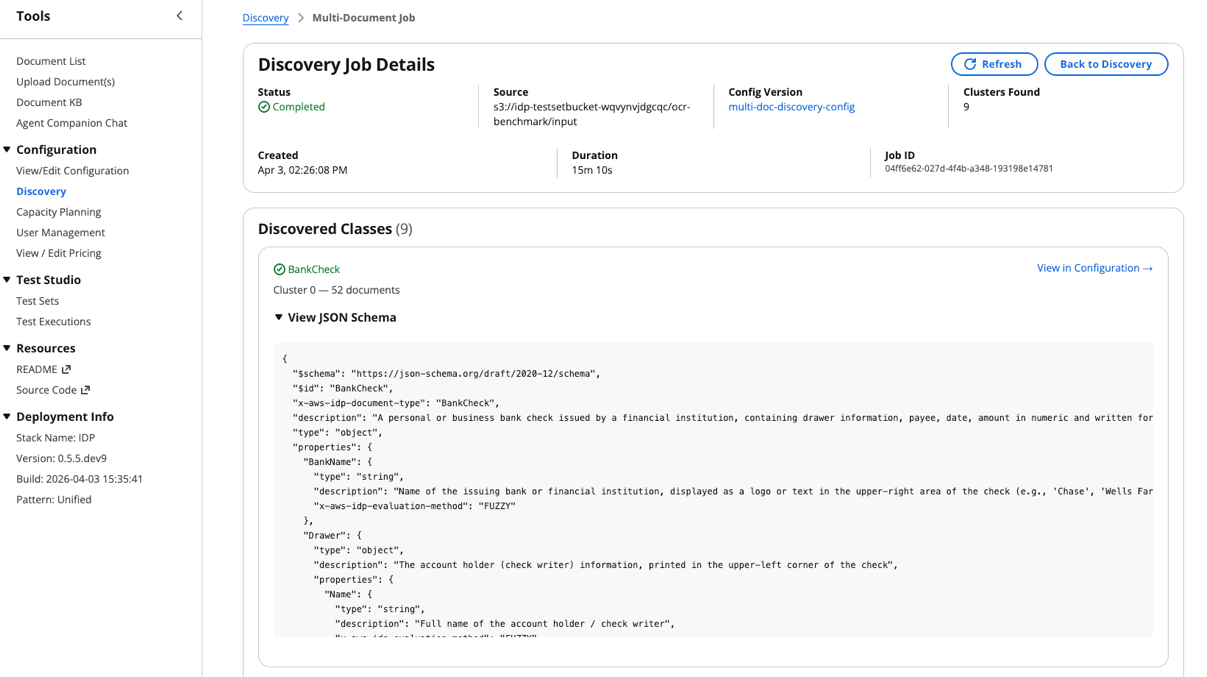
- Scroll to the bottom of the Discovery Job Details to access the Quality Report:
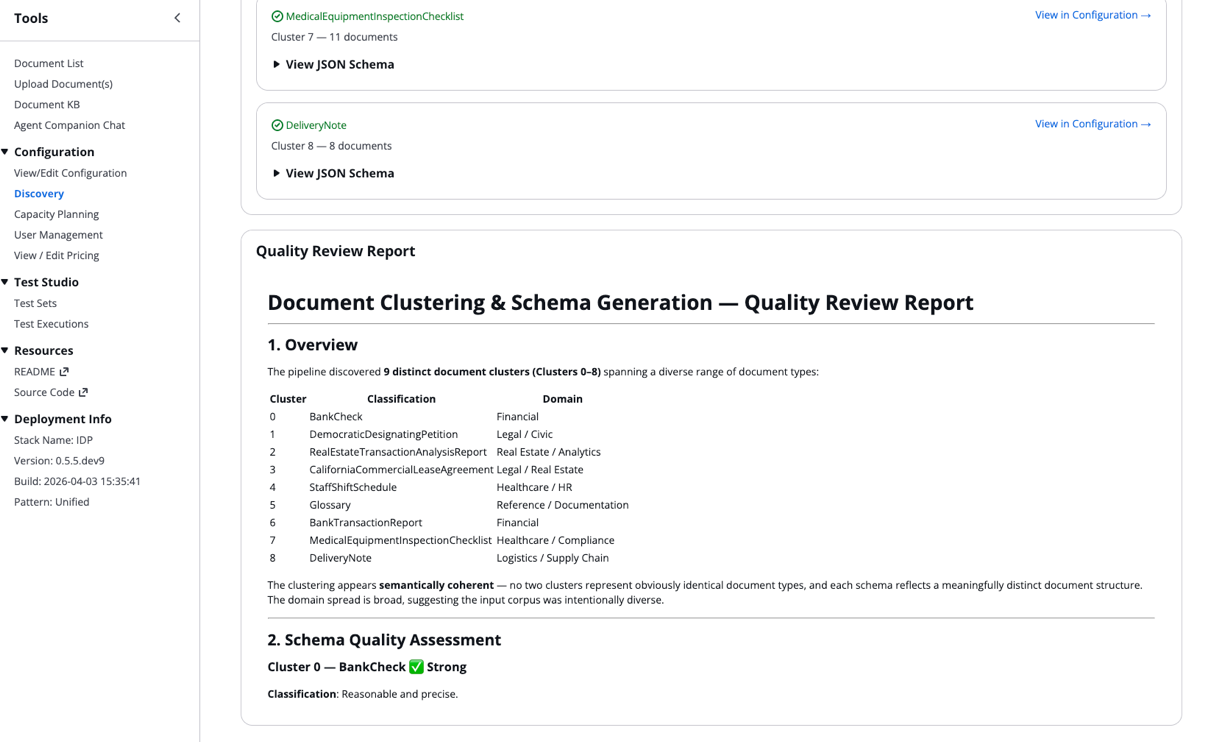
The discovered classes and their JSON schemas automatically integrate into your configuration file.
Best practices for optimal results
Before you run the multi-document discovery job at scale, there are a few best practices worth keeping in mind. Because the workflow currently processes only the first page of each PDF, make sure your input files are single-document files. Multi-document packets aren’t yet supported. After you have initial results, thoroughly review the quality report summary to catch issues like overlapping clusters or uneven document distributions before you finalize your schemas.
Next steps
Where you go from here depends on what the workflow found in your documents:
- If your schemas look clean and the quality report shows low overlap: You’re ready to move forward with running IDP at scale on your documents. The schemas are automatically added to the classes field of the IDP Accelerator configuration.
- If the quality report flagged overlapping clusters, review the recommendations and use them to refine the generated schemas. This might include merging similar schemas into a single class or adjusting field definitions to reduce overlap.
- If schema quality is inconsistent across clusters: Check whether your document collection has a highly uneven distribution of document types. Running the discovery job on a more balanced subset can help the agent produce more reliable clusters and schemas.
Conclusion
In this post, we showed you how the multi-document discovery feature solves the challenge of needing schemas before you can process documents but needing to process documents before you can build schemas. The solution combines visual embeddings, automatic clustering, and agentic schema generation with multimodal LLMs. It transforms an opaque collection of unknown documents into structured, review-ready document classes and schemas. You’ve seen how the workflow handles embedding generation, cluster tuning, and parallel classification and schema generation. You’ve also seen how the reflection step gives you a transparent analysis into the agent’s generated output for human review.
We’d love to hear how the multi-document discovery feature works on your document collections. Share your results, questions, or suggestions in the comments below. If you run into issues or want to contribute, open an issue or pull request in the GitHub repository.