Artificial Intelligence
Design responsible AI controls for Amazon Aurora PostgreSQL
A customer support chatbot that queries historical tickets and knowledge base articles stored in Amazon Aurora PostgreSQL-Compatible Edition can deliver fast, context-aware answers. However, it also introduces challenges around privacy, accuracy, safety, and governance, especially when the underlying data contains sensitive customer information. In this post, we map the eight AWS Responsible AI (RAI) dimensions to Aurora PostgreSQL capabilities. We then walk through a design pattern for the Explainability dimension, using a Retrieval Augmented Generation (RAG) based customer support chatbot as the reference use case. This post implements one dimension, Explainability, in depth. Treat it as Part 1 of a series rather than a full build-out of all eight.
Amazon Aurora PostgreSQL-Compatible Edition makes it more straightforward to operationalize responsible AI through its native Aurora Machine Learning (Aurora ML) capabilities. With Aurora ML, you can invoke Amazon SageMaker endpoints and Amazon Bedrock foundation models directly from SQL, without data movement, custom extract, transform, and load (ETL) pipelines, or complex integrations. This post uses Aurora ML to generate vector embeddings from SQL, keeping the embedding pipeline inside the database layer.
AWS defines eight core Responsible AI dimensions, published through the AWS Well-Architected Responsible AI Lens, Amazon Bedrock Guardrails, and the Responsible Use of AI Guide. These dimensions (Fairness, Explainability, Privacy and Security, Safety, Controllability, Veracity and Robustness, Governance, and Transparency) provide a structured framework for evaluating and implementing trustworthy AI systems.
Use case overview
Customer support systems often struggle to provide accurate, context-aware responses while maintaining privacy and compliance. Consider a customer support chatbot built on Amazon Aurora PostgreSQL that uses RAG with pgvector embeddings, Amazon Bedrock model inference, and AWS Responsible AI guardrails to deliver grounded, explainable responses.
A customer can ask questions such as “Why was my last bill high?” or “Where is my last order?” and receive accurate answers with citations, while sensitive data remains obscured through personally identifiable information (PII) redaction and access controls.
Mapping the AWS Responsible AI dimensions to Aurora PostgreSQL
The following table maps the eight AWS Responsible AI dimensions to practical implementation strategies for a customer support chatbot built on Amazon Aurora PostgreSQL-Compatible Edition. It highlights how database features, AWS AI services, and governance controls work together to deliver a trustworthy, secure, and explainable RAG-based chatbot.
| RAI Dimension | What It Means | Implementation Approaches | Key PostgreSQL / Aurora Features | Primary AWS Services / Tools |
| 1. Fairness | Chatbot should provide equal quality responses regardless of language, region, or customer profile | Bias testing using diverse support queries. Decouple demographics from embeddings. Metadata filtering and multilingual testing. | pgvector, JSONB metadata, SQL filtering, views | Amazon Bedrock Model Evaluation, Amazon SageMaker Clarify |
| 2. Explainability | Users and support teams should know why the chatbot gave a specific answer | Log retrieved chunks, similarity scores, and citations. RAG tracing with source attribution. Full interaction logging. | chat_interactions table, array columns, JSONB logs, pgvector similarity | Amazon Bedrock Knowledge Bases, Amazon Bedrock InvokeModel |
| 3. Privacy and Security | Protect customer PII such as name, phone, and order details in tickets | PII redaction before embedding. Row-Level Security (RLS), encryption, IAM auth, RBAC, and anonymization. | Row-Level Security, pgcrypto, roles, policies | Amazon Bedrock Guardrails, AWS KMS, Amazon Comprehend, AWS IAM |
| 4. Safety | Help prevent harmful, toxic, or inappropriate responses | Content filters, denied topics, prompt injection protection, rate limiting, and moderation. | SQL functions, interaction logs | Amazon Bedrock Guardrails |
| 5. Controllability | Ability to steer chatbot behavior and escalate to humans | Human-in-the-loop escalation, feedback table, feature flags, prompt control, and kill switch. | chat_feedback table, escalation tables, triggers | Amazon Bedrock Guardrails, Amazon CloudWatch, AWS CloudTrail |
| 6. Veracity and Robustness | Verify accurate responses grounded in support data and avoid hallucinations | RAG grounding with similarity threshold. Versioned documents and validation checks. | pgvector typed columns, CHECK constraints, triggers | Amazon Bedrock Guardrails, Amazon Bedrock Model Evaluation |
| 7. Governance | Maintain audit trail and accountability for chatbot decisions | Audit logging with retention policy. Model version tracking and Amazon S3 archival. | pgaudit, pg_cron, JSONB model metadata | AWS Audit Manager, AWS CloudTrail |
| 8. Transparency | Clearly inform users they are interacting with AI and show data sources | Powered-by-AI notice, citations, privacy notice, and source explanation. | SQL views, interaction logs | Amazon Bedrock Knowledge Bases, AWS AI Service Cards |
Note: These are example approaches and may vary by use case.
Solution overview
This reference architecture shows how Responsible AI controls map to each component of a RAG-based chatbot on Amazon Aurora PostgreSQL-Compatible Edition.
An ingestion pipeline redacts PII from support tickets, FAQs, and product documents, then converts them into vector embeddings. When a user submits a query, AWS Lambda runs a semantic search over Aurora PostgreSQL, applies Amazon Bedrock Guardrails for privacy and grounding, sends the guarded context to an Amazon Bedrock foundation model (FM), and logs every interaction for explainability and governance.
Lambda grounds responses in enterprise data, redacts PII and applies Row-Level Security (RLS) for privacy, records citations and interaction logs for explainability, and writes audit records for governance.
When to build this versus use a managed service: Amazon Bedrock Knowledge Bases provides built-in RAG with citations and is the simpler choice when default retrieval and citation behavior meets your needs. Build the custom logging design in this post when you need provenance stored in your own schema. That provenance includes retrieved versus cited sources, similarity scores, and guardrail traces that you can query with SQL and retain under your own policies.
The following diagram illustrates the end-to-end architecture of this solution, showing the data ingestion flow (left), the query and response flow (center), and the responsible AI controls applied at each stage (center and right).
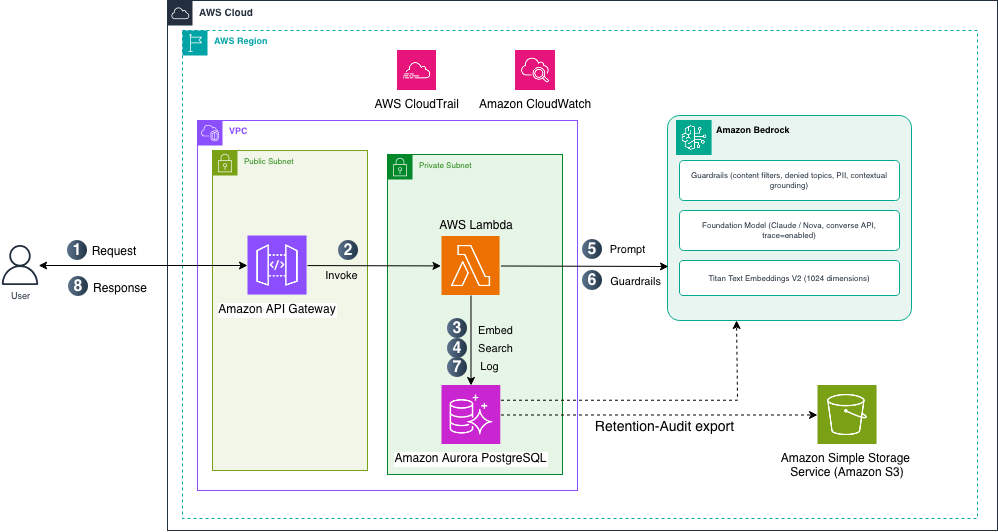
Figure 1: Architecture of RAG-based customer support chatbot with Responsible AI controls on Amazon Aurora PostgreSQL
Data ingestion
An ingestion pipeline loads historical support tickets, FAQs, and product documentation into Amazon Aurora PostgreSQL after redacting PII, using the pgvector and aws_ml extensions for vector operations and Aurora ML integration.
The Aurora ML aws_bedrock.invoke_model_get_embeddings function transforms the text into Amazon Titan Text Embeddings V2 vectors (1,024 dimensions), and pgvector stores them.
Aurora PostgreSQL functions as both a relational store for structured customer data and a vector database for semantic search.
Query and response flow
When a user asks a question, the chatbot follows these steps (see Figure 1):
- The user sends a natural language question to Amazon API Gateway over HTTPS.
- API Gateway invokes AWS Lambda.
- Turn the question into a vector. Lambda calls the Aurora ML
aws_bedrock.invoke_model_get_embeddingsfunction with Amazon Titan Text Embeddings V2. This must be the same model used to embed the knowledge base, so the question and documents both produce comparable 1,024-dimension vectors. - Run a similarity search. Aurora PostgreSQL uses the
pgvectorcosine distance operator to compare the question vector with the stored knowledge vectors, and returns the most relevant chunks with their similarity scores. Row-Level Security limits results to the current tenant. - Build the augmented prompt. Lambda combines the user’s question with the retrieved chunks, labeling each one
[Source N]. This gives the model knowledge from your database that it would not otherwise have. - Generate a grounded answer. Lambda sends the prompt to Amazon Bedrock. Guardrails check the input (content filters, denied topics, PII), the foundation model writes an answer based on the retrieved chunks, and a contextual grounding check confirms the answer is supported by those sources.
- Log the interaction for explainability. Lambda writes the complete interaction to the
chat_interactionstable: the question, retrieved chunk IDs, similarity scores, the sources actually cited, the guardrail trace, and the model ID. - Lambda returns the answer, with its source citations, to the user.
Supporting operations run separately from each request:
- Ingestion: document embeddings are created once, when content is loaded (see Data ingestion).
- Retention:
pg_cronarchives older interaction records to Amazon Simple Storage Service (Amazon S3). - Monitoring: Lambda sends logs and metrics to Amazon CloudWatch, and AWS CloudTrail records API activity for audit.
Prerequisites
Before you begin, make sure you have the following in place:
- An Amazon Aurora PostgreSQL cluster with the
pgvectorextension enabled. HNSW indexes and iterative index scans require newerpgvectorversions, and Aurora ML and Amazon Bedrock model support are versioned separately. See the Aurora ML, pgvector, and Bedrock documentation for the current minimum versions rather than pinning to a specific one. - The
aws_mlextension enabled on the cluster (CREATE EXTENSION IF NOT EXISTS aws_ml CASCADE), with an AWS Identity and Access Management (IAM) role attached to the cluster grantingbedrock:InvokeModel. Aurora ML calls Bedrock in the cluster’s own Region. - The
aws_s3extension enabled on the cluster (CREATE EXTENSION IF NOT EXISTS aws_s3 CASCADE), with an IAM role attached for thes3Exportfeature so the retention job can export to Amazon S3. - Amazon Bedrock access with Amazon Titan Text Embeddings V2 (
amazon.titan-embed-text-v2:0) for embeddings and a foundation model that supports the Bedrock Converse API for answer generation. Model availability and recommended versions change over time, so choose a current model from Supported foundation models in Amazon Bedrock. Newer models are invoked through cross-Region inference profile IDs. - Amazon Bedrock Guardrails configured for PII protection, content filtering, and contextual grounding (enable the contextual grounding policy in your Guardrail configuration).
- IAM roles with appropriate permissions for Amazon Bedrock, Lambda, and Aurora PostgreSQL.
- A custom cluster parameter group that adds
pgauditandpg_cronto the existingshared_preload_librariesvalue (append to it rather than replacing it, so defaults such aspg_stat_statementsare preserved. This requires a cluster restart). Setcron.database_nameto your target database. - Basic familiarity with PostgreSQL, SQL, and Python.
Note: The prerequisites listed here focus on the database layer. Your application layer (for example, AWS Lambda, Amazon API Gateway, and a chat UI) is separate and depends on your deployment architecture.
Design patterns for the Explainability dimension
This section presents the database-layer design patterns that make every AI-generated response traceable, from the user query, through retrieval and guardrail evaluation, to the final answer and its citations.
Step 1: Set up the database schema
Create the core tables for customer data, chat sessions, interaction logging, and feedback:
Start by creating the schema and the tables you need. Each table serves a specific Responsible AI dimension:
The customers table stores profiles for tenant-aware access control:
The chat_interactions table is the core of the Explainability implementation. It logs every query-response cycle with full RAG provenance, including retrieved chunk IDs, similarity scores, cited versus retrieved sources, guardrail traces, and the model used:
Because chat_interactions stores raw request_text and response_text, protect it the same way as the source data: redact PII before the INSERT (reusing the ingestion-time guardrail), or encrypt those columns with pgcrypto, and apply Row-Level Security to the log tables so tenants cannot read each other’s interactions. Logging unprotected customer content would undercut the Privacy and Security control this design is meant to demonstrate.
The chat_feedback table captures user ratings and comments on chatbot responses, which supports the Controllability dimension. The ON DELETE CASCADE clause makes sure the 90-day retention purge does not fail with foreign key violations:
Step 2: Prepare the knowledge base with pgvector and Aurora ML
Create the retrieval layer with vector embeddings, tenant isolation, and Aurora ML integration:
Create an HNSW index for fast approximate nearest neighbor search:
Enforce tenant isolation with Row-Level Security so that vector search results are scoped to the current tenant before data leaves the database:
Generate vector embeddings directly from SQL using Aurora ML, keeping the embedding pipeline inside the database layer:
Always redact PII before inserting data into the knowledge base. Use Amazon Bedrock Guardrails (the ApplyGuardrail API) or Amazon Comprehend (the detect_pii_entities API) to identify and mask PII in your ingestion pipeline, as shown in the following example:
Step 3: Retrieve context and generate responses
When a query reaches your application layer, retrieve the top matching knowledge chunks using the pgvector cosine similarity operator. The following SQL query shows this pattern:
Note: The 0.7 cosine-similarity cutoff drops weakly related chunks so the model is not grounded on noise. Tune it against your own data. The category filter and this threshold both post-filter HNSW results and may return fewer than 5 rows. Raise hnsw.ef_search or use iterative index scans (pgvector 0.8.0+) to compensate.
The following pseudocode shows the key patterns for contextual grounding, guardrail-intervention handling, citation parsing, and interaction logging. The snippets focus on the Responsible AI logic rather than application plumbing.
Use guardContent blocks to enable contextual grounding in the Bedrock Converse API:
Check stopReason to handle cases where the guardrail blocks the response:
Distinguish actually cited sources from all retrieved sources. On an Explainability post, this distinction is the point:
Log every interaction for Explainability. The INSERT captures the full RAG provenance chain:
We define confidence_score as the mean cosine similarity of the top-k retrieved chunks. The intent field classifies the query (for example, billing or order_status), and response_latency_ms records end-to-end inference time.
Step 4: Log interactions and add governance
Every chatbot interaction (the user query, retrieved chunks, similarity scores, response, and citations) is logged to the chat_interactions table using the INSERT shown in Step 3, supporting Explainability and Transparency. Customer feedback captured in chat_feedback supports continuous improvement, reinforcing Controllability. For Governance, pgaudit provides query audit trails, and pg_cron drives automated data retention.
Set up pgaudit and pg_cron, which both require shared_preload_libraries (see Prerequisites):
Query for governance review:
Archive both tables to Amazon S3 and purge only after the export succeeds. Running archive and purge as two independent cron jobs is unsafe: if the archive fails, a separately scheduled purge still deletes the rows. Wrap both in one function so the DELETE runs only when the export returns. Also archive chat_feedback, because the cascade would otherwise delete feedback that was not saved. The 90-day window matches a typical support-data retention policy. Adjust it to your own regulatory requirements.
Validate the solution
Run one question end to end, then read the row it produced. That single row is the evidence the design works: it shows which chunks were retrieved, how similar they were, which sources the answer actually cited, and the guardrail outcome.
Expected: One row whose cited_sources is a subset of retrieved_chunk_ids, similarity_scores at or above your 0.7 threshold, and a guardrail_action of NONE for a clean question. If cited_sources is empty, the model did not ground its answer and the response should be treated with caution.
Limitations and considerations
- Amazon Bedrock Guardrails adds latency to each inference call and incurs per-text-unit charges. Contextual grounding has additional pricing. Benchmark your response times and costs before production deployment.
- Interaction logging grows storage over time. The S3 archival and purge cron jobs help manage this, but monitor your Aurora storage and adjust the retention period as needed.
- HNSW indexes provide approximate nearest neighbor search. Post-filtering (for example, by category or tenant) runs after the index scan and may return fewer rows than your LIMIT. Increase
hnsw.ef_searchor use iterative index scans (pgvector0.8.0+) to improve recall. - The contextual grounding check evaluates whether the model’s response is grounded in the provided context. It does not guarantee factual accuracy of the source documents themselves.
- Aurora ML embedding generation runs synchronously in the database. For large batch ingestion, consider batching updates or using an asynchronous pipeline.
- Everything in this post except Aurora ML (the
aws_bedrock.invoke_model_get_embeddingscalls) works on Amazon Relational Database Service (Amazon RDS) for PostgreSQL as well.
Clean up
To avoid ongoing charges, delete the following resources if you created them for this walkthrough:
- Unschedule the cron job first, or it fails nightly once the schema is gone:
SELECT cron.unschedule('archive_and_purge');. - Drop the schema:
DROP SCHEMA rai_postgresql CASCADE;. - Delete the Amazon Bedrock Guardrail.
- Remove the AWS Lambda functions and API Gateway endpoints.
- Delete the Amazon S3 audit bucket (or configure a lifecycle policy).
- Delete the Aurora PostgreSQL cluster (or stop it if you plan to reuse it).
- Remove IAM roles created for Bedrock and Aurora ML integration.
- Drop the application role (roles are not removed by
DROP SCHEMA):DROP ROLE app_user;.
Cost considerations: This solution uses Amazon Aurora PostgreSQL, Amazon Bedrock (model inference and embeddings), and Amazon Bedrock Guardrails. Costs vary by Region, instance size, request volume, and model choice. For pricing details, see the pricing pages for each service.
Conclusion
Amazon Aurora PostgreSQL-Compatible Edition, with pgvector, Row-Level Security, pgaudit, pgcrypto, pg_cron, and Aurora ML, provides database-layer building blocks for Responsible AI. Several dimensions also depend on AWS services outside the database, as the mapping table shows.
In this post, we focused on the Explainability dimension as a detailed design walkthrough. By logging retrieved chunk IDs, similarity scores, cited sources, and guardrail traces in Aurora, you get a queryable audit trail at the database layer. The mapping table shows how the remaining dimensions build on the same foundation, combining Aurora PostgreSQL features with AWS AI services.
The key takeaways from these design patterns are:
- Log retrieval provenance at query time: retrieved and cited chunk IDs, similarity scores, and the guardrail trace.
- Distinguish the sources actually cited from everything retrieved. That distinction is what makes an answer explainable.
- Enforce tenant isolation with Row-Level Security, and set the tenant context before a vector search runs.
- Archive audit data before purging, and protect the log tables as carefully as the source data.
As a next step, explore Amazon Bedrock Knowledge Bases, the fully managed RAG capability that now supports Aurora PostgreSQL as a vector store in many AWS Regions and provides built-in citation generation, which can help reduce the custom integration code required for Explainability in new projects.