AWS Storage Blog
Bridge legacy and modern applications with Amazon S3 Access Points for Amazon FSx
Organizations rely on file storage accessed from traditional, file-based, applications while simultaneously wanting to build modern, cloud-native applications and services that access the same underlying data. Consequently, many cloud-native apps are built to work with Amazon S3. Amazon Web Services (AWS) recently introduced a new capability, S3 Access Points for Amazon FSx which solves challenges for enterprises managing both legacy and modern applications. The new Amazon Simple Storage Service (Amazon S3) Access Points for Amazon FSx for NetApp ONTAP and Amazon FSx for OpenZFS enables seamless access to file data through both file protocols and Amazon S3 APIs.
Using S3 Access Points with Amazon FSx allows concurrent, multi-protocol access to shared data sets from both file- and object-based applications. This dual-protocol capability means that you can get the best of both worlds without data duplication or complex synchronization mechanisms. Existing file-based applications continue accessing data through traditional file protocols (NFS, SMB), while cloud-native, serverless applications simultaneously access the same data using the Amazon S3 API. Furthermore, all of this is done without having to duplicate or move data between multiple storage services.
The business advantages are compelling, you can now build modern, event-driven, workloads using your enterprise file data. These event-driven architectures can automatically trigger AI inference workflows when new data arrives, initiate model training pipelines based on file modifications, process log files in real-time, and transform datasets on-demand, all without managing more infrastructure. This serverless approach delivers faster time-to-value for data-driven applications while you only pay for the compute that you actually use. This means that you remove the operational overhead of provisioning and managing dedicated servers, scale processing capacity automatically based on demand, and reduce both complexity and cost. Most importantly, you unlock innovation for your business without disrupting the legacy applications that still drive critical operations.
This post explores three serverless architecture patterns that show how S3 Access Points enable cloud-native applications to access Amazon FSx file data alongside your existing file-based workloads, bridging traditional and modern computing approaches without data duplication.
Architecture 1: Containerized applications on Amazon ECS with AWS Fargate
This architecture demonstrates how containerized serverless applications running on Amazon Elastic Container Service (Amazon ECS) with serverless compute through AWS Fargate can simultaneously access the same file data as traditional file-based applications running either on Amazon Elastic Compute Cloud (Amazon EC2) instances or from an on-premises environment. This pattern is ideal for organizations modernizing applications incrementally—running new microservices in containers while maintaining existing file-based applications without data duplication.
This architecture provides several key advantages:
- Removes data silos and duplication—Instead of maintaining separate copies of data for file-based and object-based applications, both workloads access a single source of truth, reducing storage costs and removing complex data synchronization workflows.
- Accelerates application modernization—Development teams can build cloud-native containerized applications using familiar Amazon S3 APIs and SDKs without waiting for complete migration of legacy file-based systems, enabling parallel modernization tracks.
- Streamlines container deployments—Fargate tasks can access file data through standard Amazon S3 API calls without requiring NFS/SMB client configuration, volume mounting, or persistent storage management, reducing container complexity and startup times.
- Enables true serverless architecture—Unlike traditional file mounts that require persistent connections, Amazon S3 API access allows containers to scale to zero and start on-demand without maintaining file system connections, optimizing costs for variable workloads.
- Provides protocol flexibility—Different application components can use the most appropriate access method (NFS/SMB for file operations, Amazon S3 API for object operations) based on their specific requirements, without architectural compromises.
- Maintains real-time consistency—All changes are immediately visible across both access methods, providing data integrity for workflows that span traditional and modern applications.
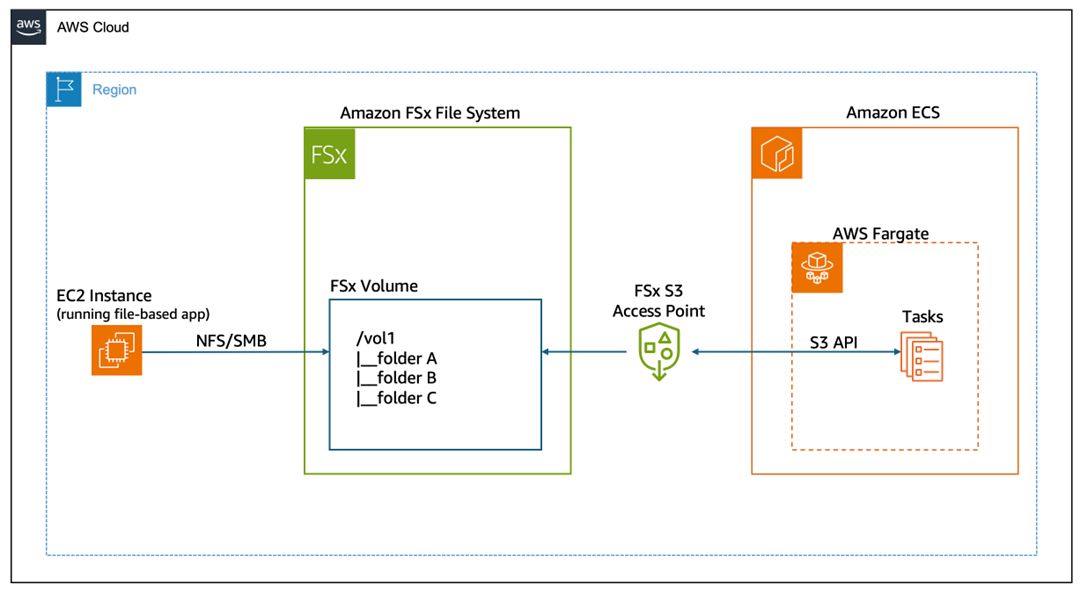
Figure 1: Amazon S3 Access Points for FSx architecture diagram.
How it works
This architecture enables concurrent access to shared data through two different protocols:
- EC2 instances mount the Amazon FSx file system using NFS or SMB protocols, providing traditional file system access for legacy applications.
- ECS Fargate tasks access the same data through the Amazon S3 access point using the AWS SDK for S3, enabling containerized serverless applications to read and write data using familiar Amazon S3 APIs.
- Data remains consistent across both access methods—changes made through file protocols are immediately visible through the Amazon S3 API and in the other direction.
- No data movement is required—both workloads access the same underlying storage in the Amazon FSx file system.
Architecture 2: Event-driven serverless processing with AWS Lambda
AWS Lambda is a serverless compute service that runs your code in response to events and automatically manages the underlying compute resources for you. This architecture demonstrates how Lambda functions can be triggered by events (for example scheduled or custom events) to process data in Amazon FSx file systems. This pattern is ideal for automated data processing workflows, ETL jobs (for example file format conversions), and scheduled analytics tasks—all of which need to access file data without maintaining EC2 instances.
This architecture provides several key advantages:
- Eliminates infrastructure management overhead—Lambda functions can process file data without requiring EC2 instances, NFS/SMB client configuration, or VPC file system mounts, which dramatically reduces the operational complexity and maintenance burden.
- Enables true pay-per-use economics—Process file data only when events occur, paying solely for actual execution time rather than maintaining always-on compute resources, which results in significant cost savings for intermittent or scheduled workloads.
- Streamlines Lambda function development—Developers can use standard AWS SDK for Amazon S3 calls instead of complex file system libraries or custom mounting logic, which accelerates development and reduces code complexity.
- Provides automatic scalability—Lambda automatically handles concurrent processing of multiple files or events without capacity planning, making it ideal for variable workloads such as batch processing, nightly ETL jobs, or burst analytics.
- Reduces cold start latency—Amazon S3 API access eliminates the overhead of mounting file systems during Lambda initialization, which enables faster function startup and more responsive event processing.
- Bridge legacy and modern architectures—Existing file-based applications continue operating normally while serverless functions perform automated processing, transformations, or analytics on the same data without disruption or migration.
- Supports diverse event sources—The same file data can trigger processing from multiple sources (Amazon EventBridge schedules, Amazon S3 events, custom application events, AWS API Gateway) without architectural changes, which enables flexible workflow orchestration.
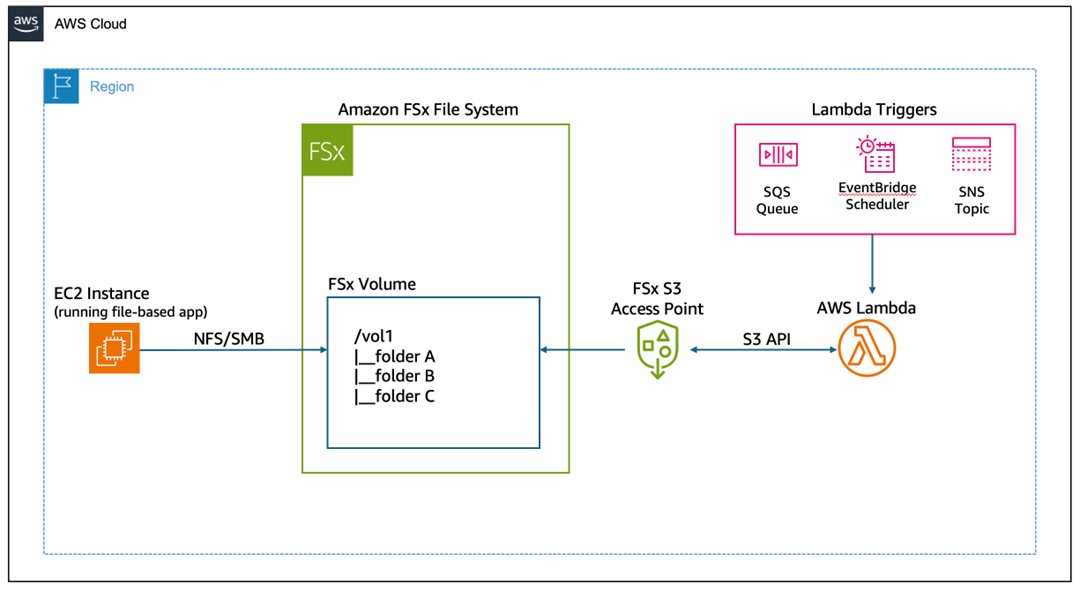
Figure 2: event-driven serverless processing of file data.
How it works
This architecture enables event-driven serverless processing of file data:
- EC2 instances mount the Amazon FSx file system using NFS or SMB protocols, providing traditional file system access for legacy applications.
- Event triggers initiate Lambda function execution—either on a schedule (EventBridge) or through custom application events.
- Lambda function executes serverless code that accesses file data through the Amazon S3 access point using standard Amazon S3 API calls.
- Data processing occurs without provisioning or managing servers—Lambda automatically scales based on the number of events.
- Results are written back to the Amazon FSx file system through the Amazon S3 access point, making them immediately available to file-based applications.
Architecture 3: Use AWS Step Functions to automate serverless workflows
This architecture shows how AWS Step Functions orchestrate serverless workflows such as automating discovery and cataloging of large datasets stored in Amazon FSx. In this example, the workflow triggers an AWS Glue Crawler that accesses file data through an S3 Access Point, scans the contents, and automatically catalogs the schema and metadata into the AWS Glue Data Catalog. Step Functions manages the entire process by periodically checking the crawler’s progress until it completes, removing the need for manual oversight or custom status-checking code. After cataloging completes, you can immediately query the data using Amazon Athena, transform it with AWS Glue ETL jobs, or analyze it with other AWS analytics services—all without moving data from your Amazon FSx file system.
This architecture provides several key advantages:
- Unlocks analytics on file-based data without migration—AWS Glue Crawlers can directly discover and catalog data stored in Amazon FSx file systems through the S3 Access Point, enabling SQL queries through Athena and ETL transformations without costly and time-consuming data movement to Amazon S3.
- Enables automated data discovery at scale—Crawlers can automatically detect schema changes, new partitions, and evolving data structures in your Amazon FSx file systems, maintaining an up-to-date data catalog without manual intervention or custom scripting.
- Streamlines complex workflow orchestration—Step Functions can coordinate multi-step processes (crawling, validation, querying, and notification) across Amazon FSx data using standard AWS service integrations, eliminating the need for custom polling logic or workflow management code.
- Provides unified access for hybrid workloads—Although file-based applications continue writing data through NFS/SMB, analytics workflows can simultaneously discover and query that same data through Amazon S3 APIs, creating a seamless bridge between operational and analytical systems.
- Accelerates time-to-insight—Data becomes queryable immediately after being written to Amazon FSx, without waiting for batch transfers or ETL pipelines, enabling near-real-time analytics on operational file data.
- Reduces operational complexity—The visual workflow designer and built-in error handling of Step Functions eliminate the need for custom orchestration code, while automatic retry logic and state management ensure reliable execution of multi-step processes.
- Supports incremental modernization of analytics—Organizations can build modern, serverless analytics pipelines on existing Amazon FSx data without disrupting legacy file-based applications, allowing gradual adoption of cloud-native analytics tools.
- Enables cost-effective periodic processing—Serverless components only run when needed (for example nightly catalog updates), avoiding the cost of maintaining always-on analytics infrastructure for intermittent data discovery tasks.
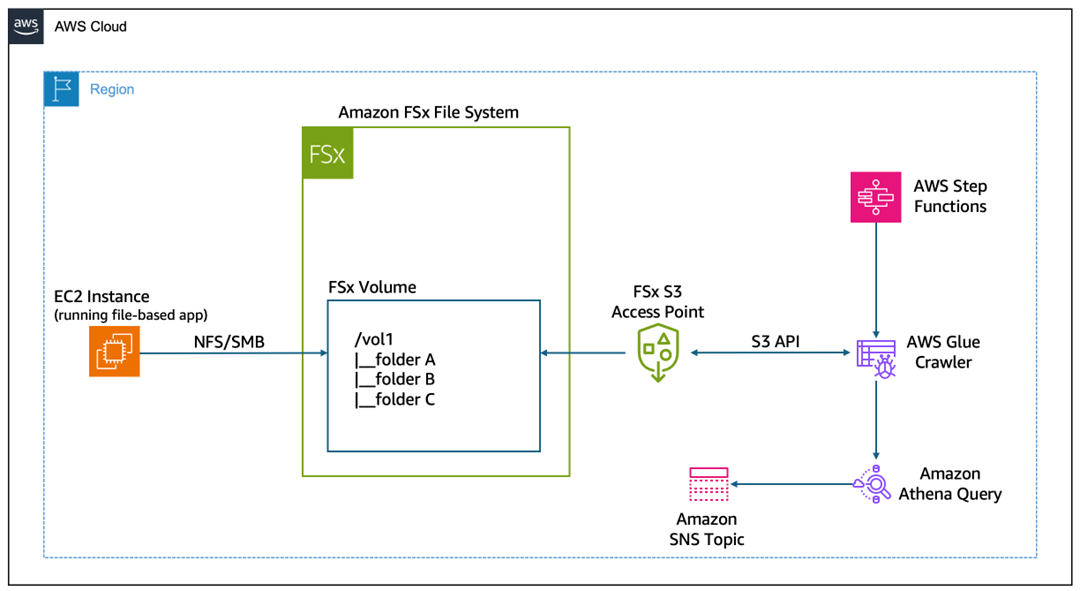
Figure 3: Architecture diagram showing end-to-end workflow to partition and query large datasets
How it works
This architecture enables an end-to-end workflow to partition and query large datasets.
- The Step Functions state machine begins execution, which is either manually triggered or invoked by an event source such as EventBridge.
- Step Functions calls the AWS Glue StartCrawler API to initiate the crawler, which begins scanning the Amazon FSx file system data through the S3 Access Point.
- The workflow pauses for 30 seconds to allow the crawler time to begin processing before checking its status.
- Step Functions invokes the AWS Glue GetCrawler API to retrieve the current state of the crawler execution.
- The workflow examines the crawler status to determine if it’s still running, has completed successfully, or has failed.
- If the crawler is still running, then the workflow returns to the Wait state and continues polling until the crawler finishes.
- When the crawler reaches a Ready or Stopped state, the Step Functions execution completes successfully and the cataloged metadata is available for use.
- If the crawler returns a Failed status, then the Step Functions execution terminates with a failure state for troubleshooting and remediation.
- An SQL query is executed against the newly cataloged data in Athena, filtering for specific partitions and limiting results to five rows.
- The SQL query results are retrieved from the Athena query.
- Results are published to an Amazon Simple Notification Service (Amazon SNS) topic, notifying subscribers of the processed data output.
Conclusion
Amazon S3 Access Points for Amazon FSx represent a practical solution to a common enterprise challenge: enabling modern, cloud-native applications to work with data created and managed by legacy systems. Rather than maintaining duplicate datasets or building complex synchronization pipelines, organizations can now provide direct Amazon S3 API access to their Amazon FSx file systems. This capability reduces operational complexity, eliminates data consistency issues, and lowers storage costs while preserving existing file-based workflows. The architecture patterns demonstrated here—containerized applications on Amazon ECS Fargate, event-driven AWS Lambda processing, and AWS Step Functions orchestration—show how serverless compute can directly integrate with traditional file storage, enabling automation, analytics, and AI/machine learning (ML) workloads without infrastructure overhead.
The path forward is clear: evaluate which datasets in your Amazon FSx for ONTAP or Amazon FSx for OpenZFS file systems could benefit from serverless processing, analytics, or integration with cloud-native services. Configure S3 Access Points for those file systems and begin building event-driven workflows that respond to business events in real-time. Whether you’re looking to automate data processing, enable analytics on operational data, or build AI-powered applications that learn from your file-based datasets, S3 Access Points provide the bridge between your existing infrastructure investments and modern serverless capabilities. Start small with a single use case—perhaps automated log processing or scheduled data transformations—and expand as you realize the operational and cost benefits of eliminating data duplication while accelerating innovation.