AWS Database Blog
Distribute Amazon RDS traffic between read replicas using Network Load Balancer
In this post, you will learn how to use a Network Load Balancer (NLB) to distribute traffic across Amazon Relational Database Service (Amazon RDS) read replicas with health-aware, AZ-affinity routing. You will also learn how this architecture simplifies hybrid connectivity over AWS Direct Connect or AWS Site-to-Site VPN to your RDS read replicas. The load balancer acts as the stable entry point for read replica traffic, without AWS PrivateLink overhead. For PrivateLink-based alternatives, see Accessing Amazon RDS across VPCs and Accessing Amazon RDS across accounts.
There are several approaches to balance traffic across read replicas, including Amazon Aurora (Aurora) built-in reader endpoints, Amazon Route 53 weighted routing, and open source proxies such as ProxySQL and PgBouncer. Each comes with benefits and trade-offs, which the following section discusses.
Existing approaches for read replica load balancing
Several approaches exist today for distributing read traffic across replicas, each with its own strengths. This post presents an architecture based on Network Load Balancer as an additional option to consider alongside them.
Aurora reader endpoint
If you run Aurora, you can use its built-in reader endpoints. The Aurora reader endpoint automatically load balances read traffic across available read replicas, distributing connections without requiring client-side logic, a proxy, or a load balancer. This simplifies your architecture and improves read scalability. You can learn more about the Aurora reader endpoint distribution logic in How does Aurora MySQL or PostgreSQL distribute workload between reader nodes.
Route 53 weighted routing
Route 53 weighted routing can distribute traffic across read replicas, as described in Load balancing strategies for RDS read replicas and this AWS re:Post article. This is straightforward to set up and works across all engines supported on Amazon RDS. This approach requires a Route 53 hosted zone. It is prone to client-side DNS caching that causes uneven traffic distribution. Setting a low time to live (TTL) value helps reduce the effect. It has no awareness of the caller’s Availability Zone. For on-premises clients over Direct Connect or Site-to-Site VPN, consuming Route 53 private hosted zones adds cost and complexity with Amazon Route 53 Resolver Inbound Endpoint.
Connection pooling with ProxySQL and PgBouncer
For connection pooling and database-aware routing, open source proxies such as ProxySQL and PgBouncer are well-established solutions that support read/write splitting and can distribute connections across read replicas. For a detailed comparison of PgBouncer and Amazon RDS Proxy for PostgreSQL workload, see understanding the difference between PgBouncer and Amazon RDS Proxy for PostgreSQL connection pooling. They also support highly available configurations with HAProxy and near zero-downtime upgrades. These tools introduce operational overhead because you must deploy, patch, and scale the proxy tier yourself. A single proxy instance is pinned to one Availability Zone, so database traffic routes through that AZ regardless of where the client and RDS instance reside. This prevents AZ-affinity traffic flow. Achieving high availability requires additional components or multiple proxy instances, adding further complexity.
The Network Load Balancer architecture described in this blog post addresses health-aware routing, AZ affinity, and hybrid connectivity in a single solution. This architecture works with any Amazon RDS engine that supports read replicas. Configure the target group port to match your engine (for example, 3306 for MySQL, 5432 for PostgreSQL).
Solution overview
To distribute read traffic across replicas with health awareness and AZ affinity, this solution uses a Network Load Balancer as the stable entry point. An AWS Lambda function keeps the Network Load Balancer target group synchronized with the current IP addresses of your RDS read replicas.
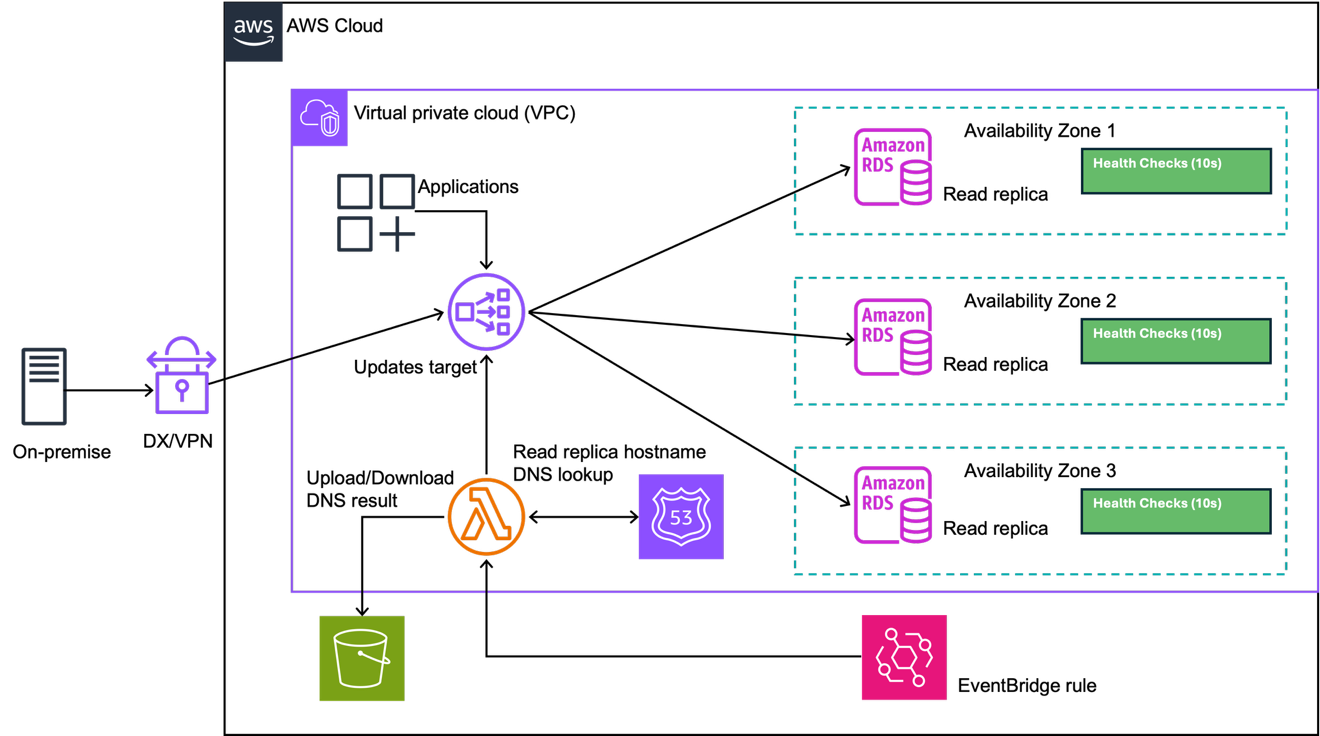
Figure 1: Architecture overview
How it works
The Lambda function, triggered by Amazon EventBridge, continuously synchronizes your RDS read replica IP addresses with a Network Load Balancer target group. It monitors DNS changes, registers new replicas, and cautiously deregisters stale ones, so your application traffic always flows to healthy, available database endpoints.
Trigger mechanism
Amazon EventBridge rule triggers the Lambda function every minute (configurable to a shorter interval). This frequent polling means that changes to your read replica fleet, whether from scaling events, failovers, or maintenance, are reflected in the Network Load Balancer target group within 60 seconds.
DNS resolution process
When invoked, the Lambda function reads environment variables containing the DNS names of your RDS read replicas and the Amazon Resource Name (ARN) of the Network Load Balancer target group to manage.
The function then resolves each replica DNS name to its current IP addresses. To handle transient DNS fluctuations (temporary resolution failures or network interruptions), the code includes retry logic that prevents false positives from triggering unnecessary deregistration.
State management
Because Lambda functions are stateless, the solution persists state across invocations using two JSON files stored in Amazon Simple Storage Service (Amazon S3).
active_ip.jsoncontains the IP addresses that were successfully resolved from DNS during the last invocation. This represents the known-good state of your replica fleet.pending_ip.jsontracks IP addresses that are candidates for deregistration, along with a counter indicating how many consecutive invocations each IP has been flagged for removal.
On the first invocation, if these files do not exist in S3, the Lambda function creates them automatically based on the current DNS resolution results and Network Load Balancer target group state.
Registration is immediate, while deregistration follows a cautious approach. Registering an IP that shouldn’t be registered carries low risk because the Network Load Balancer performs health checks on targets. If an IP is invalid or unreachable, the health check marks it as unhealthy and the Network Load Balancer won’t route traffic to it. Subsequent invocations clean up the IP when it stops appearing in DNS.
Key design decisions
AZ affinity and cross-AZ data transfer costs
Network Load Balancer supports Availability Zone DNS affinity. When you turn on this feature, clients that resolve the Network Load Balancer DNS name using Route 53 Resolver receive load balancer IP addresses within their own Availability Zone. If no healthy Network Load Balancer IP addresses exist in the client’s own Availability Zone, DNS might fall back to an IP address in another Availability Zone. For applications running on Amazon Elastic Compute Cloud (Amazon EC2), Amazon Elastic Container Service (Amazon ECS), or Amazon Elastic Kubernetes Service (Amazon EKS) within the same Amazon Virtual Private Cloud (Amazon VPC), this topology-aware routing helps reduce inter-AZ data transfer costs, lower latency, and build zonally independent application architectures.
To fully benefit from zonal affinity, keep cross-zone load balancing disabled so that traffic stays within a single Availability Zone end to end, minimizing both cost and latency.
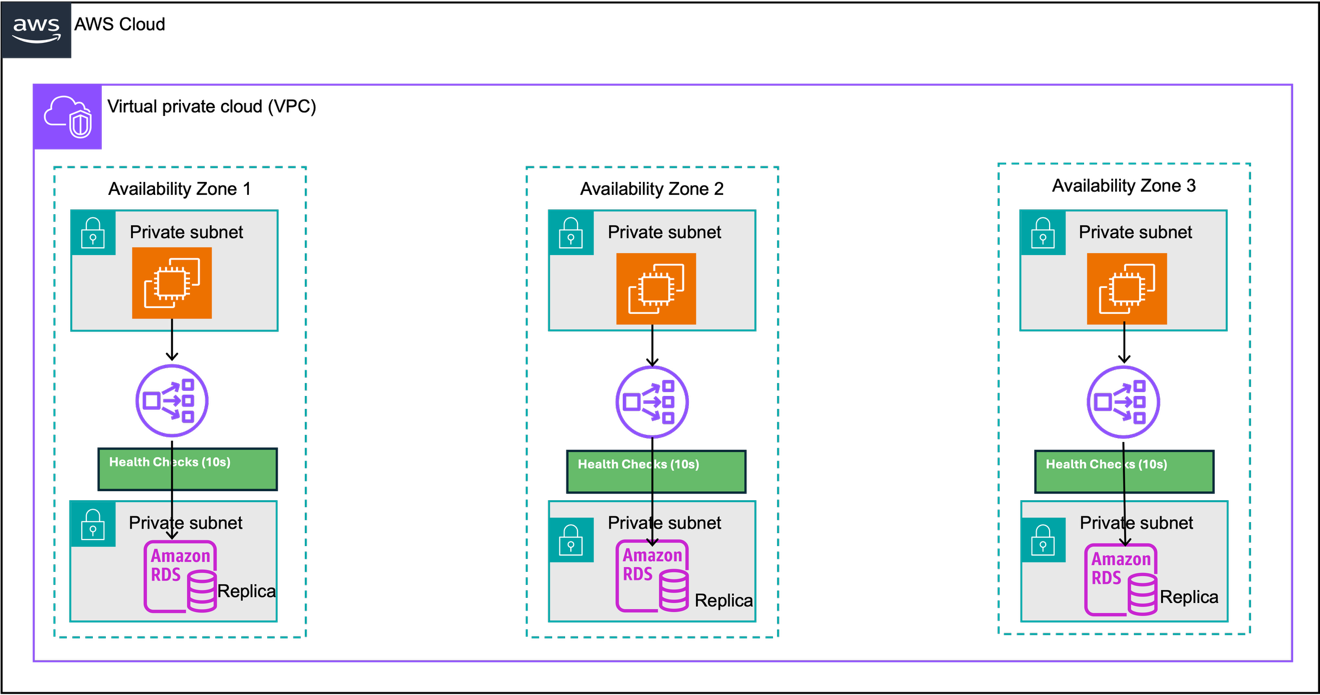
Figure 2: NLB AZ affinity
Eliminating PrivateLink overhead
This architecture connects clients directly through the Network Load Balancer, without requiring PrivateLink. This removes the hourly endpoint charges and data processing fees associated with PrivateLink, reducing overall cost.
A Network Load Balancer provides one static IP address per enabled Availability Zone. Applications in the same or a different VPC or AWS account can reach these IP addresses directly through AWS Transit Gateway or VPC peering. On-premises clients can also connect to these IP addresses directly, without a DNS dependency.
Health detection
You can configure health checks as frequently as every 5 seconds (the shortest interval Network Load Balancer supports, with a default of 30 seconds). When a replica fails its health check, the Network Load Balancer stops sending traffic to it, keeping requests flowing only to healthy targets.
Hybrid and on-premises connectivity
If you connect from on-premises over Direct Connect or Site-to-Site VPN, the Network Load Balancer approach reduces the setup needed for database connectivity.
If you want a custom domain name pointing to your private RDS endpoints, consider how on-premises clients resolve DNS. On-premises clients don’t natively resolve a Route 53 private hosted zone for the weighted records. You have several options.
- Maintain a public domain name mapped to private infrastructure IP address, effectively revealing your internal topology through public DNS.
- Find a DNS configuration that supports multiple CNAME chaining for the same domain.
- Deploy Route 53 Resolver inbound endpoints paired with on-premises DNS forwarders and Route 53 private hosted zones, which adds significant operational overhead.
A private Network Load Balancer receives a publicly DNS-resolvable host name. Although the Network Load Balancer DNS name resolves through public DNS, it returns private IP addresses. These are reachable from within the VPC (and VPC peering or Transit Gateway). For on-premises clients, reachability requires Direct Connect or a Site-to-Site VPN. The Network Load Balancer provides a single host name across all enabled Availability Zones, compared to individual read replicas that each have their own endpoint host name. On-premises clients resolve this host name through standard DNS, and traffic flows over your existing Direct Connect or Site-to-Site VPN connection to the static IP addresses of Network Load Balancer.
If mapping a custom domain to your existing infrastructure isn’t a requirement, then no additional DNS infrastructure, no Resolver endpoints, and no private hosted zone configuration are needed.
Since Network Load Balancer IP addresses are static, on-premises clients can also connect directly by IP address.
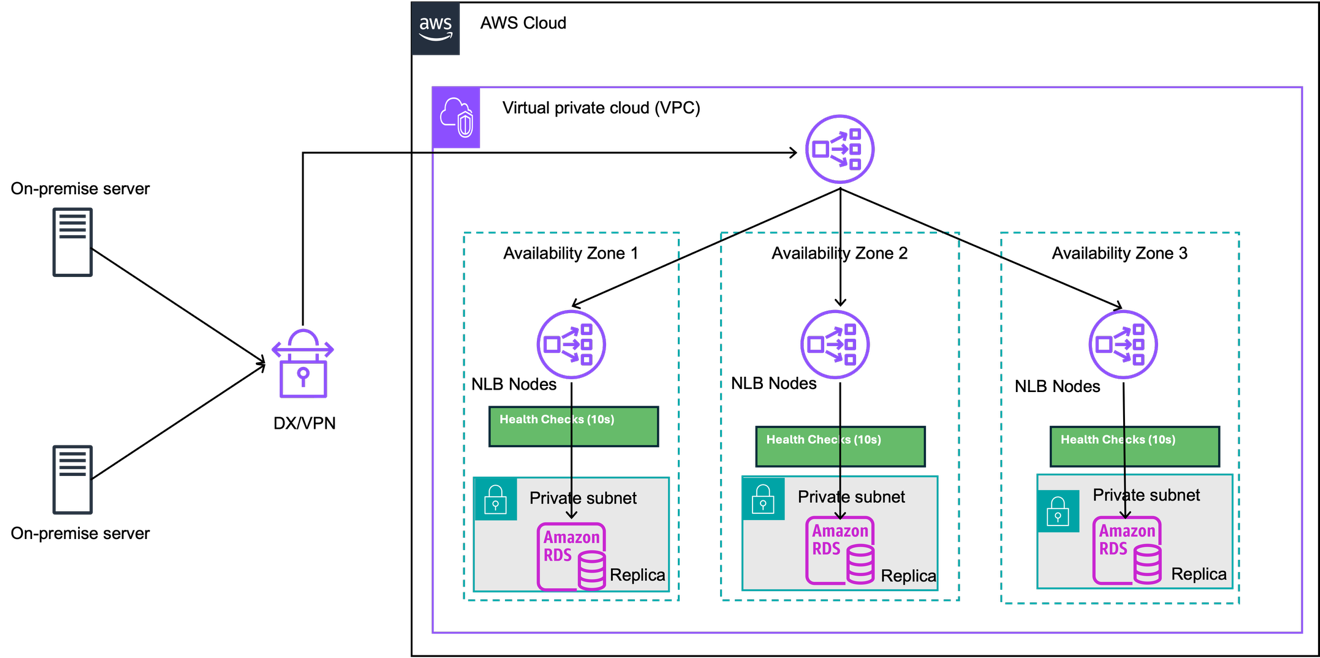
Figure 3: On-premises connectivity
Implementation
Prerequisites
- An AWS account with permissions to create Network Load Balancer, Lambda, Amazon S3, and Amazon EventBridge resources.
- An Amazon RDS instance with one or more read replicas across multiple Availability Zones.
- A VPC with subnets in at least two Availability Zones.
- Familiarity with AWS CloudFormation.
- AWS Command Line Interface (AWS CLI) installed and configured.
Deployment
The solution is available in the RDS read replica NLB registration GitHub repository. The repository contains the Lambda function (populate_NLB_TG_with_RDS_RR.py), a CloudFormation template, and a detailed Deployment Guide.
Quick start:
- Clone the repository and run the included
deploy.shscript, which packages the Lambda code and uploads it to Amazon S3: - Deploy the CloudFormation stack using the template URL printed by the script. Key parameters include:
RDSReplicaDNSNames– Comma-separated DNS endpoints of your read replicas.NLBTargetGroupARN– ARN of your existing Network Load Balancer target group (or setCreateTargetGroup=trueto create one).S3BucketName– Bucket for Lambda state persistence (or setCreateS3Bucket=true).
- Verify that targets are registered and healthy:
You should see each replica IP listed with "State": "healthy".
For the full parameter reference, optional resource creation flags, CLI deployment, troubleshooting, and cleanup, see the Deployment Guide.
The following screenshot shows an example Amazon CloudWatch log entry when the Lambda function runs successfully.
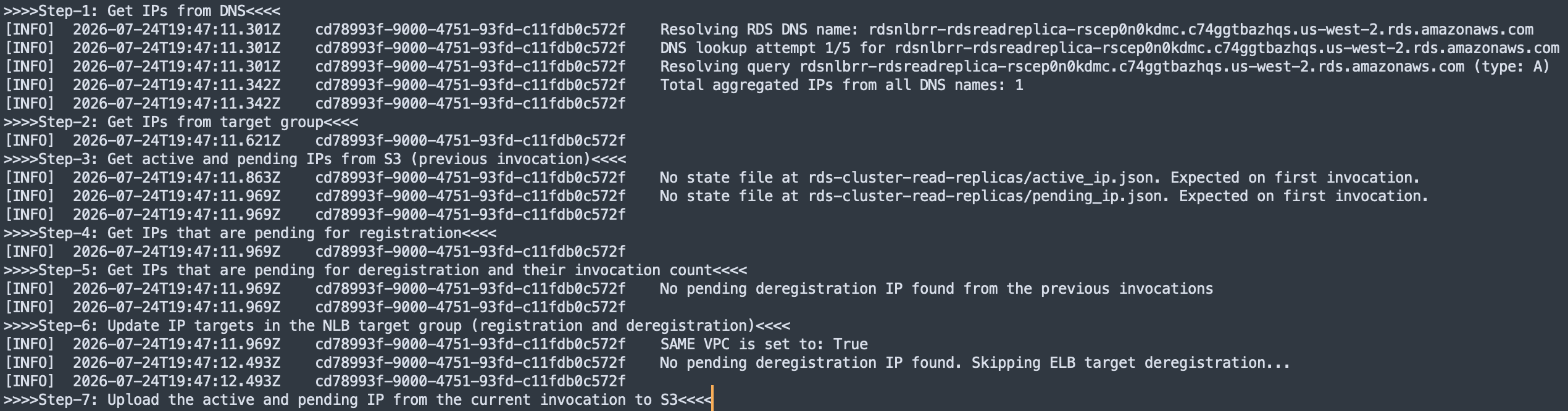
Figure 4: Amazon CloudWatch log for a successful Lambda run
The following screenshot shows the registered targets in the Network Load Balancer target group.
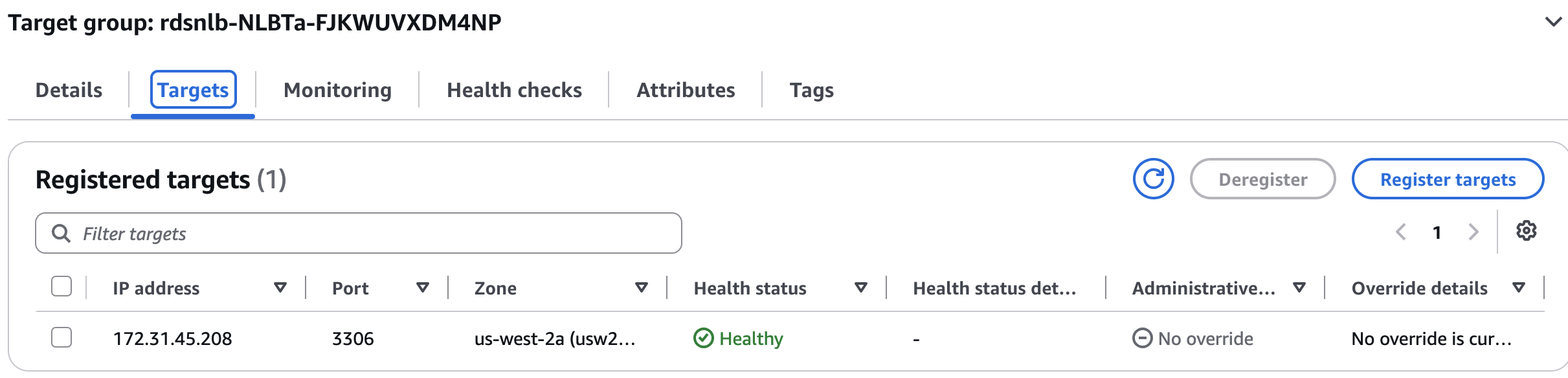
Figure 5: Registered targets in the Network Load Balancer target group
Note: Make sure the RDS security group allows inbound TCP traffic on your database port from the Network Load Balancer subnets. For the AWS Identity and Access Management (IAM) policy for the Lambda function and S3 bucket security configuration, see the Deployment Guide.
Cost estimate
This cost estimate covers the resources used with Network Load Balancer handling TCP traffic across three AZs, a Lambda function running every minute to resolve RDS endpoint IPs and update Network Load Balancer target groups, an S3 bucket to store DNS resolution results between invocations, and three RDS read replicas (db.r6g.large with 100 GB gp3 storage each).
The following is an estimated total cost of ownership for this architecture in a deployment (three AZs, three read replicas, moderate traffic) where application server traffic to read replicas is distributed evenly across AZs. This considers only the additional overhead cost without the RDS cost, at the time of writing (subject to change).
NLB and Lambda IP sync cost
| Service | Configuration |
| Network Load Balancer | 1 NLB, 3 AZs, ~10 GB/hr TCP throughput, ~500 new connections/sec, ~120 s avg connection duration |
| AWS Lambda | 1 invocation/min (IP sync function), x86, 512 MB memory |
| Amazon S3 | ~0.5 GB storage, ~43,200 PUT/GET requests/month |
| Data Transfer (Lambda) | Minimal outbound (DNS resolution + S3 API calls) |
Note: Use the AWS Pricing Calculator with the preceding configuration to estimate the monthly cost for your Region and traffic pattern.
When connections use round-robin or uniform load balancing without AZ awareness, each application server has an equal probability of connecting to any of the three read replicas. Only one out of three connections lands in the same AZ as the caller. The remaining two-thirds (66.7 percent) of connections cross AZ boundaries.
For example, at 10 GB/hour (about 7 TB/month) through the Network Load Balancer: 7 TB × 0.667 ≈ 4.7 TB of inter-AZ traffic per month. For current inter-AZ data transfer rates, see EC2 data transfer pricing.
With AZ DNS affinity enabled and cross-zone load balancing disabled, traffic stays within the same AZ end to end in the steady state, reducing inter-AZ data transfer.
Note: To estimate the impact for your workload, review your current inter-AZ data transfer costs to RDS and compare them against the Network Load Balancer architecture overhead. This helps you determine whether the architecture results in net savings or additional overhead for your specific traffic patterns.
Clean up
To avoid ongoing charges, remove the resources created for this solution.
- Delete the CloudFormation stack. This removes the Network Load Balancer, Lambda function, Amazon EventBridge rule, and IAM roles.
- Verify that the Network Load Balancer and target groups are deleted. You can use the AWS CLI command
aws elbv2 describe-load-balancersto confirm. - Delete the S3 bucket or state files that the Lambda function used for DNS resolution results.
- If you created read replicas for testing, delete them using the AWS CLI or CloudFormation.
Considerations and limitations
- Note that the Network Load Balancer balances connections, not queries. Open or recycle connections periodically for query redistribution logic.
- In Amazon EKS environments, pod DNS queries handled by CoreDNS can break the Network Load Balancer zonal DNS affinity. When a pod and its CoreDNS node are in different AZs, the DNS response returns the Network Load Balancer IP for the CoreDNS node’s AZ rather than the application node’s AZ. To preserve AZ-local routing, deploy NodeLocal DNSCache so each pod resolves DNS through a cache daemon running on its own node. For setup steps, see Install NodeLocal DNSCache in Amazon EKS.
- When a replica IP is deregistered, the Network Load Balancer applies the target group’s deregistration delay (default 300 seconds, configurable). This gives existing connections time to complete gracefully before the target is removed from the load balancer.
Conclusion
In this post, you learned how to use a Network Load Balancer and a Lambda function to spread read traffic across Amazon RDS read replicas. The Lambda function keeps the target group in sync with your replica IP addresses. Network Load Balancer health checks send traffic only to replicas that pass their checks. Availability Zone DNS affinity, with cross-zone load balancing turned off, keeps traffic within the client’s Availability Zone. This architecture also gives on-premises clients a single stable host name and static IP addresses over Direct Connect or Site-to-Site VPN, without PrivateLink or Route 53 Resolver endpoints.
To get started, deploy the CloudFormation template from the GitHub repository. Then check that the target group lists your read replicas. After deployment, watch Amazon CloudWatch metrics for Lambda errors and unhealthy target counts to confirm the synchronization works.