AWS for Games Blog
Player profiles to leaderboards: Choosing the right AWS database, Part 1
Modern live service games operate with millions of concurrent players generating large amounts of data, across player profiles, inventories, leaderboards, matchmaking, chat systems, and even real-time telemetry. For a good player experience, profiles need to load near-instantaneously at login, requiring the database servicing this call to deliver very low-latency reads. Leaderboards drive competition and keep players engaged between sessions. Inventories and in-game economies must be accurate: if a player buys an item or trades currency, that transaction must be reliable. Matchmaking needs to get players into a game as quickly as possible, even during peak hours. Chats are critical to community and must reliably store all conversations. For the studio operating the games, they need analytics to understand game performance and player behaviors alike. Without this data, they cannot understand the player experience and grow their player base.
Each of these functions of running a game requires different access patterns, consistency requirements, and latency targets. A leaderboard needs sorted ranking operations with microsecond response times. A player profile needs consistent key-value reads and writes at scale. An analytics pipeline needs to scan billions of rows and compute aggregates efficiently. A social graph needs to traverse relationships between millions of connected players. No single database engine is optimized for all these access patterns at once. A relational database that handles complex inventory joins well will struggle with the throughput demands of session management. An in-memory store that delivers microsecond leaderboard lookups is not designed to run analytical queries across petabytes of historical telemetry.
This is the first post in a series that will discuss the foundational data workloads: player profiles, inventory, session management, and content configuration. Part 2 addresses live operations and social features: leaderboards, matchmaking, chat, social graph, and game analytics.
Understanding the AWS purpose-built database portfolio
AWS offers a portfolio of purpose-built databases; each designed for specific data access patterns. The following section maps common gaming use cases to the right service, explains the reasoning behind each recommendation, covers the trade-offs, and ranks alternatives by industry adoption when multiple options are viable. This post assumes familiarity with AWS database services and basic game backend architecture.
The following figure shows which AWS database services align with each gaming use case covered in this series:
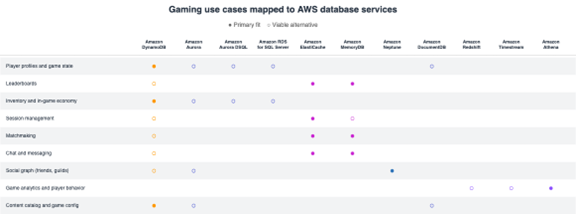
Figure 1. Gaming use cases mapped to AWS database services. Filled circles indicate primary fit and empty circles indicate viable alternatives.
Player profiles and game state
Player profiles store persistent data like display names, progression, currency balances, and preferences. Game state captures session-level information such as position, health, quest progress, and equipped items. These records are the most frequently read and written in any game backend.
Amazon DynamoDB:
Players load their profile when they log in and save it through their entire playtime until they log out. At scale, that translates to millions of single-key reads and writes per second. DynamoDB handles this single-key access pattern with consistent single-digit millisecond latency at any scale, without requiring connection pooling, and with on-demand capacity mode eliminating capacity planning. DynamoDB global tables replicate player data across regions, so players always hit a local copy. Atomicity, consistency, isolation, and durability (ACID) transactions guarantee atomic operations like updating progression and unlocking content together. DynamoDB Accelerator (DAX) drops read latency to microseconds for hot player data. Use player ID as partition key with sort keys for fine-grained access to profile subsets.
- Pros
- Pay-per-request pricing scales with your player base
- Built-in backup and point-in-time recovery
- Zero operational overhead
- Cons
- 400 KB item size limit requires splitting large player states
- Ad-hoc queries across player attributes need pre-planned Global Secondary Indexes
- Eventually consistent reads by default
Amazon Aurora:
Aurora supports both MySQL and PostgreSQL, letting studios choose based on existing expertise. Some games tie player profiles to entitlements, guild memberships, and purchase history through foreign key relationships. When you need to join across those tables or run reports, a relational engine handles that naturally.
- Pros
- Full SQL support for complex queries and reporting
- Aurora Serverless auto-scales for unpredictable traffic
- Up to 15 read replicas for read-heavy workloads
- Cons
- Requires connection pooling (Amazon Relational Database Service (Amazon RDS) Proxy) at high concurrency
- Horizontal write scaling needs application-level sharding
- Higher operational complexity than DynamoDB
Amazon DocumentDB:
Player profiles often have varying schemas, different loadouts, progression paths, and nested inventory structures per player. A document model stores this naturally as JSON without forcing a rigid table schema, and teams already on MongoDB can migrate with minimal changes to their data access layer.
- Pros
- MongoDB API compatibility reduces migration effort
- Flexible schema handles varying player data structures
- Rich query language for filtering nested documents
- Cons
- No native multi-region active-active replication
- Not proven at DynamoDB-level scale in gaming
- Query latency is low but not sub-millisecond
Amazon RDS for SQL Server:
Many game studios, especially in the massively multiplayer online games (MMO) space, have years of game logic embedded in SQL Server stored procedures. Amazon RDS for SQL Server lets them move to a fully managed environment while preserving full compatibility with their existing codebase.
- Pros
- Full compatibility with existing stored procedures and Transact-SQL (T-SQL)
- Automated backups and patching
- Multi-AZ for high availability
- Cons
- No serverless option, requires instance sizing and capacity planning
- Licensing costs are higher than open-source engines
- Horizontal scaling requires application-level sharding
Amazon Aurora DSQL:
For studios that chose the relational path for player profiles but find Aurora’s operational overhead challenging at scale (connection pooling, patching windows, manual sharding), Aurora DSQL removes those pain points while keeping SQL, ACID transactions, and multi-region consistency. It’s serverless, requires no connection pooling, has no downtime for upgrades, and provides active-active multi-region with distributed ACID guarantees.
- Pros
- No connection pooling required
- Zero downtime for patching and upgrades
- Active-active multi-region with distributed ACID transactions
- Serverless with no capacity planning
- Cons
- Higher write latency for cross-region transactions
- Limited PostgreSQL feature support (no stored procedures)
- PostgreSQL-compatible only
Inventory and in-game economy
Inventory tracks items players own. Economy encompasses purchases, trades, crafting, and marketplace transactions. These workloads demand strong consistency and atomic operations to prevent item duplication or currency loss.
DynamoDB:
When a player buys an item, the game needs to deduct currency and grant the item in one atomic operation, if either fails, neither should happen. DynamoDB transactions guarantee this at any throughput without connection limits.
- Pros
- Scales horizontally without sharding
- Conditional writes prevent double-spend natively
- Serverless pricing aligns cost with transaction volume
- Cons
- Transactions capped at 100 items or 4MB, whichever is reached first
- Complex marketplace search (multi-attribute filtering, text search) needs a complementary service like Amazon OpenSearch Service
Aurora:
Some game economies are complex, auction houses with bidding, escrow, trade history, and refund logic across multiple tables. SQL joins and referential integrity handle this more naturally than denormalized key-value models.
- Pros
- Full SQL for complex transaction logic
- Foreign keys enforce data integrity across tables
- Rich reporting and analytics on economic data
- Cons
- Requires connection pooling at high concurrency
- Horizontal write scaling needs application-level sharding
Amazon RDS for SQL Server:
Studios with existing SQL Server-based economies can move to managed infrastructure without rewriting stored procedures that handle trades, purchases, and marketplace logic.
- Pros
- Full T-SQL and stored procedure compatibility
- Automated backups and patching
- Multi-AZ for high availability
- Cons
- No serverless option
- Licensing costs higher than open-source engines
Aurora DSQL:
When inventory and economy logic benefits from SQL joins and referential integrity but the studio wants serverless scaling without managing connections or capacity. Distributed ACID transactions across regions keep item ownership consistent without application-level coordination.
- Pros
- Optimistic concurrency avoids lock contention on high-volume parallel transactions
- Scales writes automatically without application-level sharding
- Distributed ACID keeps cross-region trades consistent
- Cons
- Higher write latency for cross-region item transfers
- PostgreSQL-compatible only
Session management
Session data tracks active player connections: authentication tokens, server assignments, matchmaking state, and party membership. Sessions are short-lived, high-throughput, and extremely latency-sensitive.
Amazon ElastiCache:
Every API call checks the session, that’s the hottest read path in your backend. In-memory storage gives you microsecond lookups, and native time to live (TTL) means sessions clean themselves up without any application logic.
- Pros
- Handles millions of concurrent sessions without connection overhead
- No cleanup code needed
- Simple key-value model fits session data naturally
- Cons
- Not durable by default
- Node failures lose active sessions and players must re-authenticate
- Memory is the scaling constraint
Amazon MemoryDB:
Uses the same Valkey/Redis OSS-compatible API as ElastiCache, but with multi-AZ durability. If losing sessions during a node failure is unacceptable for your game (long sessions, competitive matches), MemoryDB keeps them safe.
- Pros
- Durable without needing a separate persistence layer
- Eliminates the dual-write pattern of Redis plus a database
- Same Valkey/Redis OSS-compatible API, no code changes
- Cons
- Slightly higher write latency than ElastiCache due to durability guarantees
- Higher cost per node
DynamoDB:
When session data needs to live beyond the session itself, for audit trails, analytics, or compliance, DynamoDB persists it durably with TTL handling automatic deletion after expiry.
- Pros
- Built-in TTL for automatic cleanup
- Durable by default
- Integrates with DynamoDB Streams for session event processing
- Cons
- Single-digit millisecond latency vs. microsecond for in-memory
- Adds up when checked on every API call
Content catalog and game configuration
Item definitions, skill trees, quest configurations, event schedules, and store offerings. Authored by game designers, updated with patches or live events, and read by every game client and server. Heavily read-biased with infrequent writes.
DynamoDB:
Every game client and server reads item definitions, skill trees, and config data on nearly every request. DynamoDB with DAX turns those into microsecond cached reads, and DynamoDB Streams push content updates to game servers the moment designers publish a change.
- Pros
- DAX caching handles read-heavy patterns efficiently
- DynamoDB Streams enable real-time propagation without polling
- Version control patterns using sort keys support safe rollbacks and A/B testing
- Cons
- Deeply nested content structures are harder to query than in a document database
- No native full-text search for content discovery tools
DocumentDB:
Game content definitions are often deeply nested JSON, an item has stats, which have modifiers, which reference other items. DocumentDB query language handles nested filtering and updates more naturally than key-value expressions.
- Pros
- Rich query language for nested documents
- Flexible schema accommodates varying content structures
- MongoDB API compatibility
- Cons
- No native caching layer like DAX
- Pair with ElastiCache for hot reads
- Higher operational overhead than DynamoDB
Aurora:
When content has strong relational structure, items reference materials, materials reference gathering nodes, nodes reference maps, foreign keys and joins keep that data consistent without denormalization.
- Pros
- Referential integrity enforced at the database level
- SQL makes content management tools straightforward to build
- Read replicas handle read-heavy patterns
- Cons
- More operational complexity than DynamoDB
- Requires connection management at scale
Conclusion
The studios that scale successfully treat their database layer as a portfolio of purpose-built services, each matched to the specific access patterns of the workload they serve.
In this post, we’ve covered player profiles, inventory, session management, and content configuration.
DynamoDB handles the bulk of transactional game data, including player profiles, inventory, and content catalogs. ElastiCache and MemoryDB power session management with microsecond lookups. Aurora and Aurora DSQL fill the gap when relational modeling is genuinely needed, and Amazon RDS for SQL Server supports studios with existing stored procedure-based architectures. DocumentDB serves teams with MongoDB-compatible workloads.
Combined with the second part of this series, these posts provide a guide to choosing the right AWS database for every major gaming workload.
To explore reference architectures and sample implementations, see the Guidance for Custom Game Backend Hosting on AWS. To learn more about building games on AWS, visit AWS for Games.
If you have questions or want to share how your studio approaches database decisions, reach out to your AWS account team.