AWS for Games Blog
Player profiles to leaderboards: Choosing the right AWS database, Part 2
In the first part of this series, we covered how to choose the right Amazon Web Services (AWS) database for core transactional workloads: player profiles, inventory, session management, and content configuration.
In this post, we continue with the real-time, social, and analytical workloads: leaderboards, matchmaking, chat, social graph, and game analytics. Each of these has distinct access patterns that require different database choices. This post assumes familiarity with AWS database services and basic game backend architecture.
Understanding the AWS purpose-built database portfolio
The following sections walk through each gaming use case and explain which of these services fits and why. The following figure shows which AWS database services align with each gaming use case covered in this series:
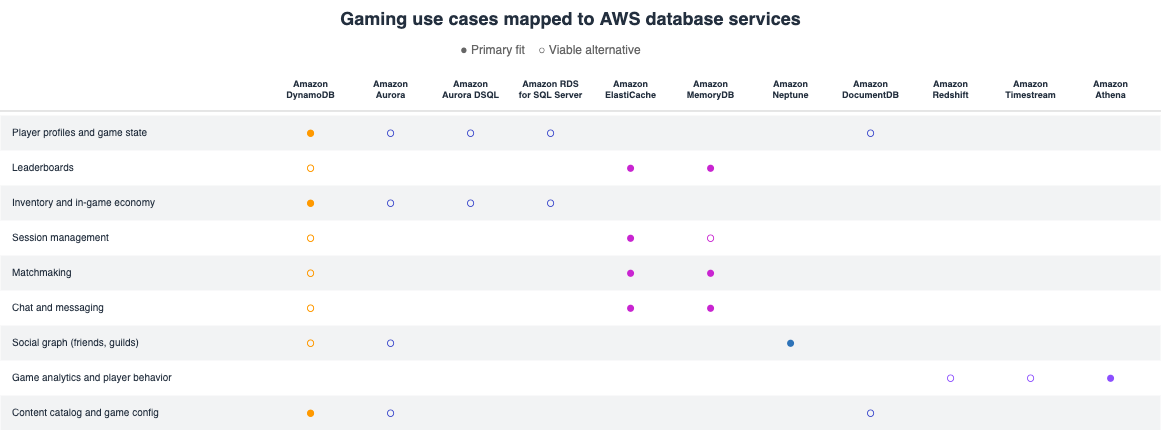
Figure 1: Gaming use cases mapped to AWS database services. Filled circles indicate primary fit and empty circles indicate viable alternatives
Leaderboards
Leaderboards rank players by score, rating, or other metrics. Core operations include updating a player’s score, retrieving the top-N players, looking up a specific player’s rank, and fetching players around a given rank position.
Amazon ElastiCache or Amazon MemoryDB (Valkey and Redis OSS compatible)
Leaderboards need to answer questions like “what’s my rank?” and “who’s in the top 100?” in real time across millions of players. Redis sorted sets do this. Rank computation is built into the data structure, not your application code.
- Pros
- O(log N) rank lookups regardless of player count
- No custom sorting logic needed
- Supports time-windowed leaderboards with TTL
- Cons
- Memory-bound
- Large leaderboards consume significant RAM
- Single score dimension per sorted set limits multicriteria rankings
Amazon DynamoDB
For less complex or segmented leaderboards (top scores per level, per region), a global secondary index on score works without adding another service to the stack.
- Pros
- No additional infrastructure to manage
- Integrates naturally if player data is already in Amazon DynamoDB
- Cons
- No built-in rank computation
- You can get top-N but not “player X is ranked 4,327th” efficiently
Matchmaking
Matchmaking groups players into game sessions based on skill rating, latency, region, and party size. It’s write-heavy during peak hours and requires fast reads to evaluate potential matches.
If your matchmaking rules can be expressed as configuration (skill range, latency limits, party size, team balance), Amazon GameLift Servers FlexMatch handles the queue, evaluation, and placement without a database. It’s not a database service, but it might eliminate the need for one in this use case.
Amazon ElastiCache or Amazon MemoryDB
Matchmaking needs to queue players by skill, pop them when a match is ready, and notify them instantly. Both Amazon ElastiCache and Amazon MemoryDB provide sorted sets for the queue and pub/sub for the notification, with sub-millisecond latency. Use Amazon ElastiCache when the queue is ephemeral, or Amazon MemoryDB when queue state must survive node failures.
- Pros
- Sorted sets naturally model skill-based queues
- Pub/sub delivers instant match notifications
- Flexible enough to handle multiple queue types (ranked, casual, regional)
- Cons
- Queue data is transient
- Match history, skill ratings, and match results need a separate durable store
Amazon DynamoDB
For less complex matchmaking where players enter a queue and an AWS Lambda function evaluates matches asynchronously, DynamoDB Streams can trigger the matching logic without a separate queue infrastructure.
- Pros
- No additional infrastructure beyond what you already have
- Event-driven with DynamoDB Streams and AWS Lambda
- Durable by default
- Cons
- Higher latency than in-memory queues
- Less natural for real-time sorted operations
Chat and messaging
In-game chat includes whispers, party chat, guild channels, and system notifications. Requirements include low-latency delivery, strict message ordering, and often persistence for history retrieval and moderation.
Amazon ElastiCache or Amazon MemoryDB
Chat messages need to arrive in order in milliseconds and fan out to everyone in the channel. Both Amazon ElastiCache and Amazon MemoryDB support streams, with ordered, persistent message logs and consumer groups that map directly to how chat channels work. Use Amazon MemoryDB when chat message durability matters, or Amazon ElastiCache when messages are ephemeral.
- Pros
- Supports both 1:1 and broadcast patterns in one data structure
- Consumer groups handle fan-out without application logic
- Configurable retention controls memory usage
- Cons
- In-memory storage limits long-term history
- Older messages need archiving
- Moderation and content filtering require a separate processing layer
Amazon DynamoDB
Players expect to scroll back through chat history and search old messages, and moderators need to review flagged conversations. DynamoDB provides durable, query-able storage for that history layer.
- Pros
- The ability to partition by channel ID and sort by timestamp mean efficient history retrieval
- Scales to volume of stored messages
- Integrates with DynamoDB Streams for moderation pipelines
- Cons
- Not suited for real-time delivery
- Latency is single-digit milliseconds versus microseconds for in-memory
- Most studios pair it with Redis rather than using it alone
Social graph (friends, guilds, clans)
Social features include friend lists, guild membership, follower relationships, blocked players, and friend recommendations. These are inherently graph-structured: players are nodes, relationships are edges, and common queries traverse connections.
Amazon Neptune
When a player opens their friends list, the backend needs to traverse connections, find mutual friends, suggest new ones, and check guild membership. These are graph traversal problems, and a graph database answers them in a single query instead of multiple round trips across tables.
- Pros
- Built-in traversals replace complex application logic
- Gremlin query language is expressive for relationship patterns
- Amazon Neptune machine learning (ML) automates friend recommendations without custom ML pipelines
- Neptune Analytics provides built-in graph algorithms (community detection, PageRank, similarity) for identifying player cliques and influential players without custom code
- Cons
- Lower write throughput than DynamoDB
- Higher cost for studios that only need add/remove/list friend operations
- Bulk loading requires Amazon Neptune-dedicated loader
Amazon Aurora
For studios already running Amazon Aurora, a friends table with SQL joins can handle mutual friends, guild membership hierarchies, and role-based permissions without adding a dedicated graph database. Self-joins answer “friends of friends” in a single query, and foreign keys enforce referential integrity: A player can’t be in a guild that doesn’t exist.
- Pros
- Uses existing infrastructure if Amazon Aurora is already in the stack
- SQL joins handle two-hop queries naturally
- Relational constraints enforce data integrity across social relationships
- Cons
- Joins degrade beyond two to three hops
- No built-in graph traversal or recommendation engine
- Connection pooling is required at high concurrency
Amazon DynamoDB
If your social features are limited to add friend, remove friend, and list my friends without traversals or recommendations, an adjacency list in DynamoDB can handle it without adding another service.
- Pros
- No additional infrastructure
- Uses the same table and access patterns as player profiles
- Low operational overhead
- Cons
- Multi-hop queries (friends of friends, mutual friends) require multiple round trips and application logic
- No built-in recommendation engine
Game analytics and player behavior
Analytics covers player behavior tracking, event telemetry, A/B testing results, monetization analysis, and churn prediction. This data is write-heavy, append-only, and queried in aggregate rather than by individual record.
Amazon Athena
The Games Industry Lens of the AWS Well-Architected framework positions this as the reference pattern because most studios start with event data landing in Amazon Simple Storage Service (Amazon S3). With Amazon Athena, you can query it immediately without provisioning other infrastructure.
- Pros
- No infrastructure to manage
- Pay only per query
- Works directly on your existing S3 data lake
- Cons
- Query latency is higher than Amazon Redshift for complex queries
- No indexes or materialized views
- Not suited for production dashboards with frequent refreshes
Amazon Redshift
When your analytics team needs persistent tables, scheduled dashboards, and complex joins across billions of events daily, a dedicated data warehouse outperforms ad-hoc query engines.
- Pros
- Columnar compression accelerates aggregations
- Spectrum queries S3 without loading
- Integrates with Amazon Quick for agentic dashboards
- Cons
- Requires capacity planning (unless using serverless)
- Data loading has seconds-to-minutes latency
- Cost scales with cluster size and query complexity
Amazon Timestream
Some analytics are inherently time-series, session duration trends, latency percentiles over time, or player count curves. Amazon Timestream handles these with built-in functions instead of custom SQL.
- Pros
- Built-in time-series functions (bucketing, interpolation, percentiles)
- Automatic data lifecycle management, serverless
- Cons
- Not a general purpose analytics engine
- Limited join capabilities
- Focused strictly on time-stamped data
Conclusion
The studios that scale successfully treat their database layer as a portfolio of purpose-built services, each matched to the specific access patterns of the workload they serve.
In this post, we’ve covered leaderboards, matchmaking, chat, social graph, and game analytics.
Amazon ElastiCache and Amazon MemoryDB power real-time features such as leaderboards, matchmaking queues, and chat delivery. Amazon Neptune models social relationships. Amazon Redshift drives player behavior analytics while Amazon Timestream captures operational telemetry. Amazon Athena provides serverless analytics directly on your data lake.
Combined with the first part of this series, these posts provide a guide to choosing the right AWS database for every major gaming workload.
To explore reference architectures and sample implementations, see the Guidance for Custom Game Backend Hosting on AWS. To learn more about building games on AWS, visit AWS for Games.
If you have questions or want to share how your studio approaches database decisions, reach out to your AWS account team.