AWS Public Sector Blog
Modernize Moodle LMS with AWS serverless services
Moodle is a popular open-source learning management system (LMS) serving 500 million users from 236 countries. Many education institutions use Moodle to provide an online learning platform for their students to achieve their learning goals. These institutions have shifted from traditional face-to-face learning to hybrid and online learning, and Moodle’s global community, plugins ecosystem, and open-source licensing model have helped with this transition.
Moodle itself is a monolithic application developed using PHP, with the database typically using MariaDB, MySQL or PostgreSQL. By default, Moodle stores its application data within the database and files in a directory called moodledata. To improve performance, Moodle also supports caching services such as Valkey, Redis or Memcached.
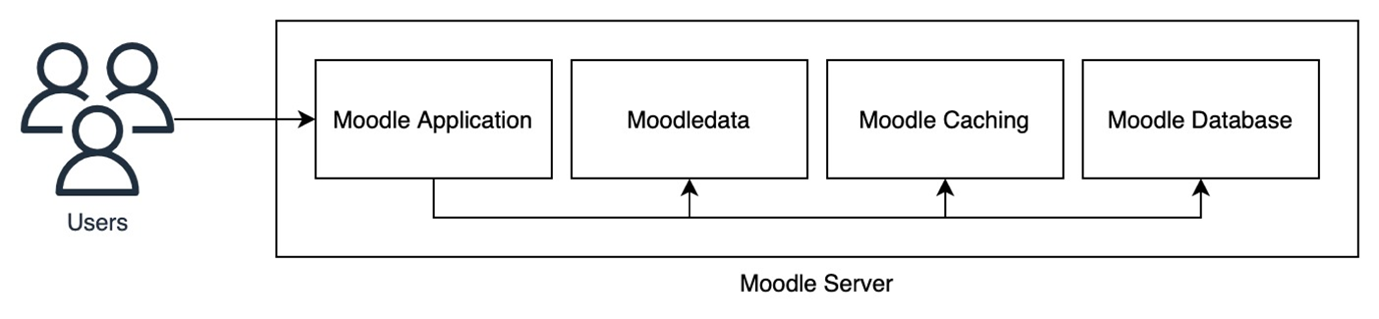
Figure 1. High-level visualization of the infrastructure components within Moodle.
Many education institutions deploy and run Moodle on physical hardware or a virtualized environment. These institutions are looking to improve the scalability of their Moodle application, simplify operations and monitoring, and also optimize operating costs. One way to approach this is to use containers and serverless technology. Containers offer a way for developers to package the application code together with its dependencies and configuration. This makes the deployment of the application highly portable, enabling automation so the platform can be more reliable and predictable. Beyond containers, serverless technology extends to databases and caching layers, eliminating capacity planning and manual scaling operations while providing automatic resource optimization based on actual demand. In this blog post, you will learn how to deploy and run Moodle using serverless technology on Amazon Web Services (AWS).
Benefits of serverless containers for Moodle on AWS
AWS offers Amazon Elastic Container Service (Amazon ECS), a fully managed container orchestration service that makes it simple to deploy, manage, and scale containerized applications. Amazon ECS provides additional advantages in running Moodle compared to using physical hardware or a virtual machine (VM)-based environment.
Serverless containers with AWS Fargate
Amazon ECS supports AWS Fargate as a launch type to provide a serverless, pay-as-you-go compute engine for containerized workloads. By using Fargate, customers can focus on deploying and managing the Moodle application rather than infrastructure. Fargate removes the operational overhead of scaling, patching, securing, and managing servers. Security is also improved through workload isolation by design, as each task runs in its own dedicated runtime environment.
Integrated monitoring
Amazon ECS with a Fargate launch type has a built-in integration with Amazon CloudWatch Container Insights that can be enabled with one click to collect, aggregate, and summarize metrics and logs from applications. It automatically collects metrics from applications such as CPU, memory, disk, network, and diagnostic information to help customers isolate performance issues and resolve them quickly.
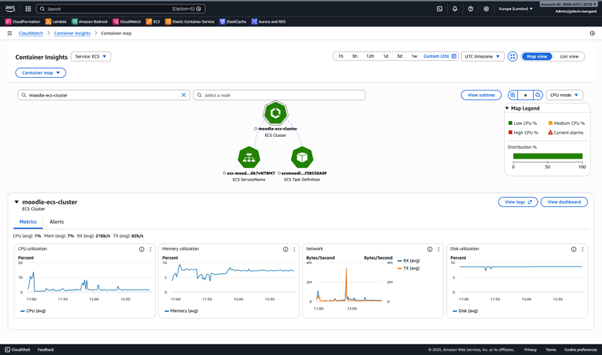
Figure 2. Amazon CloudWatch Container Insights map view of resources within Amazon ECS.
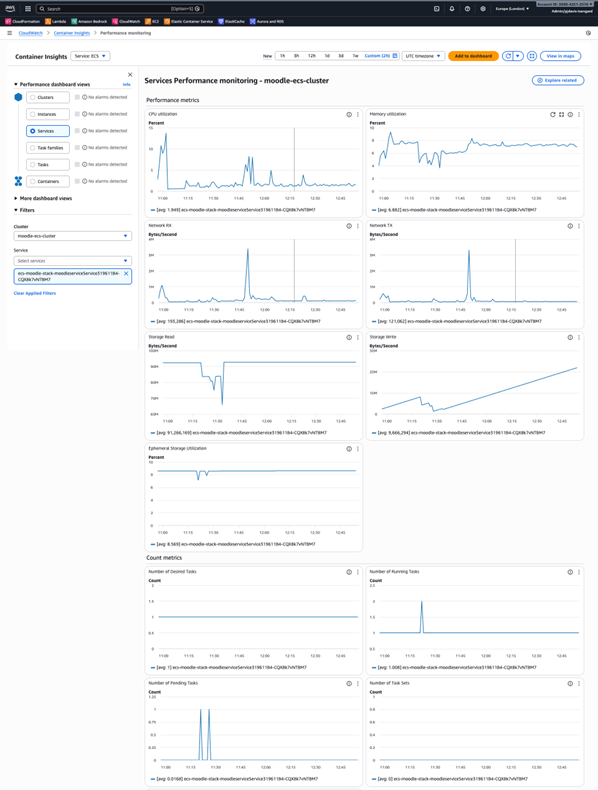
Figure 3. Amazon CloudWatch Container Insights performance monitoring dashboard.
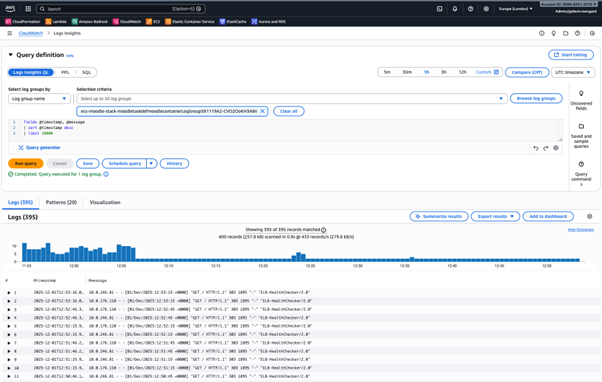
Figure 4. Amazon CloudWatch Logs insights.
Reliably handle spiky traffic with faster scaling
Containers generally have faster start-up time compared to VMs due to the lower overhead of not having to boot a separate operating system kernel or initialize virtual hardware devices. Using Amazon ECS service scheduler, customers can launch up to 500 Fargate tasks per minute per service. With the fast scaling and start-up time, Moodle application services can scale more quickly during spiky traffic where there are many concurrent users at the same time, such as with online classes, exams, and registrations. This provides students with a more reliable and consistent experience when accessing the LMS. Faster scaling and start-up time also reduces the need for the operations team to pre-provision the compute capacity to meet the spikes in demand. When traffic subsides, the service can scale down, reducing costs by only running the capacity needed.
Optimize costs
By using Fargate, customers can configure Moodle tasks to use the right amount of vCPU and memory, reducing the need to over-provision compute capacity, therefore saving costs. Fargate also has a capacity provider called Fargate Spot which allows customers to launch Moodle tasks using spare capacity in the AWS Cloud for a discount of up to 70%. Fargate Spot tasks can be interrupted with a two-minute warning if AWS needs the capacity. The solution in this blog post is configured to use Fargate Spot with a ratio of 3:1, meaning for every four tasks, three run on Fargate Spot and one runs on standard Fargate. This ensures that at least one standard Fargate task is always running to maintain Moodle application availability if Spot tasks are interrupted. The minimum of one standard task is maintained through the use of the base parameter in the capacity provider configuration. In larger deployments with more tasks, the impact of Spot interruption is distributed across multiple services, minimizing user disruption risk.
Benefits of serverless databases and caching for Moodle on AWS
Complementing the serverless container architecture, this solution leverages serverless database and caching services by default to provide a fully serverless infrastructure for Moodle LMS. Amazon Aurora Serverless and Amazon ElastiCache Serverless offer several key advantages for educational workloads:
Automatic scaling for variable workloads
Educational institutions experience highly variable traffic patterns throughout the academic calendar. Peak usage occurs during class times, exams, and registration periods, while usage drops significantly during evenings, weekends, and academic breaks. Serverless databases and caching automatically scale compute and memory resources within seconds to handle these demand fluctuations without manual intervention or pre-provisioning.
Cost optimization through pay-per-use
Traditional provisioned databases and cache clusters require capacity planning for peak loads, resulting in over-provisioned resources during off-peak periods. Serverless options charge only for actual resource consumption, automatically scaling down to minimal capacity during periods of low activity, which can result in significant cost savings.
Reduced operational overhead
Serverless databases and caching eliminate the need for capacity planning, instance sizing, and manual scaling operations. AWS automatically handles these tasks, allowing IT teams to focus on educational outcomes rather than infrastructure management. This is particularly valuable for institutions with limited technical staff.
Faster time to production
With serverless options, there’s no need to determine optimal instance types, cluster configurations, or capacity requirements upfront. Institutions can deploy quickly and let the platform optimize resource allocation based on actual usage patterns, accelerating time to value.
AWS architecture for running Moodle LMS with AWS serverless services
Now that we’ve covered the advantages of running Moodle LMS with AWS serverless containers, let’s examine the architecture for the solution.
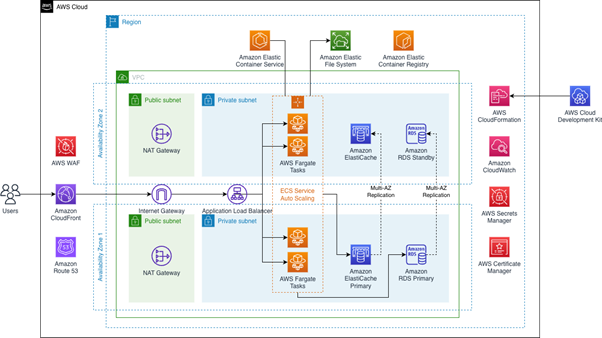
Figure 5. Architecture diagram for running Moodle with serverless containers on AWS. The architecture features modular architecture using AWS services explained in more detail in the following section.
The solution is deployed using AWS Cloud Development Kit (AWS CDK), which allows users to define cloud application resources using familiar programming languages. The solution is deployed using two Availability Zones (AZs) for high-availability.
Content delivery and security
On the application endpoint, an Amazon CloudFront distribution is created and used as the endpoint for end-users to access the Moodle application. CloudFront improves the performance of the application by serving the content near to where the end-users are located with low latency. The solution creates and associates an AWS Web Application Firewall (AWS WAF) web access control list (ACL) with the CloudFront distribution with Amazon IP reputation list managed rule group enabled. You can also enable additional rules as needed in this web ACL. Behind CloudFront, the Moodle application traffic is load-balanced using an Application Load Balancer (ALB). Traffic is secured with encryption-in-transit with the TLS certificate stored in AWS Certificate Manager (ACM). The ALB automatically distributes the incoming traffic across multiple Moodle instances. It monitors the health of its registered targets, and routes traffic only to the healthy targets. The ALB scales the load balancer as the incoming traffic changes over time. The solution uses a CloudFront VPC Origin, which allows the ALB to be located in a private subnet, ensuring that CloudFront is the only publicly available access point to the Moodle application.
Compute layer
The incoming traffic distributed by the ALB is received by a pool of ECS tasks using a combination of Fargate and Fargate Spot capacity providers. The Amazon ECS service automatically orchestrates multiple Amazon ECS tasks running the Moodle containers. The container image for the application is based on the moodle-php-apache container image with the Moodle source code copied and installed when the first container of the deployment starts. The installation follows best practices from the documentation. The container image is stored in Amazon Elastic Container Registry (Amazon ECR) which provides a fully managed container registry.
Storage layer
To centralize and share moodledata files and the Moodle source code and configuration across multiple Moodle instances, a shared file system is used. Amazon Elastic File System (Amazon EFS) is a simple, serverless, set-and-forget elastic file system. Amazon EFS makes it simple to set up, scale, and cost-optimize file storage on AWS. Amazon EFS is deployed and mounted on the Amazon ECS tasks to be used as underlying Moodle and moodledata filesystem.
Database layer
The Moodle database is also centralized and deployed into an Amazon Relational Database Service (Amazon RDS) instance. By default, the sample repository is configured to use Amazon Aurora Serverless, which provides the automatic scaling and cost optimization benefits described earlier. The sample repository also supports provisioned Aurora, MariaDB, and MySQL configurations for workloads requiring consistent performance characteristics.
With Amazon RDS, a managed service, you can set up, operate, and scale a relational database in the cloud. It provides cost-efficient and resizable capacity, while managing time-consuming database administration tasks—allowing you to focus on your applications and business.
Caching layer
To improve the overall performance of the application, Moodle has a built-in caching mechanism that can make use of memory, filesystem, or external cache store such as Valkey, Redis, or Memcached. By default, the sample repository is configured to use Amazon ElastiCache Serverless for Valkey as a centralized cache store. ElastiCache for Valkey offers several advantages for Moodle deployments. The serverless deployment option is priced 33% lower and node-based deployment is priced 20% lower than other supported engines, with a reduced minimum cache size of 100MB (compared to 1GB for other engines)—making it cost-effective for development, test, and production environments. The sample repository also supports Redis Serverless, as well as node-based clusters for both Valkey and Redis configurations.
How to run Moodle LMS on serverless services with AWS
The complete solution is available as a sample in our GitHub repository. For detailed instructions on deploying the sample application, including prerequisites and step-by-step guidance, please see the readme file in the GitHub repository.
Conclusion
In this post, we showed how to deploy Moodle LMS using a fully serverless architecture on AWS—combining AWS Fargate for containers, Amazon Aurora Serverless for the database, and Amazon ElastiCache Serverless for caching. This approach enables educational institutions to automatically scale for variable traffic patterns, optimize costs through pay-per-use pricing and Fargate Spot savings, reduce operational overhead by eliminating capacity planning, and gain visibility into performance with integrated Amazon CloudWatch monitoring. Explore the complete solution in our GitHub repository to get started. This comprehensive serverless solution allows educational institutions to focus on delivering quality learning experiences rather than managing infrastructure.
If you use this solution and would like to provide comments about how it can be improved, you can provide feedback in GitHub using the “Issues” feature.
You can also find more information about each of the AWS services used for this solution in the AWS guides:
- Amazon ECS Developer Guide
- Amazon EFS User Guide
- Amazon Aurora User Guide
- ElastiCache User Guide
- User Guide for Application Load Balancers
- Amazon CloudFront Developer Guide
- Amazon CloudWatch User Guide
Learn more in these blog posts that feature common use-cases and integrations within Moodle: