AWS Storage Blog
Automatically decompress files in Amazon S3 using AWS Step Functions
Every day, AWS customers process millions of compressed files in Amazon S3, from small ZIP archives to multi-gigabyte datasets. While decompressing a single file is straightforward, processing thousands of files efficiently requires complex orchestration, error handling, and infrastructure management.
Consider this scenario: Your organization receives over 10,000 compressed files daily from partners, ranging from 5 MB to 50 GB in size. Traditional approaches force you to choose between downloading files locally with bandwidth constraints and storage limits, running always-on Amazon EC2 instances with unnecessary costs, writing custom AWS Lambda functions limited by 10 GB temporary storage and 15-minute timeouts, or managing complex orchestration code with significant maintenance overhead.
This post presents a serverless solution that uses AWS Step Functions to automatically route files to optimal compute resources, using Lambda for files under 1 GB and EC2 for larger files. The solution handles compression formats including zip, gzip, tar, tar.gz, tar.bz2, and tar.xz, processes files in parallel without throttling, and cleans up resources automatically.
Solution overview
Our solution first evaluates your file’s size and format to determine the most efficient processing path. For files under 1 GB, it automatically triggers a Lambda function that quickly processes the file while maintaining cost efficiency. When dealing with larger files, the workflow seamlessly switches to provisioning and managing EC2 instances for more robust processing power.
Throughout this process, whether handling small or large files, the workflow maintains complete control over resource management with the ability to process files concurrently at scale. Built-in error handling provides automatic retry with exponential backoff, while cost optimization is achieved through Spot instances for EC2 processing and automatic resource cleanup. Security is maintained through Amazon VPC isolation and encryption for both data in transit and at rest.
The following diagram shows what happens behind the scenes:
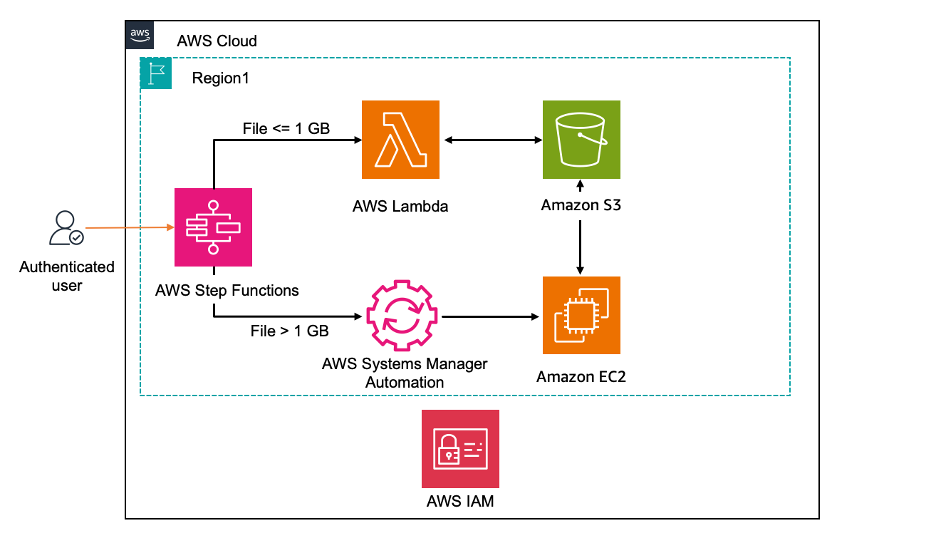
The architecture implements several key patterns that ensure reliability and efficiency. The Step Functions state machine evaluates file metadata and intelligently routes processing to the appropriate compute resource. Resource management is handled through AWS Systems Manager for EC2 instance configuration, while comprehensive observability is achieved through Amazon CloudWatch logging. Security is enforced through least-privilege AWS Identity and Access Management (IAM) roles and VPC endpoints for S3 access, ensuring that data never traverses the public internet.
From your perspective as a user, interacting with this powerful workflow necessitates minimal effort. The core parameters include your source bucket and key for the compressed file, the target bucket and prefix for extracted contents, and networking configuration including subnet ID and security group IDs. Here’s a complete example of the input parameters:
{
    "source_bucket": "your-source-bucket",
    "source_key": "your-compressed-file.zip",
    "target_bucket": "your-target-bucket",
    "target_prefix": "extracted/",
    "output_bucket": "your-output-bucket",
    "instance_type": "your-desired-instance-type",
    "SubnetId": "subnet-xxx",
    "SecurityGroupIds": "sg-xxx"
}
With these parameters, the solution handles everything else automatically, from resource provisioning to cleanup. This masks the sophisticated orchestration happening behind the scenes, where Step Functions coordinates between Lambda, EC2, and S3 to provide reliable and efficient file processing at any scale.
Prerequisites and setup
Before deploying this solution, ensure you have AWS CLI version 2.x or later installed and configured with appropriate credentials. Your AWS account needs an existing VPC with private subnets for Lambda function and EC2 instance, along with S3 buckets already created for source files, extracted targets, and process logs. The deployment user requires specific IAM permissions to create the necessary resources. These include CloudFormation permissions to create, update, and delete stacks, IAM permissions to create roles and policies scoped to solution resources, and permissions to create Lambda functions, Step Functions state machines, and launch EC2 instances in your specified VPC. Additionally, the solution needs S3 permissions to read from source buckets and write to target buckets. To begin deployment, first clone the GitHub repository and review the configuration files to ensure they match your environment.
Deploy the IAM roles first, as this is a one-time setup per AWS account. The IAM stack creates the necessary execution roles for Step Functions, Lambda, Systems Manager and EC2 with least-privilege permissions:
aws cloudformation create-stack \
    --stack-name s3-unzip-roles \
    --template-body file://s3unzip-on-aws-iamroles-global.yaml \
    --tags Key=Project,Value=s3unzip \
    --capabilities CAPABILITY_NAMED_IAM
Next, deploy the main solution stack which creates the Step Functions state machine, Lambda function, and Systems Manager Document for launching EC2, if needed:
aws cloudformation create-stack \
    --stack-name s3unzip-on-aws-services-regional \
    --template-body file://s3unzip-on-aws-services-regional.yaml \
    --tags Key=auto-delete,Value=no Key=Project,Value=s3unzip \
    --capabilities CAPABILITY_NAMED_IAM \
    --parameters ParameterKey=VpcId,ParameterValue=vpc-xxx \
    ParameterKey=SubnetIds,ParameterValue=subnet-xxx \
    ParameterKey=SecurityGroupIds,ParameterValue=sg-xxx
After deployment completes, test the solution with a sample file to verify everything is working correctly. Upload a test archive to your source bucket, trigger the workflow using the Step Functions API, and monitor the execution progress through the AWS Management Console or CLI:
aws stepfunctions start-execution \
    --state-machine-arn arn-xxx \
    --input '{"source_bucket": "your-source-bucket", "source_key": "your-bucket-key", "target_bucket": "your-target-bucket", "target_prefix": "your-target-prefix", "output_bucket": "your-output-bucket", "instance_type": "desired-ec2-instance-type", "SubnetId": "subnet-xxx","SecurityGroupIds": "sg-xxx" }'
Refer to the GitHub repository for detailed steps for deployment, testing, and troubleshooting.
Key considerations
Create an S3 gateway endpoint on the VPCs where Lambda function and EC2 instance are expected to be launched. Without this endpoint, Lambda and EC2 execution will hang and eventually timeout.
Ensure that the source and target bucket parameters are in the same region where the Step Functions state machine, Lambda function and Systems Manager Document are being executed.
You are responsible for the cost of the AWS services used when deploying the solution described in this blog in your AWS account. For cost estimates, refer to the pricing pages for each AWS service or use the AWS Pricing Calculator. Understanding the cost structure of this solution helps optimize your deployment for maximum efficiency. The primary cost components include Lambda invocations, EC2 instance usage, S3 API requests (GET/PUT), and Step Functions state transitions. Remember to clean up any resources to manage ongoing costs.
Cleaning up
For files larger than 1 GB that trigger EC2 instance launches, verify that EC2 instances terminate successfully after processing completes to prevent ongoing compute charges.
To delete the resources created by this solution, perform the following actions:
- Delete the CloudFormation stack that creates the Step Functions state machine, Lambda function, and Systems Manager Document for launching EC2 in every applicable Region
- Delete the CloudFormation stack that creates IAM roles
Conclusion
This solution eliminates the complexity of processing compressed files at scale in Amazon S3. By automatically routing files to the appropriate compute resource and handling all orchestration, you can focus on your business logic rather than infrastructure management. The complete solution with CloudFormation templates and documentation is available in our GitHub repository.
Deploy it in your environment and test with your specific file types. Efficient file decompression at scale needs careful architecture decisions. This solution provides a robust, scalable approach that works with your existing Amazon S3 infrastructure while minimizing operational overhead.