AWS Storage Blog
How WeatherBug reduced storage costs by 80% using Amazon S3 Storage Lens and Kiro CLI
WeatherBug is the third largest weather intelligence company in the US, delivering real-time forecasts, radar, lightning alerts, and interactive maps to over 10 million users. As their data footprint has grown across hundreds of Amazon Simple Storage Service (Amazon S3) buckets in a multi-account AWS environment, their storage costs rose steadily with no clear visibility into what was driving spend.
By following a three-phase optimization approach using Amazon S3 Storage Lens and Kiro CLI, WeatherBug achieved an 80% reduction in storage costs within 6 months, without sacrificing stability or data accessibility.
In this post, we walk through how they did it and give you a replicable framework to drive similar results in your own environment.
WeatherBug’s challenge
WeatherBug’s S3 footprint spanned hundreds of buckets across a multi-account AWS environment, and costs were climbing. The team lacked granular visibility into what was driving spend, making it impossible to act decisively.
A closer look revealed systemic inefficiencies:
- Over half of their versioned buckets had no lifecycle policy, meaning noncurrent object versions accumulated indefinitely with no automatic expiration
- Log buckets representing a significant portion of their storage footprint sat in S3 Standard, the most expensive tier, despite being rarely accessed after the first few days
- Landing zone buckets held stale data well beyond their processing window, with no expiration rules to clean up after ingestion completed
- Unnecessary data duplication and cross-Region replication of non-critical datasets inflated costs without adding operational value
The root cause wasn’t a single misconfiguration. It was the absence of a unified storage strategy. WeatherBug needed comprehensive visibility before they could act, and a systematic framework to prioritize changes safely.
Solution overview
Before implementing an automated solution, the WeatherBug team undertook a critical first step: a thorough, manual review of the datasets spread across their hundreds of S3 buckets. S3 Storage Lens and its advanced metrics aided significantly this deep dive, providing precise insight into the footprint and usage of individual datasets.
After defining a small, specific set of necessary storage and access patterns, the team determined that a tailored approach using S3 lifecycle management (rather than S3 Intelligent-Tiering) would yield significant long-term cost savings. Working closely with AWS, WeatherBug used AWS CloudFormation to address their unique access patterns with custom lifecycle policies, which allowed them to manage storage transitions at the prefix level based on specific business requirements.
WeatherBug verified each change using Amazon CloudWatch metrics and AWS Cost Explorer before scaling adjustments across their environment.
The team used Kiro CLI to analyze access patterns and generate optimized lifecycle policies. AWS CloudFormation then deployed those policies consistently across hundreds of buckets. Kiro CLI handled discovery and recommendations. CloudFormation provided the governance and repeatability needed for production changes on a scale.
The following three phases outline the approach to optimize Amazon S3 costs: Visibility and Assessment, Quick Wins, and Strategic Optimization.
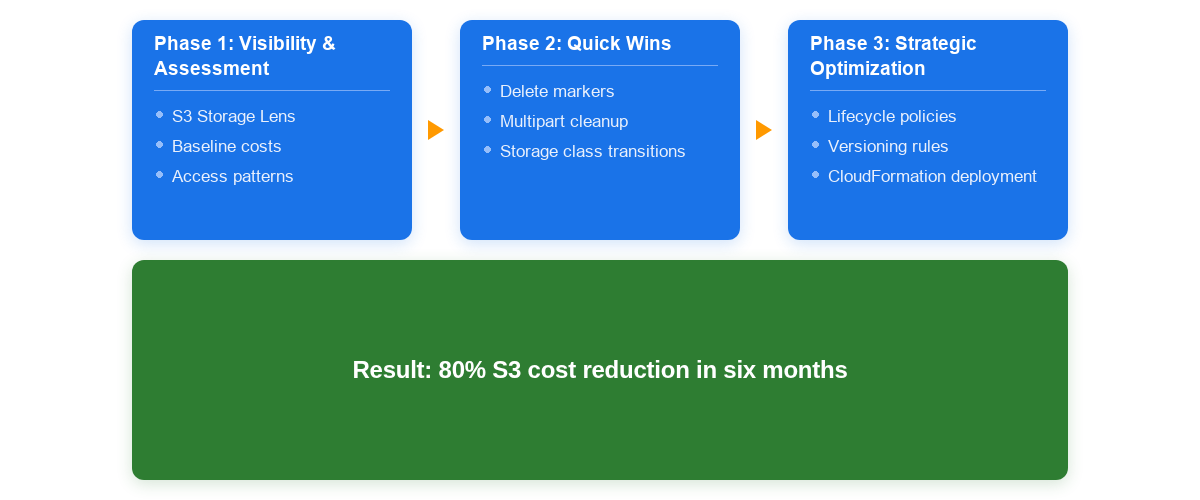
Figure 1: WeatherBug’s three-phase S3 cost optimization workflow
Prerequisites
Before you begin implementing the optimization approach described in this post, verify you have the following:
- The AWS Command Line Interface (AWS CLI) installed and configured with appropriate credentials
- Kiro CLI access
- AWS Identity and Access Management (IAM) permissions for S3 management
- Basic understanding of S3 storage classes and lifecycle policies
Phase 1: Visibility and assessment
WeatherBug’s first move was deploying S3 Storage Lens across their multi-account environment. This gave them a comprehensive view of usage patterns, surfacing critical gaps: versioned buckets with no lifecycle policy and log buckets sitting in S3 Standard. Without this visibility, they couldn’t prioritize where to act.
With comprehensive visibility as your foundation, you can identify where costs concentrate and where optimization opportunities exist.
The following Kiro CLI interaction is an example from a sample environment and can be tailored as needed.
- Open your terminal and verify Kiro CLI is properly configured.
- Run the following Kiro CLI command to deploy S3 Storage Lens and generate an initial cost assessment. In Kiro CLI, @q invokes the AI assistant from the terminal.
@q Deploy Amazon S3 Storage Lens across for my s3 account:
- Enable account level visibility
- Set up daily metrics collection
- Configure storage pattern analysis
- Show cost optimization opportunities for s3
- Generate initial s3 assessment report and save it locally for review
In response to the CLI command, Kiro CLI generates two comprehensive reports and saves them in your current directory:
- s3-storage-lens-assessment-report.md – Full analysis with detailed recommendations, action plans, and CLI commands
- s3-storage-lens-quick-reference.md – Quick access guide for immediate actions
In the following sample analysis, buckets prefixed with lz are landing zone buckets, temporary staging areas where WeatherBug holds incoming data before processing. bucket-2 and bucket-5 served as log buckets, accumulating application and access logs that were rarely revisited after the first few days.
With versioning enabled and no lifecycle policy, Amazon S3 retains every previous object version indefinitely. As a best practice, configure NoncurrentVersionExpiration to retain only the number of versions your recovery requirements demand (for example, two or three noncurrent versions).
| Bucket name | Versioning | Lifecycle policy | Cost risk | Notes |
| bucket-1 | Yes | No | HIGH | Noncurrent versions accumulate indefinitely. |
| bucket-2 | No | No | HIGH | Log bucket. Files accumulate in STANDARD. |
| bucket-3-lz | Yes | Yes, 30-day exp | Medium | NoncurrentVersionExpiration needed. |
| bucket-4-lz | No | No | Medium | Recommend lifecycle expiration policy. |
| bucket-5 | No | No | HIGH | Log bucket. Accumulates in STANDARD. |
Based on this analysis, the assessment identified two categories of optimization opportunities ranked by cost impact and implementation risk:
- Critical issues (immediate action required)
- Versioning without lifecycle management
- Impact: HIGH cost risk
- Affected:
bucket-1 - Estimated savings: 40–60% on versioned object storage costs
- Log buckets without lifecycle policies
- Impact: HIGH cost risk
- Affected:
bucket-5,bucket-2 - Estimated savings: 70–85% on log storage costs after 90 days
- Versioning without lifecycle management
- Medium priority optimizations
- Landing zone buckets: Infrequent access pattern
- Impact: Medium cost risk
- Affected:
bucket-3-lz,bucket-4-lz - Estimated savings: 30–50% on landing zone storage
- Landing zone buckets: Infrequent access pattern
These commands surface the most actionable indicators: where spend concentrates, where lifecycle coverage is missing, and where compliance gaps create avoidable cost. WeatherBug’s existing CloudFormation foundation gave them a consistent way to roll out the changes identified here.
Phase 2: Quick wins
With their assessment complete, WeatherBug moved to low-risk changes that could deliver immediate savings. They identified expired delete markers and incomplete multipart uploads consuming hidden storage across S3 environments. A single CloudFormation rule cleaned these up and established the foundation for deeper optimization.
Run the following Kiro CLI command to identify delete markers and incomplete multipart uploads consuming hidden storage:
@q Analyze storage waste from delete markers and incomplete uploads:
- Identify expired markers
- Show storage and cost impact
- Suggest cleanup policy
- Summarize results in a tabular format and store local
Kiro CLI scans your environment and produces a detailed breakdown of storage waste by bucket.
| Bucket | Versioned | Delete markers | Multipart uploads | Estimated cost |
| bucket-a | Yes | 129k | 0 | $28.40 |
| bucket-b | No | 0 | 287 | $12.40 |
| bucket-c | Yes | 486k | 0 | $312.40 |
| bucket-d | Yes | 243k | 892 | $198.60 |
| bucket-e | Yes | 112k | 0 | $24.80 |
Summary:
- Total buckets: 238
- Buckets with issues: Approximately 30
- Delete markers: Over 1.2 million
- Monthly cost impact: $1,020
We recommend implementing cleanup operations as standard practice across your buckets. Implement the cleanup policy using CloudFormation:
Rules:
  - Id: "all.delete.markers.incomplete.uploads"
    Status: "ENABLED"
    ExpiredObjectDeleteMarker: true
    AbortIncompleteMultipartUpload:
      DaysAfterInitiation: 2
Phase 3: Strategic optimization
Building on quick wins, WeatherBug tackled their largest savings opportunity: comprehensive lifecycle management. By analyzing access patterns at the prefix level, they identified storage where custom lifecycle policies could deliver most of their overall savings.
Run the following Kiro CLI command to analyze access patterns and identify lifecycle optimization opportunities:
@q Analyze access patterns and create optimal lifecycle rules:
- Show access frequency for objects across buckets
- Recommend storage class transitions
- Calculate potential transition savings
- Summarize results in a tabular format and store local
Kiro CLI evaluates your bucket access patterns and recommends storage class transitions.
| Bucket | Size (GB) | Current | Recommended | Savings per month |
| bucket-f | 14,800 | STANDARD | STANDARD_IA | $155.40 |
| bucket-g | 7,200 | STANDARD | GLACIER Deep Archive | $158.47 |
| bucket-h | 33,600 | STANDARD | GLACIER Deep Archive | $739.54 |
| bucket-i | 8,800 | STANDARD | STANDARD_IA | $92.40 |
| bucket-j | 2,240 | STANDARD | GLACIER Deep Archive | $49.30 |
Summary:
- Total storage: Approximately140 TB
- Potential monthly savings: $9,800
WeatherBug used CloudFormation to automate lifecycle transitions for inactive prefixes:
Rules:
  - Id: "datasetname1.v1"
    Prefix: "dataset-name1/"
    ExpirationInDays: 2
    NoncurrentVersionExpiration:
      NoncurrentDays: 2
Cleaning up
If you implemented the solutions in this post in a test environment, remove resources to avoid ongoing charges:
aws s3control delete-storage-lens-configuration --account-id YOUR_ACCOUNT_ID --config-id account-wide-storage-lens
aws s3api delete-bucket-lifecycle --bucket YOUR_TEST_BUCKET_NAME
aws cloudformation delete-stack --stack-name YOUR_STACK_NAME
Conclusion
By following this three-phase approach (gaining visibility with S3 Storage Lens, capturing quick wins through storage hygiene, and executing strategic lifecycle optimizations with Kiro CLI), WeatherBug achieved an 80% reduction in storage costs within 6 months. This was accomplished without sacrificing data accessibility or operational stability.
“In a world of trade-offs, we were able to have it all: a smarter, faster solution that delivered significant cost savings while maintaining the quality and reliability our customers expect,” says Adam Lauer, Director of Platform Engineering at WeatherBug.
The framework described in this post is designed to be replicable. Whether you’re managing dozens or hundreds of S3 buckets, the same pattern to assess, prioritize, and automate can drive meaningful cost savings in your environment.