亚马逊AWS官方博客
Building a Traceable, Read-Only AWS Operations Workbench with NotiOps, an Agentic AI Assistant
Summary: This post shows how NotiOps helps operations teams launch incident investigations quickly and trace every response back to its sources. The solution primarily uses AWS DevOps Agent, AWS Knowledge MCP, open-source AWS Labs MCP servers, and read-only AWS APIs for investigation and evidence gathering, while keeping workload operations within a read-only boundary.
Table of Contents
1. New Challenges for AIOps
As generative AI enters cloud operations, teams typically ask three questions first: What evidence supports the answer or investigation result? Does the answer come from a trusted AWS information source? Could the agent change the production environment? In an operations setting, an answer that sounds plausible but cannot be traced to its source is not enough. Likewise, an agent with broad write permissions is difficult to introduce directly into production on-call workflows.
NotiOps is an agentic AI assistant for AWS that provides a browser-based, read-only cloud operations workbench. Engineers can use natural language to query AWS environments, search official documentation, investigate incidents, and analyze costs and resource health. A Sources panel accompanies every response and shows both the MCP servers or AWS APIs invoked and links to the relevant official documentation. If a turn does not invoke an external tool, NotiOps explicitly labels the source as “Model knowledge, not real-time data,” so that model inference is not presented as a current fact.
For complex incidents that require correlation across metrics, logs, change history, and resource relationships, users can select Deep investigation in NotiOps to engage AWS DevOps Agent in the target account. NotiOps automatically includes the current account and question context, then displays investigation progress, root-cause findings, mitigation recommendations, and a link to the original report on the same page. Compared with opening the AWS DevOps Agent console separately, NotiOps brings official documentation Q&A, account switching, rapid read-only diagnostics, deep investigation, cost analysis, and AWS Support case collaboration into one interface. Engineers no longer need to repeatedly locate the same resources or assemble evidence across multiple consoles.
This post focuses on three core NotiOps design commitments: every response includes sources, AWS facts are grounded primarily through official AWS MCP servers, and investigation paths remain read-only. It also describes two deployment options, a one-click AWS CloudFormation deployment and a full setup.sh deployment, together with the corresponding upgrade and cleanup procedures.
2. Three Design Commitments
- Every response includes sources: The Sources panel lists the tools, MCP providers, AWS APIs, official documentation links, or report links used during the current turn. When no external tool is invoked, it explicitly discloses “Model knowledge, not real-time data.” The presence of sources does not mean that a conclusion no longer needs review; it gives engineers a clear starting point for verification.
- AWS facts come primarily from official AWS MCP servers: For AWS concepts, service behavior, and best practices, NotiOps searches official documentation through AWS Knowledge MCP. Cost, pricing, Amazon CloudWatch, AWS CloudTrail, and AWS API capabilities are provided through open-source AWS Labs MCP servers. Current resource state within an account comes from read-only AWS APIs, and these data sources are also identified in the Sources panel.
- Investigation paths remain read-only: NotiOps runtime tools primarily use read operations such as Describe, Get, and List. A read-only tool allowlist, system constraints, output auditing, and IAM permissions provide defense in depth. NotiOps can recommend remediation actions, but it does not stop, delete, modify, or scale workloads on a user’s behalf.
3. Solution Overview
NotiOps is not intended to replace the final judgment of an operations engineer. Its purpose is to shorten the path from finding evidence to organizing that evidence and developing recommended next steps. It packages official knowledge retrieval, live account data, and common cloud operations tasks as reusable MCP tools and Skills, then returns the answer, investigation details, and sources in a single workspace.
- AWS knowledge Q&A: Search official documentation, AWS Blogs, AWS What’s New, and AWS Well-Architected guidance through AWS Knowledge MCP, with clickable sources included in the response.
- Direct agent conversations: Start a conversation with either NotiOps Agent or AWS DevOps Agent, depending on the task.
- Incident investigation: Use AWS DevOps Agent, CloudWatch MCP server, CloudTrail MCP server, AWS API MCP server, and read-only AWS APIs to gather alarms, metrics, logs, change history, and resource state.
- Skill Hub: Use 11 prebuilt operations Skills, create and validate team-specific Skills, and publish documentation-based Skills to an AWS DevOps Agent Space.
- Cost and resource health: Analyze actual costs and configurations through the AWS Billing and Cost Management MCP server, AWS Pricing MCP server, and read-only resource tools.
- Proactive notifications: Normalize several types of Amazon EventBridge signals into the web notification inbox. Slack and Lark can be enabled as optional collaboration channels.
- Transparent sources: Present tool calls, documentation URLs, reports, and model-knowledge fallbacks in a single Sources panel.
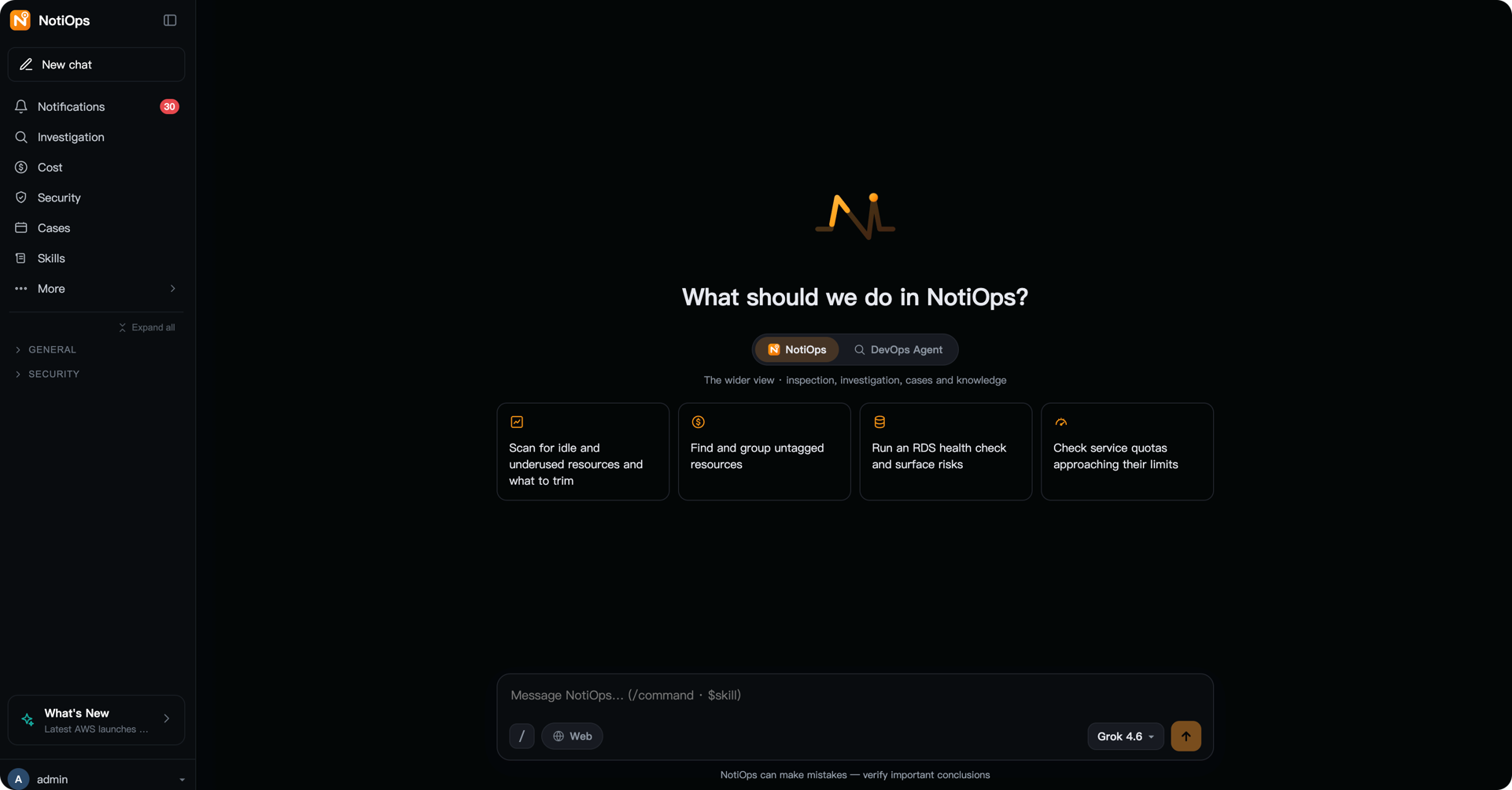
[Figure 1: The NotiOps web console] |
4. How NotiOps Works
- The user asks a question: An engineer signs in to the web console through Amazon Cognito, selects an account and model, and enters a question in natural language. Web search is optional and can remain disabled when the team wants to use official AWS sources as the validation baseline. The engineer can also choose either NotiOps Agent or AWS DevOps Agent for the conversation. Eligible customers with AWS Enterprise Support may receive reduced AWS DevOps Agent service charges, helping lower their token-related costs.
- The agent gathers evidence first: The agent running in Amazon Bedrock AgentCore Runtime selects tools based on the question. It queries AWS Knowledge MCP first for AWS concepts and service behavior; invokes the relevant AWS Labs MCP server for costs, pricing, metrics, logs, and change history; and uses read-only AWS APIs for the current state of account resources.
- Deep investigation: For an issue that requires cross-signal correlation and formal root-cause analysis, the user can select Deep investigation. NotiOps locates the AWS DevOps Agent associated with the current account, starts an investigation, and continuously returns its progress. When the investigation finishes, the root cause, mitigation recommendations, investigation ID, and downloadable report appear in the current conversation. The investigation path reads the customer environment but does not automatically perform remediation.
- The read-only boundary blocks changes: The tool layer exposes only selected read and analysis capabilities, and the general-purpose AWS API fallback is also restricted to read-only operations. System instructions and output auditing further reject requests to stop, delete, modify, or scale resources. IAM roles form the final permission boundary.
- The system assembles the sources: Every tool call is mapped to a source record. Tools that return a documentation or report URL also include a clickable link. If no external tool is used, the model name and a “not real-time data” label provide a transparent fallback source.
- The response and Sources arrive together: The agent organizes the evidence into a summary, findings, risks, and recommended validation steps, then streams the response and Sources back together. Engineers can open the original documentation from the Sources panel or repeat the verification using the displayed API and tool information.
The following diagram shows the relationships among the NotiOps control plane, models, and tools, together with the read-only permission boundary in customer accounts.
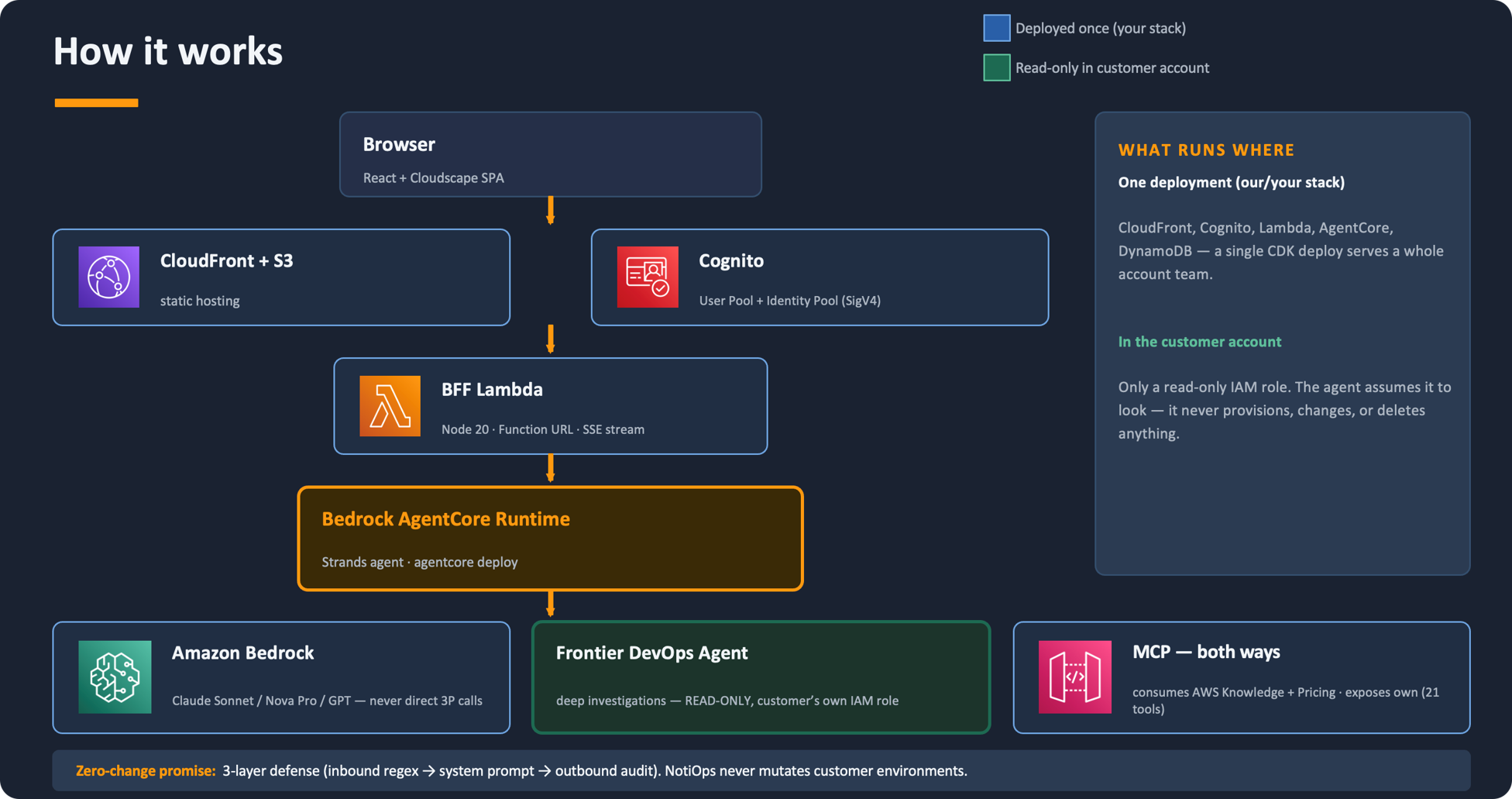
[Figure 2: Where NotiOps runs and how it maintains the read-only boundary] |
This architecture separates the team-facing control plane from the evidence-gathering permissions in customer accounts. Amazon Cognito authenticates browser requests, which a backend-for-frontend (BFF) AWS Lambda function streams to AgentCore Runtime. Based on the task, the agent then routes the request to AWS DevOps Agent or processes it through the AWS MCP servers integrated with NotiOps. Amazon Bedrock provides the underlying foundation models. Customer accounts do not need a general-purpose write agent; they only need to provide a constrained, read-only IAM role.
5. Security Boundaries and Data Flow
In this post, read-only means that the operations investigation and resource-inspection paths do not modify customer workloads. NotiOps can explain a recommended change and its risks, but it does not return or automatically run commands that stop, delete, modify, or scale workloads. AWS Support case actions and administrative configuration changes are separately authorized control-plane operations and should not share the workload investigation role.
The NotiOps read-only commitment does not rely on prompts alone. The code limits agent capabilities through a tool allowlist, system instructions reject requests that intend to make changes, and output auditing checks for potentially exposed change commands. The IAM permissions of the deployed roles provide the final boundary that cannot be bypassed. For the general-purpose AWS API MCP server, the runtime adds defense in depth through read-only mode and a denylist for sensitive read operations.
- Begin with a single account and least-privilege permissions, enabling only the APIs required by the scenarios being validated.
- Verify important conclusions against the original metrics, logs, CloudTrail events, cost data, or official documentation linked in Sources.
- Use separate permissions, explicit user confirmation, and audit records for control-plane write operations such as AWS Support case updates and administrative configuration.
- Do not enter passwords, access keys, tokens, personal information, or other data that should not enter the model context in a prompt.
- Internet search is optional. When enabled, external web pages appear as separate sources. If an organization requires answers to rely only on official AWS sources, leave this option disabled.
6. Prerequisites
For the one-click CloudFormation deployment, prepare the following:
- An identity that can sign in to the AWS Management Console and create a CloudFormation stack and the associated IAM resources.
- A valid email address that can receive an Amazon Cognito temporary password, and an Amazon Bedrock model available in the target AWS Region.
- To use AWS DevOps Agent deep investigation, select a Region supported by the service. In an unsupported Region, the template skips creation of the Agent Space without failing the stack.
- For a multi-account deployment with AWS Organizations, deploy from the organization management account or a delegated administrator account for CloudFormation StackSets.
The full setup.sh deployment additionally requires Git, Node.js, Python, uv, AWS CDK, and AWS credentials with permission to deploy the required resources. A container runtime such as Finch or Docker is required only when enabling a Slack or Lark bot.
7. Deploying NotiOps
NotiOps provides two deployment paths. The one-click CloudFormation option is designed for browser-only environments and deploys Web Chat, official documentation Q&A, resource inspection, AWS DevOps Agent deep investigation, AWS Support integration, Skills, model management, and the FinOps pages for the deployment account. The full setup.sh deployment adds instant messaging, proactive event delivery, daily inspections, the full administration dashboard, and detailed Cost and Usage Report (CUR) analysis with Amazon Athena.
7.1 Option A: One-Click CloudFormation Deployment
This option does not require AWS CDK, Node.js, Python, or a container runtime on the local computer, and it does not require a long-lived access key. The customer only needs to download the template in a browser and sign in to the AWS Management Console.
- Download the template. Open the latest NotiOps GitHub release and download notiops-webchat.template.json.
- Upload the template. Open AWS CloudFormation in the target Region, choose Create stack > With new resources > Upload a template file, and upload the template.
- Enter the parameters. For AdministratorEmail, enter an address that can receive email. For an initial deployment, you can retain the default values for the other parameters.
- Confirm optional capabilities. EnableDeepInvestigation defaults to Yes. The template creates an Agent Space when AWS DevOps Agent is supported in the Region and automatically skips it otherwise.
- Create the stack and sign in. Select the CloudFormation IAM capability acknowledgement and submit the stack. After the stack reaches CREATE_COMPLETE, open ChatUrl from Outputs and sign in as admin with the temporary password sent by email.
7.2 Option B: Full setup.sh Deployment
When you need instant messaging, proactive delivery, scheduled inspections, the administration dashboard, or CUR and Athena integration, download the source code from the public GitHub repository and run the interactive script:
On its first run, the script checks local dependencies and the current AWS identity, then prompts you to confirm the account, Region, and optional instant messaging platform. If instant messaging is enabled, AWS CDK creates empty secrets. After deployment, enter the credentials through the administration interface or AWS Secrets Manager.
The default command deploys in single-account mode. To perform read-only investigations and event forwarding across member accounts in AWS Organizations, run the following command from the organization management account or from a member account registered as a delegated administrator for CloudFormation StackSets:
Deployment recommendation: Start with the one-click deployment or the single-account setup.sh deployment. Validate sign-in, Sources, official MCP access, live data queries, and rejection of write operations before enabling multi-account access, instant messaging, proactive inspections, or CUR and Athena integration.
8. Upgrading NotiOps
8.1 Option A: One-Click CloudFormation Deployment
Download the new notiops-webchat.template.json from GitHub Releases. In AWS CloudFormation, select the existing stack and choose Update > Replace existing template, then upload the new template. On the parameter page, retain Use existing value, review the change set, and submit the update.
An upgrade does not resend the administrator invitation email or clear chat history, configuration tables, or data buckets. To roll back, update the stack again using the earlier template.
8.2 Option B: Full setup.sh Deployment
setup.sh performs an incremental deployment and updates only the components that have changed. It does not overwrite instant messaging credentials previously stored in AWS Secrets Manager. Before upgrading, review the release notes and validate sign-in, Sources, deep investigation, and the read-only boundary in a test account.
9. Common Use Cases
9.1 Starting a New Conversation
Users can begin a new conversation by selecting the target account, conversation topic, and model, then describing the issue in natural language. Example questions include, “Which alarms fired in the last 24 hours?” and “Has this service had any recent deployment changes?” Based on the question, NotiOps selects the appropriate official MCP server, read-only AWS API, or Skill, and returns the response together with the tools invoked and clickable sources. Users do not need to know the exact console location or API name in advance, and follow-up questions continue within the same conversation context.
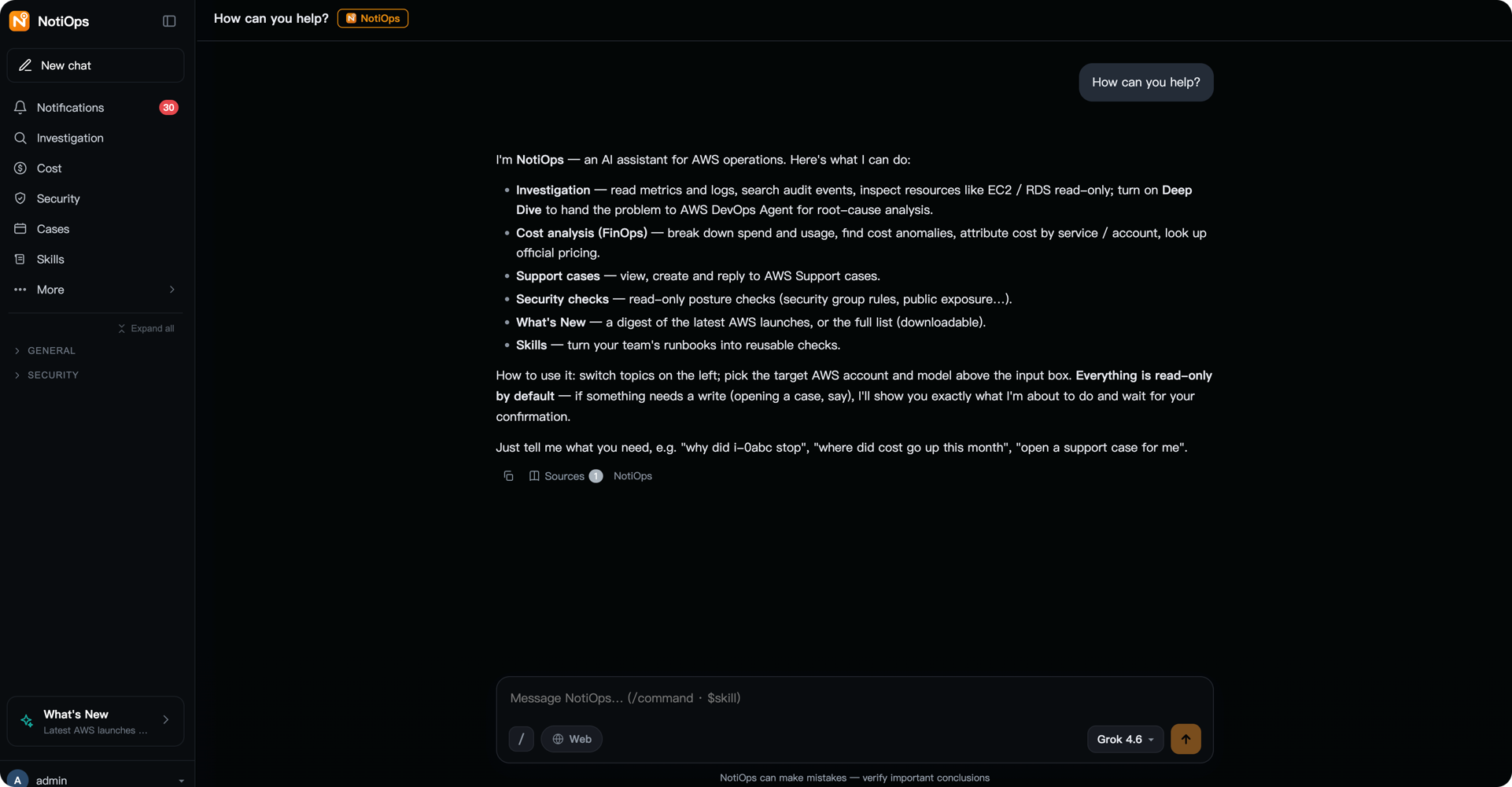
[Figure 3] |
9.2 Investigating Alarms
When a CloudWatch alarm or AWS Health event arrives, an engineer can carry the account, Region, resource, and time window from the notification into a follow-up investigation of related metrics, logs, resource state, and CloudTrail change history. Sources shows the CloudWatch, CloudTrail, or AWS API MCP tools that were used. The engineer remains responsible for confirming the final conclusion against the original evidence.
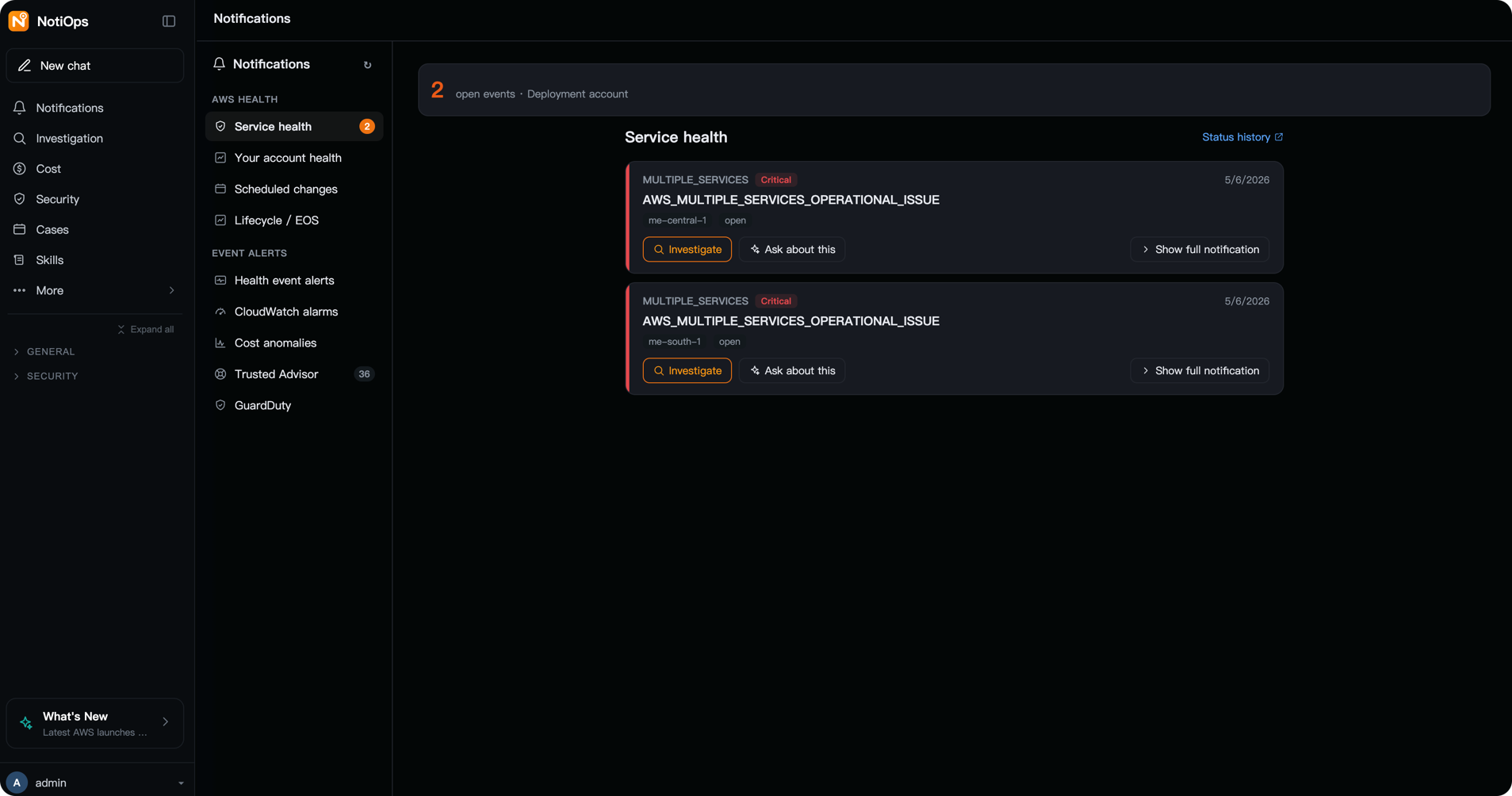
[Figure 4] |
9.3 Investigating Incidents
Incident investigation is available at two levels of depth. For a well-scoped issue, an engineer can begin with a rapid read-only investigation of metrics, logs, resource state, and recent changes. When the issue requires cross-service correlation or formal root-cause analysis, the engineer can select Deep investigation to engage AWS DevOps Agent. The investigation appears in a side panel and, when complete, returns a summary, root cause, mitigation plan, investigation ID, and online report to the current conversation. The engineer can then ask follow-up questions or proceed to an AWS Support case.
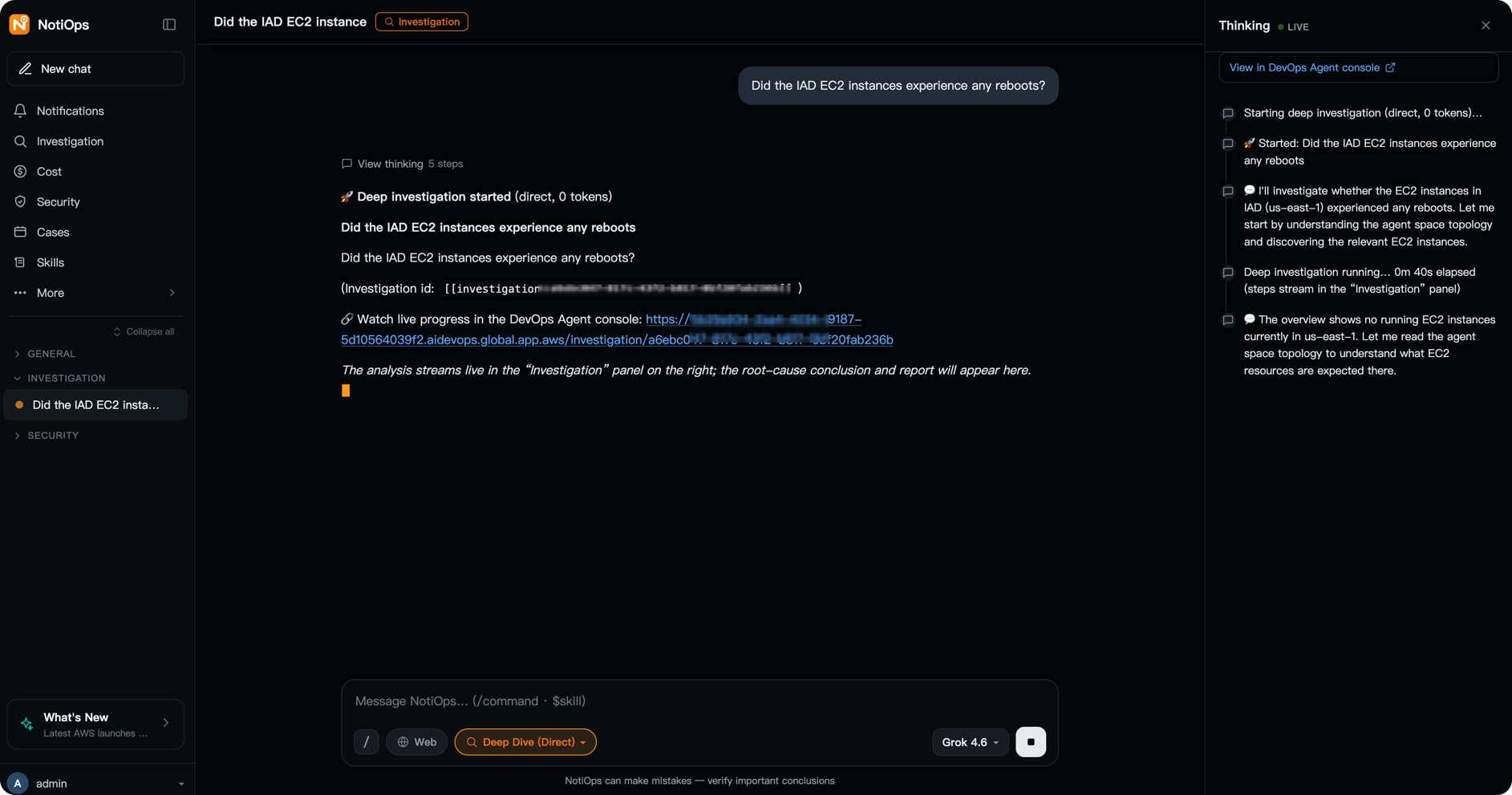
[Figure 5] |
9.4 Analyzing Costs and Idle Resources
Engineers can begin with a question such as, “Why did costs increase this week?” and progressively narrow the analysis by service, account, Region, and usage type. For idle or underutilized resources, NotiOps identifies candidates and explains the basis for its estimates rather than deleting resources directly. Before applying any optimization, confirm the business owner, dependencies, retention requirements, and rollback plan.
For more complex tasks, users can invoke a Skill instead of relying only on natural-language questions. For example, the cost spike Skill can guide NotiOps through an in-depth investigation and generate a report.
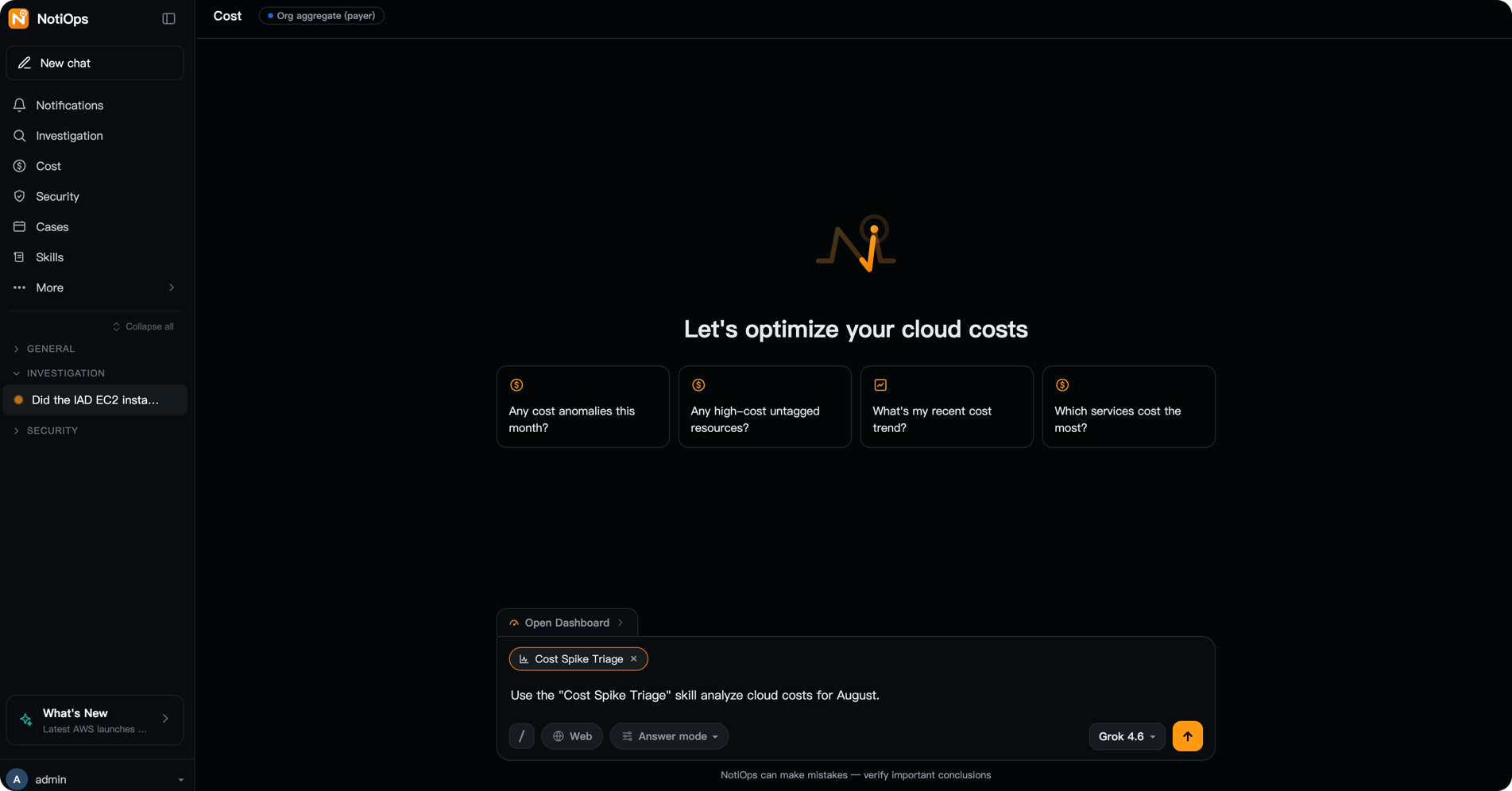
[Figure 6] |
9.5 Collaborating on AWS Support Cases
With the appropriate permissions and AWS Support plan, NotiOps can consolidate case lists, correspondence, and current status in the workbench, reducing context switching between the investigation and case pages. It also supports creating, updating, summarizing, and closing cases through natural language.
When AWS Support assistance is needed, an engineer can first ask NotiOps to summarize the symptoms, scope of impact, timeline, evidence reviewed, and AWS DevOps Agent findings, then create or update the case. Subsequent replies, case status, and the AWS Support communication thread remain available in the same workbench. Creating, replying to, and closing cases are explicitly authorized control-plane operations. They should use separate permissions and require user confirmation, and they do not share the read-only investigation permissions for customer workloads.
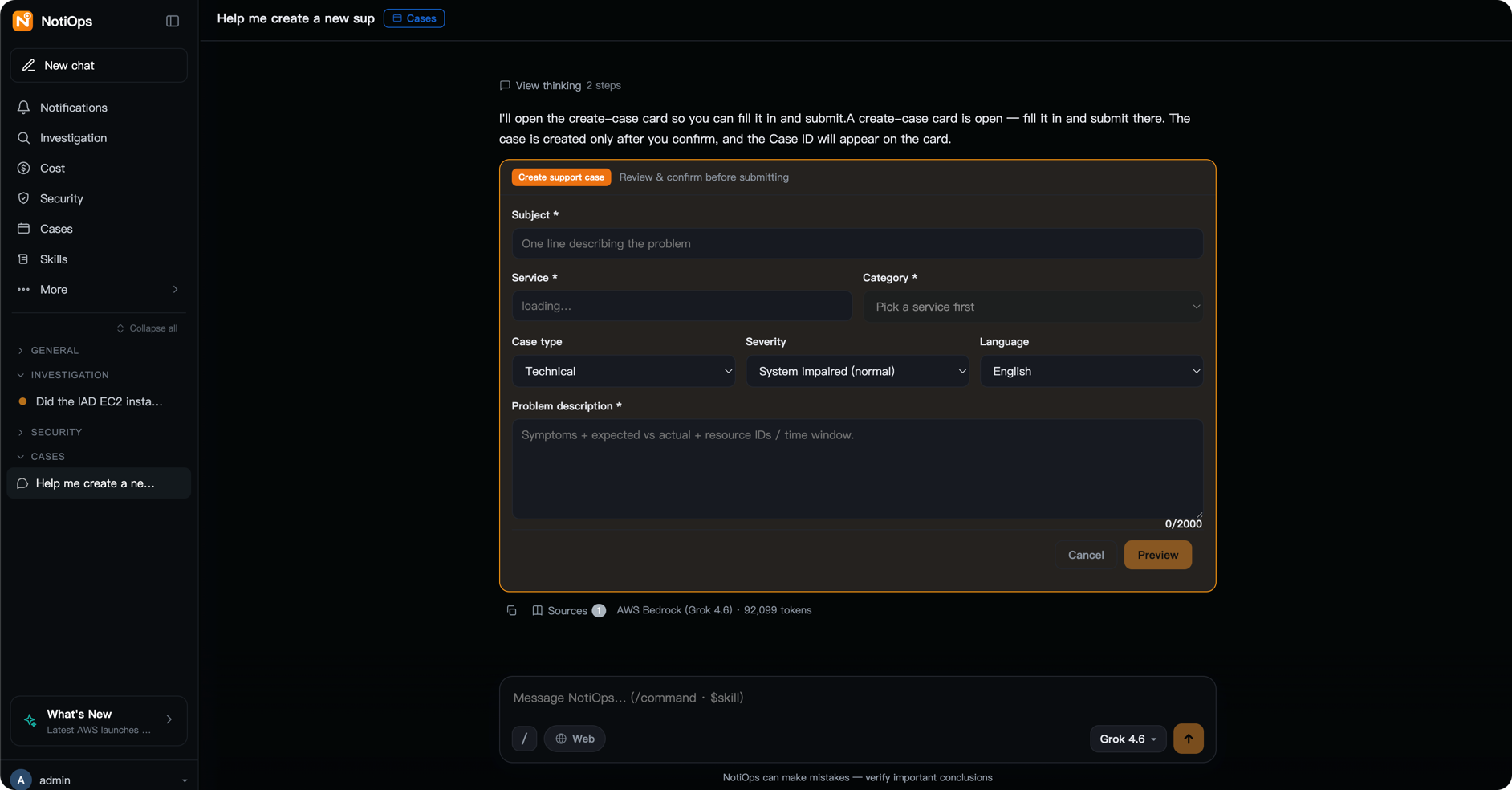
[Figure 7] |
9.6 Skill Hub
Skill Hub captures frequently used operations workflows as reusable, versioned task templates. NotiOps includes 11 prebuilt Skills for scenarios such as cost spikes, resource health, and incident investigation. Teams can also create their own Skills, define inputs, steps, and outputs, and validate them against known cases. Documentation-based Skills can be published to a target AWS DevOps Agent Space so that AWS DevOps Agent can reuse team knowledge during investigations.
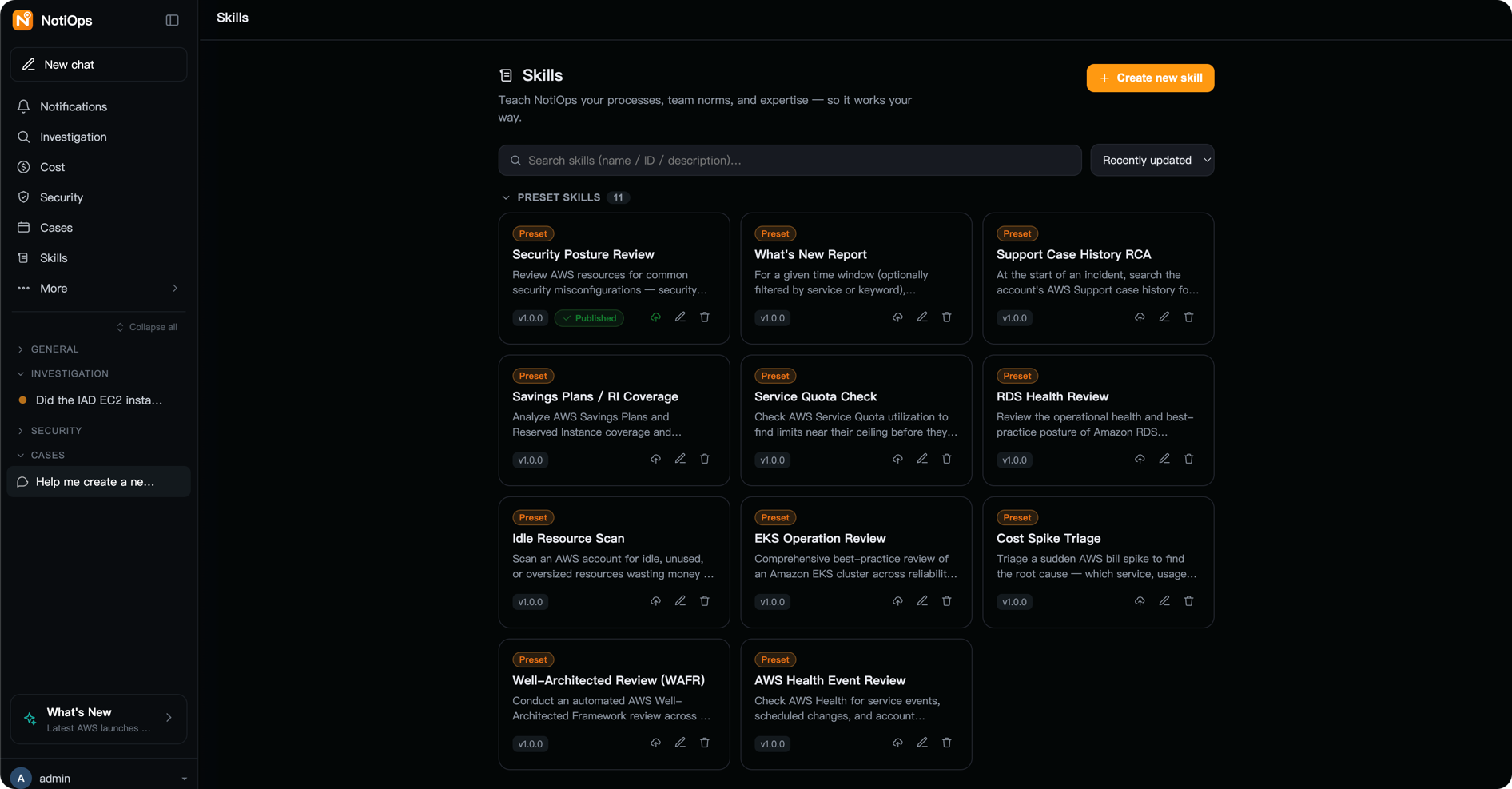
[Figure 8] |
9.7 Administration
Administrators can manage the model catalog available to users, the default model, background-task models, Skills, credentials, and deployment configuration. The full deployment also provides administration features for target accounts, notification thresholds, and proactive inspections. Configuration changes should follow least-privilege and auditing requirements. Model catalog changes take effect immediately and do not require redeploying the entire application.
10. Cost Considerations
Depending on the features enabled, NotiOps uses Amazon Bedrock, Amazon Bedrock AgentCore, AWS Lambda, Amazon DynamoDB, Amazon S3, Amazon EventBridge, Amazon CloudWatch, Amazon Elastic Container Registry (Amazon ECR), and optionally Amazon Elastic Container Service (Amazon ECS) on AWS Fargate and cross-account resources. Charges depend on model usage, agent runtime, event volume, log volume, storage, data scanned, and whether an instant messaging service runs continuously.
We recommend starting with the one-click CloudFormation deployment to establish a Web Chat baseline and measure model and tool usage for official documentation Q&A, account queries, and cost analysis. When instant messaging, proactive notifications, or CUR and Athena analysis are required, evaluate the additional cost of the full deployment. Before rolling out to production, use AWS Pricing Calculator to develop a budget model and configure alerts for anomalous spending.
Cost estimation tool: AWS Pricing Calculator
11. Cleaning Up Resources
11.1 Option A: One-Click CloudFormation Deployment
The TeardownMode stack parameter defaults to KeepData. When the stack is deleted, this setting retains the configuration table, chat history table, and data bucket. DeleteEverything deletes this data. Both modes delete the Amazon Cognito user pool, so users must be invited again after a new deployment.
To remove everything, first update the stack and change TeardownMode to DeleteEverything. Wait for the update to complete successfully, then delete the stack. The delete confirmation dialog does not change parameter values; CloudFormation uses the value from the last successful deployment.
11.2 Option B: Full setup.sh Deployment
Run –dry-run first to review the resources that will be affected. The default command deletes the runtime resources and stacks but retains three tables configured with the RETAIN policy. –delete-everything also removes the tables, CUR reports and buckets, saved Athena queries, and remaining log groups. The script asks you to enter the account number for confirmation and, by default, backs up buckets locally before deletion. Add –no-backup when a backup is not required.
Cross-account resources are not deleted automatically by default. To remove member-account StackSets, explicitly add –delete-member-stacksets. To remove the AWS Health forwarding stack from each linked account, run:
The script does not delete shared AWS CDK bootstrap resources, such as CDKToolkit, because other projects may depend on them.
12. Conclusion
NotiOps demonstrates an agentic AI operating model designed for cloud operations: every response can be traced to supporting evidence, AWS information is grounded primarily through official AWS MCP servers, current account state comes from read-only AWS APIs, and workload changes remain outside the agent’s execution boundary. Its value is not limited to generating answers. It helps engineers build an evidence trail that they can verify against the original data and official documentation.
To get started, download the CloudFormation template from the GitHub release, deploy Web Chat from a browser, and validate Sources, official MCP access, and read-only behavior with routine operations questions. You can then choose the full setup.sh deployment based on your team’s collaboration model, required depth of FinOps data, and multi-account needs. For production use, treat the sample code as a starting point and complete the necessary security review, observability, testing, cost governance, and operational hardening.
➡️ Next Steps:
Related Products:
- Amazon DevOps Agent — Agent to resolve and prevent incidents
- Amazon CloudFormation — Infrastructure-as-code service for AWS resources
- Amazon Bedrock — Managed service for building and scaling generative AI apps with foundation models
- Amazon CDK — Infrastructure-as-code framework to model cloud resources
- Amazon Cognito — Offers secure, scalable, and customized sign-up and sign-in in minutes
Related Articles:
- Leverage Agentic AI for Autonomous Incident Response with AWS DevOps Agent
- Farewell to Bastion Hosts: Achieving Secure and Intelligent Operations for Private Subnets Using AWS EICE (EC2 Instance Connect Endpoint) and Chaterm
- From AI agent prototype to product: Lessons from building AWS DevOps Agent
- Introducing Amazon Bedrock AgentCore: Securely deploy and operate AI agents at any scale (preview)
- Unlocking the power of Model Context Protocol (MCP) on AWS
13. Resources
*Amazon Web Services currently deploys the aforementioned certain generative AI-related services in Global regions. Amazon Web Services China region services are operated by NWCD and Sinnet, with more details at the official Amazon Web Services China region website.