Artificial Intelligence
Using Strands Agents to create a multi-agent solution with Meta’s Llama 4 and Amazon Bedrock
Multi-agent solutions, in which networks of agents collaborate, coordinate, and reason together, are changing how we approach real-world challenges. Enterprises manage environments with multiple data sources, changing goals, and various constraints. This is where multi-agent architectures shine. By empowering multiple agents that each have specialized tools, memory, or perspectives to interact and reason as a collective, organizations unlock powerful new capabilities:
- Scalability – Multi-agent frameworks handle tasks of growing complexity, distributing workload intelligently and adapting to scale in real time.
- Resilience – When agents work together, failure in one can be compensated or mitigated by others, creating robust, fault-tolerant systems.
- Specialization – Individual agents excel in specific domains (such as finance, data transformation, and user support) yet can seamlessly cooperate to solve cross-disciplinary problems.
- Dynamic problem solving – Multi-agent systems can rapidly reconfigure, pivot, and respond to change, which is essential in volatile business, security, and operations environments.
Recent launches in agentic AI frameworks, such as Strands Agents, make it easier for developers to participate in the creation and deployment of model-driven, multi-agent solutions. You can define prompts and integrate toolsets, allowing robust language models to reason, plan, and invoke tools autonomously rather than relying on handcrafted, brittle workflows.
In production, services such as Amazon Bedrock AgentCore support secure, scalable deployment with features like persistent memory, identity integration, and enterprise-grade observability. This shift towards collaborative, multi-agent AI solutions is revolutionizing software architectures by making them more autonomous, resilient, and adaptable. From real-time troubleshooting in cloud infrastructure to cross-team automation in financial services and chat-based assistants coordinating complex multistep business processes, organizations adopting multi-agent solutions are positioning themselves for greater agility and innovation. Now, with open frameworks such as Strands, anyone can start building intelligent systems that think, interact, and evolve together.
In this post, we explore how to build a multi-agent video processing workflow using Strands Agents, Meta’s Llama 4 models, and Amazon Bedrock to automatically analyze and understand video content through specialized AI agents working in coordination. To showcase the solution, we will use Amazon SageMaker AI to walk you through the code.
Meta’s Llama 4: Unlocking the value of 1M+ context windows
Llama 4 is Meta’s latest family of large language models (LLMs) that stands out for its context window capabilities and multimodal intelligence. Both models use mixture-of-experts (MoE) architecture for efficiency, are designed for multimodal inputs, and are optimized to power agentic systems and complex workflows. The flagship variant, Meta’s Llama 4 Scout, supports a 10 million token context window—an industry-first—enabling the model to process and reason over large amounts of data in a single prompt.
This supports applications such as summarizing entire libraries of books, analyzing massive codebases, conducting holistic research across thousands of documents, and maintaining deep, persistent conversation context across long interactions. The Llama 4 Maverick variant also offers a 1 million token window, making it suitable for demanding language, vision, and cross-document tasks. These ultralong context windows open new possibilities for advanced summarization, memory retention, and complex, multistep workflows, positioning Meta’s Llama 4 as a versatile solution for both research and enterprise-grade AI applications
| Model name | Context window | Key capabilities and use cases |
| Meta’s Llama 4 Scout | 10M tokens (up to 3.5M using Amazon Bedrock) | Ultralong document processing, entire book or codebase ingestion, large-scale summarization, extensive dialogue memory, advanced research |
| Meta’s Llama 4 Maverick | 1M tokens | Large context multimodal tasks, advanced document and image understanding, code analysis, comprehensive Q&A, robust summarization |
Solution overview
This post demonstrates how to build a multi-agent video processing workflow by using the Strands Agents SDK, Meta’s Llama 4 with its multimodal capabilities and context window, and the scalable infrastructure of Amazon Bedrock. Although this post focuses primarily on building specialized agents to create this video analysis solution, the practices of creating a multi-agent workflow can be used to build your own adaptable, automated solution at the enterprise level.
For scaling, this approach extends naturally to handle larger and more diverse workloads, such as processing video streams from millions of connected devices in smart cities, industrial automation for predictive maintenance through continuous video and sensor data analysis, real-time surveillance systems across multiple locations, or media companies managing vast libraries for indexing and content retrieval. Using the Strands Agents built-in integration with Amazon Web Services (AWS) services and the managed AI infrastructure of Amazon Bedrock means that your multi-agent workflows can elastically scale, distribute tasks efficiently, and maintain high availability and fault tolerance. You can build complex, multistep workflows across heterogeneous data sources and use cases—from live video analytics to personalized media experiences—while maintaining the agility to adapt and expand as business needs evolve.
Introduction to agentic workflows using Strands Agents
This post demonstrates a video processing solution that implements an agent workflow using six specialized agents. Each agent performs a specific role, passing its output to the next agent to complete multistep tasks in the process. This is conducted through the same analysis as the deep research architecture, in which there is an orchestrator agent that coordinates the process of the other agents working together in tandem. This concept in Strands Agents is called Agents as Tools.
This architectural pattern in AI systems allows for specialized AI agents to be wrapped as callable functions (tools) that can be used by other agents. This agentic workflow has the following specialized agents:
Llama4_coordinator_agent– Has access to the other agents and kicks off the process from frame extraction agent to summary generations3_frame_extraction_agent– Uses OpenCV library to extract meaningful frames from videos, handling the complexity of video file operationss3_visual_analysis_agent– Has necessary tools that process the frames by analyzing each image and storing it as a JSON file to the provided Amazon Simple Storage Service (Amazon S3) bucketretrieve_json_agent– Retrieves the analysis on the frames in the form of a JSON filec_temporal_analysis_agent– AI agent that specializes in temporal sequences in video frames by analyzing images chronologicallysummary_generation_agent– Specializes in creating a summary of the temporal analysis of the images
Modularizing the video analysis solution with Agents as Tools
The process begins with the orchestrator agent, implemented using Meta’s Llama 4, which coordinates communication and task delegation among specialized agents. This central agent initiates and monitors each step of the video processing pipeline. Using the Agents as Tools pattern in Strands Agents, each specialized agent is wrapped as a callable function (tool), enabling seamless inter-agent communication and modular orchestration. This hierarchical delegation pattern allows the coordinator agent to dynamically invoke domain-specific agents, reflecting how collaborative human teams function.
- Customizability – Each agent’s system prompt can be independently tuned for optimal performance in its specialized task.
- Separation of concerns – Agents focus on what they do best, making the system more straightforward to develop and maintain.
- Workflow flexibility – The coordinator agent can orchestrate components in different sequences for various use cases.
- Scalability – Components can be optimized individually based on their specific performance requirements.
- Extensibility – New capabilities can be added by introducing new specialized agents without disrupting existing ones.
By turning agents into tools, we create building blocks that can be combined to solve complex video understanding tasks, demonstrating how you can use Strands Agents to support multi-agent systems with specialized LLM-based reasoning. Let’s examine the coordinator_agent:
Calling the coordinator_agent triggers the agent workflow to call the s3_frame_extraction_agent. This specialized agent has the necessary tools to extract key frames from the input video using OpenCV, upload the frames to Amazon S3, and identify the folder path to pass off to the run_visual_analysis agent. The following diagram shows this flow.

After the frames are stored in Amazon S3, the visual_analysis_agent will have access to tools that list the frames from the S3 folder, use Meta’s Llama in Amazon Bedrock to process the images, and upload the analysis as a JSON file to Amazon S3.
The code below will walk you through the different key parts of the different agents. The following example shows the visual_analysis_agent:
After uploading the JSON to Amazon S3, there is a specialized agent that retrieves the JSON file from Amazon S3 and analyzes the text:
This output will then be fed to
the temporal_analysis_agent to gain temporal awareness of the sequences in the video frames and provide a detailed description of the visual content.
After the temporal analysis output has been generated, the summary_generation_agent will be kicked off to provide the final summary.
Prerequisite and Setup Steps
To run the solution on either the notebook or the Gradio UI, you need the following:
- An AWS account with access to Amazon Bedrock.
To copy over the project,
- Clone the Meta-LLama-on-AWS github repository:
- In your terminal, install the correct dependencies:
Deploy video processing app on Gradio
To deploy the video processing app on Gradio, follow these application launch instructions:
- To launch the Python terminal, open your Python3 command line interface
- To install dependencies, execute
pip installcommands for the required libraries (refer to the preceding library installation section) - To execute the application, run the command
python3 gradio_app.py - To access the interface, choose the generated hosted link displayed in the terminal
- To initiate video processing, upload your video file through the interface and then choose Run
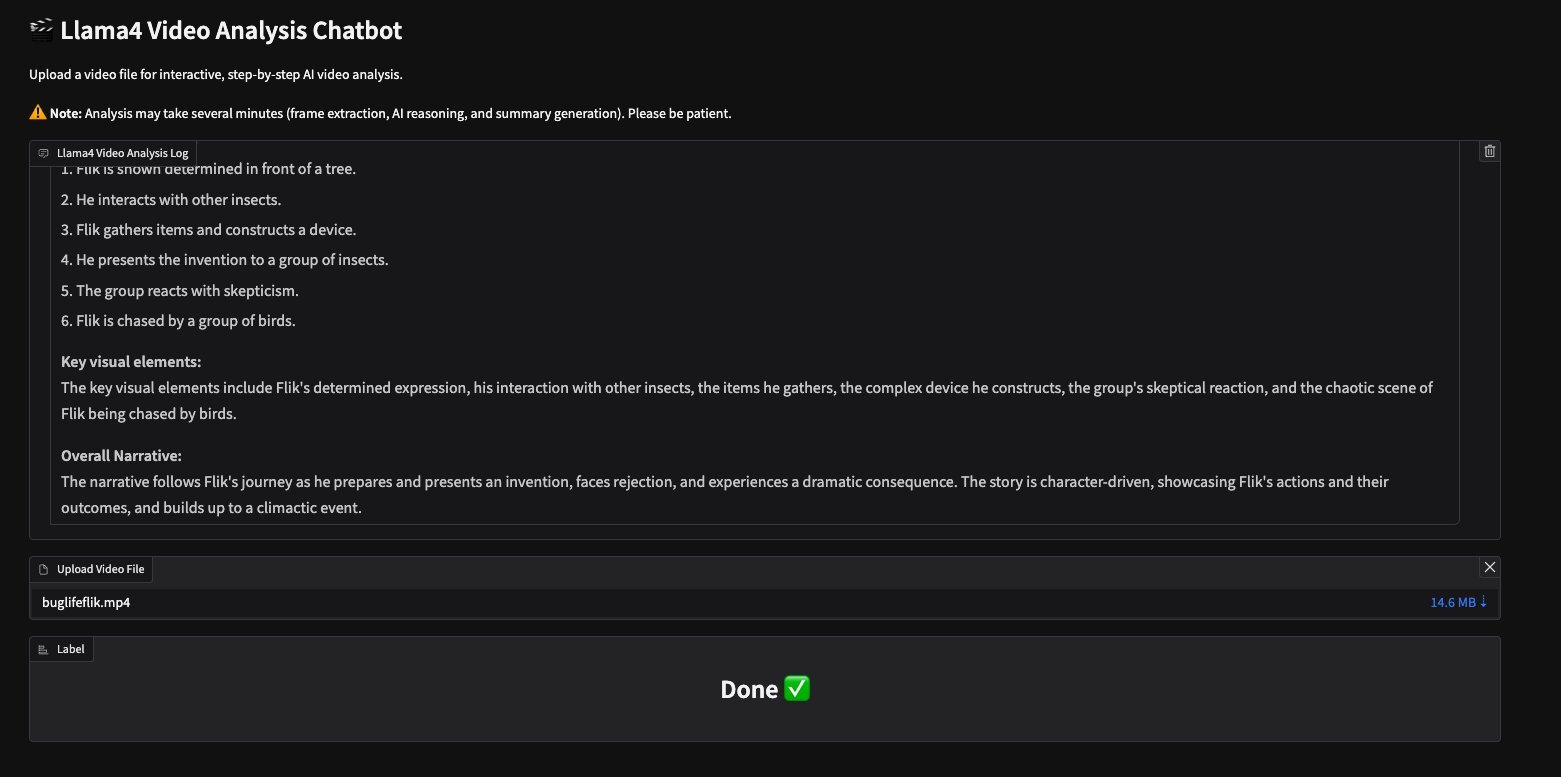
The Meta’s Llama video analysis assistant provides the following output for the video buglifeflik.mp4 provided in the GitHub repository:
The following screenshot shows the Gradio UI with this output.
Running in the Jupyter Notebook
After the necessary libraries are imported, you need to manually upload your video to your S3 bucket:
After the video is uploaded, you can start the agent workflow by instantiating a new agent with fresh conversation history:
Cleanup
To avoid incurring unnecessary future charges, clean up the resources you created as part of this solution:To delete the Amazon S3 files:
- Open the AWS Management Console
- Navigate to Amazon S3
- Find and select your Amazon SageMaker bucket
- Select the video files you uploaded
- Choose Delete and confirm
To stop and remove the SageMaker notebook:
- Go to Amazon SageMaker AI in the AWS Management Console
- Choose Notebook instances
- Select your notebook
- Choose Stop if it’s running
- After it has stopped, choose Delete
Conclusion
This post highlights how combining the Strands Agents SDK with Meta’s Llama 4 models and Amazon Bedrock infrastructure enables building advanced, multi-agent video processing workflows. By using highly specialized agents that communicate and collaborate through the Agents as Tools pattern, developers can modularize complex tasks such as frame extraction, visual analysis, temporal reasoning, and summarization. This separation of concerns enhances maintainability, customization, and scalability while allowing seamless integration across AWS services.We encourage developers to explore and extend this architecture by adding new specialized agents and adapting workflows to diverse use cases—from smart cities and industrial automation to media content management. The combination of Strands Agents, Meta’s Llama 4, and Amazon Bedrock lays a robust foundation for creating autonomous, resilient AI solutions that tackle the complexity of modern business environments.
To get started, visit the official GitHub repository for the Meta-Llama-on-AWS agents project for code examples and deployment instructions. For further insights on building with Strands Agents, explore the Strands Agents documentation, which offers a code-first approach to integrating modular AI agents. For broader context on multi-agent AI architectures and orchestration, AWS blog posts on agent interoperability and autonomous agent frameworks provide valuable guidance shaping the future of intelligent systems.
About the authors
 Sebastian Bustillo is an Enterprise Solutions Architect at Amazon Web Services (AWS), working with airlines and is an active member of the AI/ML Technical Field Community. At AWS, he helps customers unlock business value through AI. Outside of work, he enjoys spending time with his family and exploring the outdoors. He’s also passionate about brewing specialty coffees.