AWS for M&E Blog
AI-enriched ingestion pipelines for searchable live and VOD media on AWS
Media organizations manage vast content across multiple inventory systems, such as Time-Addressable Media Store (TAMS) for live broadcasts, media asset management for video on demand (VOD) archives, image libraries, and audio collections, yet discoverability remains limited to manually applied metadata. A producer searching for “the moment the goalkeeper dives to save a penalty” has no mechanism to find it. The producer must know which system holds the footage, then scrub through hours of video manually.
As organizations adopt TAMS and cloud-centered workflows through the Amazon Web Services (AWS) Cloud-Native Agile Production (CNAP) program, the opportunity is clear: Make content discoverable by what it contains rather than how it was tagged. This post, which is Part 1 of a two-part series, describes how AI-powered ingestion pipelines analyze each piece of media at ingest time, extracting elements such as:
Video embeddings – Mathematical vectors capturing visual scenes, actions, and compositions
Audio embeddings (Marengo 3.0) – vectors of the non-speech audio in each clip, such as crowd noise, music, sound effects, and ambient environment. Spoken words are captured separately by transcription embeddings.
Speech transcription – Keyword-searchable text of everything said
Structured scene descriptions – Natural language summaries from Amazon Bedrock Data Automation
Key moments – Editorially significant events detected by AWS Elemental Inference within seconds of on-air occurrence
Part 2 of this series covers the unified search architecture that queries across both live and VOD content simultaneously.
Architecture overview
The solution spans three AWS Regions with four deployment stacks: a centralized search and API layer, two ingestion pipelines (one for live events, one for VOD assets), and the BBC TAMS API implementation.
The following diagram illustrates the solution’s architecture. The TAMS Store (on the bottom left) ingests live broadcast feeds using AWS Elemental MediaLive and processes segments through AI analysis. The Media Asset Management (MAM) Store (bottom right) ingests uploaded VOD assets using AWS Elemental MediaConvert. Both pipelines index enriched documents to Amazon OpenSearch Service in the control plane (top), which serves unified search using Amazon Bedrock embeddings and Amazon API Gateway:
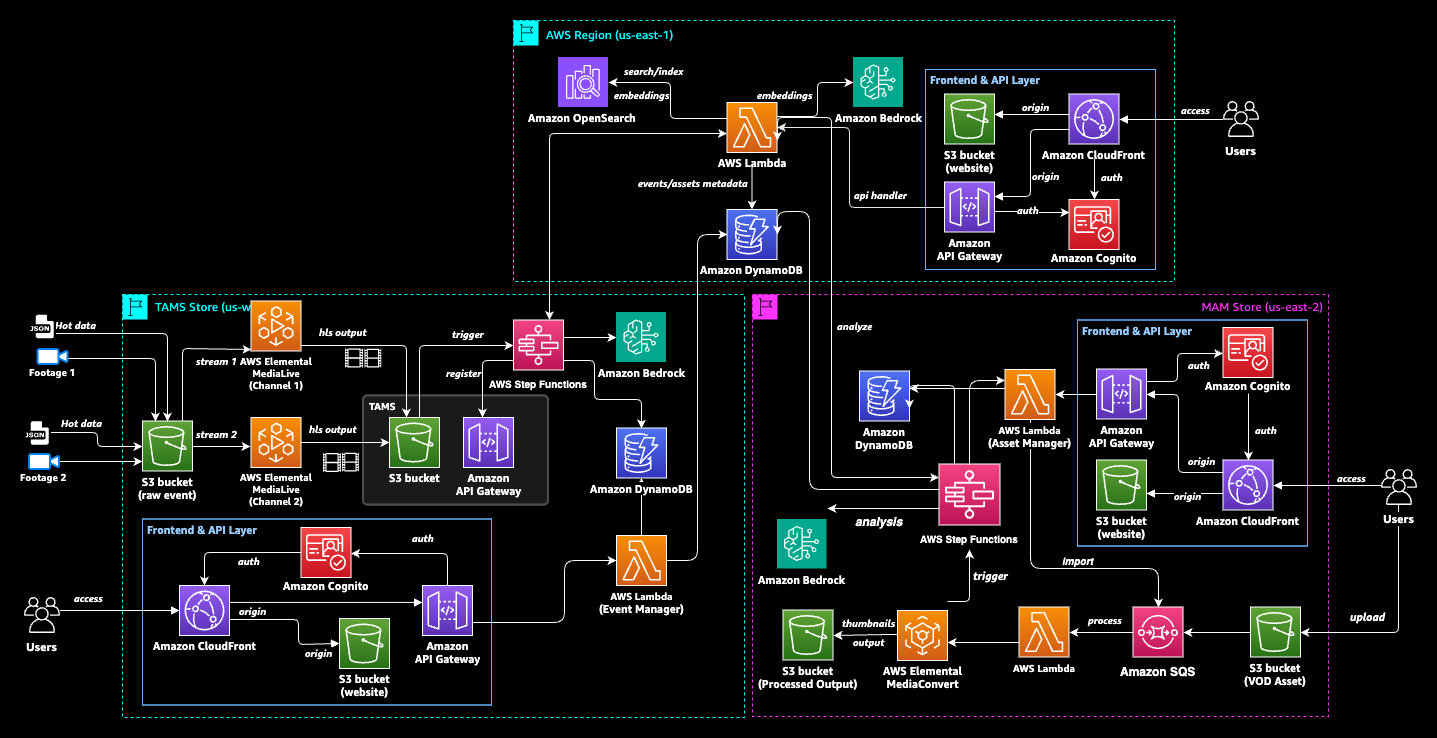
Figure 1: The solution architecture
AWS services used
The following table contains the AWS services used in the solution:
| Category | Services |
| Media processing | AWS Elemental MediaLive, AWS Elemental MediaConvert, AWS Elemental Inference |
| AI/ML | Amazon Bedrock (TwelveLabs Marengo 3.0, Amazon Bedrock Data Automation, Titan Text Embeddings V2), Amazon Transcribe |
| Search and data | Amazon OpenSearch Service, Amazon DynamoDB |
| Orchestration | AWS Step Functions, AWS Lambda, Amazon EventBridge, Amazon Simple Queue Service (Amazon SQS) |
| Storage | Amazon Simple Storage Service (Amazon S3) |
| Frontend and API | Amazon CloudFront, Amazon API Gateway, Amazon Cognito |
Both pipelines produce identically structured documents in Amazon OpenSearch Service, which means a single search query can span content regardless of source.
Live event ingestion with TAMS
The live pipeline is built around the BBC TAMS API specification, storing media as short segments in Amazon Simple Storage Service (Amazon S3) with an API describing their timing and relationships.
Capture and analysis
AWS Elemental MediaLive ingests live feeds and outputs HTTP Live Streaming (HLS) segments (approximately 6 seconds each) to Amazon S3. As segments accumulate, an Amazon EventBridge Scheduler triggers the analysis pipeline every 60 seconds per active channel, claiming a batch of about 10 new segments representing 1 minute of content.
The segment pipeline is orchestrated by AWS Step Functions running three analysis branches in parallel:
- Marengo embeddings – The batch is concatenated into a single clip and submitted to TwelveLabs Marengo 3.0 (using Amazon Bedrock), producing 512-dimensional vectors across four channels: fused (combined signal), visual (what is seen), audio (what is heard), and transcription (what is said). These vectors capture the semantic content of the media in a form that can be compared mathematically to search queries later.
- Amazon Bedrock Data Automation scene analysis – Amazon Bedrock Data Automation analyzes the clip and returns video summaries, chapter descriptions, shot boundaries, text overlays (OCR), and Interactive Advertising Bureau (IAB) content categories. This produces the natural language descriptions that power keyword search and provide human-readable context for each indexed segment.
- Amazon Transcribe – Speech-to-text captures commentary, interviews, and dialogue, which is content invisible to visual analysis but critical for queries such as “the commentator says offside.”
Each processed batch produces multiple Amazon OpenSearch Service documents (one per Marengo scene, with embedding vectors and Amazon Bedrock Data Automation descriptions), indexed within 60–90 seconds of broadcast capture. Content is searchable while the event is still live.
Key moments with AWS Elemental Inference
Running in parallel with the segment pipeline, AWS Elemental Inference continuously analyzes the livestream directly from AWS Elemental MediaLive. This fully managed AI service detects editorially significant moments, such as goals, saves, celebrations, and dramatic plays within seconds of on-air occurrence without waiting for batch processing.
When a key moment is detected, AWS Elemental Inference emits an event to Amazon EventBridge containing presentation timestamps marking the exact start and end, descriptive tags (for example, “goal” and “save”), and an AI-generated description of what occurred. An Amazon EventBridge rule triggers an AWS Lambda function that extracts the clip, Amazon Bedrock Data Automation runs for a focused scene description, generates Marengo embeddings for visual similarity search, and indexes the key moment as a standalone document in Amazon OpenSearch Service.
The result is that key moments are searchable within 20–30 seconds of occurring on air, which is significantly faster than the segment pipeline’s 60–90-second cadence. A researcher searching “goal” during a live match finds it almost instantly after it happens.
The following diagram illustrates the process: Every 60 seconds, AWS Step Functions claims a batch of HLS segments and runs Marengo (embeddings), Amazon Bedrock Data Automation (scene analysis), and Amazon Transcribe (speech-to-text) in parallel. Simultaneously, AWS Elemental Inference monitors the livestream and detects key moments within 20–30 seconds:
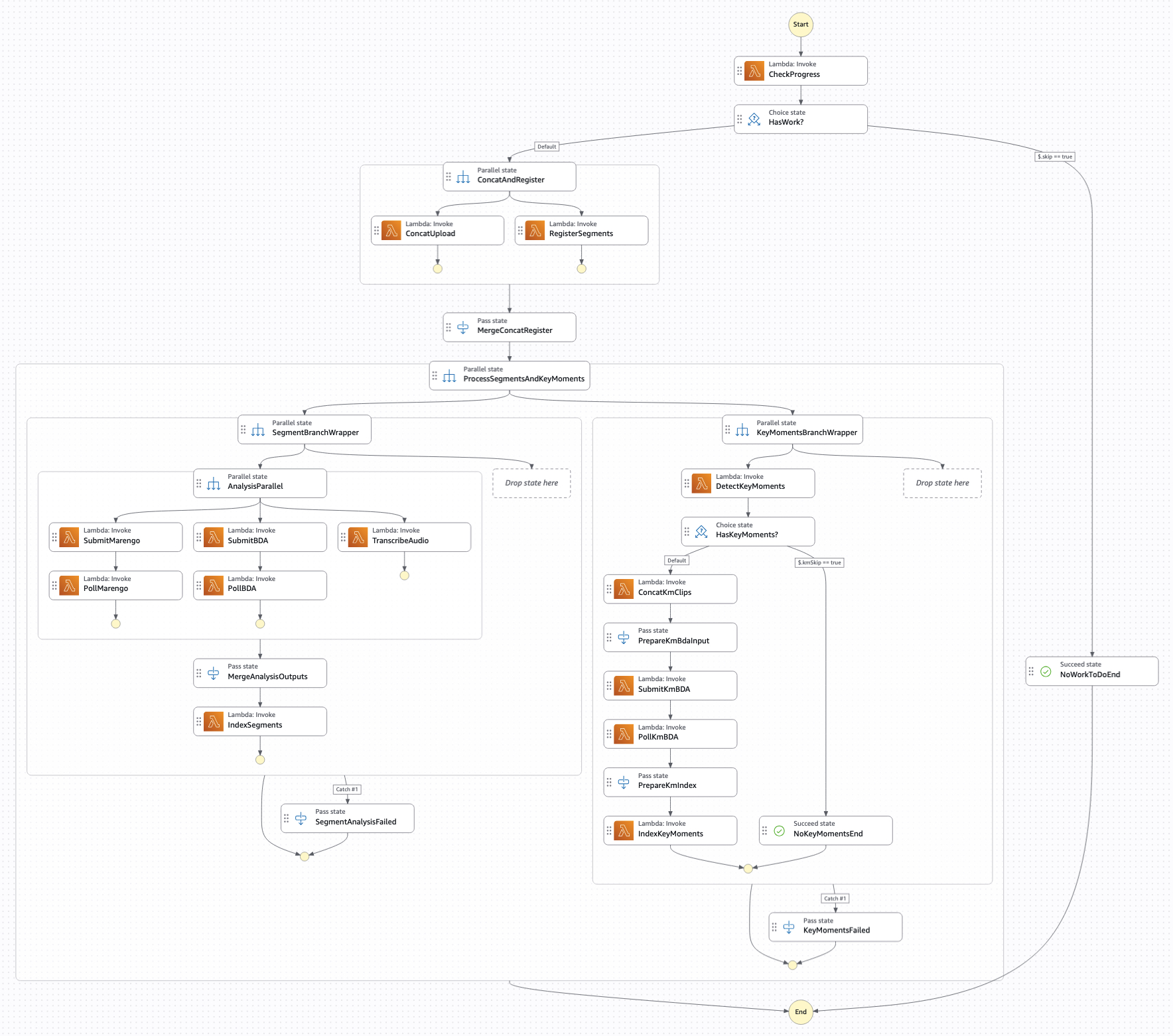
Figure 2: The live segment pipeline
TAMS integration
The AI enrichment is additive. The pipeline registers segments with the BBC TAMS API maintaining the canonical timeline. Standard TAMS tools (Omakase Player and TAMS Tools UI) continue working unchanged. The AI layer is a parallel search index, not a replacement.
VOD asset ingestion with MAM
The MAM pipeline applies the same AI analysis to uploaded files (video, audio, images), optimized for depth over speed.
As illustrated in the following diagram, uploaded assets flow through Amazon Simple Queue Service (Amazon SQS) for backpressure control, AWS Elemental MediaConvert for transcoding, then AWS Step Functions orchestrates parallel Marengo, Amazon Bedrock Data Automation, and Amazon Transcribe analysis, with a 24-hour timeout accommodating multi-hour content:
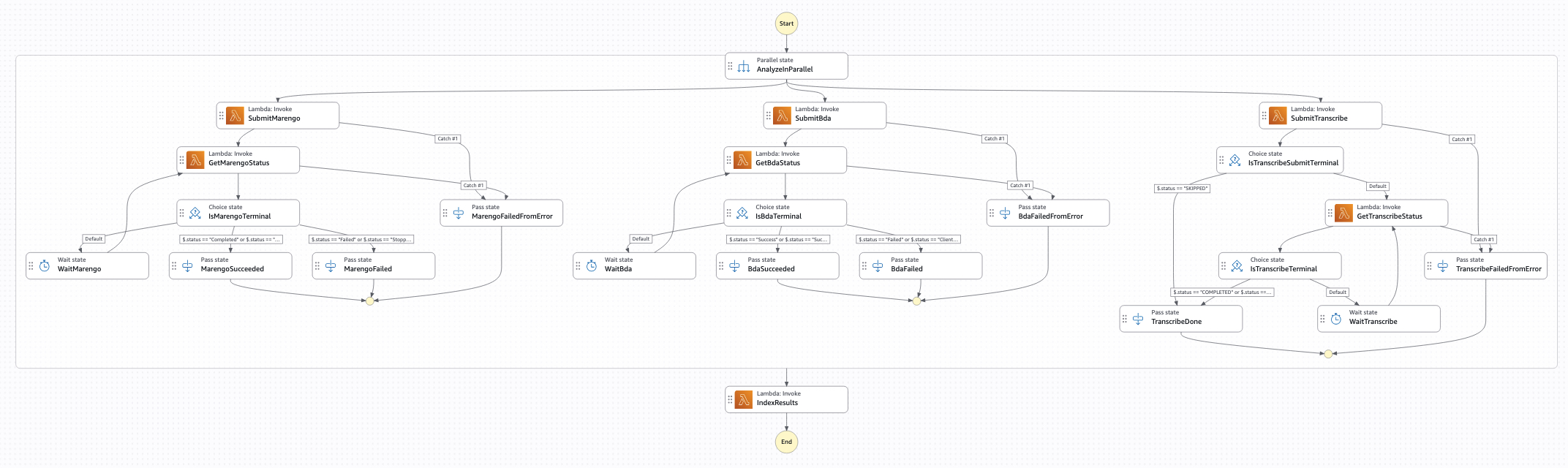
Figure 3: The MAM pipeline
Upload and transcoding
Users upload media files to Amazon S3 through the asset management application. An Amazon SQS queue provides backpressure control during bulk uploads, with controlled concurrency preventing downstream services from being overwhelmed.
The trigger function branches by modality: Video goes to AWS Elemental MediaConvert (HLS + proxy MP4 + thumbnails), audio gets an Advanced Audio Coding (AAC) transcode, and images skip directly to analysis.
Parallel AI analysis
After transcoding (signaled using Amazon EventBridge), the same three AI branches run in parallel using AWS Step Functions, with VOD-specific differences:
Marengo uses dynamic segmentation (auto-detecting scene boundaries) rather than fixed intervals, producing 50–80 clip embeddings for a 30-minute video
Amazon Bedrock Data Automation provides modality-specific configurations: chapters + IAB for video, transcript + sentiment for audio, captions for images
Amazon Transcribe produces full transcription, also fed into Amazon Titan Text Embeddings V2 for semantic text-to-text matching
The state machine has a 24-hour timeout, accommodating multi-hour content where Amazon Bedrock Data Automation can take 2–3 hours. Each branch retries with exponential backoff on quota errors; a failed branch doesn’t stop the pipeline, instead employing partial indexing with later retry.
Key moments for VOD
AWS Elemental Inference processes on-demand content too. After transcoding, the video is analyzed for key moments. It has the same capabilities as live, but they’re applied to archived media.
Detected moments get the same treatment: clip extraction, Amazon Bedrock Data Automation description, Marengo embeddings, and standalone indexing.
Indexing structure
The indexing strategy breaks each asset into a set of documents tuned to its media type, facilitating retrieval at both the asset level and the moment level. The breakdown works as follows:
Video – One parent document + N segment documents (per scene) + M key moment documents
Audio – Similar structure on 6-second boundaries
Images – Single document with one embedding and caption
Each document also carries an Amazon Titan Text Embeddings V2 embedding of its descriptive text, enabling semantic matching when a query’s meaning aligns with how Amazon Bedrock Data Automation described the scene. Because each piece of content is fully analyzed and embedded before it becomes searchable, processing time scales with content length. The following table lists approximate end-to-end times for representative content types:
| Content | End-to-end time |
| 30-second video | Approximately 1.5 minutes |
| 30-minute video | Approximately 27 minutes |
| 30-minute audio | Approximately 1 minute |
| Single image | Approximately 30 seconds |
| 4-hour video | Approximately 3 hours |
Design principles
The following principles shape how the system ingests, represents, and retrieves multimodal content. Together they prioritize search precision, reliable reprocessing, and the flexibility to onboard new sources without reworking the underlying search infrastructure:
- Multichannel embeddings – Four separate vectors per segment (fused, visual, audio, transcription) rather than a single combined vector. This facilitates channel-matched search: a query about crowd noise searches audio embeddings specifically; a query about a red jersey searches visual embeddings without being diluted by unrelated speech.
- Key moments as first-class documents – Detected moments are standalone search results with their own embeddings and rich labels, competing directly in ranking. “Goal: long-range strike from 25 yards” outranks a generic segment showing the same scene because its concentrated metadata produces higher scores across both keyword and semantic legs.
- Idempotent processing – Deterministic document IDs (derived from Amazon S3 URIs or timestamps) make reprocessing safe. Failed batches can be retried without duplicates.
- Extensibility – Adding a new inventory system requires one ingest connector producing the common document schema. Search infrastructure remains unchanged.
What comes next
With both live and VOD content enriched with multimodal AI intelligence and indexed in Amazon OpenSearch Service, the next question is, how do you search it effectively?
In Part 2, we describe how a single natural language query uses five parallel search strategies across both live and VOD content, with reverse media search facilitating queries by image, video clip, or audio sample.
To discover how your organization can use unified content discovery powered by AWS, contact your AWS representative.
Further reading
Guidance for Cloud-Native Fast-Turnaround Media Workflows on AWS
AWS open source TAMS API implementation
Transform live video for mobile audiences with AWS Elemental Inference
TwelveLabs video understanding models are now available in Amazon Bedrock
Amazon Bedrock Data Automation
New guidance and tools: Cloud-native fast-turnaround media workflows on AWS
About the authors
Figure 4: Author photo – Mohan Kumar Guruswamy
Mohan Kumar Guruswamy is an applied AI solutions engineer on the Prototyping and AI Customer Engineering (PACE) team at Amazon Web Services (AWS). Mohan partners with customers to build working prototypes on AWS using their own use cases and data, demonstrating what’s possible and accelerating informed decisions on their cloud journey.
Figure 5: Author photo – Ankit Patel
Ankit Patel is an applied AI solutions engineer on the Prototyping and AI Customer Engineering (PACE) team at AWS. Ankit helps customers bring their innovative ideas to life by rapidly prototyping, using AWS to build, orchestrate, and manage custom applications.