AWS for M&E Blog

Author: Joan Morgan
Joan Morgan is a Media and Entertainment Solutions Engineer at AWS.

Now Available: AWS Virtual Waiting Room solution
This post from the AWS Compute blog explains how to use the new AWS Virtual Waiting Room solution to buffer user requests to your website during times of peak demand and sudden bursts of traffic, preventing system resource exhaustion and providing an improved user experience. For retail or event sales, medical appointments and vaccine registrations, […]

Part 2 – anatomy of a live streaming AWS CloudFormation template
In an earlier blog, we shared an AWS CloudFormation template that automated the deployment of a simple live streaming workflow using AWS Elemental MediaLive and AWS Elemental MediaStore. We took apart the template and analyzed the various sections of the template including the defined MediaLive and MediaStore resources. Since the blog’s publication, AWS Elemental MediaPackage […]

Introducing the Video On Demand on AWS Foundation Solution
We received feedback from you that the existing Video on Demand on AWS solution has more features than required for some transcoding workflows. To solve this, we created a new solution called Video On Demand (VOD) on AWS Foundation that is now available in the AWS Solutions Library. With this new streamlined solution, you simply […]

Anatomy of a live streaming AWS CloudFormation template
To build an end-to-end, live video streaming workflow with AWS, you typically begin by setting up each of the required AWS Media Services through the AWS Management Console. The console is a great tool to explore all the features each Media Service offers, and the settings you can enable, disable, or tweak as you put […]

Monitoring AWS Media Services using Amazon CloudWatch Events
The Media Services Application Mapper (MSAM) tool was created to help video streaming operators monitor their live channels. The tool provides a web interface that visualizes the components of live video workflows, including logical connections between AWS Media Services and other services from AWS. MSAM can be configured to show error messages, alerts, and alarms […]

Monetizing VOD assets using ad marker insertion
AWS Elemental MediaConvert lets you specify ad insertion points in your outputs. This capability is incredibly useful if your input video doesn’t contain ad markers (SCTE-35 markers) but you still need to monetize (or even black out) your content. A tutorial is available (as part of a larger AWS VOD workshop) on GitHub to demonstrate […]

AWS Elemental Quality-Defined Variable Bitrate viewer
Quality-Defined Variable Bitrate (QVBR) encoding is a rate control mode that launched in AWS Elemental MediaConvert and AWS Elemental MediaLive in 2018. QVBR is an enhanced version of variable bitrate (VBR) rate control that minimizes wasted bits and adjusts bitrate to maintain consistent video quality. QVBR is also available in the appliance and software products […]

Monetizing encrypted live stream with AWS Elemental MediaTailor
Configuring AWS Elemental MediaTailor to enable ad insertion for an encrypted HLS live stream is no different than for a live stream in the clear. Behind the scenes, MediaTailor ensures that the protected content stays encrypted by preserving the appropriate HLS key tags (EXT-X-KEY). Meanwhile, it leaves the ads unencrypted by setting the same HLS […]
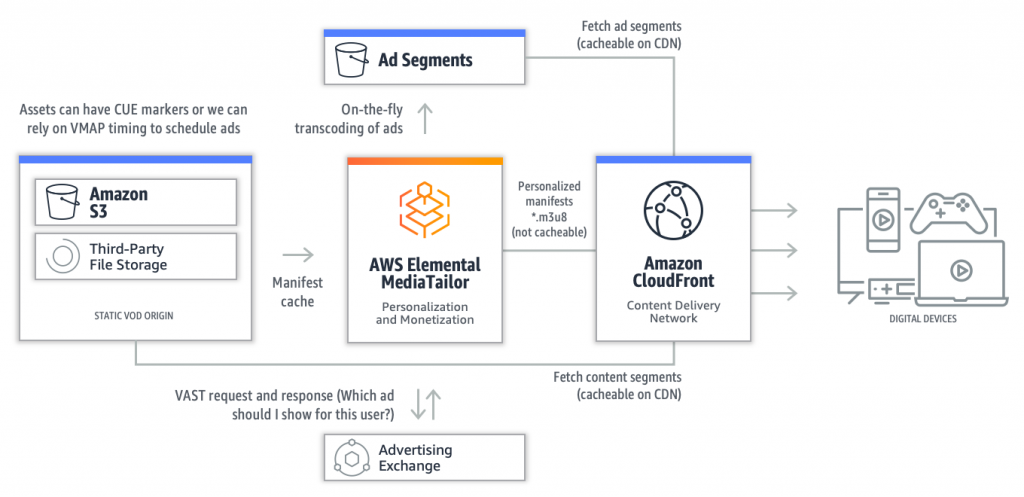
Video on demand ad insertion with AWS Elemental MediaTailor
Monetizing your HLS Video On Demand (VOD) assets couldn’t be easier using AWS Elemental MediaTailor. MediaTailor simply needs access to your HLS media asset, and an Ad Decision Server (ADS). Try it for yourself by following this tutorial we’ve made available via GitHub http://bit.ly/mediatailor-vod The tutorial will walk you through creating an AWS Elemental MediaTailor […]

Creating a custom AWS Elemental MediaTailor metric and Amazon CloudWatch alarm
In a previous blog, we demonstrated how to programmatically access default logs and metrics provided by AWS Elemental MediaTailor. In this post, we will walk through creating our own metric using the MediaTailor log groups that have been made available in Amazon CloudWatch. At a glance, this is what we will do: Create an IAM […]