Data Orchestration Guide
Guide to implementing data orchestration on AWS
Guide to implementing data orchestration on AWS
Data orchestration is the automated process of coordinating data capture, movement, transformation, and other pipeline operations across large, distributed systems. Data orchestration also covers scheduling, error handling, and retries. Data orchestration helps scale and integrate data pipelines, reducing bottlenecks and improving operational efficiency. This guide highlights data orchestration tools on AWS, how to build the right solution, pipeline integration, and monitoring.
Introduction
Applying manual processes to your data management quickly becomes unsustainable when working with a large-scale, distributed architecture. Centralized orchestration is generally more efficient at scale and helps decrease issues such as silent failures going unnoticed and degraded data quality.
Data orchestration vs Extract, Transform, Load (ETL)
Data orchestration differs but is related to traditional Extract, Transform, Load (ETL) processes. While ETL tools focus on the mechanics of moving and transforming data, orchestration coordinates when and how those ETL processes run. For example, it makes sure that a heavy transform job only begins after data collection and the system has validated the raw data.
Orchestration acts as the control plane for your data pipelines. A centralized control plane helps make operations more reliable and repeatable.
AWS provides various orchestration solutions to fit different architectural needs. These range from fully managed hosting environments for open-source frameworks, like Amazon Managed Workflows for Apache Airflow (Amazon MWAA), to scalable AWS-native serverless options, such as AWS Step Functions.
Core concepts in data orchestration
It is worthwhile understanding the fundamental components of orchestrated data workflows before selecting a service to use.
Directed Acyclic Graphs (DAGs)
A directed acyclic graph (DAG) is an organized, directional flowchart of tasks within your data pipeline, where tasks are nodes and dependencies are edges. DAGs are designed to help prevent circular logic, such as where a task accidentally waits on itself to finish before proceeding.
Pipeline triggers
Triggers initiate orchestrated data flows. They can be:
- Schedule-based (for example, running a batch job every night at midnight)
- Event-based (for example, triggering a pipeline when a new file lands in an Amazon S3 bucket)
- Manual trigger-based (for example, a request through an API)
Idempotency and retry logic
Idempotency is a property of a data pipeline, meaning that running a task multiple times produces identical results without any unintended effects. Idempotency is a necessary property to have reliable retry logic. If a task fails due to a network timeout, the orchestration service must be able to restart it without corrupting the downstream dataset.
Lineage and auditability
Data lineage is the tracking you perform on data from its origin to its final destination. In orchestration, auditability is the ability to observe exactly how data is transformed as it moves through your pipeline.
Choosing the right data orchestration platforms on AWS
AWS offers a variety of services to help you modernize your data strategy. Your existing infrastructure, internal expertise, and your business case can all influence which services are right for you. The AWS Analytics decision guide provides a helpful framework for evaluating these requirements.
Here is how the primary AWS data orchestration services compare:
AWS Step Functions
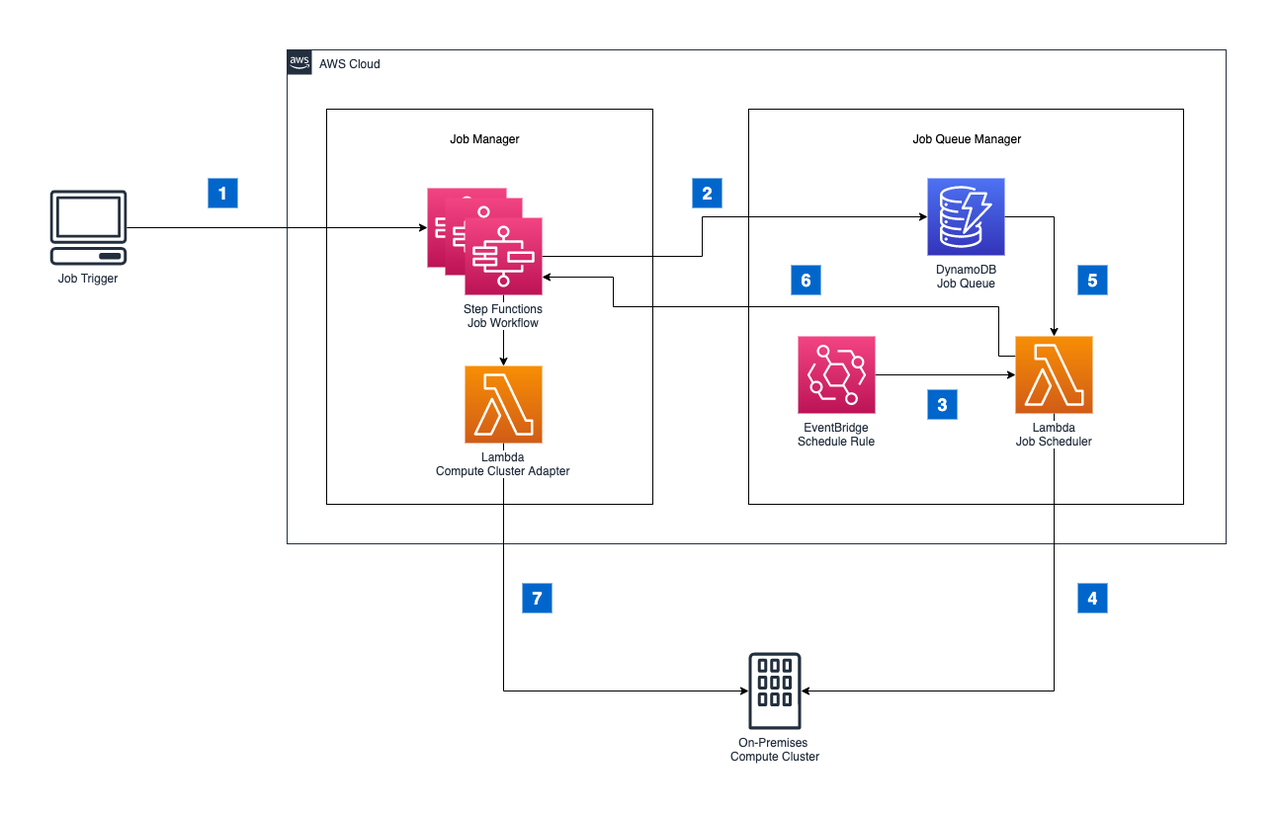
AWS Step Functions is a serverless orchestration service that lets you use AWS Lambda functions and over 220 other AWS services to build distributed applications. It coordinates workflows by organizing them into state machines, essentially logic-coded flowcharts for the movement of data or shifts in program state. Data pipelines need to be predictable and resilient. Each step is a distinct "state" that predictably runs a task.
AWS Step Functions can build Standard Workflows for data orchestration processes that need to run for up to one year. Express Workflows designed for synchronous or asynchronous high-event-rate workloads run for up to five minutes. AWS Step Functions automatically scales horizontally and provides built-in fault tolerance and retry logic.
When to use AWS Step Functions: It is well-suited for event-driven workflows, serverless architectures, streaming pipelines, and when you need to integrate AWS services without writing custom orchestration code.
AWS Glue Workflows
AWS Glue Workflows performs data orchestration within the AWS Glue data integration service. It allows you to build DAGs for AWS Glue entities, specifically connecting crawlers, jobs, and triggers. It provides a visual interface where you can monitor and troubleshoot your ETL pipeline. You can automate scheduled and triggered workflows, as well as on-demand workflows.
When to use AWS Glue Workflows: Use this service when your pipelines are heavily AWS Glue-centric. It is suited for simpler ETL data processes where you need to tightly couple AWS Glue jobs and crawlers.
Amazon EventBridge Pipes and Scheduler
Amazon EventBridge Pipes reduces the amount of integration code you need to write and maintain when building event-driven applications. You can use it to create point-to-point integrations between event producers and consumers with optional transform, filter, and enrich steps. EventBridge Scheduler helps you configure scheduling patterns, set a delivery window, and define retry policies.
When to use Amazon EventBridge Pipes and Scheduler: This service is best suited for executing event-driven triggers, decoupling microservice pipelines, or managing scheduled invocations that do not require the complex dependency management of a full DAG.
Amazon Managed Workflows for Apache Airflow (Amazon MWAA)
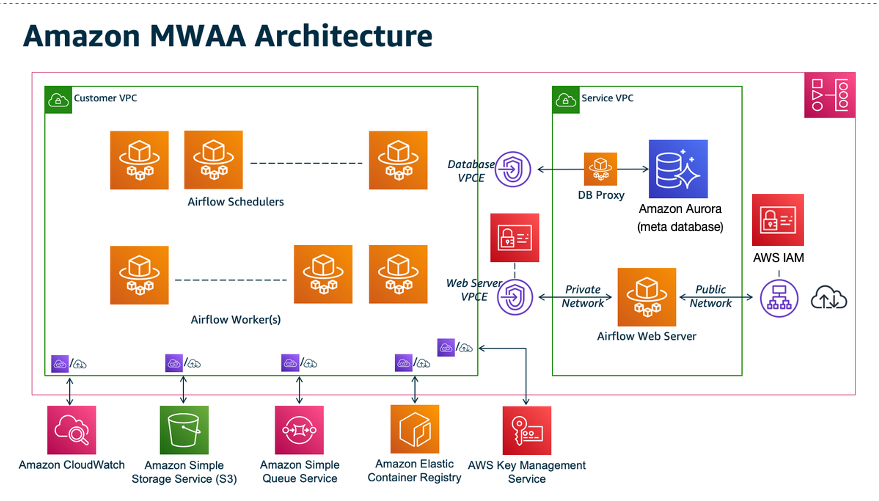
Amazon MWAA is a managed orchestration service for Apache Airflow, an open source platform for building and monitoring complex pipelines programmatically. It is optimized for coordinating analytics and ETL jobs.
Amazon MWAA orchestrates and schedules data flows using Python DAGs. It has an auto-scaling mechanism to help reduce overhead. It automatically increases the number of Apache Airflow workers in use based on queued tasks.
When to use Amazon MWAA: It is effective when you need to manage complex DAGs, have an existing investment in Apache Airflow, or need Python-native pipelines.
How to implement data orchestration on AWS
Effective and reliable data orchestration requires careful planning. Here is a seven-step process to help you design and deploy your workflows.
1. Map your data dependencies
Your first goal is to map out complete data lineage. Inventory data sources, destinations, and the necessary transformation steps between them. That is your foundation. On top of that, map out any upstream or downstream dependencies. If complete, your map should reveal the correct sequence of events, so you understand the dependency order that allows the pipeline to run reliably.
During this phase, you should also define your relevant Service Level Agreements (SLAs) for stakeholders of the data pipeline in question. Set baseline performance and availability metrics.
2. Design your DAG or workflow structure
Monolithic workflows can be challenging to manage and troubleshoot. Building your DAG or workflow from small, individually manageable tasks makes it easier to pinpoint failure points. Make sure that you logically separate your ingestion, transformation, and loading stages to operate independently. Also, build out failure branches and retry logic so that the pipeline can handle errors gracefully.
3. Set up your orchestration service
Configure your chosen orchestration service to manage the workflow:
Amazon MWAA: Set up your environment and designate an Amazon S3 bucket to store your DAGs and supporting files. You manage your dependencies using a requirements.txt file. Review the Get started with Amazon Managed Workflows for Apache Airflow guide for prerequisites.
AWS Step Functions: Define your workflow using JSON-based Amazon States Language (ASL) to create a state machine. Scope your identity and access management (IAM) roles to the permissions required for each specific task.
AWS Glue Workflows: Configure your AWS Glue Workflows triggers and set up crawler-to-job chaining so that data is automatically processed after the schema is successfully cataloged.
4. Integrate with data services
Connect your data orchestration service of choice to your underlying data volume and compute layers. You can configure Amazon S3, Amazon Redshift, Amazon RDS, and Amazon DynamoDB as direct sources or consumers. For heavy transformation tasks, use AWS Glue within orchestrated pipelines.
Where applicable, take advantage of zero-ETL integrations. For example, you can set up the Amazon Aurora to Amazon Redshift zero-ETL data movement automation to reduce the total volume of manual extraction jobs.
5. Implement error handling and alerting
Failures in distributed systems are inevitable. The important thing is to log those failures. An effective logging method is to configure dead-letter queues (DLQs) using Amazon SQS that capture failed events you can inspect later. You can also configure Amazon SNS to send real-time notifications when failures occur during complex workflows. Amazon CloudWatch alarms can trigger when tasks run long or when failure rates spike.
6. Monitor data pipeline health
Amazon CloudWatch logs and metrics can help you track pipeline health as well as monitor resource utilization and execution history for your MWAA environments and Step Functions state machines. For Glue workflows, you can monitor the native AWS Glue job metrics.
7. Automate with infrastructure as code
Use AWS CloudFormation or the AWS Cloud Development Kit (CDK) to define all your resources, including your IAM roles and networking configurations. Version-control your DAGs and state machine definitions in the same repository as your application code to help keep pipeline deployment consistent.
Handling common data orchestration challenges
Operational challenges are inevitable when you scale orchestration environments. Here is how to address the most common challenges on AWS:
Late-arriving data
Data does not always arrive on schedule in distributed systems. If a pipeline expects a file at midnight, but it arrives at 1:00 AM, a rigid schedule might cause the pipeline to fail.
The solution: Build tolerance into your pipelines rather than relying on rigid schedules. In Amazon MWAA, use sensor operators that actively wait for a specific file to appear in Amazon S3 before triggering any downstream tasks. In event-driven architectures, Amazon EventBridge can trigger workflows dynamically as high-quality data arrives.
Pipeline sprawl
If you have multiple data engineers building workflows, you might begin to see undocumented, redundant pipelines.
The solution: Combat pipeline sprawl by enforcing strict naming conventions and mandatory tagging on all orchestration resources. That allows you to centralize monitoring and easily identify which data team owns which pipeline. You can periodically audit your environment to prune stale or duplicate DAGs.
Cross-account pipelines
Enterprise architectures often split data storage, processing, and consumption across multiple AWS accounts for data security. Orchestrating a pipeline that spans these boundaries requires careful management so that you don't create data silos.
The solution: Use IAM role chaining to allow an orchestration service in one account to securely assume a role and run a task in another. For granular data access control across accounts and better data governance, integrate your pipelines with AWS Lake Formation.
Cost management
Orchestration services can become expensive if they are over-provisioned or inefficiently utilized.
The solution: You can optimize your Amazon MWAA environments by monitoring worker utilization. If your workers are frequently idle, you can scale down the environment. Avoid using always-on infrastructure for low-frequency workflows that run a few times a week. Instead, use serverless AWS Step Functions, where you pay for the specific state transitions you consume.
Monitoring and continuous improvement
Once your orchestration pipelines are running in production, your focus can shift to ongoing maintenance and optimization. Establish a routine for continuously monitoring performance, costs, and security.
Track pipeline SLAs
Use AWS data analysis tools such as CloudWatch to monitor your pipelines against their service level agreements (SLAs) to see how often targets are missed. Tracking this frequency allows you to catch degrading performance and recurring failures before they disrupt downstream business users.
Attribute compute costs
Use AWS Cost Explorer to attribute orchestration and compute costs directly to specific pipeline owners. This promotes financial accountability and can also highlight inefficient workflows you might want to refactor.
Audit DAG complexity
Periodically evaluate the performance and complexity of your DAGs. Over time, pipelines often accumulate temporary fixes that are no longer necessary but still affect performance. Other changes or entire pipelines become obsolete as business requirements change. Prune these stale pipelines to reduce overhead and simplify your overall technical environment.
Maintain security visibility
Use AWS CloudTrail to monitor access patterns and Amazon GuardDuty to track threat signals across workflows. Continuous monitoring helps make sure you maintain least-privilege access and that data movement complies with your security policies.
Conclusion
Data orchestration is a key infrastructure solution for organizations. Designing a functional, scalable solution will help with data operations across the business. AWS offers a range of services for orchestration, organizing data, and building scalable data pipelines, with monitoring tools to guide you.
Choose your data orchestration solution depending on your data consumption use cases for now and in the future. Get started by exploring data and analytics solutions on AWS.
Next steps on AWS
Browse all cloud computing concepts
Browse all cloud computing concepts content here:
Did you find what you were looking for today?
Let us know so we can improve the quality of the content on our pages