AWS Compute Blog
Burst to Region: Overflow AWS Outposts workloads to Amazon EC2
AWS Outposts brings AWS infrastructure into your data center, giving on-premises workloads the low latency and data locality they need. But unlike the AWS Region, an Outposts rack has a fixed amount of compute. When your workload needs more instances than the rack can provide, you have two options: drop requests, or overflow them somewhere with room to grow. This post shows you how to automate the second option. You build a Burst to Region pattern that detects capacity constraints on your Outpost, launches Amazon Elastic Compute Cloud (Amazon EC2) instances in the parent Region, gradually shifts traffic to them, and returns traffic to local instances once capacity recovers.
To implement this pattern you configure Amazon CloudWatch, Amazon Simple Notification Service (Amazon SNS), AWS Lambda, Amazon EC2 Auto Scaling, Elastic Load Balancing (Application Load Balancer), and Amazon EventBridge. You trade a moderate latency increase for continued availability during capacity events.
When to use this pattern
This pattern assumes your Outposts workload scales out through Amazon EC2 Auto Scaling. Burst to Region reacts to instance-capacity exhaustion on the rack. It engages when your workload tries to launch more instances than the available Outpost capacity supports. If your fleet is fixed size and degrades under load without scaling out, the capacity alarm never fires and overflow never triggers. For those workloads, monitor per-instance saturation (CPU, latency) separately.
Good candidates prefer local capacity but can tolerate Region latency under pressure. If your application runs on Outposts for proximity yet degrades gracefully when some traffic takes the longer path to the Region, it fits this pattern. Examples include:
- Internal enterprise applications.
- Stateless web frontends and API layers.
- Pre-processing tiers where single-digit to tens-of-milliseconds additional round-trip latency during peaks is acceptable.
Poor candidates cannot absorb any added latency or must stay on the Outpost. Avoid this pattern for:
- Applications with sub-millisecond requirements.
- Workloads with strict data residency or sovereignty mandates that prevent traffic from leaving the on-premises environment.
- Real-time control systems with hard timing constraints.
- Applications tightly coupled to on-premises data stores with no Region replica.
The core tradeoff is explicit. During capacity events, you accept moderately higher latency to maintain availability. If your workload cannot tolerate any latency increase, keep it pinned to Outposts and reserve capacity through other means, such as Capacity Reservations.
Solution overview
Burst to Region works in three moves: detect capacity pressure on the Outpost, launch overflow compute in the parent Region, and shift traffic gradually until local capacity recovers. Six AWS services coordinate to make this automatic. The following diagram shows the reference architecture for the Burst to Region pattern, illustrating how the six AWS services interact during capacity detection, overflow scaling, traffic distribution, and recovery.
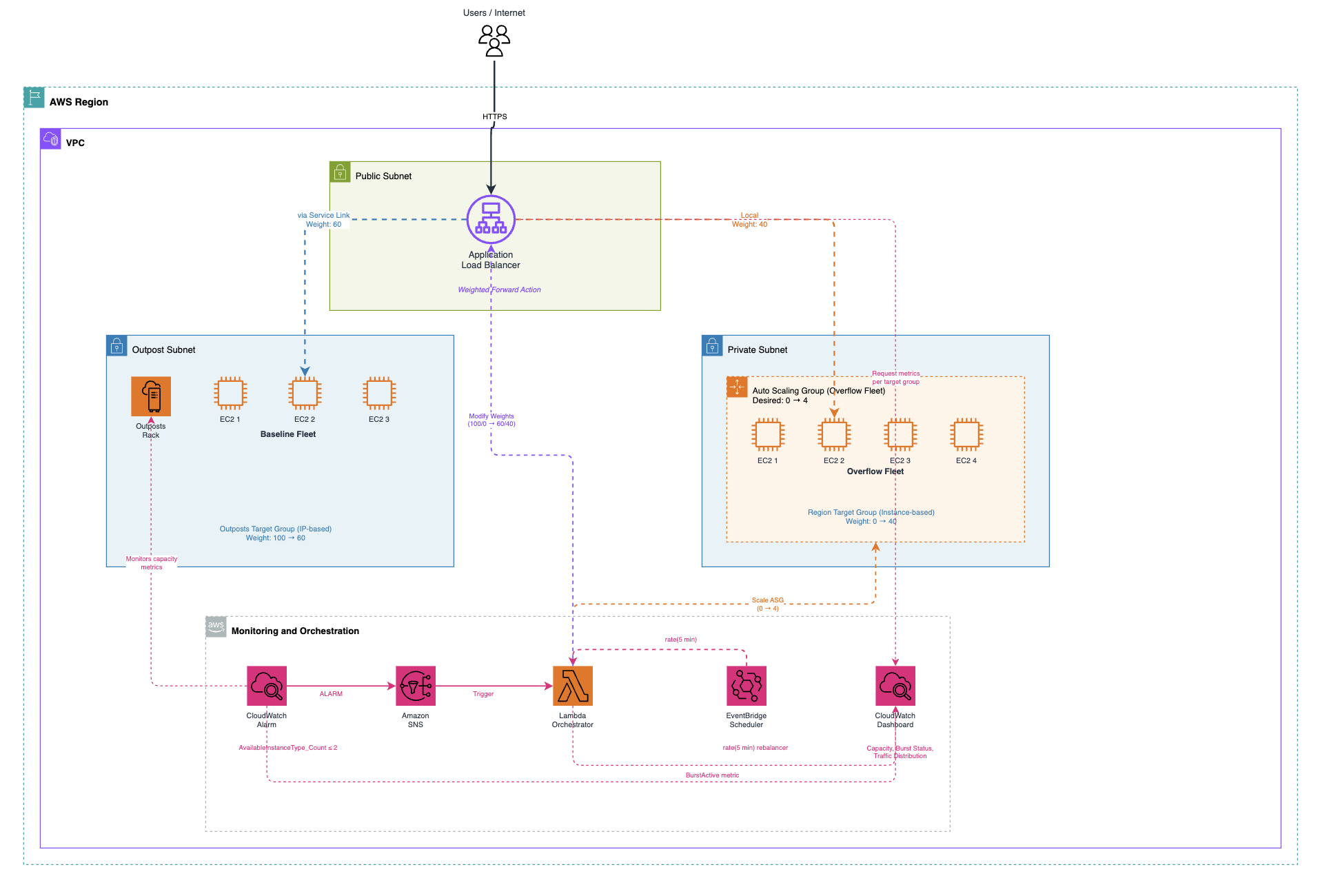
Figure 1: Reference architecture for Burst to Region on AWS Outposts
The pattern uses six AWS services working together:
- Amazon CloudWatch monitors Outposts capacity utilization and raises alarms.
- Amazon SNS provides event fan-out from alarm to orchestrator.
- AWS Lambda orchestrates the burst logic (scale-out, weight adjustment, recovery)
- Amazon EC2 Auto Scaling manages the overflow fleet lifecycle.
- Application Load Balancer distributes traffic across both locations using weighted target groups.
- Amazon EventBridge handles periodic recovery evaluation.
You must configure five phases for this pattern:
- Monitor. CloudWatch tracks Outposts capacity utilization metrics in the
AWS/Outpostsnamespace. - Detect. A CloudWatch alarm fires when utilization exceeds a threshold (for example, 80%).
- Overflow. The alarm triggers a Lambda function through Amazon SNS. Lambda scales out a Region-based Amazon EC2 Auto Scaling group and adjusts ALB target group weights.
- Distribute. The ALB splits traffic between Outposts instances and Region instances using weighted forwarding.
- Recover. An Amazon EventBridge scheduled rule periodically evaluates capacity. When Outposts recovers, Lambda scales down the overflow fleet and returns all traffic to local instances.
Design decisions
We chose Application Load Balancer with weighted forwarding over Amazon Route 53 weighted routing for traffic distribution. ALB provides health-aware routing to only healthy overflow instances and target group stickiness for session consistency. Weight changes take effect for new connections after calling the ModifyRule API. DNS-based shifting through Route 53 provides too coarse control for rapid weight adjustments, and TTL propagation delays make recovery slower.
The burst orchestrator runs as a Lambda function rather than a long-running service. It executes only during state transitions, so there is no steady-state compute cost. Lambda integrates natively with Amazon SNS and Amazon EventBridge for event-driven invocation without additional infrastructure.
You implement recovery with an Amazon EventBridge scheduled rule (every 5 minutes) rather than relying solely on the CloudWatch alarm to return to OK state. The alarm confirms capacity is available, but does not confirm that overflow instances have drained active connections. The scheduled rule provides gradual, safe scale-down.
Implementation
This section walks through the key components of the Burst to Region pattern. For the complete deployable AWS SAM template, see the GitHub repository.
Prerequisites
To deploy this pattern, you need:
- An AWS account with a configured AWS Outposts rack.
- An Amazon Virtual Private Cloud (Amazon VPC) with subnets associated with your Outposts and subnets in the parent AWS Region.
- IAM permissions to create CloudWatch alarms, Lambda functions, Auto Scaling groups, and ALB resources.
- AWS Serverless Application Model (AWS SAM) CLI installed and configured.
- Existing Amazon EC2 Auto Scaling group running on your Outpost (these become your baseline fleet)
- A custom domain name with a DNS record (Route 53 alias or CNAME) pointing to your Application Load Balancer, and an AWS Certificate Manager (ACM) certificate for that domain to enable HTTPS.
Capacity monitoring and alarm
The CloudWatch alarm monitors instance utilization on the Outpost and triggers the burst workflow when capacity is constrained.
The InstanceTypeCapacityUtilization metric reports the percentage of a given instance type’s capacity in use. Note that this metric includes capacity consumed by managed services such as Amazon Relational Database Service (Amazon RDS) or Application Load Balancer running on the Outpost — not only your application’s EC2 instances. Factor this into your threshold planning.
Why these values matter:
- Period: 300 and EvaluationPeriods: 2 require 10 minutes of sustained high utilization before triggering. This avoids false alarms from transient spikes.
- Threshold: 80 (recommended starting point) leaves a 20% buffer. A threshold set too high (95%) risks launch failures before the overflow fleet is ready. A threshold set too low (50%) causes unnecessary bursts.
- TreatMissingData: notBreaching prevents false alarms when data points are missing. Since this alarm is scoped to a single instance type, treating missing data as breaching could trigger unnecessary bursts when the instance type is simply not in use.
- Separate scale-out from scale-in: This alarm triggers burst scale-out at 80%. Recovery is handled separately by the Amazon EventBridge scheduled rule, which uses a lower threshold (for example, 60%) before scaling in. This hysteresis gap prevents flapping where scaling down immediately pushes utilization back above the alarm threshold.
Burst orchestrator (Lambda)
The Lambda function handles two event paths: alarm-triggered scale-out and scheduled recovery evaluation. The following pseudocode shows the orchestration flow:
The key actions the function performs:
- scale_out_overflow — Sets the overflow Auto Scaling group desired capacity from 0 to your configured burst size.
- set_alb_weights — Calls the ModifyListener API to adjust weighted forwarding between the Outposts and Region target groups.
- publish_burst_metric — Writes a custom CloudWatch metric (BurstActive) for dashboard visibility.
- handle_recovery_check — Called every 5 minutes by Amazon EventBridge. Confirms Outposts capacity has recovered, steps weights back gradually, waits for connection draining, then scales down the overflow fleet.
Important: The orchestrator does not shift ALB weights immediately upon scale-out. It waits for the next Amazon EventBridge invocation (up to 5 minutes) to confirm that overflow instances have passed health checks and are registered as healthy in the target group. This helps prevent routing traffic to instances that have not finished launching.
For the production-ready implementation with error handling, gradual weight stepping, and connection draining verification, see the GitHub repository.
Overflow Auto Scaling group
The overflow fleet starts at zero and scales only when the Lambda function sets desired capacity during a burst event:
The overflow fleet starts at zero capacity and incurs no cost at rest. During a burst event, the Lambda function calls the SetDesiredCapacity API to launch overflow instances. During recovery, it sets desired capacity back to zero.
The launch template mirrors your Outposts instance type to maintain consistent performance characteristics across both locations.
ALB weighted forwarding
The ALB listener uses weighted forwarding across two target groups. In steady state, all traffic goes to Outposts (weight 100/0). During burst, the Lambda function adjusts these weights dynamically using the ModifyListener API. Clients reach the ALB through a DNS record — either a Route 53 alias or a CNAME pointing to the ALB’s DNS name.
Note on stickiness: Target group stickiness keeps a client pinned to whichever target group served its first request for DurationSeconds. We set this to 300 seconds (5 minutes) to match the Amazon EventBridge evaluation interval. This balances session consistency for stateful workloads against the need for weight changes to take effect within a reasonable window. For purely stateless workloads, you can disable stickiness entirely to allow immediate weight convergence. For workloads requiring longer session affinity, increase the duration but understand that weight transitions will converge more slowly — existing sticky sessions continue going to the original target group until they expire.
Traffic weight progression
Use stepped transitions rather than abrupt weight changes. The following table shows the recommended progression:
| Phase | Outposts weight | Region weight | Condition to advance |
| Normal | 100 | 0 | Steady state |
| Burst step 1 | 90 | 10 | Region target group has at least 1 healthy host |
| Burst step 2 | 70 | 30 | Region target group healthy for 2 consecutive checks |
| Burst step 3 | 50 | 50 | Only if Outposts capacity exceeds 95% used |
| Recovery step 1 | 80 | 20 | Outposts capacity below 70% |
| Recovery step 2 | 100 | 0 | Outposts capacity below 60% for 2 checks |
Avoid jumping directly from 0% to 50% Region traffic. Cold overflow instances need time to warm caches and stabilize before absorbing significant load.
Best practices
Apply these best practices to get the most from this pattern while avoiding common pitfalls.
Traffic tiering
Classify your workloads into two tiers at the ALB listener level. Latency-critical paths use routing rules with the Outposts target group only. These never overflow regardless of capacity state. Overflow-eligible paths use the weighted forwarding rule. This separation helps make sure that your most latency-sensitive flows are not impacted by the burst mechanism.
Managing data gravity
For stateless workloads, Burst to Region requires no special data handling. For workloads with session state or shared data:
- Store session state in Amazon ElastiCache or Amazon DynamoDB rather than local instance memory. Both Outposts and Region instances access the same session store.
- If your application reads from a local database on Outposts, overflow instances need a Region-accessible replica. Consider Amazon Relational Database Service (Amazon RDS) read replicas or DynamoDB global tables.
Anti-pattern: Do not burst workloads that write to Outposts-local storage and expect synchronous consistency. The latency and complexity of cross-location writes defeats the purpose of the pattern.
Cost optimization
The overflow fleet consumes On-Demand pricing by default since it starts at zero and scales only during peaks.
| Burst profile | Recommended pricing | Rationale |
| Unpredictable spikes (minutes) | On-Demand | Maximum flexibility, no commitment waste |
| Predictable daily peaks (hours) | Savings Plans (Compute) | Covers overflow hours at discount |
| Frequent, long bursts | Reserved capacity plus On-Demand | Baseline discount plus burst flexibility |
Monitor your BurstActive custom metric over time. If overflow is active more than 30% of the time, you likely need additional Outposts capacity rather than relying on Region overflow.
Security consistency
Maintain identical security posture across both environments:
- Use the same security group rules for Outposts and Region instances.
- Deploy with AWS CloudFormation StackSets to support consistency.
- Share the same IAM instance profile. The overflow launch template references the same role as your Outposts instances.
- Apply the same AWS Systems Manager patch baselines and compliance rules to both fleets.
Observability
Build a CloudWatch dashboard that provides visibility into burst state and performance. The SAM template in the repository deploys a pre-configured dashboard tracking:
- Burst status: Custom
BurstActivemetric (1 = active, 0 = normal) - Capacity headroom:
UsedInstanceType_Countcompared toAvailableInstanceType_Count. Note thatUsedInstanceType_Countincludes instances consumed by managed services (Amazon RDS, ALB), so your available application capacity may be lower than the raw availability count suggests. - Overflow fleet size: Auto Scaling group
GroupInServiceInstances. - Latency comparison:
TargetResponseTimeper target group (Outposts compared to Region) - Traffic distribution:
RequestCountper target group.
Set a CloudWatch alarm on Region target group TargetResponseTime exceeding your acceptable threshold. This provides early warning if overflow latency degrades beyond your tolerance.
Service link considerations
Because the ALB resides in the Region, all traffic to Outposts targets traverses the service link. Keep the following in mind:
Bandwidth planning: Steady-state traffic to Outposts targets flows over the service link. Verify that your connection meets the minimum 500 Mbps per compute rack recommended by AWS, with sufficient headroom for both application traffic and Outposts control plane communication. Monitor service link VIF throughput using IfTrafficIn and IfTrafficOut metrics (on service link VIFs) to detect saturation before it impacts performance.
Latency impact: The service link adds latency compared to a locally deployed load balancer. The exact impact depends on your service link connection type and distance to the parent Region (AWS specifies a maximum of 175 ms round-trip for service link). For internet-facing workloads, this is typically negligible relative to the client-to-Region round trip. For workloads serving on-premises users through the Local Gateway, consider Route 53 weighted routing between an ALB on Outposts and a separate ALB in the Region instead.
Connection draining: When scaling down the overflow fleet, allow sufficient time for in-flight requests to complete. The deregistration delay configured on the target group (default 300 seconds) and the Auto Scaling scale-in cool-down period work together to help provide graceful termination and minimize the risk of dropping active connections.
Failure modes: If the service link goes down, the ALB cannot reach Outposts targets. Health checks fail, and all traffic automatically shifts to Region targets. This provides an unintentional but useful failover behavior. However, note that the overflow fleet is sized for burst capacity, not for sustaining 100% of production traffic. Monitor the ConnectedStatus metric (under the AWS/Outposts namespace, dimension OutpostId) and alert on degradation. If you need full failover capability, architect a separate disaster recovery solution with appropriately sized Region capacity.
Limitations
Be aware of these constraints when implementing this pattern:
- ALB requirement: The pattern requires an Application Load Balancer in the Region. Workloads that rely on direct IP access through the Local Gateway (without an ALB) cannot use this pattern without an architecture change.
- Stateful workloads: Applications with local disk state or in-memory sessions require external session stores (ElastiCache, DynamoDB) before they can burst. Without this, overflow instances serve requests without session context.
- Database coupling: If your application writes to a database running exclusively on the Outpost, overflow instances in the Region cannot reach it without a cross-location replica or proxy. Read-heavy workloads with a Region read replica are ideal candidates.
- Service link as single path: All ALB-to-Outpost traffic shares the service link with AWS control plane operations. Under extreme load, bandwidth contention can degrade both application traffic and management operations.
- ALB on Outposts: As of this writing, ALB on Outposts does not support weighted target groups spanning both locations. The ALB must reside in the Region for this pattern to work.
Testing the pattern
Validate the burst mechanism before relying on it in production:
Simulate capacity pressure:
Verify overflow fleet launched:
Verify ALB weights shifted (after recovery check runs):
Trigger recovery:
Confirm overflow fleet scales back to zero and all traffic returns to Outposts targets. Recovery is gradual — the Amazon EventBridge rule evaluates every 5 minutes and steps weights back before scaling down, so full recovery may take 10–15 minutes depending on your weight progression configuration.
Clean up
To avoid ongoing charges, verify that the overflow Auto Scaling group has scaled to zero, then delete the stack:
This removes all resources created by the template, including the Lambda function, CloudWatch alarm, SNS topic, Amazon EventBridge rule, and the overflow Auto Scaling group.
Conclusion
This Burst to Region pattern extends AWS Outposts capacity into the parent Region during peak demand. You trade a moderate latency increase for continued availability when local capacity is exhausted.
The pattern works best when you clearly classify which workloads can overflow, implement gradual traffic transitions, and maintain security and observability parity across both environments.
For the complete deployable AWS SAM template including the Lambda orchestrator, CloudWatch dashboard, and all IAM roles, see the GitHub repository. To learn more about capacity planning for Outposts, see Managing your AWS Outposts capacity using Amazon CloudWatch and AWS Lambda and AWS Outposts monitoring and reporting: A comprehensive Amazon EventBridge solution.
For more information, see the AWS Outposts User Guide and the Amazon EC2 Auto Scaling User Guide.