Artificial Intelligence
KnowledgeForge: mining gold from the ITSM ticket graveyard
KnowledgeForge is about mining gold from the IT Service Management (ITSM) ticket graveyard: the resolved incident tickets whose knowledge never reaches a knowledge base article. Enterprise IT support teams resolve thousands of tickets every month, and each one holds something useful: a symptom, a root cause, and the fix an engineer applied. That knowledge stays locked in ticket history, where the next engineer to hit the same problem won’t find it.
The knowledge base itself has the opposite problem. It grows, but it grows messy: duplicate articles pile up, content goes stale, and quality varies depending on who wrote each article and when. A support engineer searching for an answer wades through near-identical drafts, some accurate and some three product versions out of date.
We built KnowledgeForge to work both sides of that gap. It mines resolved incident tickets for new articles. At the same time, it curates the existing knowledge base by sorting articles by type, removing duplicates, scoring their quality, and rewriting weak content. A knowledge manager reviews and approves the result, so a person still owns what goes live.
This post covers the AWS building blocks behind KnowledgeForge: Amazon Bedrock for generation and content improvement, Amazon S3 Vectors, a capability of Amazon Simple Storage Service (Amazon S3), for duplicate detection, and AWS Step Functions for orchestration. For each one, we explain why we chose it and link to the documentation. If you’re building a large-scale document-processing pipeline on generative AI, you can reuse these patterns.
Prerequisites
To deploy and follow along with this solution, you need:
- An AWS account with access to Amazon Bedrock, and access enabled for Anthropic Claude Sonnet 4.5 and Amazon Titan Text Embeddings V2 models.
- Permissions to create the resources this solution uses: Amazon S3 buckets and Amazon S3 Vectors indexes, AWS Step Functions state machines, AWS Lambda functions, Amazon Elastic Container Service (Amazon ECS) services on AWS Fargate, Amazon DynamoDB tables, Amazon Simple Queue Service (Amazon SQS) queues, Amazon Bedrock guardrails, and AWS Key Management Service (AWS KMS) keys.
- The AWS Cloud Development Kit (AWS CDK) installed, and working familiarity with Amazon Bedrock, AWS Step Functions, Amazon ECS, and vector embeddings.
- The code from the aws-samples/sample-knowledgeforge repository.
A closed-loop knowledge base lifecycle
KnowledgeForge is two subsystems that feed each other. Generation turns clustered incident tickets into new draft articles. When a group of related tickets describes the same problem, the system writes a knowledge base article and a root cause analysis document from that cluster. Curation then takes every article, both newly generated and existing, through four steps: classify it by type, check for duplicates, score its quality, and improve weak content. Finished articles go to ServiceNow for knowledge-manager review.
The loop closes because curation stores a vector for every article, and generation reads those vectors back before writing anything new. The following diagram shows how the two subsystems connect.
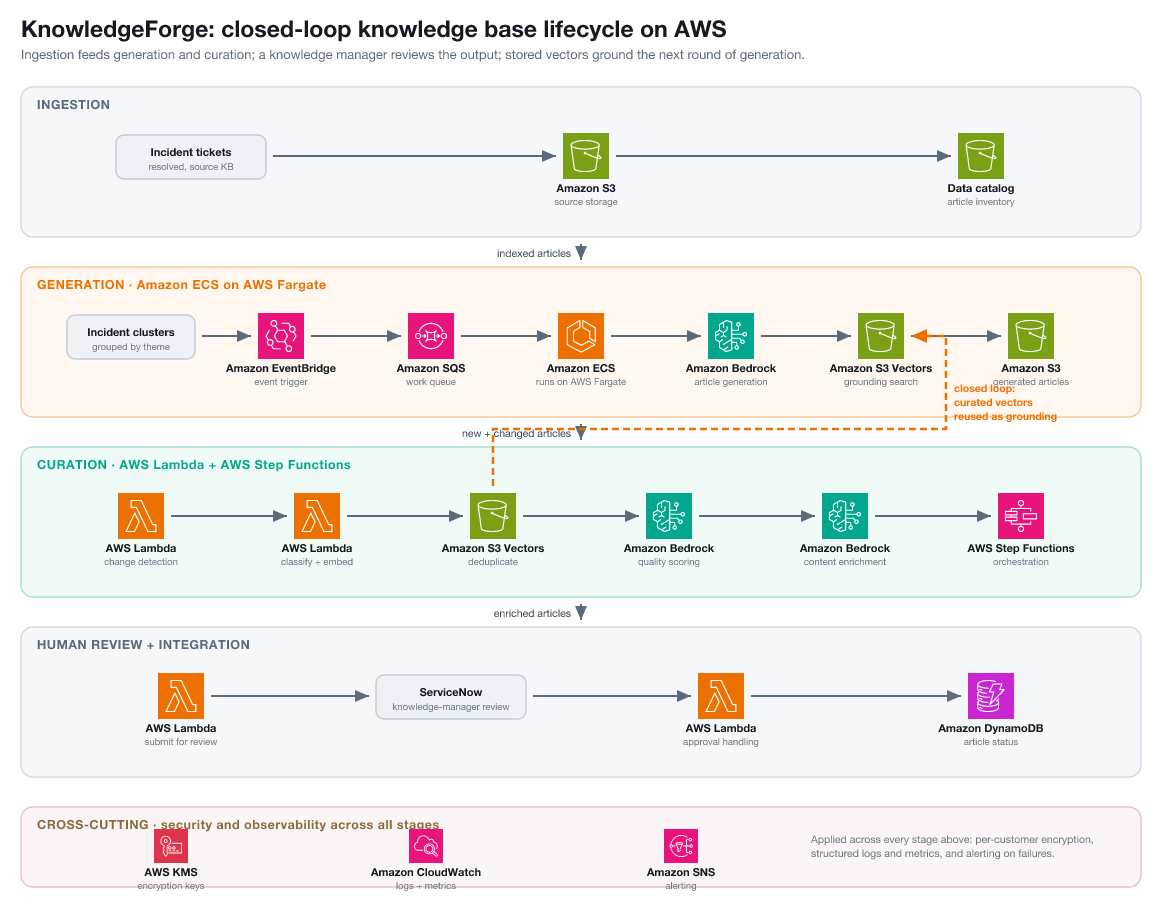
Figure 1: The closed-loop knowledge base lifecycle. Ingestion feeds generation and curation, a knowledge manager reviews the output, and curation embeds every article so generation can reuse those vectors as grounding on the next run.
At a high level, an article moves through five stages:
- Ingestion – Resolved tickets and existing articles land in Amazon S3, tracked by a data catalog.
- Generation – Clustered tickets become new draft articles on Amazon ECS with AWS Fargate.
- Curation – Each article is classified, deduplicated, quality-scored, and improved through an AWS Step Functions workflow on AWS Lambda.
- Human review – Enriched articles go to ServiceNow for knowledge-manager approval, and the decision is written back to Amazon DynamoDB.
- Closed loop – Curation embeds every article into the Amazon S3 Vectors index, and generation reuses those vectors on the next run.
The two subsystems run on different compute, for reasons the next sections explain as they follow an article through the system.
Generating articles from incident clusters
Generation starts with a cluster of tickets that share a theme. An upstream process groups resolved incidents by the problem they describe and drops the result into an Amazon S3 bucket as a JSON file, scoped to one customer. Each theme carries keywords, an article scope, and a sample of ticket descriptions and work notes.
A new file in the bucket sends an event to an Amazon SQS queue. A container on Amazon ECS with AWS Fargate polls the queue, reads the file, and processes up to five themes at once for a customer.
Before writing, the system grounds itself in what exists. For each theme, it retrieves the five most similar existing articles from that customer’s Amazon S3 Vectors index and passes them to the model as reference context. This Retrieval Augmented Generation (RAG) keeps terminology consistent and reduces invented procedures. When no reference articles exist yet, the system generates from the ticket data alone and flags the procedures for review.
Generation runs on Anthropic Claude Sonnet 4.5 in Amazon Bedrock. For each theme, the model produces two documents with a fixed structure:
- Knowledge base article: Title and summary, symptoms, root cause, resolution steps, prevention, and related topics.
- Root cause analysis document: Executive summary, problem description, customer impact, five-why analysis, workaround and resolution, corrective and preventive actions, timeline of key events, and cause code.
We use response streaming from Amazon Bedrock so the container assembles each document as tokens arrive rather than waiting for the full response.
Why containers instead of functions
We run generation on Amazon ECS with AWS Fargate because of the shape of the work. Generating two full documents for a theme can take several minutes, and a busy file holds many themes, so a single unit of work can run for a long time. The workload also arrives in bursts, quiet for stretches and then a large batch at once. A long-running container service that scales its task count on queue depth, and scales back when the queue drains, fits this pattern well.
AWS Fargate matches this profile. It runs our containers serverlessly, scales on demand as themes arrive, and lets the team focus on the generation logic rather than on managing compute capacity. Each document lands in Amazon S3 as JSON, ready for curation.
Finding duplicate articles with Amazon S3 Vectors
The first curation challenge is detecting whether an article already exists. Duplicates come in several forms. Two articles describe the same fix in different words, a newer article supersedes an older one, or an engineer copies an article, changes two lines, and saves it as new.
We chose Amazon S3 Vectors to solve this. It stores embedding vectors directly in Amazon S3, which avoids a standalone vector database. It keeps metadata alongside each vector for per-customer filtering and bills per query and per gigabyte rather than per running node. That makes it affordable to keep a vector for every article in the library. If you already store content in Amazon S3, you can add vector search without new infrastructure. For details, see the Amazon S3 User Guide.
Keyword matching misses these duplicate forms, so the pipeline matches on meaning. Every article gets a 1,024-dimension embedding from Amazon Titan Text Embeddings V2, stored in a per-customer Amazon S3 Vectors index. A vector store usually powers retrieval. Here the same index doubles as a duplicate detector. A new article is embedded, the index is queried for the nearest existing vectors, and anything inside a tight cosine-distance threshold counts as a duplicate. We start with a cosine distance of 0.05 (a similarity of 0.95 or higher) and a top-K of 5. We tuned the distance by sampling flagged pairs and tightening it until near-identical articles matched without catching merely related ones. A looser threshold produced false duplicates, and a tighter one missed reworded copies. The query is one call, filtered to the current customer and to active articles:
When the system finds a duplicate pair, it keeps the fresher article and retires the stale one instead of dropping the newcomer by default. The newest accurate version wins, which is the behavior a support engineer wants.
Reusing the index this way helps on retries too. Embeddings cost a model call to produce. A re-run reads the stored vector back instead of recomputing it, saving both time and Amazon Bedrock spend when a batch reruns.
Orchestrating curation at scale with AWS Step Functions
Curation runs over batches of articles that need orchestration to spread work across workers and recover from failures. AWS Step Functions provides that with a two-phase distributed map. It manages workflow state, applies the retries and error handling declared in the definition, and fans work across workers without custom coordination code. For how the distributed map works, see the AWS Step Functions Developer Guide.
Two configuration choices are worth calling out. First, we set the item processor to STANDARD rather than EXPRESS. Each article makes long-running Amazon Bedrock calls that exceed the 5-minute EXPRESS limit, and STANDARD keeps a full execution history for debugging. Second, we point the ItemReader at a manifest file in Amazon S3 rather than passing items inline, which keeps the workflow state small.
A daily schedule on Amazon EventBridge starts the run. An AWS Lambda function finds customers with new or changed articles, groups the changes into batches, and places each batch on an Amazon SQS first-in-first-out (FIFO) queue. The FIFO queue orders batches per customer across runs, using the customer ID as the message group key, so different customers still run in parallel. Ordering across runs is only part of the story. Within a single execution, Phase 2 can process up to 40 batches concurrently, so FIFO alone doesn’t stop two duplicates in different batches from racing. What actually protects deduplication is that it runs sequentially within each batch inside the worker, while quality scoring and improvement run in parallel. Sequential dedup per batch, parallel quality and improvement, and FIFO for cross-run ordering together keep duplicate detection consistent.
A dispatcher function pulls one batch at a time and starts a Step Functions execution. The state machine runs in two phases, each a distributed map so the articles in a batch process concurrently:
- Classify and embed – Each article is classified by type and given a vector embedding.
- Deduplicate, score, and improve – The pipeline finds duplicates, scores quality, and improves content that falls below the threshold.
The following diagram shows the trigger chain, the two phases, and the fault-tolerance mechanisms that protect a run.
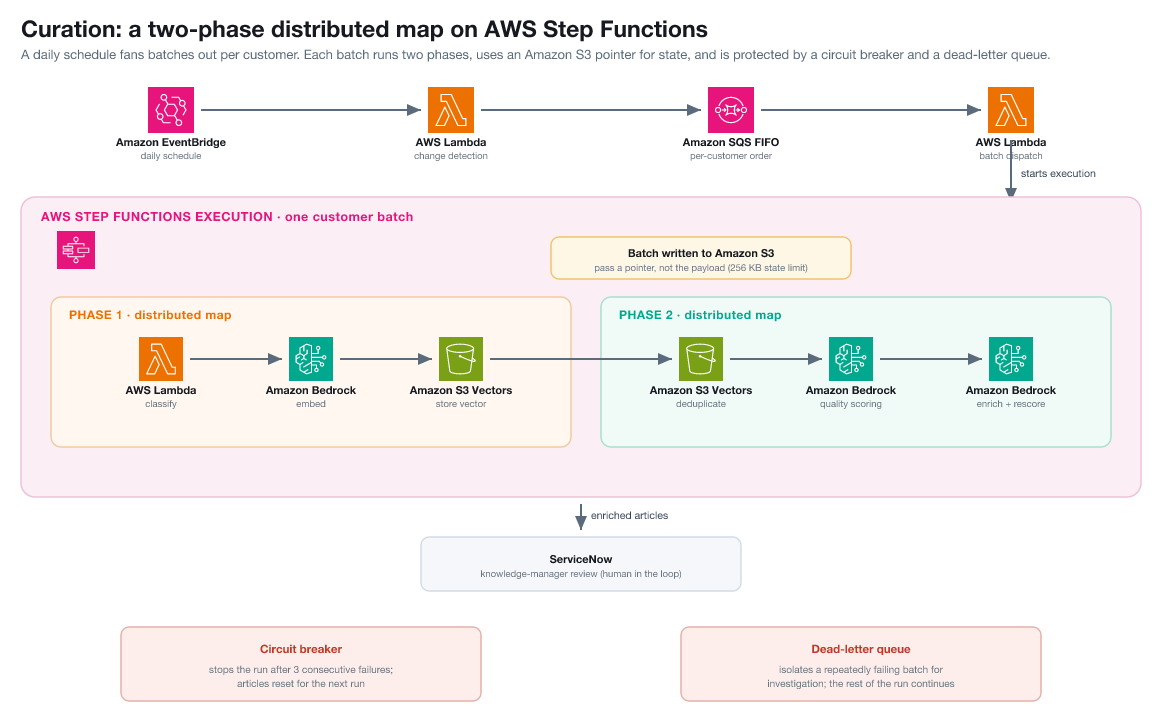
Figure 2: Curation runs as a two-phase distributed map. Batches are ordered per customer through an Amazon SQS FIFO queue, article content is passed as an Amazon S3 pointer rather than inline state, and a circuit breaker and dead-letter queue keep a bad batch from stalling the run.
Passing pointers, not payloads
A Step Functions execution carries state between states, capped at 256 KB. Knowledge base articles, with full HTML bodies, pass that limit quickly. Rather than thread article content through the state machine, we write the batch to Amazon S3 and pass only the location through the workflow. Each map worker reads what it needs directly from Amazon S3, so the state payload stays small no matter how large the articles are.
The distributed map reads its work items from a manifest in Amazon S3 rather than from inline state. A tolerated-failure percentage lets the run absorb a few bad articles without aborting the whole batch:
Recovering from failures
Two mechanisms keep a bad batch from taking down a run:
- Dead-letter queue – A batch that fails repeatedly is set aside for investigation instead of blocking the queue behind it.
- Circuit breaker (best effort) – After three consecutive failures, the dispatcher stops starting new batches and resets the affected articles to their starting state. The failure counter lives in the memory of a warm Lambda function, so it isn’t shared across concurrent dispatcher containers and resets when a new job starts. Under interleaved multi-tenant load the breaker might not trip, so we treat it as a best-effort backstop rather than a guarantee. Nothing is lost either way: the next scheduled run picks up reset articles, and a tripped breaker signals that a service dependency needs attention first.
Making Amazon Bedrock reliable at scale, and improving article quality
The engineering effort goes into running tens of thousands of model calls concurrently against shared service quotas. The pipeline reaches Anthropic Claude Sonnet for generation and improvement, and Amazon Titan Text Embeddings V2 for deduplication vectors, all through Amazon Bedrock model inference. For model availability by AWS Region, see Supported models by AWS Region.
Keeping model calls inside their limits
Three controls keep generation predictable under load:
- A hard wall-clock timeout on each execution, so a slow response cannot hold a worker open indefinitely.
- Automatic retry with backoff – The Amazon Bedrock client runs in adaptive mode, retrying on its own when it meets throttling, with exponential backoff on longer content-improvement calls.
- A guardrail fallback – We run an Amazon Bedrock guardrail on model output to filter unintended content. The guardrail is a production control, and the following fallback is a resilience measure that keeps it in force under normal conditions rather than a signal that it is optional.
The guardrail API has its own rate limit. If it throttles, the pipeline processes the article without the guardrail and logs a warning instead of failing, which keeps things moving during a spike. In code, the fallback is a short piece of the model-call wrapper:
A fourth control handles truncated output. Content-improvement responses have a token budget, and a long article can hit it, leaving the JSON response cut off. The system detects the “stopped at token limit” signal and retries with double the budget, up to the model’s ceiling. Short articles never trigger this path, so the common case pays nothing for the safety net.
Scoring quality before and after improvement
Not every article needs improvement, and improvement does not always help. A quality score decides. Each article is scored across ten weighted dimensions, from the highest weight to the lowest:
- Completeness
- Actionability
- Structure
- Coherence
- Readability
- Self-service value
- Freshness
- Automation readiness
- Grammar
- Security
The weighted total produces one score, and a threshold decides whether the article meets the bar as-is or goes forward for improvement. The threshold is configurable, so a customer can hold generated content to a higher bar than imported content.
Articles below the threshold go through content improvement, also on Amazon Bedrock. This step has a practical challenge: a model asked to improve prose will often change image tags and hyperlinks too, and break them. Placeholders solve it. Before improvement, the system swaps every image and link for a numbered token, improves the prose around those tokens, and swaps the real media back afterward. The model never sees the raw markup, so headings and structure survive.
In code, this is a pair of functions that bracket the improvement call. The first replaces every media tag and link with a numbered token and records what it removed. The second puts the originals back after the model returns:
Because the model only ever sees [IMG_1] or [LINK_3], it cannot corrupt a URL or an image reference. The restore step keeps the published article’s media exactly as it started.
After improvement, the article is scored again. The new version is kept only when its score beats the original. Otherwise the original stands. That before-and-after check lets the pipeline improve content automatically without quietly making the library worse.
Serving many customers safely
The system runs many customers on shared infrastructure, and a knowledge base is exactly the data customers expect kept separate. Isolation is designed in from the start: each customer gets its own copy of everything that touches its content:
- A configuration profile
- An Amazon S3 Vectors index
- A set of model prompts
- An Amazon Bedrock guardrail
- An AWS KMS encryption key
Because those resources are per-customer, each customer’s data stays within its own boundary. A duplicate check runs against that customer’s index alone, content improvement uses that customer’s prompts, and data is encrypted under that customer’s key. No shared pool exists where one customer’s articles could surface in another’s results.
Onboarding a customer doesn’t mean editing a central list. The system discovers customers from the data catalog at run time, so adding one only means provisioning its resources, with no change to the pipeline code.
Results and lessons learned
The behavior here comes from our internal testing, not a guaranteed service level. Because each customer flows through its own Amazon SQS FIFO message group, adding a customer adds a parallel stream of work rather than slowing the others. Your own throughput will depend on article size, model latency, and your Amazon Bedrock quotas.
A representative run showed the pattern you can expect. Most articles came through fully processed on the first pass, a small share were held for improvement, and a smaller share were removed as duplicates. The run completed with no dead-letter-queue messages and no timeouts. A handful of articles hit the content-improvement token limit, were reset automatically, and were retried with a higher budget on the next run rather than failing. That last case matters, because it shows the resilience controls turning what would otherwise be hard failures into automatic retries.
Four lessons stand out. Reusing the vector index as a duplicate detector turned a hard problem into a nearest-neighbor query. Passing an Amazon S3 pointer through Step Functions instead of the article body removed a class of state-size failures. Scoring quality on both sides of improvement made it safe to run automatically. Treating a guardrail throttle as a warning kept the pipeline healthy through load spikes. The larger point is the closed loop itself: generated content feeds curation, and curation grounds the next round of generation, so the knowledge base improves as the system runs.
Clean up resources
The resources in this solution are billable, so remove them when you finish to avoid ongoing charges. Deleting the two AWS CDK stacks, one for knowledge base generation and one for knowledge base curation, removes most of them. That includes the AWS Lambda functions, the AWS Step Functions state machine, the Amazon ECS service on AWS Fargate, the Amazon SQS queues, and the Amazon DynamoDB tables.
A few resources need manual attention because they hold data or are created per customer:
- Amazon S3 Vectors indexes and vector buckets – Delete each per-customer index, then the vector bucket.
- Amazon S3 buckets – Empty and delete the source, output, and pipeline buckets.
- Amazon Bedrock guardrails – Delete the per-customer guardrails if the stack leaves them in place.
- AWS KMS keys – Schedule deletion of the per-customer keys.
- Amazon DynamoDB tables – Confirm the metrics and article-status tables are removed if you disabled point-in-time recovery retention.
See the repository README for the exact deletion commands.
Conclusion
The ITSM ticket graveyard is a knowledge problem that looks like a data problem. The resolutions already exist, trapped where nobody can reuse them, next to a knowledge base that decays faster than any team can hand-curate it. KnowledgeForge closes that gap with generative AI on AWS. It mines tickets into articles with Amazon Bedrock, catches duplicates with Amazon S3 Vectors, and orchestrates the flow with AWS Step Functions. A knowledge manager stays in control of what goes live.
To get started building a similar pipeline:
- Create a vector index using the Amazon S3 Vectors documentation.
- Embed a sample of your own articles and load the vectors.
- Run the nearest-neighbor query shown earlier to flag duplicates.
- Add the AWS Step Functions distributed map to batch-process articles.
- Layer on the score-improve-rescore quality gate.
The complete code is available in the aws-samples/sample-knowledgeforge repository on GitHub. The code samples throughout show the load-bearing parts of each pattern, ready to adapt to your own knowledge base.
To learn more, see the Amazon Bedrock User Guide, the AWS Step Functions Developer Guide, and the Amazon S3 User Guide.