Artificial Intelligence
Running ComfyUI workflows on Amazon SageMaker AI processing jobs
With ComfyUI workflows on Amazon SageMaker AI processing jobs, you can automate content generation at scale. For enterprises, every delay or misstep in creating compelling multimedia assets can mean lost sales, faded brand relevance, or missed marketing deadlines. When a product launch deadline looms or a seasonal promotion needs urgent assets, waiting for designers to iterate on a single social media post or a 15-second video ad can cost thousands in lost conversions.
You can automate the creation of revenue-driving images, audio, and video at scale with AI. Imagine generating hundreds of on-brand social media visuals in an hour for a global campaign, synthesizing hyper-personalized voiceovers for multilingual ad audits, or producing video clips with AI-crafted scripts and visuals, while staying tightly aligned with brand guidelines. Another benefit is freeing creative teams to focus on high-impact strategy while AI handles repetitive, time-consuming tasks. For enterprises, time saved in content production is time spent launching another campaign, targeting another niche audience, or re-engaging lost customers.
In this post, we walk you through how to deploy ComfyUI workflows on Amazon SageMaker AI processing jobs to generate hundreds of high-quality images in a single batch. You learn how to set up the infrastructure using AWS Cloud Development Kit (AWS CDK), configure GPU-accelerated processing, and automate image generation at scale. You can then adapt this solution to your ComfyUI workflows specific to your needs. We will guide you through a practical, step-by-step process to automate ComfyUI workflows to generate hundreds of high-quality images in a single batch empowering you to scale your creative pipeline.
Why this matters
Running ComfyUI on SageMaker AI processing jobs provides several key benefits for your content pipeline:
- Accelerate campaigns: Generate content within minutes to hours depending on the size, capturing fleeting trends and deadlines.
- Boost conversions through personalization: Deliver tailored visuals, voiceovers, and videos to distinct audience segments driving higher click-through and purchase rates.
- Protect brand equity: Enforce consistent style, tone, and compliance across media types.
- Safe prototyping, confident scaling: Test AI-generated content in controlled environments before rolling out to global audiences.
ComfyUI
ComfyUI is a node-based, visual workflow builder for generative AI that makes it straightforward to compose, test, and iterate on complex image, audio, or video pipelines without coding every step. You connect modular components into a reproducible graph that can be versioned and shared across teams.
Deploying ComfyUI on SageMaker AI processing jobs brings several benefits to your image generation workflows. GPU-accelerated instances deliver fast inference times, while pay-per-second billing with automatic job termination makes sure you only pay for the compute you use. The queue-based architecture scales naturally with your workload, processing multiple requests in parallel without manual intervention. Lastly, you can export your own ComfyUI workflow as JSON and have it deployed.
Image generation with Z-Image Turbo
Z-Image Turbo introduces a Scalable Single-Stream Transformer architecture (S3DiT) for text-to-image diffusion. Z-Image concatenates text and image modality tokens into one unified sequence (Early Fusion), allowing dense cross-modal interaction at every layer. This early fusion design means the model treats text tokens, image latent tokens, and even image semantic tokens uniformly in the Transformer, maximizing parameter sharing across modalities.
Z-Image Turbo uses a decoder-only Transformer backbone, inspired by large language model (LLM) decoders, with 30 layers, hidden size 3840, 32 attention heads, 10240 Feed Forward network intermediate dimensions, and a total of 6B parameters. This backbone alternates single-stream multi-head attention blocks and single-stream feed-forward blocks, each customized for stability using normalization and gating techniques.
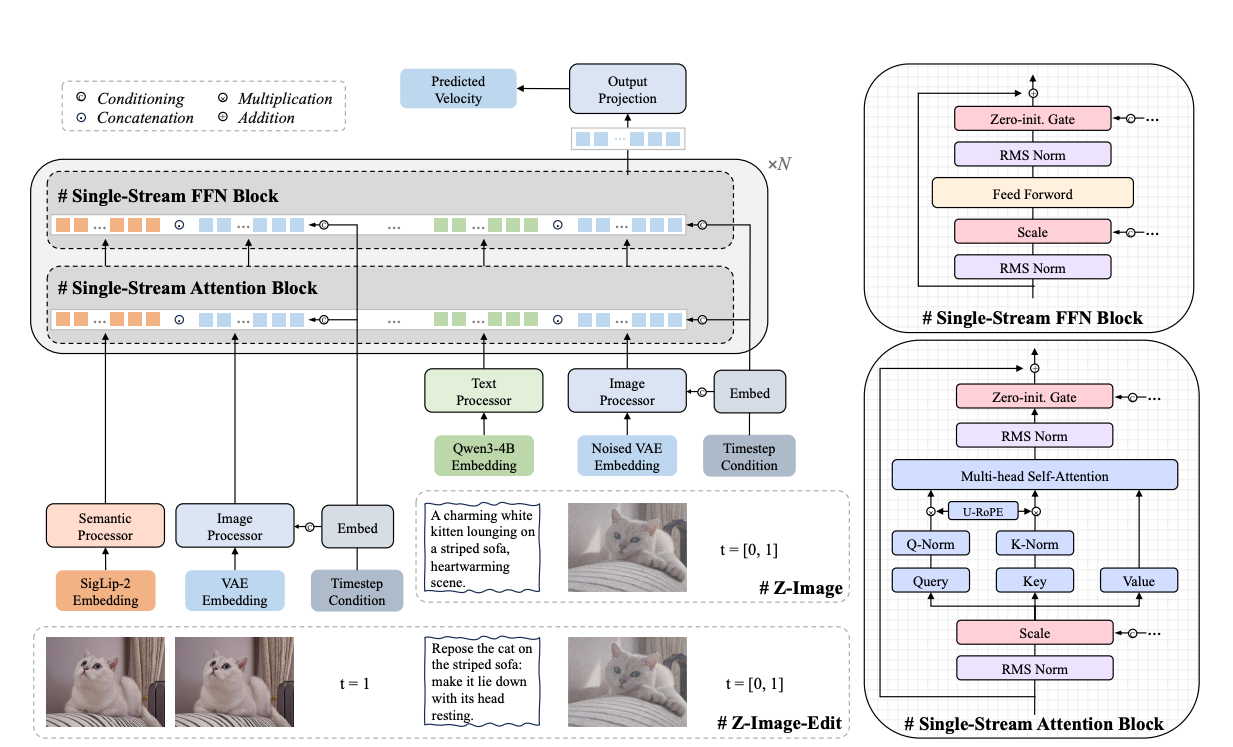
For this solution we use ComfyUI’s workflow for Z-image Turbo stored in the processing job container. This workflow can be swapped into your ComfyUI workflow. When changing workflows, make sure that you have the models used in the workflow downloaded, custom nodes installed in the container, and your instance type has enough VRAM.
Other use cases
Although this example focuses on image generation, ComfyUI’s workflow engine can scale AI-driven creative tasks as mentioned previously, whether it’s audio synthesis, 3D asset rendering, or dynamic video animations, allowing enterprises to automate diverse content pipelines at scale. By using AWS infrastructure, businesses can deploy these workflows across thousands of outputs, turning every creative idea into a revenue-generating asset. Here are some examples of other applications of running ComfyUI as a batch job for large-scale generation:
- Scalable ad creative A/B testing at speed: Automatically produce hundreds of ad variants, social media carousels, video snippets, or social media ready clips for global campaigns, including hyper-specific designs or style iterations (minimalist or bold) to test which creative resonates best with each demographic.
- Dynamic packaging and label design for global launches: Generate locale-specific designs for international product launches, adapting colors, imagery, and text to align with regional aesthetics, regulations, or holidays (for example, Lunar New Year-themed labels), and test multiple designs at scale before physical production.
- Interactive video storytelling for gaming and entertainment: Build branching video narratives for games, streaming services, or interactive ads where AI generates dynamic cutscenes that change based on user choices, such as hero appearances or dialogue options, turning passive viewing into an engaging, personalized experience.
Solution architecture
Now that you understand the business value and use cases, let’s explore how to implement this solution. The architecture uses three AWS CDK stacks: the DataStack with an Amazon Simple Storage Service (Amazon S3) output bucket, the SecurityStack with an Amazon Virtual Private Cloud (Amazon VPC), and the ComfyUISmStack with an AWS Lambda trigger function. It also uses a SageMaker AI processing job running on a GPU instance, Amazon Elastic Container Registry (Amazon ECR) for the container image, and Amazon CloudWatch for logging. The processing job runs inside the VPC’s private subnets. To see the full code implementation, see the GitHub repo.
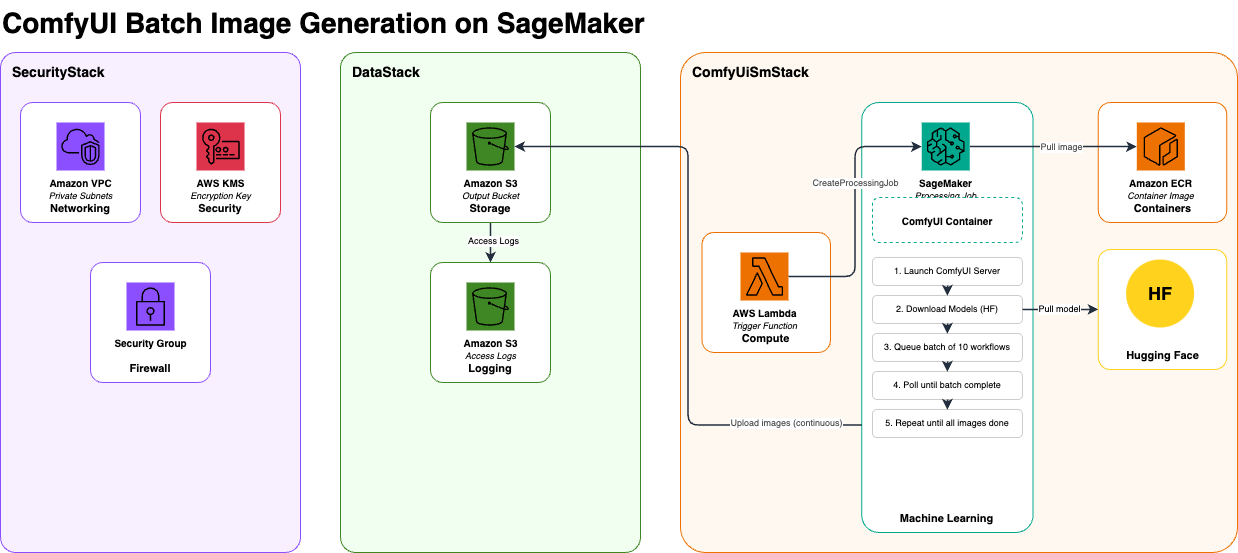
DataStack
The DataStack implements the storage layer using Amazon S3 buckets with server-side encryption for output data. The output bucket stores the generated images from ComfyUI workflows.
SecurityStack
The SecurityStack establishes the foundational security infrastructure for the entire solution. It creates an Amazon VPC with public and private subnets across two Availability Zones for high availability (HA) and network isolation. The VPC includes a NAT gateway for secure outbound internet access from private subnets where SageMaker AI processing jobs run.
A customer-managed AWS Key Management Service (AWS KMS) key provides encryption at rest for data, including Amazon S3 buckets, Amazon CloudWatch logs, and environment variables. The key has automatic rotation enabled and includes resource policies allowing AWS services like Amazon S3 and CloudWatch to use it for encryption operations. VPC Flow Logs are enabled and sent to CloudWatch for network traffic monitoring and security analysis.
ComfyUISmStack
The ComfyUISmStack orchestrates the core processing pipeline through an AWS Lambda function that triggers SageMaker AI processing jobs. The Lambda function can be invoked manually to initiate GPU-powered processing using ml.g5.xlarge instances running a custom Docker container. This container packages ComfyUI with the Z-Image Turbo model, providing high-quality image generation with configurable parameters for prompts, seeds, and batch processing.
The stack creates a reusable processing job construct that handles Docker image building and deployment to Amazon ECR, AWS Identity and Access Management (IAM) role creation with comprehensive permissions for SageMaker AI, Amazon S3, Amazon ECR, Amazon VPC, and CloudWatch access, processing job definition with VPC integration, AWS KMS encryption, and network isolation, as well as Lambda trigger function configuration with environment variables containing the full job configuration.
The processing job runs in private subnets for secure AWS service communication. Container logs stream to CloudWatch for real-time monitoring and troubleshooting. The job uses continuous Amazon S3 upload mode, streaming generated images to the output bucket as they’re created rather than waiting for job completion.
Process flow
The process begins when you trigger the Lambda function, which creates a processing job and submits it to SageMaker AI. SageMaker AI provisions a GPU instance within the private network, pulls the ComfyUI container image from the registry, and deploys it with the necessary storage and network configurations. After the container is running, the ComfyUI server:
- Downloads AI model components from HuggingFace through a secure outbound connection.
- Organizes them into their respective directories.
- Loads models into GPU memory and waits for full initialization.
With the server ready, the system reads text prompts from a file and loops through them in batches. For each image, it:
- Selects a prompt based on a unique seed value.
- Populates the workflow template with the prompt and seed.
- Sends the request to ComfyUI for processing.
The GPU generates each image based on the workflow instructions. As images are produced:
- They’re written to an output directory and synced to Amazon S3 in real time, making results available before the job finishes.
- Container logs stream to CloudWatch for monitoring and troubleshooting.
After each batch is queued, a polling loop checks the processing queue every 15 seconds until all requests finish. After the queue is empty, the server shuts down, the container exits, and SageMaker AI terminates the instance. You can then access Amazon S3 to download generated images organized by job timestamp, and review CloudWatch logs for issues.
Walkthrough
The following sections walk through deploying the ComfyUI on SageMaker Processing Jobs solution.
Prerequisites
Before beginning deployment, make sure that you have the following:
- Python 3.13+
- AWS Command Line Interface (AWS CLI) configured with appropriate credentials
- Docker installed and running
- AWS CDK v2
- AWS CDK bootstrapped in your target AWS account and AWS Region
Setup
1. Clone the repository
2. Environment configuration
Create your environment file from the example template:
Edit .env with your AWS account details:
3. Install dependencies
This project uses uv for dependency management:
You can also use pip:
4. Bootstrap AWS CDK
Bootstrap AWS CDK in your target AWS account and AWS Region (required for AWS CDK deployments):
For example:
5. Service quota request
Request a service quota increase for six ml.g5.xlarge instances in SageMaker AI processing jobs through the AWS Management Console.
Configuration
The processing job configuration is defined in config/config.yaml:
- Instance type:
ml.g5.xlarge(GPU-enabled) - Instance count: 6
- Volume size: 125 GB
- Container: Custom ComfyUI Docker image
Deploy stacks
Note: you will start incurring cost by running this command.
Trigger the processing job
After deployment, trigger processing jobs through the Lambda function created by the AWS CDK code.
Function name: ComfyUiSmStack-ProcessingJob-Trigger-ComfyUI-trigger-Lambda
You can invoke the function through the:
- AWS Management Console (Lambda service → Test button)
- AWS CLI:
When invoked, the Lambda function:
- Generates a unique job name with timestamp.
- Creates a SageMaker AI processing job with the predefined configuration.
- Provisions six
ml.g5.xlargeGPU instances. - Runs the ComfyUI workflow.
Processing job outputs
After the processing job finishes, outputs are stored in the Amazon S3 output bucket created by the solution.
Samples
The following are example outputs from a batch job that runs Z-Image on sample prompts.

Clean up
To avoid ongoing charges, complete the following cleanup steps.
Empty Amazon S3 buckets
Destroy AWS CDK stacks
Conclusion
In this post, we demonstrated how enterprises can automate AI-powered content generation at scale by running ComfyUI workflows on SageMaker AI processing jobs. By combining ComfyUI with the managed GPU infrastructure of SageMaker AI, we created a batch job that generates hundreds of high-quality images, turning what traditionally took creative teams weeks into a process that finishes in under an hour.
This solution used Z-Image Turbo’s 6B-parameter diffusion transformer model to deliver photorealistic images while keeping inference costs low. The AWS CDK deployed the infrastructure with security, encryption, and network isolation built in from the ground up. With pay-per-second billing and automatic instance termination, enterprises only pay for the compute that they consume, alleviating idle resource costs.
AI-powered content generation is becoming increasingly important for competitive enterprises. By combining ComfyUI with Amazon SageMaker AI, you can automate content generation at scale with secure, cost-effective infrastructure. To get started, visit the SageMaker AI documentation and the GitHub repository for this solution. We’d love to hear how you’re using ComfyUI and SageMaker AI for content generation. Share your use cases and questions in the comments.