AWS Storage Blog
Replicate Amazon S3 bucket configurations across AWS Regions with AWS Step Functions
Many organizations operate thousands of Amazon S3 buckets in a single AWS Region, each with its own configuration accumulated over the years. Some were created manually in the AWS Management Console and others by scripts that are no longer actively maintained, provisioned by different business units with their own policies, lifecycle rules, encryption, and tags. When a compliance requirement calls for those same buckets, configured identically, in a new Region, recreating them manually means opening each one, reading its settings, and applying them one bucket at a time. That process is slow and error-prone, and it becomes harder as the number of buckets grows.
S3 gives you many bucket-level controls, including policies, lifecycle rules, encryption, access controls, and tags. S3 Cross-Region Replication (CRR) keeps live object data in sync across Regions, and S3 Batch Operations copies existing objects in bulk, but both focus on the objects themselves. The bucket’s own configuration still has to be reproduced through a separate set of API calls.
In this post, we show you how to automate that work with AWS Step Functions and AWS Lambda. With a single invocation, the solution creates a bucket in your target Region and replays the source bucket’s configuration onto it, logging every run to Amazon DynamoDB and Amazon CloudWatch so you have an audit trail. We cover when this approach fits compared to defining buckets in infrastructure as code (IaC), how the workflow is built, and how to deploy and test it in your own account with the provided AWS Cloud Development Kit (AWS CDK) stack.
Solution overview
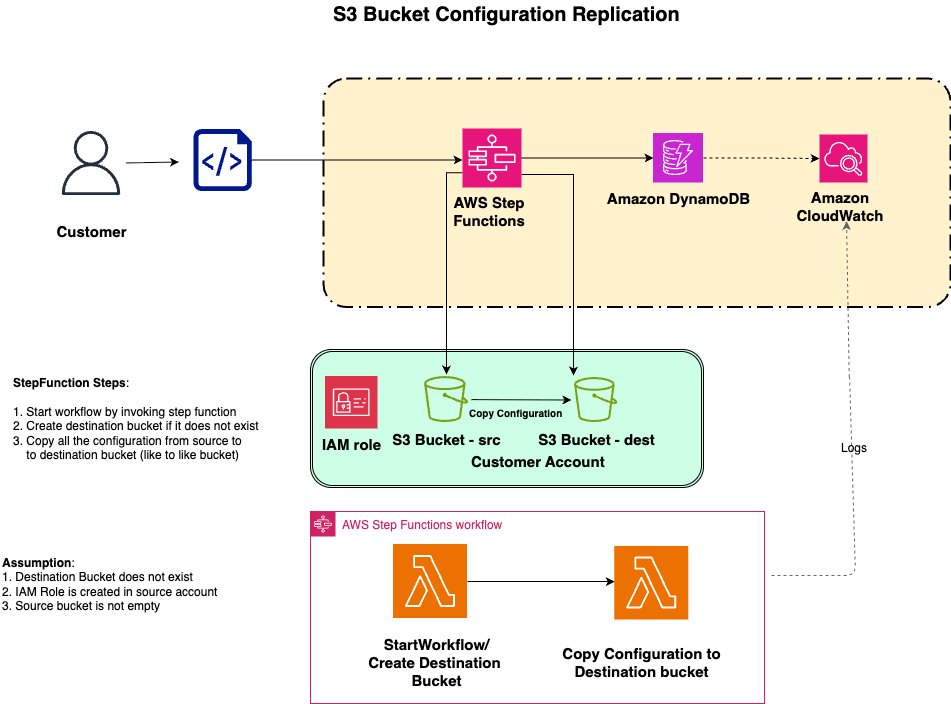
The solution uses Step Functions to orchestrate two Lambda functions that together recreate an S3 bucket’s configuration in a target Region. When you invoke the workflow with a source bucket Amazon Resource Name (ARN) and a destination Region, Step Functions runs the following steps in order:
- The first Lambda function creates the destination bucket in the target Region and writes an initial record of the run to a DynamoDB audit table. If you don’t supply a destination bucket ARN in your invocation payload, the function generates a unique bucket name prefixed with dest- so you can invoke the workflow without planning names ahead of time.
- The second Lambda function reads the source bucket’s configurations through the S3 API and applies each one to the destination bucket. If the source bucket has server access logging enabled, the function also creates a dedicated access logging bucket in the destination Region, so the replicated logging configuration points to a valid target.
Each step returns a status value that the Step Functions workflow inspects through a choice state. If the create step doesn’t return CREATED or the configure step doesn’t return FINISHED, the workflow routes to a failure state and marks the DynamoDB record accordingly. Every run is recorded in DynamoDB with the source and destination configuration snapshots, which gives you an audit trail of what was replicated, when, and between which buckets. Detailed execution logs land in CloudWatch for each Lambda function, alongside the Step Functions execution history.
The solution is designed for cross-Region replication within a single AWS account. The Lambda functions assume an AWS Identity and Access Management (IAM) role named s3-bucket-permissions-free (created for you by the AWS CDK stack) to read from the source bucket and write to the destination bucket, so both bucket ARNs must live in the account where you deploy the stack.
The following diagram shows how these pieces fit together.
The solution copies the following bucket-level configurations from the source bucket to the destination bucket:
- Bucket policy
- Lifecycle rules
- Versioning (including the multi-factor authentication (MFA) delete setting, where enabling it still requires the root user and an MFA device)
- Server-side encryption (SSE-S3 and SSE-KMS)
- CORS rules
- Server access logging (with a dedicated logging bucket created in the destination Region)
- Bucket tags
- Block Public Access settings
- Bucket ownership controls and bucket access control lists (ACLs, which are copied when ownership controls are non-default)
- Object Lock configuration
- Requester Pays
- Static website hosting configuration
A few behaviors are worth knowing before you run the workflow. Because AWS Key Management Service (AWS KMS) keys are Region-scoped, copying SSE-KMS encryption works only if a usable key already exists in the destination Region for the replication role to use. If your source bucket uses Object Lock and you need it on the destination, create the destination bucket with Object Lock enabled beforehand and pass its ARN in the payload.
The full solution, including the AWS CDK infrastructure code, the Lambda function source, and the helper scripts you will use to deploy and invoke it, is published in the accompanying GitHub repository. In the following steps, you will clone the repository, deploy the infrastructure into your account with a single script, and then invoke the Step Functions workflow to replicate the configuration of a source bucket into a destination Region.
Prerequisites
To follow along with the steps in this post, you will need access to the following AWS services and local tools:
- An AWS account with permissions to create and manage Step Functions state machines, Lambda functions, DynamoDB tables, and IAM roles, and to deploy AWS CloudFormation stacks (used by AWS CDK).
- An existing S3 bucket in your source Region that has the bucket-level configurations you want to replicate, such as a bucket policy, lifecycle rules, or tags.
- Git, for cloning the sample repository.
- The AWS Command Line Interface (AWS CLI) version 2 or later installed, configured with credentials for the account where you plan to deploy. If you haven’t set this up before, follow the steps in Configure the AWS CLI.
- The AWS CDK version 2.x or later installed, for deploying the solution.
- Node.js (version 16 or later) and npm (version 10 or later), both required by the AWS CDK.
- Java (version 17 or later), required to build the Lambda function code. Amazon Corretto is a no-cost, production-ready distribution of OpenJDK.
We recommend testing the solution in a non-production account first.
Clone the sample repository
On your workstation, clone the repository and change into the project directory:
git clone https://github.com/aws-samples/sample-s3-copy-configuration.git
cd sample-s3-copy-configuration
Deploy the CDK stacks
Set the Region you want to deploy to and run the provided deploy script. The script uses the AWS credentials from your current shell, so make sure the right profile is active before you run it:
export AWS_REGION=us-east-1
chmod +x deploy.sh
./deploy.sh
The deploy.sh script detects missing prerequisites, installs npm dependencies, builds the AWS CDK application, and bootstraps the AWS CDK environment for your account and Region if it hasn’t been bootstrapped already. It then deploys four AWS CDK stacks: the IAM stack (which creates the s3-bucket-permissions-free role used by the Lambda functions), the persistence stack (the DynamoDB audit table), the compute stack (the two Lambda functions), and the workflow stack (the Step Functions state machine named S3Workflow). When the script is complete, the solution is live and ready to invoke.
Configure the invocation payload
The workflow is invoked with a small JSON payload that tells it which source bucket to read from and where to create the destination bucket. Open invoke-workflow-payload.json in the repository and replace the placeholder values with your own details:
{
  "sourceBucketARN": "arn:aws:s3:::your-source-bucket",
  "destBucketARN": "arn:aws:s3:::your-destination-bucket",
  "sourceAccountNumber": "012345678901",
  "destAccountNumber": "012345678901",
  "sourceRegion": "us-east-1",
  "destRegion": "us-east-2"
}
sourceAccountNumber and destAccountNumber should match, because this solution is designed for single-account cross-Region replication. destBucketARN is optional. If you remove the field, the first Lambda function generates a unique bucket name prefixed with dest- for you. If you do supply a destination bucket ARN, make sure the bucket doesn’t already exist in the destination Region, because the workflow creates it as its first step.
Invoke the workflow
From the same directory, run the provided invocation script:
./invoke-workflow.shThe script reads your account and default Region from the AWS CLI, constructs the ARN of the S3Workflow state machine, and starts a new Step Functions execution using the payload you configured in the previous step. You can follow the execution in real time on the Step Functions console by selecting the S3Workflow state machine and opening the latest execution. Each task in the workflow maps to one of the two Lambda functions described in the solution overview, and the Step Functions console shows inputs, outputs, status transitions, and any errors for each step.
If the execution completes with a CloseWorkflow status, the destination bucket is created in the destination Region with the source bucket’s configurations applied to it. A record of the run is also written to the DynamoDB audit table, and each Lambda function’s logs are available in Amazon CloudWatch Logs.
Verifying the results
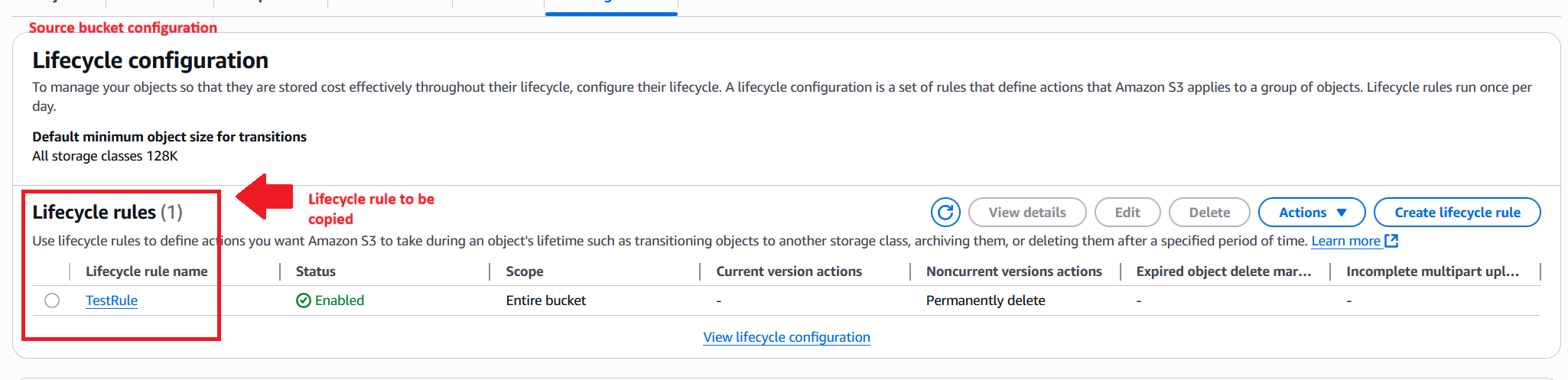
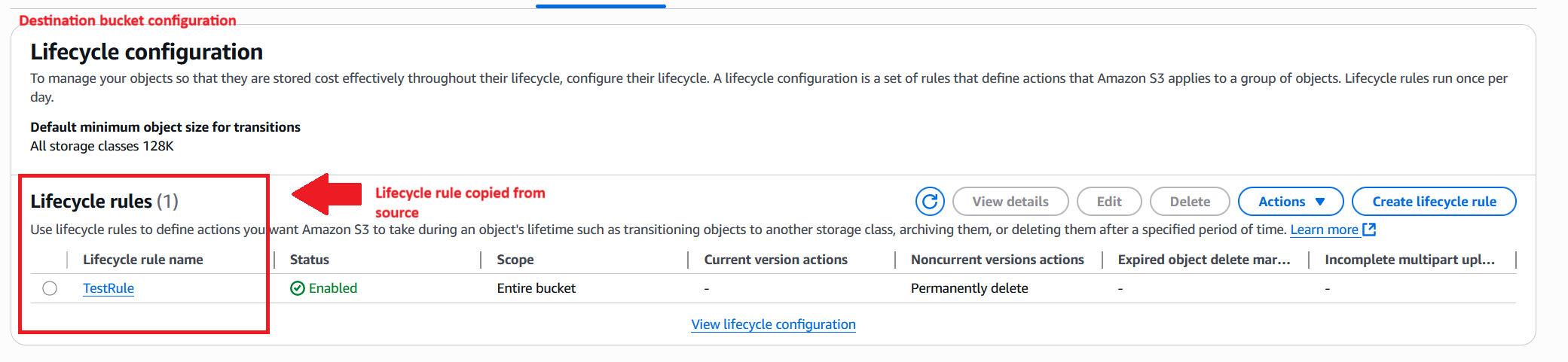
When the workflow is complete, you can confirm the destination bucket’s configurations on the S3 console by opening the destination bucket and comparing its settings with the source. The following screenshots walk through three of the configurations the workflow copies in a typical run.
The first screenshot shows a lifecycle rule named TestRule on the source bucket.
After the workflow is complete, the same lifecycle rule appears on the destination bucket.
The following screenshot shows the source bucket’s policy and Object Ownership configuration.
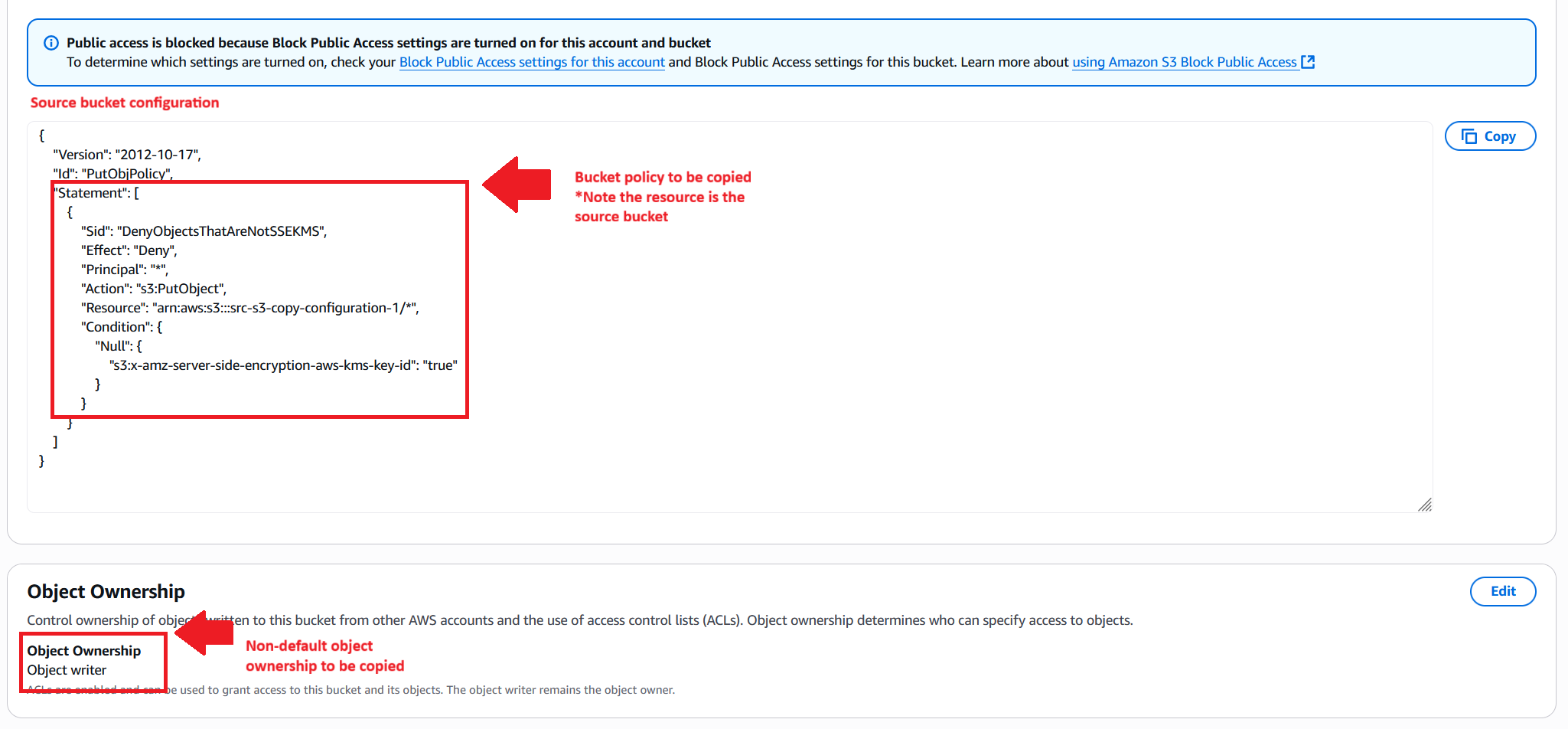
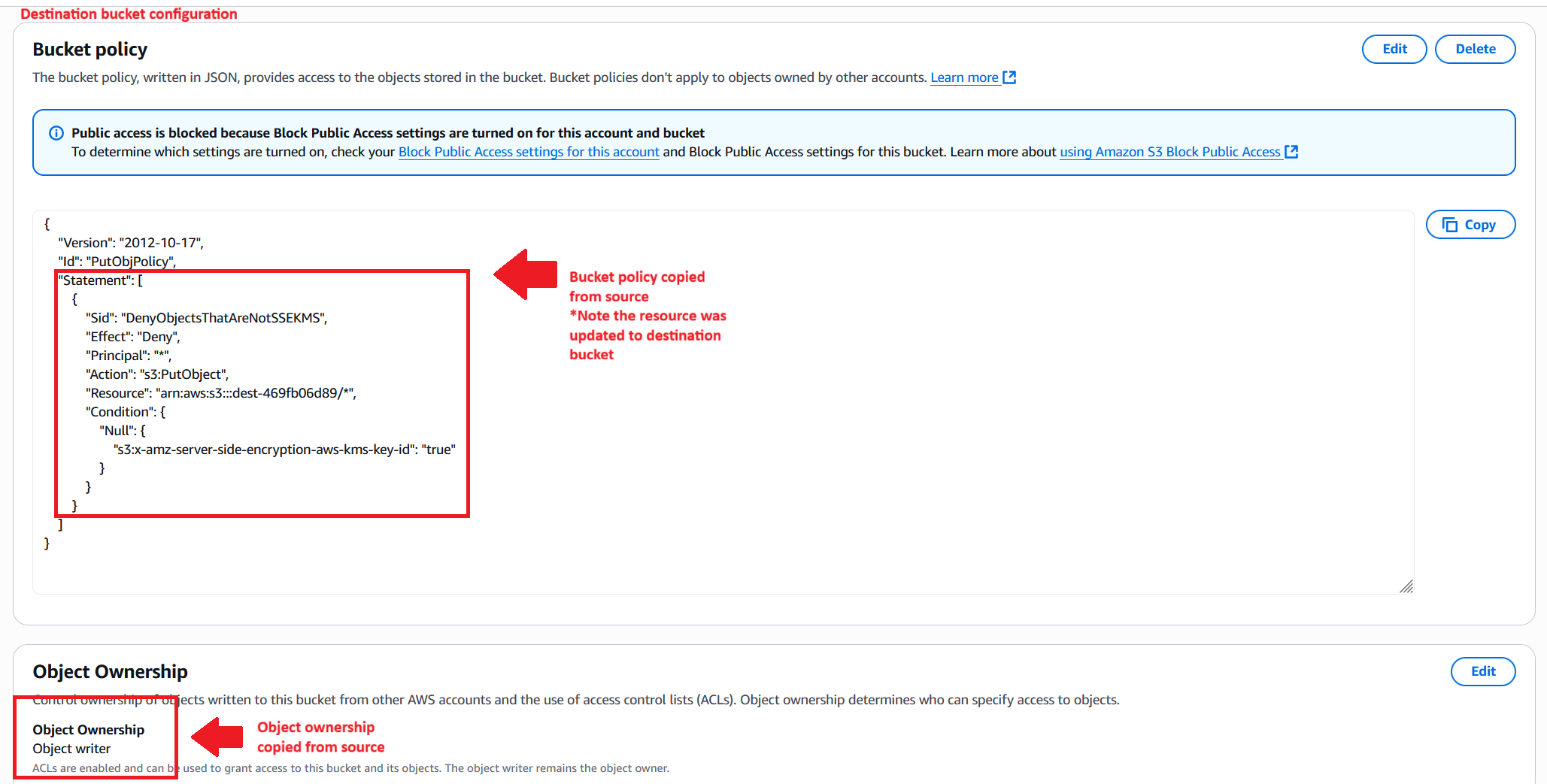
The workflow copies the bucket policy and ownership controls to the destination bucket, as shown in the following screenshot. Because the solution calls PutBucketPolicy with the source policy’s JSON as is, resource ARNs that reference the source bucket will still point at the source bucket after the copy. If your source policy contains bucket-scoped resource ARNs, plan to review and update them on the destination bucket so they reflect the new bucket’s ARN. The copied ownership controls don’t require rewriting.
You can also open the DynamoDB audit table on the DynamoDB console to see the source and destination configuration snapshots captured for the run, along with its status.
Important considerations
Before you run this solution against your own buckets, there are a few things worth noting:
- Use IaC for greenfield deployments – When you control a bucket’s full lifecycle, define its configuration in AWS CloudFormation or the AWS CDK for deterministic, version-controlled templates. Use this workflow when you need to replicate configuration from a running bucket instead.
- Partial failures – Configurations are copied sequentially, so if one copy fails, the run stops with no automatic rollback and is marked
FAILEDin DynamoDB. Recovery is simple: identify the failed copy in the Lambda function’s CloudWatch logs, fix the cause, and rerun the workflow. - Performance – Each Lambda function runs with 512 MB of memory and a 30-second timeout, which suits typical buckets. A bucket with an unusually large configuration (for example, dozens of lifecycle rules or a very large policy) can approach that limit; raise the timeout and memory in the compute stack if you hit it.
- Cost – The solution uses Lambda, Step Functions, DynamoDB, and the destination and log buckets it creates. For current pricing, see the AWS Lambda, AWS Step Functions, Amazon DynamoDB, and Amazon S3 pricing pages, and remember to clean up resources you no longer need.
- Permissions – The two Lambda functions assume the IAM role named
s3-bucket-permissions-free, which the AWS CDK stack creates with a policy covering thes3:Get*ands3:Put*operations the workflow needs, pluskms:GetKeyPolicyandkms:PutKeyPolicyfor encryption. If a run fails with an access-denied error, check CloudWatch Logs for the denied API call and compare it against the inline policy incdk/lib/iam/iamStack.ts.
Cleaning up
To avoid ongoing charges from the resources you just deployed, run the provided cleanup script from the repository root:
export AWS_REGION=us-east-1
./cleanup.sh
The script finds buckets the workflow created (prefixed with dest- or server-access-logging-), prompts you before emptying and deleting them, and then destroys the four AWS CDK stacks with cdk destroy --all. If you invoked the workflow against a source bucket you still need, make sure you’re only deleting the destination and log buckets the workflow generated, not your original source bucket.
Conclusion
In this post, we showed how to automate the replication of S3 bucket configurations across Regions using Step Functions and Lambda. We walked through how the workflow stands up a destination bucket, copies the bucket-level configurations from the live source bucket rather than from a template, and records every run in DynamoDB for audit. We also covered when this approach complements IaC and when IaC remains the better path for greenfield deployments.
It’s a practical fit when you’re consolidating buckets after a merger, meeting a new data-residency requirement, or working with buckets that predate your IaC pipelines. Clone the sample GitHub repository, deploy it into a non-production account, and run it against one of your own buckets to see the output firsthand.
To learn more about the AWS services used in this solution, see the Amazon S3 User Guide, the AWS Step Functions Developer Guide, and the AWS Lambda Developer Guide. We’d love to hear how you adapt this workflow for your environment. Drop a comment with any feedback or ideas for extensions.