AWS Storage Blog
Scalable cross-cloud data migration to Amazon S3 with distributed rclone
Migrating petabytes of data across cloud providers is one of the most operationally demanding tasks an organization can take on. At this scale, simple transfer approaches break down. Teams lose track of what has been copied and what has failed. Transfers stall and require constant manual intervention to restart. In some cases, teams need to apply business logic like custom tags, which increases the migration time, raises the risk of data drift, drives up costs, and delays access to the data teams need.
AWS provides the building blocks to turn this into a distributed, self-healing pipeline. To enable tracking of objects more efficiently, Amazon Elastic Container Service (Amazon ECS) automatically discovers and batches objects from the source provider. These are pushed to an Amazon Simple Queue Service (Amazon SQS) queue which distributes those batches as self-contained transfer jobs with built-in retry logic. This reduces the need for manual intervention when transient failures occur. A fleet of Amazon Elastic Compute Cloud (Amazon EC2) instances running rclone workers then scales up and down with queue depth, copying the data into Amazon Simple Storage Service (Amazon S3) pushing aggregate throughput well beyond what a single machine can deliver. Amazon CloudWatch Logs can be used for troubleshooting when failures occur and CloudWatch metrics can be used to monitor various performance metrics throughout the migration.
In this post, I show you how to build this distributed migration architecture and deploy it with a single AWS CloudFormation template. In my testing using a 2.7 PB dataset of media archives from IBM Cloud Object Storage into Amazon S3, the architecture achieved 15-120 Gbps aggregate throughput across the worker fleet, completing the migration in about two weeks and resulted in about $2,000 of compute costs. You can use this pattern to migrate data from any S3-compatible storage provider, including IBM Cloud Object Storage, Google Cloud Storage, and Azure Blob Storage into S3 while applying custom metadata tags during transfer.
Solution overview
To address the operational challenges described in the previous section, I designed a distributed migration architecture combining serverless orchestration with auto scaling compute resources. The solution eliminates manual processes through automated object discovery, provides observability, and enables granular control over throughput and cost. The architecture consists of three layers as shown in the following diagram.
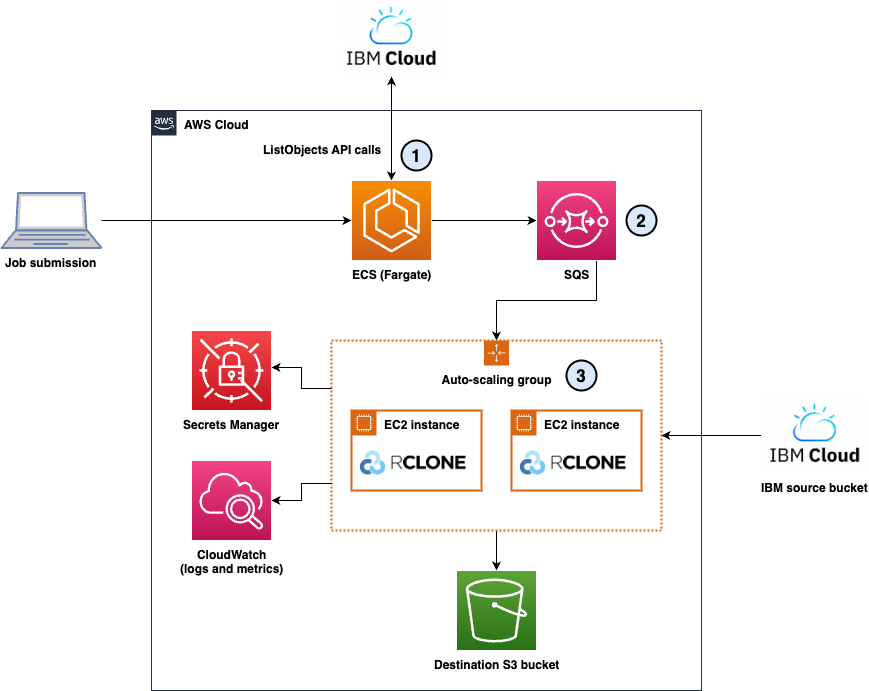
Figure 1: The distributed cross-cloud migration architecture showing the three layers: (1) Discovery Layer, (2) Queueing Layer, and (3) Execution Layer
1. Discovery layer: Automated object enumeration
The discovery layer uses Amazon ECS with AWS Fargate to automatically enumerate objects from source storage systems. Fargate-based lister containers connect directly to the source cloud provider, retrieve object lists through paginated API calls, and batch files into groups of 20. Each batch becomes a self-contained message containing a complete source and destination configuration.
2. Queueing layer: Decoupled job distribution
Amazon SQS serves as the central job distribution mechanism. The queue receives self-contained messages from lister containers, each including source configuration, destination configuration, and file lists. This design enables natural retry logic through visibility timeouts, a dead-letter queue for persistent failures after two attempts, and queue depth as a scaling signal for the worker fleet.
3. Execution layer: Distributed rclone workers
The execution layer consists of an Amazon EC2 Auto Scaling group managing a fleet of r5n.xlarge instances. Each instance runs six worker processes that long-poll the SQS queue, receive file batches, and execute rclone transfers to copy the data from the source to S3. The Auto Scaling policy maintains a target of 100 messages per instance, automatically scaling from 0 to 5 instances based on queue depth.
Workers dynamically build rclone configurations from the self-contained SQS messages, retrieving source credentials from AWS Secrets Manager and using instance roles for permissions to copy objects into S3. This architecture delivers aggregate throughput of 15-120 Gbps depending on fleet size.
Observability: Comprehensive logging and metrics
Amazon CloudWatch Logs captures detailed information across three log groups: lister logs tracking object enumeration, worker logs monitoring application health, and per-file logs containing rclone transfer output. Workers can also publish custom CloudWatch metrics tracking the files transferred and the transfer duration, which enables real-time monitoring of migration progress.
Multi-cloud flexibility through self-contained messages
Each SQS message includes the complete source and destination configuration, so that a single deployment can handle migrations across multiple buckets from the same cloud provider. Although this architecture was built for migrating from IBM Cloud Object Storage during my tests, its use of S3-compatible endpoints makes it adaptable to other cloud providers. For example, Google Cloud Storage and Azure Blob Storage both support S3-compatible APIs, so that you can migrate from these platforms by updating the endpoint configuration and credentials in Secrets Manager. This flexibility makes the solution a general-purpose cross-cloud migration pattern rather than a provider-specific implementation.
Architecture deep dive
Now that we’ve covered the high-level architecture, let’s explore each layer in detail, examining the technical decisions and implementation specifics that make this solution effective for petabyte-scale cross-cloud migrations.
1. Discovery layer: Amazon ECS Fargate listers
The discovery layer uses ECS with Fargate to automatically enumerate objects from source storage systems. Fargate-based lister containers connect directly to the source cloud provider, retrieve object lists through paginated API calls, and batch files into groups of 20. Each batch becomes a self-contained message containing a complete source and destination configuration.
I chose Fargate over AWS Lambda for this task because listing billions of objects can take hours. Unlike Lambda, which has a 15-minute maximum timeout, Fargate tasks have no execution time limit and are more cost efficient for long-running enumeration tasks than Lambda’s per-invocation pricing model at this scale.
This batching strategy provides critical advantages:
- Fault isolation: If a batch fails, then only those 20 files need retry, instead of the entire migration.
- Granular progress tracking: Each completed batch represents measurable progress through CloudWatch metrics.
- Natural retry mechanism: SQS visibility timeout automatically returns failed batches to the queue without manual intervention.
The 20-file batch size balances SQS message size limits (256 KB), failure granularity, and processing efficiency.
2. Queueing layer: Amazon SQS
Amazon SQS decouples the orchestration layer from the execution layer, providing natural retry logic, dead-letter queue handling after two failed attempts, and queue depth as a scaling signal for Auto Scaling decisions.
Self-contained message format:
Each SQS message includes complete job configuration, which enables multi-cloud flexibility. The following shows a simplified example; actual messages contain up to 20 keys.
{
 "source_bucket": "s3-compatible-source-bucket",
 "dest_bucket": "aws-s3-destination-bucket",
 "keys": ["path/to/file1.mp4", "path/to/file2.mov"]
}
This design allows a single worker fleet to handle concurrent migrations from IBM Cloud, Azure, and Google Cloud without deploying separate infrastructure for each source.
3. Execution layer: EC2 Auto Scaling workers
Although Fargate works well for the discovery phase, EC2 is better suited for the sustained transfer workload, delivering up to 25 Gbps with enhanced networking (vs approximately 10 Gbps per Fargate task), lower per-worker cost (approximately $0.05/hr vs $0.12 to $0.15/hr on Fargate), and the ability to handle multi-terabyte files that take hours to transfer.
A single rclone process typically achieves 500 Mbps-6 Gbps throughput depending on file size; migrations made up of large files will have higher aggregate throughput compared to lots of tiny files. Running six processes (workers) per instance maximizes the 25 Gbps network capacity while balancing CPU and memory resources. This configuration delivered 3-24 Gbps per instance, with full fleet capacity reaching up to 120 Gbps aggregate throughput. The high variance in throughput is due to a combination of lots of tiny files and large files which is typical in production projects.
Worker application architecture:
Each worker runs a Python application (worker.py) that long-polls the SQS queue, dynamically builds rclone configurations from message content, and executes transfers with exponential backoff retry. On success, the worker deletes the message from the queue. On failure, the message automatically returns to the queue for reprocessing.
Data transfer: rclone
I chose rclone over the AWS Software Development Kit (SDK) for its unified command-line interface across S3-compatible providers, including IBM Cloud Object Storage, Google Cloud Storage, and Azure Blob Storage, eliminating the need for provider-specific SDK code in each worker.
rclone command structure:
rclone copyto \
  --s3-chunk-size 200M \
  --s3-upload-concurrency 2 \
  --s3-no-check-bucket \
  --update \
  --stats 30s \
  --stats-one-line-date \
  --header-upload "x-amz-tagging:MigratedBy=cross-cloud-migration&OpCo=SOME_OP_CO&TagKey=TagValue" \
  -v \
  source:bucket/path/file.mp4 \
  destination:bucket/path/file.mp4
Configuration management: AWS Secrets Manager
Secrets Manager stores all credentials which are dynamically retrieved by the workers:
Per-source credentials:
/migration/source_access_key– Access key for S3-compatible storage credentials/migration/source_secret_key– Secret key for S3-compatible storage credentials/migration/source_endpoint– Source API endpoint
Workers retrieve these secrets at startup and use instance roles for AWS authentication, eliminating hardcoded credentials.
Observability: CloudWatch Logs and metrics
The solution writes to the following CloudWatch Logs log groups:
/migration/lister– Discovery task output, including object enumeration progress, batching activity, and errors during source listing/migration/workers– Per-file transfer streams containing rclone output, errors, and status messages
The worker processes publish the following custom metrics to the Migration CloudWatch namespace:
- FilesTransferred – Count of successfully transferred objects per batch
- TransferDuration – Time in seconds to process each batch
- FailedTransfers – Count of batches that failed after processing
The scaling policies rely on the following built-in service metrics:
- SQS ApproximateNumberOfMessagesVisible – Queue depth, used as the scaling signal for the Auto Scaling group and the scale-from-zero alarm
- EC2 Auto Scaling GroupInServiceInstances – Number of active worker instances, used to calculate backlog per instance
Prerequisites
Before deploying this solution, make sure that you have the following:
- An AWS account with permissions to create VPC, ECS, EC2, SQS, CloudWatch, Secrets Manager, and AWS Identity and Access Management (IAM) resources.
- AWS Command Line Interface (AWS CLI) installed and configured with appropriate credentials and permissions.
- Source cloud provider credentials for your S3-compatible storage.
Deploy the infrastructure
To deploy the migration infrastructure:
- Download the CloudFormation template
cross-cloud-s3-migration.yamlfrom the GitHub repository. - Open the AWS CloudFormation console.
- Choose Create stack and select With new resources (standard).
- Under Specify template, choose Upload a template file, select the downloaded YAML file, and choose Next.
- For Stack name, enter
cross-cloud-migration. - Choose Next, review the stack configuration, acknowledge the IAM resource creation, and choose Create stack.
The CloudFormation stack creates the following resources:
- Three Secrets in Secrets Manager with placeholder values that need to be updated.
- VPC with three public subnets across three Availability Zones (AZs)
- SQS queues (main queue and dead-letter queue)
- ECS cluster and task definition with embedded Python listing code
- EC2 Auto Scaling group with embedded worker application code
- CloudWatch Log groups and metrics
- IAM roles with least-privilege permissions
Configure source credentials
After the CloudFormation stack completes, configure your source storage credentials in Secrets Manager. This example uses IBM Cloud Object Storage:
To store IBM Cloud Object Storage credentials:
- Open the Secrets Manager console.
- Configure the secrets:
- Name:
/migration/source_access_key - Select “Retrieve Secret value” > “Edit” > Plaintext
- Value: Enter your IBM Cloud Object Storage access key ID
- Name:
- Choose Save.
- Repeat steps 2 and 3 for
/migration/source_secret_keywith your IBM Cloud Object Storage secret access key, and/migration/source_endpointwith your IBM Object Storage S3 endpoint. - You should have three secrets:
/migration/source_access_key/migration/source_secret_key/migration/source_endpoint
Launch a migration job
With the stack deployed and your source credentials configured in Secrets Manager, you can launch a migration job by running a single CLI command. You can run this in your AWS CloudShell or on your local machine.
To start migrating data:
- In the CloudFormation console, select your cross-cloud-migration stack.
- Choose the Outputs tab.
- Copy the value for RunTaskCommand. The command looks similar to the following:
aws ecs run-task \
  --cluster cross-cloud-migration-cluster \
  --task-definition rclone-lister:1 \
  --launch-type FARGATE \
  --network-configuration "awsvpcConfiguration={subnets=[subnet-abc123],securityGroups=[sg-xyz789],assignPublicIp=ENABLED}" \
  --overrides '{"containerOverrides":[{"name":"lister","environment":[{"name":"SOURCE_BUCKET","value":"YOUR_SOURCE_BUCKET"},{"name":"DESTINATION_BUCKET","value":"YOUR_DEST_BUCKET"}]}]}'
4. Replace YOUR_SOURCE_BUCKET with your source bucket name and YOUR_DEST_BUCKET with your S3 destination bucket name.
5. Run the command in your terminal.
The Fargate task begins enumerating objects from your source bucket, batching them into groups of 20, and sending messages to the SQS queue. As the queue depth increases, the Auto Scaling group automatically launches EC2 instances, with each instance running six worker processes that execute rclone transfers.
Monitor migration progress
Once your migration job is running, you can monitor progress, throughput, and failures directly from the CloudWatch console.
To track your migration:
- Open the CloudWatch console.
- In the navigation pane, choose Log groups.
- Select
/migration/listerto view discovery task logs, or/migration/workersto view per-file transfer details including rclone output and error messages. - To monitor queue depth, choose Metrics in the navigation pane, select the SQS namespace, and view the ApproximateNumberOfMessagesVisible metric for your queue.
- To track Auto Scaling activity, open the EC2 Auto Scaling console and select your Auto Scaling group to view the Activity tab.
When tested with a 2.7PB dataset, the queue reached approximately 135,000 messages. The Auto Scaling group scaled to five instances within 10 minutes, maintaining steady throughput of 3-24 Gbps per instance across several S3 buckets throughout the two-week migration for approximately $2,000 in compute costs.
Cleaning up
To avoid incurring future charges, delete the resources created during this walkthrough when you no longer need them.
To delete the migration infrastructure:
- Open the CloudFormation console.
- Select the cross-cloud-migration stack.
- Choose Delete.
- Choose Delete stack to confirm.
The CloudFormation stack deletion removes all resources including the VPC, subnets, SQS queues, Auto Scaling group, ECS cluster, CloudWatch Log Groups, and IAM roles.
If you have active Fargate tasks or EC2 instances running, then wait for them to complete or manually terminate them before deleting the stack. Furthermore, delete any S3 buckets created for testing purposes.
Conclusion
Cross-cloud data migration at petabyte scale requires provider-agnostic architectures that have built-in resilience. To get there, I broke the migration problem into three layers: a discovery layer that automatically enumerates objects from the source provider, a queueing layer that distributes work as self-contained messages through Amazon SQS, and an execution layer that scales EC2-based rclone workers horizontally based on queue depth. I then deployed the infrastructure using a single CloudFormation template, configured source credentials in AWS Secrets Manager, ran the Fargate-based lister to populate the queue, and observed the Auto Scaling group spin up workers to process the transfers.
The challenges explored here aren’t unique to any single provider: transient failures, bandwidth throttling, and the operational overhead of tracking millions of objects at scale are problems every team faces when moving data between cloud providers. This architecture treats those challenges as design constraints from the start. A failed worker releases messages back to the queue, and a new source provider requires a Secrets Manager update, not a redeployment.
Have you implemented similar cross-cloud migration solutions? I’d love to hear about your experiences and challenges in the comments.
To get started, download the CloudFormation template to deploy this solution in your AWS Management Console.
More resources:
- Learn more about S3 storage classes for archival workloads
- Read about AWS data migration best practices
- Migrate data from Google Drive to S3 using rclone
- Migrate data from Dropbox to S3 using rclone