AWS DevOps & Developer Productivity Blog
Automate planned lifecycle upgrades with AWS DevOps Agent and Kiro
AWS uses Planned Lifecycle Events (PLEs) for AWS Health to signal that a managed service version is approaching end of standard support. Several AWS services such as Amazon Elastic Kubernetes Service (Amazon EKS), Amazon Relational Database Service (Amazon RDS), Amazon OpenSearch Service, and Amazon ElastiCache publish these events through AWS Health when a running resource needs to move to a newer version before a published deadline. For the team receiving that alert, the work that follows is remarkably similar regardless of which service triggered it. Engineers must identify every affected resource across accounts and AWS Regions, determine the correct target version, and assess compatibility constraints for dependencies and consumers. They then update infrastructure-as-code (IaC) definitions to reflect the new versions, validate that no breaking changes are introduced, and deploy within the deadline. When multiple services reach end-of-support on overlapping timelines, each with dozens of affected resources, this per-service effort compounds into a sustained operational burden for engineering and operations teams.
AWS DevOps Agent is a frontier agent that resolves and proactively helps prevent incidents, continuously improving reliability and performance of applications on AWS and hybrid environments. AWS DevOps Agent helps review software changes for production risks while investigating incidents and identifying operational improvements as an experienced DevOps engineer.
AWS DevOps Agent and Kiro are transforming how organizations manage version upgrades across AWS managed services and turn these into a governed, event-driven workflow. The AWS DevOps Agent automates the investigation: it discovers impacted resources, analyzes upgrade paths, and produces a structured change specification. Kiro provides the agentic development environment to apply those changes, validate safety constraints, and open a pull request (PR) for human review. The engineer’s role shifts from executing the upgrade to reviewing a PR that has already been investigated, coded, and validated. The engineers can even write the upgrade logic as a custom AWS DevOps Agent skill, and the framework handles orchestration, validation, and delivery.
This post and the sample code demonstrates the approach with an end-to-end Amazon EKS upgrade example. The underlying pattern of event detection, agent-driven investigation, automated code changes, and a failure retry loop applies to other AWS managed services that publish AWS Health PLEs.
In this post, you will learn how to:
- Automate planned lifecycle upgrade events detection using AWS Health and Amazon EventBridge
- Use AWS DevOps Agent to investigate the upgrade path and produce a structured change spec.
- Run Kiro CLI (headless mode) in a continuous integration and continuous delivery (CI/CD) pipeline to apply code changes, validate safety constraints, and open a pull request.
- Close the loop with automatic upgrade deployment failure detection where a failed deployment triggers root-cause analysis, mitigation planning, operator notification, and a code fix pull request without human initiation.
Solution overview
The following diagram shows the end-to-end flow, from the initial AWS Health event through to the pull request and the pipeline upgrade loop.
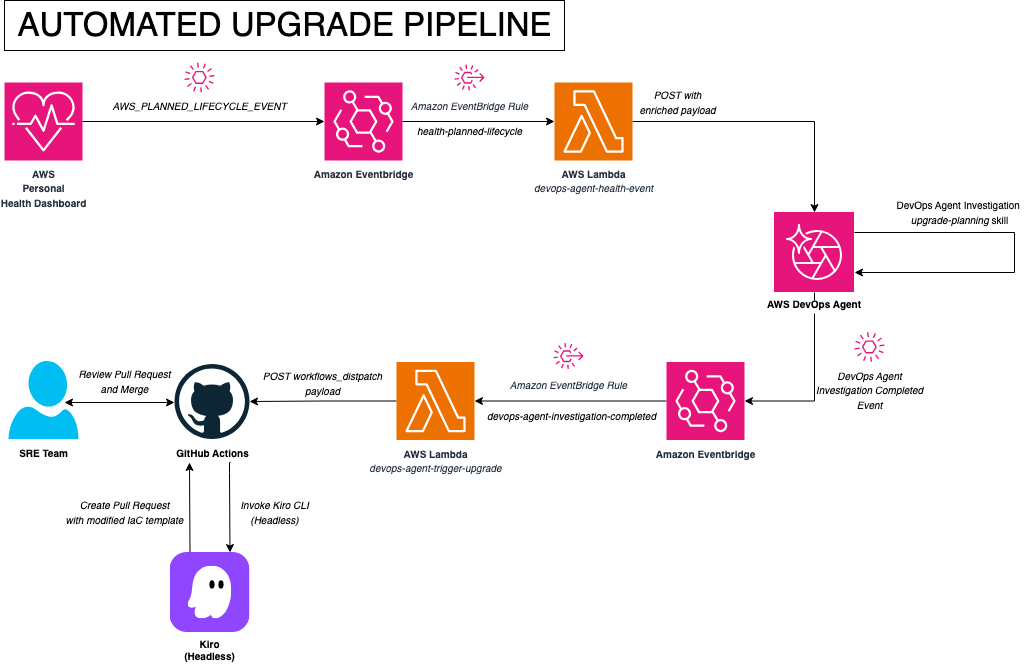
Figure 1: Architecture diagram of the automated upgrade pipeline
There are five main phases in this flow. Let’s walk through each phase.
Phase 1: Detection
a. The pipeline starts when AWS Health publishes an AWS_EKS_PLANNED_LIFECYCLE_EVENT to the default Amazon EventBridge bus with the following event details:
b. An Amazon EventBridge rule named eks-health-planned-lifecycle matches this event and invokes the AWS Lambda function devops-agent-health-event.
c. The Lambda function extracts the relevant information (cluster name and region), builds a webhook payload with eventType: incident and priority: HIGH, and POSTs to AWS DevOps Agent webhook endpoint, instructing the agent to follow the eks-upgrade-planning skill for the specific cluster and region. The Lambda function does not validate those values, so a failed extraction can leave the investigation running against placeholder data.
Phase 2: Investigation
a. AWS DevOps Agent uses the eks-upgrade-planning skill to discover cluster topology, validate the version increment, check addon compatibility, scan for deprecated APIs, and determine upgrade sequence.
b. The agent outputs a structured AWS Cloud Development Kit (AWS CDK) Change Spec containing target version strings for every component, a rollback readiness assessment (confirming the 7-day rollback window will be available post-upgrade), a feasibility assessment (READY, BLOCKED, or NEEDS_REMEDIATION), and a risk rating.
c. When AWS DevOps Agent completes its investigation, it emits an Investigation Completed event to Amazon EventBridge with the following event details:
Phase 3: Code and validation
a. A second Amazon EventBridge rule devops-agent-investigation-events matches this event, filtered by agent_space_id so that only events from the specific agent space trigger the pipeline.
b. The rule invokes the Trigger Upgrade Lambda function (devops-agent-trigger-upgrade). This Lambda function fetches the investigation’s journal records through ListJournalRecords and scans the output for content markers to determine the next action. Markers are checked in a fixed priority order so that a failure investigation quoting upstream CLUSTER_VERSION context cannot accidentally re-trigger an upgrade workflow. When either a CDK Change Spec heading or a resolved CLUSTER_VERSION line is present, the Lambda function treats the investigation as having produced an actionable upgrade plan. It retrieves the GitHub Personal Access Token (PAT) from AWS Secrets Manager, builds the investigation metadata into a summary JSON, and dispatches the eks-upgrade.yml GitHub Actions workflow through the GitHub API. The dispatched payload is a compact summary record (~3.8 KB) containing the CDK Change Spec, not the full investigation transcript, which exceeds GitHub’s workflow dispatch size limit.
c. Before the workflow lets a coding agent near the code, it validates what the investigation produced. An extraction step scans the received payload for fenced code blocks containing CLUSTER_VERSION. Each candidate block is held to a strict format contract:
- No leftover placeholder markers.
- A Kubernetes version matching
X.Y. - A kubectl layer package matching
@aws-cdk/lambda-layer-kubectl-vNN. - Every addon version matching
vX.Y.Z-eksbuild.Nunless explicitly markedNOT_INSTALLED.
The workflow also enforces the agent’s own feasibility verdict. If the investigation concluded BLOCKED or NEEDS_REMEDIATION, the run stops and the coding agent is not invoked. When validation passes, the single deduplicated spec block is written to a temporary file for the coding step. The workflow stops with an error if no spec block is found, no block passes validation, or multiple conflicting specs are present. The pipeline fails closed rather than handing an ambiguous instruction to a coding agent.
d. GitHub Actions then installs Kiro CLI, gated on a minimum tested version, with anything newer allowed through but flagged as untested. The installer is downloaded and executed as two discrete steps rather than piped from curl, and Kiro is then invoked in headless mode:
e. Two things are worth noting about this invocation. Kiro is trusted with file tools only (read, write, glob, grep) with no shell or command execution, so the scope of the agent step is limited to file edits in the checked-out working tree. And it is told explicitly not to derive version numbers: every value comes from the validated spec file, so a model that misreads the investigation cannot substitute a version of its own. Kiro reads kiro-cdk-instructions.md, a standalone reference that prescribes the CDK modification procedure for EKS upgrades, then modifies lib/iteration3-stack.ts and nothing else. The kubectl layer dependency is handled separately, by npm, in a later step. Neither the AWS DevOps Agent nor Kiro can query a package registry, so neither can know which versions of that layer actually exist. The spec carries only the package name and npm resolves the version. It is the pipeline’s own principle applied to itself: identify what the model cannot know, and move it out of the model’s reach rather than letting it guess.
f. Two independent gates run after Kiro exits. The first diffs the working tree against a single-file allowlist and fails the run if anything other than lib/iteration3-stack.ts was touched. That diff is a containment check on the agent’s write access and only after that audit passes, a separate step updates the kubectl layer dependency in package.json. The second gate runs the full build and CDK synthesis pipeline, so a change that does not compile or synthesize does not create a pull request.
Phase 4: Review and deploy
a. After Kiro exits, the workflow opens a GitHub Pull Request (PR) on a branch named upgrade/eks-automated-<run_id>. Kiro’s role ends at file edits. It does not interact with Git or GitHub. The PR body includes a rollback window advisory documenting the 7-day reversal deadline, a reviewer checklist, and a machine-readable investigation-context block containing the agent space ID and task ID. The post-merge deploy workflow parses that block to tag the AWS CloudFormation stack, so a future upgrade failure carries a record of which investigation produced the deployed plan. The tag is informational only and the failure investigation is not linked to the upgrade investigation, keeping the two workstreams independent.
b. The automated pipeline pauses at the pull request. The Site Reliability Engineering (SRE) team reviews the changes using their existing approval process.
c. After merge, the team deploys using their standard CI/CD pipeline. The investigation-context tags on the stack enable traceability back to the originating event if issues arise.
Phase 5: Failure detection and automated mitigation
The pipeline includes a closed-loop failure path. If a deployed upgrade fails, the system automatically investigates the root cause, generates a mitigation plan, notifies the SRE team, and opens a code fix pull request, all without human initiation. The pipeline attempts this automated recovery once. If the failure investigation itself does not produce actionable results, the pipeline stops and we recommend manually reviewing the cluster upgrade failure through the AWS DevOps Agent console or standard operational runbooks.
With EKS version rollbacks now available, the eks-failure-root-cause skill evaluates whether a rollback is the faster recovery before recommending a code fix. In case a deployment failure occurs within the 7-day rollback window, the root-cause investigation first evaluates whether a version rollback would resolve the issue faster than a code fix. When rollback readiness checks pass and the root cause is version-related (not a code or configuration error), the skill directs the agent to recommend version rollback (aws eks update-cluster-version --kubernetes-version <previous-version>) as the primary recovery action, with the code fix PR as a follow-up hardening measure. If rollback is not viable (outside the window, node skew, forward-only addon changes), the pipeline continues to the existing code fix workflow.
The following diagram shows the failure path from CloudFormation rollback through to the code fix pull request and operator notification.
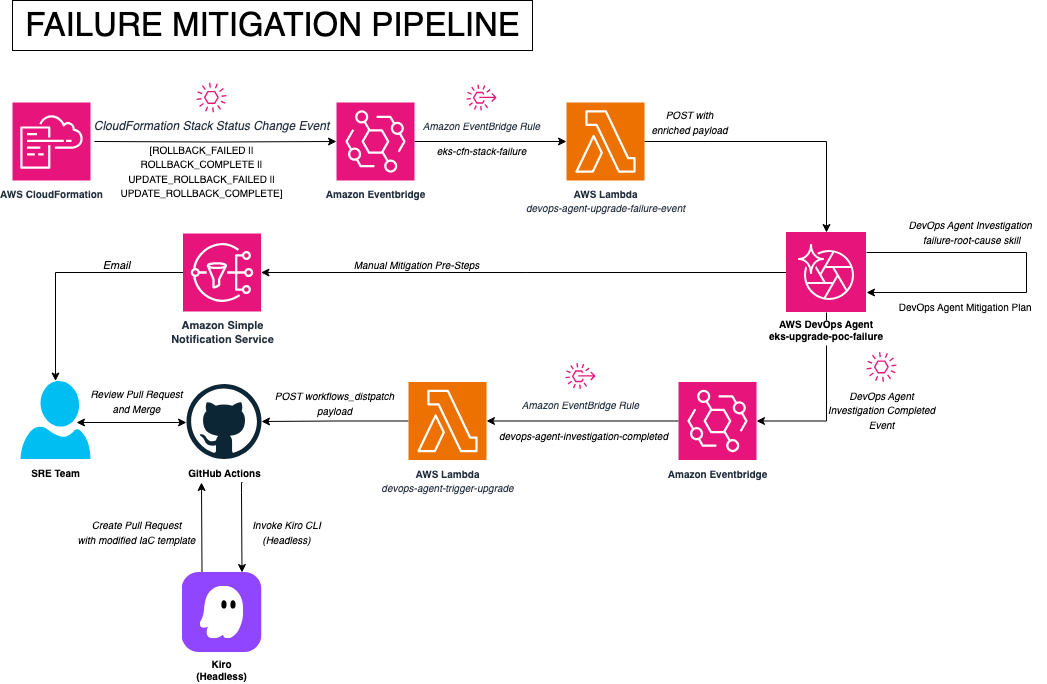
Figure 2: Architecture diagram of the failure mitigation loop
a. When cdk deploy fails after merge, CloudFormation emits a stack status change event (such as ROLLBACK_FAILED, ROLLBACK_COMPLETE, UPDATE_ROLLBACK_FAILED, or UPDATE_ROLLBACK_COMPLETE) to Amazon EventBridge. An Amazon EventBridge rule (eks-cfn-stack-failure) matches one of these terminal rollback statuses and invokes the Failure Lambda function.
One point deserves emphasis before a responder acts on this event: a CloudFormation stack rollback does not revert an EKS control plane version. Reverting the template to one that specifies a lower Kubernetes version is not a cluster version rollback. That has to be initiated explicitly through the UpdateClusterVersion API, the AWS CLI, or the console. If CloudFormation had already updated the control plane before failing on a later resource, the stack can report a completed rollback while the cluster remains on the new version. Confirm the cluster’s actual Kubernetes version rather than inferring it from the stack status.
b. The Failure Lambda function opens a new investigation on the same agent space (eks-upgrade-poc) used for upgrade planning. The prompt instructs the agent to analyze the failure and produce a root-cause assessment. Using the scoping controls for agent sessions, a single agent space can handle both investigation types safely:
- Global Instructions (applied to all agent types) enforce hard rules: “never reference findings from an upgrade-planning investigation when performing failure root-cause analysis” and vice versa. These always-on rules are the primary isolation boundary.
- A triage skill (
eks-investigation-triage-rules, scoped to Incident Triage) adds explicit “never link” rules that prevent the agent from correlating failure investigations with upgrade investigations, even when they involve the same cluster. - Scoped RCA skills activate based on incident context:
eks-upgrade-planningtriggers for Health events,eks-failure-root-causetriggers for CloudFormation rollbacks. The agent selects the correct skill automatically.
c. When the root-cause investigation completes, it emits the Investigation Completed event to Amazon EventBridge. The same Trigger Lambda function that handles upgrade completions picks up this event (filtered by agent_space_id).
d. The Trigger Lambda function (devops-agent-trigger-upgrade) fetches the investigation’s journal records through ListJournalRecords and scans for content markers. If a Root Cause heading is present in the content markers but no Mitigation Plan heading exists, the Lambda function knows the root-cause phase is complete but mitigation hasn’t run yet. It programmatically activates the Mitigation Agent by calling UpdateBacklogTask with status PENDING_START, instructing AWS DevOps Agent to generate a recovery plan based on the root-cause findings. It then schedules a one-time check by using Amazon EventBridge Scheduler, set for five minutes later, to poll for mitigation completion. The Mitigation Agent does not reliably emit a second completion event. If mitigation is still running when the check fires, the Lambda function reschedules at three-minute intervals. If the execution has finished but its journal records are not yet fully written, it retries at one-minute intervals until they appear. Polling is capped at thirty attempts so a stuck mitigation cannot loop indefinitely. If the mitigation execution ends in a terminal failure status (FAILED, CANCELED, or TIMED_OUT), the Lambda function publishes an Amazon Simple Notification Service (Amazon SNS) alert and stops polling rather than retrying indefinitely. Because a native Investigation Completed event and a scheduled poll can both reach the Trigger Lambda function for the same task, dispatches are guarded by a lock built on deterministic Amazon EventBridge Scheduler schedule names, so the same recovery is not dispatched twice.
e. The Mitigation Agent produces up to two outputs depending on what the failure requires: an execution plan with immediate recovery steps if manual intervention is needed, and an agent-ready specification with CDK code changes if an infrastructure fix can prevent recurrence. Either output may be omitted if the mitigation does not call for it.
f. When the scheduled poll detects the mitigation output, the Trigger Lambda function delivers both results:
- Operator notification: The SRE team receives an SNS notification with the immediate recovery steps so they can recover the cluster without waiting for a code review.
- Code fix pull request: If the mitigation includes a CDK change spec, a GitHub Actions workflow runs Kiro CLI to implement the agent-ready specification and opens a pull request for human review. When the root cause lies outside the CDK stack, such as an application-level API deprecation or a custom admission webhook, the pipeline delivers the execution plan with manual remediation steps only and does not generate a PR.
The responder acts on the urgent manual steps immediately while the automated code fix goes through the normal review process.
Why a closed loop matters
Even with thorough investigation and validation, real-world upgrades can fail because of conditions the agent couldn’t observe pre-deployment: workload-specific API deprecations, custom admission webhooks that reject updated resources, or transient control plane issues during the upgrade window. A pipeline that only handles the happy path leaves the team scrambling manually when things go wrong. The closed loop is designed to apply the same agent-driven rigor to failure recovery.
Keeping skills current: Daily skill review
AWS services evolve continuously, new EKS versions ship, addon defaults change, and API deprecation timelines shift. A skill written today may contain outdated version constraints or miss a new upgrade path within weeks. The pipeline includes an automated daily review that keeps the agent’s skills current without manual monitoring.
An Amazon EventBridge rule triggers a Skill Review Lambda function daily. The Lambda function fetches all four skill files (eks-upgrade-planning, eks-failure-root-cause, eks-investigation-triage-rules, and eks-skill-review itself) from the GitHub repository’s main branch and posts them, embedded in the incident description, to the agent space as a new signed-webhook investigation. The agent runs a dedicated review skill (eks-skill-review) that verifies each claim in the embedded content against authoritative AWS sources. It queries AWS APIs for current EKS version availability, addon defaults, and deprecation schedules, then compares what it finds against the embedded skill content.
When the review identifies gaps, outdated constraints, or missing upgrade paths, the Trigger Lambda function dispatches a skill-update.yml GitHub Actions workflow. Kiro CLI applies the recommended edits to the skill files and opens a pull request. The team receives an SNS notification on the eks-skill-update-notifications topic, reviews the PR, and after merging, re-uploads the updated skill zips to the agent space. If no changes are needed, the pipeline logs the result and exits silently. A third path guards against silent failure: if the agent’s output carries the spec heading but no parse-able spec can be isolated from it, the Lambda function dispatches the workflow with the full findings so the run fails visibly rather than reporting a false no-change result.
This self-maintenance loop means the pipeline’s knowledge stays aligned with EKS capabilities, including changes like the recently announced version rollback feature, without requiring the team to manually track service announcements and update skills.
Two caveats apply. First, skill-based triage routing relies on model judgment and can vary between runs on identical input. Treat the daily review as a best-effort maintenance loop, not a guaranteed daily gate. Second, while the review inspects its own skill file, edits to the review procedure still require the same human merge-and-re-upload cycle as any other skill change.
Safety constraints: What the pipeline enforces and why
Amazon EKS upgrades carry risks that make automated safety checks essential. The pipeline enforces constraints at every stage, from the agent’s investigation through to the final CDK diff validation.
Only one minor version at a time. EKS does not support skipping Kubernetes versions. For example, you can move from 1.30 to 1.31, but not from 1.30 to 1.32. The agent validates this in Step 2 of its investigation and stops with an error if a version skip is detected. This constraint means that clusters that are multiple versions behind require sequential upgrades, each with its own investigation and validation cycle.
Control plane upgrades are reversible for 7 days. EKS supports Kubernetes version rollbacks, so you can revert a control plane upgrade to the previous minor version within seven days. EKS evaluates rollback readiness through cluster insights under the ROLLBACK_READINESS category, checking API usage compatibility, cluster health, kubelet and kube-proxy version skew, and EKS-managed add-on compatibility. Insights with ERROR or UNKNOWN status block the rollback until resolved, so rollback can be unavailable even within the 7-day window if readiness checks fail. After the window closes, rollback is no longer offered regardless of cluster state. Rolling back from a version under standard support into one under extended support resumes extended support charges. The upgrade-planning skill checks rollback readiness during its investigation and documents the window in the PR body, so reviewers know their safety net and its constraints.
Rollback is not always viable. Even within the 7-day window, rollback may be unavailable or inappropriate when:
- Resources were created during the 7-day window using APIs or fields that exist only in the newer version, which must be removed before rolling back.
- Add-on versions are not rolled back automatically, and a downgrade can fail if the current configuration settings are incompatible with the target add-on version. Rollback readiness insights evaluate only EKS managed add-ons.
- Nodes were already upgraded and now have version skew. Managed node groups must be rolled back before the control plane, the inverse of the upgrade sequence.
- Workloads have adopted features available only in the newer Kubernetes version.
- The cluster uses AWS Fargate worker nodes. Fargate pods running the current version must be deleted before rollback, or the kubelet version skew check bypassed with
--force. - The cluster was automatically upgraded at the end of extended support (rollback unavailable), or at the end of standard support (rollback requires changing the cluster’s upgrade policy to
EXTENDEDfirst) - The cluster was created at its current Kubernetes version rather than upgraded into it, so there is no prior version to return to.
- Rollback supports only N to N-1. You cannot roll back across multiple minor versions.
The agent’s risk assessment flags the conditions the pipeline actually encodes (deprecated API usage, add-on version incompatibility, and node version skew) and records them in the PR body alongside its ROLLBACK_AVAILABLE verdict. The remaining conditions above are documented AWS behavior that reviewers should confirm manually. The pipeline does not check them. Note too that the --force flag bypasses insight checks only. It does not bypass the prerequisite validations (the 7-day window, the created-at-version check, or the single-minor-version rule) and it cannot override an incompatible Amazon EKS feature enabled at the current version.
vpc-cni must be updated before node groups. New Amazon Machine Images expect the updated CNI plugin, so the Amazon Virtual Private Cloud (Amazon VPC) CNI add-on upgrade must precede any node group update. If the add-on has not been updated first, pods on the new nodes lose networking. The CDK stack declares this ordering explicitly: the managed node group carries a CloudFormation DependsOn the Amazon VPC CNI add-on, so an update cannot reach the node group before the add-on has been updated. The sequence is also declared non-negotiable in the upgrade-planning skill and the Global Instructions, and the agent reproduces the required order in its investigation output and the PR body. The remaining add-on order (kube-proxy, then Coredns) is documented operational sequence rather than a synthesized dependency.
A Replace means cluster destruction. A Replace action deletes the resource and recreates it. For an Amazon EKS cluster, that means the control plane, all workloads, and all state are destroyed and rebuilt from scratch, which makes the cdk diff the single most important thing a reviewer looks at. The pipeline reduces the chance of a destructive change reaching that review through layered gates rather than a single check:
- Version values are taken verbatim from the validated spec file rather than derived by the model.
- Kiro CLI is restricted to file tools only (
read,write,glob,grep) and cannot run shell commands. - A file-change allowlist fails the run if anything other than
lib/iteration3-stack.tswas modified. - A separate step updates the kubectl layer dependency, and a final validation step runs the build and CDK synthesis so that only changes that compile and synthesize successfully can reach a pull request.
The PR body’s reviewer checklist then requires a cdk diff showing Modify and not Replace, alongside version-correctness and add-on compatibility checks. That is a human gate, not an automated one, and it is the final defense before the separately triggered deploy workflow runs after merge.
These constraints are enforced at multiple points: during the agent’s investigation, during Kiro’s code modification and validation, and again at the human review gate on the pull request. Redundant checks at the earlier stages reduce the risk of a single point of failure allowing a destructive change through.
With the safety model clear, here’s what you need before deploying.
Getting started
Follow these steps to deploy the whole solution into your own account, from the Amazon EKS cluster through to the agent space, skills, and event routing.
Important: This solution deploys billable AWS resources including an Amazon EKS cluster, AWS Lambda functions, Amazon EventBridge rules, AWS Identity and Access Management (IAM) roles, and AWS Secrets Manager secrets. You will incur charges while these resources are running. We recommend deploying in a development account and following the Clean up section after completing the walkthrough to avoid ongoing charges.
Prerequisites
To deploy this pipeline in your own environment, you need the following:
AWS account and tooling
- An AWS account in a region where AWS DevOps Agent is available, with AWS CDK bootstrapped and AWS Command Line Interface (AWS CLI) v2 configured.
- Permissions to create Amazon EKS clusters, AWS Identity and Access Management (IAM) roles, Lambda functions, Amazon EventBridge rules, and Secrets Manager secrets. The walkthrough uses administrative credentials for brevity. Scope them down for anything beyond a sandbox account.
- Node.js 20.x or later and
npm.
GitHub
- A GitHub repository (fork or clone https://github.com/aws-samples/sample-automate-planned-lifecycle-upgrades-with-aws-devops-agent-and-kiro).
- A GitHub fine-grained Personal Access Token (PAT) granting Read and write on Actions, Contents, and Pull requests for your fork, which you will store on AWS Secrets Manager.
- A
KIRO_API_KEYrepository secret holding your Kiro CLI API key. - For the optional post-merge deploy workflow only: an IAM role that trusts GitHub’s OpenID Connect (OIDC) provider, with its ARN stored as the
AWS_DEPLOY_ROLE_ARNrepository secret. The sample does not create this role, and the upgrade pipeline through pull request creation works without it.
Kiro
- A Kiro CLI API key, which requires a Kiro Pro, Pro+, or Power subscription.
Step 1: Clone the repository
Step 2: Run the bootstrap script to provision the Amazon EKS cluster, AWS DevOps Agent space, Lambda functions, and Amazon EventBridge rules:
Step 3: Follow the README to configure the webhook credentials, GitHub PAT, and Kiro API key.
Step 4: Upload the AWS DevOps Agent skills and configure agent instructions
Operations teams use AWS DevOps Agent Space web apps for daily incident response activities. This standalone application provides an interface where SREs can launch investigations, interact with the agent through natural language chat, view application topologies, and review incident prevention recommendations.
- Access the AWS DevOps Agent space web app
- In the AWS DevOps Agent console, select your agent space (
eks-upgrade-poc). - Select Launch web app from the top right, choosing IAM or AWS IAM Identity Center option based on your setup. This opens the dedicated web app that the operations teams use to conduct investigations and review recommendations within that space.
- In the AWS DevOps Agent console, select your agent space (
The single agent space uses Global Instructions, agent-type-scoped instructions, and four skills to route investigations correctly and enforce isolation between upgrade and failure paths.
- Configure Global Instructions
- In the AWS DevOps Agent web app navigate to Knowledge > Instructions > All agents
- Paste the contents of
instructions/global-instructions.mdfrom the repository and select Save.
The Instructions page groups global instructions with the agent-type-scoped instructions, as the following screenshot shows.
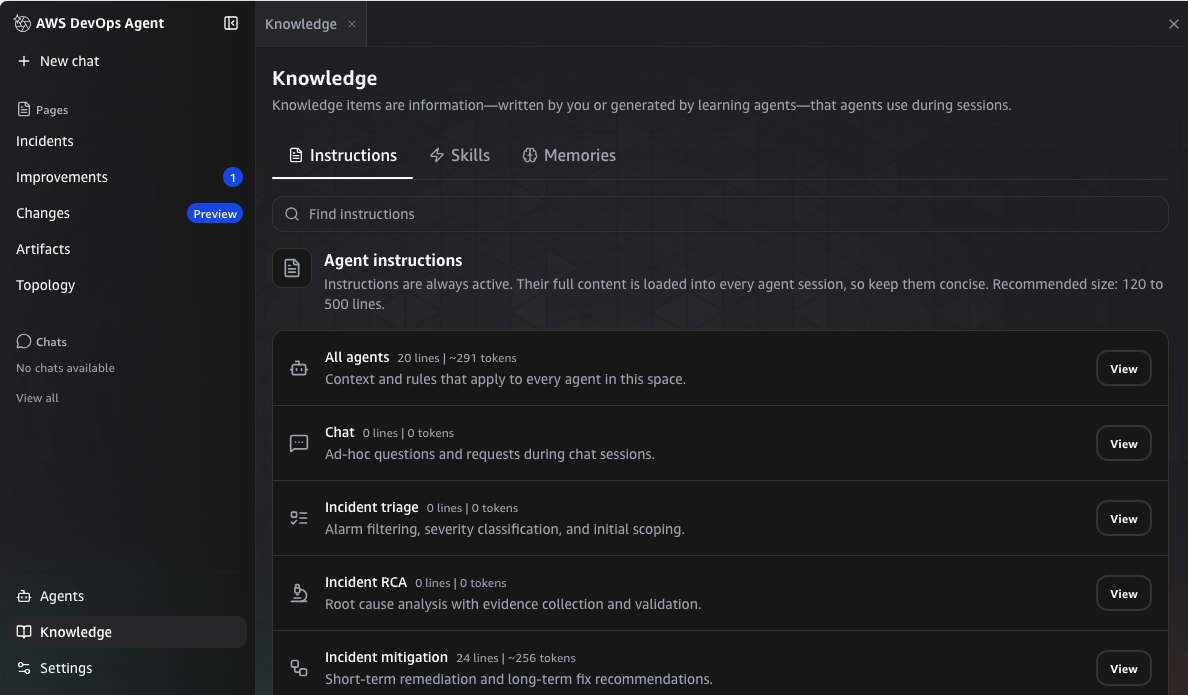
Figure 3: The Instructions page showing Global Instructions and agent-type-scoped instructions
- Configure Incident Mitigation instructions
- In the same agent space, navigate to Knowledge > Instructions > Incident Mitigation
- Paste the contents of
instructions/mitigation-agent-instructions.mdfrom the repository and select Save.
- Upload the agent skills
- Zip the skill folder from the repository:
-
- In the AWS DevOps Agent web app, navigate to Settings > Skills > Custom Skills and select Add Skill.
The Skills page separates the custom skills you upload from AWS managed skills, as the following screenshot shows.
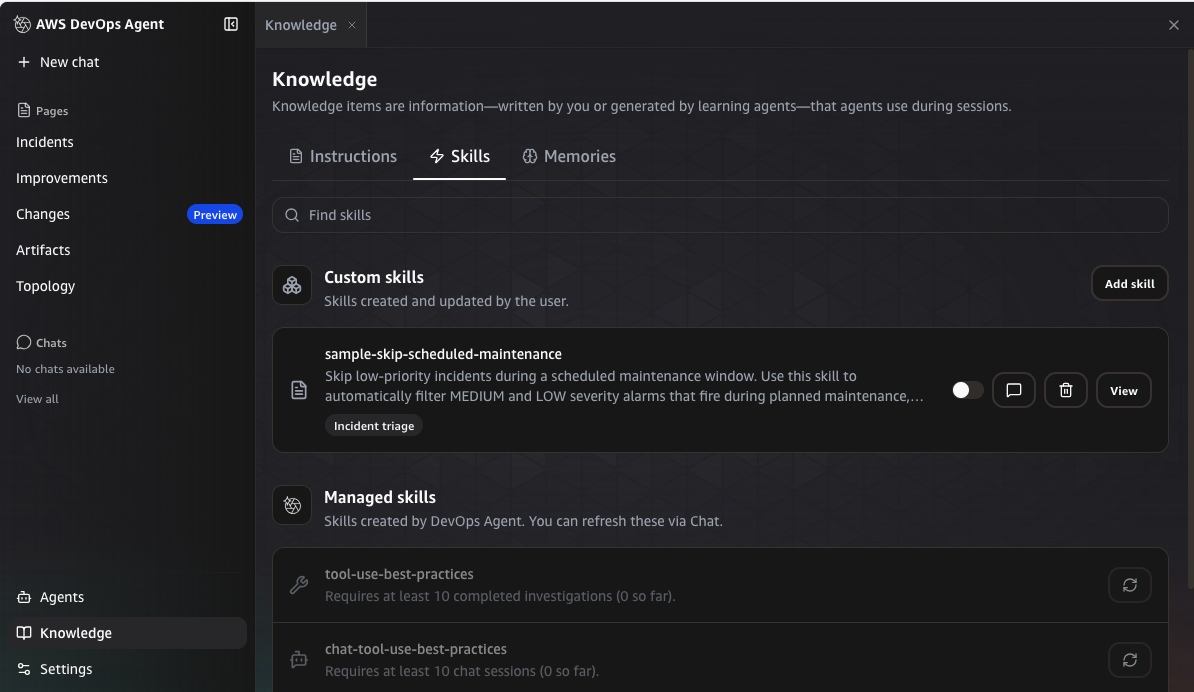
Figure 4: The Skills Management page with the Custom Skills and Managed Skills tabs
-
- Select Upload Skill from the pop-up.
- For each skill, upload the zip file.
- Under agent type scope, select the agent type listed in the following table and choose Upload.
Note: Each skill must be scoped to the correct agent type so the agent activates it in the right context.
| Skill | Scope | Purpose |
eks-upgrade-planning |
Incident RCA | 7-step EKS upgrade investigation producing a CDK Change Spec |
eks-failure-root-cause |
Incident RCA | Root-cause analysis for CloudFormation rollback failures |
eks-investigation-triage-rules |
Incident Triage | Prevents linking between upgrade and failure investigations |
eks-skill-review |
Incident RCA | Daily review of skills for gaps and outdated information |
The Upload Skill dialog takes the zip file and the agent type scope together, as the following screenshot shows.
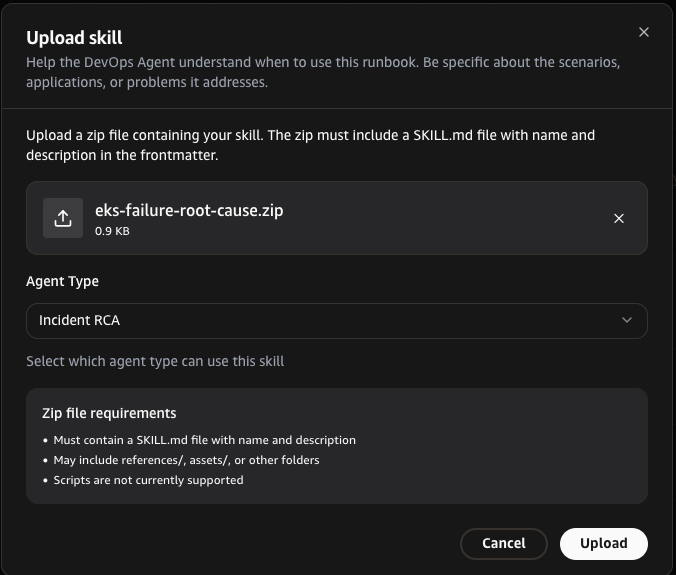
Figure 5: The Upload Skill dialog for choosing a skill zip file and agent type scope
Step 5: Subscribe to SNS topics
Subscribe your on-call email to both SNS topics the stack creates: eks-upgrade-failure-mitigation (mitigation plans and pipeline failure alerts) and eks-skill-update-notifications (daily skill review findings).
Step 6: Test the pipeline end-to-end
The README includes a step-by-step walkthrough, end-to-end test instructions, and optional configuration for the failure mitigation SNS notifications.
Clean up
To avoid ongoing charges, delete the resources deployed during this walkthrough. The repository includes a cleanup script that removes everything in reverse order.
Run the cleanup script:
The script deletes the CloudFormation stack (agent space, Lambda functions, Amazon EventBridge rules, Secrets Manager secrets) and the CDK stack (EKS cluster, node group, VPC). See the repository README for pre-cleanup steps and details on resources that require manual removal.
Security best practices
Security and compliance is a shared responsibility between AWS and the customer, as outlined in the Shared Responsibility Model. We encourage you to review this model for a comprehensive understanding of the respective responsibilities.
In this solution, we implemented the following security measures:
- Secrets management. Webhook HMAC credentials and the GitHub PAT are stored on AWS Secrets Manager and are not hard-coded or passed as environment variables. Lambda functions retrieve secrets at invocation time using least-privilege IAM policies scoped to only the specific secret ARNs they require.
- Least-privilege IAM. Each Lambda function operates with a dedicated IAM role granting only the minimal permissions required for its specific function. The Health Lambda function can only read webhook credentials and invoke the AWS DevOps Agent webhook. The Trigger Lambda function can only read journal records, update backlog tasks, create and delete the Amazon EventBridge Scheduler schedules it uses for mitigation polling, dispatch GitHub workflows, and publish to the two designated SNS topics (
eks-upgrade-failure-mitigationfor operator notifications andeks-skill-update-notificationsfor daily skill review alerts). - Webhook authentication. Communications between Lambda functions and the AWS DevOps Agent webhook use HMAC-SHA256 signed payloads. The agent validates the signature on every request, rejecting payloads with an invalid or missing signature.
- GitHub token scoping. The GitHub Personal Access Token uses fine-grained permissions scoped to a single repository with only the Actions, Contents, and Pull Requests permissions required for workflow dispatch and PR creation.
- No long-lived credentials in CI/CD. The post-merge deploy workflow (
eks-deploy.yml) uses GitHub Actions OIDC federation to assume a short-lived IAM role, removing long-lived access keys from the GitHub environment. - Encryption. All data at rest in Amazon Simple Storage Service (Amazon S3) (CloudFormation template uploads, CDK assets) is encrypted using server-side encryption. Secrets Manager secrets are encrypted with a customer-managed AWS Key Management Service (AWS KMS) key created by the template. All API communications use TLS encryption in transit.
- Constrained agent tooling. Kiro CLI runs with file tools only (
read,write,glob,grep), with no shell or command execution, so the scope of the agent step is limited to file edits in the checked-out working tree. After Kiro exits, a separate workflow step diffs the working tree against a single-file allowlist (lib/iteration3-stack.ts) and fails the run if any other file was modified. The mitigation path’s workflow uses a wider three-file allowlist (addingpackage.jsonandpackage-lock.json), since a code fix can legitimately require other dependency changes. The agent cannot execute commands, alter workflow definitions, or touch IAM policies or the CloudFormation template. - Pinned, verified CI tooling. Kiro CLI is pinned to a minimum tested version. The workflow fails on anything older and warns on anything newer, so an untested release cannot be silently adopted. The installer is downloaded and executed as two discrete steps rather than piped directly from curl to a shell.
We recommend applying these additional security practices:
- Enable AWS CloudTrail logging for the devops-agent API calls to maintain an audit trail of agent interactions.
- Restrict the Amazon EventBridge rules to accept events only from expected sources and account IDs.
- Rotate the GitHub PAT and webhook HMAC secret on a regular cadence.
- Review the OWASP Top 10 for LLMs for guidance on securing AI-driven pipelines.
Looking ahead: Additional AWS DevOps Agent capabilities
Two recently released AWS DevOps Agent capabilities could further strengthen this pipeline, though they are not included in our solution:
Release management: AWS DevOps Agent can automatically review code changes for standards adherence, cross-repository dependency risks, and access-control correctness before deployment. In the context of this pipeline, Release management could evaluate the Kiro-generated CDK pull request against your organization’s policies and flag cross-service breaking changes that CDK diff alone would miss. It can also generate and execute change-specific tests against a running environment, catching integration failures before merge. For more information, see Release management.
Improvements (proactive incident prevention): AWS DevOps Agent analyzes patterns across your incident investigations and delivers prioritized recommendations to help prevent recurring failures. For the EKS upgrade pipeline, this means the agent can identify systemic patterns across multiple failed upgrades, such as a recurring addon incompatibility or a misconfigured node group setting, and generate agent-ready specifications to address the root cause proactively. Recommendations are categorized across observability, infrastructure, governance, and code optimization, and can be handed directly to a coding agent for implementation. Access this capability through the Improvements page in the AWS DevOps Agent web app. For more information, see Proactive incident prevention.
Conclusion
This pipeline shifts end-of-support upgrades from a reactive, manual process to a proactive, event-driven workflow. The investigation, code changes, and validation that an engineer previously performed per cluster now arrive as a reviewed pull request, with no human intervention until the approval step. When AWS Health detects an approaching end-of-support milestone, the system investigates, codes, validates, and delivers a pull request. This reduces mean time to remediation from days to minutes and frees engineers to focus on architecture decisions rather than repetitive upgrade mechanics.
The pipeline’s separation of investigation from delivery means that onboarding a new AWS managed service, such as Amazon RDS engine versions, Amazon ElastiCache engine upgrades, or Lambda runtime deprecations, requires only a new investigation skill. The event routing, code modification, validation, and PR infrastructure remains unchanged.
To get started, clone the repository and run bootstrap.sh, which deploys the CDK stack first (VPC, EKS cluster, managed addons, and the AWS Load Balancer Controller) and then the devops-agent-space.yaml CloudFormation template that creates the agent space, IAM roles, Amazon EventBridge rules, Lambda functions, and Secrets Manager secrets. Configure your webhook credentials and GitHub PAT on AWS Secrets Manager, point the GitHub Actions workflow at your CDK repository, and the pipeline is live. The next Planned Lifecycle Event that fires for your Amazon EKS clusters will produce a validated, reviewable pull request with no human intervention required until the review step.
Next steps
Whether you are exploring, prototyping, or ready to deploy, here is where to go next:
Just evaluating? Read the event workflow walkthrough, which traces every event, Lambda function invocation, and decision point traced end to end, with nothing to deploy. Pair it with the upgrade-planning skill to see the investigation logic that produces the CDK Change Spec.
Ready to run it? Clone the repository and follow the deployment guide in a development account. Roughly 25 minutes for bootstrap.sh, plus 10–15 minutes of configuration, and the synthetic health event in the README produces your first agent-generated pull request. Run cleanup.sh when you are finished to stop the charges.
Ready to adapt it? The investigation logic lives entirely in skills/eks-upgrade-planning/SKILL.md. The routing, validation, and PR machinery is service-agnostic. Onboarding another service that publishes lifecycle events means a new skill and a matching Amazon EventBridge pattern, not a new pipeline. Start with that skill’s output contract, since it is what the validation gate enforces.
To go deeper on the solution, see the AWS DevOps Agent documentation for how investigations, skills, and agent types work, the AWS DevOps Agent Skills reference for the SKILL.md format, and the Kiro CLI documentation for headless-mode options.