Migration & Modernization
Migrate MuleSoft APIs to AWS serverless with AWS Transform custom
When you migrate a portfolio of MuleSoft applications to AWS serverless, each application brings its own decisions: how every connector maps to an AWS service, how DataWeave scripts translate to AWS equivalents, and how error-handling strategies carry over. Multiply those decisions across a portfolio, and each migration becomes a one-off exercise.
In this post, explore how AWS Transform custom migrates MuleSoft applications to AWS serverless. It captures your migration decisions in a reusable definition that generates deployable, test-covered artifacts across your application portfolio. You author each rule a single time, and the agent applies it consistently to supported patterns, turning portfolio-wide modernization into a repeatable framework.
AWS Transform custom
AWS Transform custom is an agentic AI capability of AWS Transform that automates large-scale code modernization. Instead of migrating one application at a time, you capture your migration decisions once in a reusable transformation definition written in natural language. The agent then applies those rules consistently across your entire application portfolio. This turns portfolio-wide modernization from a series of one-off projects into a repeatable, scalable framework.
The MuleSoft migration challenge
A typical enterprise MuleSoft app includes these components:
DataWeave transformations. MuleSoft’s proprietary transformation language handles JSON, XML, CSV, and binary data with type coercions, date formatting, recursive mapping, and custom modules. These scripts require conversion to run on AWS compute services.
Connectors to external systems. MuleSoft offers a wide range of connectors, including Salesforce, databases, Java Message Service (JMS) and Advanced Message Queuing Protocol (AMQP) messaging, SFTP, email, Amazon Simple Storage Service (Amazon S3), and Amazon Simple Queue Service (Amazon SQS). Each connector has its own authentication model, error handling, and connection pooling behavior. Connectors like HTTP Request and File have direct AWS equivalents, while others, such as Workday and SAP, require custom Lambda integrations.
MEL expressions. Older applications use Mule Expression Language, a Java-like syntax for flow control, variable access, and payload manipulation. These require different conversion handling than DataWeave 2.0.
Enterprise Integration Patterns. MuleSoft implements patterns like content-based routing, scatter-gather (fan-out/fan-in), publish-subscribe, and dead letter channels as first-class components. Depending on the pattern, you can implement these as AWS native solutions.
API Manager policies. MuleSoft’s API Manager handles rate limiting, OAuth enforcement, client ID validation, and IP whitelisting. These need equivalent enforcement in Amazon API Gateway. MuleSoft’s RESTful API Modeling Language (RAML) specifications also require conversion to OpenAPI format for API Gateway compatibility.
Manual migration requires expertise in both MuleSoft and AWS service architectures. With AWS Transform custom, you can encode that expertise into a definition that the agent follows.
Solution overview
This process flow shows how the AWS Transform custom lifecycle applies to a MuleSoft migration, carrying each application through four stages, from selecting a provided definition to refining it across your portfolio.
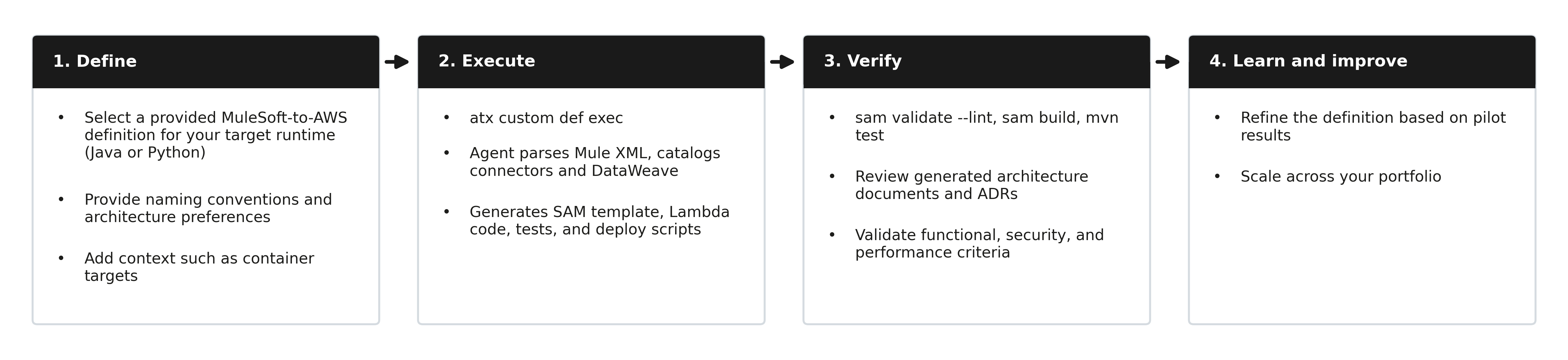
Figure 1: The AWS Transform custom lifecycle applied to a MuleSoft migration (steps may vary with each application)
You start with one of two provided MuleSoft transformation definitions and add context for the agent to apply, such as naming conventions and architecture preferences. You then run the transformation from the command line, and the agent analyzes your source code and generates the AWS artifacts: infrastructure-as-code, application code, tests, and documentation. You validate the result through template checks, tests, and the generated migration validation checklist. Through continual learning, the agent applies what it learns from each execution and your feedback, so the definition produces consistent results across your portfolio. The Running a transformation section walks through these steps in detail.
With AWS Transform custom, you can use two MuleSoft transformation definitions: AWS/mulesoft-to-aws-native-java and AWS/mulesoft-to-aws-native-python. These transformations take a MuleSoft application codebase as input and produce a deployable AWS serverless application as output. The default target architecture is serverless: Amazon API Gateway, AWS Lambda, Amazon DynamoDB, and AWS Step Functions. The sections that follow describe the specific service mappings, connector translations, and DataWeave handling. The examples in this post use Java, but they apply to Python too.
Mapping MuleSoft to AWS: the pattern library
The transformation definition includes core mappings for architecture, connectors, and DataWeave conversion. These reflect common patterns that you adjust to fit your architectural preferences and constraints.
Architecture mapping: where things land
This table shows how common MuleSoft components map to AWS services and when to use each one.
| MuleSoft Component | AWS Service | When to Use |
|---|---|---|
| HTTP Listener | Amazon API Gateway + Lambda | REST/HTTP endpoints |
| Scheduler | Amazon EventBridge scheduled rules | Cron and rate-based triggers |
| File Listener | Amazon S3 event notifications + Lambda | File-triggered processing |
| Anypoint MQ | Amazon SQS / Amazon Simple Notification Service (Amazon SNS) / Amazon MQ | Message-driven patterns |
| Object Store | Amazon DynamoDB (TTL) / Amazon ElastiCache | Key-value and caching |
| Choice Router | Step Functions Choice state | Content-based routing |
| Scatter-Gather | Step Functions Parallel state | Fan-out/fan-in |
| Foreach/Batch | Step Functions Map state | Iterative processing |
| Flow Reference | Step Functions chained states | Flow composition |
| Error Handler | Step Functions Catch + dead-letter queues | Error propagation |
The default architecture is serverless: API Gateway to Lambda to Step Functions. You can also provide additional context, such as container targets (Amazon Elastic Container Service (Amazon ECS) or Amazon Elastic Kubernetes Service (Amazon EKS)) for long-running workloads. You can also specify naming conventions and organizational architecture requirements, which the agent incorporates into the generated artifacts.
Connector mapping: how integrations translate
Every MuleSoft connector maps to a specific AWS implementation pattern. Common mappings include:
| MuleSoft Connector | AWS Replacement | Key Considerations |
|---|---|---|
| HTTP Request | Lambda + HTTP client library | Preserve timeouts, TLS config, auth |
| Salesforce | Lambda + Salesforce REST API | OAuth 2.0 via AWS Secrets Manager, bulk API for large operations |
| Database (MySQL/PostgreSQL) | Lambda + JDBC (HikariCP) with Amazon RDS | Connection pooling, stored procedure support |
| JMS/AMQP | SQS or Amazon MQ | Redelivery policy to maxReceiveCount, transaction to visibility timeout |
| File | S3 + Lambda event notifications | Preserve autoDelete, watermark, file matchers |
| SFTP | AWS Transfer Family + S3 | Credentials in Secrets Manager |
| Amazon Simple Email Service (Amazon SES) | Templates, attachments via MIME multipart |
For connectors with no direct AWS equivalent (Workday, SAP, NetSuite, CMIS), the definition generates a Lambda function that calls the target system’s REST or SOAP API directly. It adds TODO markers for endpoint verification and stores credentials in Secrets Manager.
DataWeave conversion
Not every DataWeave script needs the same treatment. The transformation definition classifies scripts by complexity and routes each one accordingly. Simple operations, such as field renaming and header pass-through, become API Gateway mapping templates with zero Lambda invocations. Medium-complexity operations, such as array filtering and JSON merging, use Step Functions intrinsic functions. Complex transformations, such as regex, XML/CSV parsing, custom modules, or recursive mapping, run inside Lambda functions. This approach reduces cost and latency by reserving compute for transformations that genuinely need it.
Prerequisites
To follow along with this post, you need:
- An AWS account with access to AWS Transform custom
- The AWS Transform command line interface (atx) installed and configured
- A MuleSoft application source code directory (Mule XML configuration files and associated resources)
- The AWS Serverless Application Model (AWS SAM) command line interface, installed for template validation
Running a transformation
Run one of these commands.
For target application to use Java runtime:
atx custom def exec -n AWS/mulesoft-to-aws-native-java -p <local-path-to-Mule-API>
For target application to use Python runtime:
atx custom def exec -n AWS/mulesoft-to-aws-native-python -p <local-path-to-Mule-API>
Provide your MuleSoft application source code to AWS Transform custom. The agent processes each application through these steps:
- Analyze and architect: Parse Mule XML, catalog connectors and DataWeave, extract properties, and produce architecture documents (from-state MuleSoft analysis and to-state AWS architecture with Architecture Decision Records (ADRs)).
- Resolve dependencies: Pin dependency versions and produce a lockfile for reproducible builds.
- Generate SAM template: Write template.yaml with Amazon API Gateway, Lambda functions with SnapStart enabled to reduce Java cold-start latency, AWS Secrets Manager, Amazon CloudWatch alarms, and dashboard resources.
- Write build and application code: Generate pom.xml, Lambda handlers with route dispatch, DataWeave conversions as Java methods, repository classes, and mock implementations for external systems unreachable during development.
- Create tests: Generate unit tests covering every route, error cases, and DataWeave parity validation with input/expected fixture pairs.
- Generate deployment artifacts: Produce samconfig.toml, deployment script, and deploy runbook with rollback procedures.
- Run tests and validate: Execute
mvn test,sam validate --lint, andsam build. Produce a migration validation checklist covering functional, security, and performance criteria.
The migration validation checklist covers these areas:
- Functional validation: does the AWS implementation match MuleSoft behavior?
- Security: credentials in Secrets Manager and least-privilege AWS Identity and Access Management (AWS IAM)
- Performance: Lambda memory and timeout settings
- Operational readiness: Amazon CloudWatch alarms, AWS X-Ray tracing, and structured logging
- Test coverage: happy path, error handling, and edge cases
This managed transformation generates Java Lambda functions with AWS SAM for infrastructure as code. Java is a natural fit for MuleSoft migrations since MuleSoft applications typically use Java-based connectors and libraries. The pattern library and step structure remain consistent regardless of runtime.
These seven steps describe what the agent does for a single application. To apply the same definition across your portfolio, see the Scaling across your portfolio section.
Generated artifacts
Each transformation produces these mandatory artifacts:
| Artifact | Purpose |
|---|---|
| template.yaml | SAM template defining all AWS resources |
| Lambda function code | Function code for each mapped AWS compute resource |
| Dependency manifests | pom.xml per function (Java) |
| From-state architecture doc | Original MuleSoft application documented |
| To-state architecture doc | Target AWS architecture with Architecture Decision Records (ADRs) |
| Migration validation checklist | Functional, security, and performance validation |
| Unit tests | Coverage for happy path, errors, and edge cases |
What the definition doesn’t cover
Here is what you handle outside the transformation definition:
Runtime deployment and integration testing. The definition generates code and verifies that SAM templates pass sam validate –lint and sam build. Deploying to AWS and running integration tests against live services is a separate step.
CI/CD pipelines. The definition produces deployable artifacts but not the pipeline to build, test, and deploy them automatically.
API consumer cutover. The definition migrates the API implementation but does not address how existing consumers switch from MuleSoft endpoints to AWS endpoints. Cutover planning (DNS strategy, traffic shifting, backward compatibility) is a separate workstream.
Data migration. APIs move, but the databases they connect to do not. If your MuleSoft apps read from on-premises databases, you need AWS Database Migration Service (AWS DMS) or AWS Direct Connect for connectivity.
Runtime performance tuning. Lambda memory and timeout defaults are reasonable starting points. You can provide MuleSoft runtime information (CloudHub worker sizes, transaction volumes, response time baselines) directly to the AWS Transform custom agent as additional context. The agent incorporates that information into the definition for more informed Lambda configurations. Post-deployment, Lambda Power Tuning further optimizes for actual traffic patterns.
Scaling across your portfolio
After you validate the transformation on a pilot application, you can apply the same definition across your portfolio:
- Start with one pilot application to validate the transformation definition.
- Review and refine the definition based on the pilot results.
- Group the remaining applications by connector type and complexity.
- Run the transformation across each group, starting with the simplest applications.
- Assign a reviewer to validate the generated artifacts for each application group.
Because the definition is reusable, the rules you refine during the pilot carry forward to every application in your portfolio.
Conclusion
In this post, you learned how a transformation definition automates MuleSoft to AWS migration using AWS Transform custom. The definition provides a structured approach to the full migration lifecycle: analysis, pattern mapping, code generation, and validation. It adapts to the connectors, DataWeave complexity, and integration patterns in each application.
To get started, select one of the two transformations (AWS/mulesoft-to-aws-native-java or AWS/mulesoft-to-aws-native-python) from the AWS Transform console catalog and pilot it on one application.
Expect the pilot phase to take one to two days for a small application, including manual review of the generated artifacts. During the pilot, most of your time goes to reviewing the generated artifacts rather than running the transformation itself; actual times vary with application complexity and environment. Validation criteria should include:
- SAM templates pass
sam validate --lintandsam build - Generated tests cover happy path and error cases
- The architecture document accurately reflects the target design
For more information, see the AWS Transform custom documentation. To explore related services, see AWS Lambda, AWS Step Functions, and Amazon API Gateway. For questions about MuleSoft migration patterns, reach out to your AWS account team.