AWS Public Sector Blog
Building an identity-verified remote assessment platform on AWS
Universities across the UK conduct tens of thousands of online interviews and exams each year. During a single admissions intake, over 20,000 video interviews were recorded for international applicants, with 1.3% of sessions showing confirmed fraud, including 0.15% involving deepfakes. A survey by the International Center for Academic Integrity (ICAI) found that 2% of students admitted to having someone else complete an exam or assignment on their behalf, confirming that impersonation remains a persistent risk in remote assessments.
The broader academic integrity landscape compounds this challenge. More than 60% of students globally admit to some form of academic dishonesty, and contract cheating services continue to grow. These trends place increasing pressure on institutions to protect the credibility of remote admissions, interviews, and exams without relying solely on manual review.
This pressure coincides with a strategic push to expand the global reach of UK higher education. The UK International Education Strategy sets a target of £40 billion in education exports by 2030 and emphasizes sustainable recruitment of high-quality international students. Meeting that goal requires assessment processes that scale globally while preserving academic integrity and institutional reputation. AI has a key role to play in helping universities conduct remote interviews and exams efficiently without compromising trust.
In this post, we show how to build a secure, scalable assessment platform on Amazon Web Services (AWS) using multi-agent AI and biometric verification to automate identity checks and exam evaluation. The solution uses Amazon Bedrock AgentCore to coordinate specialized agents, Amazon Rekognition for face verification, Amazon Transcribe for speech analysis, and Amazon Textract for identity document extraction. These services are combined with voice-matching models to detect impersonation before and during exams, which reduces fraud risk and enables institutions to assess candidates with greater confidence.
Solution architecture
The platform is built on Amazon Bedrock AgentCore and uses five specialized agents coordinated across three workflows: registration, authentication, and exam execution. The following diagram shows the platform architecture, including the five agents, Amazon Bedrock AgentCore Gateway, and the AWS services they use.
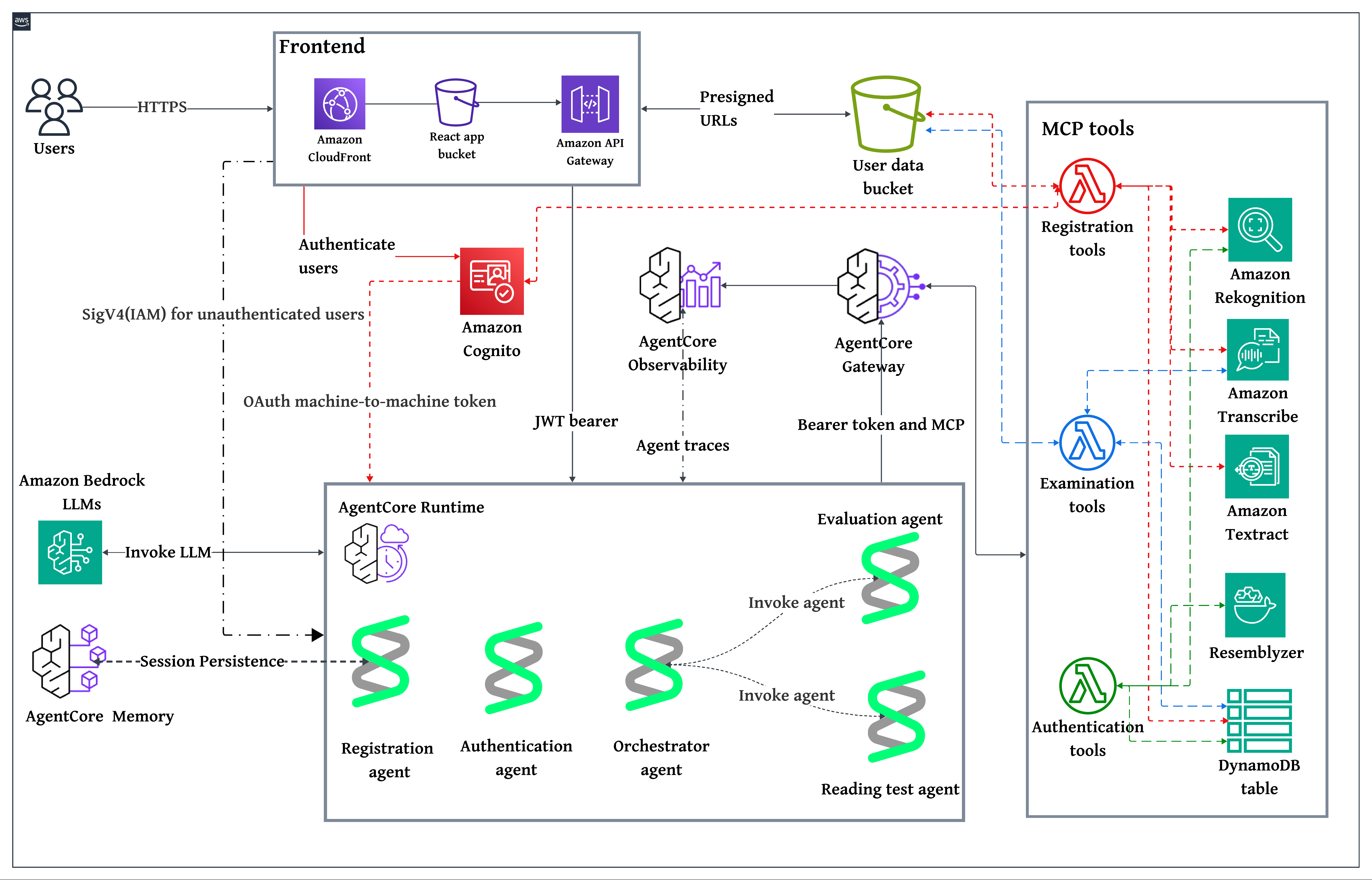
Figure 1: End-to-end architecture connecting the React frontend, five Amazon Bedrock AgentCore agents, AWS Lambda tool functions, and AWS AI services
Registration establishes the user’s verified identity. A single registration agent handles document extraction, voice capture, and account creation across three sequential steps, using Amazon Bedrock AgentCore Memory to maintain context between them. At the end of registration, the user has an Amazon Cognito account with biometric references (face and voice) stored in Amazon Simple Storage Service (Amazon S3).
Authentication verifies the user’s identity before each exam attempt. The authentication agent compares a live face capture against the stored reference using Amazon Rekognition and matches voice samples using a speaker-embedding model. Both checks must pass for the user to proceed.
Exam execution demonstrates a reading proficiency assessment, where the user reads a displayed passage aloud while being recorded. An orchestrator agent coordinates two child agents: a reading test agent that handles transcription and biometric monitoring during the exam and an evaluation agent that scores the reading across multiple dimensions. Reading passages are stored in Amazon DynamoDB and served to the frontend.
The reading assessment is one example of what can be built on this architecture. The modular design allows additional specialized agents to be added for other exam types, such as listening comprehension, writing, coding assessments, or domain-specific evaluations, without modifying the existing registration or authentication flows.
Model flexibility
All agents in this solution are built with the Strands Agents SDK and run on Amazon Bedrock AgentCore Runtime. Each agent can use any foundation model (FM) available through Amazon Bedrock, including first-party models such as Amazon Nova and third-party models such as Claude by Anthropic in Amazon Bedrock. Changing the underlying model requires updating a single configuration parameter—no changes to agent logic or tool integrations are needed.
Tool access through Amazon Bedrock AgentCore Gateway
Rather than each agent invoking AWS services directly, the platform implements tools as AWS Lambda functions and exposes them through the AgentCore Gateway using the Model Context Protocol (MCP). This gives all agents shared access to capabilities, including:
- Identity document extraction (Amazon Textract)
- Speech transcription (Amazon Transcribe)
- Face detection and comparison (Amazon Rekognition)
- User account management (Amazon Cognito)
- Biometric profile storage and lookup (Amazon DynamoDB)
- Voice embedding comparison (Resemblyzer)
The gateway enforces authentication for every tool invocation. Before an agent can access tools, it obtains an OAuth 2.0 token using client credentials that flow through Amazon Cognito. The following example shows how an agent requests a gateway access token:
This prevents agents from accessing underlying AWS services directly. The gateway validates every request, acting as a centralized security boundary.
Voice verification
Voice matching uses Resemblyzer, an open source speaker recognition library that generates 256-dimensional neural embeddings from audio recordings. Comparing these embeddings using cosine similarity determines whether two recordings come from the same speaker.
Resemblyzer runs as a Lambda container image on AWS Graviton2 (ARM64) processors. To eliminate cold-start latency, we use provisioned concurrency to keep warm instances available with the voice model preloaded in memory.
Detailed solution flows
The following sections walk through each workflow in detail, including the agent prompts, tool implementations, and key code patterns.
Registration flow
Registration uses a single agent invoked three times by the frontend, with each invocation performing a distinct function:
- MODE 1: Extract identity data from an ID document
- MODE 2: Collect a spoken security phrase and verify it matches the intended text
- MODE 3: Complete account creation
Amazon Bedrock AgentCore Memory maintains conversation context across all three modes. The frontend generates a session ID one time and includes it in all three agent calls. The registration agent saves data from MODE 1 and MODE 2 to memory, then loads that data in MODE 3. The frontend doesn’t store or retransmit sensitive identity information.
Because users don’t yet have an account during registration, the frontend uses an Amazon Cognito identity pool with unauthenticated access enabled. This provides temporary AWS Identity and Access Management (IAM) credentials scoped to two permissions: invoking the registration agent on Amazon Bedrock AgentCore Runtime and calling Amazon API Gateway for Amazon S3 presigned URLs. The frontend signs each agent request using AWS Signature Version 4 (SigV4).
The following prompt instructs the registration agent on how to determine which mode to execute and what tools to call in each case:
In MODE 1, the first step of registration, the user uploads a government-issued ID document for identity extraction. The following screenshot shows the Assessment Portal interface for uploading the ID document.
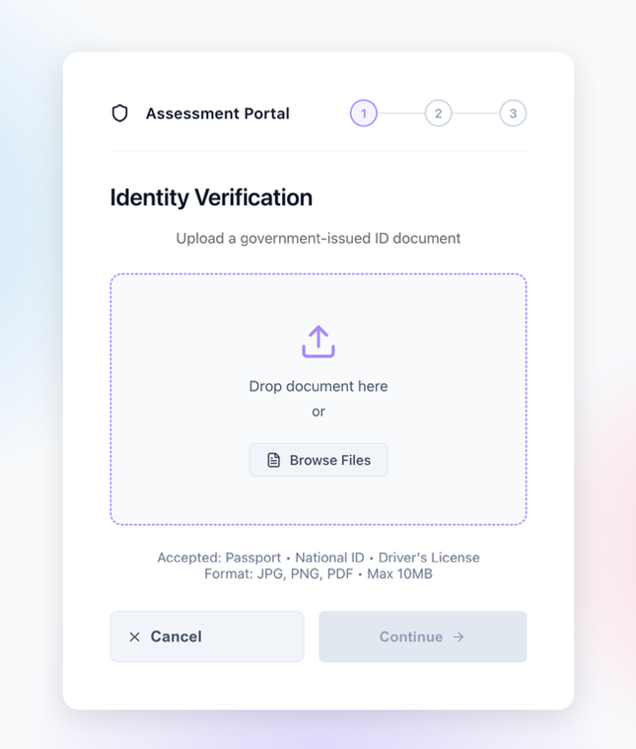
Figure 2: Registration step 1
The user uploads a government-issued ID using an Amazon S3 presigned URL. The registration agent calls the extract_data_from_passport tool through the gateway. The following code shows how the Lambda tool uses Amazon Textract to extract structured fields from the identity document:
The agent generates a personalized security phrase from the extracted data (for example, “My name is Jane Doe, and I was born in 1995”), then saves the extraction data and passport Amazon S3 URL to Amazon Bedrock AgentCore Memory. The following code shows how the agent persists state so that later modes can retrieve it:
In MODE 2, the second registration step, the user records themselves saying the personalized phrase. The frontend uploads the recording to Amazon S3 and invokes the registration agent again with the same session ID. The following screenshot shows the Assessment Portal interface for voice verification.
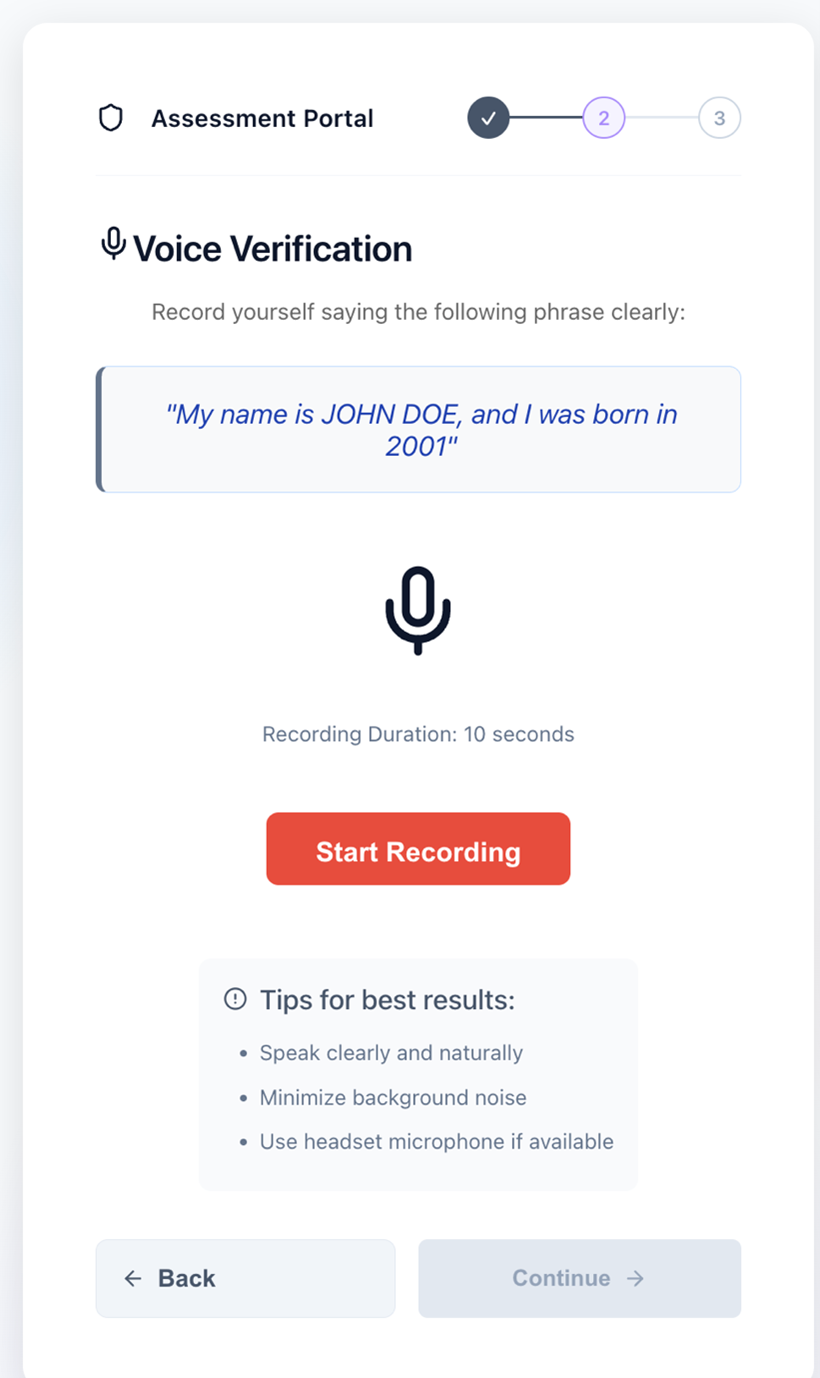
Figure 3: Registration step 2
The agent calls the verify_spoken_phrase tool, which uses Amazon Transcribe to convert the audio to text and compare it against the expected phrase. The following code shows how the tool starts a transcription job and verifies the spoken content:
The following screenshot shows the Assessment Portal interface for voice verification with notification that the voice was verified.
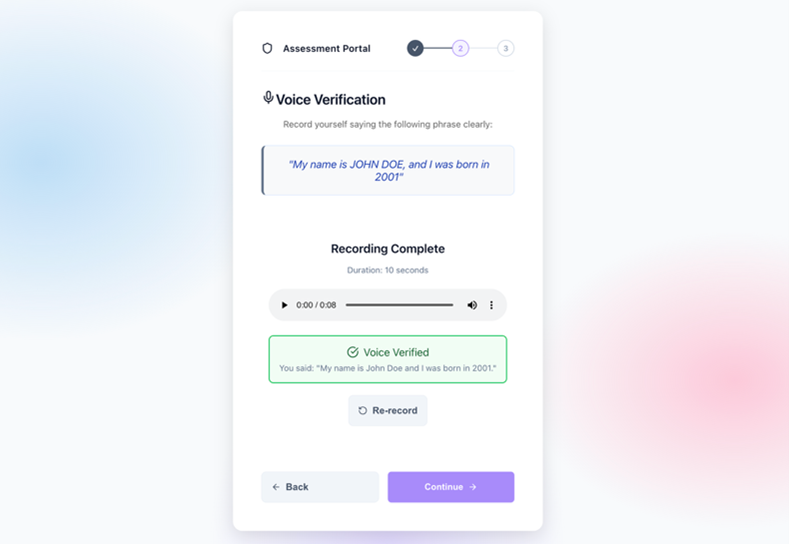
Figure 4: Voice verification confirmed
The agent saves the verification result and voice URL to memory using the same session ID.
In MODE 3, account creation, the frontend invokes the registration agent a third time with only the email and session ID but no identity data. The agent loads all previous data from memory. The following code shows how the agent retrieves the extraction and verification context saved in earlier modes:
With data loaded from memory, the agent completes registration by invoking three tools in sequence. The following code shows the face extraction tool, which uses Amazon Rekognition to detect and crop the face from the ID document:
The following code shows the Amazon Cognito account creation tool, which generates a password and creates the user with a permanent password so they can sign in immediately:
Finally, the agent saves the user profile to DynamoDB, linking the Amazon Cognito account to the biometric references in Amazon S3. At this point, the user is registered and ready for authentication. The following screenshot shows successful creation of login credentials.
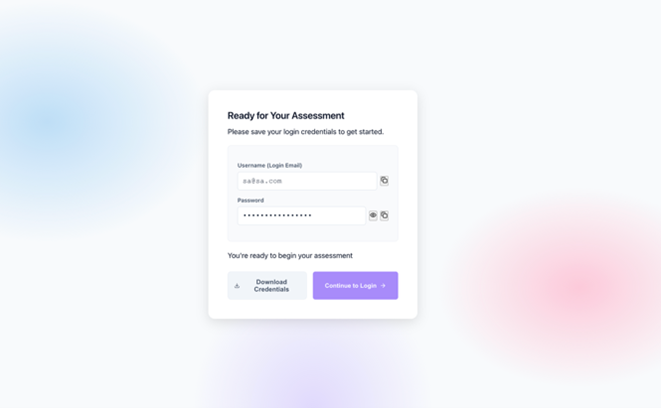
Figure 5: Registration complete
Authentication flow
The following prompt defines the authentication agent’s verification workflow, showing the sequence of tool calls the agent executes for every biometric check:
To authenticate the password, the user signs in with email and password using an Amazon Cognito user pool. The following code shows the frontend authentication flow:
The following screenshot shows the sign-in screen in the Assessment Portal.
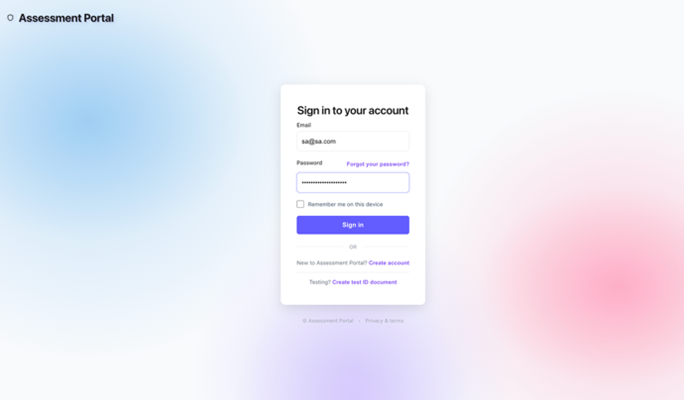
Figure 6: Sign-in page
Amazon Cognito returns a JSON web token (JWT) containing the user’s profile information, valid for 1 hour.
To verify the biometric, the user captures a 6-second video saying a security phrase. The frontend extracts a still frame and the audio track, uploads both to Amazon S3, then invokes the authentication agent with the JWT bearer token. The following screenshot shows the Identity Verification screen
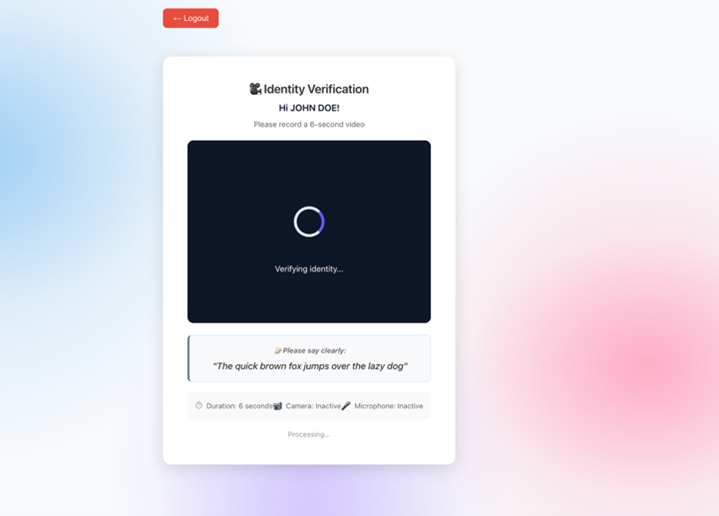
Figure 7: Biometric identity verification
The agent executes a four-step workflow through Amazon Bedrock AgentCore Gateway tools:
1. To look up the user profile, the agent converts the cognito_sub from the JWT to the internal user_id by querying a DynamoDB global secondary index. This also returns paths to biometric references from registration.
2. Compare the face with the reference. The following code shows the face comparison logic using the Amazon Rekognition CompareFaces API:
3. To compare the voice with the reference, the agent calls compare_voice_with_reference, which uses the pre-warmed Resemblyzer model described in the Solution architecture section to generate speaker embeddings and calculate cosine similarity. The following Python code shows the voice comparison logic inside the authentication-tools Lambda container:
4. Log authentication attempt. The following code shows the structured log entry recorded to Amazon CloudWatch for audit purposes:
Authentication succeeds only if both face and voice verification pass—an attacker would need to defeat both systems simultaneously. The following screenshot shows the Identity Verified screen with face verification passing at 100% and voice verification passing at 83.3%.
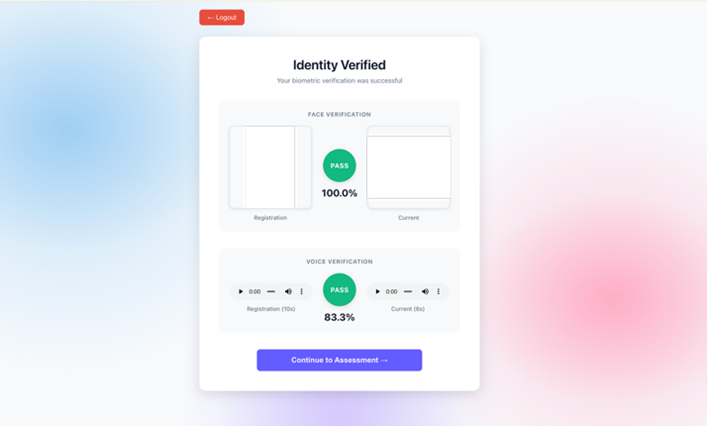
Figure 8: Identity verified
Exam and evaluation flow
The exam workflow demonstrates multi-agent coordination using the orchestrator pattern. When a user starts an English reading test, three agents work together to administer the exam, verify identity, and calculate scores.
First, the passage is retrieved and recorded. The frontend randomly selects a passage ID and retrieves the passage text by calling the select_reading_passage tool directly through Amazon Bedrock AgentCore Gateway using MCP protocol. The following code shows how the frontend issues the MCP tool call to fetch a random passage:
The passage is displayed to the user with a brief preview period. The user reads the passage aloud while being recorded, and the video is uploaded to Amazon S3. The passage ID is forwarded to the orchestrator agent so the reading test agent can retrieve the same text for scoring comparison. The following screenshot shows the Reading Test screen with a test in progress.
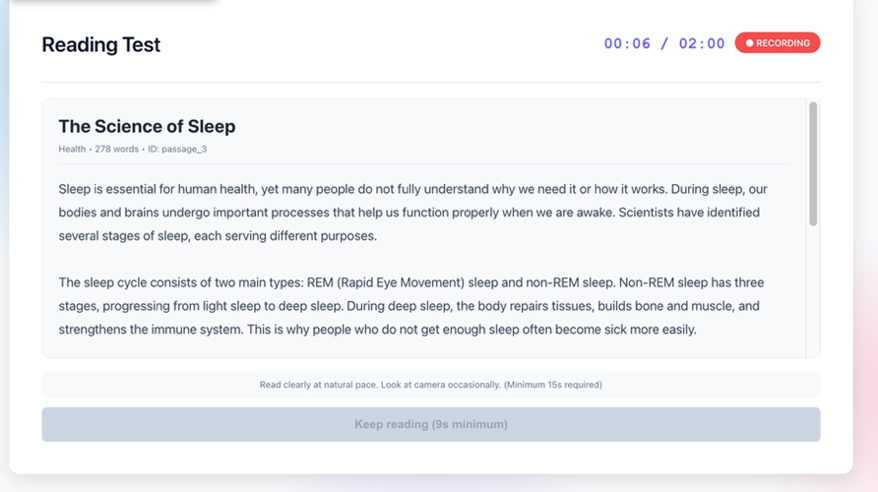
Figure 9: Reading test in progress
The frontend invokes the orchestrator agent through JWT bearer authentication with the video URL, user ID, and passage ID. The following prompt shows how the orchestrator is instructed to coordinate two child agents in sequence:
The orchestrator delegates all processing to specialized agents and doesn’t perform transcription, biometric checks, or scoring itself. This solution uses the agents as tools pattern from the Strands Agents SDK, where each sub-agent is wrapped as a callable tool. The orchestrator decides when to invoke each agent, the same as it would decide when to call any other tool. The following code shows how the reading test and evaluation agents are defined as tools:
The Strands Agents framework supports additional multi-agent patterns, including swarm, graph, workflow, and agent-to-agent (A2A) protocol for distributed communication. For more details, refer to Strands Agents Multi-agent Patterns.
The reading test agent executes six tools in sequence to process the recording. The following prompt defines this workflow:
The following sections describe some of these tools in detail:
- Transcription tool – The agent sends the video to Amazon Transcribe, which extracts the audio automatically. The following Python code shows how the tool retrieves word-level confidence scores from the transcription result:
- Word alignment tool – The agent aligns transcribed words to the original passage using sequence matching. The following Python code shows how every passage word is classified as correct, missing, or low confidence:
This shows the status of all passage words, not only words spoken, which prevents gaming.
- Biometric extraction tool – The agent extracts a face frame and a 5-second audio segment at random timestamps using FFmpeg. The following Python code shows the random extraction approach:
Because the extraction point is unpredictable, an attacker can’t prerecord the opening of a session and switch partway through—the genuine test-taker must be present for the full duration
- Identity verification tool – The agent calls the same face and voice comparison tools used during authentication, checking the randomly extracted samples against registration references. Both must pass.
The orchestrator then calls the evaluation agent with the transcription data. The following prompt defines the scoring workflow:
The agent uses Amazon Bedrock AgentCore Gateway tools for objective metrics—word clarity from Amazon Transcribe confidence scores and reading accuracy using sequence matching—then applies its own foundation model reasoning to assess grammar and coherence. The final score combines accuracy (40%), fluency (25%), speed (15%), grammar (10%), and coherence (10%), mapped to CEFR levels (A1 through C2) and a pass or fail outcome.
The Orchestrator combines responses from both agents and returns a single result to the frontend, which displays the overall score, a breakdown across six scoring dimensions, a word-level analysis grid (green for correct, yellow for low confidence, and red for missing), the CEFR level, and biometric verification status. If biometric verification failed during the exam, results are flagged for manual review. The following screenshot shows the word-level analysis grid.
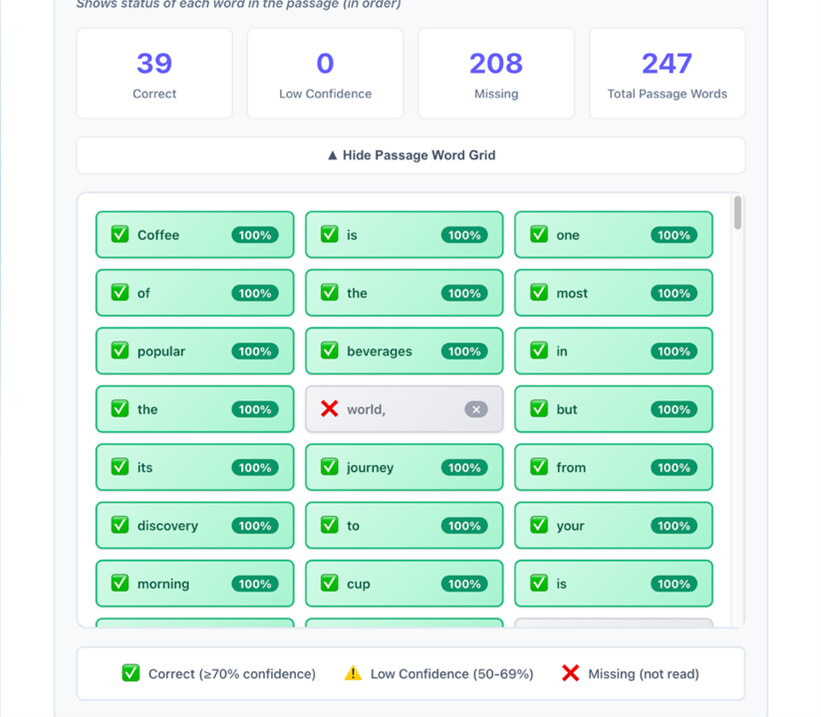
Figure 10: Word-level analysis grid
Security and data protection
The platform collects biometric data, face images, voice recordings, and exam videos that require careful handling. Amazon S3 lifecycle policies can be configured to automatically delete biometric files after a retention period that aligns with an organization’s compliance and data protection requirements. Data is encrypted at rest and in transit, and all authentication attempts are logged to Amazon CloudWatch for audit purposes.
Access to tools is controlled through the Amazon Bedrock AgentCore Gateway using OAuth 2.0 machine-to-machine authentication. Each agent must obtain a valid token before invoking any tool, and the gateway can restrict which tools are available to specific agents. This prevents an evaluation agent from accessing user account management tools.
Conclusion
Remote assessment fraud is a growing challenge as education and professional development move online. This post demonstrated how to build a scalable, identity-verified assessment platform using Amazon Bedrock AgentCore, combining specialized AI agents, biometric verification, and serverless architecture.
The implementation focuses on English language assessment, but the architecture applies broadly. Professional certification bodies, corporate hiring teams, financial services compliance programs, and healthcare credentialing boards all face similar challenges: verifying that the right person is completing the right assessment. The multi-agent design makes adaptation straightforward—create specialized agents for the new domain, add domain-specific tools to the gateway, and reuse the existing biometric verification components without modification.
To learn more about how Amazon Bedrock AgentCore and generative AI can help your organization build secure, identity-verified assessment systems, contact your AWS account team or contact AWS sales support.