Artificial Intelligence
Building a restaurant telephony AI host with Amazon Connect
At many restaurants, a large share of orders still arrive by phone, and those calls usually land on a staff member who is already taking care of customers at the counter. Callers wait on hold, orders get written down by hand, and busy periods make both worse. Adding an app or a website helps customers who prefer to order online, but it does nothing for the person who wants to call and order.
In this post, we show you how to build a voice ordering system that answers a phone number and takes the order from greeting to confirmation, with no app, no website, and no sign-in. A caller dials a phone number, and an AI host greets them, answers menu questions, finds a nearby pickup location, and confirms the order out loud. The system uses Amazon Connect Customer for the telephony channel, Amazon Lex V2 with Amazon Connect Agentic Voice for real-time speech, and Amazon Connect Customer AI agents to orchestrate the conversation, connected to a restaurant backend through the Model Context Protocol (MCP) and Amazon Bedrock AgentCore.
This solution handles the telephony channel specifically. The audio arrives over the phone network rather than a browser, and the system identifies the caller by phone number rather than by a login. The solution builds the agent logic and the backend services as separate modules, so the ordering logic stays independent from the channel that calls it.
The walkthrough shows you how to:
- Deploy the system with AWS Cloud Development Kit (AWS CDK)
- Answer an inbound phone call with Amazon Connect and route it through a contact flow.
- Provide real-time speech recognition and synthesis with Amazon Connect Agentic Voice (Advanced ASR and TTS)
- Orchestrate the conversation and backend tool calls with an Amazon Connect AI agent.
- Keep the conversation safe and on topic with an Amazon Connect AI Guardrail.
- Connect the agent to backend services as discoverable tools through AgentCore Gateway and MCP.
Amazon Connect Agentic Voice provides the speech layer natively in Amazon Connect, handling speech recognition for listening and text-to-speech for speaking. The Amazon Lex V2 bot uses it for both, while an Amazon Connect AI agent handles the reasoning and the calls to the backend. A later section covers how Agentic Voice speeds up turn-taking.
Solution overview
The design keeps three things apart. Amazon Connect handles the call, an Amazon Connect AI agent runs the conversation, and the backend holds the menu, carts, orders, and locations. A call comes in through Amazon Connect, a contact flow opens an Amazon Connect AI agent session and connects the caller to the agent. Amazon Connect Agentic Voice provides speech recognition and synthesis throughout the call, the AI agent reasons over the conversation, and it reaches the backend through MCP tools exposed by AgentCore Gateway. Because MCP is an open standard for connecting an agent to external tools, the backend can change without touching the agent.
In this solution, the contact flow, the Amazon Lex V2 speech layer (Amazon Connect Agentic Voice), and the Amazon Connect AI agent are all provisioned and managed through Amazon Connect. You do not stand them up as separate services. A single Amazon Connect deployment brings the telephony, the speech, and the AI agent together. The AgentCore Gateway and the restaurant backend are the parts you build and integrate yourself.
The solution deploys the following:
- Amazon Connect Customer provides the inbound telephony, the contact flow, and the phone number that accepts calls.
- Amazon Lex V2 hosts the voice bot that the contact flow connects the caller to. It uses Amazon Connect Agentic Voice for speech and routes each turn to the AI agent.
- Amazon Connect Agentic Voice handles Advanced ASR (with confidence-based end-of-turn detection) and expressive TTS, natively in Amazon Connect.
- Amazon Connect Customer AI agents provide the orchestration AI agent that drives the conversation, powered by Anthropic Claude Haiku 4.5 in Amazon Bedrock.
- Amazon Connect AI Guardrails keep the conversation safe and on topic with content filters, denied topics, and profanity filtering.
- AgentCore Gateway exposes the backend APIs as MCP tools the agent can discover and call by name.
- Amazon AppIntegrations registers the AgentCore Gateway as an MCP application the AI agent can use.
- Amazon API Gateway fronts the backend with REST endpoints secured by AWS Identity and Access Management (IAM).
- AWS Lambda runs the business logic for menus, carts, orders, and location lookups, and pushes the caller’s phone number into the agent session.
- Amazon DynamoDB stores customer profiles, orders, menu items, carts, and locations.
- Amazon Location Service provides geocoding and route calculation for pickup recommendations.
Architecture diagram
Figure 1 shows the solution, which is organized into four sections.
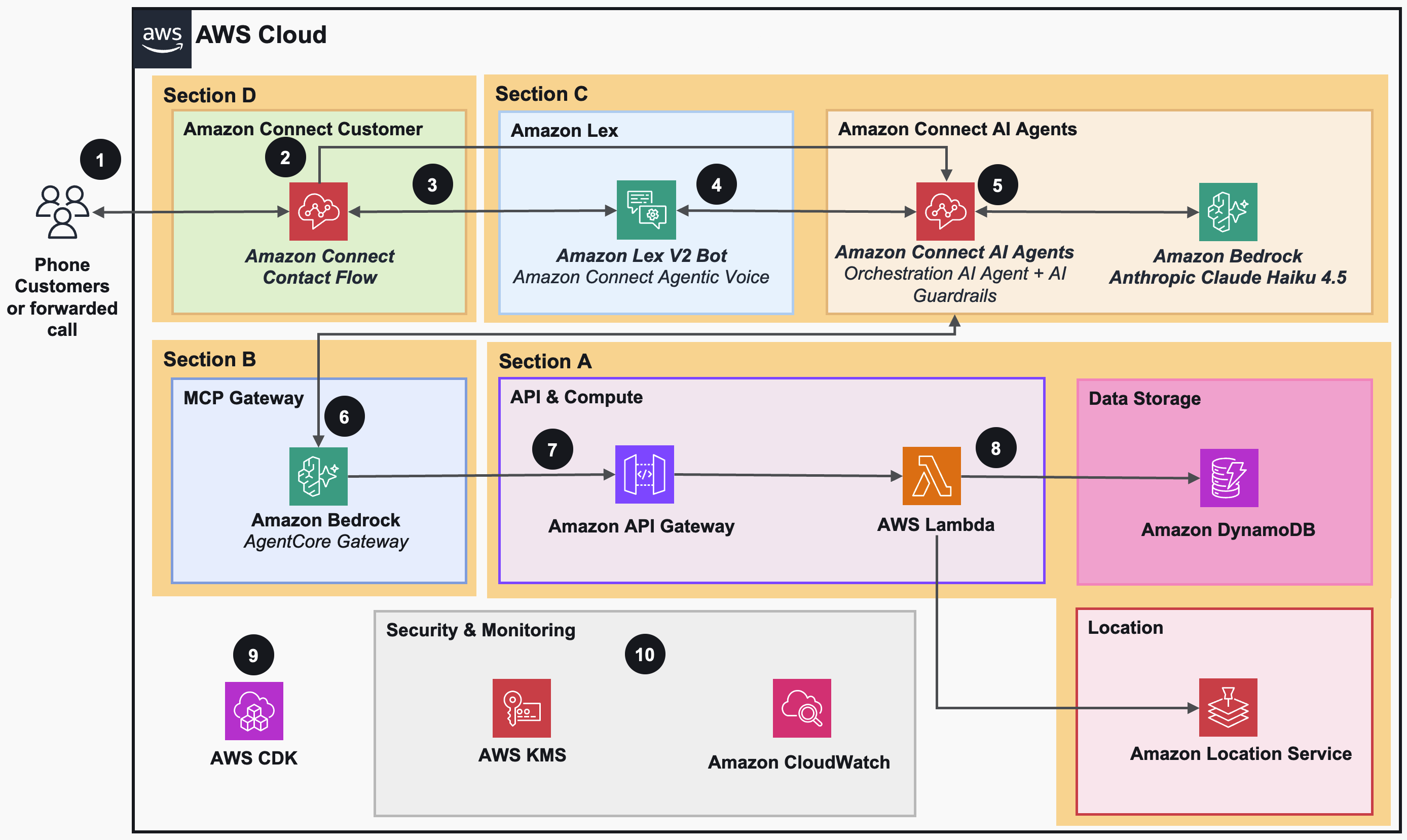
Figure 1: The telephony voice ordering solution, organized into four sections.
Section A, backend infrastructure. This section deploys the restaurant backend. Amazon DynamoDB holds the customer, order, menu, cart, and location data, and Amazon Location Service handles addresses and routing. AWS Lambda runs the business logic, and Amazon API Gateway exposes it with IAM authorization. Resources deploy in dependency order.
Section B, AgentCore Gateway. This section provisions an AgentCore Gateway that reads the REST API’s OpenAPI schema at deploy time and registers each endpoint as a named MCP tool. The gateway uses custom JSON Web Token (JWT) authorization and validates inbound tokens against the Amazon Connect instance.
Section C, Amazon Connect instance and AI agent. This section creates the Amazon Connect instance, the Amazon Connect AI Agents assistant, and the orchestration AI agent. It registers the AgentCore Gateway as an MCP server in Amazon AppIntegrations and creates an Amazon Lex V2 bot with Amazon Connect Agentic Voice for Advanced ASR. It then defines the AI Guardrail with content safety policies, defines the AI agent with the Anthropic Claude Haiku 4.5 system prompt and the guardrail attached, publishes the agent version, and associates a security profile that grants the agent access to the backend tools.
Section D, Amazon Connect telephony. This section creates the contact flow and claims the phone number. The contact flow is the entry point for every inbound call. It enables logging, sets Agentic Voice for text-to-speech, and captures the caller’s phone number. It then opens an Amazon Connect AI agent session, pushes the caller’s phone number into that session with a Lambda function so the agent can identify the caller, plays the greeting, and connects the caller to the Amazon Lex V2 bot. The Lex bot provides the real-time speech layer, using Agentic Voice Advanced ASR to listen and Agentic Voice TTS to speak, while the AI agent handles reasoning and tool calls.
The numbered callouts in Figure 1 trace the solution end to end:
- A call is initiated to the phone number provisioned by Amazon Connect, either by a customer or forwarded from another line.
- The Amazon Connect contact flow sets the Agentic Voice, captures the caller’s phone number, opens an Amazon Connect AI Agents session, pushes the caller’s phone number into the session, and plays the greeting to the caller.
- The contact flow connects the caller to the Amazon Lex V2 bot with Amazon Connect Agentic Voice for speech recognition and synthesis throughout the conversation.
- Amazon Lex V2 routes the conversation to Amazon Connect AI Agents, delegating the conversation logic to the orchestration AI agent.
- The Amazon Connect AI agent, powered by Anthropic Claude Haiku 4.5 in Amazon Bedrock and protected by an AI Guardrail for content safety, drives the conversation, resolving the caller’s location, fetching the menu, managing the cart, and placing the order.
- The AI agent calls the available tools through Amazon Bedrock AgentCore Gateway using the MCP protocol.
- AgentCore Gateway forwards each tool call to Amazon API Gateway, which routes the request to the appropriate AWS Lambda function.
- AWS Lambda reads and writes Amazon DynamoDB for cart, order, menu, and location data, and calls Amazon Location Service for geocoding and nearest-location lookup.
- AWS CDK deploys all eight stacks in a single script.
- Amazon CloudWatch provides centralized monitoring, logging, and alerting across all services, and all data at rest is encrypted using AWS Key Management Service (AWS KMS).
Callouts 1 through 8 happen during a single phone call, callout 9 covers how the solution is built and deployed, and callout 10 covers how it is monitored and secured. The following section sets deployment and operations aside and gets closer to the call itself.
Inbound call flow
This section follows one call from the caller’s side, from the first ring to the spoken reply. It is the same runtime path as callouts 1 through 6 in Figure 1. Figure 2 shows it as a sequence so the order of events is more straightforward to see.

Figure 2: Inbound call flow, with the components inside the Amazon Connect boundary.
The dashed boundary marks what Amazon Connect provides. The contact flow, the Amazon Lex V2 speech layer (Amazon Connect Agentic Voice), and the Amazon Connect AI agent all come from one Amazon Connect deployment, so you configure them through Amazon Connect rather than as standalone services. The AgentCore Gateway sits outside the boundary and connects the agent to your backend.
The numbered steps in Figure 2 correspond to these stages of the call:
- The caller dials the phone number, and Amazon Connect answers.
- The Amazon Connect contact flow sets the Agentic Voice, captures the caller’s phone number, opens an Amazon Connect AI agent session, pushes the number into that session, and plays the greeting before connecting the caller to the speech layer.
- Amazon Connect Agentic Voice provides speech recognition and synthesis throughout the conversation, passing each turn to the Amazon Connect AI agent.
- The AI agent calls backend tools through AgentCore Gateway when it needs menu, cart, order, or location data, and the spoken reply flows back to the caller.
Prerequisites
Before you begin, verify you have the following in place:
- An AWS account
- Amazon Bedrock model access for Anthropic Claude Haiku 4.5 in the AWS Region where you deploy, requested on the model access page in the Amazon Bedrock console
- An Amazon Connect phone number quota of at least one in your account and Region, requested through the Service Quotas console if you have never claimed a number.
- Node.js 18.x or later, with 24.x recommended.
- AWS Command Line Interface (AWS CLI) 2.x configured with credentials.
- git to clone the repository.
- AWS CDK bootstrapped in your target account and Region (
npx cdk bootstrap aws://<ACCOUNT_ID>/<REGION>)
The deployment enables the Contact Lens and bot management settings on the Amazon Connect instance for you, which the Amazon Lex V2 bot with Agentic Voice and the Amazon Connect AI agent require. No Docker or Python is needed. Deploy in a Region where Amazon Connect Agentic Voice, Anthropic Claude Haiku 4.5, Amazon Connect with AI agents, and AgentCore Gateway are all available. US East (N. Virginia), us-east-1, is a good place to start.
Deploy the solution with AWS CDK
The full solution is available in the sample repository on GitHub. Clone the repository and change into the project directory.
Run the deployment script with a deployment prefix. The prefix is added to every resource name, so you can deploy the solution more than once in the same account.
The script runs a preflight check and then deploys each AWS CDK stack in dependency order, passing the outputs of one stack to the next. It builds the backend first, with the Amazon DynamoDB tables, the Amazon Location Service resources, the AWS Lambda functions, and the Amazon API Gateway REST API, and seeds sample menu and location data. It then creates the Amazon Connect instance and the Amazon Connect AI Agents assistant, adds the AgentCore Gateway in front of the backend APIs, defines the Amazon Lex V2 bot, the AI Guardrail, and the orchestration AI agent, and finally creates the contact flow and claims the phone number. The gateway is deployed after the Connect instance because it validates tokens against that instance.
When the script completes, it prints the number to dial:
How the contact flow works
The job of the telephony layer is narrow. Amazon Connect answers the call, and a contact flow decides what happens next. The contact flow runs a short sequence of steps for every inbound call.
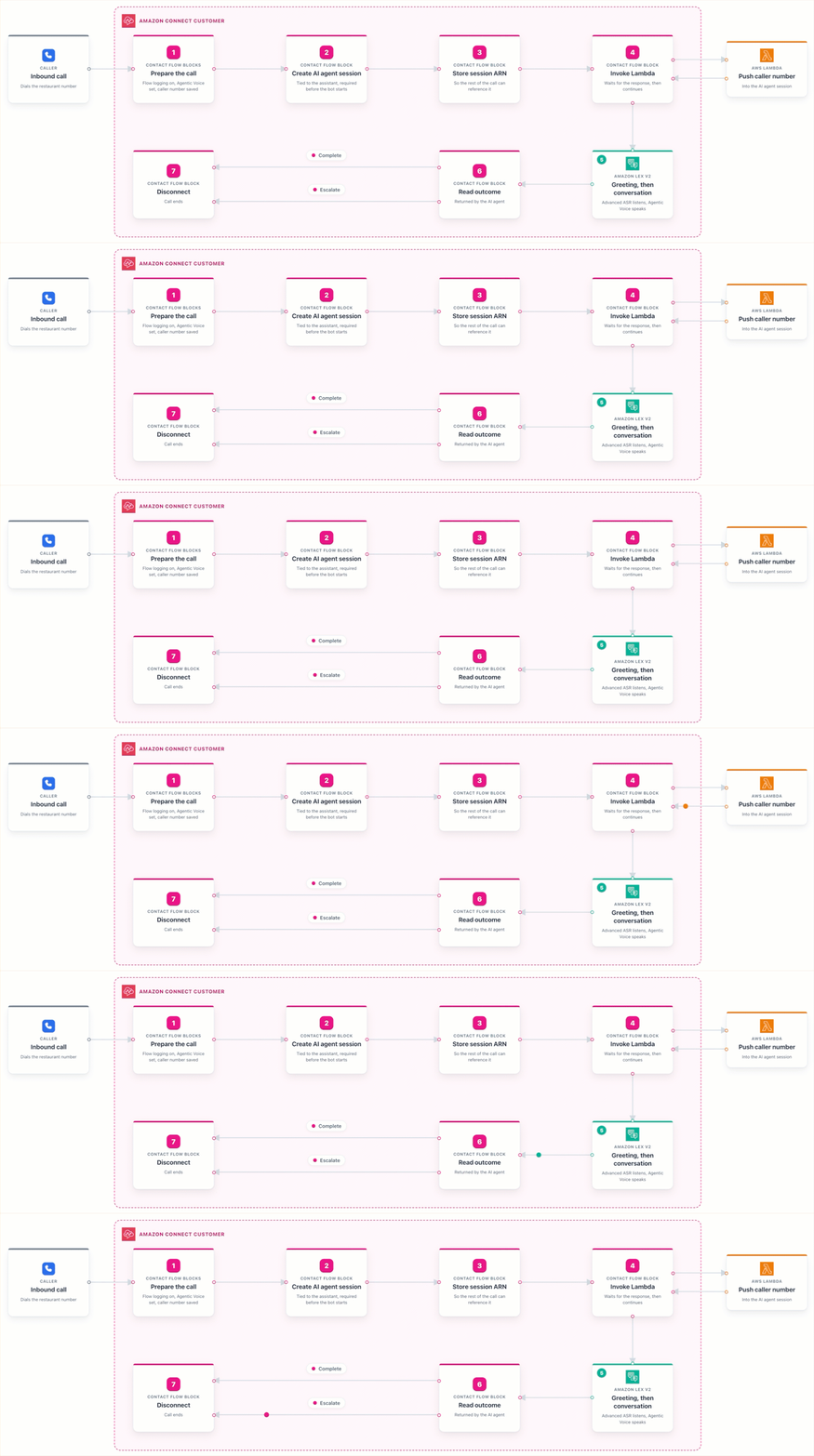
Figure 3: Contact flow steps, from the inbound call to the disconnect.
It first enables Contact Lens logging, so each step is recorded in Amazon CloudWatch for debugging. It sets the voice for the call to Amazon Connect Agentic Voice, so every spoken response uses the agentic text-to-speech engine. It captures the caller’s phone number as a contact attribute. It opens an Amazon Connect AI agent session tied to the assistant, which the Lex bot requires, and stores the session so the rest of the call can reference it. It then invokes a Lambda function that pushes the caller’s phone number into the AI agent session, so the agent can identify the caller without asking. Finally, it plays a short greeting and connects the caller to the Amazon Lex V2 bot, which provides the real-time speech layer for the rest of the call, using Agentic Voice Advanced ASR to listen and Agentic Voice TTS to speak.
When the AI agent finishes, the bot returns control to the contact flow, which reads the outcome and ends the call. The agent signals the end with one of two outcomes. Complete ends a finished order, and Escalate is available when a caller asks for a person. In this solution both outcomes disconnect the call, but because the call lives in Amazon Connect, you can wire the Escalate path to an Amazon Connect queue to transfer the caller to a live agent with the full conversation context.
Storing menus, carts, and orders
Five Amazon DynamoDB tables cover the ordering workflow. The Customers table stores profiles, including name, phone, and loyalty information, which you can use to recognize a returning caller. The Orders table keeps order history along with the pickup location. The Menu table holds items, prices, and availability, which can differ by location. The Carts table holds in-progress carts and uses a time-to-live value so abandoned carts clean themselves up. The Locations table holds restaurant details such as coordinates, hours, and tax rates that the agent uses for totals and recommendations. DynamoDB on-demand capacity scales with traffic, so there is no throughput to manage.
Finding a pickup location
Amazon Location Service helps a caller find a convenient pickup spot without typing anything. A phone caller has no browser to share a location, so the agent asks for a ZIP code or a cross-street and uses Amazon Location Service to turn that into coordinates. From there, the backend can do a few things with those coordinates. It can find the nearest restaurants, rank them by driving time rather than straight-line distance so it favors a short detour along the caller’s route, or geocode a specific address. That lets the agent say something a caller can act on, such as “the closest location is on Main Street, about five minutes away,” instead of reading back an internal code.
Running the conversation with Amazon Connect AI Agents and Agentic Voice
Two managed capabilities run the conversation. Amazon Connect Agentic Voice through the Amazon Lex V2 bot provides the voice, and an Amazon Connect AI agent provides the reasoning.
Amazon Connect Agentic Voice handles the speech work within the call, natively in Amazon Connect. Its Advanced ASR recognizes speech across a range of accents and tolerates the background noise that comes with a phone line, and it uses confidence-based end-of-turn detection to tell when the caller has finished, rather than waiting out a fixed silence window. That shortens the pause between the caller finishing a sentence and the agent responding, so the conversation feels more natural. Its text-to-speech generates expressive voice for the agent’s replies, and a caller can interrupt the way people do on real calls. Because the contact flow selects the voice, the bot itself carries no voice setting, and changing how the agent sounds is an edit to the contact flow rather than a redeployment of the bot. The end-of-turn confidence and silence thresholds can be tuned per intent for cases such as reading back a payment card number or an address. For guidance, see Agentic voice best practices.
The Amazon Connect AI agent, powered by Anthropic Claude Haiku 4.5, decides what to do at each turn. Its system prompt is written for voice, so responses stay short, prices are spoken naturally, such as “five ninety-nine,” and internal IDs are never read out loud. The agent greets the caller, answers menu questions, resolves a pickup location, builds the cart, reads it back for confirmation, and places the order. It reaches the backend only through the tools that AgentCore Gateway exposes, so the conversation logic stays separate from the backend.
Connecting the agent to backend tools with MCP
The AI agent never calls the backend Lambda functions directly. AgentCore Gateway sits in between and presents the backend endpoints as MCP tools that the agent discovers and calls by name, covering menu lookups, cart operations, order placement, customer and order history, geocoding, and location search. The gateway is registered with the Amazon Connect AI Agents assistant as an MCP application through Amazon AppIntegrations, and it authorizes each call with a JSON Web Token that it validates against the Amazon Connect instance.
That layer is what keeps the design loosely coupled. When the agent calls a tool such as PlaceOrder, the gateway turns it into a REST request to Amazon API Gateway, which routes it to the matching AWS Lambda function. Because the agent talks to named tools rather than to specific functions, you can change a backend handler or add a tool without changing the agent. The same backend can also serve other channels, since they all place orders against the same tools and data.
Figure 4 shows how a single tool call travels from the agent to the backend.
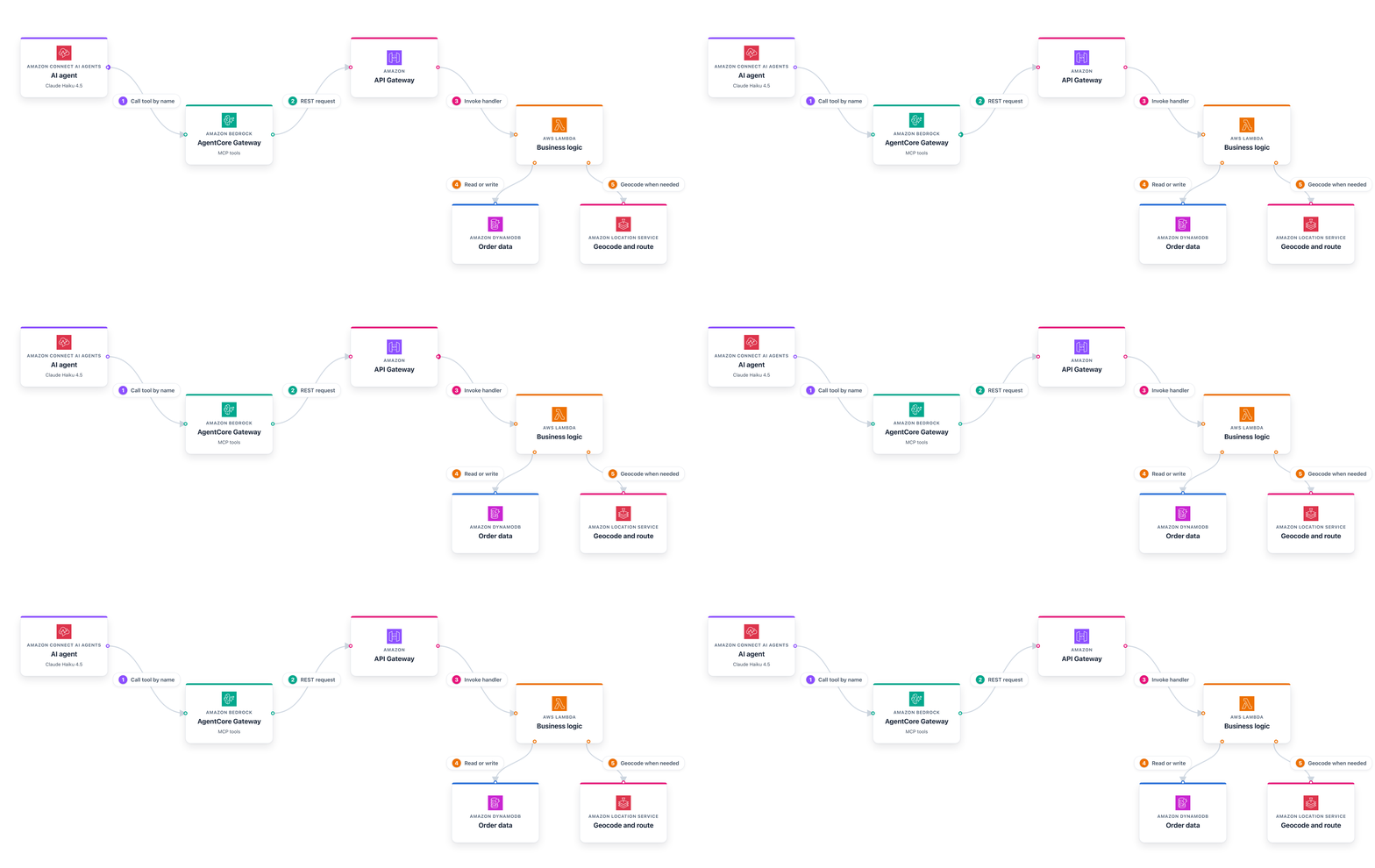
Figure 4: A single tool call, from the AI agent to the backend.
Recognizing a caller without a login
A phone caller does not sign in, so the system uses the caller’s phone number as the basis for identity. The Amazon Connect contact flow captures the caller’s phone number, and a Lambda function pushes it into the AI agent session, where the agent reads it as a session attribute. The agent turns that number into a customer ID and uses it for every tool call in the conversation.
That ID keeps each caller’s cart separate and stamps the finished order with the number it came from, so an order can be matched back to a caller afterwards. If no number is available at all, because the caller blocks caller ID, the agent generates an anonymous ID for the session and the order still goes through. Each caller gets an isolated cart, so concurrent calls never interfere with one another. The sample also exposes customer profile and order history as tools, so you can extend the agent to greet a returning caller by name or offer their last order.
This recognizes a returning caller without asking for a login, but it is not identity verification, and the caller’s phone number should not be treated as proof of who is calling. A production deployment that needs verified identity can add a step such as a one-time passcode.
Keeping the conversation safe with AI Guardrails
The AI agent has an Amazon Connect AI Guardrail attached that keeps the conversation safe and on topic. The guardrail applies content filters for harmful categories such as hate, insults, sexual content, violence, misconduct, and prompt attacks. It blocks a set of denied topics such as political discussion and financial investment advice, and it filters profanity with both a managed list and a custom word list.
When a caller says something off topic or unsafe, the guardrail intervenes and the agent replies with a set message, such as “I am sorry, I can only help with restaurant orders,” and steers the conversation back to the order. The guardrail is defined and attached to the agent in the same AWS CDK stack, so it deploys with the rest of the solution and needs no console steps.
Guardrail strength is worth tuning against your own prompt rather than setting as high as it goes. Filters that are too broad will block legitimate turns, and personally identifiable information filters in particular can catch the address or ZIP code a caller has to give to find a pickup location.
Ordering walkthrough
Dial the number from the deploy output. The agent greets you and asks what you would like. You can speak naturally, ask about the menu, give a ZIP code for pickup, and confirm the order, all by voice. While the caller talks, the agent calls backend tools in the background, so there are no pauses while data loads.
You can follow the call in Amazon CloudWatch Logs. The contact flow logs show the call setup, the Amazon Connect AI agent logs show the conversation turns and the tool calls, and the order lands in the Orders table with its total and estimated ready time.
Cost
You pay for the AWS services the system uses. As of July 2026, running this solution with the default settings in US East (N. Virginia) costs about $35 per month for 1,000 voice orders that average five minutes each.
The largest line items are the inbound call minutes on Amazon Connect, the Anthropic Claude Haiku 4.5 tokens for orchestration, and the Amazon Lex V2 speech requests. The solution claims a local Direct Inward Dialing (DID) number by default, which keeps the per-minute rate low. Switching to a toll-free number raises it. There are no always-on compute charges, because Amazon Connect and the AI services bill by usage. Prices change, so check the pricing page for each service and set up a budget in AWS Cost Explorer to track spend.
Clean up
To avoid ongoing charges, remove the resources when you are done. The cleanup script deletes the stacks in reverse order so each stack is removed before the ones it depends on.
Cleanup is destructive. It releases the phone number, deletes the order history in Amazon DynamoDB, and removes the Amazon Connect instance, the Amazon Connect AI Agents assistant, the AI agent, the AI Guardrail, the Amazon Lex V2 bot, and the AgentCore Gateway. Back up anything you want to keep first. When the script finishes, confirm in the AWS CloudFormation console that all eight stacks show as deleted and that the phone number has been released.
Conclusion
In this post, we showed you how to build a telephony voice ordering system that answers a phone call and takes an order end to end. Amazon Connect answers the call and runs a contact flow, Amazon Connect Agentic Voice provides real-time speech recognition and synthesis, an Amazon Connect AI agent handles the reasoning with an AI Guardrail keeping it safe and on topic, and AgentCore Gateway connects the agent to the backend through MCP tools. Because the agent talks to tools rather than to specific functions, you can change the backend or add tools without touching the agent, and the same backend can serve other channels.
To get started, visit the sample repository on GitHub and adapt it to your menu and locations.
Additional resources
- Amazon Connect Agentic Voice best practices
- Create AI guardrails for Amazon Connect AI agents
- Getting started with Amazon Bedrock AgentCore
- Model Context Protocol specification
- Amazon Connect Administrator Guide
- Amazon Lex V2 Developer Guide
- Amazon Location Service documentation