AWS for M&E Blog
Introducing KNFSD File Cache: Extending your NFS storage into the cloud
For years, you’ve been able to use Amazon Web Services (AWS) to scale your compute infrastructure up, out, and across. The storage side hasn’t kept pace, especially for organizations built on Network File System (NFS), with data that lives on-premises or across hybrid environments. Whether you need more throughput for compute-heavy workloads, faster shared access for parallel jobs, or compute placed in another AWS Region or Availability Zone without data replication, the problem is the same. Scaling data access to match elastic compute, without migration or client-side changes, has remained a challenge.
KNFSD File Cache (KNFSD) solves that. It’s an open source NFS caching proxy solution running on Amazon Elastic Compute Cloud (Amazon EC2) that transparently extends your existing NFS servers into AWS, placing a high-performance caching layer right next to your cloud instances, giving your workloads fast access to shared data regardless of where they run.
In this post, you’ll learn how it works and where it fits alongside any NFS-compliant storage (whether that’s an on-premises filer, a third-party, or an AWS service like Amazon FSx). We also cover how to deploy a production-ready, autoscaling cluster using a single Terraform module, delivering aggregate throughput at less than $6 per hour per 100 Gb per second.
“Our collaboration with AWS on the original KNFSD prototypes proved that high-performance caching at extreme distance is practical for cloud rendering. We’re looking forward to adopting the new AWS Solutions Guidance for KNFSD File Cache—it productizes exactly the kind of capability we had to build by hand.”
– Kimball Thurston, CTO, Wētā FX
Who is this for?
KNFSD is designed for any organization that needs high-performance, read-heavy access to NFS data in the cloud, and the ability to write back to the source. The uses cases include, but aren’t limited to:
- Compute-intensive industries with heavy read I/O: Any workload that requires fast, shared access to large datasets stored on existing NFS infrastructure—including Media & Entertainment (render farms), High-Performance Computing, Financial Services, Healthcare & Life Sciences, Energy, and Weather & Climate Science.
- Hybrid cloud and multi-cloud: Organizations looking to extend their existing NFS infrastructure into AWS, from either on-premises filers, or other cloud providers, without migrating or duplicating data.
- Multi-Region and Multi-AZ: Studios and research teams distributing compute across AWS Regions or Availability Zones, with KNFSD caching data locally to eliminate latency to a central NFS source.
“The KNFSD caching solution has surpassed our expectations. During development we collaborated with AWS to ensure the critical internal metrics we needed for production at scale were exposed, saving us from building custom tooling. Thanks to this engagement, we went from a place of uncertainty to having the confidence in now running this solution effectively in production across a number of projects.”
– Greg Newman, Sr. Manager of Production Engineering and Digital Resources, Industrial Light & Magic (ILM)
What is KNFSD File Cache?
KNFSD is an open source AWS Solution Guidance that provides a high-performance NFS caching proxy, purpose-built for hybrid and burst compute use cases. It builds on an existing open source project, forked and extended with AWS integrations. It comes complete with optimizations to run on AWS (including AWS Graviton), developer and production container support, comprehensive metrics dashboards using OpenTelemetry and Amazon CloudWatch, and modernized security with Common Vulnerabilities and Exposure (CVE) hardening.
KNFSD File Cache is based on proven Linux kernel technologies:
- nfs-kernel-server – The Linux kernel’s native NFS server, which supports re-exporting NFS mounts. This means the proxy mounts your source NFS exports and serves them onward to downstream clients as if it were the original filer.
- cachefilesd (FS-Cache) – A Linux kernel module that persistently caches network file system data on local disk. When the same file is requested again, it’s served directly from cache rather than fetched from the source.
KNFSD stands for kernel NFS daemon, a nod to the kernel-space components that power the solution. The solution contains no proprietary agents, no vendor-specific protocols, and no lock-in to a specific storage solution; any NFS client that can talk NFSv3 or NFSv4 to your existing filer can work with KNFSD without modification.
Two levels of caching
KNFSD provides a two-tier cache hierarchy on each proxy instance:
| Layer | Technology | Medium | Characteristics |
|---|---|---|---|
| L1 | Linux block cache | RAM | Ultra-low latency, bounded by instance memory |
| L2 | FS-Cache (cachefilesd) | Local NVMe | High throughput, persists across reboots, terabytes of capacity |
When a client requests a file, the proxy first checks L1 (RAM). If the data has been evicted from RAM, L2 (NVMe disk) serves it at local storage speeds. Only on a complete cache miss does the proxy fetch from the source filer. After the file is fetched, subsequent reads from any client connected to that proxy are served from cache.
“At EngineLab, we’ve deployed KNFSD as a core part of our cloud burst rendering architecture for studios like Barnstorm VFX. It lets them scale render capacity on AWS the moment their on-prem compute is exhausted, with KNFSD efficiently caching common assets like textures across modest bandwidth connections. When they’re rendering, they pay for compute; when they’re not, they scale back to zero. For us, that’s what it’s really about: removing the infrastructure ceiling so our customers can focus on the creative work, take on more ambitious projects, and never have a deadline dictated by the size of their render farm.”
– Sam Reid, CEO/Co-Founder, EngineLab
How it works
The architecture is straightforward. The following figure shows the deployment configuration of KNFSD to provide local access to re-exported NFS data, for low latency/high bandwidth consumption by compute.
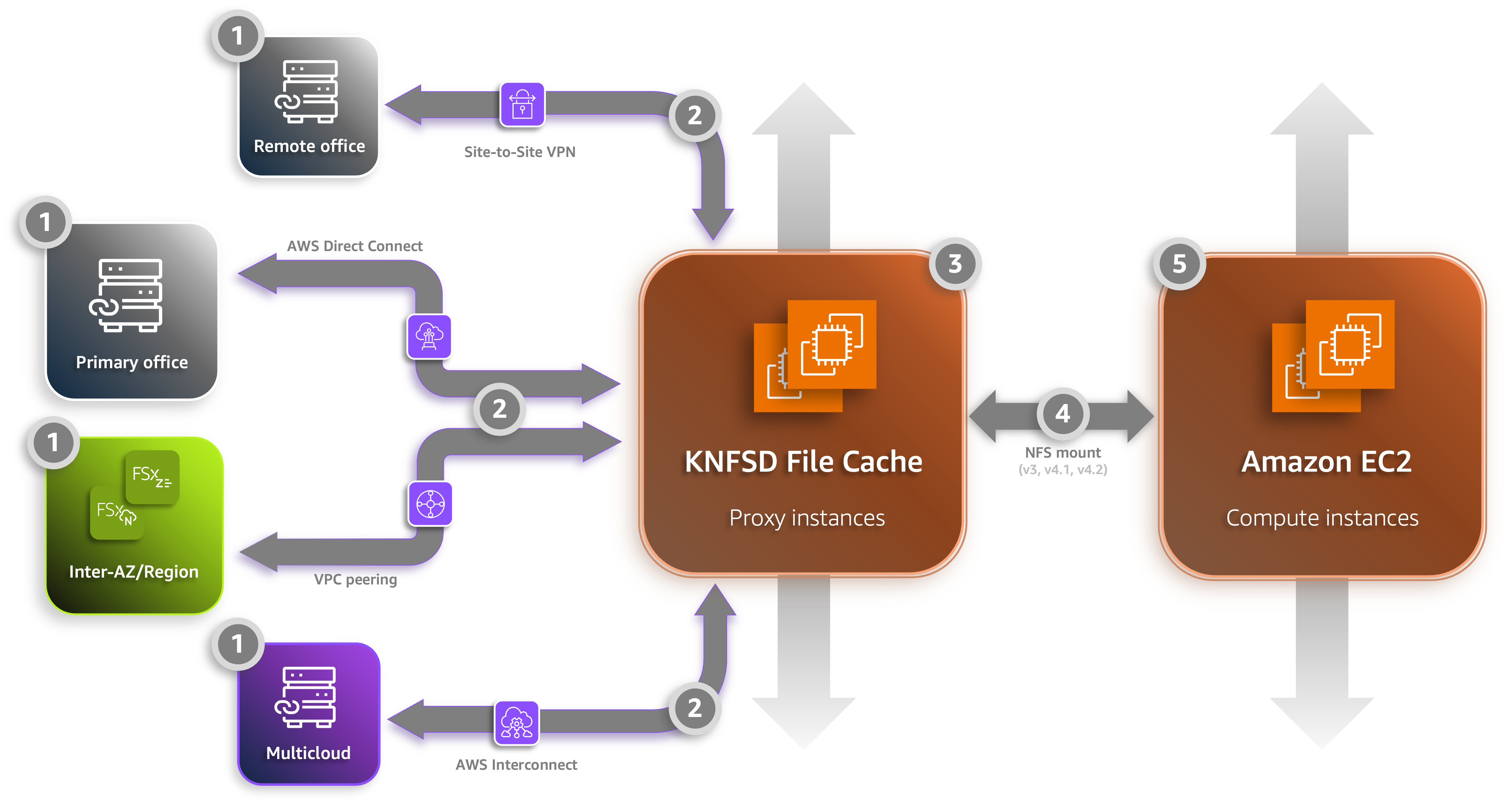
Figure 1: KNFSD architecture diagram
The displayed configuration contains the following features:
- Source mounts – Each proxy instance mounts exports from your source NFS devices, including on-premises filers, NFS-compliant Amazon FSx services, within another Availability Zone or Region, or from other cloud providers.
- Connection – KNFSD supports the same connections as any other AWS infrastructure, including AWS Site-to-Site VPN, AWS Direct Connect, or AWS Interconnect (multicloud), providing secure, low-latency access to on-premises storage.
- Load distribution – An Amazon EC2 Auto Scaling group manages multiple KNFSD instances. Client traffic is distributed using DNS round-robin or Elastic Load Balancing (Network Load Balancer).
- Transparent to clients – NFS clients mount the KNFSD export exactly as they would mount any NFS share. No special drivers, agents, or configuration.
- Consumption – Amazon EC2 instances scale to process workloads, accessing their dependent source data through KNFSD without modification, writing results back when required, and providing signals to scale up KNFSD instances as throughput requirements increase.
“An NFS cache is something our customers have asked us for repeatedly over the years. It’s great to have an AWS-supported solution we can confidently put in front of them.”
– Paul Judkins, VP Cloud Services, Integrated Media Technologies (IMT) Global
Where KNFSD File Cache fits
AWS offers a broad portfolio of storage services, such as Amazon Simple Storage Service (Amazon S3) for durable object storage and analytics, Amazon FSx for fully managed high-performance file systems, and Amazon Elastic File System (Amazon EFS) for elastic, serverless NFS. Each is purpose-built to be the primary store for its target workloads.
For workloads that need burst-scale throughput from an existing NFS source, without migrating data or changing a single client mount path, you need a transparent acceleration layer. Managed options such as Amazon File Cache and Amazon FSx for NetApp ONTAP FlexCache address some of these scenarios, but there are many cases where a basic, low-cost, open source caching layer running on Amazon EC2 is the best fit; particularly when you need full control over tuning, transparent NFS re-export semantics, and the ability to elastically scale up and out capability.
That is the niche KNFSD fills. The repository provides a hardened AMI, a root Terraform module (with multiple child modules and separate database and metrics modules), built-in observability, health checking, autoscaling, and fanout topologies.
Because the cache persists on the KNFSD tier, downstream compute instances can be run as Amazon EC2 Spot instances (deeply discounted, interruptible capacity that AWS can reclaim with short notice) without risking data loss or re-fetching. If a Spot instance is reclaimed and replaced, the new instance immediately benefits from the warm cache.
“On Avatar: The Way of Water we ran a cloud render farm 250% the size of our on-prem facility, and the NFS cache we co-developed with AWS was instrumental in scaling access to the show’s data. The areas we identified for improvement after Avatar (elastic scaling, load balancing and tiered caching) are precisely what AWS has now built into KNFSD File Cache. We’re excited to adopt it across our hybrid render pipeline and contribute to the open-source project.”
– Andy Wright, Head of Pipeline, Wētā FX
Key features
KNFSD is built to be fast to deploy, straightforward to operate, and observable from day one. In this section, we walk through the capabilities that matter most in production.
Pre-built AMI
The repository includes a Packer build script that produces optimized Amazon Machine Images (AMIs) based on Ubuntu, for both traditional x86 Intel and AMD processors, and ARM-based processors such as AWS Graviton Processors (ARM64) architectures.
The Packer build creates an image with:
- A tuned Linux kernel with NFS re-export and FS-Cache enabled
- The KNFSD metrics agents for observability, using CloudWatch and OpenTelemetry
- The KNFSD HTTP agent for health checking and status
- Smoke tests for build validation
AWS offers a range of storage-optimized Amazon EC2 instances (with local NVMe for the L2 tier) that let you match your KNFSD instances to the access pattern of each pipeline stage. Workloads dominated by millions of small file reads benefit from the lowest-latency NVMe in the latest i7ie and i8g families, while large sequential reads favor raw throughput and cache volume from the im4gn and i3en families.
The AWS Graviton advantage is particularly compelling because NFS re-export and disk caching parallelize well across cores without needing high single-thread performance (a natural fit for AWS Graviton’s architecture). An im4gn.16xlarge delivers the same 10–12 GB per second as an i3en.24xlarge at roughly half the hourly on-demand cost. The following table is an illustrative list of a few Amazon EC2 instance types for comparison; see the Amazon EC2 instance types documentation to see the latest instance types and regional pricing.
| Instance | Arch | Network | Local NVMe | $/hr ** | Best for |
|---|---|---|---|---|---|
| im4gn.16xlarge | ARM | 100 Gbps | 30 TB | $5.82 | High-throughput, best cost per GB/s |
| i8g.16xlarge | ARM | 50 Gbps | 15 TB | $5.49 | Latest-gen NVMe, small-file IOPS workloads |
| i3en.24xlarge | x86 | 100 Gbps | 60 TB | $10.85 | Massive cache capacity; KNFSD workhorse |
| i7ie.48xlarge | x86 | 100 Gbps | 120 TB | $24.95 | 65% better NVMe latency, latency-sensitive reads |
** At time of writing in US-East-1, North Virginia
Fanout architecture
For workloads where many clients read the same large dataset, KNFSD supports an optional two-tier fanout deployment. A single high-memory proxy (Tier 1) handles all communication with the source filer, ensuring each file crosses the Wide Area Network (WAN) only once and caters for high latency/low bandwidth scenarios. A second cluster of smaller proxies (Tier 2) fan out to serve hundreds of clients. This effectively breaks the caching solution into two parts: the initial long-haul transfer and re-export of NFS using the primary Tier 1 KNFSD instance, and the specification and optimization of secondary Tier 2 KNFSD instances that serve the NFS clients directly. This configuration enables the secondary KNFSD instances to scale up and down as well as in and out while still maintaining cloud hydration, preventing potential repeats of the initial long-haul transfer and preserving the ability to quickly re-cache after infrastructure changes. The following figure shows a basic fanout architecture.
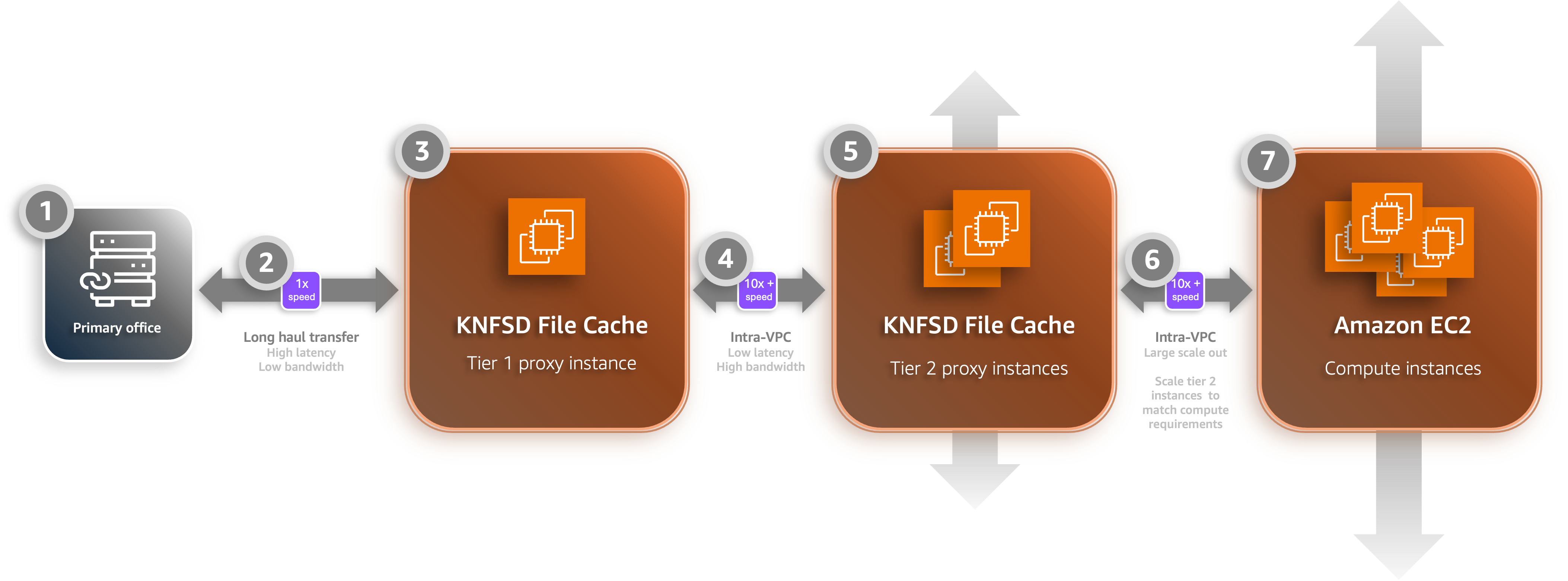
Figure 2: Example of a two-tier, KNFSD fanout architecture
The displayed configuration contains the following features:
- Source mounts – The source NFS file servers, where data will be cached from, and processed data will be written back to.
- Long-haul transfer – Data is cached into the primary Tier 1 KNFSD instance, supporting low bandwidth, high latency scenarios.
- Tier 1 KNFSD instance – This primary tier instance provides a single point of caching for the long-haul traffic and passes writes back to the source filers.
- Intra-cache transfer – Data transfer between your KNFSD Tier 1 and Tier 2 instances happens within the Amazon Virtual Private Cloud (Amazon VPC).
- Tier 2 KNFSD instances – These instances fan out to accommodate throughput needs, allowing tailoring of the instance type to suit the performance characteristics of the workloads required and using the local Amazon VPC for performant transfer capabilities.
- Compute-cache transfer – Compute instances mount to the Tier 2 KNFSD instances using the same low latency/high bandwidth local Amazon VPC connections.
- Elastic compute – Amazon EC2 instances scale to process workloads, accessing their dependent source data on the Tier 2 KNFSD instances without modification, writing results back when required, and providing signals to scale up Tier 2 to support throughput requirements.
Observability and metrics
Traditional NFS infrastructure often operates as a closed system; teams know storage feels slow but lack the granularity to diagnose why or to make informed decisions about capacity. KNFSD publishes over 70 custom metrics to CloudWatch using the CloudWatch Agent and an OpenTelemetry-based KNFSD metrics agent. These metrics provide comprehensive visibility into every layer of the caching infrastructure, supporting a deep, data-driven understanding of the infrastructure performance. The following figure shows multiple examples of metrics displayed in dashboard views.
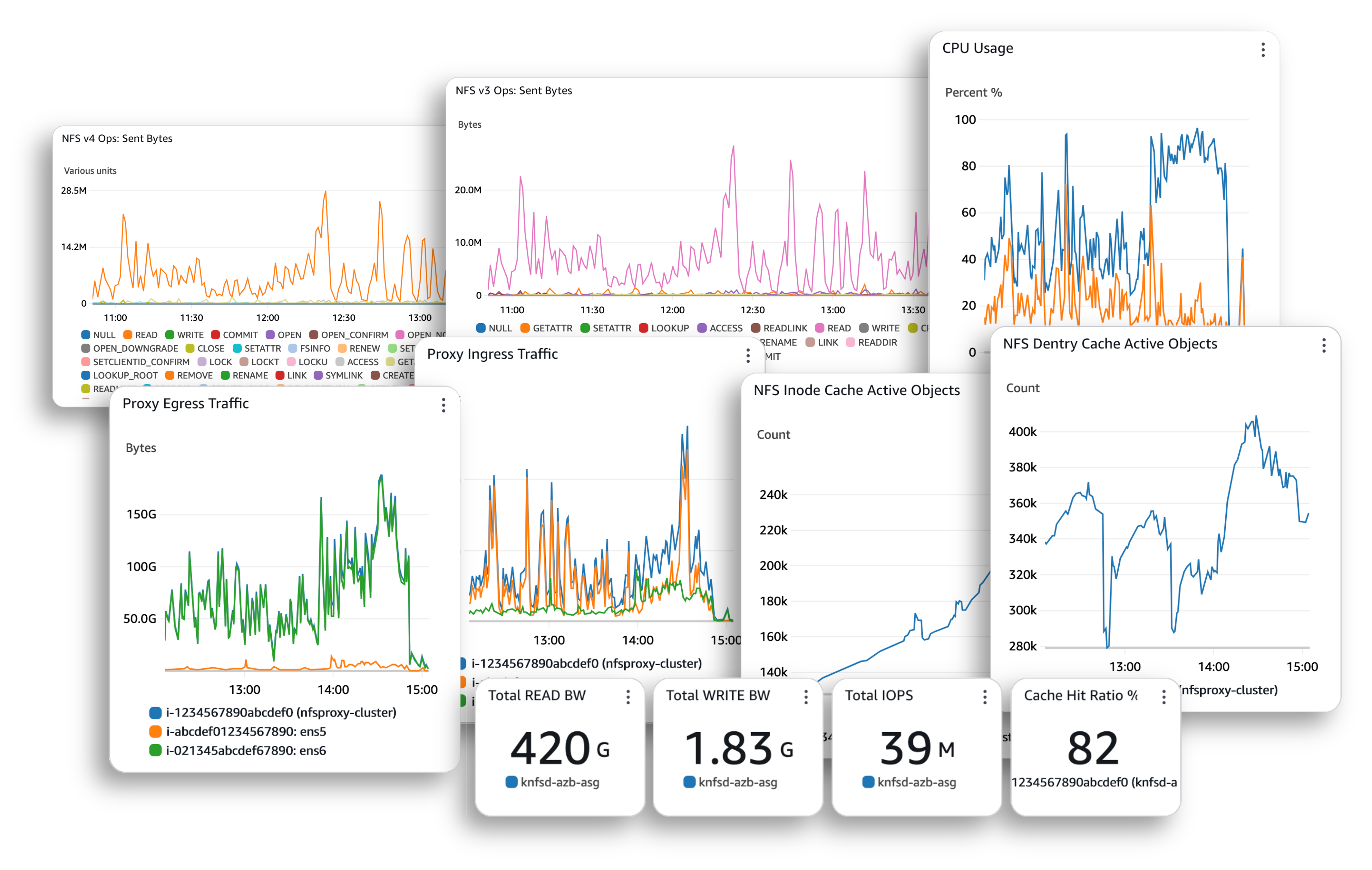
Figure 3: Multiple views of metrics available using KNFSD
Metric categories
The published metrics cover five key areas:
- NFS connections and client counts – Track cluster utilization and know when to scale out additional KNFSD instances.
- Read/write throughput and latency (RTT and EXE) – Confirm clients are getting local-speed performance and identify degradation early.
- FS-Cache hit/miss rates, least recently used (LRU) activity, and space utilization – Understand how effectively the cache is serving hot data rather than fetching from the source.
- NFS thread and socket queue depths – Detect saturation in the proxy’s request-handling pipeline before it becomes a client-visible bottleneck.
- Per-mount and per-export breakdowns – Pinpoint which specific exports or source servers are driving load, enabling targeted tuning.
Together, these metrics provide a complete picture of proxy health, cache effectiveness, and client-side experience, so operators can make informed decisions about capacity, performance tuning, and cost optimisation.
“For AWS to deliver a solution that hooks right into metrics and gives you real insight into what’s going on, that’s huge. The dashboards are solid and provide visibility that most teams simply don’t have into their render farm data.”
– Rob Dueckman, Senior Solutions Architect, Integrated Media Technologies (IMT) Global
Pre-built CloudWatch dashboard
A pre-built CloudWatch dashboard is deployed alongside the cluster as part of the standard infrastructure-as-code deployment. This provides immediate, out-of-the-box visibility without requiring manual metric configuration. The dashboard surfaces the most operationally significant metrics at a glance, including cache hit ratio, active object counts, read/write bandwidth, IOPS, and per-proxy traffic distribution.
Export to Prometheus and Grafana
Because the metrics agent is OpenTelemetry-based, you can also export telemetry to Prometheus and Grafana if preferred.
Right-sizing infrastructure and controlling costs
The cache hit ratio (the single most important metric) directly measures how effectively the proxy absorbs read load that would otherwise hit the origin server. When combined with LRU eviction rates and thread and socket queue depths, it tells operators exactly how to respond: scale out (add KNFSD instances) when connections are saturated but the hit ratio is healthy, scale up the cache disk when evictions climb and the hit ratio drops.
These same metrics eliminate guesswork when performance issues arise. Operators can quickly distinguish between network constraints, cache disk saturation, and proxy overload, then take the appropriate targeted action rather than blindly adding capacity.
Developer experience and deployment
The project is designed to get you from clone to running cluster with minimal friction. The repository ships with a Visual Studio Code Dev Container that provides a fully configured development environment (Terraform, Packer, Go, Python, AWS Command Line Interface (AWS CLI), and all linting and testing tools) ready to use without installing anything locally. Open the repo, launch the container, and you’re building AMIs and deploying clusters immediately.
Deployment is a single Terraform module that requires only your Amazon VPC subnet, your AMI build, and your source NFS exports to begin. The KNFSD infrastructure (Amazon EC2 Auto Scaling group, security groups, health checks, DNS records, optional load balancer, FSID database, and so on) is created and managed declaratively. You version-pin to a release tag and update at your own pace through the standard Terraform workflow.
The same Dev Container environment supports the full development lifecycle: building AMIs with Packer, executing and profiling performance, deploying test clusters, and running smoke tests using Terratest integration. There’s no gap between the contributor environment and the deployment environment: they’re the same environment.
Auto scaling
Autoscaling for NFS caching doesn’t work well with standard metrics. CPU utilization poorly reflects proxy load—an instance can be saturated with NFS connections while CPU utilization sits at 40%. KNFSD instead scales on a custom CloudWatch metric: the number of active NFS connections per instance. When connections exceed your configured threshold, the cluster adds capacity automatically. The scaling policy is deliberately scale-up only, because scaling down would evict warm cache data that took time to build, and more critically, would sever active NFS mounts, causing client-visible I/O stalls. When your workload subsides, you scale down on your own schedule.
Get started
KNFSD is open source under the Apache 2.0 license and available now on GitHub.
The repository includes:
- Detailed prerequisites for getting started.
- A step-by-step tutorial that walks you through deploying a source NFS server, a KNFSD proxy, and an NFS client end-to-end
- Comprehensive documentation covering every feature, configuration variable, and operational consideration
- Ready-to-use examples for Amazon FSx for NetApp ONTAP, Amazon FSx for OpenZFS, and third-party NFS Gateway devices
For questions, feature requests, or feedback:
- GitHub issues
- Contact us through email
Conclusion
Your NFS infrastructure was never meant to stop at the data center wall. With KNFSD, it doesn’t have to.
Whether you’re running compute-heavy tasks across thousands of cores, or extending hybrid workflows into AWS without re-architecting your pipeline, KNFSD gives your data the same elasticity that your compute already enjoys on AWS—transparently, performantly, and without storage lock-in.
Get started today at KNFSD File Cache.
Further reading
- For more information about NFS re-exports from the AWS HPC community: Accelerating file reads with a storage caching server (AWS HPC Blog)
- To understand more about how Wētā FX scaled on AWS with NFS re-exporting for Avatar 2: Way of Water: How Wētā FX scaled NFS for Avatar: The Way of Water (DigiPro 2023)