AWS for M&E Blog
Streamlining content compliance: Automating media analysis with AWS Bedrock – Part 2
In a previous post on the AWS for M&E Blog, we introduced a framework for automating content compliance using foundation models (FM) on Amazon Bedrock, demonstrating a two-stage workflow that performs video-level analysis followed by targeted frame-level analysis to flag potential compliance issues across multiple regional rating systems. In this post, we extend that foundation by providing a complete reference implementation on GitHub with deployment instructions so you can run the solution with your own content.
From automation to intelligence
The scope of what media compliance teams must evaluate continues to expand. Broadcast watershed and indecency regulations, obscenity standards, language restrictions, content ratings requirements across dozens of regional and international frameworks, technical quality control specifications, accessibility mandates, brand safety guidelines—the list of compliance obligations facing media organizations is extensive and constantly evolving. Every market carries its own regulatory expectations, cultural sensitivities, and enforcement timelines, and content that clears one jurisdiction might require edits, re-ratings, or outright rejection in another.
Manual compliance reviews—frame-by-frame analysis performed by human reviewers against printed rating taxonomies—are expensive, inconsistent, and increasingly unsustainable at scale. Reviewer fatigue introduces variability, and the sheer volume of content means that backlogs grow faster than teams can clear them.
But merely analyzing content against rating standards isn’t sufficient. A compliance decision requires validating rights and clearance, enforcing technical delivery specifications, and reconciling content against title registries. As compliance teams face mounting pressure, three challenges stand out:
- Fragmented validation workflows – Rights checks, quality control (QC) reviews, and content analysis happen in silos, requiring manual coordination and repeated handoffs across teams and tools.
- Limited contextual reasoning – Existing automation can flag content, but can’t cross-reference findings against business data like rights windows, delivery specs, or title metadata to produce a complete compliance picture.
- Escalation bottlenecks – When issues arise, compliance officers lack a unified view of content status, slowing decision-making at the point where speed matters most.
In this post, we demonstrate how to build an end-to-end agentic compliance system using foundation models on Amazon Bedrock, such as Amazon Nova. The solution introduces specialized AI agents to augment content analysis for rights validation, quality control, and title data lookups. The result is a compliance workflow that flags content and validates it against your business rules, delivering a complete compliance decision and reducing end-to-end processing time from days to minutes.
The following demo is an end-to-end walkthrough of the solution presented at NAB Show 2026, a leading annual trade show for professionals in the media, entertainment, and technology sectors.
Solution overview
The key components of the solution are a user experience layer, an ingest and preparation layer, an analysis layer, an agent validation layer, and a storage and integration layer.
Users interact with a content compliance web portal served by Amazon CloudFront and protected by AWS WAF, with authentication managed by Amazon Cognito. AWS AppSync provides the real-time GraphQL API connecting the frontend to the compliance pipeline, enabling live status updates as content moves through analysis.
In the ingest and preparation layer, raw video assets are uploaded to Amazon Simple Storage Service (Amazon S3), triggering an AWS Lambda function that generates metadata and initiates the AWS Step Functions main state machine. The ingest workflow uses AWS Elemental MediaConvert to generate playback assets, open source tools for frame extraction, and Amazon Transcribe to generate transcripts when not provided with the source asset.
With prepared video and transcript, Amazon Nova performs full video-level analysis, detecting regional ratings and content moderation flags across the entire asset in a single pass. A second workflow step triggers frame-level analysis using an image-understanding model on Amazon Bedrock, producing a detailed moderation timeline at the individual frame level.
In this workflow, we created the following specialized agents that operate concurrently within the agent validation layer:
- Rights agent – Validates content clearances against rights data, checking distribution windows, territory restrictions, and platform entitlements
- QC agent – Reviews metadata and technical specifications against quality control standards for target delivery formats
- IMDb agent – Augments content moderation findings with external title data, powered by IMDb data for enriched context
These agents are optional and can be adapted to your environment. They serve as reference implementations illustrating the potential of these capabilities. You can:
- Replace them with agents tailored to specific rights management, QC, or metadata systems
- Add new agents to address additional validation domains (for example, localization, accessibility, or regulatory domains)
- Modify the underlying sample data in knowledge bases to connect to existing infrastructure
The following image is a screenshot of the Content Compliance Demo console showing results from agent validation.
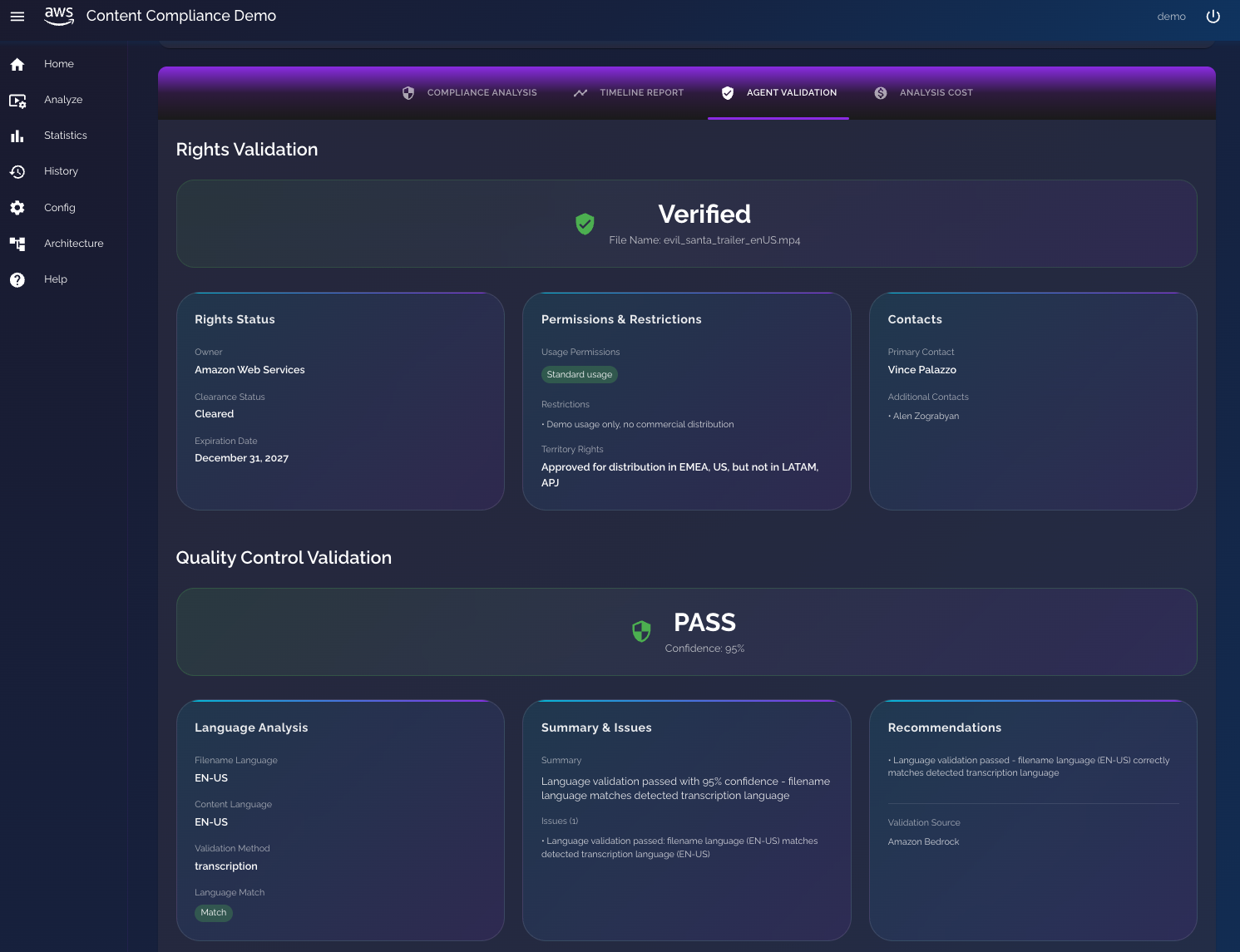
Figure 1: Screenshot from solution showing agent validation results
In the storage and integration layer, Amazon S3 stores media files and compliance reports, while Amazon DynamoDB retains analysis results, pricing statistics, and workflow artifacts. Completed compliance results are surfaced directly in the UI as well as the timeline view of Mimir by Fonn Group, integrating with existing media asset management (MAM) workflows. Mimir is a serverless cloud-native media production and collaboration platform that unifies production asset management (PAM), digital asset management (DAM) and MAM capabilities in a single interface.
How the workflow executes:
- Content ingestion – A media asset is uploaded to Amazon S3, triggering the pipeline.
- Ingest and preparation – MediaConvert is used to generate an HTTP Live Streaming (HLS) playback asset and for the frame extraction. Amazon Transcribe produces a transcript if one wasn’t provided. FFmpeg segments the video into smaller parts, allowing the analysis of long-form content.
- Full video analysis – Amazon Nova analyzes the complete video and transcript, producing regional ratings and moderation flags with confidence scores.
- Frame-level analysis – A configurable image-understanding model on Amazon Bedrock performs frame-by-frame visual analysis, generating a timestamped moderation timeline.
- Parallel agent execution – The rights, QC, and IMDb agents execute concurrently, each validating against their respective business data sources or knowledge base.
- Compliance package assembly – All agent outputs are assembled into a structured compliance package covering content analysis, rights status, QC results, and title metadata.
The following diagram is the solution architecture.
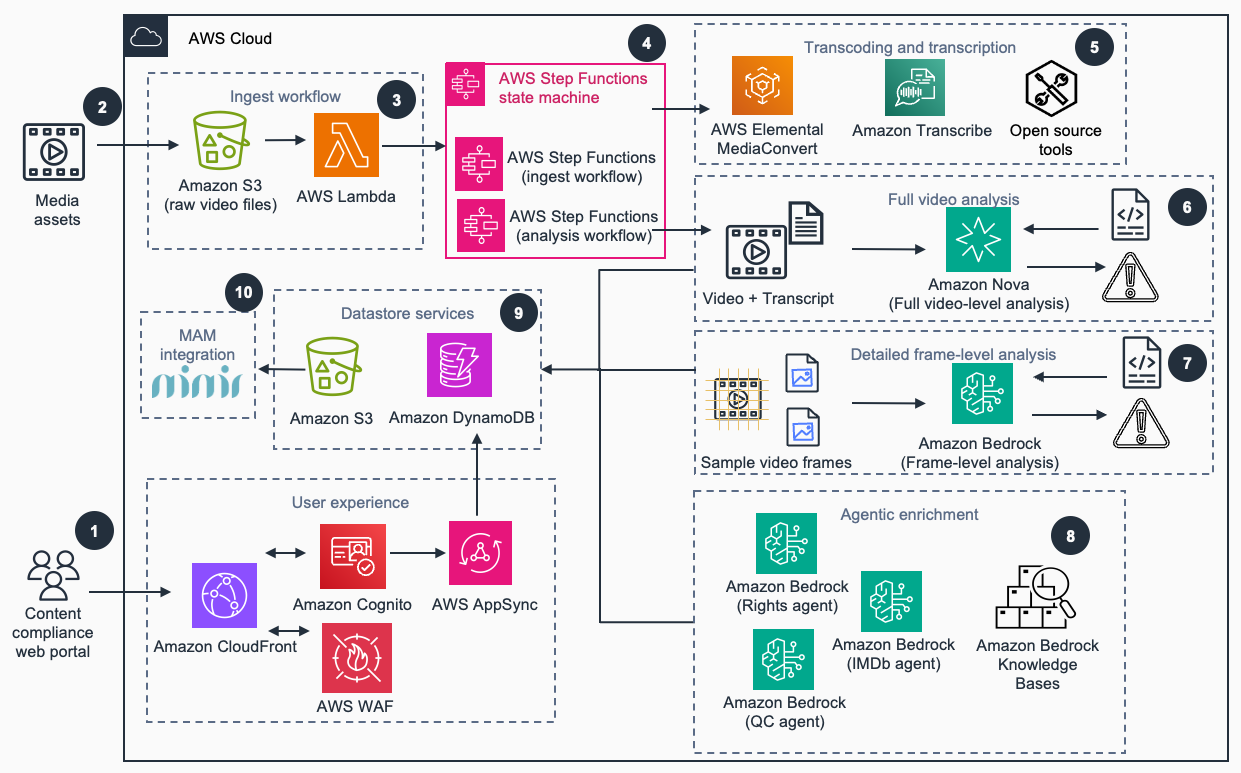
Figure 2: Content compliance with agents reference architecture
Configurable models and analysis parameters
Rather than locking operators into a single model for all analysis tasks, the content compliance solution is built to provide freedom of choice at every layer of the analysis pipeline. Organizations can select the best model for their specific content type, accuracy requirements, and cost targets. This flexibility is powered by Amazon Bedrock, a fully managed service that provides access to a broad range of high-performing foundation models through a single API.
Amazon Nova 2 Lite: Sharper analysis, greater efficiency
The foundation of any compliance pipeline is the accuracy of the content analysis. If the video analysis misses nuance—a fleeting visual element, an ambiguous lyrical reference, a fast-cut sequence—downstream processes inherit that gap, and the entire workflow degrades. Amazon Nova 2 Lite addresses this directly, delivering meaningful accuracy improvements on the kinds of edge cases that previously required human review.
In our testing across long-form and short-form content, Amazon Nova 2 Lite demonstrates three key advances:
- Higher accuracy on nuanced content elements – The model closes the gap on categories like suggestive imagery in motion, contextual drug references, and implied violence that earlier versions flagged inconsistently. This reduces false negatives at the first-pass stage, meaning fewer issues slip through undetected.
- Dramatically accelerated analysis – What previously required hours of manual reviewer time now completes in minutes per asset, enabling large-scale library processing that would be economically impractical with human-only workflows. By automating the first-pass analysis, teams can reallocate reviewer hours to edge cases and final decisions rather than exhaustive frame-by-frame screening.
- Maintained cost efficiency – Large-scale library processing becomes economically viable with the efficient price performance of Amazon Nova, even for catalogs with hundreds of thousands of assets.
- 1M context window – Long-form content (full episodes) can still be analyzed in a single pass without chunking, preserving narrative context that is critical for accurate thematic and tonal assessment.
Model selection for full video analysis
For full video analysis, operators can select Amazon Nova models or Twelve Labs Pegasus directly from the solution’s configuration interface. These multimodal understanding models enable full-video analysis without requiring frame extraction or manual chunking. The following screenshot shows the solution UI with general video analysis results.
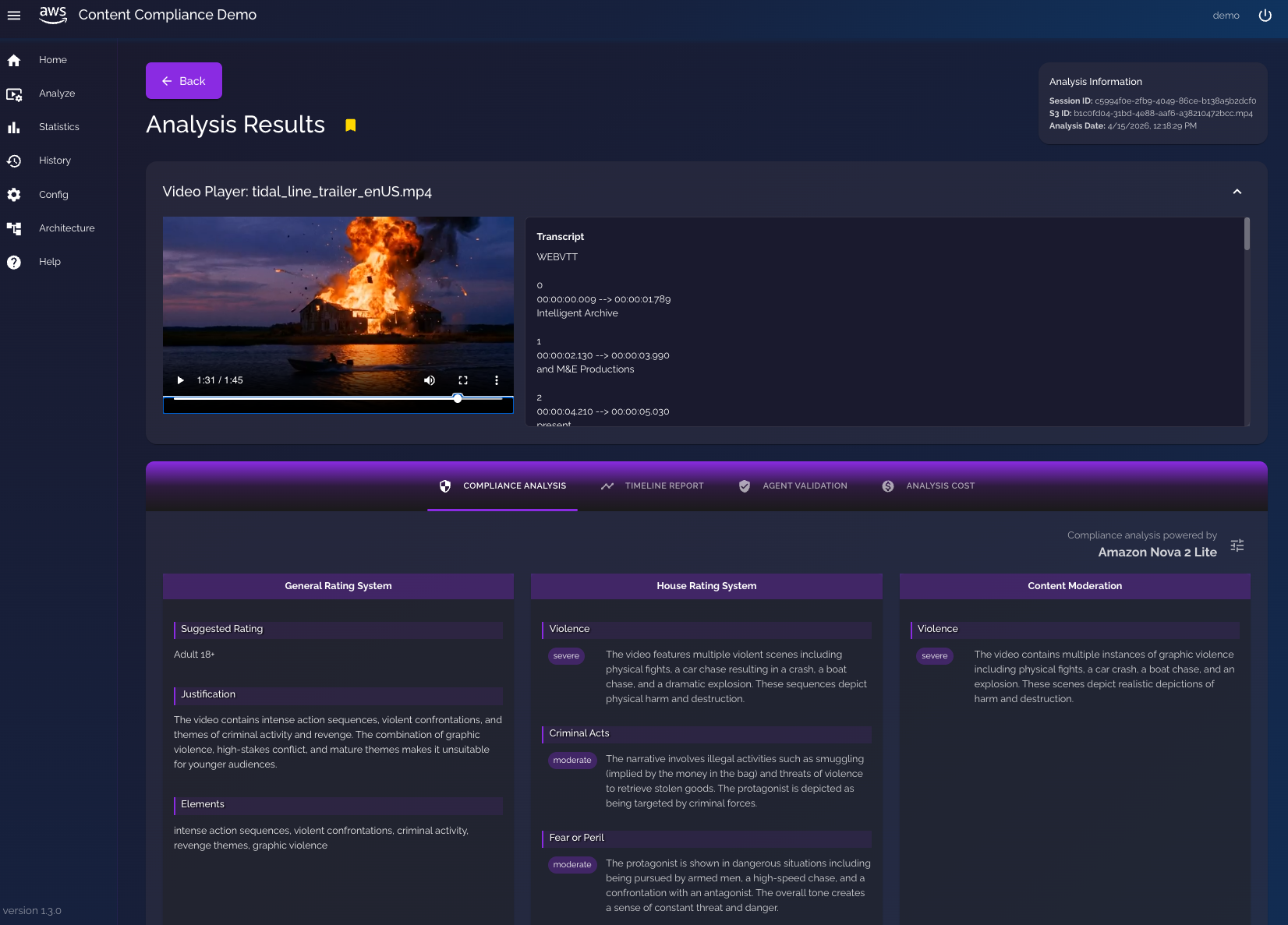
Figure 3: Screenshot from solution showing general video analysis
Model selection for frame-level analysis
For frame-level analysis, in addition to the Amazon Nova model family, operators can select from models in Claude by Anthropic in Amazon Bedrock, providing access to some of the most capable vision-language models available:
- Amazon Nova models – Consistent with the video-level selection and optimal for high-volume frame analysis pipelines
- Claude by Anthropic (for example, Claude Sonnet 4.6) – Provides visual reasoning and nuanced scene interpretation and is particularly valuable for content categories requiring complex thematic analysis
The frame-level model selection is independent of the video-level model, so operators can pair a cost-efficient video model with a frame analysis model for targeted workflows such as fine-grained small text detection, brand or logo identification, or other frame-level detail nuances. For example, a production pipeline might use Amazon Nova 2 Lite for full video analysis and escalate only flagged segments to Claude by Anthropic for deeper frame-level review. These options are currently selectable in the application. The application can be updated to add other models as well. The following screenshot shows the solution UI with an overview of the frame-level analysis.
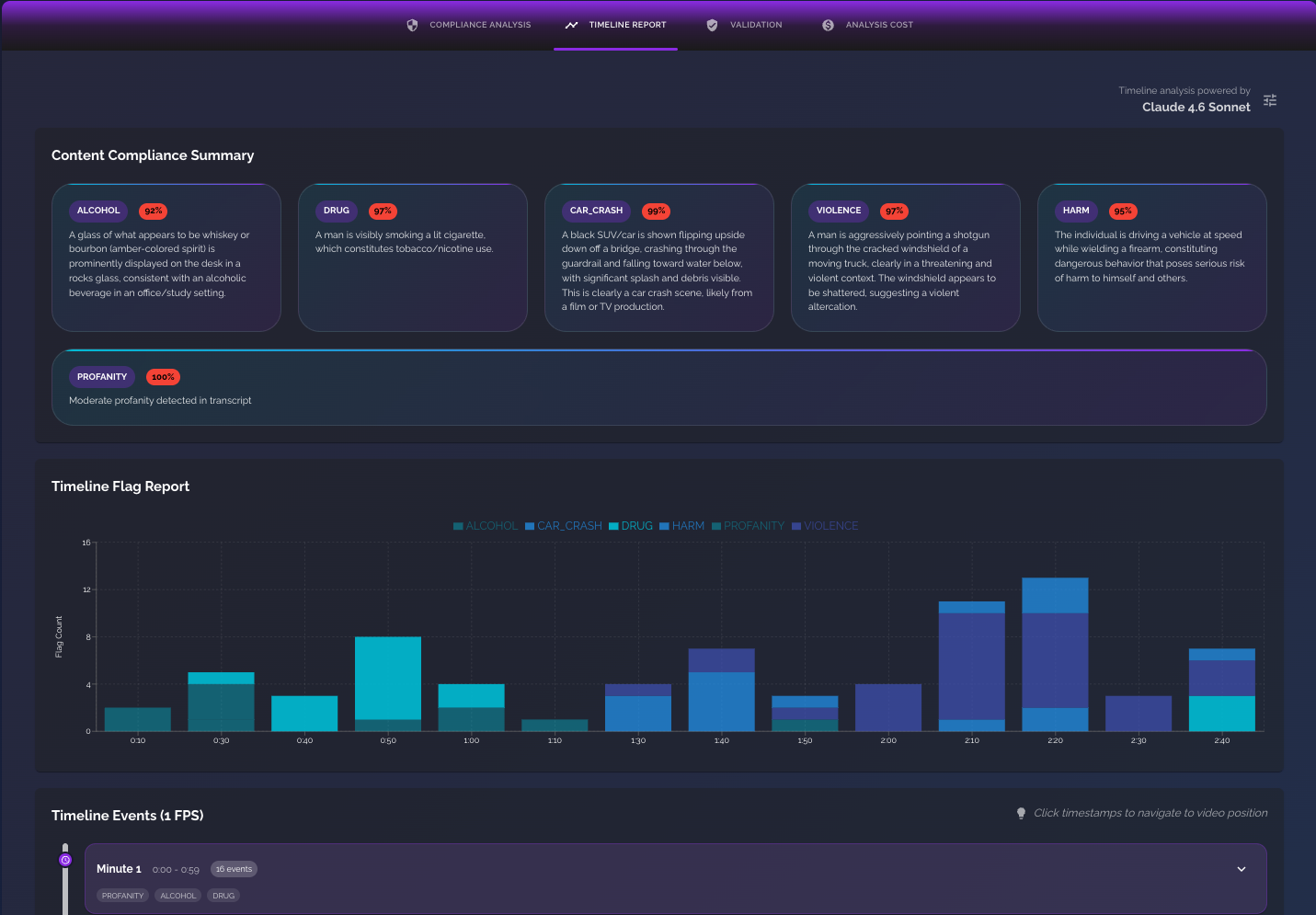
Figure 4: Screenshot from solution showing frame-level analysis overview
The following screenshot shows the solution UI with the details of the frame-level analysis.
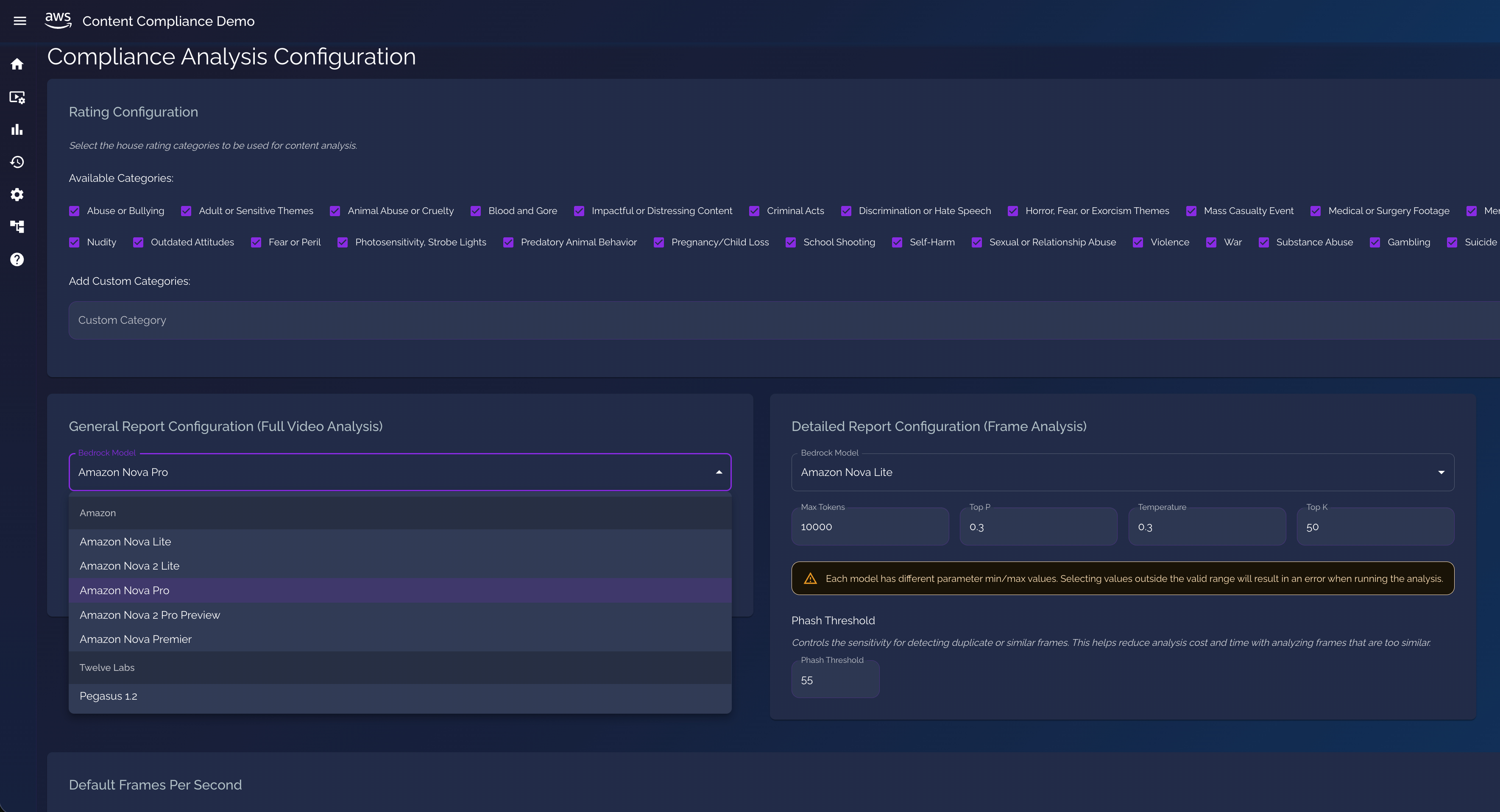
Figure 5: Screenshot from solution showing frame-level analysis details
Configurable rating categories
The solution ships with more than 25 predefined content analysis categories:
- Violence, sexual content, and adult themes
- Hate speech, discrimination, and extremist content
- Self-harm and suicide references
- Drug, alcohol, and substance references
- Profanity and language restrictions
- Animal abuse, criminal acts, and blood and gore
- Abuse or bullying, dangerous activities
Beyond these defaults, operators can add custom rating categories tailored to their specific compliance requirements, such as house rating systems, regional content standards, or brand safety guidelines.
Adaptive frame extraction by content type
Not all content is created equal. A fast-cut music video or action sequence demands significantly more visual sampling than a static news segment or dialogue-heavy drama. Our framework addresses this through adaptive frame extraction by content type in which operators can adjust the frames-per-second rate from the default sampling based on content dynamics:
- High-dynamic content (music videos, sports, or action sequences) – 3 or more frames per second (FPS) to capture rapid cuts
- Low-dynamic content (news, dialogue, or episodic content) – 1 FPS default
Combined with a perceptual hash (pHash) threshold that detects and skips visually similar frames, this ensures thorough compliance coverage for fast-paced formats without applying the same computational cost to slower-paced content. A configurable pHash threshold controls sensitivity for detecting visually similar or duplicate frames during extraction. By tuning this threshold, operators can reduce redundant frame-level analysis on content with static backgrounds or low motion. Operators configure it one time in the settings, shown in the following screenshot, and it applies automatically based on content type selected at analysis time. This configuration lever changes pricing calculations per duration of video. For example, two separate videos that are the same duration and FPS value might result in different pricing based on the number of frames the pHash removes. To accurately estimate pricing and workflow time, run your media through the application and navigate to the pricing tab to see pricing details.
Figure 6: Screenshot from solution showing configuration page
Processing long-form content
The solution handles multi-hour feature films and episodic content by automatically segmenting video into fixed-length chunks (default: 15 minutes), analyzing each segment independently alongside its corresponding transcript, then merging all segment-level results into a single cohesive compliance report. This approach preserves the full narrative context within each segment while keeping inference calls within model token limits, enabling end-to-end analysis of content at any duration.
The default fixed-duration segmentation works well for prototyping and general use. For production workflows with long-form content, consider enhancing the segmentation step with dynamic shot or scene detection. Splitting at natural editorial boundaries produces more meaningful analysis units and reduces the chance of a compliance-relevant moment being split across two segments.
Configurable RAI permissions for compliance and moderation
Accurate content analysis also requires the model to describe what it actually sees without restriction. By default, Amazon Nova models apply content filters designed for general-purpose use. For compliance officers and content moderators, however, analyzing explicit or sensitive content isn’t incidental—it’s the job. A moderation system that declines to describe what it observes isn’t useful in a professional review workflow.
Amazon Bedrock now supports the ability to disable specific responsible AI (RAI) content filters for approved moderation workloads. This capability is intended exclusively for professional content moderation use cases and requires appropriate AWS account configuration and approval. Contact your AWS account team for configuration assistance.
A compliance decision is only as useful as the workflow that acts on it. For many media organizations, the systems-of-record for content decisions are their MAM platforms, not standalone review interfaces. The content compliance solution is purely for testing purposes, but it’s also designed to integrate with existing MAM environments.
Integration with Mimir
Mimir is built for broadcast and digital-first workflows and helps teams manage the full lifecycle of media, from ingest and review through collaboration, editing workflows, sharing, and long-term archive. Mimir manages live and file-based video, images, and audio, and uses AI-assisted metadata logging to power fast discovery at scale through industry-leading search and retrieval.
In this integration, Mimir serves as the MAM integration point for the compliance solution, demonstrating how AI-powered compliance analysis can be embedded directly into an operator’s existing operational tooling. Compliance analysis is initiated from within the Mimir user experience as part of normal asset review. The integration triggers an API call-out to the compliance solution, the pipeline runs asynchronously, and results are written back to Mimir as structured findings associated with the asset so operators can validate outcomes and take action without leaving their system of record.
Compliance results in Mimir’s logging view
Mimir presents compliance findings as a timestamped event log alongside the video player. Each compliance entry includes:
- Timestamp range – Start and end time of the flagged segment, enabling precise navigation to the relevant portion of the asset
- Classification label – A compliance tag that identifies the entry type within Mimir’s logging system, keeping compliance events distinct from other asset events
- Descriptive detail – A plain-language description of the flagged content generated by the analysis models (for example, “a large explosion is visible destroying a building near a waterway, with a boat speeding away in the foreground” or “a figure dressed in a Santa Claus costume is holding a blood-soaked axe, with blood dripping from the weapon onto the floor, clearly depicting graphic violent content”)
Operators can click any entry in the logging timeline to jump the video player directly to that timestamp, enabling immediate visual validation of the flagged segment. This tight integration between the compliance timeline and the playable video proxy reduces the review cycle from minutes of manual scrubbing to a single click. The following screenshot shows compliance flags in Mimir.
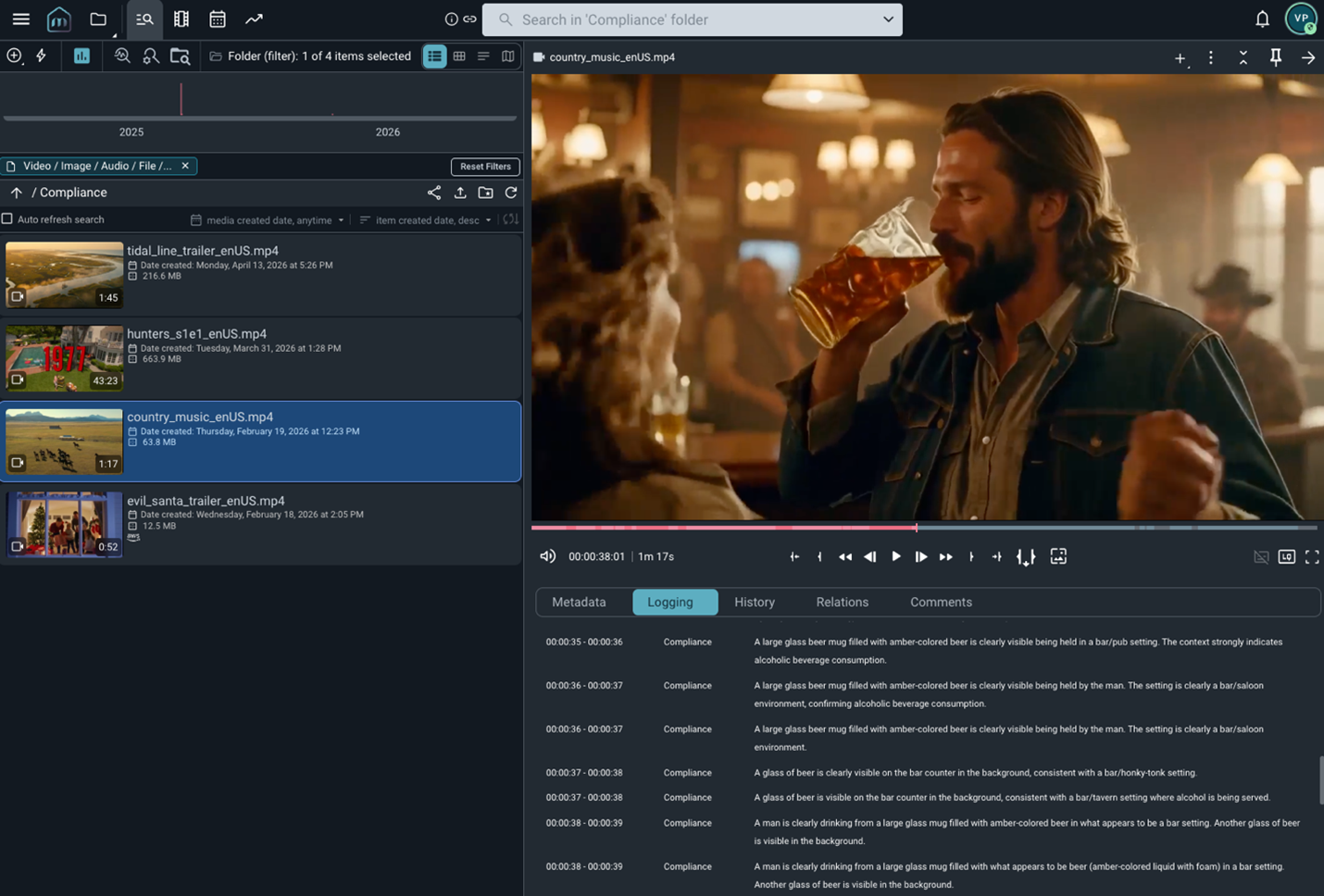
Figure 7: Screenshot from Mimir showing compliance flags
The following screenshot shows timestamp-level compliance flags in Mimir.
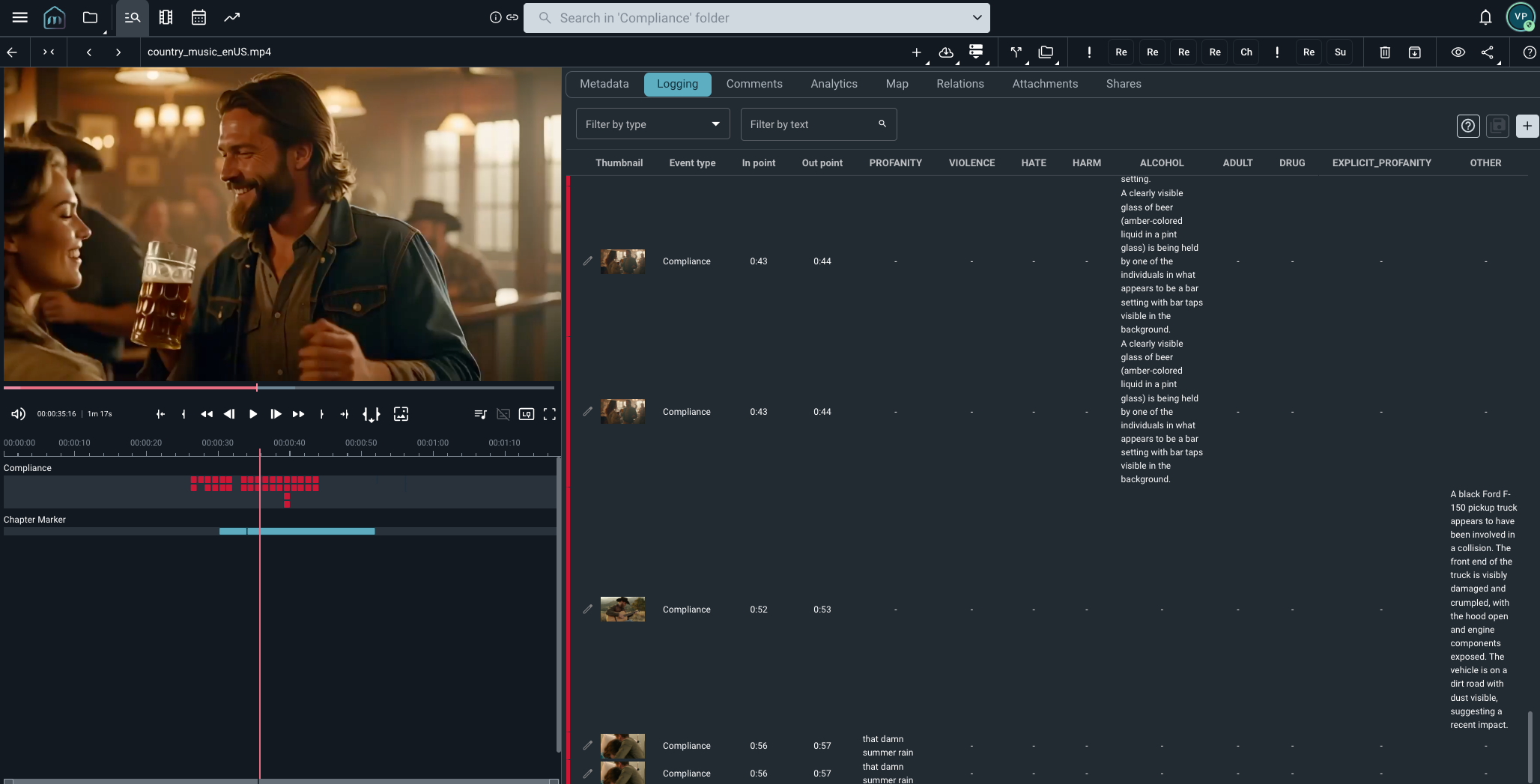
Figure 8: Screenshot from Mimir showing timestamp-level compliance flags
Agent validation with IMDb Parental Guide
The IMDb Parental Guide is a community-driven content advisory system providing factual scene-level descriptions and crowd-sourced severity ratings (None, Mild, Moderate, or Severe) across five categories—Sex and Nudity, Violence and Gore, Profanity, Alcohol/Drugs/Smoking, and Frightening/Intense Scenes—covering over 190,000 titles with daily updates.
Within the solution, we use this data to augment the content analysis AI-generated findings. After video- and frame-level analysis identifies on-screen content, the agent retrieves corresponding IMDb Parental Guide entries, so operators can validate AI detections against established human-reviewed descriptions and severity assessments for the same title.
The IMDb Parents Guides dataset is available in AWS Marketplace through AWS Data Exchange as an add-on to IMDb core data packages.
Best practices and considerations
When implementing the solution, keep the following best practices in mind:
- RAI configuration governance – Scope RAI moderation configuration to dedicated environments, implement strict AWS Identity and Access Management (IAM) access controls, and enable AWS CloudTrail logging for all Amazon Bedrock API calls. Establish a formal review process for any changes to RAI settings.
- Agent design – Keep specialized agents focused on a single domain. This makes them easier to test, update, and replace independently as your systems evolve.
- Threshold management – Use Amazon Bedrock Prompt Management to control versions of your compliance prompts and threshold configurations. This enables rapid updates—for example, when a new regional rating standard is introduced—without requiring application redeployment.
- Human-in-the-loop design – Design your human review interface around the full compliance package, not only the content analysis. Compliance officers make better decisions faster when they can see rights status, QC results, and prior compliance history alongside AI findings.
- Feedback loops – Implement mechanisms for compliance officers to record decisions and corrections. These datasets are invaluable for evaluating model performance over time and identifying systematic gaps in your prompts or thresholds.
Conclusion
Content compliance has always been a domain where accuracy and speed are in tension. Manual review is accurate but slow; automated systems are fast but historically prone to missing nuance. The combination of multimodal understanding in Amazon Nova 2, configurable RAI permissions for professional workloads, and agentic patterns resolves this tension in a meaningful way.
Organizations can now deploy a compliance pipeline that analyzes content with depth, validates it against live business data, and routes it intelligently, all in the time it previously took to assign a ticket. The solution is designed to augment compliance teams, not replace them. This frees compliance officers to apply their expertise where it matters most.
Ready to transform your content compliance workflow? Contact an AWS Representative to learn how we can help accelerate your business.