Sold by: Molecular Quantum Solutions
Deployed on AWS
AWS Free Tier
Cebule™ combines quantum chemistry, molecular dynamics, and graph neural networks in an easy to handle orchestration system accessible via tailored user interfaces and a SDK. This allows one to construct powerful high-throughput screening pipelines which can be shared with other team members. The generated data sets can be connected to machine learning training and fine-tuning tasks.
Overview
Image
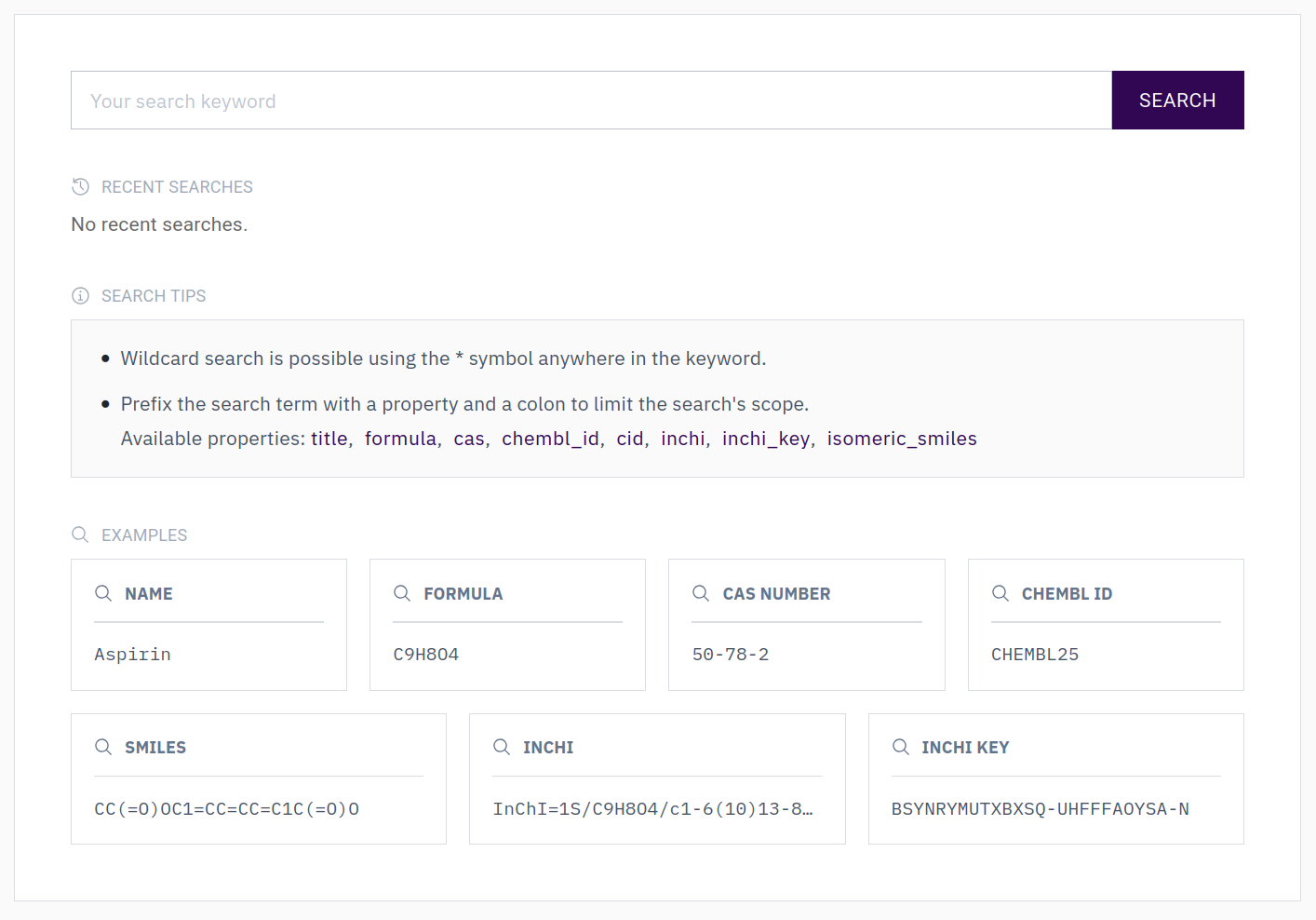
Cebule Molecules Database and Search
Image
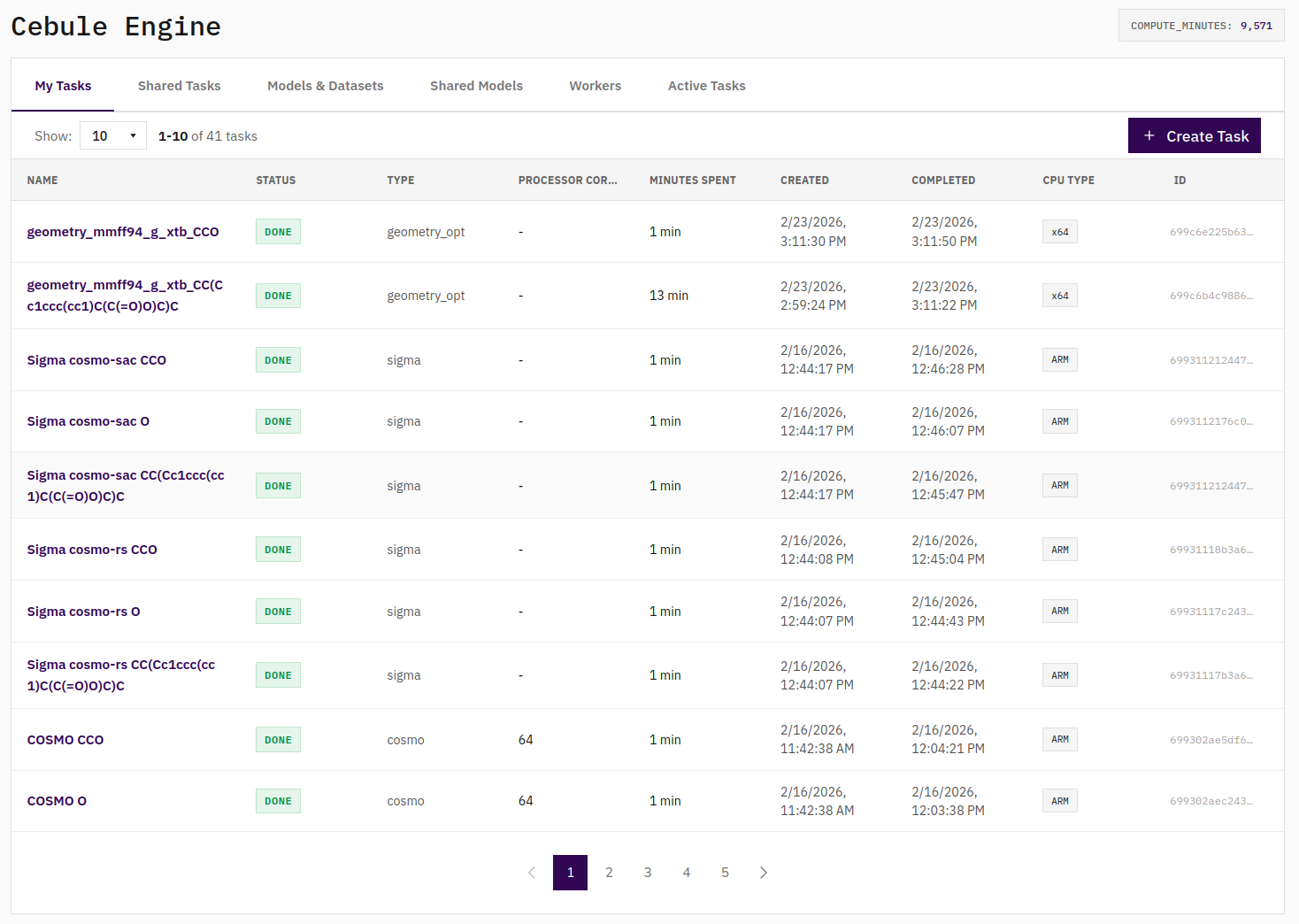
Cebule Engine
Image
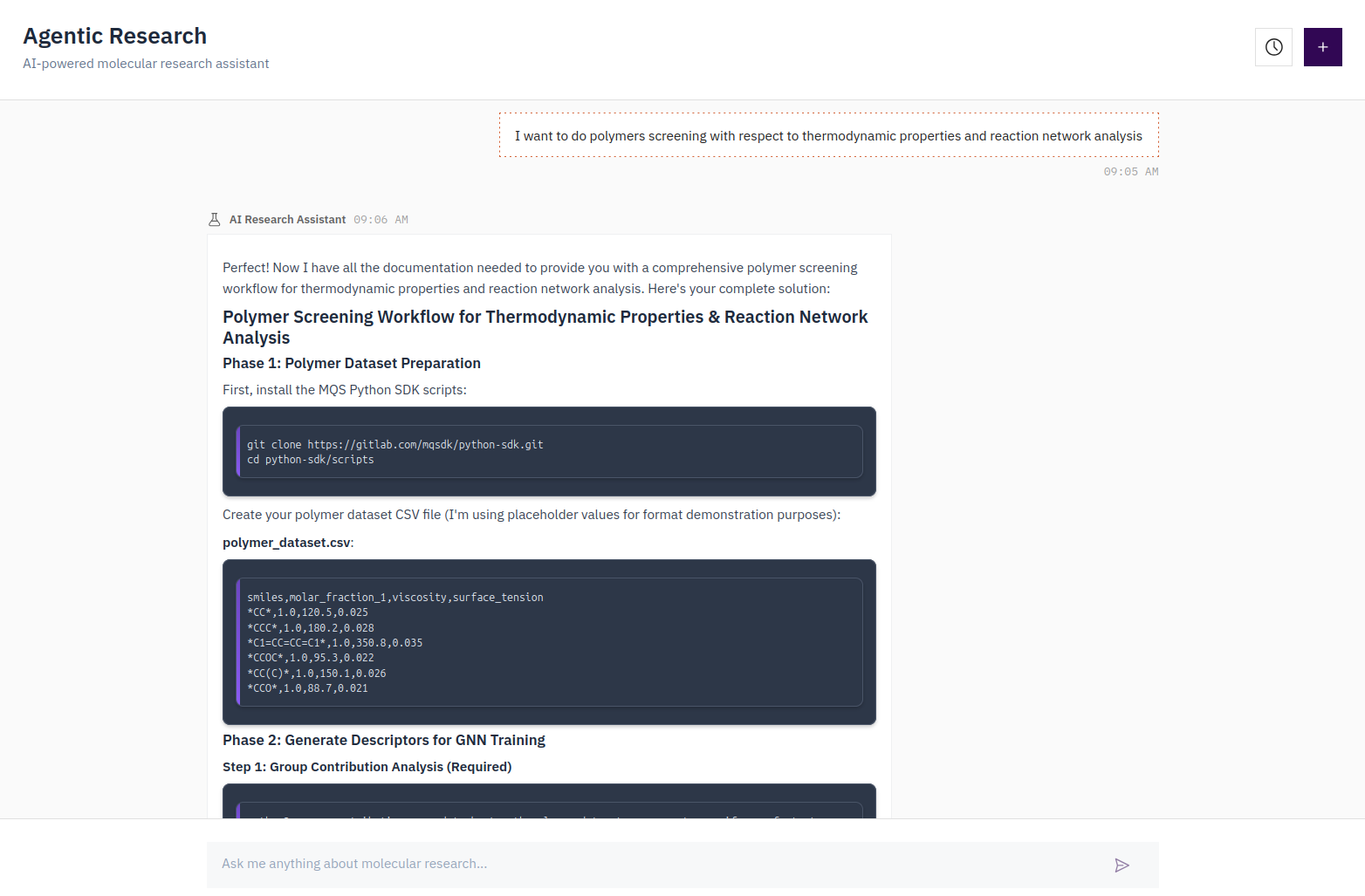
Cebule Agentic Research
The Cebule™ Platform consists of multiple tools and elements which help you to perform highly sophisticated high-throughput screening pipelines of molecules and structures:
Molecules Database. Access over 200 million geometry-optimized molecules. The Research Agent provides direct links to molecular data and SDK access for seamless integration into your workflows.
Input Guidance with the Research Agent. Get clear formatting examples in form of .csv file examples, complete with sample molecules (the ones you asked for) and data structures to accelerate your setup.
Workflow Generation with the Research Agent. Receive on-the-fly code scripts customized for your use case, plus SDK integration examples to streamline your workflow with a step by step guide.
Cebule Dashboard. Store research queries, code examples, and custom workflows in one place. Develop and refine your code directly within our hosted JupyterLab environment.
Open Architecture. Our modular design ensures no platform lock-in. Cebule SDK workflows integrate smoothly with other quantum chemistry and quantum computing packages while aligning with MLOps best practices.
Highlights
- Automated pipeline calculations via modular quantum chemistry, machine learning models tailored to CPU (Intel, AMD, ARM), GPUs (Nvidia, AMD) and QPUs.
- +200 million molecules already geometry optimized which reduces computational time for high throughput screening pipelines and allows to source specific chemical classes for machine learning purposes.
- Agentic research tool to help you set up calculations more easily and faster. The agent will provide you data examples and how to run tasks via the Python SDK. The Cebule agent makes use of the Molecules Database and the SDK documentation while also sourcing open access research literature to make your development process as efficient as possible.
Details
Sold by
Categories
Delivery method
Delivery option
Cebule API, Workers, DB, and S3
Latest version
Operating system
AmazonLinux Amazon Linux 2 (2023)
Deployed on AWS
New
Introducing multi-product solutions
You can now purchase comprehensive solutions tailored to use cases and industries.

Features and programs
Financing for AWS Marketplace purchases
AWS Marketplace now accepts line of credit payments through the PNC Vendor Finance program. This program is available to select AWS customers in the US, excluding NV, NC, ND, TN, & VT.

Pricing
Pricing is based on the duration and terms of your contract with the vendor. This entitles you to a specified quantity of use for the contract duration. If you choose not to renew or replace your contract before it ends, access to these entitlements will expire.
Additional AWS infrastructure costs may apply. Use the AWS Pricing Calculator to estimate your infrastructure costs.
Dimension | Description | Cost/12 months |
|---|---|---|
Annual License | Annual subscription to the Cebule product | $50,000.00 |
Dimensions summary
You buy the Cebule Platform through a single option: an Annual License billed by units. This is a contract subscription that runs for one year. You choose the number of units you need, so the total scales with the quantity you select. There are no separate tiers or add-on dimensions. Access covers the platform's tools for quantum chemistry and machine learning calculations across research and product design use cases. Renewal continues on the same annual, unit-based structure.
Top-of-mind questions for buyers
The pricing table defines each unit as an annual subscription to the Cebule product. The exact resource or seat a single unit maps to is not specified in the available data. Contact the vendor to confirm how units are counted for your intended usage before you commit.
Your license covers a toolstack for quantum chemistry and machine learning calculations. This includes solubility, stability, toxicity, and viscosity analysis, geometry optimization, molecular dynamics, and reaction network work. You can use it across pharma, chemistry, and materials research use cases through both code-based and dashboard interfaces.
No. This is a contract subscription billed by the number of units you select for a one-year term. Your total is fixed by that quantity, not by how many calculations you run. Usage does not add charges within the annual license itself.
docs.mqs.dk
Helpful?
Vendor refund policy
No refund possible since trialing the Cebule platform is possible via https://cebule.mqs.dk and a pay per usage model.

Legal
Vendor terms and conditions
Upon subscribing to this product, you must acknowledge and agree to the terms and conditions outlined in the vendor's End User License Agreement (EULA) .
Content disclaimer
Vendors are responsible for their product descriptions and other product content. AWS does not warrant that vendors' product descriptions or other product content are accurate, complete, reliable, current, or error-free.
Delivery details
Cebule API, Workers, DB, and S3
This CloudFormation delivery option deploys the complete Cebule architecture in the buyer’s AWS account.
What gets deployed
Networking: A VPC with public and private subnets in two Availability Zones, Internet Gateway, NAT Gateway, and route tables. Security groups restrict traffic so only the ALB is internet-facing; API and workers talk to DocumentDB and S3 within the VPC.
Compute: An Application Load Balancer in the public subnets; an Auto Scaling Group of API EC2 instances behind the ALB (port 8080); a separate Auto Scaling Group of worker instances in the private subnets. Both use launch templates with user data that fetches configuration from Secrets Manager and starts the Cebule API and worker services.
Database: An Amazon DocumentDB (MongoDB-compatible) cluster in the private subnets, with credentials stored in AWS Secrets Manager. Encrypted at rest with 7-day backup retention.
Storage: An S3 bucket with versioning and server-side encryption (AES-256) for task results and application data. Access is private (IAM roles only).
Secrets: Secrets Manager holds DocumentDB credentials, application config (Auth0, API keys), S3 config, and the Cebule registration token. API and worker instances assume IAM roles and retrieve secrets at launch—no long-term access keys in the template.
Parameters buyers must provide
Required: Auth0 client ID and secret, Auth0 domain and audience, Cebule registration token, DocumentDB master username. Network CIDRs and instance types have sensible defaults but can be changed.
Outputs
The stack exposes the API Load Balancer URL, DocumentDB endpoint and port, S3 bucket name, and Secret ARNs so buyers can integrate with their tools and finish configuration (e.g. updating app config or GHCR secrets after first deploy).
Use case
Best for production or staging deployments where you want the full Cebule stack—API, workers, database, and storage—deployed in one action with security and scaling built in.
CloudFormation Template (CFT)
AWS CloudFormation templates are JSON or YAML-formatted text files that simplify provisioning and management on AWS. The templates describe the service or application architecture you want to deploy, and AWS CloudFormation uses those templates to provision and configure the required services (such as Amazon EC2 instances or Amazon RDS DB instances). The deployed application and associated resources are called a "stack."
Version release notes
Updated task containers
Additional details
Usage instructions
Prerequisites
AWS account with permissions to create CloudFormation stacks, VPCs, EC2, DocumentDB, S3, and Secrets Manager resources.
Auth0 application (client ID, client secret, domain, audience).
Cebule registration token (shared between API and workers).
API and Worker AMIs built for your target region (e.g. us-east-1); use the AMI IDs from this listing after subscribing.
Launch steps
- Subscribe to this product in AWS Marketplace and continue to CloudFormation.
- Use Create stack with the template URL provided. Accept the template and move to the parameters screen.
- Required parameters. Set ApiAmiId and WorkerAmiId to the product AMI IDs for your region (shown after subscription). Enter EnvironmentName, Auth0ClientId, Auth0ClientSecret, Auth0Domain, Auth0Audience, CebuleRegistrationToken, and DocumentDbMasterUsername. Leave optional parameters, e.g. GhcrUsername, GhcrToken, blank unless you use private container images.
- Under Stack options and Advanced options, leave defaults or adjust (e.g. tags). Acknowledge that the template may create IAM resources (CAPABILITY_NAMED_IAM).
- Create the stack. Wait until status is CREATE_COMPLETE (typically 15 to 25 minutes).
- In the stack Outputs tab, note ApiLoadBalancerUrl. Test the API: curl http://<ApiLoadBalancerUrl>/health (or https if you attach a certificate to the ALB).
- (Optional) Update Secrets Manager secrets (e.g. app/config, docker/ghcr) with your final configuration. Restart API or worker instances if needed so they pick up changes.
Post-deploy
API endpoint: use the ApiLoadBalancerUrl output.
DocumentDB: use DocumentDbEndpoint and DocumentDbPort; credentials are in the secret named in DocumentDbSecretArn.
S3 bucket: use S3BucketName output. App config in AppConfigSecretArn.
For full parameter descriptions and architecture details, see the product documentation or README in the template source.
Resources
Vendor resources
Support
Vendor support
For getting technical support please don't hesitate to write us an email: support@mqs.dk
We highly recommend to use our research agent for all your technical or scientific questions until you have reached a good understanding of your R&D problem you would like to tackle: https://cebule.io
Further, the documentation and tutorial videos can help you to get an understanding how to use the Cebule Dashboards and the Cebule SDK.
AWS infrastructure support
AWS Support is a one-on-one, fast-response support channel that is staffed 24x7x365 with experienced and technical support engineers. The service helps customers of all sizes and technical abilities to successfully utilize the products and features provided by Amazon Web Services.
Similar products
Hive Platform is an all-in-one service that provides everything you need to develop and operate games. Experience the know-how of global game services experienced in more than 180+ countries with one Hive Platform.

Digibee is the only integration platform that minimizes cost and complexity while enabling rapid digital transformation. Any developer can build and manage integrations, connecting and modernizing the critical systems that drive their business.

Biz2X AI-powered digital lending platform empowers Banks, Credit Unions, NBFCs, NBFIs, and financial institutions to automate their end-to-end lending journey. The unified platform includes a comprehensive set of tools, including Customer Relationship Management, Loan Origination System, Loan Management System, Business Rule Engine, Portfolio Monitoring, and Collections.

BP Billing is an AI-native, multi-tenant SaaS solution that supports subscription, usage-based, and hybrid billing models for complex enterprise monetization. Built on a unified data model, it automates rating, mediation, invoicing, and order-to-cash workflows while integrating seamlessly with CRM, ERP, payments, and downstream financial systems. The platform provides scalable, API-first billing automation with real-time visibility, accuracy, and operational efficiency.
Customer reviews
No customer reviews yet
Be the first to review this product . We've partnered with PeerSpot to gather customer feedback. You can share your experience by writing or recording a review, or scheduling a call with a PeerSpot analyst.