
Sold by: PgCache
Deployed on AWS
Free Trial
PgCache is a smart read replica for PostgreSQL that caches the hot data driving most of your traffic. Stop paying to replicate cold data. Try it for free on a small workload, then scale as you grow. Change one connection string. Never serves stale data.
Overview
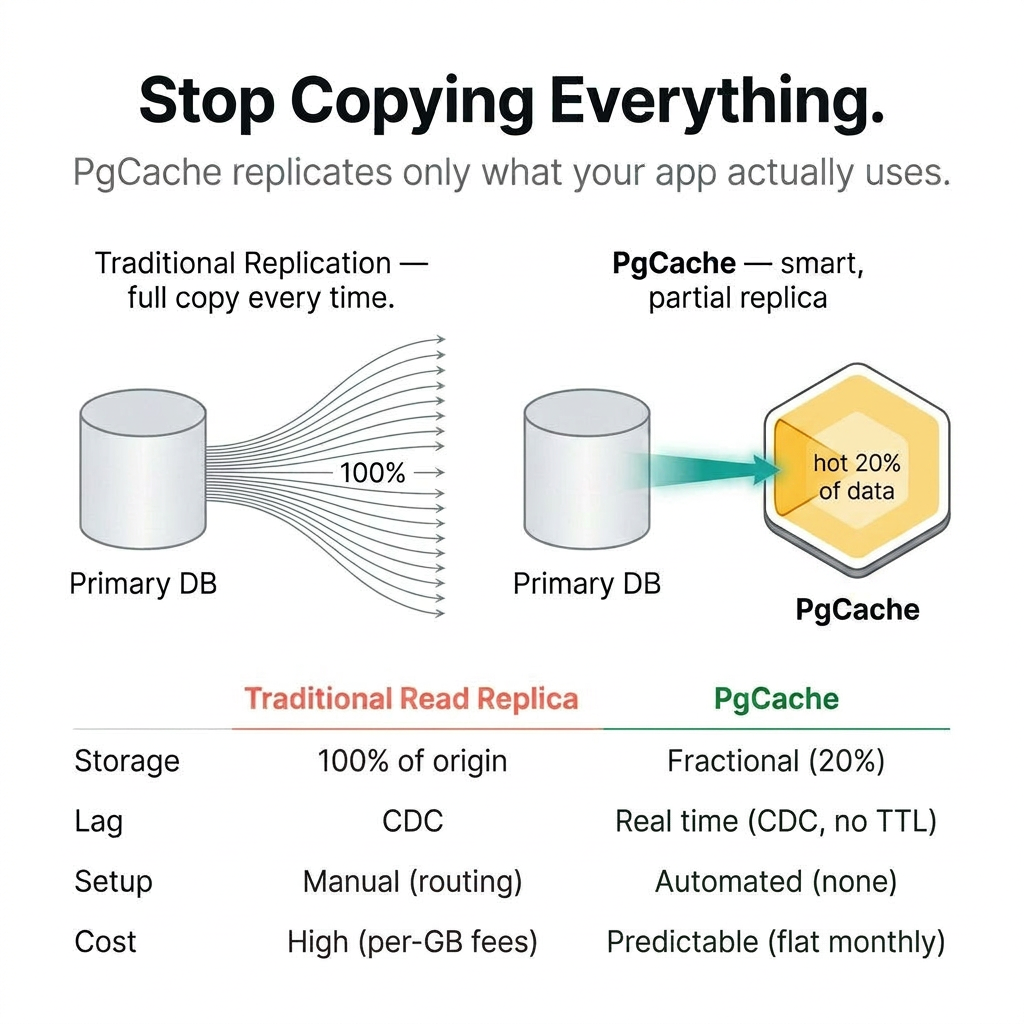
PgCache - Smart Read Replica for PostgreSQL
Stop Over-Provisioning
If you're using traditional read replicas to scale PostgreSQL, you may be paying to duplicate far more data than your workload actually needs. That means more always-on compute, more storage, more transfer cost, and more operational overhead. PgCache takes a simpler approach.
The Pareto Advantage
PgCache acts as a demand-driven proxy in front of PostgreSQL. It automatically caches the queries and data that are used most often, so you can get the benefits of a read replica without duplicating your full database footprint. The result is faster reads and lower infrastructure waste.
Drop-In Deployment
PgCache is a wire-compatible PostgreSQL proxy. Just update your connection string. No application code changes, no Redis layer, and no separate cache invalidation logic. Uncacheable queries pass through transparently to your origin database.
Always Fresh
PgCache uses PostgreSQL logical replication to keep cached data synchronized with the source database. Writes continue to go directly to your origin database, while reads are served from cache when possible. That means you can reduce stale-cache risk without adding complexity to your application.
Works With Your Existing Stack
PgCache works with PostgreSQL 16, 17, and 18, and supports any ORM or driver that speaks the PostgreSQL wire protocol. It handles parameterized queries, JOINs, aggregations, GROUP BY, DISTINCT, and window functions. If your app runs on Postgres, PgCache can fit into your existing stack.
Pricing That Scales With You
Start with a free small instance or 30-day free trial to test PgCache on a real workload before committing. After that, PgCache bills hourly per instance, the same way your read replica does. Run it 24/7 and it is a flat, forecastable line item: about $156 a month all-in for the recommended m6g.large. You are metered on instance hours, not queries, so the bill does not move when your traffic does.
Discord: https://discord.gg/n4Mrr7DgB4 For larger deployments or private enterprise offers, contact aws-team@pgcache.com
Highlights
- Cache the 20%, Offload the 80%: Automatically identifies and caches hot query data using demand-driven logic. Stop brute-force scaling and paying to replicate 100% of your cold data.
- Always Fresh, Never Stale: PostgreSQL Logical Replication (CDC) keeps cached data perfectly in sync in real time. No TTL guesses, no stale reads, no cache invalidation logic in your application.
- Test for free on a small workload, then pay by the instance hour. No per-query charges and no surprise bills, because your traffic volume is not a billing dimension. Running at scale? Contact us for a private offer at aws-team@pgcache.com
Details
Sold by
Delivery method
Delivery option
64-bit (Arm) Amazon Machine Image (AMI)
Latest version
Operating system
AmazonLinux 2023.10.20260302.1-kernel-6.1-arm64
Deployed on AWS
New
Introducing multi-product solutions
You can now purchase comprehensive solutions tailored to use cases and industries.

Features and programs
Financing for AWS Marketplace purchases
AWS Marketplace now accepts line of credit payments through the PNC Vendor Finance program. This program is available to select AWS customers in the US, excluding NV, NC, ND, TN, & VT.

Pricing
Free trial
Try this product free for 30 days according to the free trial terms set by the vendor. Usage-based pricing is in effect for usage beyond the free trial terms. Your free trial gets automatically converted to a paid subscription when the trial ends, but may be canceled any time before that.
Pricing is based on actual usage, with charges varying according to how much you consume. Subscriptions have no end date and may be canceled any time.
Additional AWS infrastructure costs may apply. Use the AWS Pricing Calculator to estimate your infrastructure costs.
Dimension | Cost/hour |
|---|---|
m6g.large Recommended | $0.137 |
m6g.medium | $0.0681 |
m6g.4xlarge | $0.959 |
m6g.xlarge | $0.274 |
m6g.2xlarge | $0.548 |
t4g.small | $0.00 |
Dimensions summary
You pay by the hour based on the EC2 instance size you run PgCache on. Six instance options are available: t4g.small, m6g.medium, m6g.large, m6g.xlarge, m6g.2xlarge, and m6g.4xlarge. These are not feature tiers. They differ only in compute capacity, so pricing scales up as you pick a larger instance to match your workload. You choose the size that fits your read traffic. Billing is usage-based and hourly, with no per-query charges and no monthly software fee. Run it continuously for a predictable, forecastable cost.
Top-of-mind questions for buyers
You pay for one running instance that acts as a caching proxy between your application and your PostgreSQL database. Each instance size maps to a set amount of compute. The proxy caches the hot data your traffic touches, so a larger instance handles more read traffic and cached working set.
Billing meters running instance-hours, so a stopped instance stops accruing software charges. There are no per-query charges and no monthly software fee. Underlying AWS storage may still bill separately while an instance is stopped. Run it continuously for a flat, forecastable line item.
Choose the instance size that matches your read workload; the six options differ only in compute capacity, not features. If traffic grows, you switch to a larger instance and your hourly rate follows that size. The change is manual — you select the new size when you deploy.
www.pgcache.com
Helpful?
Vendor refund policy
contact aws-team@pgcache.com

Legal
Vendor terms and conditions
Upon subscribing to this product, you must acknowledge and agree to the terms and conditions outlined in the vendor's End User License Agreement (EULA) .
Content disclaimer
Vendors are responsible for their product descriptions and other product content. AWS does not warrant that vendors' product descriptions or other product content are accurate, complete, reliable, current, or error-free.
Delivery details
64-bit (Arm) Amazon Machine Image (AMI)
Amazon Machine Image (AMI)
An AMI is a virtual image that provides the information required to launch an instance. Amazon EC2 (Elastic Compute Cloud) instances are virtual servers on which you can run your applications and workloads, offering varying combinations of CPU, memory, storage, and networking resources. You can launch as many instances from as many different AMIs as you need.
Version release notes
0.7.1 - 2026-10-15
Consistency
- Session settings tracked per connection: search_path, role, date-time, output and locale settings are now tracked on every connection, and reads forward while a setting they depend on is unknown. Previously a session on a non-default TimeZone or DateStyle could be served results computed under other settings.
- Results rendered with the client's settings: cache hits apply the client's output settings, so timestamps, intervals, floats, bytea and money render as origin would. Memo entries and coalesced waits are keyed by them.
- Date-time literals canonicalised: date and timestamp literals are normalised at registration, so sessions share a cache entry only when their literals select the same rows.
- Literal comparisons by column type: CDC evaluation compares literals by column type, not text, so '2024-01-15 10:00' matches 2024-01-15 10:00:00.
- Parse-changing settings forward the session: e.g. standard_conforming_strings = off or a non-UTF-8 client_encoding.
- $user in search_path: a quoted "$user" now expands to the current role, as in PostgreSQL.
- Shadowed builtins: sessions whose search_path lists pg_catalog after another schema are forwarded.
- Schema-qualified function calls: only pg_catalog-qualified calls are cached; myschema.f(x) was previously cached as the builtin.
- Concurrent deletes during population: a delete still waiting on a synchronous standby could be undone by an in-flight population.
- Stale memo entries: fixed two cases where a memo entry outlived the change that should have evicted it.
Performance
- Reads served despite an unrelated pending UPDATE: read-your-own-writes serves a read when the pending update assigns only columns the read doesn't reference.
- Fewer repopulations under CDC lag: an unrepairable TOAST update no longer invalidates a query that is still loading unless its snapshot missed the update.
- Lower per-query overhead: fewer allocations in parsing, registration and CDC evaluation.
Breaking Changes
- pgcache.txn.isolation_probes removed: use pgcache.conn.settings_probes.
- Cache host must support origin's locales: pgcache refuses to start if the cache database lacks origin's default lc_monetary, lc_numeric or lc_time.
Additional details
Usage instructions
PgCache AMI Usage
PgCache is a transparent caching proxy for PostgreSQL. This AMI includes PgCache and an embedded PostgreSQL 18 cache database, managed as systemd services. On first boot, a bootstrap script fetches your database credentials from AWS SSM Parameter Store and starts the proxy.
Prerequisites
Origin PostgreSQL database with wal_level = logical enabled Database user with REPLICATION role attribute or superuser IAM role attached to the instance with ssm:GetParameter permission
Quick Start
- Store your database URL in SSM
aws ssm put-parameter --name "/pgcache/prod/upstream-url" \ --type SecureString \ --value "postgres://user:password@host:5432/dbname?sslmode=require"
- Launch with user-data
Pass a script that calls the bootstrap with your SSM prefix: #!/bin/bash /opt/pgcache/bootstrap.sh --ssm-prefix /pgcache/prod
- Connect your application
Use the instance's private IP on port 5432.
Use the same database credentials that you stored in SSM.
SSM parameters (under your prefix)
All parameter names below are relative to your SSM prefix (for example, /pgcache/prod).
upstream-url (Required): Origin database connection URL. Example name: /pgcache/prod/upstream-url
replication-url (Optional): Separate connection URL for CDC replication. Example name: /pgcache/prod/replication-url
tls-cert (Optional): PEM-encoded TLS certificate for client connections. Example name: /pgcache/prod/tls-cert
tls-key (Optional): PEM-encoded TLS private key for client connections. Example name: /pgcache/prod/tls-key
Bootstrap options
Non-secret settings can be passed as flags in user-data along with your SSM prefix:
/opt/pgcache/bootstrap.sh --ssm-prefix /pgcache/prod --workers 4 --cache-size 4294967296 --allowed-tables users,orders
Common flags:
--workers (default: half of vCPUs): Number of PgCache worker threads.
--cache-size (default: unlimited): Maximum cache size in bytes; enables eviction when set.
--cache-policy (default: clock): Eviction policy, one of "clock" or "fifo".
--admission-threshold (default: 2): Number of times a query must be seen before it is cached.
--allowed-tables (default: all): Comma-separated list of tables that may be cached.
--pinned-tables (default: none): Comma-separated list of tables that are always kept in cache.
--pinned-queries (default: none): Semicolon-separated list of queries that are always kept in cache.
Managing the service
Check status: sudo systemctl status pgcache
View logs: sudo journalctl -u pgcache -f
Edit config: sudo vi /etc/pgcache/config.toml
Restart after config changes: sudo systemctl restart pgcache
Metrics
Prometheus metrics endpoint: http://<instance>:9090/metrics
Ports
5432: PgCache proxy (configure access via security groups).
9090: Prometheus metrics (optional; restrict as needed).
5433: Embedded PostgreSQL (listens on localhost only, not externally accessible).
Security
Database credentials are stored in SSM SecureString parameters and fetched at boot, not passed in user-data.
The PgCache configuration file is readable only by root and the postgres user.
Restrict access to port 5432 to your application VPC or specific security group sources.
Further documentation
Full documentation, including advanced configuration, troubleshooting, and architecture details, is available at:
Support
Vendor support
contact aws-team@pgcache.com
AWS infrastructure support
AWS Support is a one-on-one, fast-response support channel that is staffed 24x7x365 with experienced and technical support engineers. The service helps customers of all sizes and technical abilities to successfully utilize the products and features provided by Amazon Web Services.
Similar products

An AI-powered PostgreSQL monitoring and management platform that combines real-time metrics, proactive anomaly detection, and an agentic AI assistant to help teams diagnose and resolve issues faster.

pgEdge Cloud is fully managed, 100% open source PostgreSQL built for Agentic AI and high availability in regulated enterprises. Deploy in minutes from an intuitive console that provisions directly in your AWS account - full control, no lock-in. Start with a single node, add read replicas, or scale to multi-master clusters across regions with no re-platforming. pgEdge Cloud is AI-ready out of the box, with pgvector for vector storage and semantic search, and full compatibility with the pgEdge Agentic AI Toolkit including MCP Server, RAG Server, and hybrid search. The database platform where Agentic AI applications go to production. Meet data residency and compliance requirements in regulated industries like government, healthcare, and financial services. Deploy databases across regions to support data sovereignty and global operations. Includes backup/restore for distributed environments and 24/7 enterprise support.

TurboGate with MySQL is a complete automatic setup of your database and middletier proxy layer. It helps your business to use databases in a reliable and performant fassion. It also helps to set up your database environment in a fully automatic fassion with 1-click deployment.

TurboGate with MariaDB is a complete automatic setup of your database and middletier proxy layer. It helps your business to use databases in a reliable and performant fassion. It also helps to set up your database environment in a fully automatic fassion with 1-click deployment.
Customer reviews
No customer reviews yet
Be the first to review this product . We've partnered with PeerSpot to gather customer feedback. You can share your experience by writing or recording a review, or scheduling a call with a PeerSpot analyst.