
Sold by: cloudimg
Deployed on AWS
Free Trial
AWS Free Tier
This product has charges associated with it for seller support. Launch a ready-to-run Apache Spark 4 analytics engine in minutes - no cluster setup needed.
Overview
Image
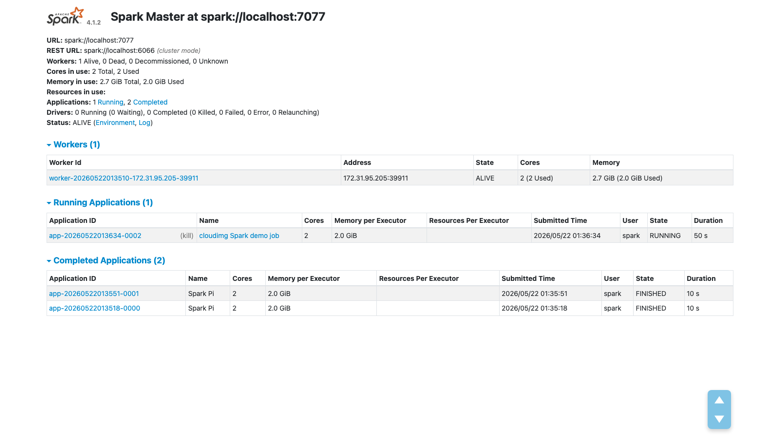
Spark master web UI
Image
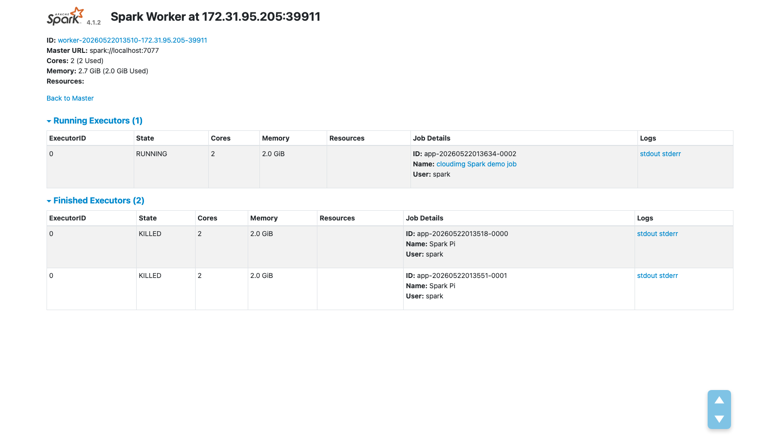
Spark worker detail
Image
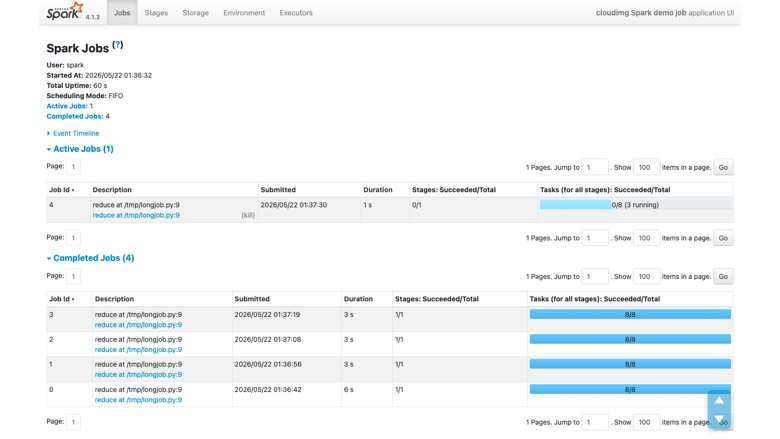
Completed Spark application
This is a repackaged open source software product wherein additional charges apply for cloudimg support services.
Overview
Apache Spark is the open source unified analytics engine for large-scale data processing. This AMI delivers Spark 4 fully installed and configured as a single-node standalone cluster on EC2, giving data engineers and small teams a working analytics engine without cluster orchestration overhead, Kubernetes dependencies, or managed-service lock-in. Submit your first spark-submit job or PySpark session within minutes of launch - not hours of configuration.
This is a repackaged open source software product with additional charges for cloudimg support services.
Why This AMI Over Alternatives
Unlike managed services that add cluster spin-up latency and per-cluster pricing, this image gives you full root access to a production-grade Spark installation on a single instance you control. There is no vendor lock-in beyond EC2, no orchestration layer to manage, and no multi-node complexity for workloads that fit a single powerful instance. For dev/test environments, proof-of-concept pipelines, or cost-sensitive production workloads, you get predictable compute costs with expert support included.
Application Stack
- Apache Spark 4 with the standalone cluster manager
- Spark master and Spark worker running as systemd services under a dedicated unprivileged spark user (automatic restart on failure, no external orchestrator needed)
- Java 17 providing the JVM runtime for every Spark process
- Python 3 installed for PySpark
- spark-submit, spark-sql, spark-shell, and pyspark CLI tools ready to use immediately
AWS Integrations
This Spark image works with core AWS data services:
- Amazon S3 - Read and write data directly from S3 buckets for scalable, durable storage of input datasets, intermediate results, and output files. Use S3 as your data lake layer without managing HDFS.
- Amazon EBS - The dedicated data volume leverages EBS for independently resizable, encrypted storage. Enable EBS encryption to protect Spark worker data, SQL warehouse contents, and daemon logs at rest.
- AWS IAM - Attach IAM instance profiles to control access to S3 buckets, DynamoDB tables, and other AWS resources without embedding credentials in your Spark jobs.
Ready to Use
The Spark distribution, configuration, systemd units, and standalone cluster are all in place at boot. The master web UI is served on port 8080, showing the cluster state, workers, and every running or completed application. Submit your first job with spark-submit or start an interactive PySpark session immediately.
Security and Hardening
- Spark processes run under a dedicated unprivileged user - not root
- No passwords or shared credentials baked into the image
- Supports EBS encryption at rest for the data volume
- Recommended deployment behind a security group restricting port8080 (master UI) and port 7077 (master RPC) to trusted CIDR ranges only
- cloudimg support can assist with enabling TLS for master-worker communication and configuring Spark authentication
- On first boot, a one-shot service writes a non-secret information file and marks itself complete - no secrets are generated or stored
Dedicated Data Volume
A separate, independently resizable EBS data volume holds the Spark worker work directory, the SQL warehouse, and daemon logs. This prevents disk-full failures during large shuffles or extended job runs by keeping cluster data isolated from the operating system disk. Resize the volume as your workloads grow without reprovisioning the instance.
Example Use Case: Nightly ETL Pipeline Development
A data engineer prototyping a nightly ETL pipeline reads raw CSV or Parquet files from an S3 bucket, transforms them with PySpark, and writes cleansed output back to S3. The single-node cluster handles datasets up to hundreds of gigabytes on memory-optimized instances. Once validated, the same spark-submit scripts can be promoted to a multi-node cluster with minimal changes.
Additional Use Cases
- Large-scale batch data processing and ETL
- Interactive analytics and ad hoc SQL over large datasets
- Data engineering pipeline development and testing
- Machine learning feature engineering
- Proof-of-concept clusters before scaling to multi-node deployments
Getting Started
Book a free consultation with cloudimg engineers to discuss your Spark deployment requirements, architecture review, or guided pilot setup. Our team can help you select the right instance type, configure security groups, enable encryption, and optimize job performance for your specific workload.
All product and company names are trademarks or registered trademarks of their respective holders. Use of them does not imply any affiliation with or endorsement by them.
Highlights
- Apache Spark 4 launches as a fully configured single-node standalone cluster with the master and worker supervised by systemd. If a process fails, systemd restarts it automatically - no external orchestrator, no Kubernetes dependency, and no multi-node complexity. Unlike managed services with cluster spin-up overhead, your analytics engine is accepting jobs within minutes of instance launch, giving data engineers immediate productivity.
- Java 17 and Python 3 are pre-installed and version-matched so spark-submit, spark-sql, spark-shell, and PySpark all work immediately with zero version reconciliation. This eliminates the hours typically spent resolving JVM and Python compatibility issues on a fresh install. The dedicated EBS data volume keeps shuffle data and logs separate from the OS disk, preventing disk-full failures during large jobs and supporting EBS encryption at rest.
- 24/7 technical support from cloudimg engineers with a one-hour average response for critical issues. Get expert help with Spark deployment, cluster configuration, job tuning, enabling TLS and authentication, and performance optimization. Unlike community-only support on free AMIs, you have a dedicated team ready to assist with production issues around the clock.
Details
Sold by
Categories
Delivery method
Delivery option
64-bit (x86) Amazon Machine Image (AMI)
Latest version
Operating system
Ubuntu 24.04
Deployed on AWS
New
Introducing multi-product solutions
You can now purchase comprehensive solutions tailored to use cases and industries.

Features and programs
Financing for AWS Marketplace purchases
AWS Marketplace now accepts line of credit payments through the PNC Vendor Finance program. This program is available to select AWS customers in the US, excluding NV, NC, ND, TN, & VT.

Pricing
Free trial
Try this product free for 7 days according to the free trial terms set by the vendor. Usage-based pricing is in effect for usage beyond the free trial terms. Your free trial gets automatically converted to a paid subscription when the trial ends, but may be canceled any time before that.
Pricing is based on actual usage, with charges varying according to how much you consume. Subscriptions have no end date and may be canceled any time. Alternatively, you can pay upfront for a contract, which typically covers your anticipated usage for the contract duration. Any usage beyond contract will incur additional usage-based costs.
Additional AWS infrastructure costs may apply. Use the AWS Pricing Calculator to estimate your infrastructure costs.
If you are an AWS Free Tier customer with a free plan, you are eligible to subscribe to this offer. You can use free credits to cover the cost of eligible AWS infrastructure. See AWS Free Tier for more details. If you created an AWS account before July 15th, 2025, and qualify for the Legacy AWS Free Tier, Amazon EC2 charges for Micro instances are free for up to 750 hours per month. See Legacy AWS Free Tier for more details.
Dimension | Description | Cost/hour |
|---|---|---|
m5.xlarge Recommended | m5.xlarge | $0.12 |
t2.micro | t2.micro instance type | $0.04 |
t3.micro | t3.micro instance type | $0.04 |
m8azn.metal-24xl | m8azn.metal-24xl instance type | $0.24 |
g4dn.4xlarge | g4dn.4xlarge instance type | $0.24 |
c8i-flex.12xlarge | c8i-flex.12xlarge instance type | $0.24 |
c7i-flex.xlarge | c7i-flex.xlarge instance type | $0.12 |
m8a.16xlarge | m8a.16xlarge instance type | $0.24 |
c5d.12xlarge | c5d.12xlarge instance type | $0.24 |
t3a.nano | t3a.nano instance type | $0.00 |
Vendor refund policy
Refunds available on request.

Legal
Vendor terms and conditions
Upon subscribing to this product, you must acknowledge and agree to the terms and conditions outlined in the vendor's End User License Agreement (EULA) .
Content disclaimer
Vendors are responsible for their product descriptions and other product content. AWS does not warrant that vendors' product descriptions or other product content are accurate, complete, reliable, current, or error-free.
Delivery details
64-bit (x86) Amazon Machine Image (AMI)
Amazon Machine Image (AMI)
An AMI is a virtual image that provides the information required to launch an instance. Amazon EC2 (Elastic Compute Cloud) instances are virtual servers on which you can run your applications and workloads, offering varying combinations of CPU, memory, storage, and networking resources. You can launch as many instances from as many different AMIs as you need.
Version release notes
Initial release of Apache Spark 4 as a single node standalone cluster.
Additional details
Usage instructions
Connect via SSH on port 22 as the default login user for your operating system variant (the user guide lists it per variant). The Spark master and worker start automatically under systemd. Browse to http://<instance-public-ip>:8080/ to open the Spark master web UI. To run a job, SSH in, switch to the spark user with 'sudo -iu spark', source the environment with 'source ~/setEnv.sh', then use spark-submit or pyspark. The standalone cluster ships with Spark authentication disabled; the user guide explains how to enable a shared secret before exposing the RPC port beyond the instance.
Resources
Vendor resources
Support
Vendor support
cloudimg provides 24/7 technical support for this Apache Spark product by email and live chat.
Contact
Email: support@cloudimg.co.uk Live chat: Available around the clock
Response Times
Critical issues receive a one-hour average response time. Our engineers assist with deployment, configuration, updates, performance tuning, job optimization, enabling authentication and TLS, and general troubleshooting.
What We Help With
- Initial deployment and launch guidance
- Spark cluster configuration and tuning
- Security hardening (authentication, TLS, security group recommendations)
- Job performance optimization
- Troubleshooting errors and failures
- Guidance on instance type selection for your workload
- Assistance with S3 integration and IAM configuration
Getting Started
Contact us for a free consultation to discuss your Spark deployment requirements, review your architecture, or request a guided pilot setup. We can help you select the right EC2 instance family based on your data volume and processing needs.
Refunds
If you experience issues with the product, contact our support team and we will work to resolve them. For refund requests, please reach out via email with your subscription details.
AWS infrastructure support
AWS Support is a one-on-one, fast-response support channel that is staffed 24x7x365 with experienced and technical support engineers. The service helps customers of all sizes and technical abilities to successfully utilize the products and features provided by Amazon Web Services.
Similar products

Apache Hudi connector with shaded dependencies to work with AWS Glue.

Easily access Iceberg tables and operate DDLs, reads/writes, time-travels, streaming writes on the Iceberg tables.

Bansir offers this software product repackaged where additional charges apply for technical support provided by Bansir Cloud email support@bansircloud.com.

This product has a fee associated with the provision and deployment of the application and AMI support. Apache Superset is a modern, enterprise-ready business intelligence web application.

Enterprise-grade Kafka UI and API for deep visibility, precise control, and instant action across your ecosystem. Kpow is secure, vendor-agnostic, and trusted by Fortune 500s for managing Apache Kafka at scale.
Customer reviews
No customer reviews yet
Be the first to review this product . We've partnered with PeerSpot to gather customer feedback. You can share your experience by writing or recording a review, or scheduling a call with a PeerSpot analyst.