
Sold by: Madarson IT
Deployed on AWS
AWS Free Tier
This product has charges associated with it for the Kali-AI v2 automated penetration testing platform. Kali-AI v2 automates penetration testing across 20 targets in parallel using a 7-tool pipeline and Claude AI, delivering white-label PDF reports for MSSPs and red teams.
Overview
Image
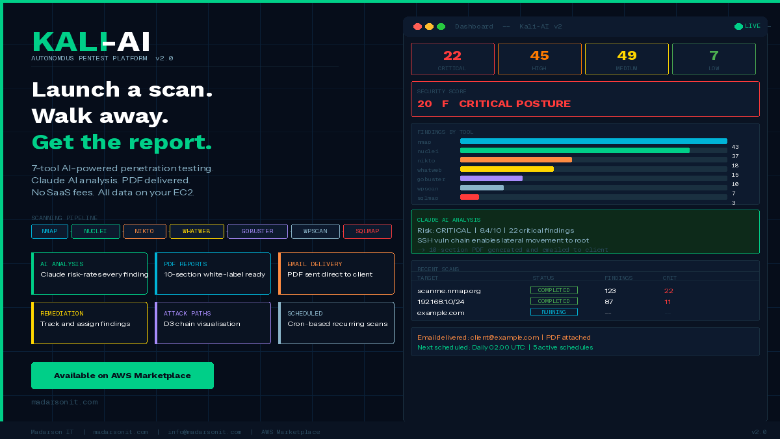
Kali-AI v2 Platform Overview
Image
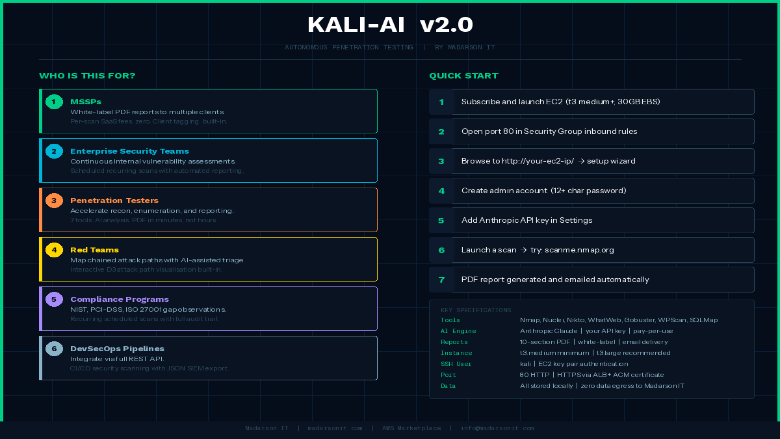
Kali-AI v2 Use Cases and Quick Start
Image
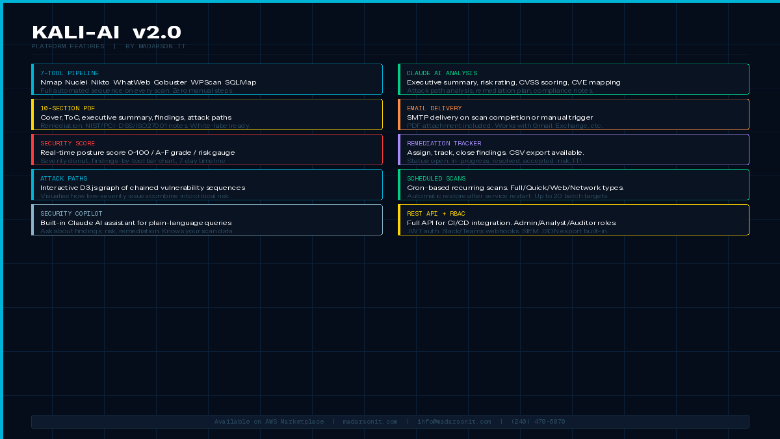
Kali-AI v2 Full Feature Set
Video
Kali-AI v2 - Autonomous PenetTesting Platform
This is a repackaged software product wherein additional charges apply for the Kali-AI v2 automated penetration testing platform.
Kali-AI v2 is a self-hosted autonomous penetration testing platform built on hardened Ubuntu 24.04 LTS. It runs a 7-tool scanning pipeline, analyzes every finding with Anthropic Claude AI, and generates professional 10-section PDF security reports automatically - no manual steps between scan launch and final deliverable.
Designed for MSSPs, security teams, red teams, and penetration testers who need repeatable automated assessments without SaaS pricing or data residency risk. All data stays on your EC2 instance.
How It Works
Kali-AI v2 automatically executes Nmap, Nuclei, Nikto, WhatWeb, Gobuster, WPScan, and SQLMap in sequence. Findings are correlated, enriched with CVE data, and analyzed by Claude AI to produce an executive summary, risk rating, attack path analysis, remediation plan, and NIST/PCI-DSS/ISO 27001 compliance observations - delivered as a polished 10-section PDF.
Key Features
- 7-Tool Automated Pipeline: Nmap, Nuclei, Nikto, WhatWeb, Gobuster, WPScan, and SQLMap run automatically in sequence with no manual orchestration required.
- Claude AI Analysis: Every finding is risk-rated and written up by Anthropic Claude, producing actionable narratives rather than raw scanner output.
- 10-Section PDF Reports: Professional reports ready to deliver to clients or stakeholders. White-label with your company name and logo. Email delivery on scan completion.
- Security Score Dashboard: Posture score (0-100, A-F), risk gauge, severity chart, and 7-day timeline.
- Remediation Tracker: Assign findings, set due dates, track status, and export to CSV.
- Attack Path Visualization: Interactive graph showing chained vulnerability sequences.
- Scan Delta: Compare new vs resolved vs persistent findings across assessments.
- Scheduled Scans: Cron-based recurring scans with Full, Quick, Web, or Network scan types.
- Batch Scanning: Up to 20 targets with parallel execution for MSSP workflows.
- Client and Project Tagging: Organize assessments by client and engagement.
- Security Copilot: AI assistant for plain-language queries about results and remediation.
- RBAC: Admin, analyst, and auditor roles with JWT authentication.
- Integrations: Slack and Teams webhooks, SIEM JSON export, and REST API for CI/CD pipelines.
Security and Data Handling
The platform runs on a hardened Ubuntu 24.04 LTS base. The first-boot wizard ensures no default credentials exist. RBAC with JWT authentication controls access across roles. All scan data remains on your EC2 instance with no vendor data retention. API keys and SMTP credentials are stored in /opt/kali-ai/.env with restricted file permissions.
Getting Started
- Launch an EC2 instance (t3.medium or larger, 30 GB EBS). Open port 80 in your Security Group.
- Browse to http://your-ec2-ip/ and complete the setup wizard.
- Create your admin account (12+ character password required).
- Add your Anthropic API key in Settings (obtain from console.anthropic.com - pay-per-use).
- Launch a scan. Try: scanme.nmap.org
- View the AI-analyzed PDF report in the Reports section.
Evaluate Before You Commit
To assess report quality and platform capabilities, request a sample anonymized PDF report from Madarson IT before deploying. Launch a t3.medium instance and run a scan against scanme.nmap.org to experience the full scan-to-report workflow with minimal commitment.
Requirements and Limitations
- An Anthropic API key is required for Claude AI analysis and is billed separately by Anthropic on a pay-per-use basis.
- Buyers should verify compatibility with their target EC2 instance types before deploying at scale.
- For HTTPS, deploy behind an AWS ALB or CloudFront distribution with an ACM certificate.
Responsible Use
AUTHORIZED USE ONLY. For security testing of systems you have explicit written permission to test. Unauthorized use violates the AWS Acceptable Use Policy, the Computer Fraud and Abuse Act (CFAA), and equivalent laws.
About Madarson IT
Madarson IT certified images are continuously updated, security-optimized, and built to meet enterprise requirements with minimal configuration. Madarson IT also offers hardened and custom images across AWS, GCP, and Azure Marketplace.
Highlights
- 7-Tool Automated Pentest Pipeline: Nmap, Nuclei, Nikto, WhatWeb, Gobuster, WPScan, and SQLMap run automatically in sequence. Findings are correlated, CVE-enriched, and analysed by Anthropic Claude AI - eliminating hours of manual tool orchestration per assessment. Schedule recurring scans, run batch assessments against up to 20 targets, and track delta changes across engagements without any manual pipeline management.
- White-Label PDF Reports with Claude AI Analysis: Every scan produces a professional 10-section PDF report with executive summary, risk rating, attack path analysis, remediation plan, and NIST/PCI-DSS/ISO 27001 compliance observations generated by Claude AI. White-label with your company name and logo for direct client delivery. Email delivery on scan completion included.
- Built for MSSP and Enterprise Workflows: Client and project tagging supports multi-tenant operations. Remediation tracker with assignee, due date, and CSV export integrates into project management workflows. Slack, Teams, and SIEM webhooks plus a full REST API enable CI/CD integration. RBAC with admin, analyst, and auditor roles controls access across your team.
Details
Sold by
Categories
Delivery method
Delivery option
64-bit (x86) Amazon Machine Image (AMI)
Latest version
Operating system
Ubuntu 24.04
Deployed on AWS
New
Introducing multi-product solutions
You can now purchase comprehensive solutions tailored to use cases and industries.

Features and programs
Financing for AWS Marketplace purchases
AWS Marketplace now accepts line of credit payments through the PNC Vendor Finance program. This program is available to select AWS customers in the US, excluding NV, NC, ND, TN, & VT.

Pricing
Pricing is based on actual usage, with charges varying according to how much you consume. Subscriptions have no end date and may be canceled any time.
Additional AWS infrastructure costs may apply. Use the AWS Pricing Calculator to estimate your infrastructure costs.
If you are an AWS Free Tier customer with a free plan, you are eligible to subscribe to this offer. You can use free credits to cover the cost of eligible AWS infrastructure. See AWS Free Tier for more details. If you created an AWS account before July 15th, 2025, and qualify for the Legacy AWS Free Tier, Amazon EC2 charges for Micro instances are free for up to 750 hours per month. See Legacy AWS Free Tier for more details.
Dimension | Cost/hour |
|---|---|
m5a.large Recommended | $0.50 |
t3.micro | $0.50 |
t2.micro | $0.25 |
m3.large | $0.50 |
p3.16xlarge | $16.00 |
c8a.2xlarge | $2.00 |
r5a.xlarge | $1.00 |
i3.4xlarge | $4.00 |
t2.xlarge | $1.00 |
i2.4xlarge | $4.00 |
Dimensions summary
You pay by the hour based on the EC2 instance type you run this platform on. Each dimension maps to a specific instance size, so your rate reflects the compute you choose. General-purpose (m and t families), compute-optimized (c families), memory-optimized (r families), storage-optimized (i and d families), and GPU-accelerated (g and p families) options are available. Smaller instances like t3.nano cost less per hour than larger ones like p3.16xlarge. You scale cost up or down by selecting a different instance, and you only pay for the hours you use.
Top-of-mind questions for buyers
Each dimension bills per hour of runtime on the matching EC2 instance type. One unit equals one hour the platform runs on that instance. You are charged for actual running hours only. Instance size sets the rate, so larger instances carry a higher hourly software charge.
The software charge meters running hours only. A fully stopped instance stops accruing the hourly software fee. Note that stopped instances may still incur underlying AWS storage charges for attached volumes, which are separate from this listing's software pricing.
Yes. The platform sends findings to a third-party AI service for analysis, which requires your own separate API key from that provider. That key and its usage are billed separately by the AI provider and are not part of this hourly instance pricing.
madarsonit.com
Helpful?
Vendor refund policy
There is no refund policy for this image

Legal
Vendor terms and conditions
Upon subscribing to this product, you must acknowledge and agree to the terms and conditions outlined in the vendor's End User License Agreement (EULA) .
Content disclaimer
Vendors are responsible for their product descriptions and other product content. AWS does not warrant that vendors' product descriptions or other product content are accurate, complete, reliable, current, or error-free.
Delivery details
64-bit (x86) Amazon Machine Image (AMI)
Amazon Machine Image (AMI)
An AMI is a virtual image that provides the information required to launch an instance. Amazon EC2 (Elastic Compute Cloud) instances are virtual servers on which you can run your applications and workloads, offering varying combinations of CPU, memory, storage, and networking resources. You can launch as many instances from as many different AMIs as you need.
Version release notes
Kali-AI v2 - Autonomous Pentest Platform on Hardened Ubuntu 24.04 LTS
Additional details
Usage instructions
Allow inbound SSH access in your security group (TCP port 22) Allow inbound web access in your security group on TCP port 80 To connect to your instance using the Amazon EC2 console: Open the Amazon EC2 console at https://console.aws.amazon.com/ec2/ In the navigation pane, choose Instances. Select the instance and choose Connect. Choose the EC2 Instance Connect tab. For Connection type, choose Connect using EC2 Instance Connect. Access the ec2 with the default username: "kali" To Access Dashboard and setup admin account: http://your-vm-ip
Resources
Vendor resources
Support
Vendor support
Support for Kali-AI v2
Madarson IT provides support for Kali-AI v2 via email at info@madarsonit.com . Contact us for assistance with deployment, configuration, scanning issues, report generation, or troubleshooting.
How to Submit a Request
When contacting support, please include:
- Your EC2 instance ID
- A description of the issue or question
- Any relevant error messages or log output
This information helps us diagnose and resolve your issue efficiently.
Private Offers and Custom Licensing
For private offers, volume licensing, or custom deployment arrangements, contact info@madarsonit.com with details about your requirements and expected usage.
AWS infrastructure support
AWS Support is a one-on-one, fast-response support channel that is staffed 24x7x365 with experienced and technical support engineers. The service helps customers of all sizes and technical abilities to successfully utilize the products and features provided by Amazon Web Services.
Similar products
The solution goes beyond compliance by offering a Ubuntu server with comprehensive security hardening by default, covering everything from applications to the Linux kernel. With VED threat mitigation, you can rest assured that your digital assets are protected against advanced threats.
By Kali
Kali Linux is an open-source, multi-platform distribution, aimed at advanced Penetration Testing and Security Auditing.
Kali Linux provides several hundred common tools and industry specific modifications, targeted towards various information security tasks, such as Penetration Testing, Security Research, Computer Forensics, Reverse Engineering, Vulnerability Management and Red Team Testing.

This product has charges associated with it for providing seller premium support. The Ubuntu 24.04 instance is pre-configured and hardened to the Defense Information Systems Agency (DISA) Security Technical Implementation Guide (STIG) standard, delivering enhanced security over a baseline image. Benefit from a fully maintained hardened image with regular STIG updates, security patches, and hotfixes, along with limited premium OS support to assist with troubleshooting, optimization, and compliance guidance. This makes it an ideal choice for companies that require a secure, compliance-ready, production-quality OS backed by expert assistance.
Kali Linux is an open-source, multi-platform distribution, aimed at advanced Penetration Testing and Security Auditing.
Kali Linux provides several hundred common tools and industry specific modifications, targeted towards various information security tasks, such as Penetration Testing, Security Research, Computer Forensics, Reverse Engineering, Vulnerability Management and Red Team Testing.
Customer reviews
No customer reviews yet
Be the first to review this product . We've partnered with PeerSpot to gather customer feedback. You can share your experience by writing or recording a review, or scheduling a call with a PeerSpot analyst.