What Is an Enterprise Private Cloud?
What is an enterprise private cloud?
An enterprise private cloud (EPC) is a cloud environment dedicated to a single organization. An enterprise private cloud is logically and sometimes physically separated from a cloud service provider’s other customers' cloud services. An EPC has dedicated resources, networks, and security and compliance controls to meet strict organizational standards. Organizations choose private cloud to gain the benefits of cloud computing while meeting the standards of an on-premise environment. This guide examines the components of an enterprise private cloud and how to deploy the right services on AWS.
An enterprise private cloud offers the benefits of cloud computing with a configuration that is similar to an on-premise environment. Also known as an internal or corporate cloud, this configuration gives a company complete control and configuration of its cloud environment through private resources and networks.
In a private cloud, you don’t share resources with other organizations. This means you can configure the cloud system more extensively to meet internal goals. Private clouds are often chosen by militaries, banks, and other highly sensitive organizations that need to ensure high levels of security.
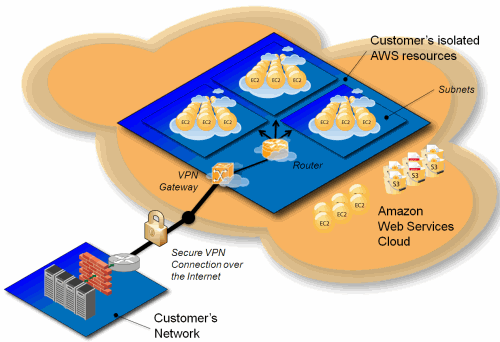
Enterprise private cloud core infrastructure
An enterprise private cloud has five central elements, each of which contributes to a complete private cloud environment. Here are the main pillars of an enterprise private cloud core.
Private networking
Private networking is how resources communicate with one another in a private cloud. Devices, services, messages, and protocols all connect to or traverse a private network.
Organizations can use Amazon Virtual Private Cloud (Amazon VPC) to create their own private, isolated, cloud network, not unlike a local area network (LAN).
Dedicated instances and hosts
A dedicated instance is a private solution that gives you full access to a resource on hardware dedicated to your AWS account. You can run other instances on this dedicated hardware. This contrasts with normal instances, which might run alongside other AWS customers’ virtual instances on the machine. A dedicated host is a private physical server that you can rent and configure like a regular physical server.
For organizations that need to isolate their workloads for regulatory compliance, dedicated instance and host solutions help meet your requirements. There are a number of AWS solutions that support dedicated, isolated instances and hosts:
- AWS Outposts: Run AWS cloud infrastructure and services on premise, at the edge, or in a data center. Outposts provide local compute and isolated networking services with AWS compute, storage, and databases.
- AWS EC2 Dedicated Hosts: Amazon EC2 Dedicated Hosts allow organizations to use existing software licenses from alternative vendors with a fully dedicated physical server. Help meet privacy compliance requirements while launching virtual machines on dedicated hosts.
- AWS EC2 Dedicated Instances: Run dedicated instances in a VPC on hardware that is dedicated solely to your organization. You can pay for dedicated instances on demand.
- Bare Metal Instances: Full, dedicated servers without a hypervisor.
Storage
Enterprise cloud storage is a method of storing various forms of data in a private, retrievable environment. Private storage is useful for organizations that have specific data-protection compliance initiatives to meet and want more control over how their provider stores data.
AWS offers several forms of storage to improve cloud storage capabilities in enterprise environments. Each of the following options offers scalable configuration for organizations:
- Amazon S3: Amazon Simple Storage Service (S3) offers object storage with scalability, security, performance, and availability.
- Amazon Elastic Block Store: Amazon Elastic Block Store (EBS) allows organizations to create storage volumes and attach them directly to AWS EC2 instances.
- Amazon Elastic File System: Amazon Elastic File System (EFS) offers a fully elastic, serverless file storage system.
Security
Cloud enterprise security refers to any strategies, frameworks, monitoring systems, or risk and threat detection activities that help to identify and protect against unauthorized third parties. By having control over security configurations, organizations can create comprehensive security architectures to meet their unique requirements.
AWS supports private clouds with a number of supplementary security technologies:
- AWS Security Hub: AWS Security Hub automatically prioritizes your critical security issues, allowing you to respond quickly and at scale to better protect your cloud infrastructure environments.
- AWS Config: AWS Config allows organizations to audit, assess, and evaluate the current configurations of their cloud computing resources.
- AWS CloudTrail: AWS CloudTrail tracks user activity and API usage across hybrid and multicloud environments, deriving insights about unusual activity.
- AWS KMS: AWS Key Management Service allows organizations to rapidly encrypt and digitally sign their data, managing keys and definition policies from one single platform.
- AWS CloudHSM: AWS CloudHSM offers streamlined management and access systems for cryptographic keys. Manage single-tenant HSM instance capacity and deploy highly reliable workloads with CloudHSM.
Identity and access management
Identity and access management (IAM) systems help to make sure that only users with authorization can access specific resources. In a private cloud environment, IAM includes multi-factor authentication, single-sign-on systems, and internal file tagging permissions to strengthen security.
AWS supports IAM configurations in enterprise clouds with:
- AWS IAM: AWS Identity and Access Management allows companies to securely and swiftly manage identities and access policies to cloud services and resources. Organizations can also integrate AWS IAM into existing internal secure-sign-on providers, such as Microsoft Entra, to streamline access management.
- IAM Identity Center: AWS IAM Identity Center allows organizations to connect existing identity and access policies to a centralized AWS system. Your organization can manage access from one common view, streamlining existing IAM policies.
Enterprise private cloud hybrid integration
Organizations can choose to implement a cloud hybrid strategy, where you connect on-premise environments with cloud resources. This blended approach means that organizations don’t have to migrate all at once, using a combination of on-premise and cloud environments.
AWS supports enterprise private cloud hybrid integration with the following technologies:
- AWS Local Zones: AWS Local Zones allow organizations to run applications on AWS dedicated infrastructure in more locations, improving accessibility for end users and reducing workload latency.
- AWS Storage Gateway: AWS Storage Gateway provides on-premises applications with access to large cloud storage, with low-latency data access.
Network connections
AWS also offers a range of technologies that facilitate the connection between cloud and on-premise environments.
- AWS Direct Connect: AWS Direct Connect provides the shortest possible path to connecting to AWS resources, reducing latency and creating streamlined private network connections between your offices and AWS data centers.
- AWS VPN: AWS VPN connects on-premise networks and remote devices directly to the cloud with an encrypted pathway.
- AWS Transit Gateway: AWS Transit Gateway offers complete connectivity for AWS accounts, on-premises networks, and Amazon VPCs, all via a single gateway. Build better visibility, improve security, and streamline digital architecture with Transit Gateway.
Design considerations for your enterprise private cloud
Designing an enterprise private cloud to meet enterprise workloads requires extensive planning to meet demands.
Here are four areas that organizations should prioritize when building an EPC.
Performance
Organizations need to select the right cloud services, instance types, storage options, and network connections to support their operations and meet workload demands. One of the benefits of a private cloud solution is that organizations can scale the computing resources they use, accessing more cloud IT infrastructure to meet any demand.
However, organizations need to design their private cloud solutions with resource utilization balancing in mind. You can use various cost optimization strategies and tools to balance cost and performance, such as the AWS Cost Optimization Hub and AWS Cost Explorer.
Availability
A cloud operating model needs to prioritize accessibility to make sure that employees and customers in different parts of the world can access company resources. Cloud providers offer multi-zone deployments, where workloads are distributed across different data center sites, providing lower latency.
Alongside a high availability for different zones, private cloud environments should also look to automatically back up to distributed servers. When automating backups and saving copies to alternative nodes, organizations can help with continuity planning, even in unexpected scenarios.
Companies can store backups in their managed private cloud, in public cloud infrastructure, in on-premises infrastructure, and in other data centers. This distributed approach helps in disaster recovery and provides a high degree of data availability.
Security
Private cloud architecture is inherently more secure than public cloud services, due to the logical separation of cloud infrastructure from other cloud customers. This means that IT teams can create more effective security systems with a higher degree of control to help protect sensitive data.
Organizations can also implement access controls, logging systems to monitor who accesses what files, and automatic tools to ensure compliance with mandatory or suggested frameworks. Adding further security controls to private cloud infrastructure helps to protect your data and goes beyond the baseline provisions supplied by cloud providers.
Cost
Private cloud environments are more expensive than using public cloud resources, as your company essentially owns that small portion of a data center. While this single-tenant environment offers more control, costs are higher.
Cost Optimization with AWS is an all-in-one, scalable purchasing model that moves to meet your workload needs. This includes a suite of management tools that monitor active resource consumption, identify cost-saving opportunities, and scale up or down to ensure you only pay for the exact private cloud resources you need.
Conclusion
Amazon Web Services offers a range of tools, systems, and services to improve access to private cloud systems, enhance data protection, and streamline cloud management. With centralized control over an enterprise private cloud, organizations can use AWS to access leading cloud computing resources while maintaining cost-efficiency.
Discover the AWS Well-Architected Framework to help build secure, high-performing, resilient, and efficient infrastructure for your enterprise private cloud.
Browse all cloud computing concepts
Browse all cloud computing concepts content here:
Did you find what you were looking for today?
Let us know so we can improve the quality of the content on our pages