AWS Cloud Operations Blog
Governing your AI workloads on AWS at scale: visibility, controls, and monitoring
If you’re responsible for AI governance as a risk officer, compliance officer, or CISO, or you work on the governance, platform, or security teams that support them, you’re probably no longer debating whether to adopt AI. You’re working out how to run it safely at scale, as workloads move from machine learning models to agents that act across entire workflows with less human oversight.
IDC research found that 88% of the AI proofs of concept it observed didn’t reach wide-scale deployment, and a 2026 Dynatrace survey showed that 52% of respondents named security, privacy, or compliance concerns as the main barrier to putting agentic AI into production. In our conversations with customers, the same three questions come up repeatedly: which models and agents are running, who approved them, and which protections apply to each one.
This post shows how to answer those questions with native AWS services. You’ll see how to inventory the AI running across your organization, choose controls for each type of workload, deploy four AWS Config conformance packs to every account, and route findings to the teams that fix them. The foundations that already govern the rest of your AWS environment apply to AI too, with a few adjustments for what’s new.
Overview of solution
We organize AI governance around three questions, one for each pillar:
| Pillar | Question it answers | AWS services |
|---|---|---|
| Visibility | Which AI resources are running, where, and who owns them? | AWS Security Hub AI inventory (with Amazon GuardDuty and Amazon Inspector), AWS Config, AWS CloudTrail, Amazon Bedrock model invocation logging, Amazon CloudWatch, AWS Network Firewall |
| Controls | Which protections does each workload need, and are they in place? | AWS Organizations policies, Amazon Bedrock Guardrails, AWS Config conformance packs and custom rules |
| Monitoring | Is anything drifting away from policy? | AWS Config, AWS Security Hub, Amazon EventBridge, Amazon CloudWatch |
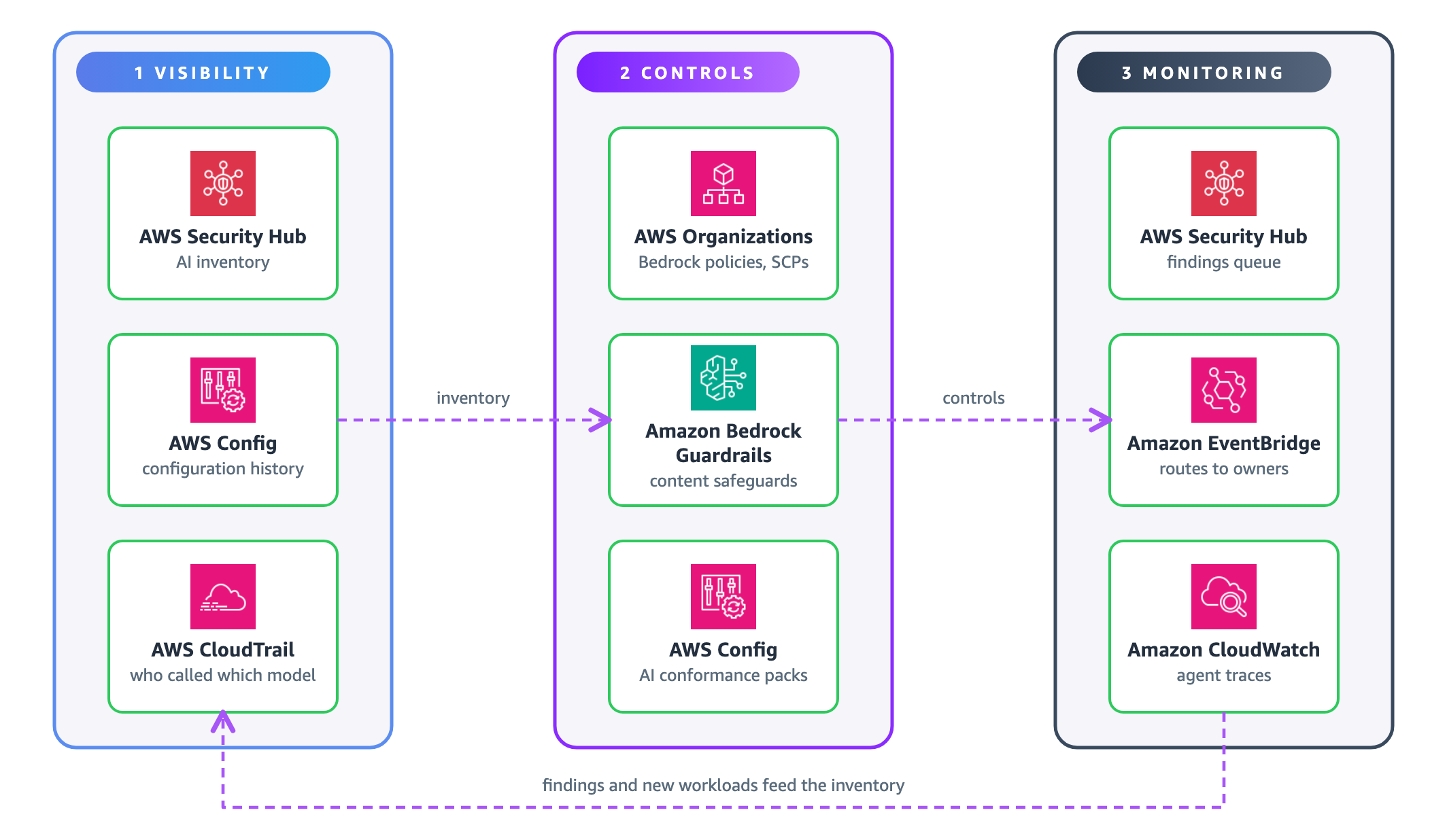
Figure 1: The three pillars of AI governance on AWS, with findings feeding back into visibility
The first time through, the pillars run in order, because you can’t apply controls to resources you haven’t found. After that, findings from monitoring show you new workloads to inventory and policies to adjust.
Not every workload needs the same controls. Place each use case in the Generative AI Security Scoping Matrix, which asks what you build on, and the Agentic AI Security Scoping Matrix, which asks how much an agent can do on its own. An assistant that only answers questions needs far fewer controls than an agent that changes production systems without approval.
Walkthrough
Prerequisites
For this walkthrough, you should have the following prerequisites:
- An organization in AWS Organizations with all features turned on, ideally with a landing zone set up with AWS Control Tower.
- AWS Config recording turned on in every account and Region you want to govern, including the management account if you want it covered.
- A delegated administrator account for AWS Config, AWS Security Hub, Amazon GuardDuty, and Amazon Inspector, typically your security tooling account, with an AWS Config aggregator that collects data from every account and Region you govern.
- Access to the AI services you plan to govern, such as Amazon Bedrock, Amazon Bedrock AgentCore and Amazon SageMaker AI.
Step 1: Establish visibility into your AI resources
AI workloads spread across managed services, self-hosted models, and calls to external AI APIs, so no single data source finds all of them. Five capabilities build the inventory together:
- AWS Security Hub AI inventory: The AI inventory discovers AI resources across your organization from three sources. Managed resources from Amazon Bedrock, Amazon Bedrock AgentCore, and Amazon SageMaker AI come from AWS Config. Self-hosted models and inference servers on Amazon EC2 instances and in Amazon ECR images come from the software inventory that Amazon Inspector collects. External AI endpoints that your workloads call come from Amazon GuardDuty DNS activity, which is often how teams first find shadow AI.
- AWS Config: AWS Config records the configuration of supported AI resources together with the infrastructure around them, such as IAM roles, Amazon S3 buckets, and VPCs, and keeps a history of every change. The aggregator collects that data into one view, and advanced queries let you search across it.
For example, the following advanced query lists the network mode, metadata service setting, and IAM role of every Amazon Bedrock AgentCore runtime in your organization:
SELECT accountId, awsRegion, resourceName,
  configuration.NetworkConfiguration.NetworkMode,
  configuration.MetadataConfiguration.RequireMMDSV2,
  configuration.RoleArn
WHERE resourceType = 'AWS::BedrockAgentCore::Runtime'
AWS Config coverage of AI resource types keeps growing, so check which resource types are recorded for the services you use before you build reports on them. To see which properties you can query for a resource type, run SELECT configuration WHERE resourceType = '<type>' against one recorded resource.
- AWS CloudTrail and model invocation logging: CloudTrail records Amazon Bedrock API calls, including InvokeModel and Converse, so you can see which identities call which models and from where. To capture the prompts and responses themselves, turn on model invocation logging. It’s off by default and is configured for each Region. Invocation logs can contain sensitive data, so restrict access to the destination and consider data protection policies in Amazon CloudWatch Logs.
- AWS Network Firewall category filtering: With URL and domain category filtering, Network Firewall rules can match traffic to the predefined Artificial Intelligence and Machine Learning category. An alert rule on that category logs which VPCs connect to external AI services, and the matched category appears in each alert log entry. Domain matching uses the TLS server name and doesn’t need TLS inspection. Matching full URL paths needs TLS inspection. The same category can later block AI services that you haven’t approved.
- Amazon CloudWatch telemetry enablement rules: Telemetry enablement rules turn on logs and traces automatically for matching resources across your organization, including Amazon Bedrock AgentCore and Amazon Bedrock knowledge bases, so agent telemetry doesn’t depend on each team setting it up by hand.
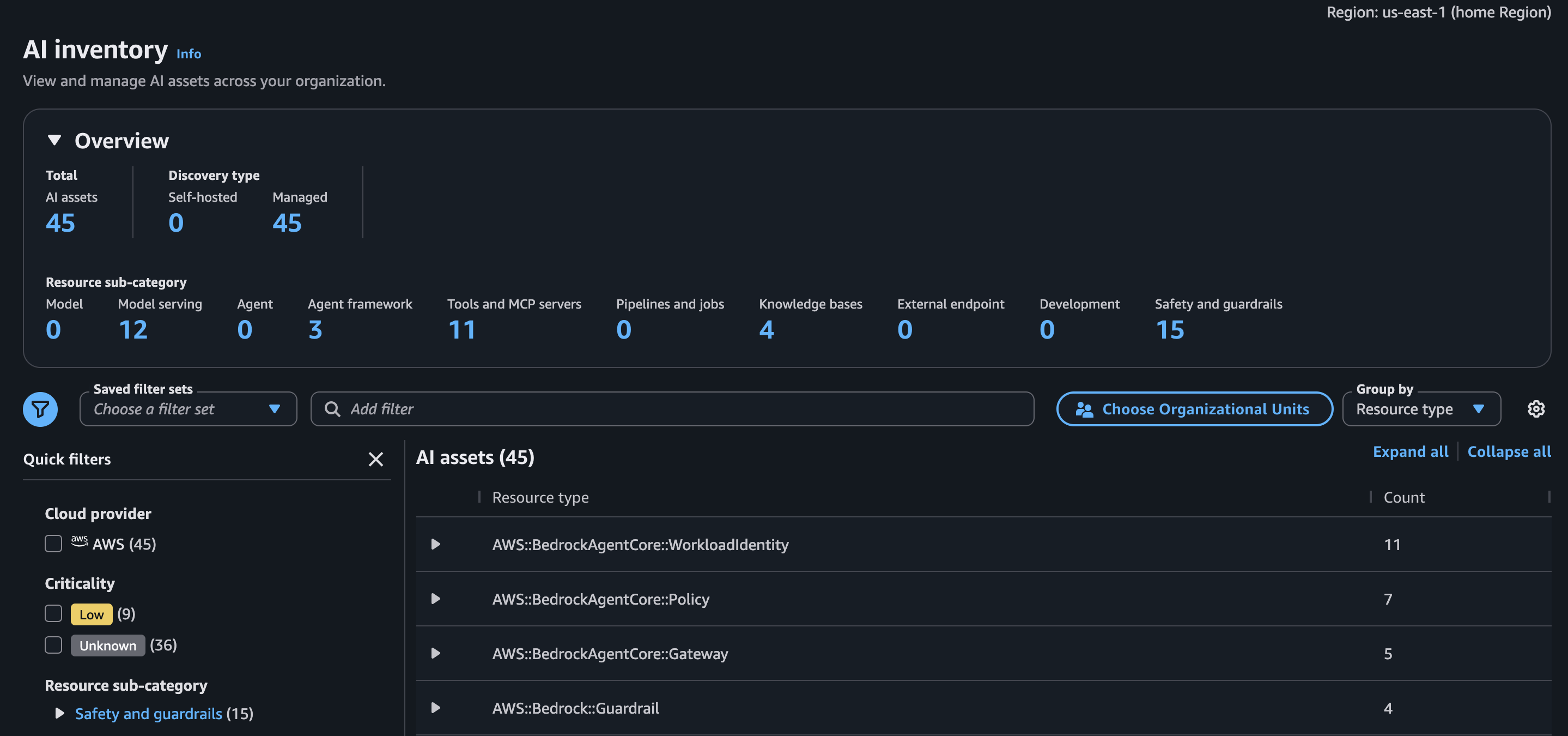
Figure 2: The AI inventory in AWS Security Hub, showing managed AI resources discovered across member accounts
Give every workload a named owner who built it, operates it, and is accountable for it, and record that owner in resource tags. A tag policy in AWS Organizations keeps tag keys such as owner, cost center, and data classification consistent across accounts.
Step 2: Choose controls for each type of workload
With an inventory in place, choose controls by type and by how each workload is built. Preventive controls stop non-compliant actions before they happen. Detective controls find non-compliance after it occurs. Proactive controls check configurations before resources are created. Most workloads need a mix of all three, weighted by the risk level from your scoping. The following table shows examples of the main controls for each type of workload:
| Workload type | Preventive controls | Detective and proactive controls |
|---|---|---|
| All AI workloads | SCPs for models and Regions, RCPs that keep data in your organization, AWS Network Firewall category rules that block unapproved AI services | AWS Config conformance packs, Amazon GuardDuty, AWS CloudTrail, AWS CloudFormation Hooks in your CI/CD pipeline |
| Amazon Bedrock | Amazon Bedrock policies that enforce Amazon Bedrock Guardrails, and model access controls | Model invocation logging and the Amazon Bedrock conformance pack |
| Amazon SageMaker AI | VPC isolation and model registry approval | Endpoint monitoring, lineage, and the Amazon SageMaker AI conformance pack |
| Amazon Bedrock AgentCore | Cedar policies that allow or deny individual tool calls, plus runtime network and identity controls | Agent evaluations, AWS Agent Registry approval, and custom rules for policy enforcement |
Two preventive controls apply to most organizations and are worth setting up first:
- Amazon Bedrock policies: Amazon Bedrock policies in AWS Organizations apply a guardrail from your management account to every Amazon Bedrock model invocation in member accounts, so applications don’t have to specify one. They’re a declarative policy type, so attachments at the root, an OU, and an account resolve into one effective policy for each account. Check the result with
DescribeEffectivePolicybefore you rely on it. - Service control policies: SCPs restrict which foundation models can be invoked and in which Regions, so a model your governance committee hasn’t approved can’t be called from any member account.
For example, the following SCP denies model invocation for every foundation model outside an approved list. It lets requests through cross-Region inference profiles, because Amazon Bedrock also checks permission on the foundation model in each Region that the profile routes to. Replace the model IDs with the ones your governance committee approved:
{
  "Version": "2012-10-17",
  "Statement": [{
    "Sid": "DenyUnapprovedModels",
    "Effect": "Deny",
    "Action": "bedrock:InvokeModel*",
    "NotResource": [
      "arn:aws:bedrock:*::foundation-model/anthropic.claude-sonnet-5*",
      "arn:aws:bedrock:*::foundation-model/amazon.nova-2-*",
      "arn:aws:bedrock:*:*:inference-profile/*"
    ]
  }]
}
For more controls, including the preventive, detective, and proactive controls in AWS Control Tower, see the AWS Control Catalog. You don’t need to set up AWS Control Tower to browse it. For tips on filtering the catalog by service, objective, and control behavior, see Search and discover governance controls with Control Catalog in AWS Control Tower.
Step 3: Deploy the AI conformance packs across your organization
A conformance pack bundles AWS Config rules into a single unit that you deploy and track together. Four packs cover AI workloads, and their templates are in the AWS Config rules GitHub repository:
- Security and Governance Best Practices for AI/ML Supporting Infrastructure covers the services around AI workloads, such as threat detection, logging, IAM, and network controls. Deploy it in every case.
- Security and Governance Best Practices for Amazon Bedrock covers Amazon Bedrock AgentCore runtimes, gateways, memory, code interpreters, and browsers, and the services behind retrieval augmented generation (RAG), such as knowledge base data sources and vector stores.
- Security and Governance Best Practices for Amazon SageMaker AI covers domains, notebooks, models, and endpoints, including network isolation and encryption.
- Security and Governance Best Practices for Self-Hosted AI/ML covers models you run yourself on Amazon EC2, Amazon ECS, and Amazon EKS, and the storage, container registries, and load balancers around them.
If you use AWS Security Hub CSPM, you can also turn on the AI Security Best Practices standard, a curated set of controls that check AI resources for settings such as network isolation, encryption, and VPC placement. Security Hub CSPM runs these control checks, and AWS Security Hub correlates their results with findings from Amazon Inspector and Amazon GuardDuty to show which AI resources are actually exposed.
To try one pack in a single account first, use Deploy conformance pack → Use sample template in the AWS Config console.
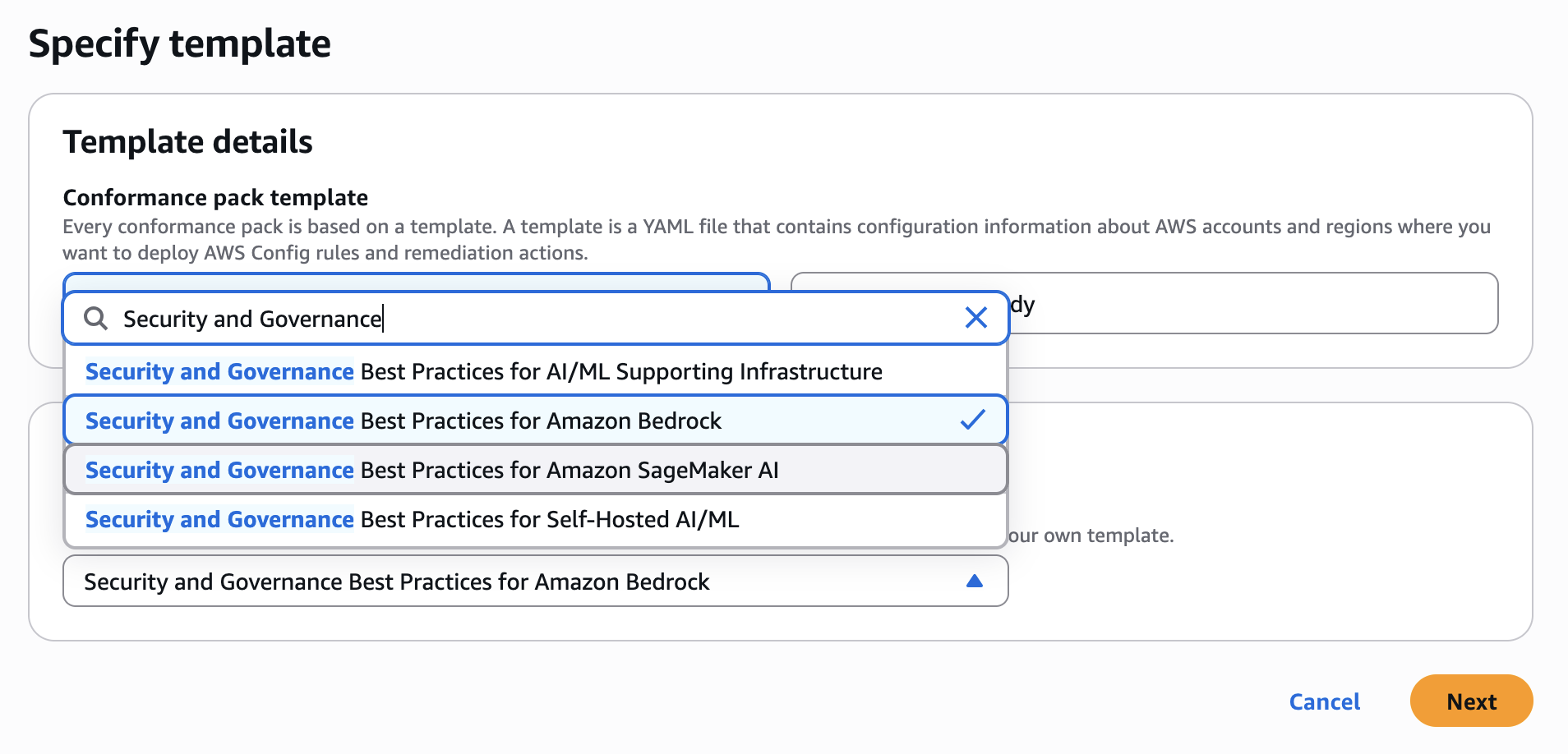
Figure 3: Choosing one of the AI sample templates when you deploy a conformance pack
To cover every account, deploy the packs as organization conformance packs from the management account or the AWS Config delegated administrator, in each Region you govern. Upload each template to an Amazon S3 bucket that AWS Config can read, and then run the following command for each pack:
aws configservice put-organization-conformance-pack \
  --organization-conformance-pack-name ai-bedrock-security-governance \
  --template-s3-uri s3://amzn-s3-demo-bucket/Security-and-Governance-Best-Practices-for-Amazon-Bedrock.yaml
AWS Config creates the rules in each member account through the AWSServiceRoleForConfigConforms service-linked role, and member accounts can’t change or remove them.
Managed rules check the configuration that matters to most customers, and some settings don’t have one yet. For example, no managed rule checks whether an Amazon Bedrock AgentCore gateway enforces its Cedar policies in ENFORCE mode instead of LOG_ONLY mode, or whether an AgentCore runtime requires version 2 of the microVM Metadata Service (MMDSv2). For gaps like these, write custom policy rules in AWS CloudFormation Guard, or use custom Lambda rules when a check needs more complex logic, and add them to your own conformance pack next to the managed rules.
Step 4: Monitor and act on findings
AWS Config evaluates your resources whenever their configuration changes, and on a schedule for periodic rules. The Conformance packs page shows a compliance score for each pack, and the aggregator gives your security team the same view across every account and Region. Scores fill in as each rule completes its first evaluation, so a newly deployed pack can show incomplete results at first.
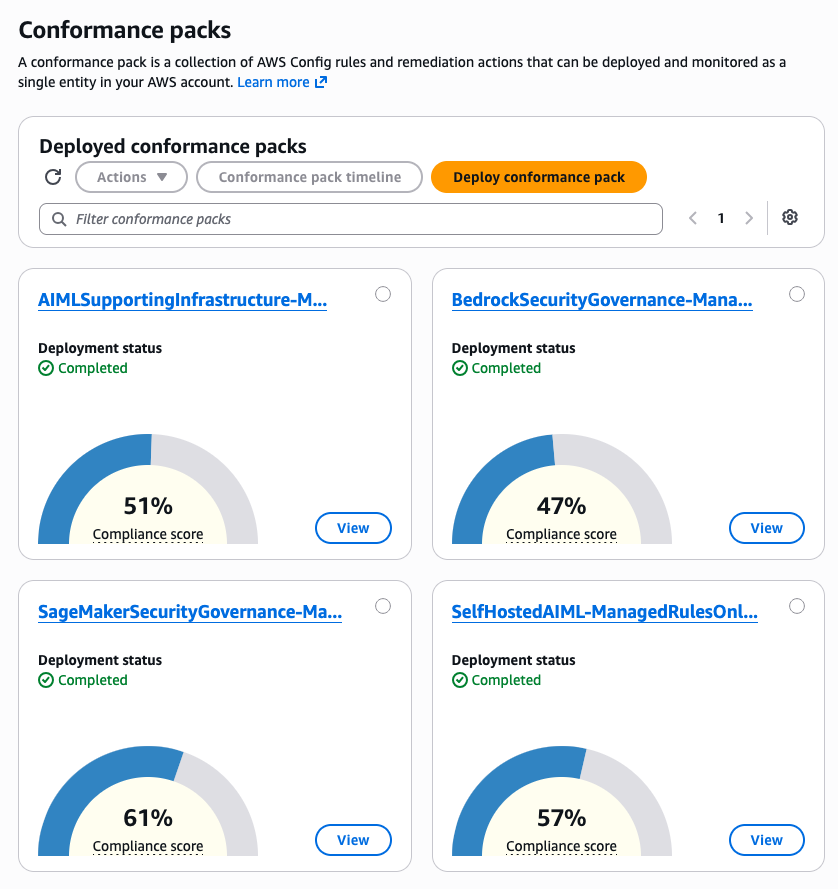
Figure 4: The four AI conformance packs in the AWS Config console, each with its deployment status and compliance score
AWS Config rule results also appear as findings in AWS Security Hub, next to threat findings from Amazon GuardDuty and vulnerabilities from Amazon Inspector, so AI configuration issues land in the queue your security operations team already works from. For the workload owner, an Amazon EventBridge rule can route each compliance change to the team that runs the resource or to an automated fix.
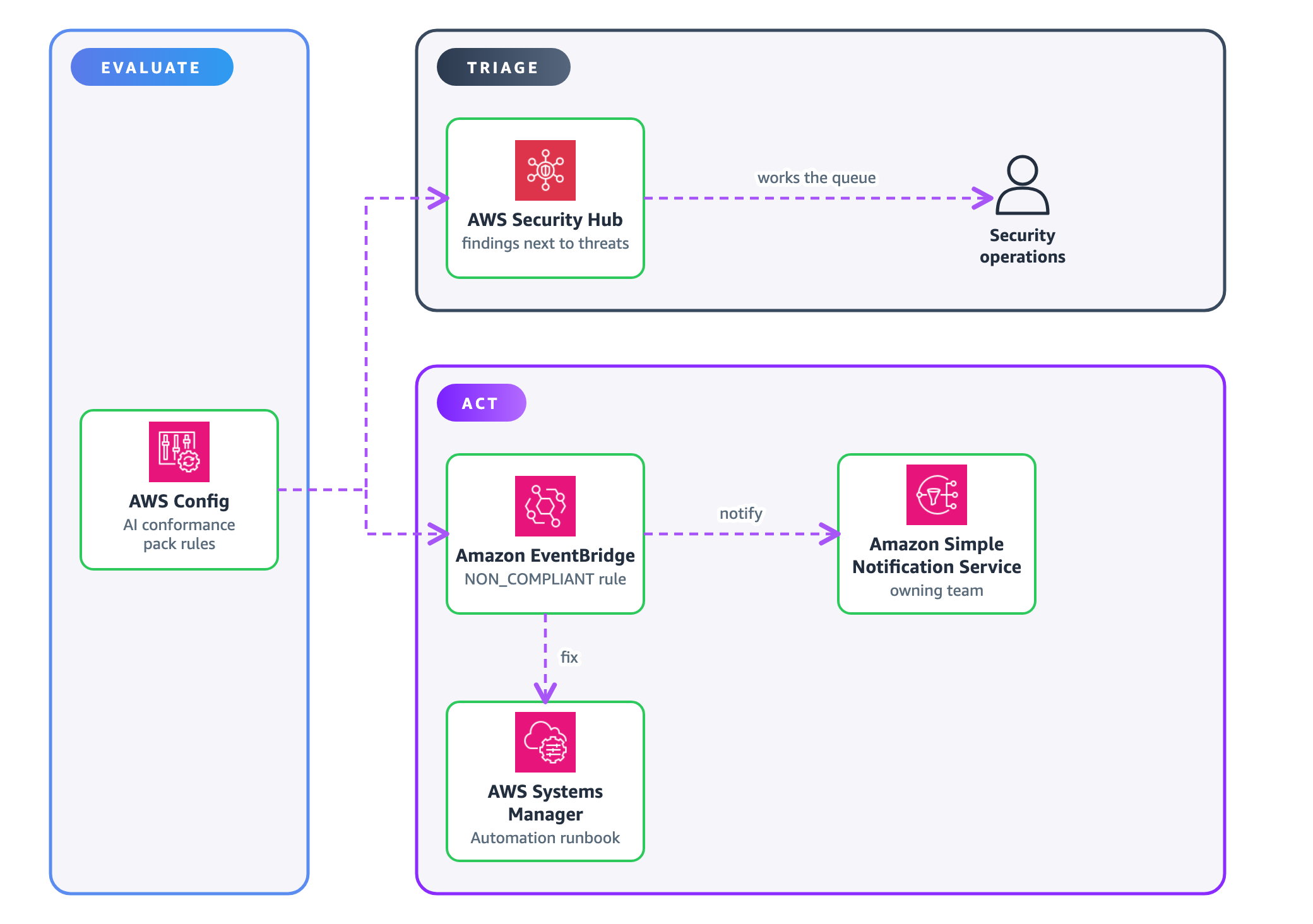
Figure 5: How findings from the AI conformance packs reach the security team and the workload owner
To route non-compliant resources to a remediation workflow
- Open the Amazon EventBridge console. In the navigation pane, choose Event buses, choose the default event bus, choose Rules, and then choose Create rule. On the rule builder selection page, choose Advanced Builder, which takes a JSON event pattern.
- Enter a name, and then choose Next.
- For the event pattern, enter the following JSON. Instead of every non-compliant result in the account, it matches only Amazon Bedrock, Amazon Bedrock AgentCore, and Amazon SageMaker AI resources that become non-compliant with a conformance pack rule. Add resource type prefixes for other services you want to route.
{ "source": ["aws.config"], "detail-type": ["Config Rules Compliance Change"], "detail": { "configRuleName": [{ "wildcard": "*-conformance-pack-*" }], "resourceType": [{ "prefix": "AWS::Bedrock" }, { "prefix": "AWS::SageMaker" }], "newEvaluationResult": { "complianceType": ["NON_COMPLIANT"] } } } - Choose a target, such as an Amazon SNS topic for the owning team, your ticketing integration, or an AWS Systems Manager Automation runbook.
- Choose Create rule.
When you first turn on the packs, expect a lot of findings. Sort them into real gaps, accepted risks, and rules that need different parameters for your environment, and fix the real gaps first. AWS Config itself has no exception mechanism, so record accepted risks where your security team already works. In AWS Security Hub CSPM, an automation rule can set the matching findings to SUPPRESSED and add a note with the risk owner and the date to review it. For rules that need different parameters, change them in your copy of the conformance pack template instead of suppressing the findings.
For agents, configuration is only part of the picture. With the telemetry rules from step 1, Amazon CloudWatch shows which tools an agent called in every account, and CloudWatch anomaly detection on tool invocation frequency can alert you when an agent’s behavior moves outside its normal range.
Finally, close the loop. New resource types in your inventory are new workloads to scope. Recurring findings point to a policy that needs to change. Exceptions that keep getting renewed are a signal to revisit the standard.
Cleaning up
If you created resources while following this post, remove the ones you don’t plan to keep to avoid ongoing charges:
- Delete conformance packs from the Conformance packs page in the AWS Config console, or with the
delete-conformance-packordelete-organization-conformance-packAWS CLI commands. - Delete the Amazon EventBridge rule and any targets you created for testing.
- Turn off model invocation logging in Regions where you don’t need it, and set a retention period on the log destination.
Conclusion
Governing AI at scale doesn’t require new foundations. It requires applying the ones you already trust to a new kind of workload. In this post, you saw where AWS Security Hub and AWS Config find the AI running across your organization, chose controls by workload type, deployed the AI conformance packs to every account, and routed findings to the teams that fix them.
You can now answer the questions from the beginning of this post from the inventory, and show the compliance history that proves your controls are still in place. To go further:
- Run the AI Governance on AWS workshop with your team. In about two hours, participants secure an AI agent end to end, from blocking a prompt injection attack with Amazon Bedrock Guardrails to verifying the result with AWS Config rules and reviewing the agent’s traces.
- Register for the Well-Architected Foundations Accelerator, and then go to the AI Foundations module. It builds the multi-account foundation step by step, including an organization-wide guardrail policy and SCPs for models and Regions.
- Contact your AWS account team for a one-on-one session or help putting these controls in place.