
Sold by: Zerve AI
Free Trial
AWS Free Tier
Zerve is an agentic data science development environment available on AWS Marketplace and as a managed SaaS. Teams write Python, R, and SQL in the same project, with serverless compute and built-in version control. Code written during exploration is production-stable by default.
5
Overview
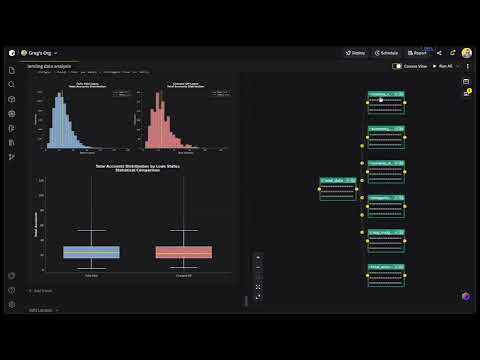
Zerve replaces the typical data science toolchain (notebook for exploration, IDE for cleanup, separate infra for deployment) with a single environment where all three happen together. Deploy Zerve in your own AWS VPC to keep data inside your infrastructure, or run it in Zerve's managed cloud to get started without any setup. Your team can work in either a canvas or notebook-based interface, both of which connect to GitHub and support any external IDE. Python, R, and SQL run in the same project with full interoperability between languages. If someone writes a transformation in SQL and a colleague picks it up in Python downstream, the serialized artifacts carry over without any manual export step. Zerve sessions produce deterministic output. The thing that trips up most notebook-based workflows, where results change depending on cell execution order or kernel state, does not happen here. What you run interactively is what runs in production. Environment setup, dependency management, and cloud orchestration are all handled at the platform level. Starting a new project or onboarding someone to an existing one takes a few clicks. You do not need a DevOps ticket. GPUs and other compute resources get provisioned per task on demand; they are not sitting idle between runs. You can deploy work as a scheduled job, an API endpoint, or an app. Or just export to whatever CI/CD pipeline your org already uses. Supported Languages and Compute Zerve runs Python, R, SQL, GraphQL, PySpark, and Markdown blocks. You pick the compute type per cell: Lambda, Fargate, GPU, or Kubernetes. Each project locks its own dependency versions. Integrations Snowflake, PostgreSQL, MySQL, and MariaDB all have native connectors in Zerve. On the AI side, both Hugging Face and AWS Bedrock plug in directly, so your team can work with LLMs (open-source or managed) without having to stand up hosting for them. If you want to trigger Zerve from other tools in your stack, the developer API works with Airflow and GitHub Actions, or really anything that can hit a REST endpoint. Security and Deployment If you self-host, everything runs in your AWS account through a CloudFormation template. Your data, your execution outputs, your secrets, all stored on your side. Zerve keeps your AWS credentials in an encrypted vault and only touches them at execution time. Nothing gets stored on Zerve's end. On the access control side, you get RBAC, SSO, and the kind of granular permissions that security teams expect before signing off. Zerve works as a fully self-hosted install or a hybrid setup, whatever fits your org. Getting Set Up The CloudFormation path takes about ten minutes. Generate an API key in your Zerve org settings, open the QuickStart template, drop in your key and a domain name, and most of the other parameters are pre-filled. Teams that want to evaluate first can use Zerve's managed cloud, which has a free tier with compute and storage credits.
Highlights
- Stable and Interactive: Data scientists typically explore in notebooks, then rewrite everything in an IDE before it can go to production. That rewrite takes time, and sometimes a completely different person does it. Zerve eliminates that second step. The code you write while exploring your data already produces stable, reproducible output. What you build interactively is what you deploy.
- Decoupled Compute and Storage: Zerve separates compute from storage so work is saved, versioned, and available to your whole team automatically. Compute resources like GPUs and extra memory are provisioned per task and release when the task finishes, so you only pay for what you use. Python, R, and SQL share the same storage layer, meaning a data engineer writing SQL and a data scientist in Python contribute to the same pipeline with no file exports.
- Real-Time Coding Collaboration: Multiple people can write and run code in the same Zerve project at the same time, like Google Docs, but for executable code. You see each other's changes live, comment inline, and review before merging. Team members working in Python, R, and SQL all share the same workspace and the same saved outputs, so there are no separate projects or manual data handoffs between roles. Github integration keeps everything synced with your existing source control.
Details
Sold by
Delivery method
Deployed on AWS
New
Introducing multi-product solutions
You can now purchase comprehensive solutions tailored to use cases and industries.

Features and programs
Financing for AWS Marketplace purchases
AWS Marketplace now accepts line of credit payments through the PNC Vendor Finance program. This program is available to select AWS customers in the US, excluding NV, NC, ND, TN, & VT.

Pricing
Free trial
Try this product free according to the free trial terms set by the vendor.
Pricing is based on the duration and terms of your contract with the vendor. This entitles you to a specified quantity of use for the contract duration. If you choose not to renew or replace your contract before it ends, access to these entitlements will expire.
Additional AWS infrastructure costs may apply. Use the AWS Pricing Calculator to estimate your infrastructure costs.
Dimension | Description | Cost/month |
|---|---|---|
Zerve AI Data Science Development Environment | - | $1.00 |
Dimensions summary
This listing offers one pricing dimension, billed per user under a contract. You pay based on the number of users who need access to the data science development environment. Pricing scales with your user count rather than by usage tiers or compute size. The platform runs on credits, which meter agent tasks and compute time that Zerve orchestrates. You can add more users as your team grows, with billing tied to that quantity.
Top-of-mind questions for buyers
Credits are the usage unit for the platform. They cover agent tasks, charged as the model's API cost plus 20%, and compute time for infrastructure Zerve orchestrates, such as Lambda, CPU, and GPU. Credits apply only to what Zerve directly manages.
Yes, using your own API keys or self-hosting can lower credit consumption, but does not eliminate it. Zerve still meters credits for orchestration, scheduling, and agentic context management even in self-hosted setups. You pay your model provider directly when using your own keys.
You can purchase add-on credits at any time. Add-on credits are pooled across multiple users on the same account and do not expire. Monthly included credits do not roll over, but add-on credits remain available until used.
www.zerve.ai
Helpful?
Vendor refund policy
There are no refunds offered.
Custom pricing options
Request a private offer to receive a custom quote.

Legal
Vendor terms and conditions
Upon subscribing to this product, you must acknowledge and agree to the terms and conditions outlined in the vendor's End User License Agreement (EULA) .
Content disclaimer
Vendors are responsible for their product descriptions and other product content. AWS does not warrant that vendors' product descriptions or other product content are accurate, complete, reliable, current, or error-free.
Delivery details
Software as a Service (SaaS)
SaaS delivers cloud-based software applications directly to customers over the internet. You can access these applications through a subscription model. You will pay recurring monthly usage fees through your AWS bill, while AWS handles deployment and infrastructure management, ensuring scalability, reliability, and seamless integration with other AWS services.
Resources
Vendor resources
Support
Vendor support
Please reach out to sales@zerve.ai with any questions or for options on contract or pricing terms.
Technical Support: For help setting up your account, technical queries or exploring the platform please reach out to support@zerve.ai
For additional training:
AWS infrastructure support
AWS Support is a one-on-one, fast-response support channel that is staffed 24x7x365 with experienced and technical support engineers. The service helps customers of all sizes and technical abilities to successfully utilize the products and features provided by Amazon Web Services.
Updated weekly
By Zerve AI

By Saturn Cloud

By Comet ML
Sentiment is AI generated from actual customer reviews on AWS and G2
Functionality
Ease of use
Customer service
Cost effectiveness
Positive reviews
Mixed reviews
Negative reviews
AI generated from product descriptions
Multi-Language Support
Supports Python, R, SQL, GraphQL, PySpark, and Markdown blocks with full interoperability between languages in the same project.
Flexible Compute Options
Provisioning of compute resources per task on demand including Lambda, Fargate, GPU, and Kubernetes with automatic release after task completion.
Native Data Connectors
Built-in connectors for Snowflake, PostgreSQL, MySQL, MariaDB, Hugging Face, and AWS Bedrock for direct integration without additional setup.
Role-Based Access Control and Security
RBAC, SSO, granular permissions, encrypted credential vault, and self-hosted deployment through CloudFormation with data and execution outputs stored in customer AWS account.
Real-Time Collaborative Development
Multiple users can simultaneously write and execute code in the same project with live change visibility, inline commenting, and GitHub integration for version control.
Notebook Environment Configuration
Support for Jupyter notebooks with configurable resources up to 4TB of RAM and GPU acceleration capabilities
Multi-Language and Framework Support
Compatible with multiple programming languages, IDEs, and machine learning libraries for data science workflows
Enterprise Security Controls
Configurable security settings including SSO, VPN, and firewall integration for enterprise compliance requirements
Distributed Computing Infrastructure
Ability to connect to distributed clusters of workers for scalable data processing and model training
Machine Learning Lifecycle Management
End-to-end support for ML workflows including experimentation, job scheduling, model deployment, and production serving
Experiment Tracking and Management
Automatic tracking of code, hyperparameters, metrics, and training run data with capability to compare and reproduce training runs in real time.
Model Registry and Deployment Management
Model Registry functionality to track models ready for deployment with full lineage integration from training to production and deployment triggering capabilities.
Production Monitoring and Drift Detection
Production model monitoring with drift detection and accuracy metric tracking using baselines automatically pulled from training runs.
Dataset and Artifact Versioning
Tracking and versioning of datasets and artifacts throughout the machine learning lifecycle.
Custom Visualization and Interactive Dashboards
Capability to build tailored, interactive visualizations for analyzing and sharing training run results and model performance data.
Standard contract
No
Customer reviews
Bobby N.
Great team and great product
Reviewed on Apr 02, 2024
Review provided by G2
What do you like best about the product?
It is an innovative approach to Data Science collaboration that the industry desperately needs.
What do you dislike about the product?
Not yet on Azure, which is our tech stack.
What problems is the product solving and how is that benefiting you?
Data Science collaboration and deployment