Sold by: Sentrilite
Deployed on AWS
AWS Free Tier
Sentrilite delivers tagless, real-time cloud cost attribution at the service level, going deeper than pod-level metrics to show exactly which process is driving your AWS spend. Built for FinOps and Engineering teams who need cloud cost visibility that pod-level tools and billing API dashboards cannot deliver.
Drill down through the full attribution chain: Namespace, Pod, Container, Process, Cost. See per-service compute and egress costs in real time, with destination-aware traceability for every byte sent.
No manual tagging. No code changes. No billing API credentials required. Deploys in 2 minutes as a single lightweight agent on EKS, ECS, or any Linux host. Custom cost rules let you alert on egress spikes and runaway processes the moment they happen, not at month-end reconciliation.
Free trial available. Start saving on cloud costs immediately.
Overview
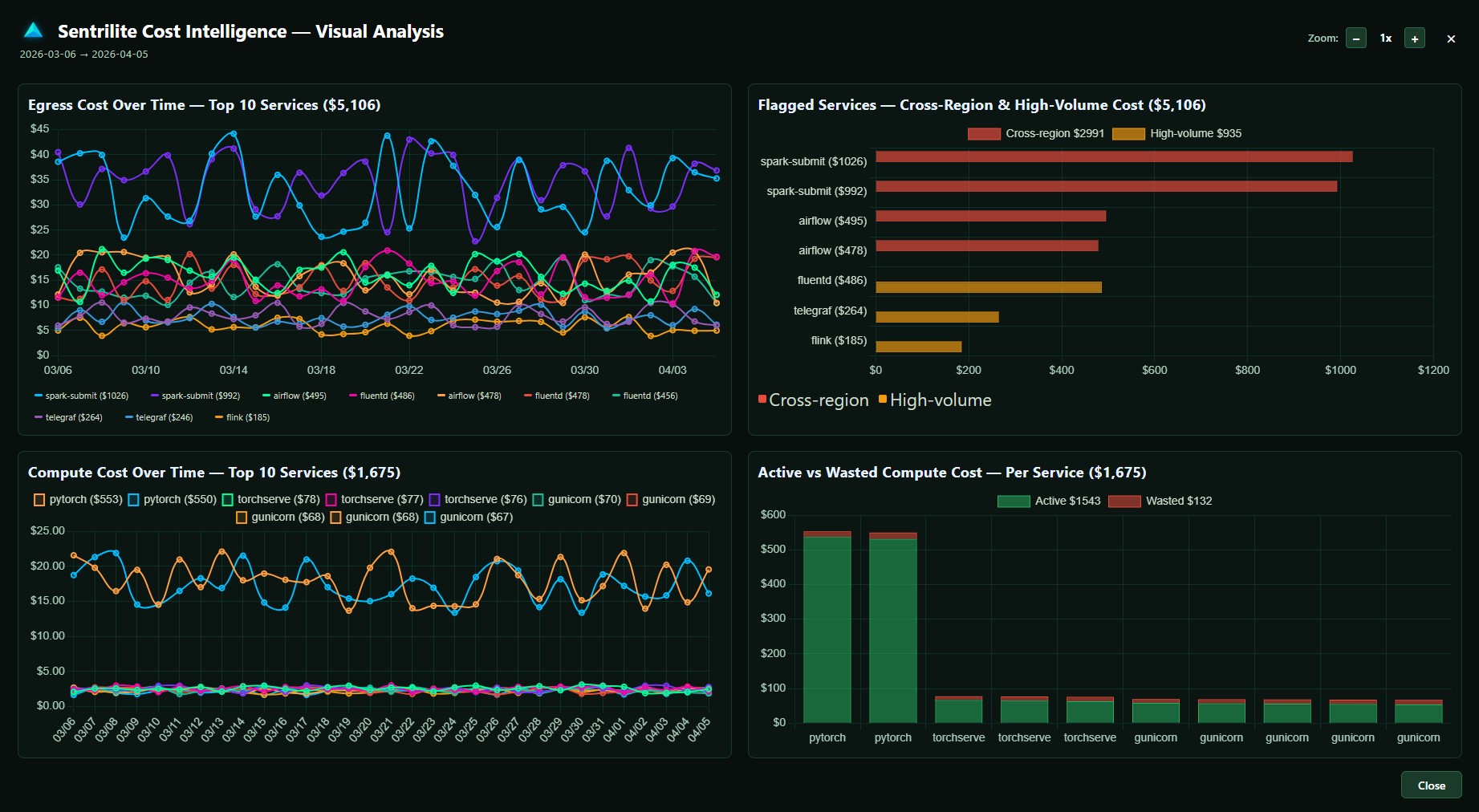
Sentrilite delivers tagless, real-time cloud cost attribution at the service level, going deeper than pod-level metrics to show exactly which process and which destination are driving every dollar of your AWS spend. Built for FinOps and Engineering teams who need cloud cost visibility that pod-level tools and billing API dashboards cannot deliver, without the manual tagging discipline most platforms require. WHAT YOU GET Tagless cost attribution. Sentrilite tracks every metric at the kernel level using eBPF and system call hooks, so no manual tagging or labeling is required. Get accurate per-service, per-node, and per-cluster cost breakdowns instantly, even on workloads that have never been tagged. Service-level granularity. Drill down through the full attribution chain: Namespace, Pod, Container, Process, Cost. See which service inside a pod is generating spend, not just which pod is hot. Most cost tools stop at pod or container level, leaving you with "this pod cost X" answers when you need "this Python script in this container talking to this S3 bucket cost X" answers. Destination-aware egress attribution. Bytes-out is half the story. Where they went is the other half, since same-AZ egress is free and public internet is 0.09 USD per GB. Sentrilite resolves every connection to its real hostname, so you see "50 GB to api.partner.com over the last hour" instead of "the pod sent 50 GB." Real-time bytes-to-dollars math. Raw byte counts are not actionable. Per-process, per-destination cost is. Sentrilite does the math live, applying region and traffic-class pricing rules so you see dollar figures attached to the exact PID and destination as events happen, not at month-end reconciliation. Custom cost rules. Define alert rules in JSON for egress spikes, daily or monthly cost ceilings per namespace, connections to specific destinations, or compute spikes. Rules hot-reload without restarts. Cost governance becomes code, version-controlled like everything else. One-click cost reports. Generate audit-ready Cost Intelligence reports as PDF, complete with full attribution chains, destination breakdowns, and remediation context for finance and engineering reviews. WHAT YOU DO NOT NEED No manual tagging. No code changes. No application restarts. No Prometheus stack required. No cloud billing API credentials. No agent in every pod. Just one privileged DaemonSet container per node, deployed via Helm or a single Docker command. WHERE IT RUNS AWS EKS, ECS on EC2, self-managed Kubernetes, and any Linux host. Multi-cloud deployments across GCP, Azure, on-premises bare metal, and hybrid environments are supported from the same agent. Sentrilite reads from the kernel, so it works the same way regardless of cloud provider, distribution, or orchestrator. WHO IT IS FOR FinOps practitioners who need accurate cost allocation without the tagging hygiene fight. Engineering teams who need to debug cost spikes the moment they happen, not at the end of the billing cycle. Platform teams running Kubernetes at scale who need per-process visibility their pod-level tools cannot provide. Anyone who has ever spent a day tracing a cost spike through CloudWatch logs, Cost Explorer, and SSH sessions to find the offending workload. HOW TO START Launch the AMI from AWS Marketplace, or run a single Docker command on any Linux host. The dashboard opens at port 8080 within 2 minutes of install, with live cost attribution data flowing immediately. No license key required for the first install. Free to try.
Highlights
- Cloud Cost Intelligence: Tagless Real-Time Cloud Cost Intelligence. Start saving on Cloud Spend in Minutes! Go beyond Pod-level abstractions and manual tagging. Get a complete Service-level cost breakdown for network/egress/ingress and compute.
Details
Sold by
Delivery method
Delivery option
64-bit (x86) Amazon Machine Image (AMI)
Latest version
Operating system
Rhel 8
Deployed on AWS
New
Introducing multi-product solutions
You can now purchase comprehensive solutions tailored to use cases and industries.

Features and programs
Financing for AWS Marketplace purchases
AWS Marketplace now accepts line of credit payments through the PNC Vendor Finance program. This program is available to select AWS customers in the US, excluding NV, NC, ND, TN, & VT.

Pricing
Pricing and entitlements for this product are managed through an external billing relationship between you and the vendor. You activate the product by supplying a license purchased outside of AWS Marketplace, while AWS provides the infrastructure required to launch the product. AWS Subscriptions have no end date and may be canceled any time. However, the cancellation won't affect the status of the external license.
Additional AWS infrastructure costs may apply. Use the AWS Pricing Calculator to estimate your infrastructure costs.
Vendor refund policy
Refunds are handled in accordance with AWS Marketplace policies. Customers may request a refund through AWS Support. Refunds are evaluated on a case-by-case basis and may be granted for technical issues or billing errors. For assistance, please contact our support team.

Legal
Vendor terms and conditions
Upon subscribing to this product, you must acknowledge and agree to the terms and conditions outlined in the vendor's End User License Agreement (EULA) .
Content disclaimer
Vendors are responsible for their product descriptions and other product content. AWS does not warrant that vendors' product descriptions or other product content are accurate, complete, reliable, current, or error-free.
Delivery details
64-bit (x86) Amazon Machine Image (AMI)
Amazon Machine Image (AMI)
An AMI is a virtual image that provides the information required to launch an instance. Amazon EC2 (Elastic Compute Cloud) instances are virtual servers on which you can run your applications and workloads, offering varying combinations of CPU, memory, storage, and networking resources. You can launch as many instances from as many different AMIs as you need.
Version release notes
Service-level cloud cost attribution using kernel-level - goes deeper than pod or container level with zero manual tagging Real-time egress cost breakdown across AWS, GCP, and Azure with cross-region and high-volume anomaly detection Compute cost intelligence with CPU and memory waste identification and idle pod detection One-click Cost Intelligence PDF report with full service-level breakdown, charts, and remediation guidance Runtime security engine with real-time detection of privilege escalation, namespace escapes, process masquerade, lateral movement, and zero-day threats Fully customizable Detection-As-Code rules - define your own detection logic in plain JSON One-click Vulnerability Assessment covering misconfigurations, exposed credentials, insecure file permissions, open ports, and unauthorized kernel modules Interactive real-time dashboard with WebSocket-based live alert feed Lightweight single-agent deployment - one Docker command or Helm chart, running in under 5 minutes Supports AWS EC2, EKS, bare metal, VMs, and hybrid on-premises workloads
Additional details
Usage instructions
Open the dashboard on http://server-ip:8080 to see live telemetry and report generation for cloud cost, runtime security and vulnerability assessment.
Support
Vendor support
AWS infrastructure support
AWS Support is a one-on-one, fast-response support channel that is staffed 24x7x365 with experienced and technical support engineers. The service helps customers of all sizes and technical abilities to successfully utilize the products and features provided by Amazon Web Services.
Similar products

Attribute is a Cloud cost management platform, enables automatic cost allocation and cost accountability to assure alignment of cloud spend to business metrics
Sentrilite is a lightweight kernel-level Cloud Runtime Detection and Response (CDR) platform built for Kubernetes and hybrid-cloud workloads. It delivers real-time Cloud Workload Protection (CWPP) against zero-day threats, privilege escalation, lateral movement, and anomalous network behavior using eBPF, without modifying applications or deploying sidecars.
Detection-as-Code lets security teams define and update custom threat detection rules in seconds using simple JSON, with automated response and no redeployments required. 300+ pre-built rules provide out-of-the-box coverage for containers, Kubernetes clusters, and hybrid cloud environments from day one.
One-click audit-ready Runtime Security reports include full attribution, triggered rules, and remediation details. One command to deploy across AWS EC2, EKS, bare metal, and hybrid environments.
Sentry is a market-leading error monitoring and tracking solution trusted by businesses of all sizes worldwide. Our AWS integration with Sentry elevates your application exception monitoring to the next level. In today’s fast-paced digital landscape, where user expectations are at an all-time high, real-time application monitoring is essential.
Cut cloud waste across AWS, GCP, AI services (OpenAI, Anthropic), and CDNs (Fastly, Cloudflare). CloudYali is a unified FinOps platform that surfaces actionable savings opportunities, eliminates idle resources, and helps teams reduce infrastructure costs from day one. Allocate spend accurately, set budget alerts, and give engineering, finance, and FinOps teams the visibility they need to optimize spending and improve unit economics.
Customer reviews
No customer reviews yet
Be the first to review this product . We've partnered with PeerSpot to gather customer feedback. You can share your experience by writing or recording a review, or scheduling a call with a PeerSpot analyst.