Artificial Intelligence
Deploy a multimodal WhatsApp ordering assistant with Amazon Bedrock AgentCore
This post shows how to deploy a multimodal WhatsApp ordering assistant built with Amazon Bedrock AgentCore and Amazon Nova 2. Many quick-service restaurants spread ordering across an app, a website, a phone line, and the counter. Each of those is a separate system to build and run. Each one also fragments the customer’s history, making the same person look like a stranger on every channel. Customers already live in their messaging apps. WhatsApp reaches more than two billion people. A customer who can text, send a voice note, or place a call from the same conversation does not need to install anything or sign in.
A single WhatsApp Business number hosts the assistant. A customer can text the restaurant, send a voice note, or place a voice call. An AI agent takes the order end to end, from greeting to confirmation. All three channels share one backend and one cross-channel memory. A customer who texts today and calls tomorrow is recognized as the same person.
The solution uses the Meta WhatsApp Business Platform as the customer front door. Amazon Bedrock AgentCore hosts the agents. Amazon Nova 2 Lite handles text through the Amazon Bedrock Converse API, and Amazon Nova 2 Sonic handles real-time speech on voice notes and calls. The agents reach the restaurant backend through the Model Context Protocol (MCP). You deploy the whole system with the AWS Cloud Development Kit (AWS CDK). The channel and the ordering logic stay separate, so the backend doesn’t change when you add or remove a channel.
Solution overview
The design keeps three things apart: (1) the WhatsApp layer handles the conversation, (2) three agent runtimes run the conversations for their channels, and (3) the backend holds the menu, carts, orders, and locations. Inbound traffic arrives on a single HTTPS webhook, is acknowledged with a 200 immediately, and then processed asynchronously so no request blocks the response. This separation keeps each layer independently deployable and straightforward to reason about.
The customer front door is the Meta WhatsApp Business Platform. It exposes the Cloud API webhook, Messages API, Media API, and Calling API. Meta manages this service. You set it up and connect it as a prerequisite, not something this solution deploys. The AWS CDK provisions everything on the AWS side. It emits the webhook URL you register with Meta.
You use the AWS CDK to deploy the following AWS resources as a set of stacks in dependency order, grouped here by function.
- Amazon API Gateway provides two REST APIs. The first is a regional HTTPS webhook on an AWS managed certificate. It’s the only public endpoint. The second is an AWS Identity and Access Management (IAM)-authorized backend API in front of the ordering logic.
- AWS Lambda runs the webhook ingest, the webhook worker, the message sender, and the ordering business logic.
- Amazon Simple Queue Service (Amazon SQS) provides the inbound queue, with a dead-letter queue, that decouples the quick acknowledgment from the rest of the processing.
- AgentCore runtime, a capability of Amazon Bedrock AgentCore, hosts the three agents. Each conversation runs in its own microVM. Sessions stay isolated.
- Amazon Nova 2 Lite (text through the Converse API) and Amazon Nova 2 Sonic (speech-to-speech for voice) are invoked through Amazon Bedrock.
- AgentCore Gateway, a capability of Amazon Bedrock AgentCore, is a managed MCP server that exposes the backend REST API as MCP tools the agents call by name.
- AgentCore memory, a capability of Amazon Bedrock AgentCore, is one shared, cross-channel record keyed by a hashed customer ID.
- Amazon DynamoDB stores customer profiles, orders, menu items, carts, and locations. It also holds a last inbound window table for the WhatsApp layer.
- Amazon Location Service handles geocoding and nearest-location lookups.
- Amazon Kinesis Video Streams (Amazon KVS) provides a signaling channel that the voice-call runtime uses to mint credentials for the managed Traversal Using Relays around NAT (TURN) relay that carries call media.
- Amazon Virtual Private Cloud (Amazon VPC) with a single network address translation (NAT) gateway is the outbound path for the voice-call runtime. This is the only runtime that requires a VPC.
- AWS Secrets Manager holds the Meta Access Token, App Secret, and Verify Token, created as empty containers you populate out-of-band. AWS Systems Manager Parameter Store holds the customer-id pepper.
- Amazon Elastic Container Registry (Amazon ECR), AWS CodeBuild, and Amazon Simple Storage Service (Amazon S3) build and store the ARM64 agent container images.
- Amazon CloudWatch captures logs and metrics, and AWS Key Management Service (AWS KMS) encrypts data at rest.
Architecture diagram
Figure 1 shows the full architecture. The diagram organizes the solution into labeled groups A through G that carry the request path. Two supporting groups sit outside that path, handling a build pipeline that runs once at deploy time to build the agent images and security and monitoring services that back every channel at runtime.
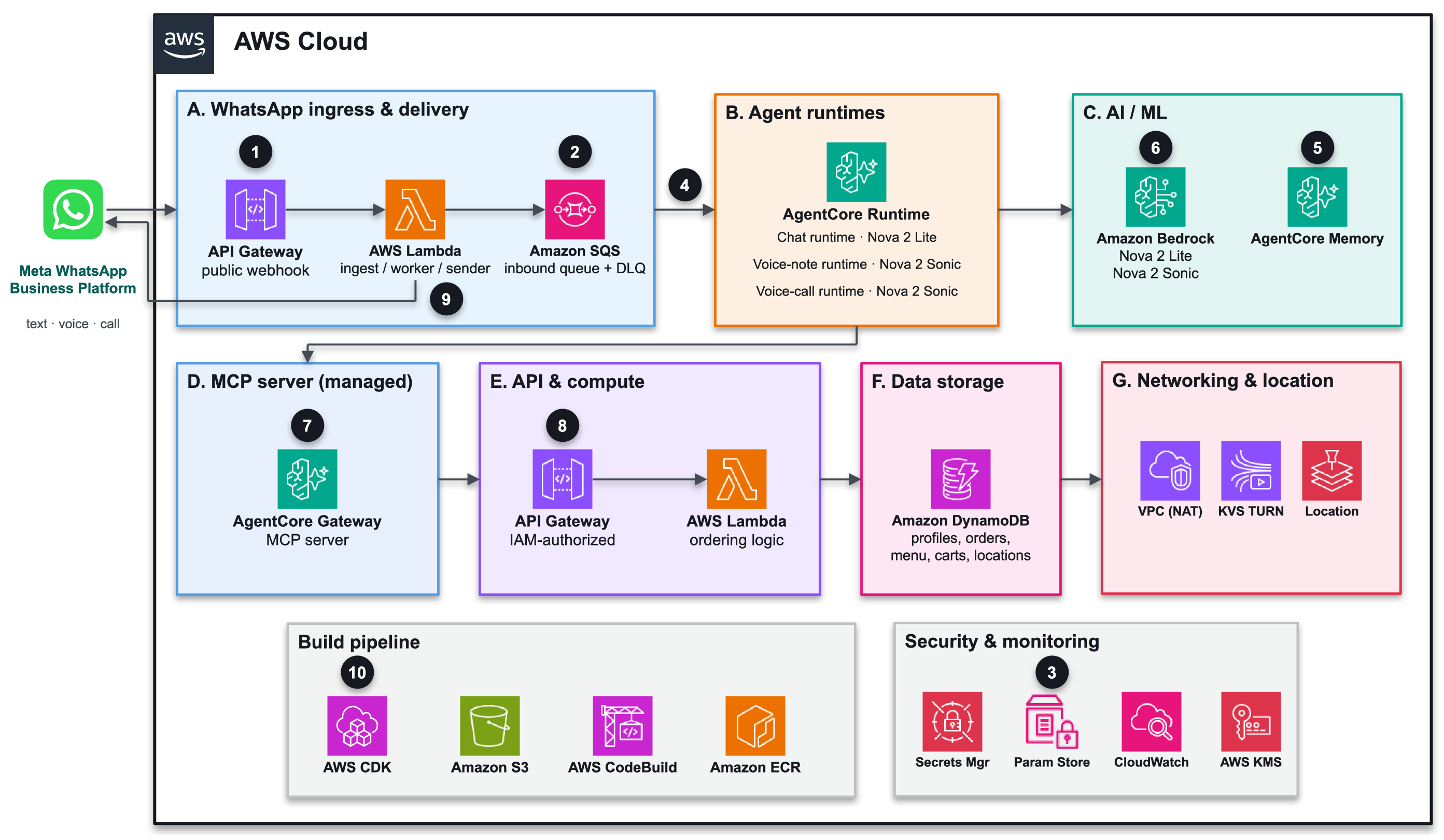
Figure 1: Multimodal WhatsApp ordering architecture on AWS
- A. WhatsApp ingress and delivery: The webhook API Gateway, the ingest, worker, and sender Lambdas, and the Amazon SQS queue. The ingest verifies the Meta signature and enqueues the message. The worker handles the remaining processing. The Sender Lambda delivers replies.
- B. Agent runtimes: Three agents on AgentCore runtime, each an ARM64 container, one per channel: chat (Amazon Nova 2 Lite), voice note (Amazon Nova 2 Sonic), and voice call (Amazon Nova 2 Sonic over Web Real-Time Communication, or WebRTC). Only the voice-call runtime runs in a VPC.
- C. Artificial intelligence and machine learning (AI/ML): Amazon Nova 2 Lite and Amazon Nova 2 Sonic invoked through Amazon Bedrock, plus the shared AgentCore memory keyed by a hashed
customer_idfor cross-channel continuity. - D. MCP server (managed): AgentCore Gateway exposes the backend REST API as discoverable MCP tools (
GetMenu,AddToCart,PlaceOrder, and more) that every runtime calls by name. - E. API and compute: The IAM-authorized backend API Gateway and the ordering Lambdas that hold the business logic.
- F. Data storage: Amazon DynamoDB stores customer profiles, orders, menu items, carts, and locations.
- G. Networking and location: Amazon Location Service for geocoding and nearest-location lookups, the Amazon KVS managed TURN relay for voice-call media, and the VPC with a NAT gateway as the outbound path for the voice-call runtime.
Two supporting groups sit outside the request path. The build pipeline (AWS CDK, AWS CodeBuild, Amazon ECR, and Amazon S3) runs once at deploy time to build and store the ARM64 agent images. It is not in the path of any request. Security and monitoring (AWS Secrets Manager, AWS Systems Manager Parameter Store, Amazon CloudWatch, and AWS KMS) back every channel at runtime.
The following steps trace a single request end to end through the architecture:
- Meta delivers an inbound webhook (text, voice note, or call event) to the Webhook API Gateway and the Webhook Ingest Lambda.
- The ingest verifies the Meta signature, enqueues to Amazon SQS, and returns
200within Meta’s window. - The Webhook Worker derives a pseudonymous
customer_idusing the pepper in AWS Systems Manager Parameter Store. - The worker fetches media from the Meta Media API and invokes the matching agent on Amazon Bedrock AgentCore runtime (chat, voice note, or voice call) with
session_id = customer_id. - The runtime reads the customer’s long-term insights from AgentCore memory at session start.
- It runs the conversation with Amazon Nova 2 Lite (text) or Amazon Nova 2 Sonic (voice) through Amazon Bedrock.
- AgentCore Gateway is the managed MCP server. It exposes the backend REST API as MCP tools the agent calls by name.
- Tools route through the backend API Gateway to AWS Lambda, Amazon DynamoDB, and Amazon Location Service. Voice-call media uses the Amazon KVS TURN relay (runtime in a VPC).
- Replies go out through the Sender Lambda (text) or the worker (voice). Events are written back to memory at session end.
- AWS CDK builds ARM64 images through AWS CodeBuild into Amazon ECR. Amazon CloudWatch logs components and AWS KMS encrypts data at rest.
In short, every request flows from Meta’s webhook through the ingest, queue, worker, and agent runtime to the backend tools, then back to the customer on WhatsApp.
Channel flows
All three channels share the same front door, backend tools, and memory. What differs is the media on the wire and the runtime that handles it.
Text message: A text message arrives on the webhook. The worker derives customer_id and invokes the chat runtime, which reads memory, streams Amazon Nova 2 Lite through the Converse API, and calls backend tools through the MCP gateway as needed. Replies go through the Sender Lambda, and events are written to memory at session end.
Figure 2 shows the text flow, from the inbound webhook through Amazon Nova 2 Lite on the Converse API to the reply delivered by the Sender Lambda.
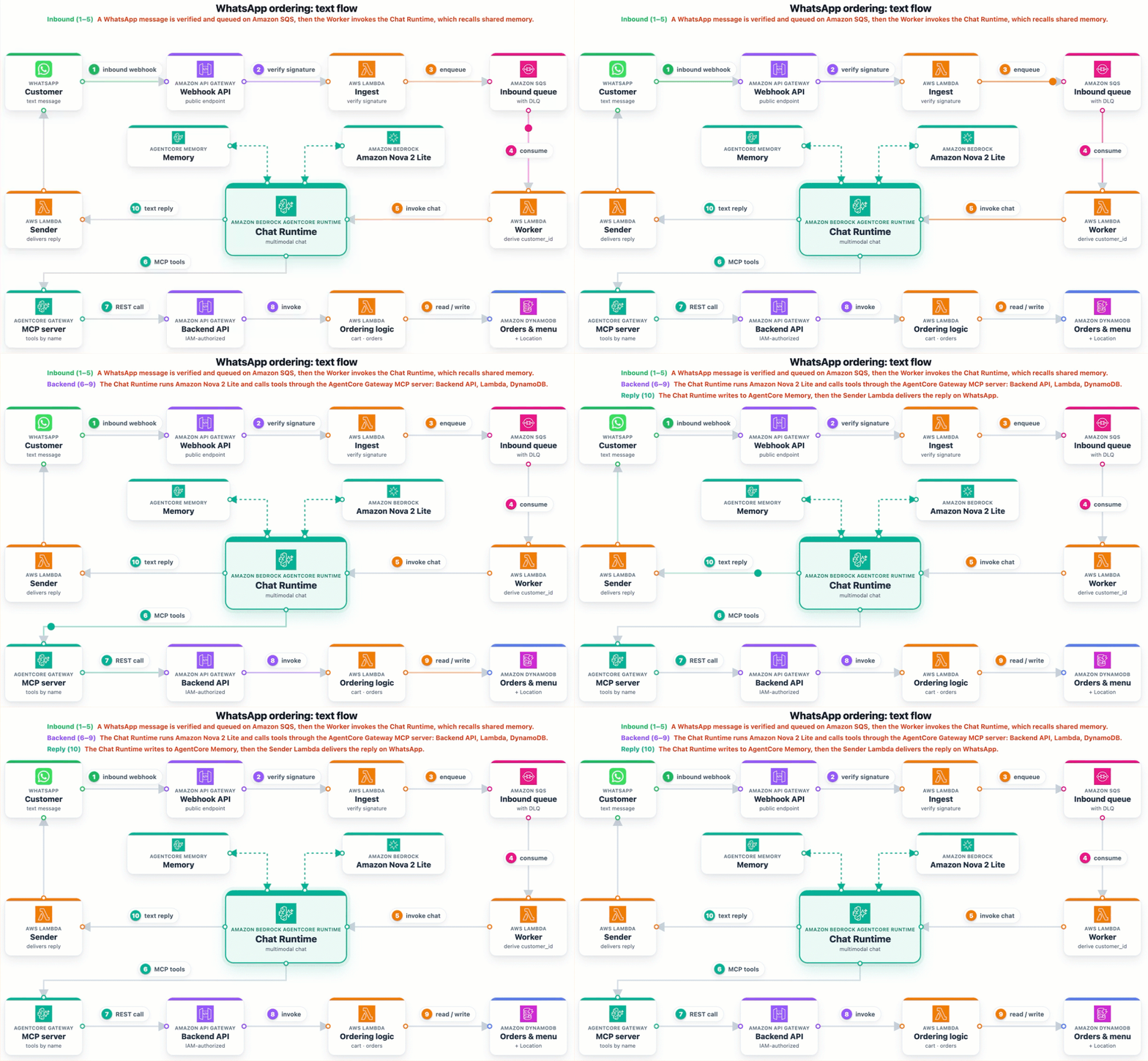
Figure 2: Text flow with Amazon Nova 2 Lite
Voice note (speech-to-speech): A voice note arrives as an audio message. The worker downloads the OGG Opus bytes and invokes the voice-note runtime. After reading memory, the audio is decoded to 16 kHz pulse-code modulation (PCM) and fed into a bounded Amazon Nova 2 Sonic speech-to-speech session. Tools are available through the same gateway. The spoken reply is returned as a WhatsApp voice message. There’s no transcription service in the path. It’s true voice-in, voice-out.
Figure 3 shows the voice-note flow, a bounded Amazon Nova 2 Sonic speech-to-speech session that returns a spoken reply with no transcription in the path.
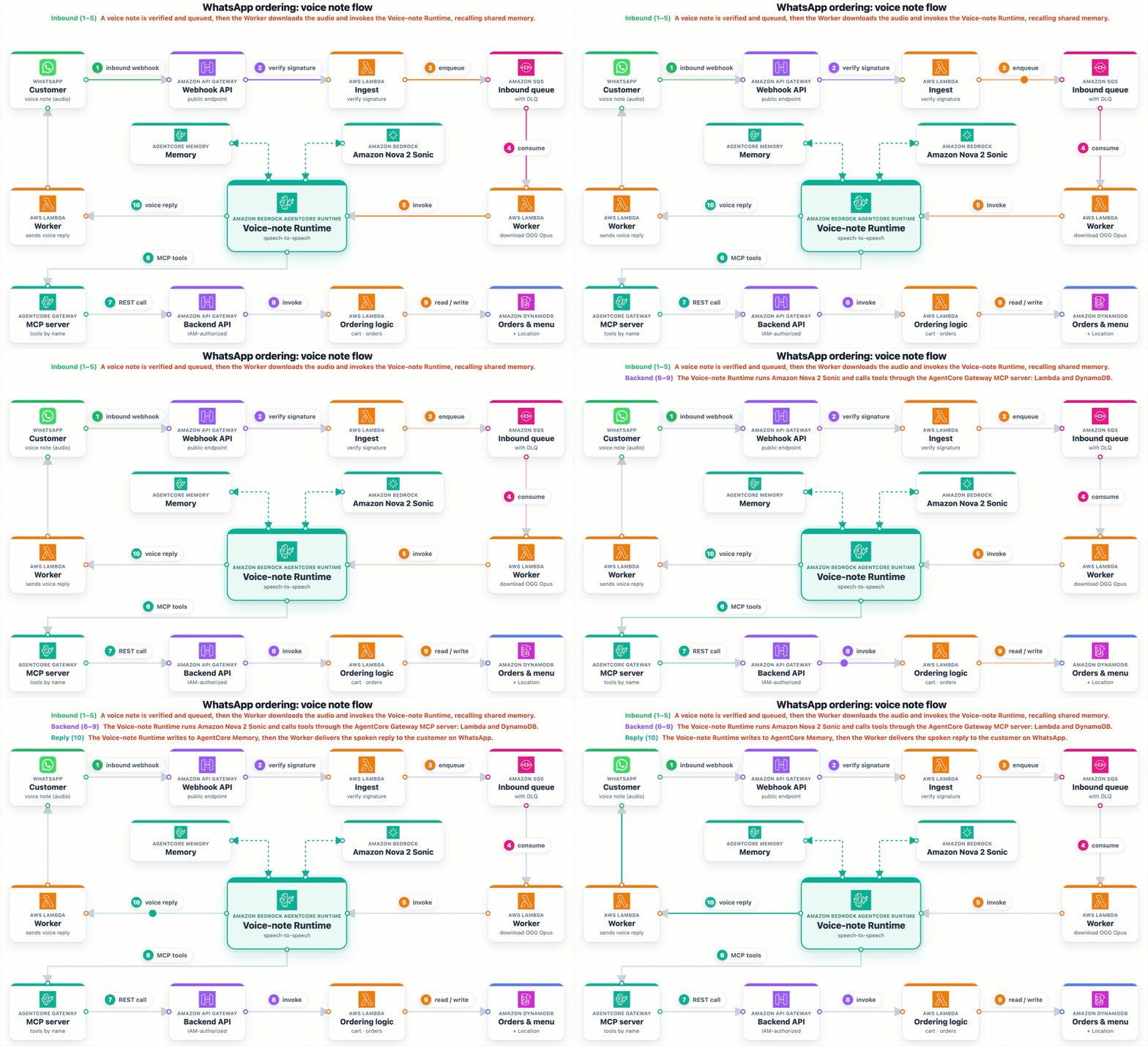
Figure 3: Voice note flow with Amazon Nova 2 Sonic
Voice call (WebRTC): The customer selects Call, and Meta’s Calling API delivers a connect webhook with the WebRTC Session Description Protocol (SDP) offer. The worker relays it to the voice-call runtime in turnOnly mode, because it has no public IP. TURN credentials come from Amazon KVS. Meta provides no trickle Interactive Connectivity Establishment (ICE) path. The aiortc answerer waits for ICE gathering and returns a single-shot SDP answer. The worker delivers that answer to Meta. Media then flows over Datagram Transport Layer Security and Secure Real-time Transport Protocol (DTLS/SRTP) through the KVS managed TURN relay. Amazon Nova 2 Sonic drives the conversation.
Figure 4 shows the voice-call flow, where WebRTC media is relayed through the Amazon KVS managed TURN relay and Amazon Nova 2 Sonic drives the conversation.
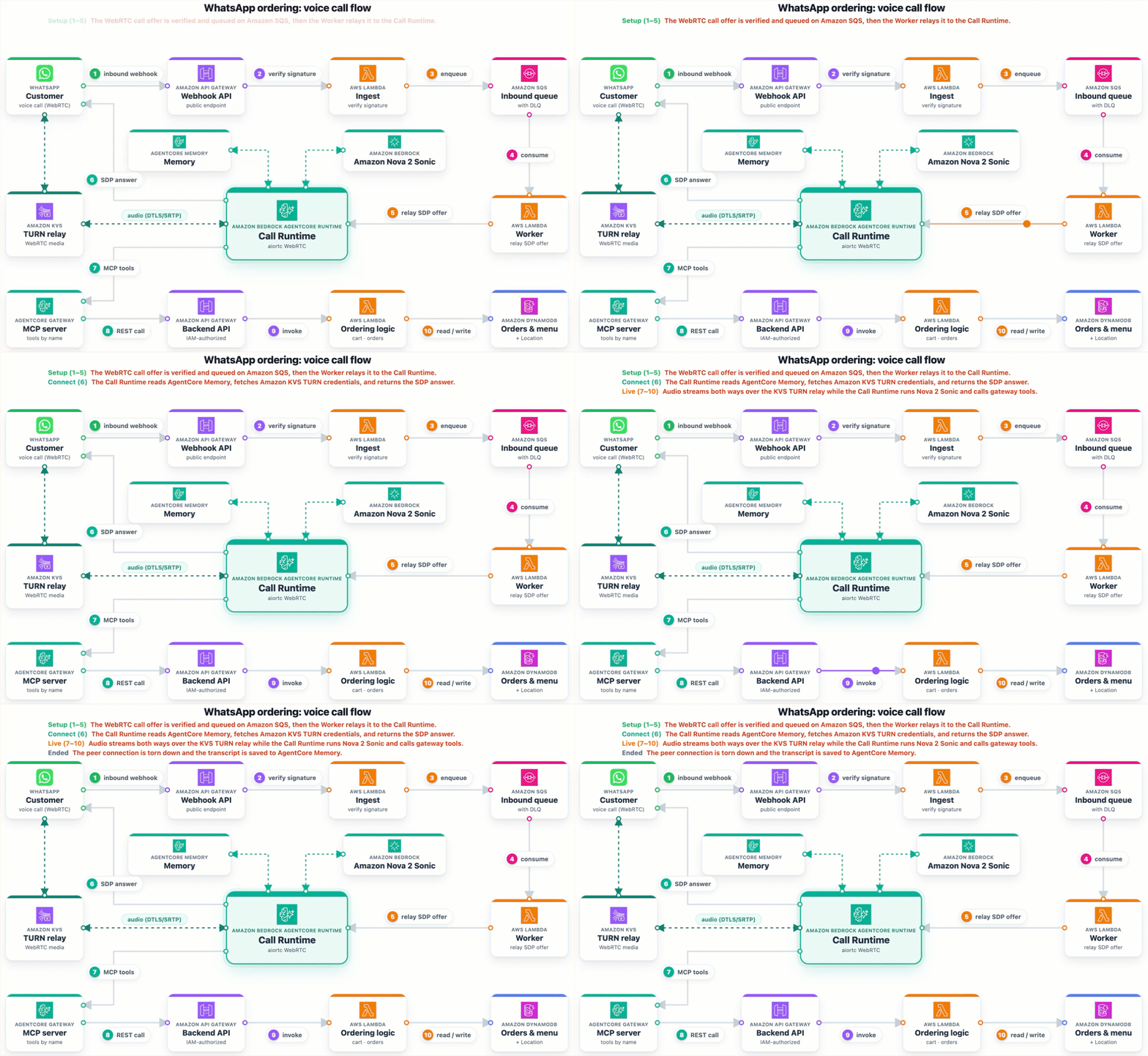
Figure 4: Voice call flow with Amazon Nova 2 Sonic
Prerequisites
This solution has prerequisites in two areas: your AWS account and your Meta WhatsApp setup. Complete both prior to running the deployment, because it asks you for specific WhatsApp values and the agent cannot reply until they are in place.
AWS prerequisites
- You need an active AWS account with Amazon Bedrock model access enabled for Amazon Nova 2 Lite (
amazon.nova-2-lite-v1:0) and Amazon Nova 2 Sonic (amazon.nova-2-sonic-v1:0) in your deployment Region. Your IAM user or role must have permissions to deploy AWS CDK stacks and create the resources this solution uses, including AgentCore runtime, Gateway, and memory. On your local machine, installNode.js24.x or later, the AWS CLI 2.x configured with credentials, and git. Finally, bootstrap AWS CDK in your target account and Region (npx cdk bootstrap aws://<ACCOUNT_ID>/<REGION>).
The agent containers build inside AWS CodeBuild on ARM64, so you do not need Python, Docker, or audio toolchains locally. Deploy in an AWS Region where Amazon Nova 2 Lite, Amazon Nova 2 Sonic, and AgentCore runtime, Gateway, and memory are all available. The US East (N. Virginia) Region (us-east-1) is a good place to start.
For model availability by Region, refer to Supported models by AWS Region in Amazon Bedrock.
WhatsApp Business Platform (Meta) prerequisites
The WhatsApp side is set up once in the Meta consoles, as a prerequisite rather than a step in this walkthrough. No AWS API can create a Meta app for you, so complete it first and have the values on hand before you deploy. For a demo, the Meta sandbox test number, which is available at no additional cost, is enough. You do not need business verification or a production number. The full procedure lives in Meta’s documentation, linked in the following section.
Have these items ready before you deploy.
- A Meta Developer App with the WhatsApp product added, linked to a Business portfolio. Adding the product provisions a WhatsApp Business Account (WABA) and a sandbox test number at no additional cost. Refer to Get started with the Cloud API.
- The App ID and App Secret. The App Secret is the key Meta uses to sign each webhook, and the webhook Lambda recomputes that signature.
- An Access Token. The temporary token works for a quick test and expires in about 24 hours. For something longer-lived, create a System User token with the
whatsapp_business_messagingandwhatsapp_business_managementscopes. - The Business portfolio ID (the setup CLI can auto-discover the Phone Number ID and WABA ID).
- A Verify Token that you invent. It is a hard-to-guess string Meta echoes back during the one-time webhook verification handshake.
- For voice calls, the WhatsApp Calling API enabled on the number.
Store none of these in source control. The Access Token, App Secret, and Verify Token are secrets and go into AWS Secrets Manager during deployment, not into the CDK templates.
Deploy the solution with AWS CDK
The full solution is in the sample repository on GitHub. The repository contains three agent containers, the AWS CDK infrastructure code, and setup scripts that wire the WhatsApp webhook to your account. Clone it, run the preflight check, then deploy with a prefix. The prefix is added to every resource name, so you can deploy more than once per account.
The script provisions every stack in dependency order. It passes each stack’s outputs to the next. First it deploys the shared VPC. Then it deploys the backend: Amazon DynamoDB, Amazon Location Service, the ordering Lambdas, and the backend REST API. Next it deploys AgentCore Gateway and the shared AgentCore memory. It then builds each ARM64 container with AWS CodeBuild, pushes to Amazon ECR, and deploys the three runtimes. After that it deploys the WhatsApp webhook and the order-notifier. It then seeds sample menu and location data. The first build of each container takes roughly 8–12 minutes. For a guided, browser-based experience, use ./scripts/deploy-all.sh --interactive-web-ui.
How the WhatsApp values reach the deployment matters for security. The CDK creates empty Secrets Manager containers for the three secrets. It does not take a secret as a CDK parameter, which would bake it into the synthesized template. You populate the secret values out-of-band, while the non-secret identifiers (Phone Number ID, WABA ID, App ID) ride along as parameters. The scripts/whatsapp-setup/ CLI handles this in two flows. The pre-deploy flow validates the Access Token and auto-discovers the WABA and Phone Number ID. It generates a Verify Token if needed and populates the secrets. After the deploy emits the webhook URL, the post-deploy flow sets the callback URL, Verify Token, and subscribed fields in Meta. It then subscribes the WABA and completes the verification handshake.
Once the webhook is subscribed and the secrets are populated, the number is live and the agent replies across all three channels.
Acknowledging fast and processing asynchronously
Meta expects a prompt HTTP response with a 200 OK status code. Taking an order, fetching media, invoking an agent, and relaying call signaling needs a little more than that brief acknowledgment window allows. So the work splits in two. The Webhook Ingest Lambda does only the fast, safe part, which is to verify the signature, enqueue to Amazon SQS, and return 200. The Webhook Worker Lambda then consumes the queue and does the rest of the processing. A burst of messages becomes a queue to work through, and the public surface stays at one endpoint. If the worker fails on a message, that message returns to the queue and retries. After a few failed attempts, the message lands in the dead-letter queue for later inspection.
One memory across three channels
What makes this feel like one assistant is shared memory. A single AgentCore memory resource is keyed by a hashed customer_id, and all three runtimes use the same key. Each runtime reads the customer’s long-term insights at session start and writes events back at the end. The insights include past orders, favorite items, and preferences the customer mentioned before. Because every channel resolves the same customer to the same memory, a customer who texts today and calls tomorrow is recognized as the same person over one number. There’s no separate cross-channel state to reconcile.
Connecting the agents to backend tools with MCP
No AgentCore runtime calls the backend Lambda functions directly. AgentCore Gateway is a managed MCP server. Each AgentCore runtime connects to it as an MCP client over HTTPS, authenticated with the runtime’s IAM role, and discovers the tools by name. Each runtime carries its own role, so the gateway grants only the access that runtime needs. There’s no separate MCP server behind the gateway. The gateway fronts the backend’s REST API and generates one MCP tool per endpoint. When an agent calls a tool such as PlaceOrder, the gateway translates it into a REST request that the backend API Gateway routes to the matching Lambda. Because the agents talk to named tools rather than specific functions, you can change a handler or add a tool without changing any agent. All three channels place orders against the same tools and data. The cart and order tools own all pricing and totals. The agent doesn’t compute them, and every order is persisted in Amazon DynamoDB with channel = "whatsapp".
Storing menus, carts, and orders
Amazon DynamoDB tables cover the workflow. They are Customers (profiles for recognizing returning customers), Orders (history with pickup location and channel), Menu (items, prices, and availability), Carts (in-progress carts with a time-to-live), and Locations (coordinates, hours, and tax rates for totals and recommendations). On-demand capacity scales with traffic, so there is no throughput to manage.
Finding a pickup location
Amazon Location Service helps a customer find a pickup spot without much typing. The agent passes a ZIP code or address to be geocoded into coordinates. The backend then ranks the nearest restaurants and returns concrete options the customer can act on.
Recognizing a customer without a login
A WhatsApp customer doesn’t sign in, so the system uses the phone number as the basis for identity. It hashes the E.164 number with a secret pepper in AWS Systems Manager Parameter Store, and the result becomes the customer_id ("wa-" + sha256(E164 || Pepper)[:16]). The raw number isn’t stored in memory or session state, which helps meet personally identifiable information (PII) requirements. If it matches a known customer, the agent greets them by name and recalls preferences. Otherwise they order as a new customer. The runtime that sends replies holds no token or phone number. The Sender Lambda resolves the recipient from a “last inbound” window table at send time. This is recognition, not identity verification. A deployment that needs verification can add a step such as a one-time passcode.
Ordering walkthrough
There is no web UI or test client. Message or call the WhatsApp Business number from a phone with WhatsApp installed. This example shows a typical exchange (lines prefixed “Agent” are the assistant’s replies, tool calls in brackets).
Voice notes and voice calls run the same flow through Amazon Nova 2 Sonic. You speak your order and the agent replies with voice. As the order advances, the order-notifier delivers proactive status updates back to WhatsApp. You can follow conversations in Amazon CloudWatch Logs.
Cost
You pay for the AWS services the system uses, and separately for Meta’s WhatsApp messaging fees. Costs scale primarily with conversation volume and the share of voice traffic, which consumes more resources per session than text. This example deploys all three channels (text, voice note, and voice call), so limiting the deployment to specific channels can reduce your baseline cost. For detailed, region-specific estimates, use the AWS Pricing Calculator and refer to Meta’s WhatsApp Business Platform pricing page. Set up a budget in AWS Cost Explorer to track spend as traffic grows.
Things to consider
WhatsApp can also receive images and documents. This solution focuses on order taking and does not act on those attachments. If your use case needs them, you can configure the backend and the chat agent to handle them, because Amazon Nova 2 Lite is already multimodal. The agent could read a photo of a loyalty card or a PDF catering request and turn it into a structured order.
The pattern also reaches beyond restaurants. The core building blocks are one business number, several conversation channels, shared memory, and MCP tools in front of a backend. The same shape fits retail support, healthcare intake, field service scheduling, and many other domains. You adapt it by changing the backend tools and data while the channel and agent layers stay the same.
For production deployments, consider enabling Amazon Bedrock Guardrails to add content filtering and grounding validation. This helps make sure agent responses stay within policy boundaries and reduces hallucinated outputs.
Clean up resources
To avoid ongoing charges, remove the resources when you are done. The cleanup script destroys stacks in reverse order, each consumer before its producers.
Cleanup is destructive. It deletes the order history in Amazon DynamoDB, the pepper in Parameter Store, the Secrets Manager secrets, and the images in Amazon ECR. Back up anything you want to keep first. It does not touch the Meta side, so unsubscribe the webhook and revoke tokens in the Meta console separately. When it finishes, confirm in the AWS CloudFormation console that stacks are gone.
Conclusion
This post walked through the architecture and deployment of a multimodal WhatsApp ordering assistant that takes an order end to end over text, voice notes, and voice calls on a single business number. An asynchronous webhook accepts traffic fast and queues the rest of the work. Three runtimes on AgentCore runtime handle their channels. Amazon Nova 2 Lite and Amazon Nova 2 Sonic run the conversations. AgentCore Gateway connects the agents to the backend through MCP tools. A single AgentCore memory gives each customer one continuous relationship across channels. To get started, clone the sample repository on GitHub and adapt it to your menu and locations. Share in the comments how you adapt this pattern for your own channels.