
Sold by: Entuity Software
Deployed on AWS
Designed for modern multi-vendor networks, Entuity Software™ enables NetOps teams to more efficiently and effectively monitor, visualise and manage their networks. Increase staff productivity and efficiency while reducing the cost of delivering infrastructure availability. Our enterprise software proactively alerts before service impact, and enables event noise reduction while reducing MTTR.
Overview
Image
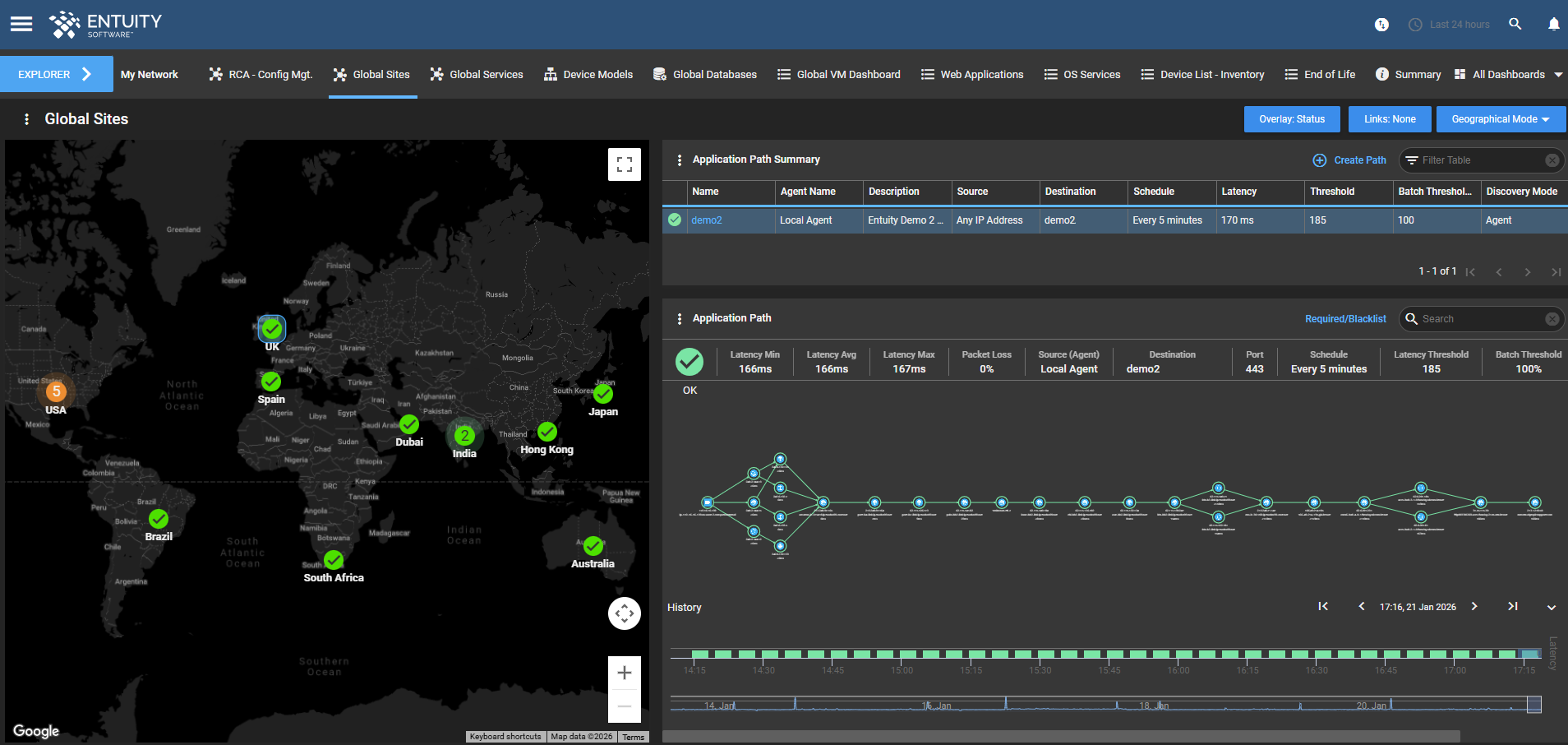
Global Site Health
Image
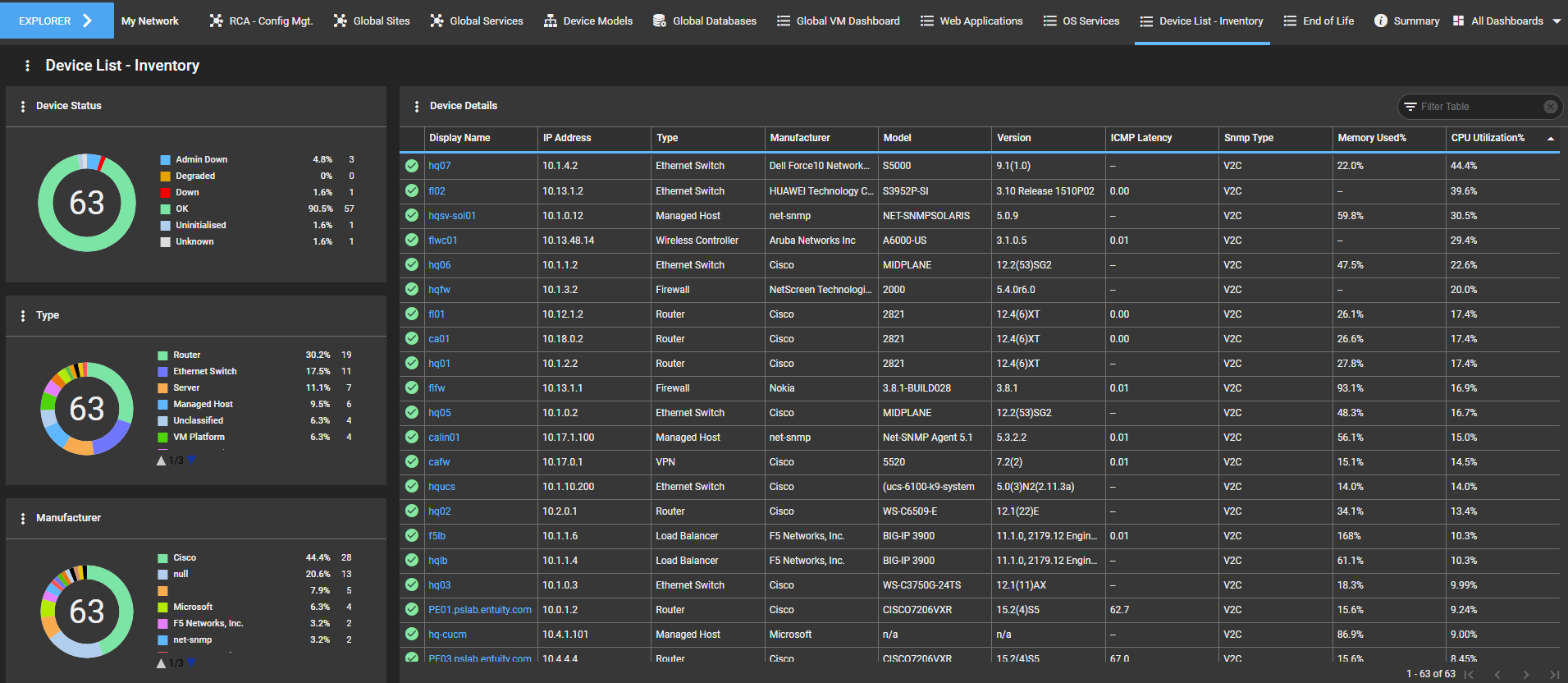
Asset Inventory
Image
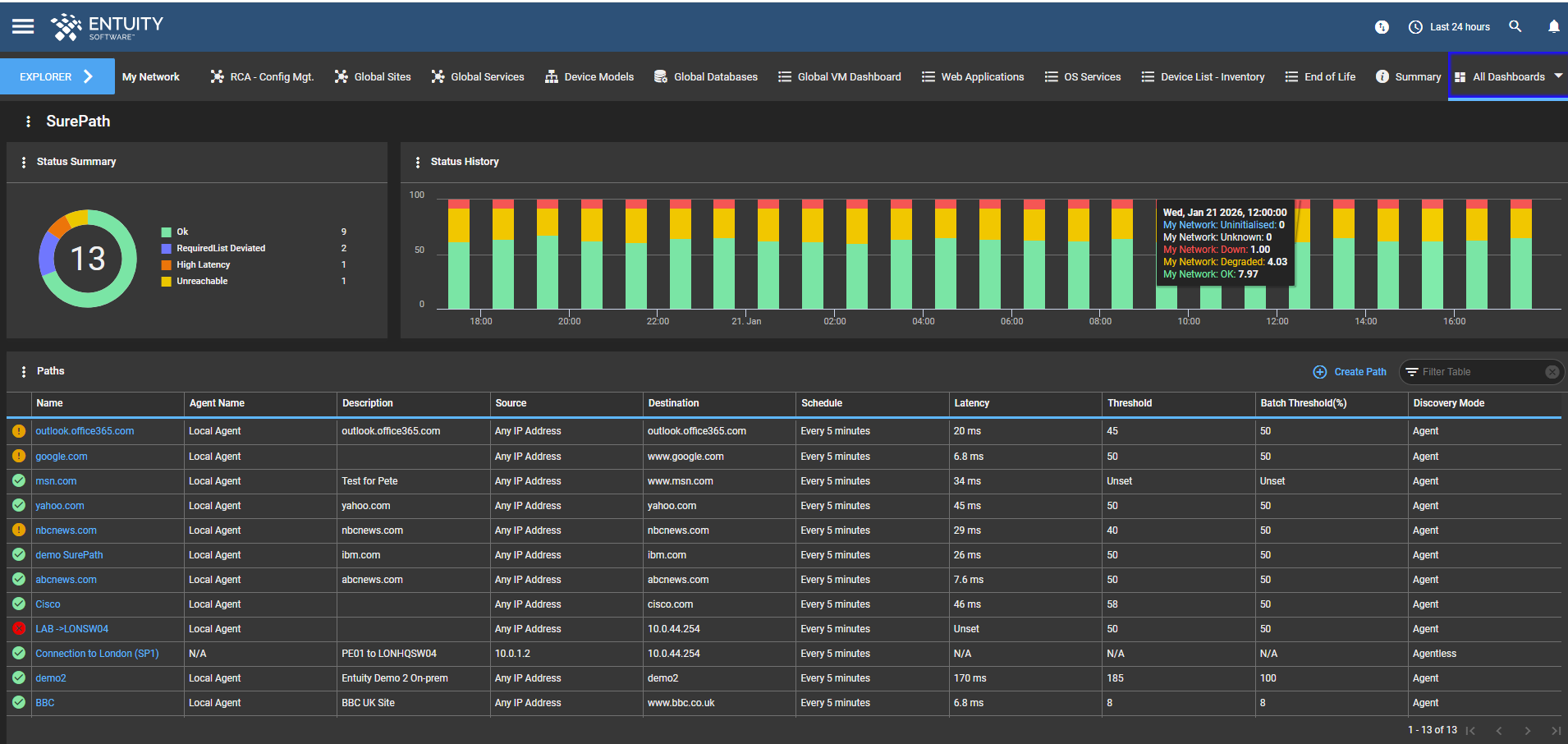
Application Reachability and Latency
Image
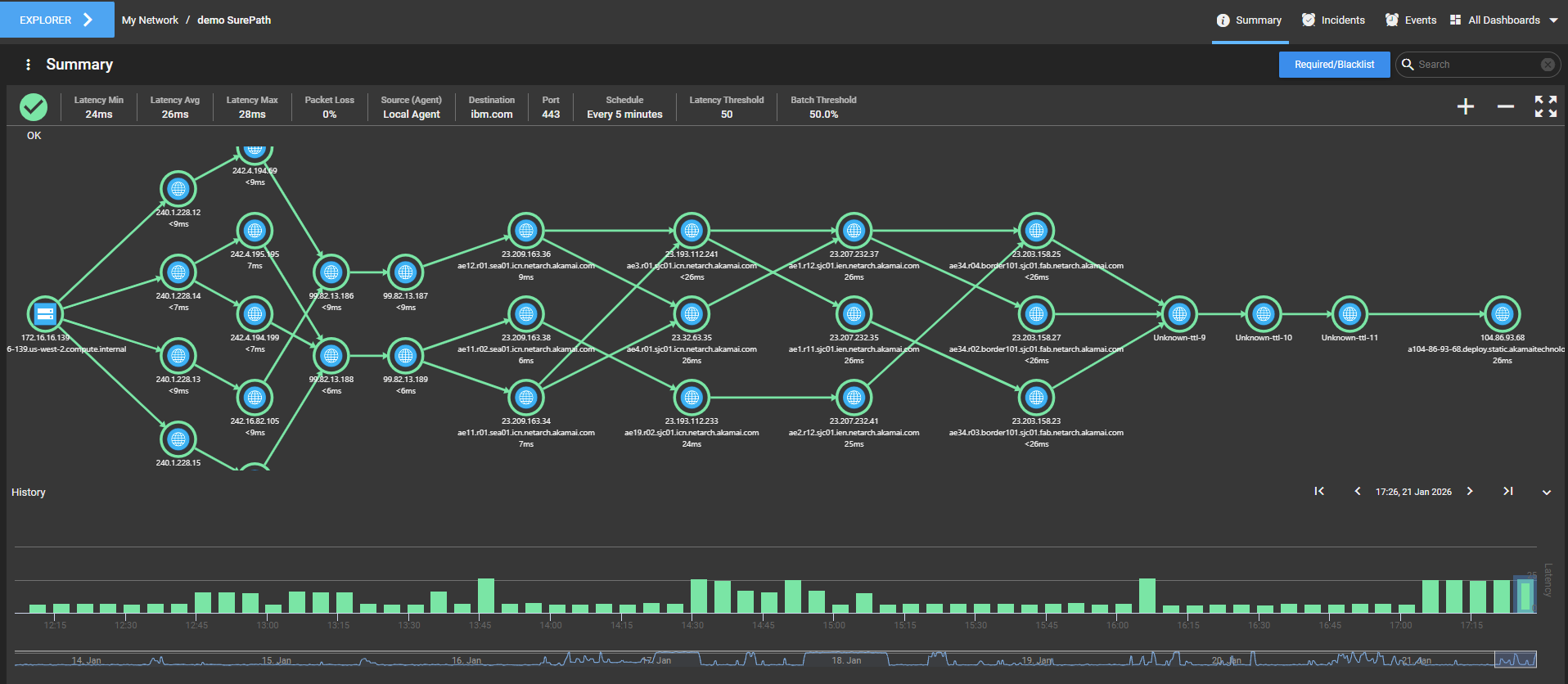
Application Path Monitoring
Image
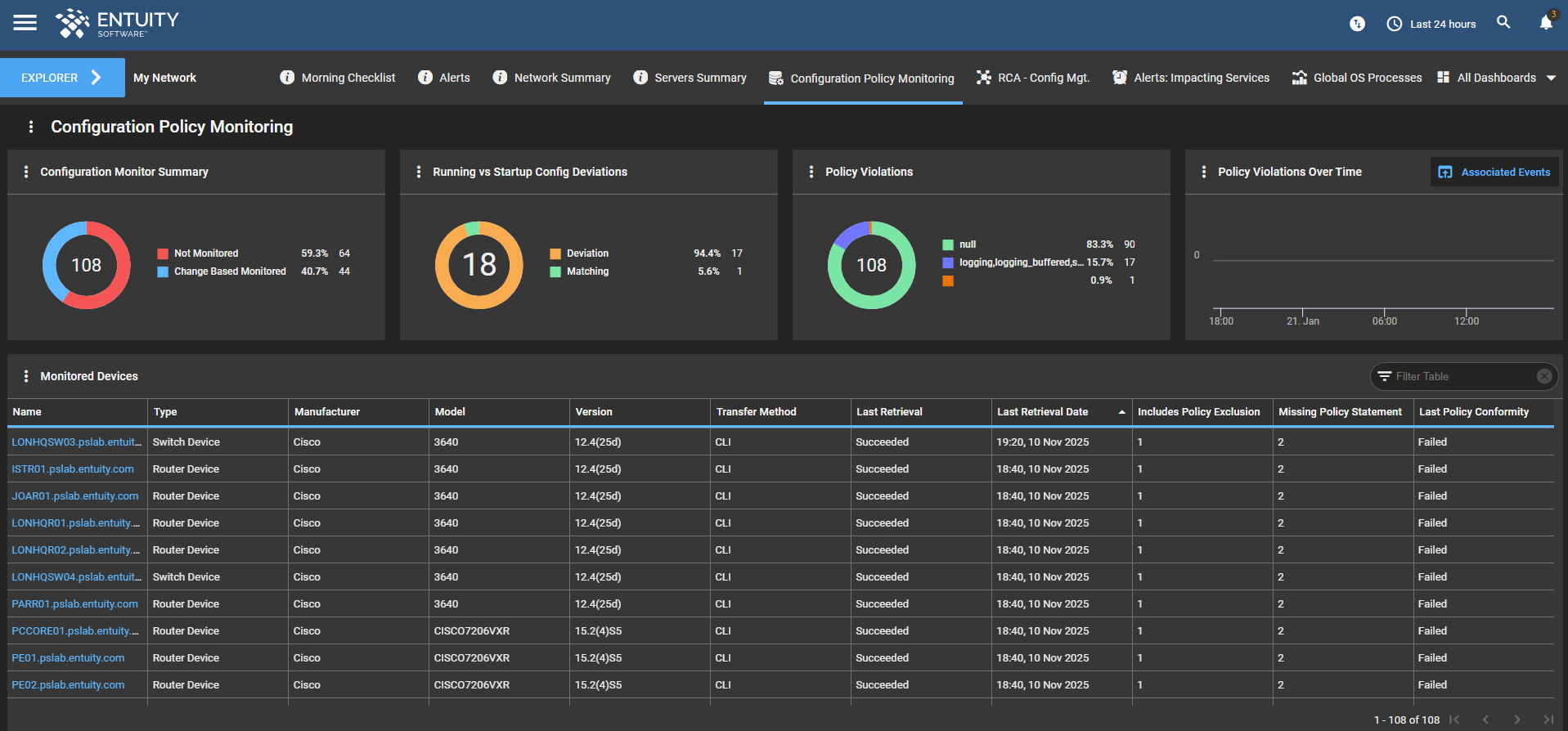
Automated Configuration and Policy Assurance

Video
Product video
Entuity Software™ empowers organizations to maximize performance across the entire technology stack from on premises servers and storage to complex cloud and network environments. By unifying discovery, intuitive visualization, and proactive monitoring into a single pane of glass, Entuity transforms fragmented data into total infrastructure control, ensuring your business stays agile and always online.
Entuity provides comprehensive, vendor-agnostic network monitoring to discover and map devices automatically including switches, routers, and firewalls, and visualize your entire estate. Offering real-time performance metrics, intelligent alerting to reduce noise, and configuration management for proactive control. Seamlessly integrate with existing tools, ITSM and internal communications platforms.
Unified Infrastructure Visibility: Deploy Entuity on Amazon EC2 to monitor your global network, server and storage assets. Gain deep, vendor-agnostic insights into physical and virtual server health (Windows/Linux/AIX) and enterprise storage arrays (Dell, NetApp, Pure) from a single centralized monitoring and management solution.
Automated Network Discovery: Rapidly identifies all network devices and services, automatically adding and configuring them to maintain an up-to-date inventory. Dynamic Topology Mapping: Generates real-time, multi-layer topology and geographical maps that visualize device relationships and incident health across global locations. Intelligent Event Management: Organizes alert data into higher-level incidents, reducing event noise by up to 99% and shortening mean time to repair (MTTR) by 45%. Network Flow Analysis: Provides detailed analysis of traffic patterns and conversations between ports to identify bandwidth consumption and network congestion. SurePath Application Monitoring: Tracks exact application paths through the network to identify bottlenecks and latency issues affecting performance. Hybrid Infrastructure Monitoring: Extends visibility beyond physical networks to include servers, storage assets, and cloud environments, including Amazon Web Services (AWS) and Microsoft Azure. Performance Analytics: Collects and analyzes metrics such as CPU, memory, and latency to provide proactive insights and predictive trending for capacity planning. Enterprise Integration: Offers out-of-the-box integrations with major ITSM tools like ServiceNow, BigPanda, BMC Helix, Slack, and Splunk for streamlined workflows. Configuration Management: Tracks and manages device configuration changes to ensure network compliance and security. IP Address Management (IPAM): Helps IT teams plan and manage IP address space within the context of IPv4 and IPv6 subnets.
Entuity Software by Park Place Technologies provides unified visibility across the entire IT estate, extending its enterprise-grade monitoring to include both physical and virtual server and storage assets.
Server Monitoring Capabilities Multi-Platform OS Support: Monitors operating system metrics for Windows, Linux, IBM AIX, and Solaris using SNMP, SSH, or WinRM. Hardware Health: Tracks critical hardware components including CPU utilization, memory usage, and internal sensors to identify over- or under-utilized resources. Virtualization Visibility: Monitors Virtual Machine (VM) instances and major hypervisors alongside physical hardware to provide a comprehensive view of server health. In-Band & Out-of-Band Monitoring: Offers flexible polling methods to gather data directly from the OS or through out-of-band management controllers.
Storage Monitoring Capabilities Vendor-Agnostic Discovery: Automatically discovers and monitors storage infrastructure from leading vendors, including Dell EMC (VNX, VNXe, Unity, Isilon), NetApp, Pure Storage, HPE Nimble, and DataDomain. Component-Level Health: Monitors all storage hardware components and raises intelligent events if assets are missing or in a sub-optimal state. Performance Monitoring: Collects and analyzes storage performance data to assist in capacity planning and identify potential bottlenecks. CMDB Integration: Automatically populates its built-in CMDB with discovered storage assets, allowing users to seamlessly manage and track their storage inventory.
This product is sized for an intermediate server capable of supporting 800 devices and 50,000 ports. Please refer to the intermediate server guidance at https://support.entuity.com/hc/en-us/articles/360006172733-Compatibility-matrix-operating-system-and-hardware-requirements-server-sizing-guide#amendingserverconfigurationcomponents for recommended system configuration.
Highlights
- Comprehensive Infrastructure Monitoring Across Hybrid Environments: Entuity delivers end to end network monitoring with automated device discovery, realtime alerting, and topology visualization; helping IT teams proactively identify performance issues across on-prem, cloud, and multi-vendor networks.
- Advanced Network Management for Optimized Performance: With built-in event management, traffic analysis, and capacity planning capabilities, Entuity streamlines network management by consolidating incidents, analyzing flow data, and enabling faster troubleshooting to maintain consistent service reliability.
- Intelligent Monitoring for Bandwidth, Latency & Application Paths: Entuity continuously tracks bandwidth, network congestion, latency, and jitter, raising alerts for abnormal traffic and application performance degradation to ensure critical business services remain uninterrupted.
Details
Sold by
Categories
Delivery method
Delivery option
64-bit (x86) Amazon Machine Image (AMI)
Latest version
Operating system
Win2025 Microsoft Windows Server 2025 Core
Deployed on AWS
New
Introducing multi-product solutions
You can now purchase comprehensive solutions tailored to use cases and industries.

Features and programs
Financing for AWS Marketplace purchases
AWS Marketplace now accepts line of credit payments through the PNC Vendor Finance program. This program is available to select AWS customers in the US, excluding NV, NC, ND, TN, & VT.

Pricing
Pricing is based on the duration and terms of your contract with the vendor. This entitles you to a specified quantity of use for the contract duration. If you choose not to renew or replace your contract before it ends, access to these entitlements will expire.
Additional AWS infrastructure costs may apply. Use the AWS Pricing Calculator to estimate your infrastructure costs.
Dimension | Description | Cost/12 months |
|---|---|---|
Entuity Full Monitor and Management | This pool of license credits covers fully-managed devices including: routers, switches, firewalls, load balancers, servers, storage devices, controllers (e.g. wireless, SD-WAN, hypervisors, etc)., databases, any other SNMP-manageable device. Note: the first onboarded hypervisor on any VM Platform is free (i.e., does not consume any additional license credits), because it is considered to be covered by the VM Platforms full device credit. Full Device licenses assigned to Controllers do not cover associated assets such as access points, SD-WAN devices and virtual machines. | $150.00 |
Entuity Basic Device Monitor | This pool of license credits covers ping-only and basic managed devices for which Entuity conducts limited polling of device-level attributes and IP monitoring, and web applications. There are two types of management for basic devices: Ping Only - checks for status via ICMP, Basic SNMP - Does not include any port data. Basic Device license credits also cover associated devices, i.e. the access points, SD-WAN devices and virtual machines that are associated with their respective controllers. Entuity supports the following platforms and controllers: Cisco Meraki (including routers, switches, APs etc), Cisco Viptela (including devices from the vManage platform), VMWare ESXi (VMs), Microsoft HyperV (VMs), Oracle VM Manager (VMs), Amazon Web Services (VMs), Microsoft Azure (VMs), Aruba Wireless Controllers (APs), Cisco Wireless Controllers (APs). | $10.00 |
Entuity SurePath Analyzer | This pool of license credits covers the number of paths you can create in Entuity's SurePath functionality. SurePath is licensed per path. If SurePath credits are not available, existing paths will use (or borrow) a Full Device credit. If more SurePath credits become available at a later date (e.g. by installing a new license, or by deleting/unmanaging other SurePath paths to free up credits), any paths currently borrowing Full Device credits will be converted to use SurePath credits, and their Full Device credits will be freed up. Any new SurePath paths added after upgrade can still use available Full Device credits, if no SurePath credits are available. | $150.00 |
Entuity Configuration Management | This pool of license credits covers both Configuration Management and Configuration Monitoring. This is licensed per device. | $15.00 |
Entuity Integrated Flow Analyzer Premium | A single activation license to enable dedicated flow collection and analysis through Integrated Flow Analyzer Premium, select 1 if required. Entuity's Integrated Flow Analyzer (IFAP) integrates flow-based performance data alongside Entuity's elemental performance data. This license provides increased functionality. IFAP Premium allows: management of flow data collection on remote servers. collection and storing of data with a granularity of 1 minute. You must configure routers to send flow data every 60 seconds. data to be retained for more than one month, which can be amended through the flow section in entuity.cfg. The only restriction is the hard drive capacity, although the default is one year. analysis of data by conversation, i.e. both source and destination IP addresses are considered through Top Conversations breakdown. defintion of custom breakdowns and data types, through which you can specify how you analyze flow data. | $6,000.00 |
Vendor refund policy
We do not currently support Entuity license refunds. Please contact sales for further questions.

Legal
Vendor terms and conditions
Upon subscribing to this product, you must acknowledge and agree to the terms and conditions outlined in the vendor's End User License Agreement (EULA) .
Content disclaimer
Vendors are responsible for their product descriptions and other product content. AWS does not warrant that vendors' product descriptions or other product content are accurate, complete, reliable, current, or error-free.
Delivery details
64-bit (x86) Amazon Machine Image (AMI)
Amazon Machine Image (AMI)
An AMI is a virtual image that provides the information required to launch an instance. Amazon EC2 (Elastic Compute Cloud) instances are virtual servers on which you can run your applications and workloads, offering varying combinations of CPU, memory, storage, and networking resources. You can launch as many instances from as many different AMIs as you need.
Version release notes
The following key additions and changes have been made to Entuity v23.0: Entuity Agent Polling Architecture User Defined Data Receivers & Streaming Telemetry Support Distributed Server, Storage, OS, and Database Monitoring Local OS Monitoring Enhanced Configuration Management and Monitoring
Entuity Agent Polling Architecture: Distributed Monitoring Addition of a new agent architecture that serves as an extension of your Entuity environment. This enables monitoring of servers, storage devices, operating systems, and database applications across locations and remote networks. This new architecture supports multiple lightweight Entuity Agents that can be registered with an Entuity server to provide extended reach and increased scalability, all while utilizing secure, client initiated communication over standard HTTPS connections, without the need for VPNs. Management of Entuity Agents is done centrally via the Entuity web-based administration pages and dashboards including viewing its status, which applications and versions are installed on the agent as well as making any modifications to those applications the Entuity Agent is entitled to. Please visit https://support.entuity.com/hc/en-us/sections/32483070851229-Entuity-Agents for further help and information on Entuity Agents in Entuity. Entuity Agent Architecture: Local OS Polling This new agent architecture also enables users to monitor operating systems locally through Entuity Agents with a more simplified configuration process. This extends monitoring capabilities to effectively and securely monitor key Linux or Windows servers in Entuity without requiring administrator/root level credentials to be stored and/or updated on the Entuity server. Please visit https://support.entuity.com/hc/en-us/articles/32451066217629-Agent-Local-OS-Monitoring for further help and information on Entuity Agent Local OS Polling in Entuity.
User Defined Data Receivers & Streaming Telemetry Support Addition of functionality enables users to create user defined data receivers. This allows users to extend Entuity default data model and monitoring capabilities for devices and software defined platforms that use newer technologies such as Streaming Telemetry, in order to take advantage of more granular, realtime data feeds. These User Defined Data Receivers can be created, edited, and deleted at any time without needing to write configuration files and can be managed within the web interface. Data received by User Defined Data Receivers is integrated with the Entuity data model, making them visible and accessible throughout the web interface in the same way that other attributes and key metrics are. Please see https://support.entuity.com/hc/en-us/sections/32654012740253-User-defined-data-receivers for further help and information on User Defined Data Receivers in Entuity.
Enhanced Configuration Management and Monitoring Various enhancements to configuration management and monitoring including: Addition of a Copy button within the Policy and Exclusion Files Management pages allowing an existing policy to be copied to use as a base for additional policies to be created. Addition of ability that allows users to set parameter values when scheduling tasks. Addition of option to upload multiple firmware files at once from the UI. Improvement to task timeouts where task Timeout can be set per configuration management sub job. Improvement to exclusion policy creation or troubleshooting where the effects of exclusion files can now be visualized within the UI. Addition of option to specify characters that should be filtered out during configuration file comparisons in the Advanced Settings of tasks.
Additional details
Usage instructions
This product is a pre-configured Windows Server environment optimized for compute-intensive workloads. It is designed to run on c5.2xlarge instances to leverage high-performance network throughput and CPU capabilities.
Step 1: Deployment
- Click Continue to Configuration and select the US East (N. Virginia) region.
- Choose the c5.2xlarge instance type.
- Ensure you select an existing EC2 Key Pair or create a new one. You will need this .pem or .ppk file to retrieve your password.
- Configure your Security Group to allow RDP (TCP Port 3389) traffic from your specific IP address.
- Configure your Storage to 90GiB (minimum).
Step 2: Initialize the Instance
- Click Launch.
- Important: Windows requires approximately 15 minutes to complete its initial boot, run post-launch scripts, and generate a unique password. Do not attempt to connect or reboot during this time.
Step 3: Retrieve the Administrator Password
- Open the Amazon EC2 Console.
- Select your running instance, click Connect, and navigate to the RDP client tab.
- Click Get password, upload your private key file, and copy the decrypted password.
Step 4: Connect via Remote Desktop (RDP)
- Open your RDP client (e.g., Remote Desktop Connection).
- Enter the Public IPv4 DNS or IP Address of the instance.
- Log in using the following credentials: Username: .\Administrator Password: [The password retrieved in Step 3]
Step 5: Install and Configure Entuity
- After SConfig loads, configure your server as required.
- Select option 15 to open CMD and navigate to D drive (rel-23.0_EYE_win)
- Run .\install and follow the prompts to install and configure.
- Once configure has completed navigate to your entuity_home\bin directory e.g. C:\Entuity\bin and run .\starteye. You can check if the system has running by using .\status
- Access the UI via your browser with default credentials admin:admin
- Even with the Security Group open, Windows Core will block Port 80 and 443 by default. Run the following as required: New-NetFirewallRule -DisplayName "Allow HTTP" -Direction Inbound -LocalPort 80 -Protocol TCP -Action Allow New-NetFirewallRule -DisplayName "Allow HTTPS" -Direction Inbound -LocalPort 443 -Protocol TCP -Action Allow
Resources
Vendor resources
Support
Vendor support
Please contact Entuity support to request a license key once the product is deployed. This product contains a 30 day license to get you started, our support team will issue a term license to match your subscription.
If you require support for your Entuity implementation, please open a support ticket (https://support.entuity.com/hc/en-us ).
Technical documentation and user guides are also available at this link.
AWS infrastructure support
AWS Support is a one-on-one, fast-response support channel that is staffed 24x7x365 with experienced and technical support engineers. The service helps customers of all sizes and technical abilities to successfully utilize the products and features provided by Amazon Web Services.
Customer reviews
No customer reviews yet
Be the first to review this product . We've partnered with PeerSpot to gather customer feedback. You can share your experience by writing or recording a review, or scheduling a call with a PeerSpot analyst.