Sold by: cloudimg
Deployed on AWS
Free Trial
AWS Free Tier
This product has charges associated with it for seller support. Discover and inventory every switch, router, and access point from first boot. A security-hardened Netdisco AMI with no default credentials, a bundled PostgreSQL database, a dedicated data volume, and 24/7 cloudimg support.
Overview
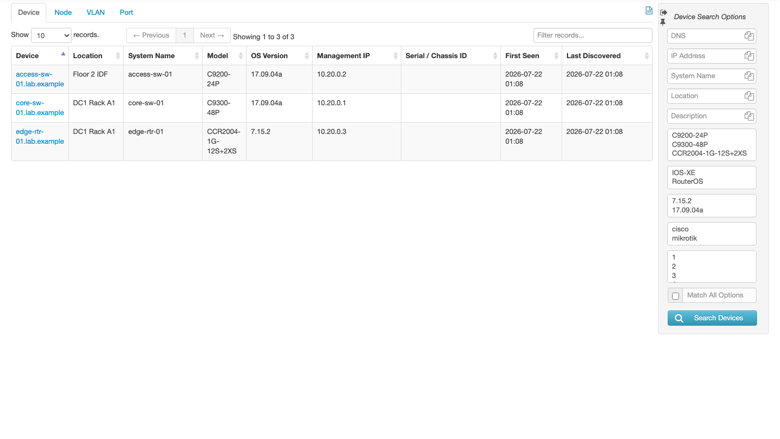
Image
Device inventory
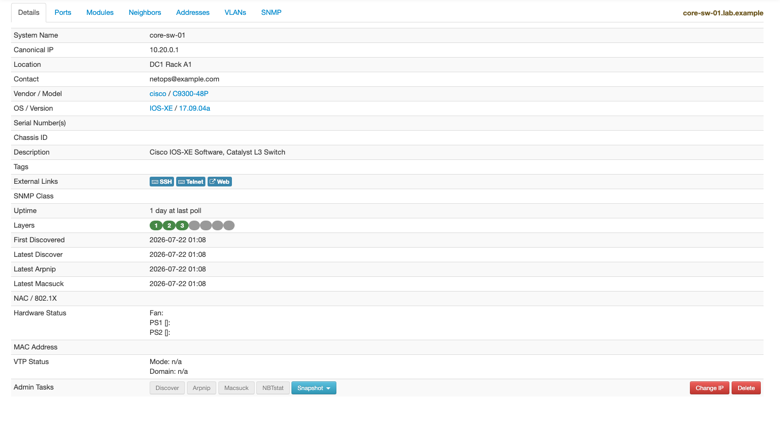
Image
Device detail
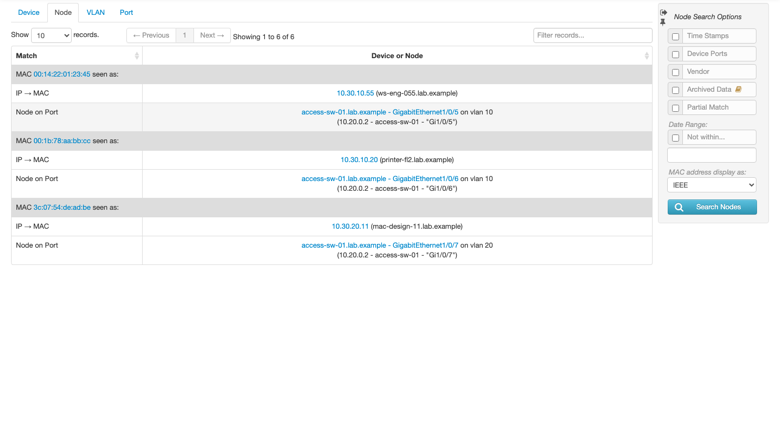
Image
Locate a MAC or IP address
This is a repackaged open source software product wherein additional charges apply for cloudimg support services.
Overview
Netdisco is an open source, web based network management and discovery tool. It polls switches, routers, and access points over SNMP, CLI, and device APIs, collects IP and MAC address data into a PostgreSQL database, and presents a web interface to inventory every device, browse and search ports and nodes, locate where a MAC or IP address is connected, and see how devices link together. This AMI delivers a fully configured, security-hardened Netdisco server behind an nginx reverse proxy, backed by a bundled local PostgreSQL database preloaded with MAC vendor reference data, eliminating the manual container setup, database provisioning, and authentication hardening a bare install requires. It ships Netdisco 2.101000 from the official netdisco container images.
Why This Image Over Alternatives
Most Netdisco deployments ship with an anonymous guest that has full administrative rights - this image disables that guest entirely and seeds a unique admin login on the first boot of every instance, so nothing is ever open to the network. Where self-managed installs co-locate database files on the OS disk, this image isolates all PostgreSQL data on a dedicated, independently resizable EBS volume for safer backups and scaling. A unique database password and a unique SNMP read only community are also generated per instance and written to a root only file.
What Is Included
- Netdisco 2.101000 run from the official netdisco web and backend container images
- nginx reverse proxy so the web interface is served on port 80 without exposing the container port
- Bundled PostgreSQL 16 carrying Netdisco's schema plus MAC vendor (OUI) reference data, ready to identify device and node vendors out of the box
- A required login - the default anonymous guest is disabled and a per-instance admin user is seeded
- Unique per-instance secrets - the admin password, the database password, and the SNMP read only community are generated on first boot
- Dedicated data volume carrying the PostgreSQL data on its own EBS disk
- Loopback-only database listener with scram-sha-256 password authentication
Secure First Boot
On first boot a one-shot service rotates the database role password, generates a unique SNMP read only community and a unique admin password, re-seeds the admin user, resolves the instance public IP through EC2 IMDSv2, and writes the credentials to a file readable only by root. No shared or default login ever exists in the image.
AWS Integration Points
- Amazon EBS - PostgreSQL data lives on a dedicated EBS volume; use EBS Snapshots for point-in-time backups or resize storage independently of the OS disk.
- Amazon VPC - Deploy within your VPC and reach the web interface over port 80 (front with TLS for public exposure); the bundled database never listens on a public interface.
- Amazon CloudWatch - Forward Netdisco, nginx, and system logs to CloudWatch for centralized monitoring and alerting.
Use Cases
- Campus or enterprise network inventory - A campus with hundreds of switches and access points can automatically discover and catalog every device with vendor, model, and software version, replacing manual spreadsheets and reducing audit preparation from days to minutes.
- MSP multi-client endpoint location - A managed service provider supporting multiple client VLANs can instantly find which switch port a given MAC or IP address is connected to, cutting troubleshooting time when onboarding new clients or investigating connectivity issues.
- Compliance-driven port auditing - A team needing to locate rogue devices for regulatory compliance can search ports and nodes, track historical connectivity, and review network topology from one web interface.
Get Started
Connect over SSH, read the generated admin password, open the web interface in your browser, and add your first device by entering the hostname or IP of a switch or router that permits SNMP from this instance. Discovery and polling run as background jobs on the backend daemon.
cloudimg Support
24/7 technical support by email and live chat. Our engineers assist with deployment, Netdisco and PostgreSQL configuration, SNMP discovery, user management, and performance tuning. Critical issues receive a one-hour average response time.
To discuss your architecture, contact our team through the support channels listed below.
All product and company names are trademarks or registered trademarks of their respective holders. Use of them does not imply any affiliation with or endorsement by them.
Highlights
- Discover and inventory every network device from first boot - Unlike a manual Netdisco install that requires container setup, database provisioning, and schema configuration, this AMI is production-ready on launch. It polls switches, routers, and access points over SNMP, CLI, and device APIs, collects IP and MAC data into a bundled PostgreSQL 16 database preloaded with MAC vendor reference data, and presents a web interface to search ports, locate any MAC or IP, and view device topology.
- Security hardened where default Netdisco is not - Most Netdisco deployments ship with an anonymous guest that has full administrative rights. This image disables that guest entirely, seeds a unique admin login on every first boot, and generates per-instance database and SNMP credentials written to a root only file. The bundled PostgreSQL binds to loopback only with scram-sha-256 authentication, so no credential is ever shared, default, or network-exposed.
- Dedicated EBS data volume with 24/7 expert support - Unlike setups that co-locate database files on the OS disk, PostgreSQL data lives on a separate EBS volume you can resize, snapshot, and back up independently. cloudimg engineers provide round-the-clock support by email and live chat with a one-hour average response for critical issues, covering deployment, SNMP discovery, user management, and performance tuning.
Details
Sold by
Categories
Delivery method
Delivery option
64-bit (x86) Amazon Machine Image (AMI)
Latest version
Operating system
Ubuntu 24.04
Deployed on AWS
New
Introducing multi-product solutions
You can now purchase comprehensive solutions tailored to use cases and industries.

Features and programs
Financing for AWS Marketplace purchases
AWS Marketplace now accepts line of credit payments through the PNC Vendor Finance program. This program is available to select AWS customers in the US, excluding NV, NC, ND, TN, & VT.

Pricing
Free trial
Try this product free for 7 days according to the free trial terms set by the vendor. Usage-based pricing is in effect for usage beyond the free trial terms. Your free trial gets automatically converted to a paid subscription when the trial ends, but may be canceled any time before that.
Pricing is based on actual usage, with charges varying according to how much you consume. Subscriptions have no end date and may be canceled any time. Alternatively, you can pay upfront for a contract, which typically covers your anticipated usage for the contract duration. Any usage beyond contract will incur additional usage-based costs.
Additional AWS infrastructure costs may apply. Use the AWS Pricing Calculator to estimate your infrastructure costs.
If you are an AWS Free Tier customer with a free plan, you are eligible to subscribe to this offer. You can use free credits to cover the cost of eligible AWS infrastructure. See AWS Free Tier for more details. If you created an AWS account before July 15th, 2025, and qualify for the Legacy AWS Free Tier, Amazon EC2 charges for Micro instances are free for up to 750 hours per month. See Legacy AWS Free Tier for more details.
Dimension | Description | Cost/hour |
|---|---|---|
m5.large Recommended | m5.large | $0.08 |
t3.micro | t3.micro instance type | $0.04 |
t2.micro | t2.micro instance type | $0.04 |
r8id.metal-48xl | r8id.metal-48xl instance type | $0.24 |
m8i.large | m8i.large instance type | $0.08 |
r8i.96xlarge | r8i.96xlarge instance type | $0.24 |
r8in.16xlarge | r8in.16xlarge instance type | $0.24 |
m8id.xlarge | m8id.xlarge instance type | $0.12 |
m7i.metal-24xl | m7i.metal-24xl instance type | $0.24 |
r5a.8xlarge | r5a.8xlarge instance type | $0.24 |
Vendor refund policy
Refunds available on request.

Legal
Vendor terms and conditions
Upon subscribing to this product, you must acknowledge and agree to the terms and conditions outlined in the vendor's End User License Agreement (EULA) .
Content disclaimer
Vendors are responsible for their product descriptions and other product content. AWS does not warrant that vendors' product descriptions or other product content are accurate, complete, reliable, current, or error-free.
Delivery details
64-bit (x86) Amazon Machine Image (AMI)
Amazon Machine Image (AMI)
An AMI is a virtual image that provides the information required to launch an instance. Amazon EC2 (Elastic Compute Cloud) instances are virtual servers on which you can run your applications and workloads, offering varying combinations of CPU, memory, storage, and networking resources. You can launch as many instances from as many different AMIs as you need.
Version release notes
Initial release of the Netdisco network management image: Netdisco 2.101000 with a bundled PostgreSQL 16 database.
Additional details
Usage instructions
Connect via SSH on port 22 as the default login user for your operating system variant (the user guide lists it per variant). Retrieve the generated admin password with: sudo cat /root/netdisco-credentials.txt. Open the web interface at http://<instance-ip>/ and sign in with the admin username and that password. Add your first device from the Discover box on the dashboard by entering the hostname or IP of a switch or router that permits SNMP from this instance; Netdisco uses the per-instance read only community from the credentials file. The bundled PostgreSQL listens on 127.0.0.1 port 5432 (loopback only) and is never exposed publicly. Netdisco reaches your devices outbound over SNMP (161/udp). The user guide covers adding devices, managing users, enabling HTTPS and maintenance.
Resources
Vendor resources
Support
Vendor support
cloudimg provides 24/7 technical support for this Netdisco AMI by email and live chat.
Scope of Support
Our engineers assist with:
- Initial deployment and instance configuration
- Netdisco and nginx configuration
- Bundled PostgreSQL configuration and administration
- SNMP device discovery and polling
- User management and access control
- Enabling HTTPS in front of the web interface
- Troubleshooting connectivity, discovery and authentication
- Guidance on EBS volume resizing and snapshot-based backups
- Software updates and version upgrades
Response Times
Critical issues (web interface down, discovery unavailable) receive a one-hour average response. General inquiries and configuration questions are addressed within the same business day.
How to Get Help
Contact the support team at support@cloudimg.co.uk . Include your instance ID, region, and a description of the issue or question. For refund requests, email the same address with your AWS Marketplace subscription details.
Recommended Instance Sizing
For evaluation and small networks, an m5.large with a 30 GB gp3 data volume is sufficient. For larger networks with frequent polling, provision a larger memory-optimized instance and size the gp3 data volume to your device and node count. Open a support ticket for personalized sizing guidance.
AWS infrastructure support
AWS Support is a one-on-one, fast-response support channel that is staffed 24x7x365 with experienced and technical support engineers. The service helps customers of all sizes and technical abilities to successfully utilize the products and features provided by Amazon Web Services.
Customer reviews
No customer reviews yet
Be the first to review this product . We've partnered with PeerSpot to gather customer feedback. You can share your experience by writing or recording a review, or scheduling a call with a PeerSpot analyst.