
Sold by: cloudimg
Deployed on AWS
Free Trial
AWS Free Tier
This product has charges associated with it for seller support. Launch a private, self-hosted photo and video gallery on EC2 in minutes. Searchable web gallery with map, timeline and similarity search, backed by 24/7 cloudimg support.
Overview
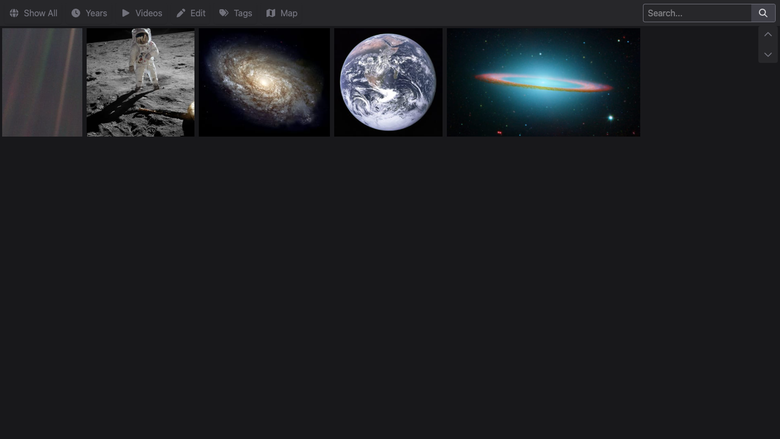
Image
Photo and video gallery
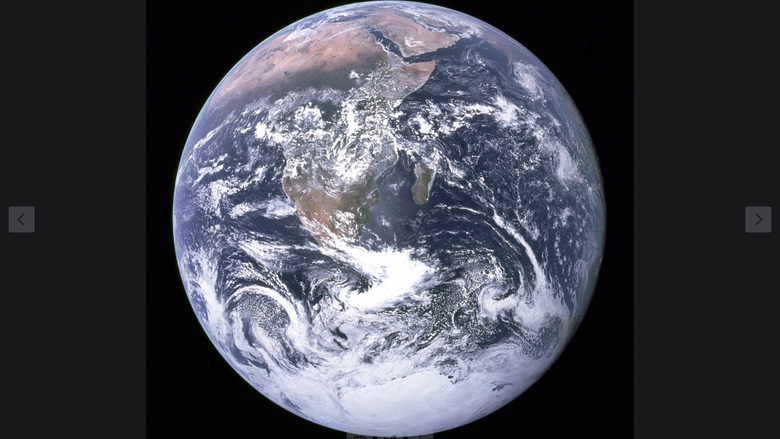
Image
Photo detail and lightbox

Image
Map of geotagged media
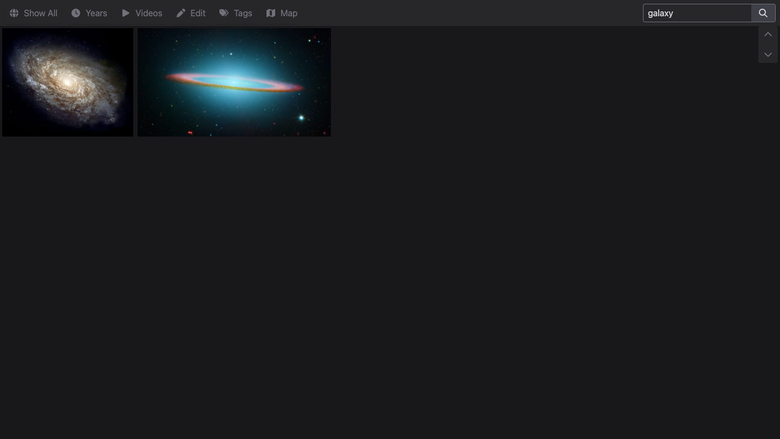
Image
Search and filter
This is a repackaged open source software product wherein additional charges apply for cloudimg support services.
Why This AMI Instead of Self-Install
Standing up HomeGallery yourself means fetching and verifying the self extracting release, creating a dedicated service account, writing a hardened systemd unit, configuring authentication, indexing your media and keeping the stack patched. This AMI removes that operational burden. HomeGallery is pre-installed, pre-configured and tested so your private gallery is serving within minutes of launching an EC2 instance. cloudimg handles tested upgrade paths between HomeGallery releases and provides 24/7 expert support that community forums and DIY troubleshooting cannot match.
Overview
HomeGallery is the open source, self-hosted photo and video gallery. It indexes a media directory into a fast, file based database and serves a clean, browsable web gallery: a photo grid, a full screen lightbox, an interactive map of geotagged media, a timeline, faceted search and content based similarity search that finds visually similar images. There is no external database and no object store to run. The current release available is HomeGallery 1.21.
Who This Is For
Individuals and families who want a private alternative to cloud photo services, keeping decades of photos and videos in their own VPC. Photographers browsing large libraries by map, date and similarity. Teams and archivists who need a searchable, self hosted media catalog on infrastructure they control. HomeGallery scales from a few hundred to hundreds of thousands of items on a single lightweight instance.
Application Stack
HomeGallery ships as a single self contained binary that bundles its own Node runtime, image processing and video tooling, so there is no separate interpreter, database server or object store to manage. It serves the web gallery directly on port 3000. Your media, the file based index and the generated previews live on a dedicated, independently resizable EBS data volume mounted at /var/lib/home-gallery, keeping gallery data off the operating system disk.
Secure By Default
HomeGallery upstream serves with no authentication by default. This AMI never ships that way. The image enables authentication with a deny all except loopback rule and no usable account, and the gallery service does not start until first boot. On first boot the instance generates a strong administrator password that is unique to that instance, stores only a salted SHA-256 hash in the configuration, writes the plaintext to a root only file, and only then begins serving. Every network client must present that per-instance password; the loopback interface is allowed unauthenticated so local health checks work. No shared, default or known credential is baked into the image.
Security Practices
- No default, shared or known credentials in the image; the admin password is generated fresh per instance on first boot
- Every network request to the gallery requires authentication; only loopback is unauthenticated
- Gallery data isolated on a dedicated EBS volume for independent resizing and encryption
- Restrict the security group so port 3000 is reachable only from trusted IP ranges
- Front the gallery with TLS on your own domain for production; cloudimg support assists with this
Getting Started
- Launch the AMI on your chosen EC2 instance
- Ensure your security group allows inbound TCP on port 3000 from your trusted IP range
- Retrieve the per-instance admin password with: sudo cat /root/home-gallery-credentials.txt
- Browse to http://your-instance-public-ip:3000/ and sign in as admin with that password
- Explore the seeded public domain sample gallery: grid, lightbox, map, timeline, search and similar-image discovery
- Copy your own photos and videos into /var/lib/home-gallery/media and re-run the indexer to build your library
cloudimg Support
24/7 technical support by email and live chat for deployment, upgrades, media indexing, TLS termination, backups and data migration. Our engineers guide you through production hardening, scaling decisions and HomeGallery version upgrades.
HomeGallery is a trademark of its respective owner. All product and company names are trademarks or registered trademarks of their respective holders. Use of them does not imply any affiliation with or endorsement by them.
Highlights
- Skip manual setup - this AMI delivers HomeGallery fully installed and hardened so your private photo and video gallery is serving within minutes of EC2 launch. Browse a photo grid, lightbox, interactive map, timeline, faceted search, and similarity search with no external database to manage.
- Secure from first boot with zero shared credentials - authentication is enforced from the start with a unique, per-instance generated password. Every network client must authenticate while loopback stays open only for health checks. Media lives on a dedicated, independently resizable EBS volume separate from the OS disk.
- 24/7 technical support from cloudimg engineers for deployment, media indexing, TLS termination, version upgrades, backup strategy, and data migration - expertise available on your schedule whenever you need it.
Details
Sold by
Categories
Delivery method
Delivery option
64-bit (x86) Amazon Machine Image (AMI)
Latest version
Operating system
Ubuntu 24.04
Deployed on AWS
New
Introducing multi-product solutions
You can now purchase comprehensive solutions tailored to use cases and industries.

Features and programs
Financing for AWS Marketplace purchases
AWS Marketplace now accepts line of credit payments through the PNC Vendor Finance program. This program is available to select AWS customers in the US, excluding NV, NC, ND, TN, & VT.

Pricing
Free trial
Try this product free for 7 days according to the free trial terms set by the vendor. Usage-based pricing is in effect for usage beyond the free trial terms. Your free trial gets automatically converted to a paid subscription when the trial ends, but may be canceled any time before that.
Pricing is based on actual usage, with charges varying according to how much you consume. Subscriptions have no end date and may be canceled any time. Alternatively, you can pay upfront for a contract, which typically covers your anticipated usage for the contract duration. Any usage beyond contract will incur additional usage-based costs.
Additional AWS infrastructure costs may apply. Use the AWS Pricing Calculator to estimate your infrastructure costs.
If you are an AWS Free Tier customer with a free plan, you are eligible to subscribe to this offer. You can use free credits to cover the cost of eligible AWS infrastructure. See AWS Free Tier for more details. If you created an AWS account before July 15th, 2025, and qualify for the Legacy AWS Free Tier, Amazon EC2 charges for Micro instances are free for up to 750 hours per month. See Legacy AWS Free Tier for more details.
Dimension | Description | Cost/hour |
|---|---|---|
m5.large Recommended | m5.large | $0.08 |
t2.micro | t2.micro instance type | $0.04 |
t3.micro | t3.micro instance type | $0.04 |
c5a.12xlarge | c5a.12xlarge instance type | $0.24 |
c5a.16xlarge | c5a.16xlarge instance type | $0.24 |
c5a.24xlarge | c5a.24xlarge instance type | $0.24 |
c5a.2xlarge | c5a.2xlarge instance type | $0.24 |
c5a.4xlarge | c5a.4xlarge instance type | $0.24 |
c5a.8xlarge | c5a.8xlarge instance type | $0.24 |
c5a.large | c5a.large instance type | $0.08 |
Vendor refund policy
Refunds available on request.

Legal
Vendor terms and conditions
Upon subscribing to this product, you must acknowledge and agree to the terms and conditions outlined in the vendor's End User License Agreement (EULA) .
Content disclaimer
Vendors are responsible for their product descriptions and other product content. AWS does not warrant that vendors' product descriptions or other product content are accurate, complete, reliable, current, or error-free.
Delivery details
64-bit (x86) Amazon Machine Image (AMI)
Amazon Machine Image (AMI)
An AMI is a virtual image that provides the information required to launch an instance. Amazon EC2 (Elastic Compute Cloud) instances are virtual servers on which you can run your applications and workloads, offering varying combinations of CPU, memory, storage, and networking resources. You can launch as many instances from as many different AMIs as you need.
Version release notes
Initial release of the HomeGallery 1.21 self-hosted photo and video gallery AMI.
Additional details
Usage instructions
Connect via SSH on port 22 as the default login user for your operating system variant (the user guide lists it per variant; on Ubuntu it is 'ubuntu'). HomeGallery serves its web UI directly on port 3000. Retrieve the per-instance admin password with: sudo cat /root/home-gallery-credentials.txt (it is generated fresh on first boot and unique to this instance). Browse to http://<instance-public-ip>:3000/ and sign in as 'admin' with that password (the browser prompts for HTTP credentials). Loopback (127.0.0.1) is allowed without a password so local health checks work; every network client must authenticate. The service is managed with systemctl (home-gallery.service). Add your own media by copying files into /var/lib/home-gallery/media and running the indexer as shown in the user guide, which also covers restricting the security group and enabling HTTPS.
Resources
Vendor resources
Support
Vendor support
cloudimg provides 24/7 technical support for this product by email and live chat.
What We Help With
- Deployment and initial configuration
- Media indexing, re-indexing and library organization
- TLS termination setup and reverse-proxy guidance
- HomeGallery version upgrades and tested migration paths
- Backup and restore procedures for the gallery data volume
- Data migration and importing existing photo libraries
- Performance tuning and instance sizing guidance
- Troubleshooting application and infrastructure issues
Deployment Prerequisites
This AMI runs on standard EC2 instances. Ensure your security group allows inbound TCP on port 3000 from trusted IP ranges only. Gallery media, the file based index and previews live on a dedicated, independently resizable EBS data volume; size it for your library and grow it as your collection grows.
Getting Help
Contact our support team at support@cloudimg.co.uk for any issues including deployment assistance, troubleshooting, configuration questions, or refund requests. We respond to all inquiries within our published response windows.
AWS infrastructure support
AWS Support is a one-on-one, fast-response support channel that is staffed 24x7x365 with experienced and technical support engineers. The service helps customers of all sizes and technical abilities to successfully utilize the products and features provided by Amazon Web Services.
Customer reviews
No customer reviews yet
Be the first to review this product . We've partnered with PeerSpot to gather customer feedback. You can share your experience by writing or recording a review, or scheduling a call with a PeerSpot analyst.