
Sold by: AKKAYA LIMOUSINE LLC
Deployed on AWS
Free Trial
AWS Free Tier
This product has charges associated with it for automated deployment, security hardening, first-boot credential generation, system optimization, and support services provided by Akkaya Limousine LLC.
Overview
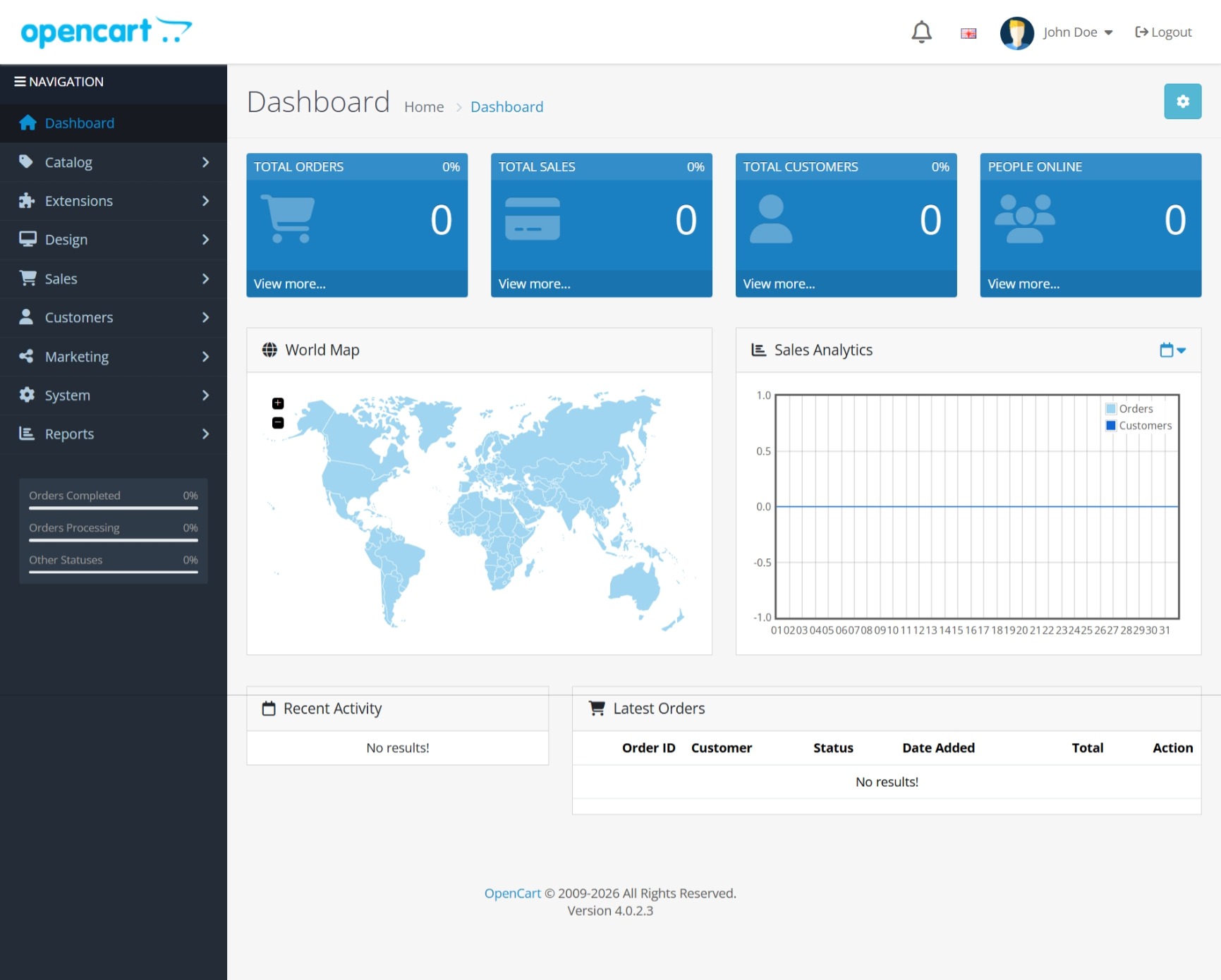
Akkaya Limousine LLC delivers a production-ready OpenCart 4 installation on Ubuntu 24.04 LTS, optimized for e-commerce workloads and designed for instant deployment on Amazon EC2.
COMPLETE E-COMMERCE SOLUTION
OpenCart is a powerful open-source eCommerce platform trusted by hundreds of thousands of online stores worldwide. This enterprise-hardened AMI provides a fully configured shopping cart solution with catalog management, order processing, customer management, payment integrations, and administrative controls ready to use from first launch.
TECHNICAL SPECIFICATIONS
Complete optimized LAMP stack configured for e-commerce workloads:
- OpenCart 4.0.2.3 (Latest Stable)
- Ubuntu 24.04 LTS with 5 years security support
- Apache 2.4 with mod_rewrite and optimized configuration
- PHP 8.3 with OPcache enabled and all required extensions
- MySQL 8.0 with security hardening
- Certbot pre-installed for free SSL certificates
AUTOMATED DEPLOYMENT
Zero-configuration first boot setup handles complete initialization automatically:
- Dynamic IP-based URL configuration for instant access
- Unique database passwords generated per instance
- Administrator credentials created and secured automatically
- All services started and health-checked
- Store fully operational within 2-3 minutes after launch
ENTERPRISE SECURITY HARDENING
Professional security configuration included:
- UFW firewall pre-configured for ports 22, 80, 443
- SSH hardening with root login disabled and key-only authentication
- MySQL security best practices implemented
- No default passwords or shared credentials
- All credentials unique per instance
- Stored securely in ~/credentials.txt
GETTING STARTED
Launch Process:
- Select this AMI from AWS Marketplace
- Choose instance type (t3.medium or larger recommended)
- Configure security group: ports 22, 80, 443
- Select SSH key pair
- Launch instance
Access Your Store:
- Wait 2-3 minutes for automated first-boot configuration
- SSH: ssh -i your-key.pem ubuntu@instance-ip
- View credentials: cat ~/credentials.txt
- Access storefront: http://instance-ip
- Access admin panel: http://instance-ip/ocpanel
RECOMMENDED INSTANCE TYPES
Development and Testing:
- t3.small (2 vCPU, 2 GB RAM)
- t3.medium (2 vCPU, 4 GB RAM)
Small to Medium Stores:
- t3.large (2 vCPU, 8 GB RAM) - Up to 10,000 daily visitors
- t3.xlarge (4 vCPU, 16 GB RAM) - Up to 50,000 daily visitors
Large Stores:
- t3.2xlarge (8 vCPU, 32 GB RAM) - High traffic workloads
SSL CONFIGURATION
For production with custom domain: sudo apt install certbot python3-certbot-apache sudo certbot --apache -d yourdomain.com Certificate auto-renewal configured automatically.
SCALABILITY
- Auto Scaling Groups compatible
- Elastic Load Balancing ready
- RDS for MySQL supported
- CloudFront CDN ready
- ElastiCache supported
SYSTEM REQUIREMENTS AND DEPENDENCIES
- Minimum instance type: t3.small (2 vCPU, 2 GB RAM)
- Minimum storage: 20 GB EBS volume recommended
- A public IPv4 address or Elastic IP is required for storefront access
- An EC2 key pair is required for SSH access
- Ports 22, 80, and 443 must be allowed in the security group
- This product uses EC2 IMDSv2 during first-boot initialization to retrieve instance information. No external packages are downloaded at launch. All software is pre-installed in the AMI.
PRODUCT LIMITATIONS
- This is a single-node deployment and does not include high availability, load balancing, or auto scaling by default
- HTTPS is not pre-configured. Customers must install their own SSL certificate after launch
- SMTP and outbound email are not pre-configured. Manual configuration required in OpenCart admin panel
- OS and application updates after launch are the responsibility of the customer
- Static IP is not included. An Elastic IP is recommended for production use
- Third-party extensions, themes, payment gateways, CDN, and backup services are not included
SUPPORT
Akkaya Limousine LLC provides deployment assistance, credential retrieval guidance, and Apache, PHP, MySQL troubleshooting.
Contact: info@akkayalimousinellc.com Website: https://akkayalimousinellc.com
OPENCART LICENSE
OpenCart is licensed under GNU General Public License v3.0 and is free and open-source software. AMI charges are for professional configuration, security hardening, automated deployment, and support services provided by Akkaya Limousine LLC.
Highlights
- Production-ready OpenCart 4 on Ubuntu 24.04 LTS with automated first-boot setup, unique instance credentials, and preconfigured web stack.
- Security-focused deployment with key-based SSH access, disabled root SSH login, disabled password authentication, and no shared default customer credentials.
- Fast launch experience with automatically generated admin and database credentials, Apache/PHP/MySQL configuration, and support from Akkaya Limousine LLC.
Details
Sold by
Categories
Delivery method
Delivery option
64-bit (x86) Amazon Machine Image (AMI)
Latest version
Operating system
Ubuntu 24.04
Deployed on AWS
New
Introducing multi-product solutions
You can now purchase comprehensive solutions tailored to use cases and industries.

Features and programs
Financing for AWS Marketplace purchases
AWS Marketplace now accepts line of credit payments through the PNC Vendor Finance program. This program is available to select AWS customers in the US, excluding NV, NC, ND, TN, & VT.

Pricing
Free trial
Try this product free for 5 days according to the free trial terms set by the vendor. Usage-based pricing is in effect for usage beyond the free trial terms. Your free trial gets automatically converted to a paid subscription when the trial ends, but may be canceled any time before that.
Pricing is based on actual usage, with charges varying according to how much you consume. Subscriptions have no end date and may be canceled any time. Alternatively, you can pay upfront for a contract, which typically covers your anticipated usage for the contract duration. Any usage beyond contract will incur additional usage-based costs.
Additional AWS infrastructure costs may apply. Use the AWS Pricing Calculator to estimate your infrastructure costs.
If you are an AWS Free Tier customer with a free plan, you are eligible to subscribe to this offer. You can use free credits to cover the cost of eligible AWS infrastructure. See AWS Free Tier for more details. If you created an AWS account before July 15th, 2025, and qualify for the Legacy AWS Free Tier, Amazon EC2 charges for Micro instances are free for up to 750 hours per month. See Legacy AWS Free Tier for more details.
Dimension | Cost/hour |
|---|---|
t3.large Recommended | $0.08 |
t3.micro | $0.01 |
t3.2xlarge | $0.32 |
t3.medium | $0.04 |
t3.small | $0.02 |
t3.xlarge | $0.16 |
t3.nano | $0.005 |
Vendor refund policy
The instance may be terminated at any time by the customer in order to stop further infrastructure and software charges associated with its continued operation. Once the instance is terminated, no additional usage-based charges for that running deployment will continue to accrue, aside from any separate AWS resources the customer chooses to keep, such as snapshots, volumes, elastic IP addresses, backups, or other related services.

Legal
Vendor terms and conditions
Upon subscribing to this product, you must acknowledge and agree to the terms and conditions outlined in the vendor's End User License Agreement (EULA) .
Content disclaimer
Vendors are responsible for their product descriptions and other product content. AWS does not warrant that vendors' product descriptions or other product content are accurate, complete, reliable, current, or error-free.
Delivery details
64-bit (x86) Amazon Machine Image (AMI)
Amazon Machine Image (AMI)
An AMI is a virtual image that provides the information required to launch an instance. Amazon EC2 (Elastic Compute Cloud) instances are virtual servers on which you can run your applications and workloads, offering varying combinations of CPU, memory, storage, and networking resources. You can launch as many instances from as many different AMIs as you need.
Version release notes
Initial public release of OpenCart 4 on Ubuntu 24.04 LTS, packaged and prepared for AWS Marketplace deployment by Akkaya Limousine LLC.
This version delivers a production-oriented OpenCart deployment image designed for fast launch, clean first-boot initialization, security-focused configuration, and simplified access for new customers deploying on Amazon EC2.
Included in this release
OpenCart 4 preinstalled and configured
Ubuntu 24.04 LTS base operating system
Apache web server configured for OpenCart deployment
PHP 8.3 installed with required extensions and OPcache support
MySQL server installed and configured for application use
OpenCart admin path configured with a non-default administrative route
Automated first-boot initialization workflow for newly launched instances
Dynamic runtime application configuration based on launched instance settings
Unique per-instance administrator credential generation
Unique per-instance database credential generation
Instance-specific credentials written to ~/credentials.txt
Preconfigured SSH hardening with key-based authentication
Disabled root SSH login
Disabled SSH password authentication
Production-oriented AMI cleanup process before image creation
Removal of shared customer credentials from the AMI state
Clean deployment flow designed to avoid retained sensitive artifacts in the published image
Security-focused implementation
This release was built with a security-first deployment approach intended for AWS Marketplace distribution.
Key implementation details include:
No shared default customer login credentials embedded in the published AMI
No default reusable application administrator password shared across buyers
No shared reusable database password shared across launched instances
Application credentials are created dynamically during first boot
Database user provisioning is completed at first boot rather than relying on a persistent shared credential in the AMI
SSH access is restricted to key-based login only
Root login over SSH is disabled
Password authentication over SSH is disabled
AMI preparation includes removal of transient data and deployment artifacts before publishing
Host-specific runtime configuration is generated after launch instead of being statically hardcoded into the image
Operational behavior after launch
When a buyer launches an instance from this AMI, the first-boot process performs the following actions automatically:
Waits for the instance to become operational
Retrieves instance metadata required for runtime configuration
Determines the network address to be used for initial application access
Creates a new OpenCart database user for that instance
Generates a unique database password
Updates OpenCart configuration files with the generated database credentials
Generates a unique OpenCart administrator username
Generates a unique OpenCart administrator password
Hashes and stores the administrator password in the application database
Restarts required services after configuration changes
Writes generated access details to ~/credentials.txt
Creates a completion marker to prevent unintended repeated first-boot execution
This design is intended to provide a cleaner and more secure deployment model for AWS Marketplace customers by reducing the presence of static credentials in the original image.
Access and administration
After launch, customers can:
Connect over SSH using the EC2 key pair selected during launch
Retrieve generated credentials from ~/credentials.txt
Access the storefront over HTTP
Access the OpenCart administration panel using the configured admin route
Sign in using the unique credentials generated for their instance
Recommended usage
This release is intended for customers who want to deploy a self-managed OpenCart environment on Amazon EC2 with:
Faster time to first launch
Reduced manual setup effort
Security-conscious initial configuration
Unique per-instance credentials
A ready-to-run Apache, PHP, and MySQL application stack
A clean starting point for customization, extension installation, and domain/SSL configuration
Recommended post-launch actions
After deployment, customers should:
Review the generated credentials immediately after launch
Change the administrator password after first login
Attach a domain name for production use
Install a valid SSL certificate before handling live customer traffic
Review AWS security groups and restrict SSH access to trusted administrative networks
Apply any store-specific configuration, theme, extension, and operational changes needed for production
Notes
This release is intended as a packaged deployment of open-source OpenCart with value-added automation, initialization logic, system preparation, and deployment support provided by Akkaya Limousine LLC.
Charges apply to packaging, deployment automation, security-oriented setup, operational preparation, and support services rather than to ownership of the underlying open-source software itself.
Buyers are responsible for their own AWS infrastructure costs, instance sizing choices, domain configuration, SSL setup, extension selection, backup strategy, and production operational policies.
Support
Support for deployment and operational guidance related to this AMI is provided by Akkaya Limousine LLC.
Support contact: info@akkayalimousinellc.com
Additional details
Usage instructions
This AMI provides OpenCart 4 on Ubuntu 24.04 LTS with Apache, PHP, and MySQL preconfigured for deployment on Amazon EC2. It is designed to simplify deployment by automatically generating unique application credentials during first boot.
Requirements
An Amazon EC2 key pair is required for SSH access.
The security group must allow port 22 for SSH administration and port 80 for web access. Port 443 should also be allowed if HTTPS will be configured.
This product uses the EC2 Instance Metadata Service (IMDSv2) during first-boot initialization to retrieve instance-specific information required for runtime configuration.
No additional application packages are downloaded during first boot. The required software stack is preinstalled in the AMI.
Launch steps
Subscribe to the product in AWS Marketplace.
Launch an EC2 instance from this AMI.
Choose an instance type appropriate for your workload.
Select an SSH key pair.
Configure the security group to allow:
Port 22 for SSH access from trusted administrative networks
Port 80 for HTTP access
Port 443 for HTTPS access
Wait approximately 2 to 5 minutes for first-boot initialization to complete.
Access the server
Connect using SSH with your EC2 key pair.
Example:
ssh -i your-key.pem ubuntu@your-instance-public-ip Retrieve credentials
After connecting, run:
cat ~/credentials.txt
This file contains the generated OpenCart administrator credentials and database details for the instance.
Access OpenCart
Storefront:
http://your-instance-public-ip
Admin panel:
http://your-instance-public-ip/ocpanel
Sign in using the credentials shown in ~/credentials.txt.
Important notes
SSH password authentication is disabled.
Root SSH login is disabled.
Administrator and database credentials are generated automatically during first boot.
HTTPS is not configured with a public trusted SSL certificate by default. For production use, customers should attach a domain name and install a valid SSL certificate.
Outbound email and SMTP are not preconfigured. Customers must configure SMTP settings manually in the OpenCart administration panel.
A public domain name, DNS configuration, SSL certificate, payment gateway account, shipping provider account, CDN, backup service, and third-party extensions are not included by default.
This AMI is intended for self-managed deployment on Amazon EC2. Customers are responsible for their own AWS infrastructure configuration, security group settings, backups, updates, SSL setup, DNS, and third-party integrations.
After first login, change the administrator password and review your security settings before using the store in production.
Troubleshooting
If the application is not ready immediately after launch, wait a few more minutes and then verify that the required services are running.
Example:
sudo systemctl status apache2 mysql php8.3-fpm Support
For deployment and operational support, contact:
Support
Vendor support
Technical support for this product is provided by Akkaya Limousine LLC.
Support contact: Email: info@akkayalimousinellc.com
Website: https://akkayalimousinellc.com
Support scope includes:
AMI launch guidance
First-boot initialization assistance
Credentials retrieval guidance
OpenCart access troubleshooting
Apache, PHP, and MySQL service checks
Deployment best-practice guidance for AWS
Support scope does not include:
Custom software development
Theme design or modification
Third-party extension troubleshooting
Store migration services unless separately agreed
Business workflow customization
Content entry or merchandising work
Response times and support availability may vary depending on request complexity and business hours.
AWS infrastructure support
AWS Support is a one-on-one, fast-response support channel that is staffed 24x7x365 with experienced and technical support engineers. The service helps customers of all sizes and technical abilities to successfully utilize the products and features provided by Amazon Web Services.
Similar products

TurnKey OpenCart helps save you time and money by providing a ready-to-run OpenCart solution that is secure, supported and easy to maintain. The system auto-updates itself with security fixes and is built in a transparent 100% open source process free of hidden backdoors.

This product has charges associated with it for seller support. OpenCart is an open-source eCommerce platform built in PHP, designed to help merchants create and manage online stores with ease.

This product has charges associated with the provision and deployment of the application and AMI support. OpenCart is an eCommerce platform with everything you need to create, scale and run your business.

OpenCart 4 is a powerful, open-source eCommerce platform designed for businesses of all sizes. With multi-store support, extensive customization options, and seamless third-party integrations, it provides a scalable and feature-rich solution for online selling. Elyxia Global Limited offers a pre-configured, security-hardened OpenCart AMI on AlmaLinux, ensuring a stable, optimized, and secure eCommerce environment. Any additional charges are clearly specified in the pricing information section.
Customer reviews
No customer reviews yet
Be the first to review this product . We've partnered with PeerSpot to gather customer feedback. You can share your experience by writing or recording a review, or scheduling a call with a PeerSpot analyst.